eLearner profiles: Diversity in Learning

I was very interested in a report of a Tertiary eLearning research fund project 2005 which looked at learner profiles – learning styles and preferences of students for elearning. Samuel Mann was on the research team and you may have seen the questionnaire. i have requested a copy of the questionnaire on CD from the lead researcher.

Jeffrey, L. Atkins, C. Laurs, A. & Mann, S. (2005). eLearner profiles: Diversity in Learning. Ministry of Education, TeLRF project report. Available at: http://cms.steo.govt.nz/eLearning/Projects/Tertiary+eLearning+Research+Fund.htm you need to scroll down the page.

What I liked about this research report is the comparison between student preferences for traditional lectures, tutorials and blended forms of online and f2f learning. You may find that these findings mirror some of the feedback you may be getting from your students about online learning. For example, they do not particularly want to be self-directed and do group work. They want lectures and are not particularly keen on online learning which can cause them a lot of anxiety. This is a NZ-based project

\”The sample size was 1811 and came from six universities, five polytechnics or institutes and six private training organisations.\”

Also the researchers categorised the learner profiles as: cognitive voyagers, strategic competitors and multimedia collaborators. If you read the executive summary of the report you will get the gist of the different profiles.

The researchers measured things such as extrinsic and intrinsic motivation, learning styles, dependent versus independent learning preferences, achievement motivation, relativistic reasoning rather than factual,working collaboratively rather than alone, time poorness, global versus sequential learning and reflective versus analytical and much more. It is a fascinating study. I hope you will take a look. Do you believe that this is the same situation for your students.

Part One: Open Pedagogy – A model for Open Education Practice

This is the first part in a series about Open Education Practices. I welcome your comments. 

Open Pedagogy – A model for Open Education Practice 
Models that are developed to describe Open Education Practice must include the concept of openness in learning and teaching, as this needs to be understood before practitioners can engage with open education. Five principles for openness informing the adoption of open education practices are described by Conole (2013). The approach:
1. facilitates a broader approach to being ‘open’;
2. enables dialogue around learning and teaching ideas and strategies;
3. uses social media to facilitate “collective aggregation”, potentially benefiting learners and teachers over time;
4. supports digital scholarship through sharing good practice and peer critiquing; and
5. encourages spontaneous innovation, creativity and different viewpoints.

Open pedagogy as a theoretical basis for open education also needs to be considered. From my perspective, and according to Conole’s (2013) work on openness, an open pedagogy has eight interconnected and dynamic attributes. These include:

  • technology that is participatory (Web 2.0 and mobile) – includes social media and applications  used by mobile devices;
  • people who have trust in others’ work, are confident and demonstrate openness;
  • innovation and creativity – involves spontaneity and a willingness to adopt another view and different approaches;
  • sharing of ideas and resources freely so that knowledge and materials can be disseminated;
  • connected community so that practitioners can network and become part of a community of practice;
  • learner-generatedness – facilitating learners’ contributions by enabling and encouraging them to create and share information, resources and ideas;
  • opportunities for reflective practice –  initiated by participation in critical analysis of practices, professional learning and connection with others’ perspectives; and
  • peer review – the open critique of others’ work and scholarship.

These attributes are shown in the diagram. The ability to freely access resources and Reuse, Revise, Remix and Redistribute them (known as David Wiley’s four Rs, 2013) is essential for these attributes to be enacted and is an integral component of an open pedagogy.  Wiley (personal communication, IT Forum, 2014) is not in favor of using the term ‘open’ to describe something unless it is clear how it differs from the norm. Each of the attributes for open pedagogy, as shown, can arguably occur separately and without being linked to open pedagogy but in this model, they are interconnected and contributing holistically to open practices. This model assumes that the conditions, as described by Wiley (2013), for open pedagogy are met.

Pedagogy 2.0
Another pedagogy that integrates well with Open pedagogy, relates to the use of social software tools for learning, and is claimed to be part of implementing what McCloughlin and Lee (2008) label as Pedagogy 2.0. They consider that this pedagogy includes the following: 

  • Content – learner-generated;
  • Curriculum – dynamic with formal and informal learning;
  • Communication – open, peer-to-peer, and multifaceted;
  • Process – situated, reflective, and inquiry based;
  • Resources – multiple informal and formal global media sources;
  • Scaffolds – support for students from a wide ranging network;
  • Learning tasks – authentic, personalized, learner-driven, and experiential (adapted from McCloughlin and Lee (2008, p. 2).

As you can see, Open pedagogy and Pedagogy 2.0 are very similar. They both rely on a dynamic, and innovative learner-generated curriculum design. Content is generated and shared by learners who participate actively in learning that is relevant to them, creative and able to be personalised. Open methods of communication and interaction are used within a global community of learners who provide peer support and review. However, Open pedagogy places more emphasis on the concept of open practices such as openness, sharing,  connectedness and reflective practice.

When Grammar Is Animated, Usage Sticks

Source: TED Ed

We are huge fans of TED Ed: Lessons Worthing Sharing. The short, animated videos on a variety of topics deliver the perfect dose of information to help students with content areas. Because educators write the scripts for these animations, they hit that sweet spot of just enough to make the point while engaging the eye as well. We also routinely publish some of these videos that don’t necessarily fit into our curriculum on our Humanities Enrichment Tumblr. As a result, our students have become big fans as well.

This summer, TED published a host of videos about grammar that we thought were extremely helpful with our learners. Two deal with punctuation, and the others talk about word usage. Emma Bryce is the author of three of the four, and she has a real knack for simplifying tricky grammatical problems.

When To Use Apostrophes 

In the first video, entitled “When To Use Apostrophes,” educator Laura McClure reviews the sometimes complicated usage. The visuals make it easy for learners to understand.


How To Use A Semicolon

Emma Bryce’s’s video called “How To Use A Semicolon” explains the correct way to use the semi-colon, and the animator, Mark Storer, creates a playful character that knocks out periods as if in an arcade game. She “clarifies best practices for the semi-confusing semicolon.”


When To Use Me, Myself, and I

In Bryce’s second video, she addresses “When To Use Me, Myself, and I.” Once again, she skillfully clarifies the different role each one plays in a sentence, even though all three refer to the same thing.


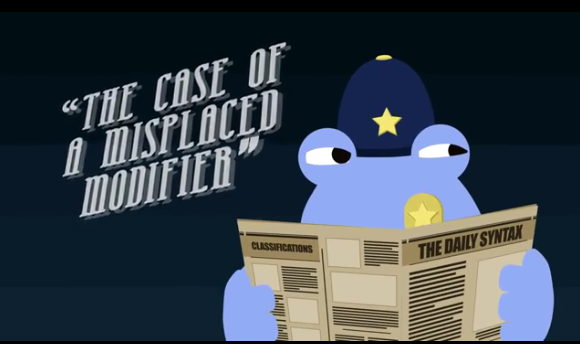
How Misused Modifiers Can Hurt Your Writing

The last Bryce video, called “How Misused Modifiers Can Hurt Your Writing,” follows in the same vein as the others. She uses her expertise to explain how misplaced modifiers create ambiguity. The animation makes it easy to see how words, phrases, and clauses in the wrong places create problems instead of adding helpful information.


Gaming The 2016 Election – Videos & Toolkits To Let Students Join The Debates

Source: PBS Learning Media


In the modern era, presidential debates have become must-see theater. In many cases, these general election showdowns have produced critical moments to determine the November outcomes. Even at their most pedantic, these debates are rare opportunities to hear the nation\’s leaders speak directly to citizens and to each other. Voters can judge how the candidates handle themselves on the world\’s largest stage.

The first debate between Democratic nominee Hillary Clinton and Republican nominee Donald Trump at Hofstra University (down the road from us here on Long Island) on Monday, September 26, 2016, is predicted to shatter television viewing records. Not incorporating this event into a day\’s lesson, therefore, would constitute educational malpractice.

Source: Watch The Debates


Teachers need to foster in their students an appreciation for civics. They need to guide young people toward understanding rhetoric and messaging. They need to use policy discussions as springboards to social awareness and future voting choices. One way to do this is by incorporating the practices of game interactions. This \”gamification\” approach to learning puts students in the driver\’s seat.

Source: PBS Learning Media

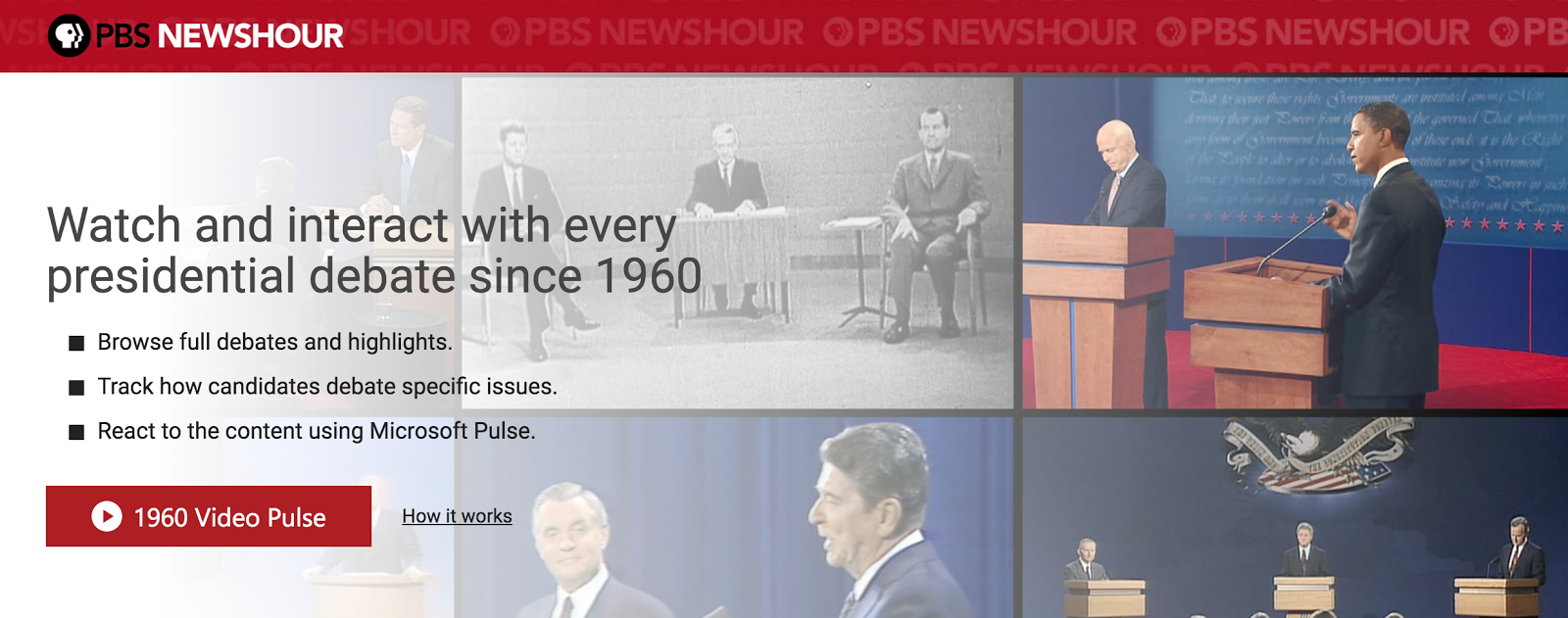
Fortunately, PBS has put together two terrific resources to bring the debates to life. The first is \”Watch The Debates\” from PBS Newshour. It allows users to view and interact with every candidate confrontation since 1960. Students can watch full encounters or highlights, and they can respond with their own verdicts.

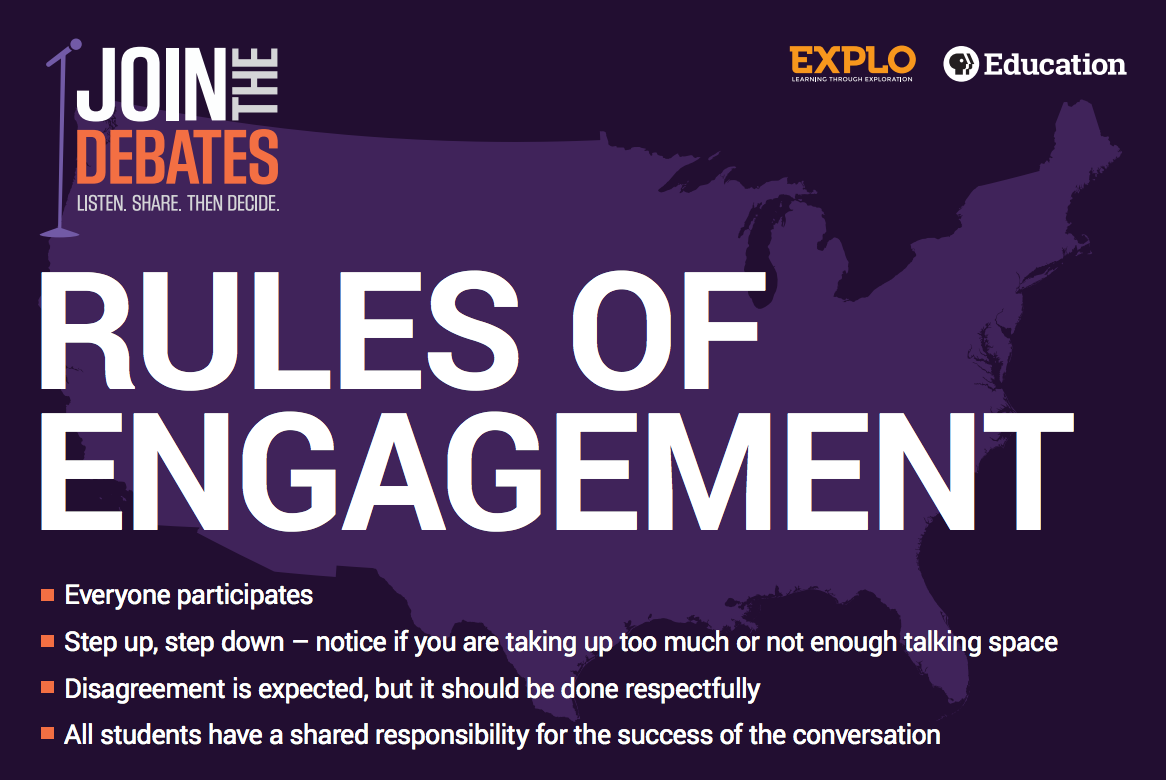
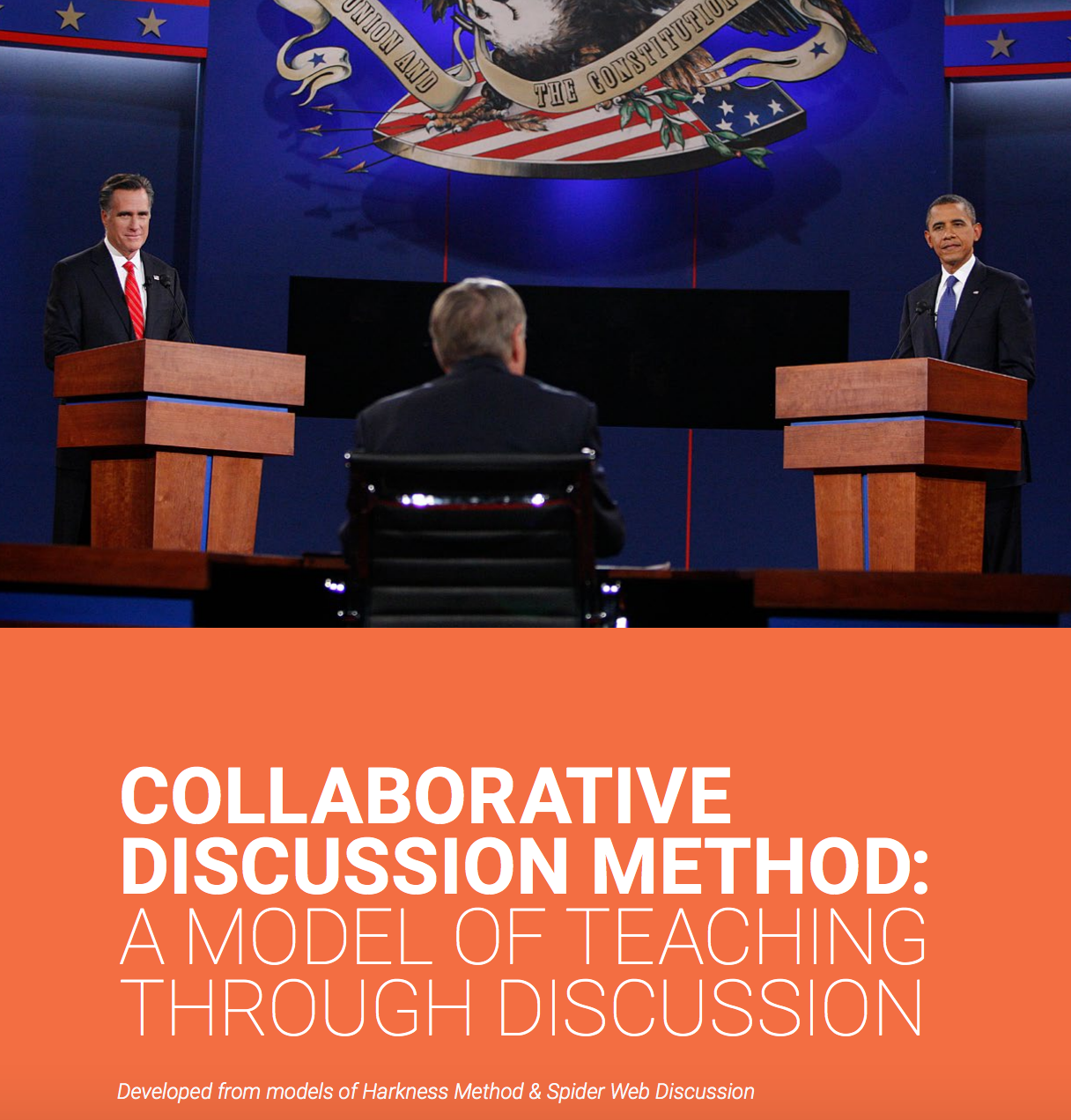
The second resource is \”Join The Debates,\” from PBS Learning Media. This site provides educators with a poster and toolkit to stage student dialogues in their own classrooms. Based on the Harkness Method and Spider Web discussion, these detailed guides allow children to reenact the debate format. Kids become owners of their own opinions, and they gain a better appreciation of the rigors of presidential parleys and the complexities of global issues.

Charts, Graphs, And Visual STEAM – Teaching The Super Bowl By The Numbers

Source: Asbury Park Press


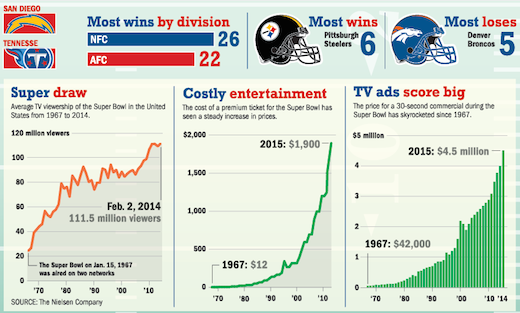
Aside from the physical drama and the halftime theatrics, the Super Bowl provides prime fodder for data analytics. The enormous volume of communication and marketing around this shared cultural moment offers a case study for exploring numbers and significance.

These days, graphs are no longer the sole purview of math class. This fall, for example, we spent a “math week” in social studies talking about how historians incorporate statistics and charts in probing the details behind pivotal events. Similarly, the Super Bowl bridges academic disciplines as an appealing touchstone for students to get excited about analytical reasoning and data design. That’s how right-brained and left-brained mindsets can merge perfectly in a contemporary STEAM study.

Some examples of lessons and visual aids that use graphs and charts include:


Source: Yellowfin

On Super Bowl Sunday, 1.25 billion chicken wings are expected to be consumed. The number of tweets is predicted to top 25 million, up significantly from the 13.4 million last year. And the average American is projected to consume 2,400 calories of Super Bowl chow.

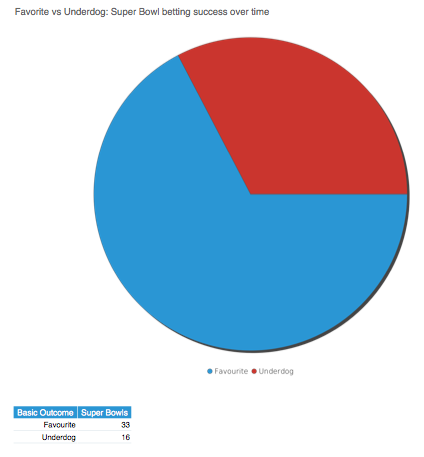
The emphasis here is on the visual presentation of numerical sets. Graphic literacy (or “graphicacy”) means that learners can “read” the grammar of lines and bars. Understanding trends and anomalies are key skills in interpreting mathematical and scientific figures.

As every educational institution searches for ways to blend STEAM proficiencies into the curriculum, the pop draw of the Super Bowl can be just the ticket to grab kids’ attentions in discovering the day’s dynamic details. Any of the tables or diagrams below would be terrific examples to show on Monday in kicking off a week of visual STEAM activities. The logical reasoning of numbers meets the illustrative narrative of the liberal arts:

Source: The New York Times


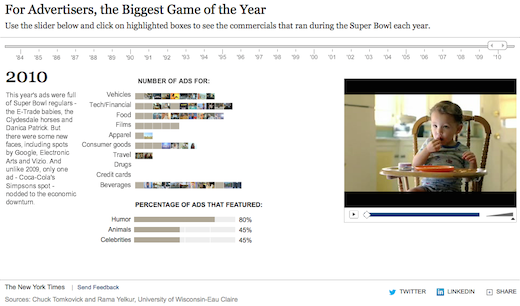
Super Bowl ads often get the most attention from both football diehards and passing revelers alike. This interactive tool from the New York Times allows students to compare a timeline of percentages as they parse the media blitz across the years.

Source: Yellowfin


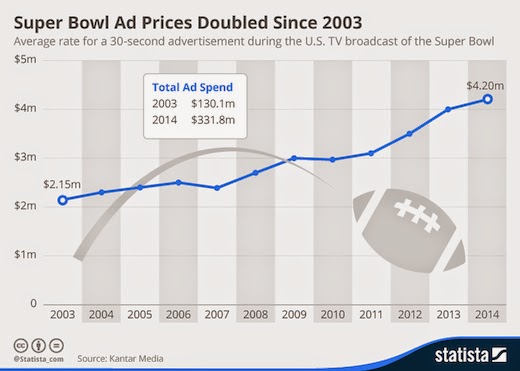
The media literacy component of Super Bowl mayhem cannot be overlooked. Many avenues exist for teachers to guide students in realizing the emotional tug of advertising during this high profile event. Yellowfin has designed an easily understood graph of Super Bowl ad prices to engage any student.

Source: Yellowfin


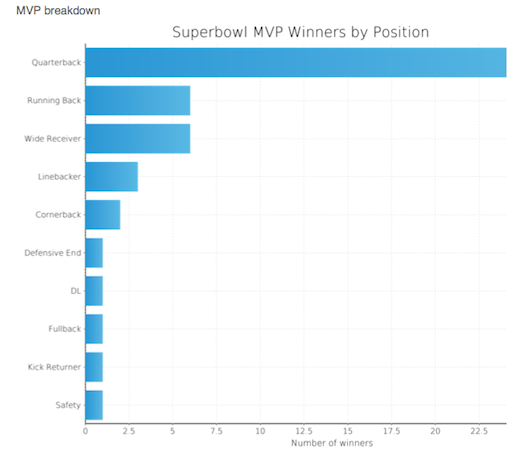
For aficionados of the sport itself, Yellowfin has assembled a horizontal bar chart of MVP winners by position. The results are familiar enough to let the content drive the comprehension. In other words, even the youngest mathematicians can expect QBs to win awards, and thus the extended blue bar becomes a visual signifier for their predictions. 

Source: Yellowfin


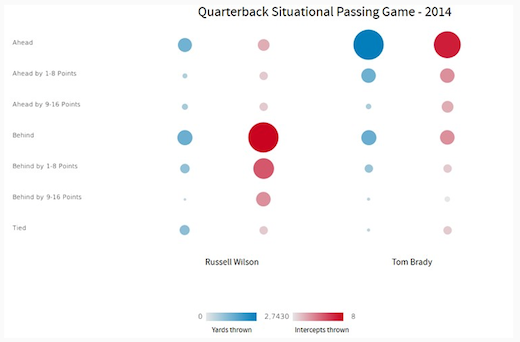
For strategists of team offenses, bubble graphs can blend with traditional tables to illuminate the choices of quarterbacks in certain situations.

For other Super Bowl educational resources, we recommend these posts: