Significance of scientific and empirical research in health reporting in India

Before 1990 doctors were utilizing the results of single or carefully selected examinations, or the procedures or advices they took in clinical school from their professors or seniors, to treat the patients. With the advent of 1990, the process of treating the patients changed dramatically as a group of science minded doctors subscribed themselves to built up a store of ‘systematic reviews’ which combined every query sort through all the best science on specific medical questions. This a statistical method to weigh the relative findings and the methods of single studies rather than relying on specific examinations or its results. Systematic reviews were revolutionary, it didn’t confine doctors’ evidence-based automatons, rather it empowered them to access a huge variety of data and make sense out of it. The review had in-fact played a role in wearing off certain misconceptions that found a way into the medicine, one such being, it was advised earlier to put infants to sleep on their stomachs, but through the reviews, it actually showed how the practice had put the children’s life in more threat. Reporting of research could grab the new audience and provide them with vital information, it can generate responses from the policymakers. The significance of scientific and empirical research stands high while reporting as any inappropriate, inaccurate, unauthentic and unreliable news draw up unnecessary expectations in pubic which in turn could result in formation of inefficient or unhealthy policies by the policy makers. Many evidences suggest that journalists while producing health reports often include their own interpretations and personal speculation lacking objectivity which results in incorrect and misleading reports.

A study published in 2014 listed the prime challenges while reporting health news:

  1. Negligible willingness of health professionals to impart information to the press
  2. Limitation of time
  3. Absence of latest statistics
  4. Problem in statistical interpretation
  5. Lack of medical knowledge in general.
  6. Little cooperation of health authorities.

The mainstream media, be it news channels or newspapers, is the first source from which the public learns about recent medical advancements. Thus, it is crucial when dealing with health issues or medical advancements to avoid creating a generalised or false narratives or generating unwarranted pressure on the already limited healthcare funding and infrastructure. There is an expectation that the media will provide unbiased, accurate and complete information while reporting on health. There are many obstacles while performing good quality health journalism. A stark gap between journalists and scientist can be witnessed which often leads to inaccurate information or the information being incomplete. There is an increasing tussle for reporting first hand news. Many reporters don’t have access to the researchers nor they have the appropriate tools. Often, special terms, expressions and abbreviations used by the health experts are not completely understood by the reporters. In addition to this, researches require time and in the industry of fast reportage and daily reminders, it almost becomes impossible to focus on it. A lot of reporters are also unaware about ‘systematic reviews’, let only their advantage. Reporters are often under pressure to report the health stories not only on time but also to sensualize it. Although the new media has provided space to journalists where they can always update their stories and explain the science behind the news.

Press Has Right To Publish News Item With Its Necessary Comments & Views

In a fresh, fine and favourable judgment, the Kerala High Court just recently on November 13, 2020 in Philip Mathew vs. State of Kerala [Crl. MC. No. 7758 of 2016] has quashed a defamation complaint registered against the Chief Editor, Managing Editor and Publisher of Malayala Manorama Daily. It is most gratifying, most refreshing and most rejuvenating to learn that Justice P Somarajan of the Kerala High Court has categorically, convincingly and cogently observed that the press has the right to publish a news item with its necessary comments and views. Such right cannot be defeated unless malafides writ large on its face and not concerning with a matter of public interest or public good. This cannot be denied or disputed! 

Photo by Kaboompics .com on Pexels.com

                                    Truth be told, it also made it clear that the contemptuous nature of news item, if it is connected with imputation of truth, which requires publication for the public good will not attract the  offence of defamation. Very rightly so! The complaint was against a news published in the daily about a Vigilance report against the complainant (R. Chandrasekaran) and three others. 

                                      To start with, the ball is set rolling in this latest, landmark and laudable judgment authored by Justice P Somarajan  by first and foremost observing in para 1 that, “The Managing Editor, the Chief Editor and the Printer and Publisher of a daily newspaper came up to quash the proceedings initiated on the allegation of offence under Section 500 IPC through a private complaint on which cognizance was taken by the Magistrate and process was issued under Section 204 Cr.P.C. Annexure A is the copy of news item published.” 

                                     While elaborating further, it is then pointed out in para 2 that, “Annexure A news item was published based on a report submitted by the Vigilance to set the criminal law in motion against the defacto complainant and three others after conducting a preliminary enquiry and recommended registration of crime against them. Going by Annexure A news item, it is clear that what is reported is the true version of report submitted by the Vigilance against the defacto complainant and three others. It is true that they were referred as accused persons in the news item, even before registration of crime in connection with the allegations.”

                            Truth be told, it is then most significantly disclosed in para 3 that, “What is reported is the true version of an enquiry report submitted by the Vigilance Department against the defacto complainant and three others. It is the duty of the fourth estate to publish all news materials, especially having public importance and it is their further duty to comment on the news material with its pros and cons so as to enlighten the society to remain vigil on the matters of public importance. It would squarely come under the first exception attached to Section 499 IPC, when it is done with bonafides for the public interest. The fourth estate is not expected to shy away from the matters governing public importance, but it is their solemn duty to serve the society with the news item with its pros and cons so as to make the society more functional and vigil. The fourth estate being one of the rostrums to address and comment on each and every matters governing public interest/public importance in a democratic society, the news item published with necessary comments, though sometimes contemptuous, may not itself amount to a defamation as defined under Section 499 IPC, unless the same is lacking in good faith and not concerning with a matter of public interest or public good. The first proviso to Section 499 IPC has got a wide canvass in a democratic system and right to publish a news item with its necessary comments and views though sometimes contemptuous, cannot be defeated unless malafides writ large on its face and not concerning with a matter of public interest or public good. The contemptuous nature of news item, if it is connected with imputation of truth, which requires publication for the public good will not attract the offence and there shall not be any misunderstanding with respect to the requirement to attract Section 499 IPC with the first exception therein. The news item published hence will not attract the offence of defamation as defined under Section 499 IPC. It was submitted that subsequently a crime was registered against the defacto complainant and three others and a refer report was submitted subsequently.”

                                Finally, it is then held in the lat para 4 that, “The private complaint submitted is really intended to defeat the solemn function vested with the fourth estate and it will tell upon what is behind it. It is an abuse of the process of court, liable to be quashed. Hence the private complaint and the further proceedings are hereby quashed. Crl.M.C. is allowed.”

                In essence, the cornerstone of this really cogent, commendable and convincing judgment is contained clearly, credibly and convincingly in para 3 which must be read maximum times. It certainly minces no words to make it amply clear as to what is the duty of the fourth estate. It also makes it further clear that the press has right to publish news item with its necessary comments and views.

                         No wonder, the Kerala High Court takes the right step in quashing the defamation case against Manorama Editors. There can certainly be no denying or disputing it! Freedom of press is most important and indispensable and its importance merits no reiteration. 

                                It goes without saying that for any democracy to function smoothly and effectively, there has to be free press which is just not possible if journalists have to keep fighting defamation case or some other case in the courts all the time! Even Supreme Court has acknowledged this and has always advocated more freedom for press and journalists to function independently just as we saw recently in case of Arnab Goswami who is the Editor-in-Chief of Republic TV and who was set free recently after 8 days from Taloja prison in Navi Mumbai after Supreme Court’s intervention by a Bench of Justice Dr DY Chandrachud and Justice Indira Banerjee! So Kerala High Court has certainly acted wisely to ensure press freedom and this definitely must be applauded and admired in no uncertain terms!  

Sanjeev Sirohi, Advocate,

s/o Col BPS Sirohi,

A 82, Defence Enclave,

Sardhana Road, Kankerkhera,

Meerut – 250001, Uttar Pradesh

Spicy puffed rice-Recipe I learnt from my Grandmaa!

Let’s discus something different today! I want to share a recipe that my grandmother use to make and some tips related to this recipe.

  1. Ingredients you require:
  • Puffed rice or Murmure (base ingredient)
  • Ghee
  • Salt or Namak
  • Mango or amchur powder
  • Chili powder or Lal mirch powder
  • Procedure:
  • Take some puffed rice in a container you want it can be a big or small bowl.
  • Add some amount of chili powder into that bowl. Maybe 2-3 spoons or as per the spicy you want your dish to be.
  • Then add 3-4 spoons of amchur or mango powder into it.
  • Add salt as per your taste.
  • Lastly, spread some ghee into it and then mix it well.

That’s it! Your tasty snack is ready to be served. It can be served alone or with any other food item.

  • Best part about this snack is:
  • It requires less or no cooking.
  • It can be easily carried anywhere whether we go to picnic or just for a walk in a garden.
  • Just like maggie it can be served in just a couple of minutes. Hence, it’s a time-consuming option.
  • We can adjust the amount of spices and puff rice according to our preference.
  • You can change the order of adding spice into it. Its not compulsory to add every ingredient step wise as I listed above in procedure.
  • We can eat it at any time we want, as lunch, dinner or as breakfast.
  • You can preserve it in any container like any other preservable snack.
  • Some tips that can add to your taste:
  • You can also use Gram or Chana instead of puff rice as your base ingredient.
  • To add more taste, you can add some roasted peanuts or any other ingredient like already roasted namkeen to it.
  • You can also roast your puffed rice to make it crunchier.
  • You can add some pieces of boiled potato.

I use to eat this snack a lot when I am starving and don’t have any other thing to cook. It’s a quick and easy option when you don’t want/have anything to cook.

5 Best Popular Posts Widgets For Blogger

  If you’re using Blogger as the platform for your personal or business blog, you’re probably looking for ways to customize it and make it your own. This way, you’ll make your webpages unique and eye-catching and ensure they’ll stand out from the many other pages on the internet. You’ll also grab the attention of your target market, encourage them to browse through your blog and become your loyal readers and followers.

Fortunately, there are lots of ways to personalize your Blogger blog, and one of these is to customize your Popular Posts widget. Haven’t installed this yet? Don’t worry since putting it in your blog easy.

Adding the Popular Posts Widget for Blogger

Just click on your blog title, access the “Layout” menu, click “Add a Gadget” and choose “Popular Posts”. A window will appear asking you to configure the widget by choosing which posts you’ll feature (e.g. those that were most viewed in the past 7 days or 30 days or from the beginning of your blog). You’ll also be asked to choose how many posts you’ll feature in your Popular Posts section and select if you’ll show the post title only or along with the image thumbnail and/or the snippet. (Remember that each widget style has different requirements, so follow the styles and instructions carefully to find out if you need the snippet and image thumbnail or not).
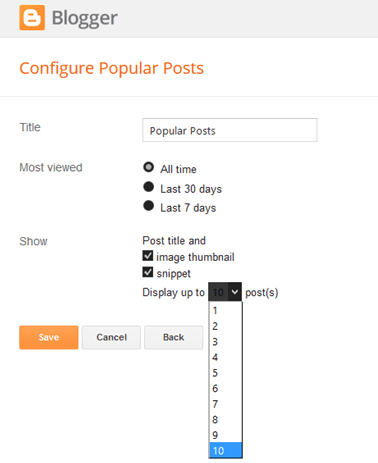
Configuring Popular Posts Widget for Blogger

Once you’ve followed these instructions, you’ll get to see the basic version of the Popular Posts Widget for Blogger in your blog. You can stick with this if it matches your blog design but, if it sticks out like a sore thumb or doesn’t suit your taste, there’s no need to fret since you can personalize it. You can choose from the following styles – see the demo blog:

Popular Posts Style 1 – Box within a box

This is an interesting widget style since it uses your snippet and image thumbnail in a unique way. Your snippet is written in opaque text and placed in a small transparent box. This, in turn, is placed in a bigger rectangular box, wherein your image thumbnail is used as a background. Choosing this Popular Posts Widget for Blogger can be a great option if you want to brighten up your blog and grab the attention of readers with your colorful photos.

popular posts widget for blogger

CSS code:

.sidebar .PopularPosts ul{margin:0;padding:0;}.sidebar .PopularPosts ul li{list-style:none !important;padding:0 !important;margin-bottom:10px;}.sidebar .PopularPosts .item-thumbnail{height:190px;margin:0;overflow:hidden;width:100%;}.sidebar .PopularPosts .item-title{position: relative;}.sidebar .PopularPosts img{height:auto;width:100%;padding:0;}.sidebar .PopularPosts .item-title a{color: #FFFFFF;font:20px Oswald;text-transform:uppercase;padding:10px;position:absolute;right:0;left:0px;margin:0px auto;text-align:center;text-decoration:none;top:40px;width:60%;height:26px;overflow:hidden;z-index:2;}
.sidebar .PopularPosts .item-snippet{background:rgba(0, 0, 0, 0.35);border-top:6px solid rgba(0, 0, 0, 0.1);border-bottom:6px solid rgba(0, 0, 0, 0.1);color:#FFFFFF;left:0px;right:0px;margin:0px auto;padding:65px 10px 10px;position:absolute;font:13px ‘Times New Roman’,Times,FreeSerif,serif;text-align:center;top:35px;width:60%;z-index:1;}.sidebar .PopularPosts .item-content{position:relative;}

Popular Posts Style 2 – Large thumbnails with small post titles underneath

This uses the same code as the basic Blogger Popular Posts Widget with a few tweaks. Popularized by well-known blogs, this style is eye-catching because it focuses on pictures, which don’t only summarize the posts’ content but also add visual drama to the entire page. This is particularly useful for blogs that focus on clothes, makeup, art and other topics that highly depend on visual presentation to better express ideas.

popular posts widget for blogger

CSS code:

.sidebar .PopularPosts ul{counter-reset:popularcount;margin:0;padding:0;}.sidebar .PopularPosts ul li{width:100%;list-style:none !important;padding:0 !important;margin-bottom:20px;position:relative;border:0;text-align:center;}.sidebar .PopularPosts .item-thumbnail a{clip: auto;display:block;height:auto;height:120px;}.sidebar .PopularPosts .item-thumbnail{width:100%;height:120px;overflow:hidden;position:relative;margin-bottom:15px;}.sidebar .PopularPosts .item-thumbnail::before{background:rgba(0, 0, 0, 0);border-bottom:29px solid #fff;border-left:29px solid transparent;border-right:29px solid transparent;bottom:0px;content:"";height:0;width:0px;left:0px;right:0px;margin-left:auto;margin-right:auto;position:absolute;z-index:3;}.sidebar .PopularPosts .item-thumbnail:after{color:#000;content:counter(popularcount, decimal);counter-increment:popularcount;font:13px "Times New Roman",Times,FreeSerif,serif;list-style-type:none;position:absolute;bottom:0;margin:0px auto;left:0px;right:0px;z-index:4;}.sidebar .PopularPosts .item-thumbnail img{position:relative;width:100%;height:auto;padding:0;}.sidebar .PopularPosts .item-title{font:15px 'Oswald', sans-serif;text-transform:uppercase;margin:0px auto;padding-bottom:10px;border-bottom:1px solid #000;}.sidebar .PopularPosts .item-title a{color:#000;text-decoration:none;}.sidebar .PopularPosts .item-snippet{padding:10px 15px;font:13px "Times New Roman",Times,FreeSerif,serif;}

Popular Posts Style 3 – Colorful boxes

If your blog needs a pop of color, this is the right choice for you. This widget style presents your Popular Posts in several boxes that feature a thumbnail image and have bright, eye-catching shades like light green, ocher yellow and vivid orange. Each box has a different color, and you can add up to four boxes.

popular posts widget for blogger

CSS code:

.sidebar .PopularPosts ul{padding:0;margin:0;}.sidebar .PopularPosts .item-thumbnail a{clip:auto;display:block;height:auto;overflow:hidden;}.sidebar .PopularPosts .item-thumbnail{width:130px;height:130px;border-right:5px solid #fff;margin:0px 10px 0px 0px !important;position:relative;}.sidebar .PopularPosts .item-thumbnail img{position:relative;height:auto;width:100%;padding:0;}.sidebar .PopularPosts ul li{float:left;margin-bottom:5px;max-height:130px;min-width:250px;overflow:hidden;}.sidebar .PopularPosts ul li:first-child{background:#D9EDF7;}.sidebar .PopularPosts ul li:first-child + li{background:#F2DEDE;}.sidebar .PopularPosts ul li:first-child + li + li{background:#DFF0D8;}.sidebar .PopularPosts ul li:first-child + li + li + li{background:#FFEEBC;}.sidebar .PopularPosts ul li:first-child + li + li + li + li{background:#E0E0E0;}.sidebar .PopularPosts .item-title{font:13px 'Oswald', sans-serif;text-transform:uppercase;padding:10px 5px 10px;}.sidebar .PopularPosts .item-title a{color:#000;text-decoration:none;}.sidebar .PopularPosts .item-snippet{font:13px "Times New Roman",Times,FreeSerif,serif;padding-right:5px;}.sidebar .PopularPosts .widget-content ul li{padding:0px 5px 0px 0px!important;}

Popular Posts Style 4 – Grid layout

Just like the large-picture widget style, the grid layout is an excellent option if you want to showcase your pictures or if your blog depends on visual information. However, the title of your posts won’t be included in the layout, so readers will have to hover their mouses on the images to read the titles.

popular posts widget for blogger

CSS code:

.sidebar .PopularPosts ul{padding:0;}.sidebar .PopularPosts ul li:first-child{width:100%;max-height:100%;opacity:0.9;}.sidebar .PopularPosts ul li:nth-child(even){margin-right:2%;}.sidebar .PopularPosts ul li{-moz-box-sizing:border-box;-webkit-box-sizing:border-box;box-sizing:border-box;position:relative;padding:0px !important;width:49%;max-height:120px;opacity:0.4;overflow:hidden;float:left;margin-bottom:2%;-webkit-transition: all 0.5s ease 0s;-moz-transition:all 0.5s ease 0s;-ms-transition:all 0.5s ease 0s;-o-transition:all 0.5s ease 0s;transition:all 0.5s ease 0s;}.sidebar .PopularPosts ul li:hover{opacity:1;}.sidebar .PopularPosts .item-thumbnail{margin:0;width:100%;line-height:0;}.sidebar .PopularPosts ul li img {-moz-box-sizing:border-box;-webkit-box-sizing:border-box;box-sizing: border-box;width:100%;height:auto;padding:0;}.sidebar .PopularPosts .item-content:hover .item-title a,.sidebar .PopularPosts .item-thumbnail-only:hover .item-title a{visibility:visible;opacity:1;}.sidebar .PopularPosts .item-title a{color:#fff;background:rgba(0, 0, 0, 0) linear-gradient(to bottom, rgba(0, 0, 0, 0) 0%, rgba(0, 0, 0, 0.93) 100%, rgba(0, 0, 0, 0.85) 100%);text-decoration:none;position:absolute;text-align:center;font:13px 'Oswald', sans-serif;left:0;right:0;bottom:0%;padding:100px 10px 10px;opacity:0;visibility:hidden;}.sidebar .PopularPosts .item-snippet{display:none;}

Popular Posts Style 5 – Numbered posts

If you love numbered lists, or if you’d like to make your blog more organized, this can be the perfect option. By using the code for this widget style, your Popular Posts will be automatically numbered and will feature clean, minimalistic boxes that include your snippet and image thumbnail.

popular posts widget for blogger

CSS code:

.sidebar .PopularPosts ul{counter-reset:popularcount;margin:0;padding:0;}.sidebar .PopularPosts ul li{float:left;max-height:130px;min-width:250px;position:relative;}.sidebar .PopularPosts .item-thumbnail::after{color:rgba(255,255,255, 0.63);content:counter(popularcount, decimal);counter-increment: popularcount;font:70px 'Oswald', sans-serif;list-style-type:none;position:absolute;left:5px;top:-5px;z-index:4;}.sidebar .PopularPosts .item-thumbnail::before{background:rgba(0, 0, 0, 0.3);bottom:0px;content:"";height:100px;width:100px;left:0px;right:0px;margin:0px auto;position:absolute;z-index:3;}.sidebar .PopularPosts .item-thumbnail a{clip:auto;display:block;height:auto;overflow:hidden;}.sidebar .PopularPosts .item-thumbnail{width:100px;height:100px;margin:0px 10px 0px 0px !important;position:relative;}.sidebar .PopularPosts .item-thumbnail:hover:before{display:none;}.sidebar .PopularPosts .item-thumbnail img{position:relative;padding-right:0px !important;height:auto;width:100%;}.sidebar .PopularPosts .item-title{font:13px 'Oswald', sans-serif;text-transform:uppercase;padding:0px 5px 10px;}.sidebar .PopularPosts .item-title a{color:#000;text-decoration:none;}.sidebar .PopularPosts .item-snippet{font:13px "Times New Roman",Times,FreeSerif,serif;}.sidebar .PopularPosts .widget-content ul li{padding:0px 5px 0px 0px !important;}.sidebar .PopularPosts .item-content{padding:5px 0px;border-bottom:1px dotted #dedede;overflow:hidden;height:100px;position:relative;}

These are just some of the widget styles you can choose from. When you’ve picked a style you want, make sure to copy its CSS code. Once you do so, go to your blog, click “Theme” on the left side and select “Edit HTML” under the template preview.

These next codes need to be pasted above the “” or “” tags, so check the instruction to know exactly where you need to put the code.

Adding the CSS

When the template editor has opened, click anywhere inside the code area and hit CTRL + F or Command F to search the following tag:

Just ABOVE the  tag, copy-paste the CSS code of one of the styles above.

Important: If the Popular Posts widget is located in the footer of your blog, remove the .sidebar class found in the CSS code in order to make it work.

Please note that most of the styles are using the ‘Oswald’ font which you need to add to your template’s code as well.

So, search for this tag:

… and just BELOW it, add this line:

Adding the JavaScript

These styles also require using a script in order to resize the popular posts image / thumbnail and trim the post snippet and title. To add the JavaScript code, search the  tag and paste the following script just above it:

//ajax.googleapis.com/ajax/libs/jquery/1.11.1/jquery.min.js

Note: if you have already the jQuery library in your template, remove the line in red.

After you have added all the codes in the right place, press the “Save theme” button to save the changes.

That’s it!

The five Popular Posts widgets for Blogger featured today are all great solutions for adding a popular post section to your blog. They all have different appearance for determining what makes a post popular, but the end result is the same: visitors are always one click away from your best content. Try some of these styles, find your favorite, and see how it impacts the performance of your blog.
