


Cyber Security and Digital Data Protection Concept. Icon graphic interface showing secure firewall technology for online data access defense against hacker, virus and insecure information for privacy.
I think computer viruses should count as life. I think it says something about human nature that the only form of life we have created so far is purely destructive. We’ve created life in our own image.
Stephen Hawking
Cyber Security the word itself defines it. Security means providing protection or defending something from attackers while cyber means crime that involves computers, mobile phones or other digital things. Hence the proper definition of the word Cyber Security is defending computers, mobile devices or other devices from malicious data. It is also known as electronic information security. As we are advancing day by day the technology too gets advanced and somewhere it creates the small tiny loopholes which hackers find easily and they get into your data. Then the hackers start blackmailing for ransom and start threatening about leaking personal photos or files in public so to stop this wrong deed cyber security helps one.
Cyber Threat:-
More than 7.9 billion records have been exposed by data breaches in the first nine months of 2019 alone. This figure is more than double (112%) the number of records exposed in the same period in 2018. Medical services, retailers and public entities experienced the most breaches, with malicious criminals responsible for most incidents. Some sectors are more appealing to cybercriminals because they collect financial and medical data. The International Data Corporation predicts that worldwide spending on cyber-security solutions will reach a massive $133.7 billion by 2022. Governments across the globe have responded to the rising cyber threat with guidance to help organizations implement effective cyber security practices. In Australia, TheAustralian Cyber Security Centre regularly publishes guidance on how organizations can counter the latest cyber threats.
Malware:-
Malware is one of the common cyber threats. Malware word means malicious software. The software which might destroy one’s computer. It is formed by either hackers or cybercriminals for the purpose of damage. It can enter in one’s computer by many ways which include sharing files from one pc to other, through emails, through apps downloaded from unsecured websites. Different types of malware includes:-
- Virus:- A programme that attaches itself to a clean file and spreads throughout a computer system, infecting files with malicious code.
- Spyware:-A programme that secretly records what a user does in order for cybercriminals to profit from it. Spyware, for example, could record credit card information.
- Adware:-Advertising software which can be used to spread malware.
- Ransomware:-Malware that encrypts a user’s files and data and threatens to delete it unless a ransom is paid.
- Trojans:-A type of malware that masquerades as genuine software. Users are duped into downloading Trojans onto their computers, which then cause damage or collect data.
To stop this cyber threats here are some solutions which may help ones:-
1. CHECK IF YOU’VE ALREADY BEEN INVOLVED IN A DATA BREACH
Change those passwords for any accounts that it suggests may have been compromised.
2. CHECK THE STRENGTH OF YOUR PASSWORDS
(use something similar to your original password to test its strength).
When choosing a password, remember: the longer it is, the stronger it is. A strong password is at least 12 characters long and hard to guess.
Using a sentence is a great way to create a long password that you’ll never forget.
3. AVOID THESE PASSWORDS
The following passwords are considered the most common and easiest to crack – so if you’ve got any of these or similar variations, you should seriously consider changing them – quickly!
- 123456 (or any chronologically-ordered numbers)
- 987654321
- 123123
- QWERTY
- 111111
- password
WHICH GENERATION IS MOST GUILTY OF USING INEFFECTIVE PASSWORDS?
4. TRUST NO ONE (ON EMAILS)
This may sound a bit extreme – but always be on the lookout for deceitful emails and compromised web pages (spam and phishing). Interacting with these puts your information at risk and can download viruses. Remember:
- don’t open email from unknown email addresses.
- trash attachments in unexpected emails.
- avoid risky clicks – instead type the address into your browser.
5. SECURE YOUR DEVICE
If your mobile device is unsecured, lost or stolen, it could be used to access your info, your money or steal your identity and irreplaceable data like photos or messages. Secure your devices by:
a) Installing anti-virus software.
b) Setting a password, gesture or fingerprint that must be entered to unlock.
c) Setting the device to require a password before applications are installed.
d) Leaving Bluetooth hidden when not in use and disabling automatic connection to networks.
e) Enabling remote locking and/or wiping functions, if your device supports them.
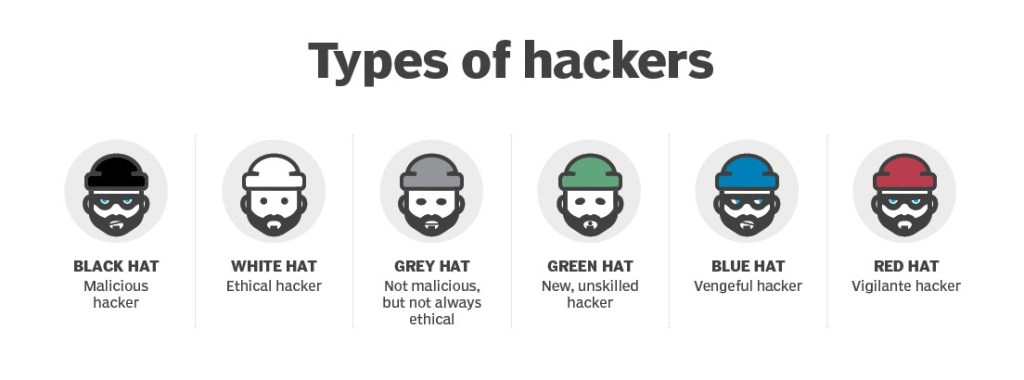
Hackers:-
A hacker is an individual who uses computers, networking or other skills to overcome a technical problem. The term also refers to those who use their abilities to commit crimes in order to gain access to systems or networks for illegal purposes. A hacker may steal information to hurt people via identity theft. The term hacker was first used in the 1960s to describe a programmer who could increase efficiency by removing excess machine code instructions from a program. It has evolved over the years to refer to someone with an advanced understanding of computers, networking, programming or hardware. The term is also commonly applied to individuals who use this skill for illegal or unethical purposes.
There are different type of Hackers according to their work:-
1) Ethical Hackers:- Previously known as white hat hackers, these individuals try to act in the public’s best interests rather than wreaking havoc. Many ethical hackers who operate in the field of pen testing were recruited to break into the company’s networks in order to identify and disclose security flaws. The security businesses then assist their customers in resolving security vulnerabilities before they are exploited by criminal hackers.
2) Threat Hackers:- Previously known as black hat hackers, these intentionally gain unauthorized access to networks and systems with malicious intent. Threat actors are criminals by definition because they violate laws against accessing systems without authorization. They may also engage in other illegal activity, including corporate espionage, identity theft and DDoS attacks.
3)Grey hat hackers:- The gray hat hackers are more likely than ethical hackers to access systems without authorization. They may offer to fix vulnerabilities they have discovered through their own unauthorized activities, rather than exploit them for illegal profit. The group’s motives may be similar to those of ethical hackers and threat actors.
4)Red hat hackers:- Similar to ethical hackers, they are sometimes known as eagle-eyed or vigilante hackers. Red hat hackers want to deter threat actors from launching unethical assaults. While red hat hackers may have the same goal as ethical hackers, their methods differ in that red hat hackers may employ illegal or extreme methods. Red hat hackers frequently use cyber assaults against threat actors’ systems.
5)Blue hat hackers:- Hackers that use hacking as a social weapon are known as spiteful hackers. It is frequently employed as a form of retaliation against a person, employer, or other entity. Blue hat hackers post personal and sensitive info online to harm people’s reputations or try to obtain illegal access to email and social media accounts.
6)Red hat hackers:- Script kiddies are unskilled or amateur hackers who attempt to hack using pre-written scripts. Often, these are inexperienced hackers that inflict minimal harm.
At last I would say that ”Be Active and don’t hesitate to ask for help from Cyberwarrior.”

 Eduindex
You must be logged in to post a comment.