Types of Attacks

The following are the four general types of attacks:

  1. Interruption
  2. Interception
  3. Modification
  4. Fabrication

Interruption

A system asset is destroyed, made unavailable, or made useless. To put it another way, a network service is degraded or made unavailable for lawful purposes.

They are attacks against the availability of the network.

Examples of Interruption Attacks:

  • Overburdening a server host to the point that it is unable to reply.
  • Severing a chain of communication
  • Overloading an intermediary network or network device to prevent access to a service.
  • Requests are being redirected to invalid locations.
  • There is a risk of software or hardware theft or destruction.
  • File management systems are disabled.

Mitigate the attack:

  • Firewalls can be used to allow or reject protocols, ports, or IP addresses. Modern stateful firewalls, such as the Check Point FW1 NGX and Cisco PIX, have the capacity to distinguish between legitimate traffic and DoS attack traffic.
  • Maintaining appropriate backups of system configuration data.
  • Replication.

Interception

An asset is accessed by an unauthorized person. A human, software, or a computer might be an unauthorized party. To put it another way, an unauthorized person obtains access to confidential or private data.

They are the attacks against the confidentiality objective of the CIA Triad.

Examples of Interception Attacks:

  • Eavesdropping in on conversations.
  • Telecommunications networks are being wiretapped.
  • Copying files or programs without permission.
  • Obtaining copies of messages in order to replay them later.
  • To capture data from a computer system or network, packet-sniffing and keylogging are used.

Mitigate the attack:

  • Encrypting the flow of information from source to destination – SSL, VPN, 3DES, and BPI+ are used to encrypt the flow of information from source to destination so that if someone is able to eavesdrop on the traffic, all they will see is ciphered text.
  • Traffic Padding is a function that generates ciphertext output endlessly, even when plain text is not available. A random data stream is created endlessly. The plaintext is encrypted and sent when it is available. When there is no plaintext in the input, the random data is encrypted and delivered. As a result, an attacker will be unable to discriminate between tree data flow and noise, and hence will be unable to estimate the quantity of traffic.

Modification

An unauthorized person not only obtains access to an asset but also tampers with it.

This is an attack against the integrity of the information.

Basically, there are three types of modifications:

  • Change: Make a change to the information that already exists. The information was previously available, but it was wrong. Change attacks can be used to target either sensitive or public information.
  • Insertion: When an insertion attack is carried out, data that did not exist earlier is inserted. This attack might be used against historical data or data that hasn’t been acted on yet.
  • Deletion: Deletion is the process of removing data from a system.

Examples of Modification Attacks:

  • Modifying the contents of network communications.
  • Changing data files and their contents.
  • Changing programs to make them function better.
  • System hardware or network topologies are being reconfigured.

Mitigate the attack:

  • Intrusion detection systems (IDS) were introduced, which could check for various signatures that indicate an attack.
  • Encryption methods are used.
  • Padding for traffic
  • Backing up your data
  • Use checksums, sequence numbers, digests, and authentication codes as communications methods.

Fabrication

Counterfeit items are inserted into the system by an unauthorized entity. Simply said, a person introduces false information, resources, or services into a network.

This is an attack against authenticity.

Examples of Fabrication Attack:

  • Using the identity of another person to send communications across the network.
  • Replaying communications that were previously intercepted.
  • The act of impersonating a website or other network service.
  • Taking another host’s or service’s address and effectively-becoming that host or service.

Mitigate the attack:

  • Authentication and authorization methods are used.
  • Putting Firewalls to Work
  • Use Digital Signatures – A digital signature method is a mathematical scheme for proving a digital message or document’s authenticity.

Principles of Security

The following are the basic fundamentals of information security:

  1. Confidentiality
  2. Integrity
  3. Availability

Every aspect of a security program (and every security control implemented by an organization) should be designed to meet at least one of these principles. The CIA Triad is their standard term.

What is Confidentiality?

Confidentiality measures are in place to prevent unauthorized disclosure of data. The confidentiality principle’s goal is to ensure that private information stays private and can only be read or accessed by those who require it to perform their job obligations.

If an unauthorized individual has access to communication, the message’s confidentiality is jeopardized. Confidential information must be safeguarded. To protect the confidentiality of its data, a business must guard against harmful acts.

Interception causes loss of message confidentially.

What is Integrity?

Integrity refers to the protection of data from unauthorized changes (e.g., additions, deletions, or changes). The integrity principle is intended to ensure that data can be trusted to be accurate and that it has not been tampered with in any way.

An interruption in the system, such as a power surge, might cause undesired changes in certain information, which is not always the consequence of a criminal act.

Modification causes loss of message integrity.

What is Availability?

The term “availability” refers to protecting the operation of support systems and ensuring that data is fully accessible at the point in time (or for the specified duration) when it is required by users. The goal of availability is to guarantee that data is available for decision-making when it is needed. The information must be updated on a regular basis, which demands its accessibility by authorized parties. Information inaccessibility is just as damaging to a company as a lack of secrecy or integrity.

Interruption puts the availability of resources in danger.

The balancing idea is represented in the diagram. To design a safe system, the three aims must be balanced correctly. If the goals aren’t balanced, an opening is created for attackers to undermine the other security goals. If a system is highly secret yet has limited availability, it is not secure.

Example: An organization collects or generates sensitive data for use in its commercial activities. Because the information is sensitive, it should only be accessible to those inside the company who require it to do their duties. Unauthorized persons should not be able to access it. This is an example of the confidentiality principle in action.

When the person who requires that data to execute a work responsibility is ready to use it, it must be easily available (i.e. online) in a fast and reliable manner so that the job assignment may be performed on time and the company’s operations can proceed. This is how the availability concept works.

Finally, the data will be utilized in computations that will influence the organization’s business choices and investments. As a result, data accuracy is important to ensure correct computations and outcomes, which will be used to make judgments. The principle of integrity ensures that data has not been tampered with inappropriately and can thus be trusted when performing computations and making choices.

How To Make Your System And Network Safe?

Network security management is the process of managing a network in such a manner that it is capable of dealing with all types of network threats and virus issues and solving them.

The following are the most important criteria to consider while ensuring the security of your system:

  1. Use Strong Passwords & Passphrases: To safeguard your system or network from malicious threats, create a strong password for login and access that includes a variety of letters, symbols, and numbers. Birthdays should not be used as a password since hackers may quickly crack them.
  2. Establish a Firewall: To secure your networking system from unauthorized access and other dangers, always establish a powerful firewall.
  3. Antivirus Protection: Antivirus software should always be installed on your computer and laptop. The antivirus program will scan, detect, and filter infected files, as well as resolve any issues that emerge as a result of viruses.
  4. Update Software: It’s important to keep your system and network up to date with the newest antivirus software and to install the latest patches and scripts for the system as needed. Virus threats will be less likely, and the network will be more secure as a result.
  5. Secure Mobile Devices: Mobile devices such as laptops, smartphones, and tablets are vulnerable to network attacks. To keep these gadgets safe, use a strong password to access their different resources. To gain access to smart devices, it is preferable to utilize a biometric fingerprint password.
  6. On-Time Backups: Files, documents, and other essential data on our system or hard drive should be backed up on a regular basis and saved to a centralised server or another secure location. This must be completed without fail. This will assist with the rapid restoration of the system in the event of an emergency.
  7. Smart Surfing on Websites: Before downloading or visiting any website on the Internet, we should keep in mind that a single incorrect click might invite a slew of viruses onto our network. As a result, always download material from trustworthy and secure sources, and stay away from unfamiliar links and websites. Also, whenever you connect to the Internet, avoid clicking on ads and offers that are regularly shown on online pages.
  8. Filter and Delete Spam Emails: Hacker-created phishing emails are designed to lure you to read them and click on exciting offers or links. Spam filters have come a long way and should be used to their full potential. Even yet, spam emails may get through, especially if a hacker is impersonating someone you know, such as a professional colleague or a firm with whom you do business.
  9. Encrypt Your Files: Using software particularly intended to disguise your IP address, encryption may safeguard critical data on Windows or macOS. Look for “HTTPS” in the URL bar, along with a padlock icon, to see if a website has been secured using encryption.
  10. Secure Configuration: The setup of devices such as routers, smart devices, and any other device that contains sensitive data must be very secure. Operating systems must be appropriately hardened. Passwords that are set by default must be updated.
  11. Removable Media Control: When introducing removable devices into the system, such as pen drives, dongles, and data cards, they should always be scanned. Removable gadgets should be used cautiously.
  12. Shut Down Computers When Not in Use: If your computer is linked to your company’s network and sits idle overnight, it becomes more visible and vulnerable to hackers. You’re restricting their access to your network by shutting off your PC. You’re also breaking their connection if they’ve already gotten access.

Network Security

Network security refers to the monitoring and control of illegal access, exploitation, and any undesired changes to the networking system. A computer networking system strategy that ensures the security of an organization’s assets, software, and hardware resources is known as network security.

Why Do We Need Network Security?

Connecting our gadgets to the internet and other networks offers us a whole new world of possibilities. We can get the information we need without keeping it on our gadgets indefinitely. We are able to interact with one another, which allows us to collaborate and coordinate our efforts. The networks that enable us to operate our lives are made up of these linked gadgets. 

Unless properly secured, any network is vulnerable to malicious usage and accidental harm. Private data, such as trade secrets and client information, might be revealed due to hackers, disgruntled workers, or inadequate security measures inside the business.

For example, losing private research can cost a company millions of dollars by robbing it of the competitive advantages it paid for. While hackers steal consumer information and sell it to be utilised in fraud, the company suffers poor press and public confidence.

Rather than causing network damage, most frequent network assaults are aimed to obtain access to information through spying on users’ conversations and data.

Attackers, on the other hand, may do more than just take data. They may be able to cause harm to users’ devices or manipulate systems in order to obtain physical access to facilities. This puts the organization’s assets and members in jeopardy.

Data is kept safe, and susceptible systems are protected from outside tampering, thanks to effective network security measures. This helps network users to be secure while focusing on the organization’s objectives.

Information security is needed for the following given reasons:

  • Unwanted Changes – To secure information against unauthorized users unintentionally or purposefully altering it.
  • Information Loss and Proper Delivery – To prevent data loss and ensure that it reaches its rightful owner in a timely manner.
  • Non-repudiation – To ensure that each node receives an acknowledgement of a message in order to defend against the sender’s rejection in particular scenarios. Let’s say a consumer places an order to buy a few shares of XYZ in the broader market, but the transaction is denied after two days since the rates have dropped.
  • Hiding the Identity of the Original Sender – To prevent a certain network user from sending any mail or message in such a way that it seems to the recipient that it was sent by a third party. For example, a user X creates a message with some favourable instructions for his personal benefit and sends it to user Y in such a way that Y accepts the message as coming from Z, the organization’s boss.
  • Inappropriate Delay – To protect the data from any unintentional delays in the path taken to deliver it to the intended destination within the specified time frame.
  • Corrupting or Deleting – To protect our hardware, like as hard drives, PCs, and laptops, from malware, viruses, and other threats that might harm our system by corrupting or destroying all of the data contained on it.
  • Malware & Unwanted Software – To safeguard our computers against malicious software that, if installed, can destroy our systems in the same way that hackers do.

Wireless Sensor Networks (WSN)

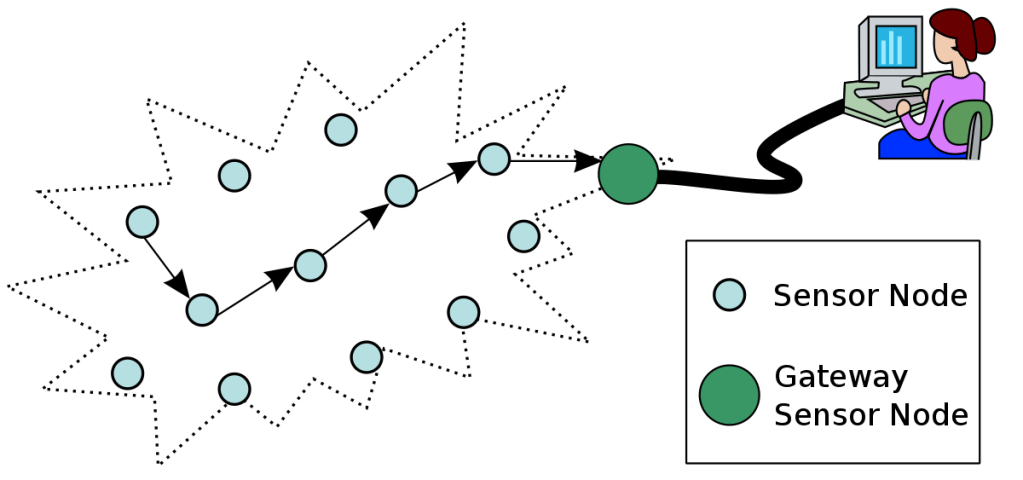
Sensors, a controller, and a communication system make up a typical sensor network. Wireless Sensor Networks, or simply WSNs, are networks in which the communication mechanism in a Sensor Network is implemented using a Wireless protocol.

Sensor Nodes are placed in high density and frequently in huge quantities to provide sensing, data processing, embedded computing, and communication in a Wireless Sensor Network.

Elements of WSN

A typical wireless sensor network is made up of two parts. They are as follows:

  • Sensor Node
  • Network Architecture

Sensor Node

In a WSN, a Sensor Node has four fundamental components. They are as follows:

  • Power Supply
  • Sensor
  • Processing Unit
  • Communication System

The sensor takes analog data from the physical environment, which is then converted to digital data by an ADC. The main processing unit, which is generally a microprocessor or a microcontroller, processes and manipulates data intelligently.

A communication system consists of a radio system for data transmission and receiving, which is generally a short-range radio. Due to the fact that all of the components are low-power electronics.

Sensor Nodes include not just the sensing component, but also key characteristics like as processing, communication, and storage.

Network Architecture

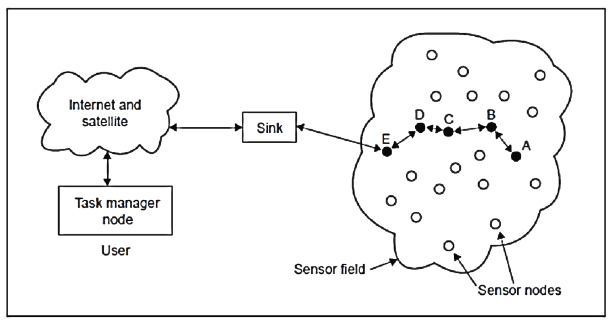
The networking of these sensor nodes is requirements is to ensure when a large number of sensor nodes are put in a broad region to cooperatively monitor a physical environment. A sensor node in a WSN uses wireless communication to connect not only with other sensor nodes but also with a Base Station.

The base station delivers orders to the sensor nodes, and the sensor nodes collaborate to complete the task. The sensor nodes relay the data back to the base station after gathering the required information.

A base station can also connect to other networks through the internet. A base station receives data from sensor nodes and conducts basic data processing before sending the updated information to the user through the internet.

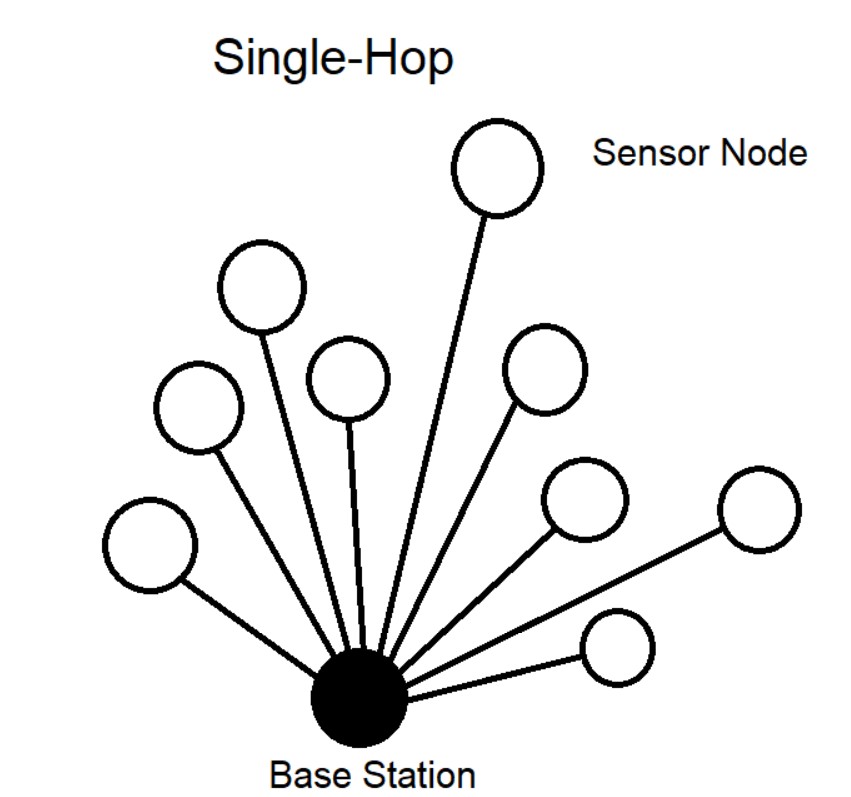
A single-hop network design is one in which each sensor node is linked to the base station.

In Multi-hop network architecture, the data is sent through one or more intermediary nodes.

Network Topologies in WSN

A few alternative network topologies utilized in WSNs are listed below.

Star Topology

Every node in the network is connected to a single central node, known as a hub or switch, in a star architecture.

Tree Topology

A tree topology is a hierarchical network in which the top node is a single root node, which is connected to numerous nodes at the next level, and so on.

Mesh Topology

Apart from delivering its own data, each node in a mesh architecture also functions as a relay receiving data from other linked nodes. Fully Connected Mesh and Partially Connected Mesh are the two types of mesh topologies.

Each node in a fully connected mesh topology is connected to all other nodes, whereas a node in a partially connected mesh topology is connected to one or more surrounding nodes.

(The left diagram is fully connected mesh topology and the right diagram is partially connected mesh topology.)

Applications of Wireless Sensor Networks

Wireless Sensor Networks have an almost limitless number of uses. Heating, ventilation, and air conditioning (HVAC), air traffic control (ATC), automotive sensors, earthquake detection, disaster management, tsunami alert systems, industrial automation, personal health care, weather sensing, and monitoring are just a few of the applications of wireless sensor networks.

Micro Electro Mechanical Systems (MEMS)

Micro Electro Mechanical Systems (MEMS) is a manufacturing technology for microscale devices such as sensors, actuators, transducers, gears, switches, pumps, etc.

Basically, MEMS are microscopic integrated devices made up of electronics, electrical, and mechanical parts that work together to fulfil a single functional need, based on a technique known as Microsystems Technology (MST).

These MEMS-based devices are typically only a few micrometers in size (between 1 to 100 micrometers).

MEMS Sensors

One of the most essential components of today’s digital world is sensors. Because all computing and processing is done using digital signals, there has to be a bridge between the analog and digital worlds. Sensors bridge this gap by observing the temporal impacts of analog physical factors and producing a piece of useful information (to the computer).

A Sensor is a device that includes fundamental sensing elements that sense a physical property such as temperature or humidity and transform it into an electrical signal. A signal processing device, such as an amplifier, filter, or ADC, or a combination of these elements, is also included in a sensor.

When it comes to MEMS Sensors, a Micromachined Microsensor, or simply a MEMS Sensor, is one that is designed and manufactured utilising MEMS Technology.

Types of MEMS Sensors

The automobile sector is a major user of MEMS technology. Modern automobiles include a variety of sensors, the most of which are MEMS-based. Some of them are:

  • IMU or Inertial Measurement Units (they are a combination of MEMS Accelerometer and MEMS Gyroscope) are used to measure pitch, yaw, and roll for autonomous driving.
  • Accelerometers used for  airbag deployment and electronic stability control.
  • We use pressure and inertial sensor for braking control.
  • Magnetometer are used for the navigational direction.
  • By using airflow sensor, air intake is being monitored.
  • Pressure sensor are used in system for monitoring tyre pressure.
  • Impact and crash sensor are used for airbag deployment and detection of impact.
  • We use fuel sensor for indicator of fuel level.
  • Temperature sensor are used for automatic climate control and monitoring of engine temperature.
  • MEMS Microphone are used for noise cancellation and communication.

Applications of MEMS

Different sensors, such as pressure, temperature, vibration, and chemical sensors, are made using MEMS technology.

MEMS Sensors like accelerometers, gyroscopes, and e-compass are popular in ships, vehicles, planes, helicopters, and drones.

Sensors, actuators, generators, energy sources, biochemical and medicinal systems, and oscillators all use MEMS. MEMS applications include the following:

  • MEMS accelerometers, MEMS pressure sensors, MEMS pressure sensors, MEMS gyroscopes, MEMS, tilt and other types of MEMS resonant sensors are examples of sensors.
  • MEMS switches, micro-grippers, micro-levers, and micro-pumps, are examples of actuators.
  • MEMS fuels cells, MEMS vibration energy harvesters, and MEMS radioisotope power generators are examples of generators and energy sources.
  • MEMS biosensors, MEMS air microfluidic and particle sensors,  lab-on-chips,  are examples of biochemical and biomedical systems.
  • MEMS oscillators are used in applications that need precise timekeeping and frequency control.

One of the breakthrough innovations is the idea of combining sensors, actuators, electrical (and electronic), and mechanical components on a single chip. MEMS technology will enable the creation of smart devices having Microsensor perception, Microactuator control, and Microelectronics computational capabilities.

Message Queuing Telemetry Transport (MQTT)

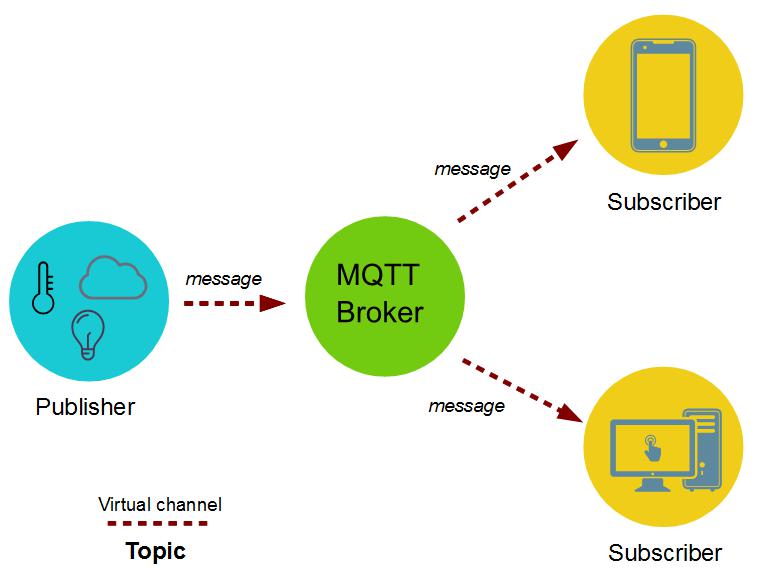
MQTT is a lightweight publish and subscribe system that allows clients to send and receive messages.

MQTT is a low-bandwidth messaging system developed for limited devices. As a result, it’s ideal for Internet of Things applications.

MQTT allows you to control outputs, read and publish data from sensor nodes, and send commands to control outputs. As a result, setting up communication across many devices is simple.

The server is in charge of responding to client requests for data to be received or sent between them. A broker is an MQTT server, while clients are just linked devices.

MQTT Components 

  1. Subscribe and Publish
  2. Message
  3. Topic
  4. Broker
  1. Subscribe and Publish

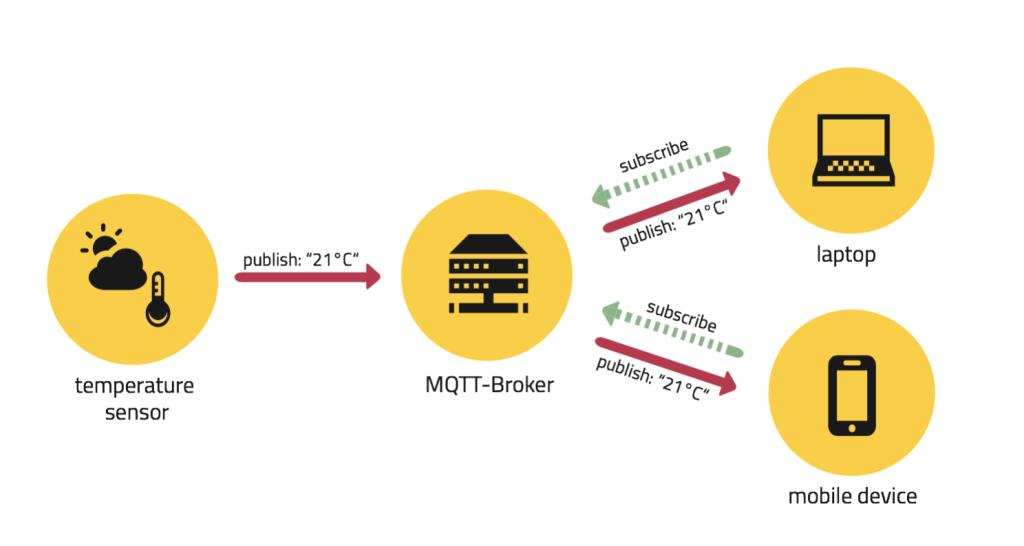
A device can either publish a message on a topic or subscribe to a topic to receive messages in a publish and subscribe system. 

For example,

Device_1 publishes on a certain topic.

Device_2 is subscribing to the same topic as Device_1 publishes.

As a result, the message is received by Device_2.

  1. Message

Messages are the information you wish to send and receive between your devices. It doesn’t matter if it’s a command or data.

For example, if we are publishing temperature data to the cloud, this data is referred to as a Message.

  1. Topic

Topics are how you indicate your interest in incoming messages or where you wish the message to be published.

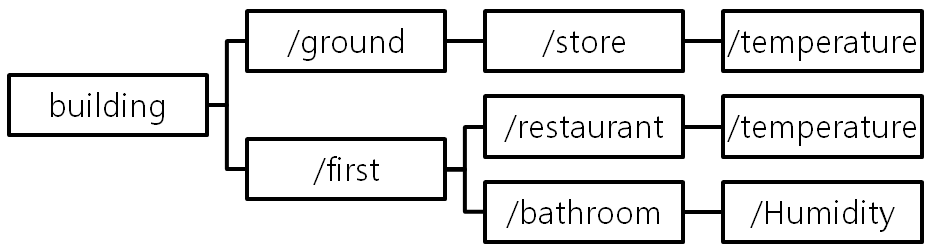
Strings separated by a forward slash are used to denote topics. A topic level is indicated by each forward slash.

For Example,

  1. Broker

The broker is in charge of receiving all messages, screening them, determining who is interested in them, and finally publishing the message to all subscribers.

QoS – Quality of Service 

With an integer number ranging from 0-2, each connection can indicate a level of service to the broker.

0 denotes at most once, or once and only once without needing an acknowledgment of delivery. This is known as the “fire and forget” strategy. When a sender sends a message, it doesn’t care if it’s delivered to the intended recipient or if it’s resent.

1 denotes at least once. The message is delivered several times until it receives an acknowledgment, which is known as acknowledged delivery. The Sender waits for the receiver’s acknowledgment after sending a message. It resends the message if it does not get an ACK. This option ensures that the message is delivered at least once, but it does not ensure that it is repeated.

2 denotes exactly once. A two-level handshake is used by the sender and receiver clients to ensure that only one copy of the message is received, which is known as ensured delivery.

Example of MQTT

Suppose, there is a device with a temperature sensor. And, it wants to send its readings to the broker. A phone/desktop application, on the other hand, want to get this temperature value. As a result, two things will occur:

  • The device specifies the topic on which it wishes to publish, for example, “temp.” The message “temperature value” is then published. 
  • The “temp” topic is subscribed by the phone/desktop application. The device’s published message, which is the temperature reading, is then received.

The broker’s job is to transmit the message “temperature value” to the phone/desktop application.

Real-time Operating System (RTOS)

A real-time operating system (RTOS) is a type of operating system designed to support real-time applications that process data as it arrives, with hardly any buffering. Processing time requirements in an RTOS are determined in tenths of seconds increments of time. It’s a time-constrained system, or we can say with fixed time limitations. Processing must take place within the stated limits in this system. Or else, the system will be useless.

Advantages of RTOS

  • Less Downtime: An RTOS ensures that the system uses more resources while keeping all devices idle. As a result, RTOS-based systems have relatively less downtime. Also, hosting firms should use RTOS to achieve the best possible outcomes.
  • Efficiency: One application is focused at a time in an RTOS. This program will almost always be the one that is already executing. All the rest in the line will be kept in the waiting stage. As a consequence, important activities may be completed on time and within the specified deadline, resulting in the exact outcomes required.
  • Reliability: Real-time operating systems, particularly those that are based on hard RTOS, are error-free. It guarantees that mistakes be dealt with more effectively. Furthermore, operating systems suffer from jitter, a problem in which the number of mistakes between loops is monitored. An RTOS may be programmed in such a way that it experiences fewer jitters if it is properly programmed. 
  • Task Management: It takes less time for a real-time operating system to go from one job to another. Shifting tasks usually take 3 microseconds or less. Critical procedures may be completed on time with this sort of quicker task management.
  • Availability: An RTOS achieves maximum outcomes, that is why it is a system that is accessible 24 /7. As a result, it is best suited for applications that must run at all times. Aside from that, an RTOS system may handle a variety of MCU systems.

Disadvantages of RTOS

  • Multitasking: Although an RTOS has the ability to focus on certain programs, this is not the same as multitasking. They’re just meant to do a handful of the duties. As a result, it’s not a good idea to use it on systems that demand to multitask.
  • Task Focus: An RTOS concentrates on a single application at a time. This is mostly done to ensure accuracy and minimize mistakes. All other applications with a low priority should be put on hold. They will be on stand-by for an unlimited amount of time.
  • Driver Requirement: Signal disruptions are unavoidable in a real-time operating system. As a result, the appropriate drivers must be loaded on the computer in order to get consistent performance. With the assistance of drivers, an RTOS will be able to respond rapidly whenever an interruption occurs.
  • Complexity: An RTOS interface have complex algorithms behind it. These algorithms will be tough to write for a typical user. Only a skilled programmer will be able to write and comprehend them.
  • Program Crashes: When working with a real-time operating system, program crashes are common. An RTOS, unlike a traditional operating system, is incapable of effectively separating memory regions. As a result, procedures will struggle to deal with them.

Cloud Computing Services

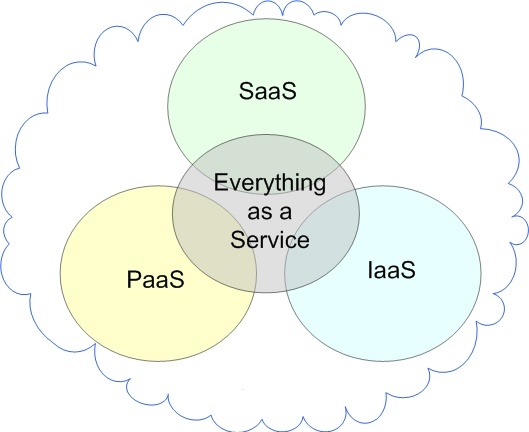
The three main Cloud Computing Services are:

  • Software as a Service (SaaS)
  • Platform as a Service (PaaS)
  • Infrastructure as a Service (IaaS)

Software as a Service (SaaS)

SaaS makes use of the internet to offer apps to consumers that are controlled by a third-party vendor. The majority of SaaS apps operate immediately in your web browser, thus there are no client-side downloads or installation required.

In simple words, Users can access software through the internet using SaaS services, which charge a monthly subscription fee.

Examples of SaaS are Dropbox, Google Workspace (formerly GSuite), Cisco WebEx, Salesforce, GoToMeeting, SAP Concur, etc.

SaaS Characteristics

  • Handled from a central location.
  • The website is hosted  on a remote server.
  • Available via the internet.
  • Scalable, with multiple levels for small, medium, and large companies.
  • Security, compliance, and maintenance are all included in the price.

When to Use SaaS

  • Startups and small businesses that need to create an ecommerce site immediately and don’t have time to deal with server or software difficulties.
  • Short-term initiatives that demand rapid, simple, and cost-effective collaboration.
  • Tax software, for example, is an example of an application that isn’t used very often.
  • Apps that require access from both the web and mobile devices.

Platform as a Service (PaaS)

PaaS is a software development platform. Because this platform is supplied through the internet, developers may focus on developing software instead of worrying about operating systems, software upgrades, storage, or infrastructure. 

PaaS enables companies to grow and develop apps using unique software components that are integrated into the PaaS. Because they take on cloud qualities, these programmes, also known as middleware, are scalable and highly available.

In simple words, People utilise these tools to create apps, and PaaS vendors supply hardware and software tools through the internet. The majority of PaaS users are programmers.

Examples of PaaS are Windows Azure, AWS Elastic Beanstalk, Heroku, Google App Engine, Force.com, OpenShift, etc.

PaaS Characteristics

  • Multiple users can access it.
  • Scalable – depending on the size of your company, you may pick from a variety of resource levels.
  • The system is based on virtualization technology.
  • It’s simple to use even if you don’t have a lot of experience with system management.

When to Use PaaS

PaaS is frequently the most cost- and time-effective method for a developer to construct a unique software.

PaaS allows the developer to concentrate on the creative aspects of app creation rather than routine duties like software upgrades and security fixes. The app will take up all of their time and brainpower to develop, test, and launch.

Infrastructure as a Service (IaaS)

Infrastructure as a Service (IaaS) refers to cloud infrastructure services that are made up of highly scalable and automated computing resources. Computers, networking, storage, and other services may all be accessed and monitored via IaaS. Instead of purchasing hardware altogether, IaaS allows organisations to acquire resources on-demand and as-needed.

In simple words, Pay-as-you-go storage, networking, and virtualization are among the services provided by IaaS companies. IaaS allows organisations to avoid investing in costly on-site resources by providing cloud-based alternatives to on-premise infrastructure.

Examples of IaaS are Linode, DigitalOcean, Amazon Web Services (AWS), Rackspace, Microsoft Azure, Cisco Metacloud, Google Compute Engine (GCE), etc.

IaaS Characteristics

  • As a service, resources are provided.
  • The price varies according on the amount of food consumed.
  • The services are extremely scalable.
  • On a single piece of hardware, there might be several users.
  • The infrastructure is under the total control of the organisation.
  • Adaptable and dynamic

When to Use IaaS

  • IaaS may be preferred by startups and small businesses to avoid spending time and money on acquiring and developing hardware and software.
  • Larger businesses may choose to maintain total control over their apps and infrastructure, but they want to buy just what they use.
  • Companies that are experiencing rapid expansion like the scalability of IaaS, which allows them to simply swap out particular hardware and software as their needs change.

Fog Computing

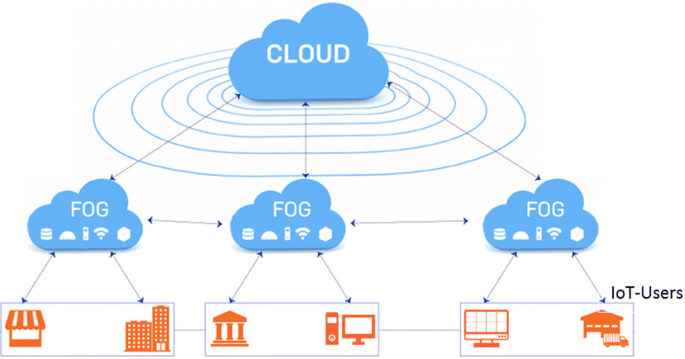
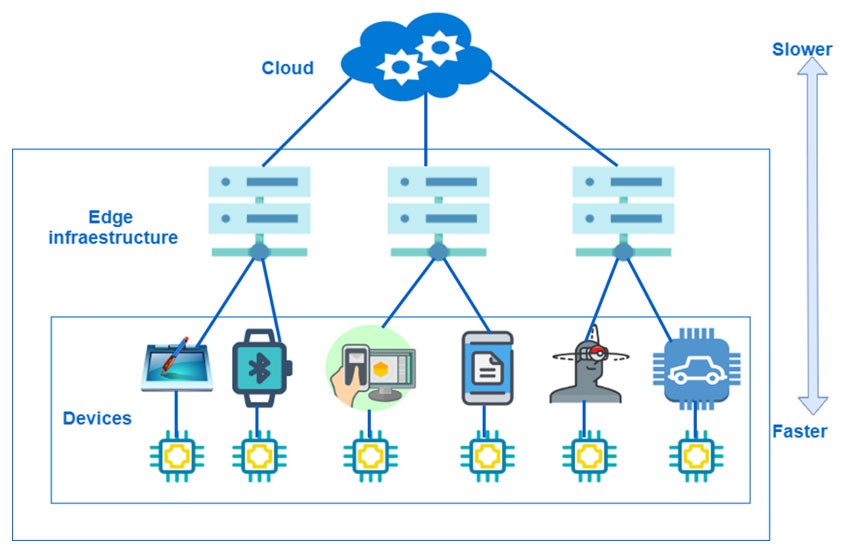
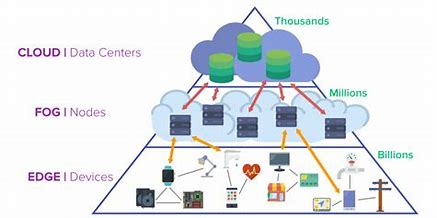
Fog computing, also known as fog networking or fogging, is a decentralised computing architecture that exists between the cloud and data-generating devices. Users may put resources, such as programmes and the data they generate, in logical areas to improve performance using this flexible structure.

In simple words, Fog computing is a type of decentralised computing infrastructure in which data, machines, storage, and applications are distributed between the data source and the cloud. 

The term “fog nodes” is used in fog computing. These fog nodes are closer to the data source, and they have more processing and storage power. When compared to sending the request to the cloud for centralised processing, fog nodes can process the data much faster.

The large number of devices connected to the internet makes the cloud more clogged. Fog computing has become important for IoT devices since cloud computing is not feasible in some circumstances. It is capable of handling the huge amounts of data generated by these devices.

Advantages of Fog Computing

  • Privacy:Fog computing could be used to limit the amount of information shared. Instead of transmitting sensitive user data to a centralised cloud infrastructure, any sensitive data may be examined locally. The IT staff will be able to track and operate the device in this manner. Also, any subset of data that requires analysis may be transmitted to the cloud.
  • Bandwidth: There are pretty minimal bandwidth requirements since the selected data may be processed locally rather than being sent to the cloud. These bandwidth reductions will be particularly useful as the number of IoT devices grows. 
  • Latency: Another advantage of processing data locally is the reduction in latency. The data can be processed at the data source that is closest to the user geographically. This can result in immediate answers, which is very useful for time-sensitive services.
  • Productivity: Fog apps can be used by customers who want the machine to perform the way they want it to. With the appropriate set of tools, developers may quickly create these fog apps. They can deploy it whenever they wish when the work is completed.

Disadvantages of Fog Computing

  • Complexity: Fog computing is a difficult concept to grasp because of its complexity. Many devices, situated in various places, each store and analyse their own collection of data. This might add to the network’s complexity. In addition, a fog infrastructure has more complex fog nodes.
  • Power Consumption: In a fog environment, the number of fog nodes present is proportional to their energy consumption. This means that these fog nodes demand a lot of energy to work properly. There is higher power usage in a fog infrastructure when there are more fog nodes. Most businesses attempt to cut costs by utilising fog nodes.
  • Authentication: Fog computing is a large-scale service provider. End users, internet service providers, and cloud providers are all part of fog computing. In the fog, this might lead to difficulties with trust and authentication.
  • Maintenance: In comparison to cloud architecture, where maintenance is smooth, fog is not. Because controllers and storages are dispersed throughout the network, additional maintenance is required. Processing is decentralised in the fog architecture.

Edge Computing

Edge computing allows for faster response times that aren’t hampered by network latency, as well as decreased bandwidth by selectively transferring the right data to the cloud.

Edge computing architecture is directly applicable to IoT-linked devices.

A large amount of data is generated by remote sensors placed on a machine, component, or device. If the data is transported back across a long network link to be evaluated, logged, and monitored, it takes considerably longer than if it is handled at the edge, near to the data source.

Edge computing was formed as a result of the rapid growth of the Internet of Things (IoT) devices that connect to the internet to receive information from the cloud or to send data back to the cloud.

Advantages of Edge Computing

  • Speed: Edge computing has the capacity to reduce latency and enhance network speed. By processing data closer to the source of information, substantially minimizes the distance it must travel.
  • Scalability: You can utilize the edge to scale your own IoT network without worrying about storage requirements. Also, IoT devices may be installed here with just one implantation.
  • Reliability: Edge computing excels at maintaining reliability. Edge computing provides an uninterruptible service since it does not rely on internet connections or servers most of the time. There is no need for users to be concerned about service disruptions or poor internet connections. It can also use microdata centers to store and possess data locally. As a result, IoT devices can be assured of a stable connection. As a result, edge computing is advised for usage in remote places where a stable network connection is unavailable.
  • Cost: IoT services require additional network bandwidth, data storage, and processing power, so they can be expensive to implement. Edge computing for IoT allows users to minimize bandwidth and data storage requirements, and data centers may be replaced with device solutions. As a result, the cost of installing IoT devices and applications is significantly reduced. Also, not all of the information is transferred to the cloud. Only the most relevant data will be transmitted to the cloud, saving network bandwidth. This can lower overall infrastructure expenditures.

Disadvantages of Edge Computing

  • Incomplete Data: Only partial sets of data may be processed and analysed using edge computing. The rest of the information is just discarded. Companies may lose a lot of important information as a result of this. As a result, companies must decide what sort of data they are prepared to lose before using edge computing. 
  • Investment Cost: Building an edge infrastructure may be time-consuming and costly. This is because of their complexity, which requires the use of more resources and equipment. Also, the IoT device with edge computing requires the use of more local hardware in order to function. Overall, this might lead to greater efficiency, but it will need considerable investment. 
  • More Storage Space: Edge computing requires a substantial increase in storage capacity on your device. This will not be a concern because storage devices are growing increasingly compact. It is, though, something to keep in mind while creating an IoT device.
  • Maintenance: Edge computing, unlike a centralized cloud architecture, is a distributed system. This means that there are more network configurations with many compute nodes to choose from. This requires a greater level of maintenance than a centralized system.

Cloud Computing

Cloud computing facilitates in the analysis and storing of the data, allowing companies to get the most out of their IoT infrastructure.

Businesses may get a lot of resources from the Cloud, so they don’t have to spend a lot of money building up their infrastructure. The IT team is more focused on day-to-day upkeep operations in the absence of on-site systems, hardware, and software, which is frequently an obvious benefit of the Cloud.

Even in the face of unexpected crises, cloud computing can keep organisations functioning. There is no immediate threat to the private data because it is stored on extra independent servers, making the Cloud a vital aspect of Internet-based companies.

Features of Cloud Computing

  • Resources Pooling
    • It indicates that the Cloud provider used a multi-tenant architecture to draw computing resources to deliver services to many clients.
    • Various physical and virtual resources are assigned and reassigned based on the needs of the client.
    • The client has little control or information about where the given resources are located, but can define location at a higher level of abstraction.
  • On-Demand Self-Service

It is one of the most essential and valuable elements of Cloud Computing since it allows the user to keep track of the server’s uptime, capabilities, and network storage allocation. This function also allows the user to keep track of the computer’s capabilities.

  • Easy Maintenance

The servers are simple to manage, and downtime is minimal, if not non-existent in some situations. Every time a new version of Cloud Computing is released, it improves steadily. The upgrades are more compatible with devices and work quicker than previous versions, as well as having problems repaired.

  • Large Network Access

With the assistance of a device and an internet connection, the user may view the cloud’s data or upload data to the cloud from anywhere. These capabilities are available throughout the network and may be accessed over the internet.

  • Availability

The Cloud’s capabilities may be customised for the user and can be vastly expanded. It evaluates storage utilisation and, if necessary, allows the user to purchase more Cloud Storage for a nominal fee.

  • Automatic System

At some level of service, cloud computing automatically analyses the data required and facilitates metering. We can track, manage, and report on consumption. It will give both the host and the client with transparency.

  • Economical

It is a one-time expense since the firm (host) must purchase storage and just a portion of it can be shared among numerous companies, saving the host money on a monthly or annual basis. Only a small portion of the money is spent on basic maintenance and a few other little costs.

  • Security

One of the most appealing aspects of cloud computing is its security. It takes a snapshot of the data saved so that it doesn’t be lost if one of the servers is destroyed. The data is kept on storage devices that cannot be hacked or accessed by unauthorised individuals. The storage service is efficient and trustworthy.

  • Pay as you go

In cloud computing, the user only pays for the services or storage space that they use. There are no hidden or additional fees to be paid. The service is reasonably priced, and most of the time some space is made available for free.

Family Business and its Challenges

All businesses face challenges and obstacles, whether it’s about hiring a good and loyal employees or the changing economy. Family businesses have the same problems as other firms, but they also have their own set of issues to deal with.

Some of the most common challenges are:

  1. Family Problems – Family problems and emotions always affect family businesses. Negative emotions like resentment, envy, and competition in family members can cause severe problems in the family business.
  2. Informality – Since everyone is from the family only, there is the absence of business policies when it comes to the family members.
  3. Lack of talent – Family members who are not qualified or talented enough to work in the family business.
  4. Training – There should be a precise training program when you involve family members in the family business. It should provide distinct information related to the aims and objectives, expectations, and responsibilities of the position.
  5. Well-organized thinking – Judgments are made day-to-day in response to the issues and problems. There is no long-term preparation or imperative planning.
  6. The pressure of hiring family members – When it comes to the family business, it’s hard to withstand the pressure that comes along when family members request to join the business.
  7. Lack of an external point of view – Family members always don’t have the same views and opinions, but they usually have the same upbringing, lifestyle, and life experiences which leads to a similar point of view of the business. Businesses need an external point of view of their company.
  8. Sibling Rivalry – When siblings are competing, it’s not good for the family business because then they will focus more on competing and less on the family business.
  9. Employing Spouse – Conflict happens in the family business when a spouse is highly qualified, liable, and responsible for the work, the results of employment in the business can be good. But this sometimes affects the personal life of the couples and sometimes the other spouse resents and becomes jealous of the success of their spouse.
  10. Communication Problems – When there is a lack of proper communication between the family members then it provokes political conflicts in the business.
  11. Vision – Every family member has a different vision for the family business and different expectations from the family business.
  12. Generation Gap – When different generations work together in a family business the work can be pleasant as well as complicated. For example, the elder generation has experienced and the younger generation has the knowledge of new technologies and sometimes when the elder generation resists in handling the responsibilities to the younger generations it can cause conflicts between them and can cause serious issues.
  13. Succession Planning – Many family businesses do not have a proper plan of action when the time comes for the next generation to take over and this gives rise to political division and tension among the family members.
  14. Business Takeover – It is important to have a proper plan of action when it comes to a business takeover because if there isn’t a proper plan then heated arguments and intense politics happen when the time for deciding the new leadership.
  15. Exit Plan – When a family starts a family business they lack in planning a proper exit strategy for the time when the owner wants to retire or wants to sell the business.

How to choose the Best Digital Marketing Agency for your business?

What is the importance of digital marketing? The reason for this is that everything nowadays is done online. Most people turn to internet platforms for any information, and in this situation, digital marketing is an excellent way to promote your products. Because there are so many Digital Marketing Agencies on the market right now, how will you pick the best one for your business?

A company’s decision to engage a Digital Marketing Agency is influenced by several variables. Here are some steps that will help you select the best Digital Marketing Agency:

  1. Find out what your business need

When looking for the finest digital marketing firms, make a strategy and ask yourself a few questions, such as: what do I want to achieve with an agency and how much am I willing to invest in it to do so? Understanding exactly what you want can aid you in locating it rather than wasting valuable time and resources.

  1. Find an agency that can help you with your requirements

“How would I select an agency for my business?” you might think. To begin, consider the packages that a firm is giving. Do they align with what you need your business to accomplish? This is an important topic to examine because if their marketing technique isn’t what you’re searching for, the agency isn’t ‘The One,’ no matter how much you like it.

  1. Do the background check 

Before you proceed, you should conduct a thorough background check on the digital marketing agency you want to hire. To determine whether or not an agency is appropriate for you, look at the results they’ve achieved. If you’re intending to employ an agency for your social media account, for example, you should learn how they manage their platform.

Another approach to determining whether or not a digital marketing agency is good is to ask for recommendations. If you have any friends, relatives, or friends-of-friends, you might ask them if they know of any agencies. You may also conduct a LinkedIn search.

  1. Ask relevant questions

What should I ask the agency, you might be wondering. You will almost certainly receive hundreds of queries; nevertheless, you must ask the right questions.

QUESTIONS YOU SHOULD ASK YOUR POTENTIAL NEW DIGITAL MARKETING AGENCY: 

  • Could you show me some examples?
  • Who will be responsible for completing the task?
  • What kind of outcomes would you be able to guarantee me?
  • How will the outcomes and return on investment be calculated? 
  1. Give the agency a task

Request that the firm create a public relations campaign or a content advertising piece for your business and that they put up specific plans to present to you. The greatest idea will be completed by the digital marketing firm at that point, and you will wait for the results. This may be in the form of press links or high post ranks (even though this will take longer).

  1. Hold a meeting with the agency 

If everything is satisfactory, schedule a meeting with the Digital Marketing Agency. This is a good way to get to know the team and have a chance to work out any concerns before signing any contracts.

The right agency can generate a significant amount of revenue for your business while also taking care of everything.

MILKHA SINGH

Milkha Singh, popularly known as “The Flying Sikh,” was a renowned Indian sprinter who began competing while serving in the Indian Army. On November 20th, 1929, Milkha Singh was born. He came from a Rathore Rajput Sikh household. Govindpura is a settlement in Punjab Province, British India, that is 10 kilometers (6.2 miles) from Muzaffargarh city (now in Pakistan).

Singh competed in the 1956 Melbourne Olympic Games in the 200m and 400m sprints for India. Due to his lack of experience, he did not go past the heat stages, but a meeting with Charles Jenkins, the 400m winner at those Games, encouraged him and gave him valuable information about training techniques. Singh won gold medals in the 200m and 400m in the National Games of India in Cuttack in 1958, He also won gold medals in the 200m and 400m at the Asian Games in 1958. With a time of 46.6 seconds, he won a gold medal in the 400m at the 1958 British Empire and Commonwealth Games. This performance earned him the position of first gold medallist from independent India in the Commonwealth Games. Singh won gold in the 400m and the 4 x 400m relay at the 1962 Asian Games in Jakarta.

Following his victory in 1958, Singh received the Padma Shri, India’s fourth-highest civilian honor. In 2001, he declined the Indian government’s offer of the Arjuna Award, claiming that it was designed to honor young athletes, not adults like him. Singh’s medals have all been donated to the country. They were first displayed in the Jawaharlal Nehru Stadium in New Delhi, then relocated to a sports museum in Patiala, where they were paired by a pair of running shoes he wore in Rome. In 2012, he gave the Adidas sneakers he used in 1960 400m final to be auctioned off by actor Rahul Bose for charity.

Milkha Singh, a renowned Indian sprinter, died on June 18 as a result of post-Covid problems. At the Post Graduate Institute of Medical Education and Research, he was receiving treatment. The 91-year-old Milkha Singh tested positive for COVID-19 on May 19 but was placed in home isolation after indicating that he was asymptomatic at his Chandigarh house. However, on May 24, the renowned athlete was taken to the Fortis hospital’s ICU in Mohali owing to “COVID pneumonia.” On June 3, he was transferred to PGIMER in Chandigarh. He was cremated with full state honors.

Nirmal Kaur, who was a former national volleyball captain and also the wife of Milkha Singh, also died due to post-Covid problems. The couple died with a mere gap of 5 days.

In a statement, his family confirmed, “It is with extreme sadness that we would like to inform you that Milkha Singh Ji passed away at 11.30 pm. on the 18th of June 2021.”

Narendra Modi, the Prime Minister of India, paid tribute to the renowned sprinter. In his tweet, PM Modi wrote, “In the passing away of Shri Milkha Singh Ji, we have lost a colossal sportsperson, who captured the nation’s imagination and had a special place in the hearts of countless Indians. His inspiring personality endeared himself to millions. Anguished by his passing away.”