The Underrated Career Lesson I Learned After I Crashed and Burned at Work

The Underrated Career Lesson I Learned After I Crashed and Burned at Work was originally published on The Muse, a great place to research companies and careers. Click here to search for great jobs and companies near you.
I nailed every word of the presentation. I articulated my points, my visual aids were clear, and my data outlined every reason my peers should get on board with my new big project: launching a peer-coaching program. This initiative was sure to make me shine in my role as a leadership coach.
But as I looked up from my slides, I could see that the audience was unmoved. Several said they simply didn’t have time for it. Others sat silently, but the look on their faces told me all I needed to know: They weren’t into it and wouldn’t support it—or me.
I walked out of the room defeated. Without the critical backing of this group, my project was doomed to fail.
Afterward, I sought out my boss for feedback, but her candid response left me even more stunned. “You should take the time to get to know each of your co-workers personally; they all have really interesting stories to tell.”
Huh? What did getting to know my colleagues have anything to do with working together professionally? How is knowing what position Greg’s kid plays in little league going to help me to get my work done? Or where Jane is getting married?
I considered myself a caring person. I used to be a social worker! But, as I thought more about my boss’ advice, it dawned on me that perhaps there was a disconnect between how my new co-workers expected me to act and how I was behaving. I’d completely failed to recognize the culture of my new workplace—not to mention the fact that building relationships with co-workers beyond spreadsheet data had been increasing in importance for a while.
When team members came into my office and wanted to chat about their weekends, I half-listened before hastily wrapping up the conversation with a “glad to hear, gotta go back to work.” When people asked me to lunch, I told them I had a big deadline (which most of the time I did), and replied, “maybe next time.” But there never was a next time.
Heeding my manager’s advice (I had nothing to lose, after all), I began investing time, energy, and effort into getting to know my colleagues—and not because I was pushing an agenda.
I asked my teammate Rebecca how she was spending the holiday weekend. I stopped by Dan’s cubicle and invited him to join me for a coffee break. I stopped walking past Mary’s desk in a big hurry in the morning and instead paused to say hello and ask who was pictured in the frame next to her computer.
And I listened with my full attention.
It took some time for them trust that I was being sincere. In fact, some of them even directly asked me what I needed or wanted, referencing my by now, long-forgotten project. Opting to be candid, I explained that I’d made a mistake when I first came on board: I’d not taken the time to get to know the most important part of my new company, the people. It took time to build relationships and form friendships.
But, you know what happened? Being genuinely interested in others and building relationships eased the stress of deadlines and the strain of long projects. Being a true people-person felt good!
I quickly learned that work relationships are instrumental in helping you succeed. People respond well to those they know and those who treat them right.
Once I realized this, three notable things happened:
  • I got picked for better projects
  • My ideas were heard (and very often approved)
  • I received additional support
When you have strong relationships with your colleagues, you’re far more likely to be respected. And when you’re respected, you can speak and expect people to listen to what you’re saying. Even if your co-workers don’t 100% agree with your ideas, they’re likely to take a chance and offer approval if they value you as a person and professional.
Having colleagues on your side means that if you make the infrequent last-minute request, ask for a favor, or even miss a deadline, you’re not going to be punished for it. You’ll be forgiven quickly and everyone will move on.
I’ve come a long way from that crash and burn, and now my days are spent guiding others to career success and fulfillment. The guiding principle on which my practice rests is that the more effort and genuine care you put into building strong work relationships, the more successful you’ll be.


Real World Advice: Transitioning from College to the Workforce

Are you preparing to complete your degree and start working full time? Would you appreciate a few words of wisdom from people who have been in your shoes? The United States Patent and Trademark Office helps inventors and entrepreneurs introduce their innovations and products to the world. We employ over 12,000 professionals with degrees ranging from electrical and mechanical engineering to finance, IT and law. Our people work as patent examiners, accountants, help desk technicians, HR professionals, trademark examining attorneys and a variety of other roles to help bring innovation to life. We tapped some of these professionals and asked them what advice they would give their college selves if they could travel back in time. We hope their words of wisdom help as you prepare to navigate the future.
“Your basic STEM knowledge — problem solving and understanding how things work — is so valuable in all aspects of life. It can help you in your career and beyond. Be willing to use it to make a difference.”- Joyce Ward Director, Office of Education and Outreach
“Self-discipline and a willingness to learn are two vital skills you must have when you enter the workforce. You will most likely have a role that will provide you some autonomy, so you need to have the discipline to get things done. And though you have a degree, you’ll still have a lot to learn, so be open to it. Don’t go in thinking you know everything.”- Rebecca Volentine Patent Examiner
“Be ready to adapt, work hard, sacrifice, and have an open mind to seek support and help. There will be a lot for you to soak up and learn, so you’ll need to be agile and willing to give of yourself.”- Arleen Vazquez Supervisory Patent Examiner
“Consider what your short and long-term goals are. Ask questions. Be confident in yourself and your abilities. Use experiences inside and outside of your professional education to build your career. Know how to budget your time and multitask. Be organized.” – Kendra Carter Patent Examiner
“Remember to G.I.V.E. — Gratitude: Don’t take things for granted, and always give appreciation for any help you receive. Initiative: Find ways to obtain the experience that you need to get you where you want to go. Volunteer: Not only does it provide a great pathway to happiness, but will also likely help your career by broadening your people network and enhancing your experience. Execute: When you take initiative to do something, make sure that you have the time to do it well.”- Sarah Harris General Counsel
“Do yourself and the world a favor — learn as much as you can so you can make informed decisions. You may discover you have strengths and passions you did not know existed.” – Ivana Miranda Financial Analyst
“Consistently do a great job. Cultivate a reputation as someone who has a high quality work product and a strong work ethic.”- Montia Pressey Trademark Attorney Advisor

Special Thanks to USPTO for this great resource!

The content and images in this article were provided to our office by the United States Patent and Trademark Office.

3 Ways to Be More Productive at Work

college student
Whether you’re just starting your first internship or you’re already settled into a full-time job, being productive is something that should be at the top of your mind. Why? Because productivity not only makes you a better employee, it also ensures that you can be successful in your role and advance in your career.

Here are three things you can do to be more productive at work.

1. Have a consistent morning routine

If you’ve ever read about the daily routines of successful entrepreneurs like Mark Zuckerberg, then you know that most of them have very specific things they do every morning, from answering their emails right when they wake up to making sure that they take the time to exercise. Although you might not consider yourself an entrepreneur (yet) having a morning routine is important even when you’re just starting out. A good way to create your routine is by figuring out the things that are most important in your day and then prioritizing them accordingly. For example, if you know that creating a to-do list and answering emails first thing in the morning will make your more productive throughout the day, make these tasks part of your morning routine and tackle them before you move on to anything else.

2. Focus on one thing at a time
While multitasking might seem like a great thing in theory, studies have consistently shown that it doesn’t work. What does work is focusing your attention on specific tasks by dividing up up your day into blocks of time. For example, if you’re a social media manager whose day involves creating social media posts, analyzing campaign performance and attending meetings, blocking off time to work on each of those tasks will ensure that you’re able to focus on each one individually and accomplish them effectively. A quick way to do this is by closing out all the tabs and programs you have open on your computer, leaving open only the ones you need for the task at hand.

3. Take breaks and know when to unplug

Taking breaks might seem counterintuitive to productivity, especially during a busy day when you have a lot to do, but they’re actually a great way to recharge your body and reset your mind. A good rule of thumb is to take a 5-10 minute break every hour to stretch your legs and look away from your computer screen. Methods like the Pomodoro Technique can come in handy here, since they’ll help you stay mindful of the passing hours and remind you to take breaks when you need them. Even more important is the idea of totally unplugging once you leave for the day. Although it may be tempting to keep checking your email, doing so will only keep you in work mode longer, making it harder to relax and making you more tired in the meantime. To truly be productive, it’s important to have some time offline every night to focus on other things and recharge for the following day.
Being productive is a great way to be successful in your role and to show your manager that you’re enthusiastic about your job. By following these steps, you’ll be able to get all your work done and still find time to have fun.
Next, get more career tips for internships and entry-level jobs such as How to Negotiate a Job Offer and find answers to common interview questions such as What Motivates You?

This Email Trick’s So Simple That I’m Mad at Myself for Not Using it Earlier

This Email Trick’s So Simple That I’m Mad at Myself for Not Using it Earlier was originally published on The Muse, a great place to research companies and careers. Click here to search for great jobs and companies near you.
I’m good at lots of things, from eating lunch at exactly noon every day, to writing article introductions that make me look cocky, to downloading productivity apps and then quickly abandoning them.
You see, I love organization, and timelines, and spreadsheets. So, if I read an article that tells me that downloading a certain app will help me organize my life, I’m 110% in.
And I’ll always use it for a few days—before ultimately deciding what I was doing previously was better. And what I was doing previously was almost always something super simple.
Take my to-do list for example. I’ve tried so many of the (free) to-do list apps out there. Yet, I always come back to using sticky notes on my Mac.
 
I’m telling you all this not because I think you’re remotely interested in my to-do list evolution, but because I want to make it clear that I’m someone who likes to keep my productivity hacks simple. And this latest I’ve come across is the most simple.
In fact, it’s so simple that I’m slightly embarrassed I haven’t used it before.
I’ve started using the Gmail email stars. You know, those little stars right next to your subject line—turns out that they’re not just there for decoration.
\'\'
Here’s how I’m using them:
  1. I star any email that needs an answer that I can’t respond to right away.
  2. At the end of every day—during my “I’m too lazy to do real work” period—I go through my starred emails and respond.
  3. I remove the star. Side note: Am I delivering on simple or what?
  4. If it requires follow-up or I’m not ready to respond yet, I give it a blue star. (Did you know you can change the star colors? Well, you can, and the instructions to do that are right here.)
  5. At the end of the week, I go through the blue stars and see what needs my attention. And depending on my conclusion, I either keep or remove the star.
This system essentially creates a quick and easy inbox to-do list that only involves one click. Plus, it helps me to feel like I’m on top of my incoming emails, while simultaneously removing that “either respond to this now or else the world ends” feeling I used to get when I saw the notifications piling up.
(Oh, and if you don’t use Gmail, fear not! Outlook has a flag system that seems to serve the same exact purpose.)
If you’re thinking this is too basic, that’s fair. (And that’s also why we compiled this list of six advanced email tools.) But if you’re thinking that you want to put in as little effort as possible to your inbox without losing track of what you need to do, test it out. Worst-case scenario, you lose about 19 seconds of your week from clicking.
So, are you going to give this a try? Do you have a better system that’s even simpler? Like, it involves zero clicks and minimal willpower? Tell me on Twitter.

Top 5 Tools for Digital Marketing

Top 5 Tools for Digital Marketing was originally published on WayUp Guide.
Software engineer
When it comes to digital marketing, few things are as important as the tools digital marketers rely on to get their jobs done. These include everything from social media platforms like Facebook and Instagram to analytics tools like Google Analytics. Allowing marketers to create, test and measure the performance of their campaigns, digital marketing tools ensure that marketers can launch and test campaigns quickly and effectively.
Here are the five common digital marketing tools.

1. Social media platforms

A common part of any integrated marketing strategy, social media platforms like FacebookInstagram and Snapchat are a great way for marketers to engage with their audiences and generate buzz around their brand. In addition to the standard features these platforms offer, there are also some features that are designed specifically for marketing. These include Facebook Ads Manager, which allows marketers to run ads and track ad performance. As an added bonus, social media management tools like Buffer and Hootsuite also integrate well with these platforms, making it easy to schedule social posts and measure engagement.

2. Design tools

Another key part of digital marketing is design and this is especially common when it comes to creating ads and content like social media posts and blog posts. Because digital marketing is such a design heavy field, doing it effectively wouldn’t be possible without design tools like Canva and Photoshop, programs that allow those without extensive graphic design skills to add dynamic images to their content.

3. Analytics tools

Another set of helpful tools for digital marketers are analytics tools. These include everything from Google Analytics (designed to track stats for web traffic to a particular site) to social media analytics tools like Facebook Insights and Twitter Analytics which provide metrics related to engagement and help marketers optimize their campaigns. For measuring stats on the backend of a site (particularly related to conversions, sales and user demographics), there are also tools like Periscope that track user data, site searches and conversion metrics.

4. Content marketing tools

For marketers who are more focused on content marketing, tools like CoSchedule and Hubspot are a big help when it comes to content creation and curation. They can help marketers identify content opportunities and craft engaging blog and social media posts that will resonate with their audience. And since Buffer also offers the ability to see what fans are talking about on social media, that content is almost guaranteed to be impactful and to generate attention for a specific event or news story.

5. Email marketing tools

The final set of tools in a digital marketer’s toolbox are email marketing marketing tools. These help marketers create email campaigns that amplify their content and encourage their users to become more engaged with their brand — taking additional steps like signing up for events and buying products. Common email marketing tools include email marketing platforms like MailChimp and Iterable which allow marketers to build email lists and automate their email campaigns. These platforms also provide analytics for every email campaign, making testing and optimization quick and easy.
Working in digital marketing involves a unique blend of passion, strategy and media savvy. In order to maximize the impact of your various campaigns, it helps to have the best tools at your disposal.
Next, get more career tips for internships and entry-level jobs such as Career Opportunities for Marketing Majors and find answers to common interview questions such as What Other Companies Are You Interviewing With?

The Role of a Master Resume in Your Job Application Process

Post-its and a paper crane on a desk.What do you do when you start working on a new resume? Let me guess—you look up a template and start filling in the blanks, maybe copy/pasting from a resume you’ve used before. It’s a common strategy, but one with many pitfalls. So to avoid the frustrations of working with a template and on a quick deadline, I suggest a radically different way to write your resumes using a tool I call the “master resume.”

Whether you’re just out of high school and haven’t had a job, or if you’re entering a doctoral program after 20 years in the workforce, this method is a way to prepare for any resume needs you could have for the rest of your career.
A master resume is a document that includes everything you’ve ever done, and it’s written just for you. There’s no page limit and no style to follow—just your own notes saved in one place. The purpose of the master resume is simply to store all of the information that you might put on an individual application’s resume.
You can start the process of writing a master resume in any way you’d like—from jotting down notes in a journal, to creating a fresh Word document, to organizing everything in a digital notebook or database. The goal isn’t to have a finished product, but to have all of the information you will need to write a resume in one place and ready for when you need it.
Why would you need all these notes? Let’s back up a bit. When you’re writing a resume for a job application, it’s important to tailor that resume to the job you’re applying for. This means highlighting relevant experiences over the ones that perhaps are not so relevant, and focusing on some skills and accomplishments over others. Done right, it’ll be very rare to have two resumes you’ve written be identical.

How to Get Started

So, what should be included in the master resume? While there is no template, there are certain things you definitely want to include when taking notes. For each job, internship, volunteer opportunity, fellowship, student group, or any other activity you might ever include on a resume, make a note of as much of the following information as you can:
  • The organization’s name
  • The organization’s city and stateA person taking notes outside.
  • Your role (whether an official title or a short description of what role you had)
  • The month and year that you started, and the month and year that you finished
  • Your duties – what are you expected to do? What does your average day entail?
  • Your accomplishments – where have you gone above and beyond? What have you been recognized for?
  • Any starting metrics – for example, if you’re managing a Twitter account for a student group, make a note of how many followers you had on your first day managing the account, so that you can calculate a percent increase during the time you manage it
  • Anything you can quantify – make a note of what you do weekly, or how many board members you pitched a marketing strategy to, or what ages you tutor as an after-school volunteer
  • Any other information that helps tell the story of this experience
You can also make a note of your supervisor’s name and contact information. Though that shouldn’t be included on any of your tailored resumes, keeping this reference information handy in your master resume will be helpful when it comes time to create a reference list.

What’s Next?

Once you have all of this information collected into one document, you can start formatting it to look more like a resume by creating section headers and writing your bullet pointsUnlike your tailored resume, don’t worry about page length. You’ll be copy/pasting from this document into your tailored resume where you can then focus on page length and the detailed aspects of design and appearance.
For the master resume to really work its magic, it’s important to start one now. Don’t wait until you’re already applying to internships or ready to start your post-grad job search. If you start now, it’ll be easier to remember details from past jobs than if you start a year from now. And once those details are written down, there’s no need to strain your memory as you think back to recall details about an experience from five years ago.
Also remember to keep your master resume updated. Did you just start a new internship, or move into a new leadership role in a student organization? Write it down right away. Did you plan a philanthropy fundraiser with your sorority, volunteer with a local nonprofit’s phone bank, or hit a new milestone on your robotics project? Write it down as soon afterwards as you can. This is all to make it easier for yourself later on, and keep the important, relevant details as fresh and accurate as possible.
Have you used a master resume in your job search? Let us know! We would love to share the tips and tricks that have worked for you with fellow Pioneers.

5 Cover Letter Lines That Make You Sound Like a Robot

Cover letters are a crucial part of any resume. It is there that you can say things that didn’t fit in your CV. It will also be there that you will be allowed to show a bit of personality and prove how excited you are by the possibility of joining the company.
Unfortunately, many people neglect their cover letters. They just copy and paste whatever they found on the internet. Or they just ask someone else to write it for them. And while it is understandable that not everybody has a talent for writing, this type of behavior might cost you a job.  So, let’s see them which lines should never be in your cover letter so you can take it from there
#1 – A generic greeting
You are writing a letter to someone. While large enterprises usually applicant tracking systems to scan resumes and make sure they meet the minimal requirements, your cover letter will be read by a real person, not to a computer. And this person has a name and can be of any gender.
So forget the “Dear Sir” and “To Whom it May Concern”. Prove that you are eager to get that job by calling the company or recruitment agency and asking to whom you should address your cover letter. If it is not possible, or you don’t get an answer, at least use “Dear Sir or Madam”.
# 2 – [Your name] is a highly qualified
Please, never write in the third person. It is one of the worst things that you can do in your cover letter. You are not a king or a company to be addressed like this. Plus, reading your name over and over will make the recruiter remember it, but not in the way that you would like. So always stick with the first person.
# 3 – “I am really excited”
One of the rules followed by the best writers is “show, don’t tell”. And while you are not trying to create anything worthy of the Nobel Prize, you can learn from them. That is to say that, instead of saying that you are really excited, you should prove it.
If you do some research about the company and add some interesting facts and ideas you got, it will tell them that you are interested in the job, for instance. This is one of the secrets to writing a create resume, and you should follow it to the dot.
# 4 – “I will provide references available upon request”
You know that your cover letter should be only one page long, and it includes addresses, greetings, and so. Meaning that each word must count. And writing something obvious can also make your recruiter think that you don’t have anything better to say.
So, saying that you will provide references upon request is useless. Of course, you will do it if they ask you to. You better off using those seven words to say something that will add value to your application.
# 5 – Any line misspelt or with grammatical errors
Here is something could certainly kill your chances to be hired. You got just one page to write. So, if you can’t proofread it, chances are that your recruiter will think that you aren’t attentive to detail or that you can’t write a decent e-mail – something usually required in many jobs.
Of course, nobody is expecting that you will write a fantastic copy, except if you are looking for a job as a cover letter writer. But you should at least ask someone to double check your writing for you.
Final thoughts
As you might have noticed, writing a cover letter is a big deal. I won’t lie to you about it. You must plan what you are going to write carefully considering to whom you will talk and the style of company you are applying.
Rules can sometimes be broken, but, generally speaking, stick with has brought results to other people so far. And it passes through avoiding silly mistakes such as these five lines above. Sometimes, it is all that take to impress a recruiter and get hired.

How to Set Up Your Online Store With WooCommerce (In 3 Simple Steps)

When it comes to e-commerce, WordPress users have a wide range of options at their disposal. While the platform doesn’t enable you to set up an online store out of the box, you can use a top-notch plugin to do so with ease. For example, WooCommerce enables you to sell both digital and physical products.
The following advice is aimed at students who are looking to create their own online store to earn extra income. There are multiple benefits to running an e-commerce store, but the main plus point owning an almost passive income stream that operates even when you’re busy with your studies. Plus, if you’re using the right theme and extensions, you’ll be able to add advanced functionality to your site with ease.
This article will discuss why you should consider using WooCommerce, and explain what it can offer you. Then it will demonstrate how to set up the platform in three simple steps, and talk about how using the right e-commerce theme – such as Shoppe – can help you easily implement new features in your store!

Why You Should Consider Using WooCommerce

woocommerce
WooCommerce is by far the most popular e-commerce solution for WordPress, although there are certainly other options. Its ease of use and high level of polish make it the best choice for many stores, both big and small.
shoppe theme
However, if you’re still on the fence, check out the ways WooCommerce can help you build a successful online store:
  • It’s easy to use: Getting started is simple, and you can find plenty of guides (such as this one!) to help you along the way.
  • The feature set is impressive: WooCommerce has almost all the features you’ll need for your store, including the ability to add, organize, and manage products and inventory.
  • There are plenty of extensions: If WooCommerce doesn’t offer a feature you need by default, chances are there’s an extension that can help you set it up.
  • You get access to regular updates: This plugin enjoys a healthy development cycle and has an active community, so it’s always up-to-date.
Now that the case has been made for WooCommerce, it’s time to check out how to set up your first online store using the plugin.

How to Set Up Your Online Store With WooCommerce (In 3 Simple Steps)

Before you can start using WooCommerce, you will, of course, need to set up a WordPress website. Then, you’ll need to install and activate the plugin.
When you’re ready on both counts, proceed to the first step.

Step #1: Customize Your Store’s Settings and Add Your First Products

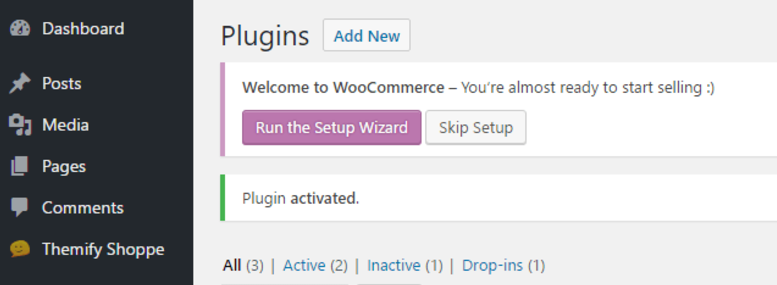
After activating WooCommerce, you’ll be prompted to run its setup wizard. This is not a strictly necessary step, but it’s recommended to do so, since the wizard will enable you to customize your store’s main settings quickly:
WooCommerce plugin
The Setup Wizard will take you through a few simple steps, such as creating the pages you’ll need, choosing your currency, picking your shipping settings, and selecting which payment processors to use.
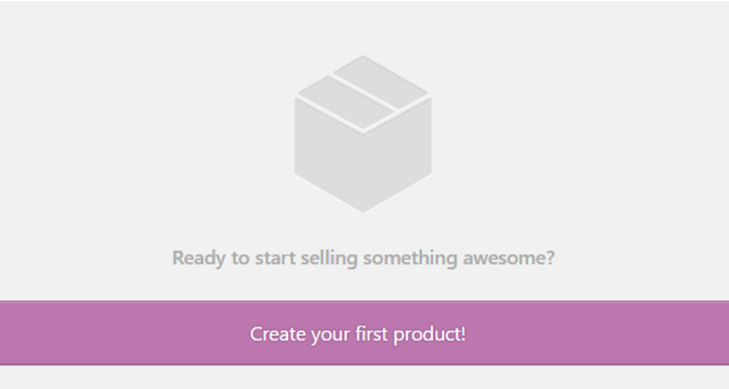
After you’ve made your way through the Setup Wizard, all that’s left before your grand opening is to add a few products to your store, which you can do from the new Products tab on your dashboard:
create product
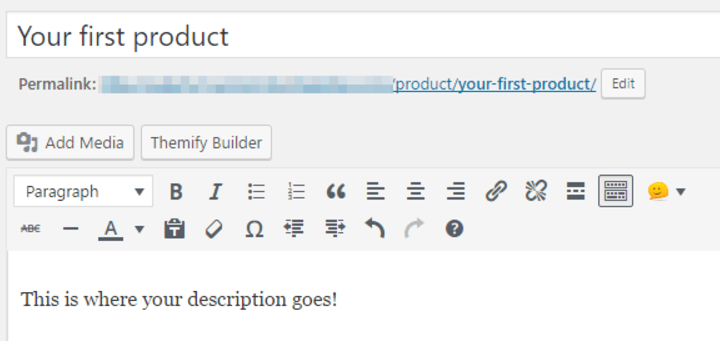
You’ll find yourself in the WordPress editor, where you can set a name and a description for your product:
create product - second version
Aside from providing a marketing boost, descriptions are also the perfect place to include any important notes customers should pay attention to. For example, if your product is digital, will they receive it via email? Will it expire, and if so, when? That’s the kind of information a good description should look to include.
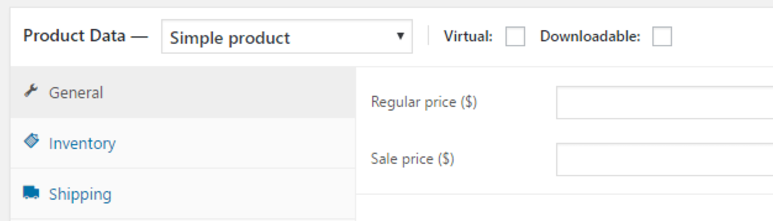
This page also enables you to choose between physical and virtual items. In most cases, your store will probably focus on one or the other:
insert product data
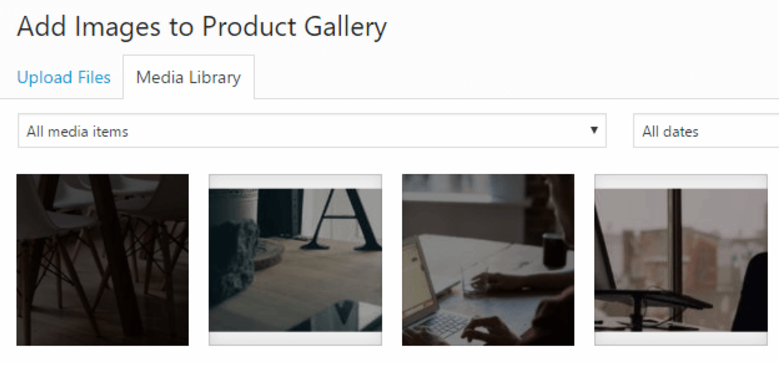
Don’t forget to set a featured image for your item, since that’s going to be one of the first things your customers will see! You can also upload more product images via the Product Gallery widget next to the editor:
product galleryWhen you’re done, remember to preview your product to see how it looks live, then hit Publish when you’re ready. Here’s an example of a product that has been fully set up:
product placement
Remember – when it comes to product images, you want to make them as attractive as possible. That means taking high-resolution pictures of your physical items and compelling screenshots for any digital products. One of the main mistakes online stores selling digital goods make is not including screenshots of their products, which can turn potential clients away.
When you’re done perfecting the look of your product pages, move to the next step to learn more about how the right theme can level up your WooCommerce store.

Step #2: Set Up a WooCommerce-Friendly Theme

If you have some experience with WordPress, you probably know how much of a difference using the right theme can make. Fortunately, there are plenty of WooCommerce-friendly themes out there. Picking the right one can make your online store look much more professional.
Your best best is to go with an e-commerce theme designed specifically for WooCommerce. These often provide you with a drag-and-drop page builder you can use to customize your pages quickly and implement designs that are proven to convert visitors. This is critical for any budding online store, since the right design may help you start making a profit earlier than you expected.
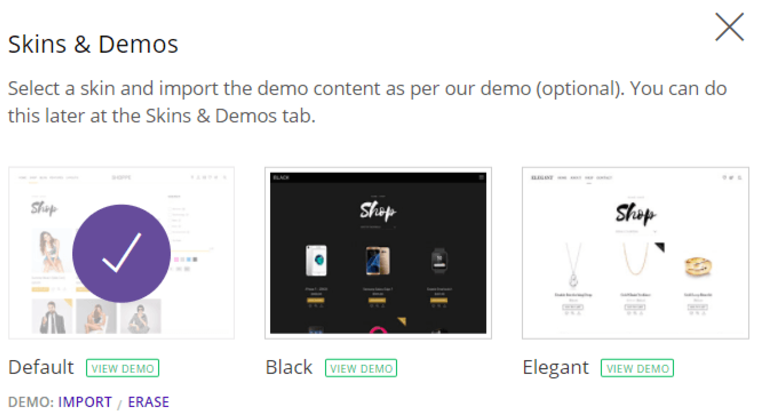
On the other hand, if you’re not familiar with the process of designing a website on your own, most e-commerce themes include plenty of pre-designed layouts and demo content to help you kick things off:
skins and demos
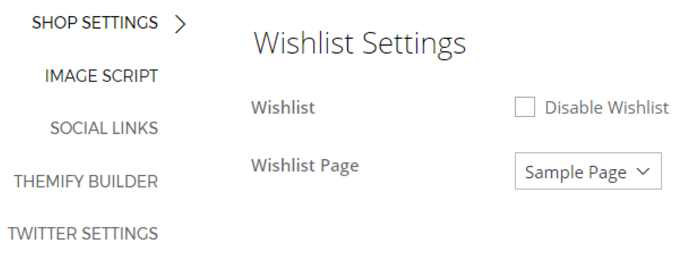
There are a lot of features you’ll want to implement as soon as possible to make your online store more user-friendly, and an e-commerce theme can help you get there faster. For example, wishlists are a mainstay of most online stores:
wishlist settings
Finally, there’s one feature in particular that you want any good e-commerce theme to pay attention to: product images. As mentioned earlier, the right images can make or break a sale, and advanced functionality, such as an AJAX slider, can help make sure yours pop:
animated product image
Now that you understand the importance of picking the right theme, there’s only one subject left to discuss that will round-off your new online store nicely – WooCommerce extensions.

Step #3: Consider Installing Extensions

To put it simply, WooCommerce extensions are similar to WordPress plugins. Although WooCommerce itself is a plugin, it has plenty of add-ons that you can use to extend its functionality even further.
Setting up extensions works just the same way as installing a regular plugin, and they come in all shapes and sizes. Take Product Add-Ons, for example:
product add-ons
This straightforward extension enables you to add custom fields and drop-down menus to your products, giving you more control over your items (which is something any store could benefit from).
Product Add-Ons isn’t the only extension worth your time. In fact, there are hundreds of them on WooCommerce’s official repository – some free and others premium. If you want help sorting the good from the bad, an online roundup is a great place to start.

Conclusion

As a student, an online store could be key for topping up your income during your studies. If you’re planning to set up an online store using WordPress, WooCommerce should be the first option you consider. Not only is it one of the most polished and reliable e-commerce plugins available, it’s also easy to set up and benefits from a vibrant (and helpful) community.
Here’s a recap of the three steps you need to take to get your first e-commerce store up and running after installing WooCommerce:
  1. Customize your store’s settings and add your first products.
  2. Set up a WooCommerce-friendly theme.
  3. Consider installing extensions.
Once you’ve done this, an almost passive income stream is at your fingertips! Good luck!

he Unexamined Life is Not Worth Living: Tools for Self-Knowledge

If this proclamation is indeed true, then where does one begin to excavate these multiple dimensions of their life? And, more than that, what is the point?
Well, from the perspective of career and educational planning, the more information we have about who we are and how those factors correlate with job fit and satisfaction, the better equipped we are to make informed decisions. Furthermore, the deeper our self-awareness and understanding of differences in personality, the better able we are to navigate the world of work.
Tools that help facilitate this self-examination include a variety of assessments, such as StrengthsFinder, Strong Interest Inventory and the Enneagram. Each of these assessments help to clarify one’s interests, strengths, and values, in addition to personality traits.
One of the best-known and widely used personality assessments is the Myers-Briggs Type Indicator (MBTI). With its basis in Jungian psychology, the MBTI looks at four different dimensions of personality in which individuals tend to gravitate towards one side. The questions posed by the MBTI illuminate preferences on how and where you get your energy (extroversion vs. introversion), how you take in and process information (sensing vs. perceiving), how you make decisions (thinking vs. feeling), and how you orient yourself to and structure your day-to-day life (judging vs. perceiving). There are 16 possible personality types based on the Myers-Briggs and each one of them has distinct traits that describe differences in styles of communication, leadership and group dynamics.
Considering most of us don’t live totally alone, in the remote mountains, interfacing with other humans on a regular basis, is virtually inescapable. To that end, the more we understand about each other, particularly ourselves, the more likely we are to have relationships that are more harmonious and effective. Familiarizing ourselves with the Myers-Briggs framework is immensely valuable, particularly in the context of work; knowing our preferences within each dimension of personality, allows us to find occupations that are better aligned.
For example, as an ENFP, the Intuitive (N) trait will manifest in seeing the big picture; easily identifying patterns and relationships between people, ideas and things; and in an ability to ideate. These parts that are driven by imagination, innovation and forward thinking, will likely need to find outlet through brainstorming and ideating on possibilities for the future, or when solving problems. If you’re in a role that does not support this dimension of your personality, it is possible you won’t be as satisfied, or engaged, on the job. While this only describes one of the MBTI traits, it serves to highlight the value in exploring the connection between who you are and how those unique dimensions impact your experience in life and work. The Myers-Briggs then becomes an ideal springboard from which to uncover the many layers of your personality that can support you in making better aligned career decisions and when navigating differences in communication and group dynamics.

5 Negative Thoughts After College Graduation and How to Deal With Them

An ancient Chinese curse says: ‘May you live in interesting times’, where interesting times are the times of changes. So, your last year in college is over, you received your diploma and went through the cap throwing. What’s next? Interesting times, indeed. You are staying at the edge of a completely new life.
It might seem scary or terrifying. But don’t let the depressing thoughts take over you. We have listed some of the worries you might be going through right now and how to deal with them.

#1. I’ll never manage to pay out my student’s loan

It might happen, that you never took student loans seriously until now. They just didn’t seem to be the real money, but it only lasts until you do the calculations. The numbers may put you down.
What to do?
Try to stay calm. You are not the only person to go through this all. There have been thousands of young people before you, and many more will come after. Speaking of people before you… Why won’t you ask for a piece of advice?

#2. Without experience I won’t find a decent job

The time has come and the first thing you need to do is to write your first CV and Cover Letter. And here you are, sitting in front of a blank page struggling, with no idea where to start. And yeah, it is hard to do something you have never done before.
Just do it.
Imagine your perfect workplace and the ideal position you want to get. Answer the question: what kind of employee this company will look for? With that image in mind writing your CV and Cover Letter won’t be that challenging. Also, check for resume samples, they are not hard to find. Filter your search request with a position. After you complete writing, don’t forget to proofread your resume. Not a single employer would like grammar mistakes, especially when your CV says “detail oriented”.

#3. No recruiter will say that I’m a good candidate

You have sent your CV to a number of companies, and one (or few) of them got interested in you. Great! But after a short moment of excitement, fear comes. Will you be able to handle your nerves? Won’t you screw it all up? Won’t you be embarrassed? Will you get a job? All these thoughts are chasing every young person on the way to their first job.
How to handle it?
The secret of a successful job interview is based on honesty, confidence and positive attitude. Small secret – set up your interview in morning hours. So the worries won’t follow you all day long. Be well-prepared: search for the information about the company, its clients, and the interviewer. Have a good sleep and breakfast. If it is your very first job interview, look for some tips on how to improve your personality traits or how to go through the job interview successfully.

#4. Moving back to parents? Great. Exactly what I’ve studied for

After living on your own in college, it might be frustrating to go back home and feel yourself like a teenager again. Especially when you go through all these debts calculations and job interviews. It may feel not quite right. You are supposed to be an adult after graduation, so why do you have to tell your mom when are you about to come back home?
Take advantage of it!
If for some reason you have to move back with your parents, don’t get desperate. It may serve you well. Your parents are always on your side and will support you, no matter what happens. So, while you are having ‘interesting times’, why won’t you benefit from their help? Still, do not make it your routine. Plan your future. How long will you stay with them? Create a deadline for yourself, for you definitely don’t want to find yourself living with your parents at your 30.

#5. My friends are far more successful and happier then me. Hate them.

Caught yourself being envy to your friend’s success? Their Instagrams and Facebook pages are filled with #lovemyjob and #whataparty hashtags? It makes you feel yourself a complete looser?
You are not!
Life is something that happens while you upload a new picture to Social Media. Young people nowadays are masters in creating a great image of themselves all over the Internet. Don’t be jealous. Their life may be as boring as yours seems to you. Compare yourself only to yourself and get better every day. This is the only way to be happy.

Summing up

Negative thoughts are chasing everybody in this crazy world. People are getting new worries and concerns every day. No wonder you have them too, especially when going through the period of major changes.
But remember the old Chinese proverb? “If your problem has a solution then…why worry about it? If your problem doesn’t have a solution then…why worry about it?”

Translating Your Classroom Experience to the Job Search

Image courtesy of George Redgrave, Flickr Creative Commons
What does a typical day look like for you?
It’s a question that comes up quite often in student appointments, particularly as they begin researching career opportunities and start assessing whether or not they envision themselves in a particular role. But, are students asking themselves this question?
I find that the students I work with are concerned about their work history, and fear that they lack a marketable skill set for the internship or job market because they don’t have a robust, multi-page snapshot of their professional experiences. While I understand their concerns, I find in a lot of cases, our students sell their skill sets a little bit short in the search. It takes some brainstorming for them to start reflecting on what they’re learning inside of the classroom and how it applies to the “real world.”
Students truly learn so much from the classroom experience. As they acquire relevant content knowledge and grow within their programs of study, they are quickly building a concrete skill set that is easily transferable to the job market.
One key to successfully articulating these skills involves translation. I led a workshop with Dr. Steve Iona, from the Physics & Astronomy Department, last quarter and he challenged our group to think creatively about this very topic. How can a student, who has completed a number of projects and assignments in the classroom, relate those activities back to a typical day on the job?
In my appointments with students who express concern about their work experience, I will often challenge them to tell me more about what they’re doing this quarter. I’ll often ask:
What courses are you taking this quarter, and what do the assignments look like?
What are some projects that you’ve completed that you’re particularly proud of, and why?
Are you taking a class with lab this term, and if so, what has your experience been like in the lab? Have you been working with a lab group? If so, how have you navigated the different working and learning styles of your team members? How have you taken their diverse perspectives and allowed them to influence (or not influence) your work?
Have you worked on a research project or paper? Did you present quantitative or qualitative data in written and visual formats? Did you have the chance to describe your research project to a lay audience (your peers, the community in a poster session)?
Are you solving sophisticated, multi-step problems in your courses?
As students start to tackle these questions, a lucrative and exciting skill set emerges that includes the ability to manage multiple projects, work effectively in a group setting, solve technical and complex problems, and navigate difficult conversations.
These skills are all great, but it can be difficult for students to decide where classroom examples might fit on a resume. After all, isn’t a resume designed to highlight professional experiences? What I often suggest to students is to first generate a working list of transferable skills and related classroom experiences, and then creatively relate aspects of these activities back to the resume. Listing relevant projects and coursework is a great place to start.
Some of these experiences might be better conveyed in the interview, and that is also great! The resume, cover letter, and application stage is not the final step; the ability to weave classroom skills into interview answers is another key to success in the internship and job hunt. Be sure to reflect on how to aid your students in capitalizing on the skills they use in lecture halls and labs in every step of the internship or job search.
So, what does a typical day look like for you?

6 Interview Tips for Graduates

Ready to interview for your first job? First interviews are exciting and also intimidating at the same time. If you put in the right level of preparation beforehand, then this can help you land your first job. Find a list of six interview tips below for interview success.
  1. Remember that first impressions are very important
Many interviews are often failed within a few minutes of entering the room. This may be due to interviewers being put off by a lack of eye contact, a weak handshake, poor body language, poor posture or even a bad attitude. Keep in mind that interviewers will make judgments about your likability, trustworthiness, professionalism and competitiveness from the beginning and then spend the rest of the interview confirming these opinions.
To make the best first impression consider doing the following:
  • Make a firm and warm handshake and wait to be invited to sit down
  • Smile and make good eye contact at the start of the interview
  • Try to relax without perching on the edge of your chair (and definitely no slouching)
  • Speak in a clear voice and take your time
  • Take time before responding to questions and avoid fidgeting or using filler phrases (“you know” and “I mean”)
  1.  Be prepared to answer competency-based interview questions
Depending on what role you are going for, employers will be looking for you to demonstrate a specific set of skills and competencies. These will be what they think are essential to the job role. For example, you may need to demonstrate how you can work as part of a team, communicate effectively, solve problems and manager your time. Have a few specific examples prepared before about times when you have demonstrated these competencies.
  1. Be prepared
Do some research and preparation before your interview. For example, you will be expected to show an interest in the organisation. Read up about the business by looking at their website and prepare questions to ask them about the employer and also the role you are going for. It’s ok to write these down and take them with you to the interview.
You can also arrange to do a mock interview with a friend and practice questions beforehand. This will give you a lot more confidence when answering similar questions during the real interview. Also, dropping into your university career center is a great way to prepare.
  1. Make the right amount of eye contact
This can make the difference in your interview since most messages processed by the brain are in fact based on a person’s body language. Your facial and eye movements in an interview are being registered more than what is listed on your resume. Your eyes reflect your level of confidence, interest and professionalism while interviewing.
To display confidence, avoid looking down at your shoes or looking at the table – these actions might convey a lack of confidence or nervousness. To reinforce honesty, make eye contact and avoid any sudden change in eye contact. When talking about something particularly interesting or even something you are proud of, let your eyes light up to show interest and intent.
  1. Make the employer feel special
You don’t want to make them feel like they are one of many you are applying to. Make your questions stand out by giving them unique and focused responses. Do this by taking into consideration what they do as a business when answering questions. Make it clear to them that you like the company and explain how you could contribute to helping to meet their goals as a business. This will add a personal edge to your interview and make you stand out.
  1. Go above and beyond to standout from the crowd
Thinks about what you can do to make yourself memorable. For example, perhaps you can do something creative like creating a short video to introduce yourself, your experience and passions. Or perhaps you can add more to your resume by adding case studies and accomplishments from your university studies. Any successes that match up to the position you are going for will help you standout and make you more memorable.
Go for it!
At the end of your interview make it clear that you are interested in the position and ask what their next steps are. Thanks the interviewer for his/her time and follow up with an email or letter expressing your enthusiasm. Soon you will find yourself starting your career and an incredible journey.
This article was submitted by Amy Pritchett, Outreach Manager for Vision Direct, the UK’s online leading retailer for contact lenses. Amy is passionate about offering career advice to graduates and helping them shape their professional vision.

Five tracker apps for increased productivity

This blog recently ran a piece on self-knowledge that began with a famous Socrates quote: “the unexamined life is not worth living”. The post referenced some useful self-examination tools – including the well-known Myers-Briggs Type Indicator assessment – that can help reveal some potentially illuminating aspects of our own hard-wired psychologies, behaviors and habits when trying to make longer-term plans around career and life goals.
When it comes to much shorter-term planning, though, there’s an entirely different sort of self-knowledge toolkit available to us today: the kind that buzzes at us regularly from our pocket or wrist. In 2017, our near-universal embracing of always-on connectivity and wearable technologies has made so-called tracker apps one of the busiest download markets for mobile platforms.
Many of us use multiple tracker apps every day without really thinking twice about it, leaning on their simple tap-and-log functionality to power activities as diverse as monitoring our calorie intake, getting directions, managing personal finances and even tweaking our sleep-wake cycles.
Our ability to rely increasingly on digital app-based support for previously ‘analogue’ tasks is, of course, both a blessing and a curse. A 2016 report on Forbes.com noted, for example, that many smartphone users were starting to turn to their apps for medical advice before contacting their doctor; a scenario in which various pros and cons are immediately clear.
Quite apart from the inherent potential for faulty apps to lead us astray, it’s also important that we retain the ability to break free from their technological hand-holding every once in a while – both in terms of preserving a useful offline skillset, and moreover to give us respite from all those constant bleeping reminders. The unexamined life may not be worth living according to Socrates, but we can all afford to treat ourselves to a little less intense scrutiny from time to time.
That said, some of the more reliable, well-used and community-supported tracker apps out there do in fact offer a genuine boost towards hitting the ground running in a new venture or career. Here are five suggestions for especially handy little downloads – all well reviewed by sizeable user groups – that might prove useful in a variety of everyday organisational tasks, especially when starting a new job or working to an upcoming deadline.
  1. Rescue Time (Apple, Android, desktop)
If you’re among those of us who are always wondering where the heck all our time disappeared to as a deadline hurtles closer, then this app might have an answer for you. Unlike many time management assistants, it doesn’t work by constantly nagging you to stop what you’re doing and focus on something else – instead, it builds you a more general workday profile based on your goal-based accomplishments logged against the percentage of your time spent on specific programs, sites and apps. This gives you the power to adjust your own habits, limiting areas that are proving a disproportionate drain on real productivity by setting your own schedule of reminders and alerts that you can turn on and off whenever you need an efficiency boost.
  1. Addapt (Apple and Android)
Like many of the best ideas, this one’s almost infuriatingly simple: an ‘always updated’ address book that’s automatically amended whenever your important contacts switch their details. In theory, this means you’ll never again be stuck without a working phone number or email to reach bosses, colleagues or clients, even if you haven’t spoken to them in a while – other users can edit their personal details remotely, and the changes will show on your device next time you look them up. The app also automatically prioritizes phone, email or text message when you navigate to a name, based on your usual method of reaching that individual. From a privacy standpoint, it’s also reassuring to know that user address books aren’t stored on Addapt’s servers.
  1. Who’s Off (Apple, Android, desktop)
If you’re working with a group – be it as part of an office workforce, or as an independent team pulling together a one-off project – then it often pays to know exactly which of your colleagues are available or not at any given moment. This app enables precisely that: by logging into a central hub, all members can quickly update the whole group with news of last-minute absences, or to arrange cover for planned away days, without having to consult a separate shift rota or holiday calendar and without sending a whole load of crossover emails back and forth. The app requires one paid account for the company or organisation, and then all the individuals in it can set up their own user accounts for free.
  1. Bananatag (Desktop)
Speaking of emails, how often have you wanted to know exactly what happens to them when they reach their destination? Bananatag sheds some light on this by essentially giving you a souped-up version of a receipt report after you hit send. As well as confirming successful delivery, it also gives you a time stamped read report showing if/when it was opened, whether attachments were clicked on, and which links were followed. Crucially, it’s still respectful of privacy – it doesn’t track individual users, but instead gives a chart-based readout of group email performance which can then be exported to an Excel sheet for reference. It’s primarily aimed at sales teams, but it also has useful applications for devising more effective internal group comms, offering a handy degree of flexibility to tailor your approach to multi-recipient engagement strategies with a range of neat email templates. A free account lets you track up to five emails a day.
  1. Flare (Apple, Android)
For the entrepreneurs and ideas people amongst you, Flare might offer a decent interactive sounding board that’s less expensive and more direct than having to pitch to a private business consultant. It works by allowing registered users to float up to one idea per day on the community forums and gather feedback from other users. If your idea earns enough positive votes, you can then follow up with some more detailed questions about specific implementation issues (or any other aspect of one day making it a reality). The app is managed by a team of expert investors and business strategists at GoDaddy, a cloud-based platform geared towards startup support, and it’s partly designed around attracting potential investors – they can also track the development of an idea they’re interested in, and offer advice or even financial backing for a specific venture once it gets past the initial community approval stages.

Preparing the Perfect Pitch: Strategies for answering “tell me about yourself”

Happy business people talking on meeting at office
“Tell me a little bit about yourself.”
It’s something we have all been asked at one time or another, and we have all responded to this question with varying levels of success. It’s a tough question to tackle, at first glance, because the question itself is as open-ended as we want it to be.
I find that this fact can make the question an overwhelming one for students to respond to. They aren’t always sure where to begin, and students have told me that they felt as if they were rambling through a response. Since this is one of the first questions we are often asked in an interview setting, it is absolutely crucial to have a strategy in place to set ourselves up for success from the start. Here are some tips to get your wheels turning about what the question is asking, and how you can quickly and effectively respond to it.
1. “Tell me about yourself” is a great way for employers to get to know your skill set, experience, and goals in mere seconds.
When I work on interviewing skills with students, we often begin by dissecting common interview questions. We analyze what we believe each question is asking, and make our best judgment about how to respond accordingly. While different professionals have their own insight on this question, I find that employers or admissions staff often ask this question to get a sense of the applicant’s skills and abilities. What accomplishments, experiences, projects, and skills is the applicant most proud of? What are their short- and long-term goals and which did they choose to prioritize for this question?
As you begin working on your own responses to this question, I suggest drafting a three-column table on a sheet of paper and listing:
  • Three skills that you’re proud of, and that relate to the job description;
  • One experience or quick example that exemplifies these skills;
  • One goal (short- or long-term) that this position might help you to achieve.
You can then weave these skills, and your story, into your response without taking a lot of time to respond.
2. Decide how you will start.
Once you have a list of skills, a short story or example, and a goal, you have the basic structure of your response! Next, I suggest taking some time to think about the first line of your answer. If we are thinking about this response as something that could be used for an interview or elevator pitch, you could try some opening lines that reflect your current professional status. Some starters include:
  • I’m a student at the University of Denver, studying Biological Sciences with minors in Chemistry and Medical Physics.
  • I’m a recent graduate of the University of Denver, where I studied Environmental Chemistry.
  • I currently serve as Career Advisor at the University of Denver, working specifically with students in the Division of Natural Science and Mathematics.
Try out a few opening lines, and reflect on which ones seem to fit in best with the skills and goals you chose for item #1. It is never a bad idea to have a few to choose from, either!
3. Be sure to practice!
While cliché, practice truly does make perfect. Take some time to practice your new response with one of our Career Advisors, record your answers using InterviewStream, or share them with a friend. As you practice, think critically about which aspects of your response seem to captivate your audience, and where you stumble. The more you work on your pitch, the more confident you’ll feel in an interview setting.
What are some strategies that you have used to answer “tell me about yourself”?

Top Benefits to Look for in Your Job Hunt

If you are looking for a job while you are in college, you don’t necessarily have to take any old crappy job just to make extra money. Today, there are many opportunities available to students, and many jobs even come with benefits. You just have to know what you want, and then find the companies that offer the benefits you want. Don’t expect too much, since you are likely going to be a part-time employee. But, there are some benefits you should be looking for when you are hunting for a part-time job. Let’s take a look at the most important benefits for working students.
  1. Paid Time Off – Whether it is vacation time or sick time, you should look for a position that offers paid time off. This may not be possible if you are strictly a summer employee, but if you continue to work once you are back in school, you will be on the payroll long enough to qualify for vacation and sick time, as well as other paid days off.
  2. Retirement Investments – It is never too early to start planning your retirement. In fact, the sooner you start saving, the earlier you may be able to retire. Look for companies that offer a 401K or other type of retirement savings plan. You contribute a certain amount, and your employer will match your contribution (to a certain amount).
  3. Health Benefits – One of the most important benefits for many people is to have a health plan. This pays for a portion of medical expenses, including prescriptions, which can often be unaffordable for college students who have no access to medical insurance. But, not all employers offer the same plans. Look for companies that have good plans with lower deductibles.
  4. Outplacement Services – Look for a company that provides outplacement services. These are services that are hired by companies when they have lay-offs, to help laid-off employees transition and find new jobs. If you have been a good employee, but the company no longer has need of your services, they will often go out of their way to help you find a new position.
  5. Disability Insurance – This goes along with the health benefits, and it is a very important benefit to look for when applying for work. If anything happens that you are injured or sick and unable to work, this type of insurance can come in pretty handy. Some companies pay the full premiums, while others pay a portion and you pay the rest.
  6. Medical and Family Leave – We never plan to have medical or family emergencies, but they happen, and we have no control when they do happen. Look for companies that understand this, and that offer both medical and family leave. This can include leave for serious health issues, caring for an ailing parent or child, childbirth and childcare, etc.
  7. Tuition Reimbursement – If you are looking for ways to pay for your education that won’t leave you with thousands of dollars’ worth of debt after graduation, look for employers that offer tuition reimbursement programs. Often, this is given if you are taking courses that are specific to your job, or that can help you to move up within the company.
  8. Expense Plan – Some companies offer an expense plan if you are going to be doing things for your job that you have to spend money on. For instance, if you are required to travel, your travel costs, meals, accommodations, etc. could be paid for. If you are working on the road, you will be able to claim mileage for your vehicle. Don’t take any job that expects you to pay for company-related expenses.