Global Surge in Domestic Violence During Covid-19 Crisis!

“O Janneman”, she increased her pace on hearing a stranger calling. She reached the bus stop but could still feel eyes on her. It was dreadful. She wanted to reach home as soon as possible. She wanted to cover herself in the safety that only a home could provide.

About 95% of women feel unsafe in public places (UN Women, 2013) and about 50% of women face harassment during commutation (Pan India Study, 2015)[1]. Though women are considered most vulnerable while commuting, their entrapment during the lockdown tells a different story. While protecting themselves from the pandemic, women face another terminal problem. Though cases such as rape, catcalling, stalking and other forms of molestation have decreased due to restrictions on movement, a rise in the cases of domestic violence is seen, which is horrendous. Even before the lockdown, 243 million females of 15-49 years have faced physical abuse (UN Women reported). National Family Health Survey 2016 reveals that 30% of women of 15-49 years’ experience physical violence. About 31% of married women experience abuse by their spouses.

Given the already sheer violation of basic human rights, the world is now experiencing a surge in such crimes! Where are we moving to?

[i]France has reported a 30% increase in such case[2]. In UK, calls to the national abuse hotline went up by 65%[3]. Spain has registered calls to 144 gender violence hotline increase by 25%[4]. In Singapore, AWARE’s Women Helpline number has registered an increase in calls by 33%.[5] In Australia 40% of frontline workers reported increase in the calls to domestic violence helpline[6]. National Commission for Women registered over 587 complaints between March 27-April 16 2020[7].

Many countries/places have registered a drop in such calls, like the Delhi Commission for Women. This trend is more frightening since it indicates the inability of victims to reach for help. A lot of women might not be able to make phone calls due to the constant presence of the abuser. A lack of help increases the chance for their abusers to coerce them and inculcate greater fear in their relationships.

The lockdown has also compromised the care and support services provided by various NGOs and counseling centers- clinical management, mental health and psycho-social support to the survivors. To free oneself from the clutches of an abuser, women need to be financially independent but given the situation of a recession of the global economy, the solution is covered by clouds.

These statistics do not tell the whole story. A lot of cases are not even reported! Women belonging to poor households find it difficult to reach out for help due to lack of access to phones and the internet while many do not report marital rapes and domestic violence due to the fear of society. UN Women reported that only about 40% of women facing domestic violence call domestic abuse hotlines and only about 10% go to the police. In the current situation, it has become even more difficult for them to reach for help.

A lot of reasons can be put forward for such an abusive behavior of men but these can never be taken as excuses to set them free. With everything that is going on, this world requires a change in mindset which certainly cannot be achieved overnight. So, there is a need for proper counseling of men too to help them get through the situation without inflicting pain on others. During the lockdown, ways should be formulated to help NGOs to reach both the victims and the abusers. There is a need for the allocation of more resources to enable these centers to reach a wider section of the population. Also, every country should have stringent laws in place and practice. It has been reported that about 1 in 4 countries do not have any laws to serve justice to the victims of domestic violence.

For a dignified life, safety and security are basic human rights. The status of women in society determines their safety. Women being the target of violence and rapes in their own homes makes me question the very core of humanity, the very idea of ‘home’. It seems that humanity has gotten lost somewhere in space- unable to find its way back to earth. As rightly pointed by the UN chief, “peace is not just the absence of war”[8]. It is indeed necessary that we come together to fight the battle to keep women safe as we fight COVID-19. For a sustainable, inclusive and resilient society, every section must live a dignified life.


[1] Bhatt, A. Women’s Safety in Public Transport-A Pilot Initiative in Bhopal. 2015. Embarq India


[2] Domestic violence cases jump 30% during lockdown in France.23rd March, 2020. https://www.euronews.com/2020/03/28/domestic-violence-cases-jump-30-during-lockdown-in-france

[3] Megha Mohan. Coronavirus: I’m in lockdown with my abuser. 31st March, 2020. https://www.bbc.com/news/world-52063755

[4] During quarantine, calls to 144 for gender violence increased by 25%. 21st March, 2020. http://www.diario21.tv/notix2/movil2/?seccion=desarrollo_nota&id_nota=132124

[5] Commentary: Isolated with your abuser? Why family violence seems to be on the rise during COVID-19 outbreak. 26 March, 2020. https://www.channelnewsasia.com/news/commentary/coronavirus-covid-19-family-violence-abuse-women-self-isolation-12575026


[6] Domestic Violence Spikes During Coronavirus As Families Trapped At Home. 27 March, 2020. https://10daily.com.au/news/australia/a200326zyjkh/domestic-violence-spikes-during-coronavirus-as-families-trapped-at-home-20200327


[7] Coronavirus cases: No Lockdown for Domestic Violence. 26 April, 2020. https://www.deccanherald.com/specials/insight/coronavirus-crisis-no-lockdown-for-domestic-violence-829941.html

[8] UN Chief calls for Domestic Violence ‘Ceasefire’ amid ‘horrifying global surge’. 6th April, 2020. https://news.un.org/en/story/2020/04/1061052


[i] The data pertains to the month of April – June (when lockdown was in full force everywhere)

Image Credit: Google
HISTORY OF INDIAN FLAG

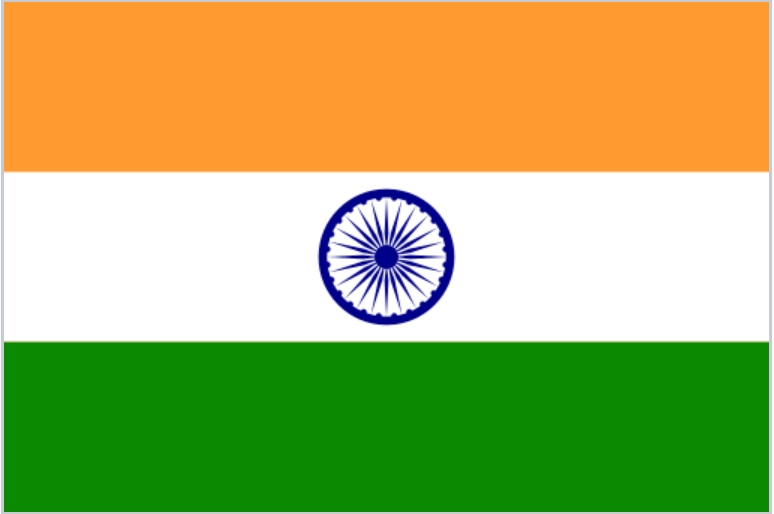
Gandhi first proposed a flag to the Indian National Congress in 1921. The Indian flag was designed by Pingali Venkayya.In the flag the deep saffron colour is for courage and sacrifice white colour is for honesty, peace, and purity dark green colour is for faith and chivalry and the chakra in the middle is for vigilance, perseverance, and justice.This flag was accepted in 1947.Bhikaji Rustom Cama, the fiery lady who unfurled the first version of the Indian national flag—a tricolour of green, saffron, and red stripes—at the International Socialist Congress held at Stuttgart

The Indian flag was designed as
A horizontal triband of India saffron, white, and India green; charged with a navy blue wheel with 24 spokes in the centre.The flag was proposed by Nehru at the Constituent Assembly on 22 July 1947 as a horizontal tricolour of deep saffron, white and dark green in equal proportions, with the Ashoka wheel in blue in the centre of the white band. From 26 January 2002, allowing private citizens to hoist the flag on any day of the year, subject to their safeguarding the dignity, honour and respect of the flag.

Physical Hardware: Every Business’ Cybersecurity Blind Spot

Admin's avatarInternational Journal of Research (IJR)

2021 has been a busy year for hackers, with?data breaches worldwide?now costing an average of £3.03 million per incident. One of the reasons for this dramatic increase is the rapid shift to cloud-based activities to accommodate remote working.

Fortunately, AI and automation are thwarting the surge in cybersecurity threats. However, the pace in which digitisation across industries is happening means that there may be weaknesses in your network infrastructure, particularly in cybersecurity practices that focus on physical hardware — including storage devices, printed circuit boards (PCB), and tap access points, to name but a few. Hardware is actually a huge cybersecurity blind spot.

Why is physical hardware the biggest blind spot in cybersecurity?

A major factor that makes physical hardware more vulnerable to cybersecurity threats than software is that hardware programming is?‘uneditable’. This means that because?PCB layouts?are permanent once they leave the factory, any vulnerabilities found…

View original post 390 more words

Stop Blogger From Redirecting Blogspot To Country Specific URLs

  Let’s say you’re from France and have set up – just for examples sake – a blog called frenchlitgeek.blogspot.com where you share your thoughts and insights on French literature. Now, with Google’s country specific redirection in Blogger, you might be redirected to frenchlitgeek.blogspot.fr when you try to access your site. The thing is, you perfectly liked the .com and didn’t sign up for the .fr but you find yourself being directed there. Sure, your blog works and all but you also wonder why.

Why Did Google Do This?

Google has always supported the expression of views, and they stated as much on their official blog. In the post Free expression and controversial content on the web, which was published in 2007, it said “Our world would be a very boring place if we all agreed all the time. So, while people may strongly disagree with what someone says, or think that a particular newspaper is total nonsense, we recognize that each of us have the right to an opinion.”

The post continued, “We also know that letting people express their views freely has real practical benefits. Allowing individuals to voice unpopular, inconvenient or controversial opinions is important. Not only might they be right (think Galileo) but debating difficult issues in the open often helps people come to better decisions”.

blogspot country redirection

While the company is clearly on the side of people freely expressing their opinions, they also believe that a line has to be drawn somewhere. Then again, for a company providing services in over 100 countries around the world and each with their own national laws and cultural norms, it’s surely difficult for a company like Google to decide where to draw boundaries.

However, there are cases like child pornography which is illegal in just about any country where decisions are clear cut.

For a company whose products are “specifically designed to help people create and communicate, to find and share information and opinions across the world”, how does Google deal with this challenge?

One of the most challenging areas where Google deals with issues regarding free expression is in Blogger, their content generation platform. Since Google can’t check what you’ve written before you publish, they rely on active vocal users who are diligent in alerting the proper if a post borders on offensive. Then again, that in itself is a tricky issue as well because what one person may view as offensive, another might not.

In other words, it’s always a work in progress with Google.

Fast forward to January 9, 2012 when Google announced it was making changes to the Blogger platform with regards to censorship. That said change would make use of a country specific domain to the Blogger platform. Doing this would allow Google to censor and remove content specific to a certain country.

In their announcement, Google said: “Migrating to localized domains will allow us to continue promoting free expression and responsible publishing while providing greater flexibility in complying with valid removal requests pursuant to local law. By utilizing ccTLDs, content removals can be managed on a per country basis, which will limit their impact to the smallest number of readers.”

The move by Google come after pressure from countries like India that are working on hunting down content on social media sites which are considered inappropriate. Also, the move followed closely on the heels of Twitter’s new censorship policies.

Since Google aims to “help people create and communicate, to find and share information and opinions across the world”, it would be strange to take down a post that was just banned in a certain area. In essence, with country specific redirection, a piece of content can still be accessible by the world save for the country where it was blocked.

How Would Country Specific Redirection Affect Your Site?

Of course, not all site owners greeted the country specific URL change with open arms. A few of the issues brought up in regard to the change include:

1. A reduction in social stats. These are your Facebook Likes, Google +1s and so on from your blog posts. They might be reduced because the URLs from one blog post will be different depending on where your readers are from.

2. A problem with external commenting platforms. If you use Disqus – for example – for your comments section, then you might run into trouble because blog URLs will be different even if essentially the page being accessed is just the same.

3. A slight problem with AdSense earnings. Some users have complained about seeing a dip in their earnings when their pages are served through country specific domains.

4. An issue with link juice. You want external sites to link to you and not your country specific URL. But the issue here is that you can’t control how others link to your page. They might use the top level domain or they might use the country code top-level domain.

Stop Blogger from Redirecting to Country-Specific Domains

If country specific redirection affects important factors such as traffic and link juice, and you need those in order to rank well, what can you possibly do? Well, thankfully, Google has provided a way to get around this. All you have to do is add an ncr/ to the end of the URL – ncr here stands for No Country Redirect. So basically, it goes frenchlitgeek.blogspot.com/ncr/.

That solution is great but do you want your users to always have to do that every time they visit your blog? To eliminate that hassle, and for the good of your site statistics, a simple redirection script will do the trick. Here’s how:

1. Log in to your Blogger account.

2. Click on Template → Edit HTML.

3. Find the  tag in the HTML editor by opening the search box using Ctrl + F.

blogger country redirection

4. Copy the redirection code seen below after the tag.

var blog = document.location.href.toLowerCase();
if (!blog.match(/\.blogspot\.com/)) {
blog = blog.replace(/\.blogspot\..*?\//, “.blogspot.com/ncr/”);
window.location.replace(blog);
}

5. Click on “Save Template”.

Credit: labnol.com

And that’s it! Whenever someone accesses your Blogger, they’ll be taken to the top level domain rather than the country specific one.

Mega Menu With Images Or Thumbnails For Blogger

  Visual content holds a certain appeal that websites integrate images to every page, or even operate solely through photos. Now, with the new AJAX navigation menu widget, images can be added to the drop-down menu as well.

The AJAX navigation menu for blogger is a widget designed specifically for the Blogger platform. It is inspired from the Mashable website long before it was given a makeover. Despite the plain and simple inspiration, the drop down menu with images is a huge hit.

It works based on the jQuery library and Blogger JSON Feed API. Function-wise, it works just like a normal drop-down menu when JavaScript is disabled. For it to work online, a blog must be for public visitors, so the Blogger JSON Feed API will function as designed.

Features

Multi-Level Menu Support

The AJAX menu is a multi-level drop-down menu that is based on the standard unordered list of HTML. When a menu contains a sub-menu, it loads on the fly when a user rolls over the main menu. What is great about this is that it saves outgoing traffic, especially on a website that uses a large navigation.

Cross-browser Compatibility

Most AJAX applications will work across different browsers even with other plugins or proprietary technology already installed.  The menu with images works in the same premise, instead of being designed for a specific browser. Because there is no telling which browser you or your blog readers would use, the new AJAX drop-down mega menu with images is the ideal option.

Some of the Windows browser supported includes IE5+, Firefox, Google Chrome, Safari Netscape 7+ and Opera 8+. When you’re using a Mac, the AJAX menu is supported on Firefox, IE and Safari. If JavaScript is disabled, however, the menu is still accessible, but only as pure CSS menu.

Automatic Sub-Menu Display

With the new AJAX menu, you only need to roll over a menu item and sub-menus will automatically load. No need to click on a menu to get the sub-menu to drop down. This not only saves users’ valuable navigation time, but also outgoing traffic.

Menu Styling

AJAX menus can be styled by simply changing the megamenu.js and the CSS style. The former is used when javaScript is turned on, while the latter is when it is turned off. You can adjust the menu parameters manually or you can use ready-to-use templates.

There are plenty of other features, but you would not be able to use or experience them if you do not install the new mega menu with images. What do you need to do then to implement it in your blog or website?

Adding Mega Menu with Images/Thumbnails in Blogger

Step 1. Log in to your Blogger account, then go to the Dashboard. Select the blog where you want to install the new mega menu.

CSS

Step 2. Click on Template, then press the Edit HTML button. Press anywhere inside the code area and use the CTRL + F function to make your search quicker and easier. Type the following tag and hit Enter to find it:

]]>

Once you find the tag, add the code below just above/before it:

.megamenu *{margin:0;padding:0;font-family:’PT Sans Narrow’}ul.megamenu{list-style:none;line-height:1;overflow:visible !important}ul.megamenu:after{margin:0;padding:0;content:’ ‘;display:block;height:0px;clear:both}ul.megamenu li{float:left;display:inline;position:relative;text-transform:uppercase}ul.megamenu li a.menu-target:after{content:””;width:0;height:0;border-left:3px solid transparent;border-right:3px solid transparent;border-top:3px solid #fff;font-size:0;line-height:0;bottom:22px;right:5px;position:absolute}ul.megamenu li a{display:block;line-height:50px;padding:0px 20px;text-decoration:none;border-left:1px solid #000;box-shadow:1px 0 0 0 rgba(255, 255, 255, 0.1) inset;color:#d9d9d9;font-size:14px;transition:all 0.3s ease-in-out}ul.megamenu li a:hover{background:#111111;color:#fff}ul.megamenu ul{position:absolute;display:none;top:100%}ul.megamenu li:hover > ul{display:block}ul.megamenu ul li{z-index:72;min-width:149px;float:none;background:#000;text-shadow:none}ul.megamenu ul li a{text-transform:none;font-weight:normal}ul.megamenu ul li a:hover,ul.megamenuid ul li a.hover{background:#E0E0E0;color:#444}ul.megamenu ul ul{display:none;left:100%;top:0}ul.megamenuid li div.megasubmenu{background:#F9F9F9;position:absolute;width:830px;z-index:90;left:0;top:100%;overflow:hidden;min-height:150px;-moz-transform:translate(0,30px);-webkit-transform:translate(0,30px);-o-transform:translate(0,30px);transform:translate(0,30px);transform-origin:50% 0;visibility:hidden;opacity:0;color:#888;box-shadow:0 10px 7px -7px rgba(0,0,0,0.1);transition:all 0.3s ease-in-out}ul.megamenuid li:hover div.megasubmenu{visibility:visible;opacity:1;-moz-transform:translate(0,0);-webkit-transform:translate(0,0);-o-transform:translate(0,0);transform:translate(0,0)}ul.megamenuid ul,ul.megamenuid ul li{display:block !important;border:0 none !important;margin:0 !important;padding:0 !important}ul.megamenuid ul li{background:none !important;float:left !important}ul.megamenuid ul.leftmenulist{position:absolute;width:18%;left:0;top:0;bottom:0;background:#EEEEEE;border-right:1px dashed #e5e5e5 !important}ul.megamenuid ul.leftmenulist a{border-left:none !important;color:#555}ul.megamenuid ul.rightmenulist{position:relative;display:block;width:81%;float:right;margin:0px 0px 0px !important;background:none}ul.megamenuid ul.rightmenulist li{display:block;overflow:hidden;position:relative;min-height:210px;padding:5px 17px 5px 0px !important}ul.megamenuid ul.rightmenulist li .thumb-container{left:0;width:100%;height:100%;position:absolute;overflow:hidden;font-size:0;line-height:0}ul.megamenuid ul.rightmenulist li .thumb-container img{position:relative;top:10px;padding:0;width:100%;height:100%;display:block}ul.megamenuid ul.rightmenulist li a{display:block;border-left:none !important;padding:0px 5px !important;line-height:1.4;color:#777;font-weight:bold;font-size:14px}ul.megamenuid ul.rightmenulist li a:hover{color:#000;background:transparent}ul.megamenuid .loading-icon{background:url(‘https://blogger.googleusercontent.com/img/b/R29vZ2xl/AVvXsEjfZ8wBvrJIMtJdvyvmRTaB9QoJib-msI2FYsmd7xTtId4mOwNs4OR6Dq6lGAeRlelCA5Bjulf9IKb1jbDh7vHhSvlCm8lkoVrdAW2mBZgB2iAE0UaUf1dWS5FoHtGU59RytAHiOaueKq0/s1600/wait.gif’) no-repeat scroll 0 0 transparent;width:22px;height:22px;position:absolute;top:50%;margin-top:-11px;right:5px}ul.megamenuid .menu-icon{border-bottom:4px solid transparent;border-top:4px solid transparent;border-left:4px solid #777;display:block;height:0;margin-top:-4px;position:absolute;right:11px;top:50%;width:0}#megamenuid{background:rgba(0, 0, 0, 0) -moz-linear-gradient(center top , #3d3d3d, #212121) repeat scroll 0 0;background:-webkit-linear-gradient(top,#3d3d3d,#212121);background-color:#3d3d3d;box-shadow:1px 1px 0 0 rgba(255, 255, 255, 0.1) inset;height:50px;width:100%;position:relative;max-width:1000px;margin:0 auto;padding:0px}#megamenuid h5{font-size:16px;margin-top:70px;text-align:center}#megamenuid h5:before{content:””;position:absolute;top:50px;left:50%;width:5px;height:2px;margin-left:-4px;border-left:2px solid black;border-right:2px solid black}#megamenuid h5:after{content:””;position:absolute;top:55px;left:50%;width:10px;height:5px;margin-left:-7px;border-top:2px solid black;border-left:2px solid black;border-right:2px solid black;border-radius:8px 8px 0px 0px}li.search-box{float:right !important;line-height:35px;margin:7px 10px 0 0}li.search-box .search-field{border:none;padding:3px;background:#3F3F3F;color:#fff;width:135px;font-size:13px}li.search-box .search-field:focus{border:none;outline:none;background:#4C4C4C;color:#fff}li.search-box .search-button{background:url(‘https://blogger.googleusercontent.com/img/b/R29vZ2xl/AVvXsEj8xQL9E3fxE3lH1FvPPilnqWPo0xyVwn8v9Ia1nwsZ8F5MCpTBtoE-FMKM5j-cuxosO_VBJ3ieJV7RBltacQvxafrXxPk73Z0pH4_o-7cUfbmjAKISj_0jwpe0pzE9bueBViR8exufgyM/s1600/search.png’) no-repeat;border:none;cursor:pointer;padding:5px 10px;transition:all 0.3s ease-in-out}li.search-box .search-button:hover{opacity:0.9}.search-alert{background:#E84C3D url(https://blogger.googleusercontent.com/img/b/R29vZ2xl/AVvXsEjBZuWpvGN8vbLv56V1DKU84U7d15FDyyR8SdhJ77342SnjLW2NewGtN5X5tF9r0nPEERNxsiiZF3VE-BqKbn1whcFLIWQYuStKcec-ddVTf0GSf1LkKi_zMD-DOhpUBi0rMFz2bTBt-0Q/s1600/search-info.png) no-repeat;background-position:5px;text-transform:capitalize;color:#fff;margin:-5px;padding:0px 15px 0px 40px;display:none;border-radius:5px}

JavaScript

Step 3. Check if your blog has the jQuery plugin already installed. If not, you need to add a few lines of code before the  tag (CTRL + F to find it). See the code below:

http://ajax.googleapis.com/ajax/libs/jquery/1.8.2/jquery.min.js

jQuery(document).ready(function($) {
 $('#megamenuid').megaBloggerMenu({
  postsNumber : 4,
  noThumbnail : 'https://blogger.googleusercontent.com/img/b/R29vZ2xl/AVvXsEjGC5pcTcRShr8PMXRjWLD47DzJ5UeUaVVVc-2qPFdlkFiGgTcg5dsb5VgklR69H1Dn8yIOk7ALZQJfdc9Y5yMIzZ3BC-bFgzUuQQCzfvkD2xzjdnSfx7Lh6zTQdIOXMvS81iZloSV1Q8Y/s1600/no_image_available.png'
 });
});

$(function(){
  $('.search-here').submit(function(e){
    if($('.search-box .search-field').val().length==0){
       $('.search-box .search-alert').fadeIn().css('display','inline-block');
      e.preventDefault();
    }
  });
});

Note

– If jQuery plugin already exist, remove the line in red.
– To change the number of posts, change the 4 value from:

postsNumber : 4

– To add a different thumbnail when a post has no image, replace the url in blue from:

noThumbnail : 'https://blogger.googleusercontent.com/img/b/R29vZ2xl/AVvXsEjGC5pcTcRShr8PMXRjWLD47DzJ5UeUaVVVc-2qPFdlkFiGgTcg5dsb5VgklR69H1Dn8yIOk7ALZQJfdc9Y5yMIzZ3BC-bFgzUuQQCzfvkD2xzjdnSfx7Lh6zTQdIOXMvS81iZloSV1Q8Y/s1600/no_image_available.png'

HTML

Step 4. Carefully add the HTML code to ensure that the drop down menu with images will work as designed. There are only three types of URLs that the AJAX Menu accepts and they must be used accordingly.

Label URL: http://yourblogurlblogspot.com/search/label/LABELNAME
Search Query: http://yourblogurl.blogspot.com/search?q=SEARCHQUERY
Label w/ Search Query: http://yourblogurl.blogspot.com/search/label/LABELNAME?q=SEARCHQUERY

Among the three URLs, the Search Query has to be URL encoded using a specific tool.

Step 5. Search the following line using CTRL + F:

Just above this line, add the following HTML code:

Note: replace the text in blue with the label url and the text in red with the name of the label. This is the label that you have added to the Labels settings of your post editor:

Step 6. Click on Save template for all the changes to take effect.

If you can’t find the line from step 5, access the Layout tab, click on Add Gadget, and then choose HTML/JavaScript Gadget. Copy the HTML code and paste it inside the box… then press the Save button.

That’s it!

Once that is done, your AJAX menu with images will be implemented and ready for you to use. Make sure to choose photos that are relevant to the menu and sub-menus so your website will have cohesive look and appeal. Research shows, however, that text accompanied by any image, even if completely irrelevant, can grab attention. 

Which Hashtag Instagram Widget Should You Choose?

  There are apps and widgets for almost everything, but one thing that is lacking is a widget that connects one of the most popular image-based social network to your website. Unfortunately, Instagram has yet to design an official widget that will allow you to easily and quickly embed grams on your website.

A widget is like a desk accessory that allows an end user to execute a particular function within a webpage. It fetches information from a particular source and then display it on an intended area. It can be designed to provide easy accessibility to weather, maps, sports updates, calendar and many others. Android and WordPress are two of the biggest contributors of web and mobile widgets, but Instagram still has to catch up.

While they’re still trying to figure out how to make an Instagram widget, take advantage of any of the third-party widgets for Instagram. But because there are plenty of them out there, choosing the right one can be tough. Well, we did the sorting and guesswork out for you and presented you with the top 3 options:

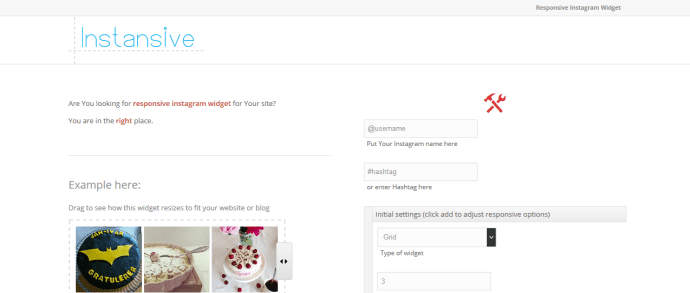
Instansive

Instansive is a widget generator for Instagram that you can use for free or for a fee. Both versions practically have the same features, except for the number of times that the photos refreshes. It only happens once per day with the free version, but is always up to date with the premium version. If you want to do away with the restrictions of this Instagram widget, be ready to make a tiny investment.

instagram widget instansive

Instansive Features

  • Display photos and hashtags in grid, slideshow or column.
  • Customize the number of columns and rows
  • Add a hover effect
  • Show or hide image captions
  • Photos are linked directly to Instagram
  • Offers native support for Drupal and WordPress

For a one-time fee of $5, you can upgrade to the premium version.

Instansive, however, is not perfect compared to other third-party widgets for Instagram, because it has limited features in terms of customization, display, and refresh frequency. Even if you pay the minimal fee, only the photos will be kept up-to-date, but no other features will be added. But look on the bright side, it is responsive.

Intagme

Intagme is pretty simple and straightforward, which can be a bonus if you have to manage plenty of social media accounts and widgets. Its features also get the job done.

instagram widget intagme

Intagme Features

  • Pull photos or hashtags and display them in grid or slideshow
  • Get to customize the layout, thumbnail, size and image padding
  • Edit photos by adding borders and/or background color

On top of all these, Intagme is 100% free, which would probably put all other third-party widgets at the bottom of your list. Before you make a final decision, however, know that Intagme lacks one display feature – column, similar to what you will see on Pinterest. It is not responsive and has limited customization options. Moreover, photos are linked to a page on Intagme.com, instead of directly to Instagram.

Related: How to Add an Instagram Widget in Blogger

SnapWidget

Among Instagram widgets, snap widget is the most popular and is used by more than 100,000 websites daily. It can be used free or for a monthly fee of $6.99.

instagram widget snapwidget

SnapWidget Features

  • Pull photos or hashtags, then display them in grid, board, slideshow, map or scrolling.
  • Thumbnail size and layout can be customized
  • Background color hover effect layout and photo padding can be used to customize photos
  • Show or hide sharing buttons

Features of Premium Version

  • All of the above
  • Create up to 10 widgets
  • Filter photos by username & hashtag
  • Link photos to Instagram or any other page add custom CSS if so desired
  • Has more advanced customization options, such as pagination controls integration of Google Analytics and photo pop-up functionality

For a price of $6.99 per month, this Instagram widget is a worthy investment, especially because the free version is ad supported. This means thumbnails are linked to a SnapWidget page where photos appear alongside ads. An added bonus is that whether free or paid, there is an option available that lets you make the widget responsive for mobile use.

Which Instagram Widget Should You Choose?

Even if only 3 options were presented, making a choice is still not a walk in the park, but at least you don’t need to shuffle through tons of widgets. From the information above, you can make an informed decision as to which Instagram widget to use. Or, you can narrow down your options based on your budget – whether you have one or not, the features you need, and how much customization control you want to have.

You should also think about how an Instagram widget can affect your SEO efforts. If you want it to be SEO friendly as the rest of your website, find out how it was developed or rendered, as some of the platforms used may not be visible to search engines. Consider all the factors above and your work will be easier.