Importance of High Impact Research Publications and How to Search Papers

Daily writing prompt
Describe a phase in life that was difficult to say goodbye to.

High impact research publications are pivotal in advancing knowledge and shaping academic and industry landscapes. They serve as the cornerstone for disseminating breakthroughs, influencing policy decisions, and fostering collaborations across disciplines. Here’s a deeper look into their importance and a guide on how to effectively use the research search tool available on Track2Training:


Importance of High Impact Research Publications

  • Dissemination of Innovative Ideas:
    High impact publications are essential for sharing new methodologies, theories, and experimental results. They reach a broad audience, ensuring that innovative ideas are disseminated throughout the scientific community and beyond.
  • Academic and Professional Recognition:
    Publishing in high impact journals not only adds credibility to a researcher’s work but also enhances their academic reputation. It often plays a crucial role in securing funding, tenure, and professional opportunities.
  • Influence on Policy and Practice:
    Research that garners high impact tends to influence policy-making, industry practices, and future research directions. Its findings are frequently cited, guiding further studies and real-world applications.
  • Global Collaboration and Networking:
    High impact research often acts as a bridge for international collaboration. Researchers from various parts of the world can build on each other’s work, leading to collaborative projects that push the boundaries of knowledge.
  • Quality and Rigor:
    The rigorous peer-review process associated with high impact publications ensures that the research meets high standards of quality, reliability, and relevance. This process helps to validate findings and enhances the overall integrity of the research field.

How to Search Using the Track2Training Research Page

The Track2Training research page is a specialized tool designed to help users locate high-quality research publications efficiently. Here’s how to make the most out of it:

  1. Accessing the Search Interface:
    When you visit the research page, you’ll find a clean and intuitive interface. Typically, there is a prominent search bar that serves as the starting point for your inquiry.
  2. Keyword Search:
    • Input Specific Keywords:
      Begin by entering relevant keywords related to your research topic. Whether you’re interested in “machine learning,” “renewable energy,” or “clinical trials,” the search bar allows you to narrow down the vast repository of research papers.
    • Use Boolean Operators:
      For more precise results, you might combine keywords using Boolean operators (AND, OR, NOT). This helps in filtering out unrelated results and focusing on the core aspects of your research interest.
  3. Advanced Search Filters:
    • Publication Date:
      Narrow your search by specifying a range of publication years to access the most current research or historical perspectives.
    • Journal or Conference Name:
      If you are looking for publications from a particular journal or conference, use the filter options provided.
    • Research Area or Discipline:
      Many research search tools, including this one, allow filtering by specific research domains, which can help in locating niche or interdisciplinary studies.
  4. Reviewing Search Results:
    • Title and Abstract Review:
      Once the search results are displayed, scan through the titles and abstracts. This quick review can help you determine the relevance of each paper before diving into the full text.
    • Citation Information:
      High impact research is often indicated by a high number of citations. Look for citation counts or related metrics if available, as they can provide insights into the influence of the research.
  5. Accessing Full-Text and Additional Resources:
    • Link to Full Papers:
      Many search tools provide direct links to the full-text versions of the papers or to their respective publisher pages.
    • Reference Management:
      Some platforms also offer options to download citations in various formats (like BibTeX or EndNote), which can be very helpful when managing references for your own research.
  6. Staying Updated:
    Regularly revisiting the research page or setting up alerts (if the functionality is available) ensures that you remain updated on the latest high impact research publications in your field.

Final Thoughts

High impact research publications not only validate the credibility and relevance of academic work but also drive progress across multiple sectors. By leveraging specialized search tools like the one offered by Track2Training, researchers can efficiently navigate through vast databases, pinpoint the most influential studies, and build upon existing knowledge to foster further innovation.

This approach not only streamlines the research process but also ensures that the most pertinent and high-quality information is at your fingertips.

Registration for 8th edition of Pariksha Pe Charcha Concludes with a Record-Breaking over 3.5 Crore Applications

Daily writing prompt
If you could un-invent something, what would it be?

Registration for the flagship initiative of Prime Minister Shri Narendra Modi, Pariksha Pe Charcha (PPC), concluded with a record-breaking over 3.5 crore participation from students, teachers and parents. This is a nationwide movement to transform exam-related stress into a festival of learning and celebration. The 8th edition of PPC 2025 has set an unprecedented milestone in terms of registrations from students, teachers, and parents across India and abroad. This remarkable response underscores the growing resonance of the program as a true Jan Andolan.

The online registration for PPC 2025 was hosted on the MyGov.in portal, from 14 December 2024 to 14 January 2025. The program’s immense popularity highlights its success in addressing the mental well-being of students and fostering a positive outlook towards examinations.

The interactive event, organized annually by the Department of School Education and Literacy under the Ministry of Education, has become a much-anticipated celebration of education. The 7th edition of PPC in 2024 was held at Bharat Mandapam, Pragati Maidan, New Delhi, in a town hall format and received widespread acclaim.

In line with the spirit of PPC, a series of engaging school-level activities commenced on 12 January 2025 (National Youth Day) and will continue till 23 January 2025 (Netaji Subhash Chandra Bose Jayanti). The activities aim to foster holistic development and inspire students to celebrate examinations as an Utsav. These activities include:

      •     Indigenous games sessions

      •     Marathon runs

      •     Meme competitions

      •     Nukkad Natak

      •     Yoga-cum-meditation sessions

      •     Poster-making competitions

      •     Inspirational film screenings

      •     Mental health workshops and counselling sessions

      •     Performances by CBSE, KVS, and NVS students

Through these activities, PPC 2025 reinforces its message of resilience, positivity, and joy in learning, ensuring that education is celebrated as a journey rather than a pressure-driven task.

*****

Call for Guest Posts on Eduindex.org – High Impact News Portal

Daily writing prompt
What’s your favorite cartoon?

Call for Guest Posts on Eduindex.org – High Impact News Portal

Eduindex.org, a prominent high-impact news portal, is now accepting guest post submissions from passionate writers, thought leaders, researchers, and professionals from diverse fields. The portal, which covers a wide array of topics ranging from education, technology, business, health, to lifestyle and current affairs, offers an excellent platform to share your insights, research, and expertise with a global audience.

This article will delve into the call for guest posts on Eduindex.org, the high-impact domains it focuses on, the benefits of contributing to this platform, and the submission process to ensure that your guest post meets the site’s editorial standards.


About Eduindex.org

Eduindex.org is a renowned news portal that serves as a comprehensive platform for content related to education, technology, business, health, and lifestyle, along with up-to-date global news and trends. Eduindex has gained a reputation for promoting high-quality content that adds value to readers and fosters intellectual discourse.

By accepting guest posts, Eduindex seeks to expand its pool of content by inviting experts, influencers, and professional writers to contribute original articles. This initiative is aimed at enriching the platform with diverse perspectives, thought-provoking ideas, and useful information that resonates with an audience of students, academics, professionals, and general readers.


Why Write for Eduindex.org?

  1. Global Reach and Visibility: Eduindex.org attracts readers from all over the world, including students, educators, researchers, professionals, and industry leaders. Contributing a guest post helps you reach a wider, global audience who are actively interested in the topics you cover.
  2. Engagement with a Diverse Audience: The platform engages with a diverse demographic, which means your content can have a broad impact across various sectors such as education, business, technology, healthcare, and more. This is an excellent opportunity to engage with people from different backgrounds and industries.
  3. Enhance Your Professional Credibility: Publishing on Eduindex.org provides you with an opportunity to showcase your expertise. It can help enhance your professional reputation and position you as a thought leader in your field. It’s a great addition to your portfolio, whether you’re an academic, an entrepreneur, or a professional writer.
  4. Networking and Collaboration Opportunities: By writing for Eduindex.org, you open doors for potential collaborations, networking opportunities, and partnerships with like-minded professionals in your field. Being featured on a high-traffic platform can increase your exposure and facilitate valuable connections.
  5. Improve Your SEO and Online Presence: Eduindex.org enjoys a strong online presence and its high domain authority. Publishing a guest post with a backlink to your website or blog can significantly boost your SEO rankings, driving more traffic to your own content and improving your online visibility.
  6. Contribute to Knowledge Sharing: Eduindex.org is committed to knowledge sharing and intellectual growth. By contributing a guest post, you are part of an effort to disseminate important ideas, research findings, trends, and news that can educate and inspire readers worldwide.

High-Impact Domains for Guest Posts

Eduindex.org covers a broad range of high-impact topics, and guest posts are invited across various fields. Below are some of the primary domains where you can contribute:

  1. Education and Learning
    • Innovations in Education
    • E-learning and Digital Education
    • Educational Policies and Reforms
    • Classroom Technologies and Tools
    • Higher Education Trends
    • Learning Disabilities and Special Education
    • Online Learning Platforms and MOOCs
    • Student Well-being and Mental Health
  2. Technology and Innovation
    • Artificial Intelligence (AI) and Machine Learning
    • Blockchain and Cryptocurrency
    • Internet of Things (IoT)
    • Cybersecurity and Data Protection
    • Cloud Computing and Big Data
    • Virtual Reality (VR) and Augmented Reality (AR)
    • Emerging Tech Trends and Innovations
    • Tech Startups and Entrepreneurship
  3. Business and Entrepreneurship
    • Business Strategy and Leadership
    • Startup Culture and Growth
    • Entrepreneurship in the Digital Age
    • E-commerce and Digital Marketing
    • Corporate Social Responsibility (CSR)
    • Global Business Trends
    • Financial Planning and Investment
    • Leadership and Organizational Behavior
  4. Health and Wellness
    • Healthcare Innovations and Research
    • Mental Health Awareness
    • Fitness and Nutrition Trends
    • Medical Technologies and Breakthroughs
    • Chronic Diseases and Treatments
    • Preventive Healthcare and Public Health
    • Healthcare Policies and Administration
    • Alternative Medicine and Holistic Healing
  5. Lifestyle and Society
    • Personal Development and Growth
    • Productivity and Time Management
    • Social Media and Digital Influence
    • Fashion and Beauty Trends
    • Travel and Adventure
    • Family and Parenting
    • Sustainable Living and Environment
    • Work-Life Balance
  6. Current Affairs and Global News
    • Political Analysis and Global Relations
    • Economic News and Market Trends
    • Social Justice and Human Rights
    • Climate Change and Environmental Issues
    • Technological Advancements in Society
    • Global Crises and Natural Disasters
    • Cultural Awareness and Diversity

Guest Post Submission Guidelines

To ensure that your guest post is considered for publication on Eduindex.org, it is crucial to follow their submission guidelines:

  1. Relevance to Eduindex.org’s Audience: Your guest post must be relevant to the topics covered by Eduindex.org, including education, business, technology, health, lifestyle, and global news. It should provide useful, insightful, or thought-provoking content that aligns with the interests of the portal’s readership.
  2. Original Content: Eduindex.org only accepts original and unique content. Your article should not have been published elsewhere, including on blogs, other websites, or social media platforms. Plagiarism is strictly prohibited.
  3. Length and Structure: Guest posts should typically be between 800 to 1,500 words. Your post should be well-structured, with clear headings, subheadings, and paragraphs to enhance readability. Use a professional tone while ensuring the content is engaging and easy to understand.
  4. Quality and Research: Articles should be well-researched, fact-based, and data-driven where applicable. Please include credible sources and references to support your claims, especially for topics that involve scientific research, statistics, or specific case studies.
  5. SEO Optimization: To maximize the reach of your post, please ensure that the article is SEO-optimized. Use relevant keywords that are aligned with your topic, and ensure that the post has a clear focus and is tailored to meet the needs of search engine algorithms.
  6. Grammar and Language: Your post should be written in proper English, free from grammatical errors and typos. Clear, concise language is preferred, and it’s essential that the content is easy to understand by a diverse audience.
  7. Author Bio and Links: Along with your article, please include a short author bio (about 50-100 words) that highlights your expertise, professional background, and any relevant accomplishments. You can also include one backlink to your website, blog, or social media profiles.
  8. Images and Visual Content: You can include relevant images, graphs, or infographics to complement your content. Ensure that any visual content used is of high quality and properly attributed. The images should be directly related to the topic of the article.
  9. Submission Process: To submit your guest post to Eduindex.org, follow the submission instructions on their website. Usually, you will need to complete a submission form and upload your article along with the author bio. After submission, your post will go through an editorial review process, and you will be notified if it has been accepted or requires revisions.

How to Submit a Guest Post

  1. Visit Eduindex.org and navigate to the “Guest Post Submission” section.
  2. Fill out the submission form with details about your article and your professional background.
  3. Upload your guest post along with any relevant images or supporting materials.
  4. Include a short author bio and links to your social media or website.
  5. Submit your post for editorial review.

Conclusion

Eduindex.org is a high-impact news portal that offers a unique opportunity for contributors to share their expertise, research, and insights with a global audience. Whether you are an academic, business professional, healthcare expert, or technology enthusiast, Eduindex welcomes your contributions on a wide range of important topics.

By submitting a guest post, you not only enhance your professional reputation but also contribute to the growth of intellectual discourse and knowledge sharing. Don’t miss the chance to be a part of this influential platform and make a lasting impact in your field.

Collaborator.pro Platform to Streamline Digital Marketing, SEO, and public relations

Key Features and Benefits:

  1. Guest Posting and Backlink Building:
    • Advertisers: Purchase guest posts on niche-specific websites to improve SEO metrics, enhance domain authority (DA), and drive targeted traffic. Collaborator offers customizable filters to help select the most relevant sites based on factors like region, topic, and price.
    • Publishers: Monetize their websites by posting articles with backlinks or selling sponsored posts. Publishers retain control over the content they accept, ensuring alignment with their audience.
  2. Guest Posting and Backlink Building:
    • Advertisers: Purchase guest posts on niche-specific websites to improve SEO metrics, enhance domain authority (DA), and drive targeted traffic. Collaborator offers customizable filters to help select the most relevant sites based on factors like region, topic, and price.
    • Publishers: Monetize their websites by posting articles with backlinks or selling sponsored posts. Publishers retain control over the content they accept, ensuring alignment with their audience.
  3. Monetization Opportunities:
    • Website and Telegram channel owners can earn by offering backlink placements or advertisements. Collaborator ensures transparency and security in transactions, with the ability to set custom prices and communicate directly with clients.
  4. User-Friendly Interface:
    • The platform simplifies the guest posting process, offering tools for seamless collaboration between advertisers and publishers, from selecting sites to finalizing agreements.
  5. Global Reach:
    • Initially focused on CIS countries, Collaborator.pro has expanded its services globally, providing access to thousands of vetted online platforms and Telegram channels worldwide.
  6. Safe and Transparent Transactions:
    • The platform emphasizes secure and ethical link-building practices, avoiding the risks of penalties from search engines by focusing on high-quality, natural links.
  7. Community and Feedback:
    • Users can provide feedback and reviews, fostering trust and accountability within the Collaborator ecosystem.

Use Cases:

  • For Advertisers: Boost SEO rankings, build brand authority, and increase visibility through strategic guest posting and digital PR campaigns.
  • For Publishers: Generate revenue by selling links or hosting sponsored posts without compromising site quality or reputation.
  • For Agencies: Provide comprehensive SEO services, including guest posting and link promotion, to clients.

Collaborator.pro is a versatile tool for those aiming to enhance their digital presence and SEO strategies efficiently while maintaining quality and relevance in link-building efforts.

Collaborator.pro is a dynamic platform designed to streamline digital marketing, SEO, and public relations efforts through high-quality guest posting and link-building opportunities. It serves as a digital PR marketplace that connects advertisers, publishers, and SEO specialists, enabling effective content placement, monetization, and brand promotion.

Key Features and Benefits:

  1. Guest Posting and Backlink Building:
    • Advertisers: Purchase guest posts on niche-specific websites to improve SEO metrics, enhance domain authority (DA), and drive targeted traffic. Collaborator offers customizable filters to help select the most relevant sites based on factors like region, topic, and price.
    • Publishers: Monetize their websites by posting articles with backlinks or selling sponsored posts. Publishers retain control over the content they accept, ensuring alignment with their audience.
  2. Monetization Opportunities:
    • Website and Telegram channel owners can earn by offering backlink placements or advertisements. Collaborator ensures transparency and security in transactions, with the ability to set custom prices and communicate directly with clients.
  3. User-Friendly Interface:
    • The platform simplifies the guest posting process, offering tools for seamless collaboration between advertisers and publishers, from selecting sites to finalizing agreements.
  4. Global Reach:
    • Initially focused on CIS countries, Collaborator.pro has expanded its services globally, providing access to thousands of vetted online platforms and Telegram channels worldwide.
  5. Safe and Transparent Transactions:
    • The platform emphasizes secure and ethical link-building practices, avoiding the risks of penalties from search engines by focusing on high-quality, natural links.
  6. Community and Feedback:
    • Users can provide feedback and reviews, fostering trust and accountability within the Collaborator ecosystem.

Use Cases:

  • For Advertisers: Boost SEO rankings, build brand authority, and increase visibility through strategic guest posting and digital PR campaigns.
  • For Publishers: Generate revenue by selling links or hosting sponsored posts without compromising site quality or reputation.
  • For Agencies: Provide comprehensive SEO services, including guest posting and link promotion, to clients.

Collaborator.pro is a versatile tool for those aiming to enhance their digital presence and SEO strategies efficiently while maintaining quality and relevance in link-building efforts.

Loganix: A Comprehensive Overview

Daily writing prompt
What are your feelings about eating meat?

Loganix is a prominent digital marketing agency that specializes in providing a wide range of SEO (Search Engine Optimization) and link-building services tailored to help businesses improve their online visibility. Since its inception in 2010, Loganix has established itself as a trusted name in the digital marketing industry, catering to agencies, businesses, and individuals looking for high-quality, scalable, and results-driven solutions.

Key Services Provided by Loganix

  1. Link Building Services
    Loganix offers premium link-building services that prioritize quality over quantity. These include:
    • Authority Links: Secure backlinks from high-authority websites, enhancing domain credibility.
    • Guest Posting: Placement of well-researched, valuable articles on reputable websites, driving referral traffic and boosting SEO.
    • Niche Edits: Adding contextual links to existing content on relevant websites, ensuring seamless integration and relevance.
  2. Local SEO Services
    Loganix provides robust local SEO strategies to help businesses dominate local search results. This includes:
    • Citation Building and Cleanup: Creating and maintaining accurate business listings across directories and correcting outdated or duplicate information.
    • Google Business Profile Optimization: Enhancing Google My Business profiles for better visibility in local map packs and search results.
    • Local Link Building: Targeting region-specific backlinks to increase local relevancy and authority.
  3. SEO Audits and Content Marketing
    Loganix helps businesses identify gaps in their SEO strategies through detailed audits. They also specialize in content creation and optimization to improve rankings and engagement.
    • SEO Audits: Comprehensive analysis of a website’s on-page, off-page, and technical SEO performance.
    • Content Creation: Delivering high-quality, SEO-optimized content tailored to target keywords and audience intent.
  4. White Label Services for Agencies
    Loganix serves as a white-label partner for digital marketing agencies, enabling them to offer top-tier SEO and link-building services under their branding. This allows agencies to scale their offerings without overburdening internal resources.

What Sets Loganix Apart?

  1. Commitment to Quality
    Loganix emphasizes building relationships with reputable sites and delivering high-value links, ensuring long-term SEO gains rather than quick, unsustainable fixes.
  2. Scalability and Customization
    The agency provides scalable solutions, making it a preferred choice for small businesses and large enterprises alike. Services are customizable to fit the specific needs and goals of each client.
  3. Transparent Reporting
    Loganix ensures complete transparency in its processes, providing clients with detailed reports outlining the progress and results of campaigns.
  4. Experienced Team
    With over a decade of experience, Loganix’s team is composed of seasoned SEO experts, content creators, and digital marketers dedicated to delivering measurable results.
  5. White-Hat Practices
    The agency strictly adheres to ethical SEO practices, ensuring compliance with Google’s guidelines and protecting clients from penalties.

Why Choose Loganix?

  • Proven Track Record: Loganix has worked with businesses across various industries, demonstrating consistent success in improving search rankings and online presence.
  • Tailored Strategies: Every business is unique, and Loganix crafts strategies that align with individual business objectives.
  • Cost-Effectiveness: Loganix delivers value for money by focusing on strategies that drive sustainable growth.

Industries Served

Loganix caters to a diverse range of industries, including:

  • E-commerce
  • Healthcare
  • Legal Services
  • Real Estate
  • Technology Startups
  • Digital Marketing Agencies

Conclusion

Loganix stands out as a reliable partner for businesses looking to enhance their digital footprint. With its focus on ethical practices, scalable solutions, and transparent processes, the agency has earned a strong reputation in the SEO and digital marketing space. Whether you’re a business owner seeking to dominate local search results or an agency looking to expand your service offerings, Loganix is well-equipped to meet your needs and deliver tangible results.

For more information, visit Loganix’s official website.

How to Promote book using Guest Posting

Guest posting can be a fantastic way to promote your book! Here’s a quick guide to help you get started:

Photo by Yaroslav Shuraev on Pexels.com
  1. Identify Relevant Blogs: Look for blogs in your book’s niche or genre. Make sure they have an engaged audience that would be interested in your book.
  2. Build Relationships: Before reaching out, engage with the blog by commenting on their posts and sharing their content. This helps establish a connection and makes your pitch more likely to be accepted.
  3. Craft a Compelling Pitch: When reaching out to the blog owner or editor, be concise and highlight what makes your book unique. Explain why their audience would be interested and how your guest post can provide value.
  4. Propose Topics: Offer a few potential guest post topics that align with the blog’s content. This shows you’ve done your research and increases the chances of your pitch being accepted.
  5. Create Quality Content: Once your pitch is accepted, write a high-quality guest post. Make it informative, engaging, and relevant to the blog’s audience. Include a byline with a link to your book or author website.
  6. Optimize Your Bio: Craft a compelling author bio that not only introduces you but also encourages readers to check out your book. Include a call-to-action and a link to where they can purchase it.
  7. Promote Your Guest Post: Once the post is live, promote it on your own social media channels, newsletter, and any other platforms you’re active on. Encourage your network to visit the blog and engage with your content.
  8. Follow Up: Stay engaged with the blog’s audience by responding to comments on your guest post. This can help you build connections and attract more readers to your book.

Remember, consistency is key. Keep guest posting on relevant blogs to expand your reach and promote your book effectively. Good luck!

Benefits of Guest Posting

 Guest posting, or contributing content to other websites or blogs, offers a range of benefits for both the guest author and the hosting site. Here are several key advantages:


  1. Expanded Reach and Exposure: Guest posting allows authors to tap into new audiences and gain exposure to readers who might not have come across their content otherwise. It helps in expanding the author’s reach and visibility within their niche.

  2. Building Authority and Credibility: Publishing guest posts on reputable sites can bolster an author’s credibility and authority within their field. It showcases their expertise and knowledge to a wider audience, establishing them as a thought leader.

  3. Quality Backlinks and SEO: Guest posting often includes a bio or author section with a link back to the author’s website or blog. These backlinks from authoritative sites can significantly impact the author’s website SEO, improving its search engine rankings.

  4. Networking and Relationship Building: Collaborating with other websites builds relationships within the industry. It allows authors to connect with other professionals, influencers, and potential partners or collaborators.

  5. Diversification of Content and Perspectives: Hosting sites benefit from guest posts by offering diverse content and viewpoints to their audience. It enriches their platform, providing fresh insights and expertise from guest authors.

  6. Increased Engagement and Traffic: Engaging and valuable guest posts often attract more readership and engagement, driving traffic to both the hosting site and the author’s website.

  7. Learning and Exposure to New Audiences: For guest authors, contributing to different platforms exposes them to new perspectives, ideas, and audiences, facilitating continuous learning and growth.

  8. Brand Exposure and Recognition: Guest posting can contribute to brand exposure for both the author and the hosting site. It helps in creating awareness about the author’s brand or expertise while adding value to the hosting site’s content offerings.

  9. Content Sharing and Social Proof: Engaging guest posts are often shared across social media platforms, increasing visibility and providing social proof of expertise and value.

  10. Mutual Benefits for Hosting Site and Author: Ultimately, both the hosting site and the guest author benefit from the exchange of quality content, audience expansion, and increased engagement.

Guest posting, when done strategically and with high-quality content, presents a win-win situation for both the contributor and the hosting site, fostering mutual growth and benefits.

The Basics Of Google Analytics For Beginners

  If you’re a business owner or a member of a marketing team, you probably know that businesses depend upon data. Tracking trends and patterns is what allows you to get ahead of the dips in the market, and make informed decisions on the direction of your company.

Those same rules that apply to business apply to owning a website. In order to deliver the best possible experience and ensure that customers from around the world are able to access your site, you need to understand from where traffic is coming from and how to leverage that information to your benefit.

Setting Your Site Up With A Tracking ID

Google Analytics won’t start collecting data from your website until you’ve implemented a tracking code into your website’s files. The tracking code is basically a block of JavaScript code that will collect data about the html that visitor used to get to your site, any cookies that the visitors has collected during their browsing history, and information about what type of browser the person is using.

The importance of this information provides you with information on how to conform your web-site to the target audience, especially in terms of design. If customers are visiting your website from an eCommerce directory, you may want to modify those links so that the customers arrive at a landing page instead of a home page. If more customers are using smartphones and tablets instead of laptop browsers, you may have to redesign the site so that it is responsive and can be easily read from a small screen.

google analytics tracking code

In order to track each individual page on the website, you will need to add a tracking code before the code of your template. If you are using a site like WordPress or Joomla! that depends on templates, you may just have to add the tracking code on the main HTML index file. Keep in mind that it can take upwards of 24-hours for Google to begin collecting information and importing that data to your dashboard, so don’t expect to see measurable results right away.

Tutorial: How to Add Google Analytics to Blogger

Researching the Data

Once you insert the code into your site, it will begin tracking data from anyone who visits your site. This data is then sent back to the Google servers and stored in your Google Analytics profile. From there, you can determine what type of information that you want to look at.

The two features of Google Analytics that are often most useful to new users is the ability to track where customers are coming from, and the ability to see keywords that have been effective in drawing in audiences.

google analytics overview

Traffic Origins

Open up your Google Analytics dashboard and click on ‘Acquisition‘. You should see a few options, but you want to pull ‘All Referrals‘ so that you can the entire list of visitors.

Next to the referral path will show a few links with a number of how many people visited your site from that link. From here you can click on the link and find out the reason for the traffic. Maybe someone has written a review on the service, you can check to see if the advertisement campaign you are operating is producing results.

google analytics all referrals

Keywords

Within the same ‘Acquisition‘ directory is another option called ‘Search Engine Optimization‘. Click on this link and then click on ‘Queries‘ to look up a list of keywords being used to describe your site. The dashboard will display an overview of up to 1,000 words or phrases used on Google that brought new visitors to your site. You can use this information to modify your posts and producing content to increase the results of certain key phrases that you feel would benefit your customer outreach.

search engine optimization, ga queries

Demographics

Underneath the audience tab, you can also track demographics. This little option will allow you to view the age, gender, and interests of individual users and segments of your visiting population. Say for example you run a senior care facility for the retired and want to put together a A/B split test to determine which advertising campaign works best. After adding the campaign to a landing page or section of your site, you can look back and find out if retired citizens are the ones responding to your ads, or if you are just bringing in traffic from younger generations who may not be interested in your services.

google analytics, georgraphical summary

Custom Campaign Tagging

Custom campaign tagging is more of an advanced feature, but once you get used to the Google Analytics interface, you can use this to separate your campaigns and easily filter through data. Maybe you just want to find out who is coming to your site from your email newsletters, and not from the general site. Google Analytics will allow you to post special links to your content on those channels of communication and then view these results under the acquisition tab and then campaigns.

Determining What Works, and What Doesn’t

Using the tools that Google Analytics provides at your disposal allows you to really determine what type of experience you want to provide your customers. Within the first month of use, if start to see trends or patterns in data that you feel you feel you can improve upon, you can use this information as a guide to edit your sites design and layout.

Getting used to the program might seem overwhelming at first, but once you jump right in and start playing around all the features, you’ll get the hang of it in no time. Google Analytics really is an important tool that every website owner should have.

7 Search Engine Optimization Tips For Bloggers

  SEO, as you might have already know, is an acronym for search engine optimization. In the simplest of words, it’s the way search engines like Google.com, Yahoo.com, Bing.com and others present your page in users’ search results on their sites.

Cool, how do they that?

Well, they do that via sophisticated software tools, called spiders. Consider the whole internet as an empty room, with air particles as websites. Now sneak a spider into that room. Each tiny step that this spider would take now is essentially crawling a website (as the room is dark and full of websites). This is how search engines crawl through the web picking up site after site, studying them and ranking them. This ranking is important, really important. A higher ranked website by Google will always be on the first page of Google’s search results for a related query compared to a lower ranked one.

So, in order to get ranked higher, you and I need SEO. SEO is like black pepper without which fried egg might not taste ‘that’ tastier. In simple words, in order for search engines to find your site and rank it higher than others in your field, you need to optimize it. Let’s see how with these 7 simple tips.

Ways to SEO Optimize your Blog

Before starting with our 7 simple tips for a quality SEO, it’s important to broadly classify those tips into two basic areas, on the basis of origin:

On-page Optimization

Refers to optimization of your actual web content including your HTML code, your text, as well as graphic content.

Off-page optimization

Off-page optimization, however, deals with things like backlinks (hyperlinks pointing to you site from other websites, apps and networks).

1. Create SEO Friendly Blog Post Titles

Post titles are important for SEO. They really are since they are deal makers or breakers. Whenever you write something, make sure you give proper attention to the post’s title. Make your titles simple, intriguing, descriptive and gullible so that people may know what is this all about and what to expect. An even better approach is to wear searchers shoes while giving a title and think how would you Google it if you were looking for content like this.

google search results, seo titleAlso, don’t forget to include keywords in your title and keep it under 70 characters (or search engines would crop it before looking).

2. Improve the quality of your content

If you think ‘content’ isn’t important for SEO, think again! Your content is the most important part of your site. While writing, don’t copy-paste from elsewhere, don’t stuff it with keywords alone, don’t bombard it with images and multimedia files and don’t write any lesser than 300 words. These all would affect your ratings quite poorly.

So, write original, use keywords in scenarios instead of straying them around (like I didn’t use SEO here, SEO there in every next line), use images where they suffice and make sure you name them properly to appear in image search results, i.e. an image with the “img009.jpg” name would never appear in the image search results but “tips_to_success.jpg” would. The best would be to use text content and wrap them proper in HTML tags like

etc. (search engines likes content this way). Also, make sure your blog post’s length is somewhere between 300-500 words – crossing over is fine but lesser isn’t.

seo title headings

3. Keywords are keys

Keywords are terms that others may use to search for your content. While keywords are important for SEO, don’t go on and stuff your site with keywords. This would make your content appear like a spam to spiders, who would neglect it henceforth.

Ideal is that once you have chosen your title (and included your keyword in it, as I have added keyword SEO in title above), use it in page URL, in your starting and ending paragraphs, as well as in article body where required without sounding awkward. Additionally, you may link it using anchor text to relevant resources in and out of site.

Adding keyword in the post URL using Custom Permalink

4. Meta-tags are important, but not ‘that’ much

If we had been living in early part of 21st century, meta tags might have done all the SEO for your site. Unluckily, we aren’t. Google and other search engines have long left using meta-tags for finding site information. Hence, if someone tells you meta-tagging is all you need for your sites SEO, tell them it isn’t.

Nevertheless, it’s important that you use your keywords in your meta-data. Some themes already do that for you, if they don’t (you can check that using page source or using view source code from browser), don’t sweat. You can use 3rd party plugins like All in One SEO Pack and Scribe.

5. Socialize!

Make others talk about your site and share your content on social media sites or their blogs. It gets even better if somehow sites with high ratings link back to your site. This makes spiders think that you are someone important that everyone these days is talking about, resulting in enhancing your ratings dramatically.

Guest posting is another good approach for that. Comment on other sites, make friends with bloggers (best in business) and make them comment at yours. These tiny little things do matter a lot, resulting in enhanced SEO of your site.

6. Link in and Link-Out

Hyperlinks or Links are important from SEO perspective. You can use them to:

Link out to other sites, networks and posts, or even to your previous posts (also called inbound or backlinks) using anchor element with keyword.

anchor element with keyword

Or even better, make others to link in to you, via sharing your content on their sites or social media networks.

As mentioned, an even outstanding strategy for building links is guest posting.

7. Write Often

Sites with new content every day, or twice thrice a week have still far better ratings than those who post every fortnight. A better incoming content frequency makes spider come to your site regularly, resulting in better ratings and enhanced SEO.

Are we done then? Well, trust me – your sites rating is in your hands, not in Google or Yahoo. SEO is just about doing things neatly and in a sophisticated manner. Walk your site these 7 steps for a quality SEO and you will witness the difference yourself at Google, if no place else.

Remember, code clean, write original, socialize… this is what SEO is all about!

How To Optimize Images For Better Search Engine Rankings

  When search engines start indexing the pages on your site, they don’t just focus on the writing. Web crawlers employed by services like Google and Bing shuffle through your site’s structural code looking for any relevant information that they might offer to their customers. Some of the information includes things like backlinks, tags and even images.

Images make up a big part of any website. They help to excite the visual senses of readers and offer a little extra entertainment value. What most blog owners don’t realize is that all of the photos that they upload to their site aren’t confined to their site alone. Crawlers make sure that these images also show up within their respective search engines sites.

Image searches can have the effect of drawing in large numbers of new readers that were just looking through content in Google images. You can benefit from this traffic and increase your average subscriber by practicing image optimization.

seo image optimization

Image Optimization Tip : Alt Tags & File Names

Visitors may love images, but computers don’t. Computers are designed to do what you tell them without violating any of the parameters. When web crawlers come across images on a website, they really don’t know what to do with it because they are made to collect information, not interpret it. The solution to this problem is to optimize images and appropriately label your alt tags so that they display the correct content when someone goes to look for it.

For example, let’s say you upload a picture of your dog, and label the “alt” tag by the dog’s name, ‘Frank’. The web crawler is going to read the alt tag without ever realizing it’s a picture of a dog; therefore, the crawler will come to the conclusion that it needs to display the image when someone run a search for ‘Frank’.

The minor word choice mistakes may not affect the operations of your website, or how your image is displayed, but it will affect the search results of others and the traffic that comes into your website. Whereas you may have been able to attract the dog lovers in the world using image optimization of your dog tagged ‘dog’, you are now drawing in crowds searching for their uncle “Frank”.

To include the alt tag, simply add alt=”this is your alt text” to your image tag. Here’s an example:

<img src="pug-dog.jpg" alt=”frank dog” />

But you don’t have to touch the html code of the image. Once the picture is uploaded, click on it and you will see the “Properties” setting. Add the alt text inside the box and hit OK:

image alt tag

This goes the same for file names on a website. You need to optimize images and file names on everything that you decide to save to your website directory so that this information can be appropriately indexed and be used as a search term. You could name the file of your dog Frank, “pug-dog.jpg”, which would encourage the search engine to add Frank into searches being performed with the phrase ‘pug dog’. Alt tags and file names play an important interpretation role between you and the machine that makes your blog possible.

Image Optimization Tip : Add A Caption

After uploading your images, you should always add a caption to the image, so that average browser understands what they’re looking at. This gives your website a more professional appearance and will help to keep people on your page.

Not everyone that comes across your picture using a Google Image search is looking for your blog. Maybe they just want to download the image, and that’s all you’ll ever get from them. The important thing is that they found your photo relevant to their search, and decided to navigate to your site in order to save it for their own use.

The longer those users stay on the site, the better it looks for you because it plays a role in the “bounce rate”. Bounce rate refers to when someone clicks on a link, realizes it’s not what they’re looking for, and then immediately goes back to the search engine. If you can reduce the number of times that this happens by providing captions and intriguing content that will make people want to stick around, your SEO ranking will improve.

blogger image caption
Image caption and SEO

Image Optimization Tip : File Size

Improving your bounce rate can be tough because the attention span of the everyday Internet user is incredibly short. It may be as short as 8 seconds. High bounce back rates and slow loading sites can be the death of most blogs because no one wants to wait for the content to load. By the time your website finally loads with the content that you need, they could have easily visited two or more sites and found what they need from someone who was better prepared to handle their traffic.

Optimize images so that you are able to keep the file size as small as possible while retaining the quality of the photo. Images taken from DSLR camera – although they may look great – can be up to 1.4 MB in size if you take them directly off your camera and upload them on your blog. This type of space is massive for any everyday blog, and will hurt your SEO ratings.

Use Photoshop or one of the many online services like Google Picasa to rescale your images or reduce the file size. One service that can perform this ability for free and do a great job is Kraken. When you access Kraken site, it will allow you to upload the picture and download the new image optimization versions to use on your Blogger site.

Putting It All Together

At the end of the day, the quality of your site and overall SEO ranking isn’t just about what you have to say. It’s the entire package of what you have to offer. Optimize images every chance you get and use the strategies discussed above. Now that you know that you might have been neglecting images all along, you can make necessary adjustments and start to see even better results from all your hard work.

5 Easy Ways To Improve The SEO Of A Blog & Boost Traffic

  5 easy ways to improve the SEO of a blog

A blogger needs to know at least the basics of SEO. For this, you don’t need to be an SEO expert but you need to know the minimum so that your posts are well indexed in the search engines.

The phrase “Content is King” is one of the widest spread Internet memes being used by so many bloggers with the idea that you should focus on having quality content, while the rest isn’t that important. This is not true. Quality content is essential, but bloggers shouldn’t focus only on this matter. Besides producing quality content, your text needs to be optimized for the search engines.

improve seo, seo tips, boost traffic
Boost traffic & increase SERP visibility with SEO

5 Easy Ways to Improve the SEO of a Blog

Now, let’s get to know the basics that any blogger needs to learn about SEO, as well as other simple SEO techniques. Below are 5 easy tips to improve the SEO of your blog:

1. Define the keyword

When you write a post, it is recommended to choose the right SEO keyword for your text. Your purpose is to make this keyword – or term – to be searched on Google, and then get your post among the top. For this, you need to use this keyword a few times in the text.

For example, here the keyword could be SEO, but this term is too common and I could hardly get in the top for this search. Then, I’ll work with a phrase or a long tail keyword, so that this post will rank for the term “easy ways to improve the SEO of a blog“. I will use this keyword a few times, but without overdoing it.

2. Use the keyword in the post title

Now that I have defined the keyword, I will use it in the post title. This step is very important, and certainly will help you to get a better SEO rank. For instance, the post title contains the easy ways to improve the SEO of a blog keyword, along with other words to form an attractive and optimized title for SEO.

3. Use the keyword in H2 tags

You must also use heading tags (h2, h3) in your posts. Here, we added the “easy ways to improve the SEO of a blog” keyword in a H2 heading. Do this always as it will help you rank well in the search results. If you don’t know or don’t understand what are the heading tags, I would suggest to do a further research on this topic.

4. Use the keyword in the text

Include the chosen keywords throughout the text. Especially in the first paragraph (please note that I have repeated the title in italics in the first sentence). But be careful when doing this, there is a maximum and minimum limit for that. A good keyword density is between 1.5% to 4.5% for best results. Less than that will have no effect and more can alert the search engines and your text might be considered spam.

5. Publish Posts with 300 words or more

Posts under 300 words have little chance to be among the top results in search engines. Of course, you will be able to rank for multiple keywords that are less popular with less than 300 words, but for the most competitive keywords that have the potential to bring a greater number of visits, it will be nearly impossible.

Thus, it is recommended to write posts with more than 300 words. It’s not hard when you really understand the topic you’re talking about.

Conclusion

As you can see, with some simple SEO techniques you can improve the traffic coming to your blog from the search engines. I hope you enjoyed these 5 easy ways to improve the SEO of a blog!

Blogger Vs WordPress: Which Is Better For You?

  There are two big-name services in the world of blogging: Blogger vs WordPress. No matter where you go on the internet looking for advice, these two names are nearly impossible to avoid because they play such an important role within the online content community.

If you’re just starting out a new blog, or making some major changes to your current layout, you’ll most likely be faced with the decision to choose between Blogger vs WordPress. Both are stellar services that are going to make your life as a blogger much easier, but ultimately, your decision must come down to one. So don’t cross over, let’s walk this path together and ensure that you don’t get lost in the wonder world of web, looking for answers.

blogger vs wordpress

Before we start!

WordPress as you might have noticed, comes in two different flavors, wordpress.org and wordpress.com. Seemingly same, but practically, not. Like in Blogger vs WordPress, hosting at wordpress.com is like renting a corporate apartment where the corporate is responsible for maintenance and facilitation of your place. While hosting at wordpress.org is similar to buying your own apartment, where you are responsible for your place’s security, maintenance and many others.

So, wherever in this post you see the word ‘WordPress’; know that it refers to wordpress.org.

User-Friendliness

WordPress is a clear front-runner in the blogging and web design community in terms of how many people actually use the platform. The founder of WordPress, Matt Mullenweg, provided eye-opening statistics that around 18.9% of the entire Internet runs on WordPress. Compared to a 2012 study done by Blogging.org, of all the actual blogs on the Internet, WordPress makes up 43%, Blogger 35%, and the remaining blogs are Tumblr or other less known services.

However, just because something is used more often than another, it doesn’t mean it’s easier to use. The problem with WordPress is that it wasn’t designed for beginners who just want to take up blogging as a side hobby. In order to set up your own WordPress blog, you have to have some previous knowledge of things like hosting, bandwidth, HTML and SEO practices. There are WordPress services out there that will help set up your site and get you online, but WordPress itself comes as a set of files that you are expected to download and configure to your own site.

Some hosting companies have made the idea of using WordPress a little bit easier with things like one-click downloads; but it’s still a pretty steep learning curve for new bloggers to overcome. You also have to deal with paying for the costs of hosting your site and acquiring the domain name. If you opt to use one of the many WordPress services instead of setting it up yourself, you’ll be stuck with a URL such as ‘yourwebsite.wordpress.com’, which takes away from the professional image you may be trying to portray.

Blogger is entirely based on Google and makes setting up a blog a breeze. With Blogger vs WordPress all you need to get started is to sign up for the service using your Google account, or make a new account like you would if you were setting up an email account. From there, Blogger takes responsibility for all your files, backing up the systems and the details associated with operating a content site like a database. Blogger is so much easier in terms of walking you through the steps, providing you with everything you need to be successful and it’s at little-to-no cost to you.

Design & Customizability

Hosting at WordPress means stepping into the Disney world. With hundreds of featured rich-customizable design templates, you would find yourself literally lost in the WordPress arena, ensuring that your site looks unique, catchy and simply marvelous to visitors. The wide array of WordPress templates include customized designs for nearly every walk of life including fashion, entertainment, music, health, kitchen, etc.

Blogger templates, some would say, are not responsive; but let me tell you a secret. With a little search online, you can find hundreds of free, highly customizable, responsive Blogger templates that you can easily integrate into your blog, so that you, and your site visitors stay in touch with your blog through their handsets. For WordPress, however, you don’t need to wander around. By default, it has rich and responsive native designs, making WordPress ideal for mobile bloggers.

Both platforms will allow you to make modifications to the theme and features of the site if you have experience or feel comfortable to use HTML and CSS. They also both provide helpful post areas for when you go to submit new content. These post areas will also include HTML and some basic functions to change the font style and the size of your text.

One design feature between the two that may tip the scale toward Blogger in the Blogger vs WordPress discussion is that Blogger is integrated with other Google services like Google Picasa. Picasa is a photo sharing site that will allow you to share all your personal photos, or the photos that you plan on using within your posts. These can then be accessed via the text editor when you are submitting content and can be easily included with the content.

Gadgets, Widgets & Plugins

Talking of plugins, WordPress provides you with thousands of easy to integrate plugins from security to multimedia, enabling you to add any feature or functionality in your site, in a couple easy steps. Users of this platform have submitted thousands of independent plugins that you can install for just about anything you would need, from SEO to E-commerce. There are so many interesting plugins available, that blog owners often make the mistake of cluttering their site with too many and distracting their readers from the content.

Blogger may not have as many plugins or widgets as WordPress, it does have enough to provide you with what you need. Blogger’s simplicity in many ways provides it with an edge over WordPress because you are able to focus most of your time in producing great content, instead of seeing how many bells and whistles you can add on the site.

The SEO Question

Not every person that starts a blog is looking to make money off the content; some people just like to write for the sake of writing. Whatever your goals are for starting the blog, search engine optimization – or SEO for short – is a key strategy in growing your readership, so others might enjoy what you have to share.

Over 1 quadrillion searches are performed via Google each year. The goal of most SEO producers is to implement strategies that can appease Google so that their content will be ranked higher up in search query results. Blogger is a service created by Google, so it’s obvious that they added their own formulas to the service to ensure that those blogs are doing what they need to do to be found.

Sticking to Blogger means Google would optimize your blog itself from a SEO perspective. All you need to do is check / uncheck a couple of options from your dashboard and Google will start crawling your site with just a click of a button. WordPress takes a hands-on approach that will require you to know a little bit more to modify your website design and content to meet these standards.

And the Blogger vs WordPress Winner Is…

In terms of Blogger vs WordPress, both services might be worth trying out, but ultimately Blogger comes out as a winner in all four categories discussed above. For new or returning bloggers, it is a fantastic service that makes it easy to focus on what you love, regardless of all the add-ons and fancy additions of WordPress. Blogger’s simplicity is perhaps one of it’s greatest advantages and provides bloggers of all experience levels a chance to succeed.

The Difference Between White Hat SEO And Black Hat SEO

  The search engine optimization (SEO) is a good way to promote your blog on Google search results and other search engines. For those who don’t understand how SEO works, here you can find several SEO articles that might help you, but we need to be also aware of the good and bad SEO techniques that could have a direct impact on our ranking.

This article will shed some light on the terms known as black hat and white hat SEO and we will get to know what’s good and what is not when we optimize our website and its content.

black hat and white hat seo

What is Black Hat SEO?

From the ‘SEO dictionary’, the term black hat SEO has to do with the abusive techniques that will force the search engines to look at a specific site and rank it. This might work at first, but the algorithms can already see some of these techniques that have become common for a fast result.

Such practices to trick the search engines are, for example, the excessive use of keywords, especially in headings and subheadings; transparent keywords to the user or the so-called hidden text, automatically generated content, pages redirecting automatically to other content and more.

What is White Hat SEO?

The white hat SEO has to do with the good techniques in the ‘eyes’ of the search engines. These are considered ethical techniques for the ranking, helping thus, the positioning of a website or blog. However, working on the white hat is a process that requires dedication and results may take longer to appear (this is why so many people opt for black hat in order to ‘try’ something more ‘effective’) but the results could be much more safe and satisfactory on a long term.

Keep in mind that Google has plenty of tricks up its sleeve to penalize anyone who doesn’t act in accordance with the policies and rules of their website – this includes removing your page from any of the positions. Fair enough, after all, why Google would ‘reward’ somebody with the top spot if the site doesn’t provide good content for its users and at the same time, doesn’t meet the requirements of the algorithm?

For those who are interested and want to get to the top of Google search results, visit the webmaster guidelines page. There, you can find more information about how to create good content, how the design of your blog/site should be and how to work with your links. Also, you can find mentions about black hat SEO techniques.

Top 10 Search Engine Optimisation for Blogger Post

  No matter what online platform you’re using, search engine optimization (SEO) is a must. Relevant keywords, quality content, and social media marketing are all important aspects of running a successful online business. If you want your blog to stand out from the competition and to really rake in the dough, follow these 12 advanced SEO strategies.


Follow These 12 SEO Strategies to Drive Traffic to Your Blog

There’s no point in having a blog for your business or website if no one sees it. Search engine optimization is just as important for a blog as it is for any other website, so you’ll want to take your time planning a detailed SEO strategy.

As you start planning your blog, keep these 12 advanced SEO strategies in mind:

1. Start with Strong Keyword Research

If you have your own blog, you may not be tied to set-in-stone deadlines. Even so, most bloggers find that it helps to plan out their posts so there is ample time for research and brainstorming. In addition to thinking about what you’re going to write, you should also perform some keyword research before you actually start to write. Why? Because keywords are the driving force behind SEO.

When you sit down to do some keyword research, there are two ways to go. One option is to come up with some topic ideas yourself and then do the keyword research for that topic. Another option is to research trending topics in your niche (and on your competitor’s blogs) and then do some research to see which keywords offer the greatest opportunity.

There are plenty of free online tools you can use to do keyword research, so take advantage of them! Create a list of potential keywords and make note of their competition ranking and search volume. You want to strike the right balance between finding keywords that people are searching for and keywords that don’t already have a ton of content. It’s a skill you’ll have to develop, but it will all start to make sense as you see how different blog posts perform when you get around to doing a site audit.
2. Take Advantage of Long-Tail Keywords

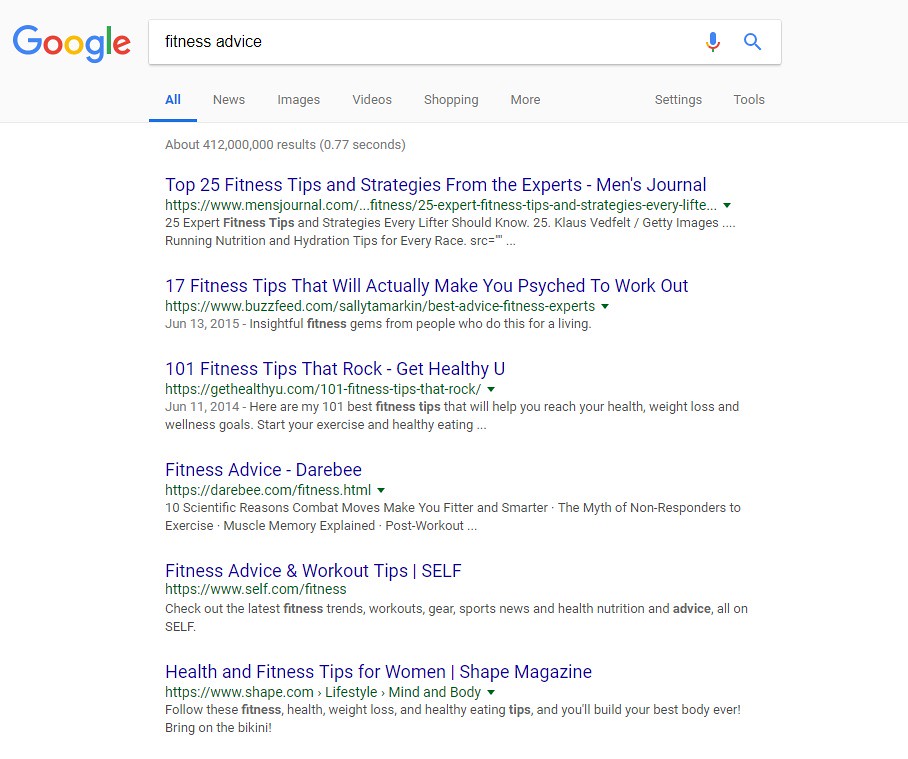
As you do your keyword research, you’ll find that certain keywords have a great deal of competition. For example, if your blog is about fitness and you type something simple like “fitness advice” into your Google search bar, you’ll get hundreds of thousands of results. You’ll see big names like Men’s Journal and Self.com on the first page of search results – names that you can’t possibly compete with.

So, how do you work your way into the first page of Google search results? By taking advantage of long-tail keyword opportunities.

Using “fitness advice” as an example, a long-tail keyword would be a string of words you put into the search bar to find specific information. If you think about it, people probably aren’t going to be searching for general fitness advice anyway – they’ll be looking for advice about specific fitness topics such as exercise motivation tips or the best workouts to burn fat.

These longer, more specific search terms are called long-tail keywords and they are a great tool for improving your blog’s SEO. Long-tail keywords have lower competition rankings while still having decent search volume. That combination means that you have a better chance of showing up on the first page of search results!

3. Perform SERP Research for Every Post

If you do a Google search for three different topics, you’ll find that the search engine results pages (SERPs) may look completely different. Some search terms yield a simple list of websites while others include paid product ads, maps of local results, answer boxes, and more. If you want your blog to rank well, you need to know what kind of SERP you’ll be appearing on and optimize for it.

The best way to do this is to try out different keywords (don’t forget about those long-tail keywords!) and see what kind of SERPs pop up. Depending on what the results are, you’ll have some idea what kind of search terms yield which results, and you can make your choices accordingly.

4. Optimize All Images for SEO

When it comes to a strong SEO strategy, the wider you spread your net the better. This doesn’t necessarily mean loading every page with dozens of keywords, however. Instead, it means taking advantage of specific SEO opportunities to build a strong overall strategy. One thing you don’t want to overlook when optimizing your blog is your images.

A good blog is all about the content, but you can’t rely solely on text for your SEO strategy. Every blog post you publish should include at least one image and it should be a good one. Depending on what topics you write about, images can do more than just break up big blocks of text – they can also demonstrate concepts and add quality to your post.

So, how do you optimize your images for SEO? You should try to work your keywords into the image file name, the alt text, and the caption text (if you use it). The image file name and caption text are self-explanatory, but you may not be familiar with alt text if you’re still new to SEO. Alt text for images is simply a description of the image that can be read by visually impaired visitors using a screen reader.

Your alt text should be an accurate and detailed description of the image, not just a list of keywords, but if you can work in your keywords naturally, all the better!

5. Make Use of Internal Links to Existing Posts

While linking to other posts within your own site is good for SEO, these links aren’t as valuable as external links. Even so, it’s a good idea to do it so you create a framework within your site that keeps your readers around for as long as possible. When planning a new post, think about the different posts you could potentially link to – don’t just link to your most popular posts, either. Internal links can be an opportunity to boost traffic to posts that are struggling to get attention. When you create internal links, be sure to use keywords for the link and use the keyword as your anchor text.

6. Update Existing Content to Keep It Current

The latest Google algorithm highly favors updated content, so don’t think that once you hit the “publish” button your work is done.  You’ll need to revisit your old posts once in a while to make sure the content is still relevant and current then make changes as needed to keep it updated. While you should do this for all of your posts if you have time, it is especially important for those posts where you appear on the 2nd or 3rd page of search results so you can bump it up to page 

When updating your existing content, there are a few different ways you can go. One option is to simply review the content and expand on some of your points. You could also beef up some of your claims with scientific evidence and an external link to the relevant journal article. Another thing you could do is add a section of quick tips at the end or scatter “fun facts” throughout the piece. Just don’t make the piece too cluttered or spammy with keywords.

7. Write Guest Posts and Obtain Backlinks

As a blogger, you have the freedom to choose what you write about and you can link to other posts on your site to increase value for your readers. What you really need to do, however, is get links from other reputable blogs back to yours – this is called backlinking and it is an important part of any successful SEO strategy. But how do you do it?

One way to get backlinks to your blog is to write a guest post for another blog. If you go this route, make sure it is a relevant blog – one that is in the same or a similar niche to yours. This ensures that the people reading your guest post will actually be interested in it and in following the link to your blog. It doesn’t hurt, however, if writing guest posts earned you some attention from a new audience.

So, how do you go about getting a gig as a guest blogger? Take the time to do some research to find other blogs that cover topics similar or complementary to your own then reach out to the owner about writing a guest post. Once you get approval, take some time to familiarize yourself with the blog and with the kind of content they publish so you can create a detailed pitch.

Unfortunately, you’ll probably find yourself dealing with a few rejections along the way, especially if you’re targeting blogs with a high readership. Just stick with it until you’re successful and then do a good job on the first one so you can get more.

8. Collaborate with Influencers

The goal of SEO is to make your blog appear on the first page of search results, so you have the greatest chance of reaching your target audience. While you should be optimizing your site for your target audience, you also want to expand your audience every opportunity you get. In addition to doing guest posts, you should also think about featuring influencers in your niche on your blog.

So, how do you collaborate with influencers on your blog? One way is to do an interview and write up a summary of that interview. You could also feature a quote from an influencer in one of your relevant posts or use some of their content as a reference in yours. When you do things like this, look for an opportunity to communicate directly with the influencer and see if you can get them to share the blog post with their own audience.

9. Experiment with Different Formats

If your blog is cluttered with content and difficult to navigate, it isn’t going to perform well. One of the main goals of SEO is to keep your readers on your site for as long as possible. If your site isn’t formatted well, readers may become frustrated at how difficult it is to find what they’re looking for that they end up leaving and going to the next result on the SERP.

Every blog is unique, so the format that works for one blog may not work for another. Don’t be afraid to experiment with different formats to see which one works best for you. Play around with different elements like infographics, videos, images, podcasts, and more. Trying out a new kind of content might inspire you or open up your blog to an entirely new audience.

10. Consider Creating a Mobile App 

We’ve already talked about the importance of optimizing your website for mobile users, but you may also want to consider creating a mobile app. Mobile apps work better for some applications than for others, but it never hurts to consider the possibility. You may even want to brainstorm some ideas then sit down and talk with an app developer to discuss your options. It’s unlikely that you’ll have the skills or the time to develop the app yourself.

While creating a mobile app is great, it can also be very expensive. If you think that it will really boost traffic and open your blog up to a new audience, it may well be worth the cost and the effort. If you aren’t sure, take the time to examine other options for improving your SEO before you spend a small fortune developing an app. If you have the money, a mobile app could be a great tool to have in your long-term SEO plan.

11. Perform Competitor Research for Keywords

Before you write a new post, you need to do your keyword research so you know how to optimize the post for SEO. In addition to doing keyword research for your own posts, however, you should also keep an eye on the keywords your competitors are ranking for. Online tools can help you identify the top-performing keywords for any given site so you can check up on your direct competitors as well as some of your lower-level competitors.

But what do you do with that keyword research? One thing you can do is try to steal the top slot on SERPs for the keywords your competitors are ranking for. If you notice that your competitor is ranking well for a low-competition keyword and you already have some content relevant to the keyword, consider making some updates to that content to further optimize the post.

You can also use competitor research to identify gaps areas where you might be able to slide into the top spot by writing a new post that is optimized for one of the keywords your competitor is not ranking well on. The options are endless, so take the time to familiarize yourself with the competition and what they are doing well so you can emulate it and improve upon it on your own blog.

12. Complete an SEO Audit

If you want to make significant improvements to your blog (and to its performance), you need to know exactly what is and is not working. You may already have some idea which posts are your most popular, but have you recently completed an in-depth audit of your entire site to see where you have opportunities to make improvements? If not, it might be time.

Generally speaking, an audit is an examination of your existing blog content and structure which includes various metrics for its performance. An SEO audit in particular looks at those specific aspects of site performance which can help you create new goals for future content in addition to providing guidance for how to update or upgrade your existing content for better search results.

When performing an SEO audit, you’ll want to look at how well each post is optimized for keywords and whether those keywords are still ranking well. You’ll want to make sure your SEO meta titles and descriptions are completed and current, and you want to check your page URLs as well. Make sure your image alt tags contain relevant keywords and include both internal and external links in your posts as much as possible.

These simple things could lead to a big boost in SERP rankings with minimal effort on your part.

Now that you’ve learned about the top 12 advanced SEO tips to drive traffic to your blog, all that is left is for you to implement them. Good luck!


How do I write SEO friendly content

Writing SEO-friendly content is essential for ensuring that your web content ranks well in search engine results and attracts organic traffic. Here are some tips to help you create content that is optimized for search engines:
Keyword Research: Start by conducting keyword research to identify relevant keywords and phrases that your target audience is likely to use when searching for information related to your topic. Use keyword research tools to find high-value keywords with moderate to low competition.
Keyword Placement: Once you have your keywords, strategically place them in your content. Include the primary keyword in your title, headings, and within the first few paragraphs. Be sure to use keywords naturally and avoid keyword stuffing, which can negatively impact your SEO.
Quality Content: Create high-quality, informative, and valuable content that genuinely serves the needs of your readers. Search engines reward content that provides a solution, answers questions, or educates the audience.

Engaging Headlines: Craft compelling and descriptive headlines that not only include your target keyword but also entice readers to click on your content. Use

tags for your main headline and

or

tags for subheadings.

Optimize Meta Tags: Write compelling meta titles and descriptions that include your target keyword. These tags provide a brief summary of your content in search engine results, so make them engaging and relevant.
Use Quality Images: Include relevant images, infographics, and multimedia in your content to enhance user engagement. Optimize images by compressing them for faster loading times and adding descriptive alt text.
Internal and External Links: Link to other relevant pages on your website (internal links) and authoritative external sources (external links) where appropriate. This helps with navigation and improves your content’s credibility.
Mobile Optimization: Ensure that your content is mobile-friendly, as search engines prioritize mobile-responsive websites. This is crucial for user experience and SEO.
Page Loading Speed: A fast-loading website is favored by search engines. Compress images, minimize HTTP requests, and use efficient hosting to improve your site’s loading speed.
User Experience (UX): Focus on providing a great user experience. Make your content easy to read, use clear formatting, and keep paragraphs and sentences concise.
Regular Updates: Fresh and up-to-date content is favored by search engines. Regularly update your content to reflect new information or changing trends in your industry.
Social Sharing: Encourage social sharing of your content by adding share buttons and promoting your content on social media. Social signals can indirectly impact your search engine rankings.
Secure Your Website: Implement HTTPS and ensure your website is secure. Search engines prioritize secure sites, and users feel more confident interacting with them.
Monitor Performance: Use SEO tools like Google Analytics and Search Console to track your content’s performance and make adjustments based on data and user behavior.
Remember that SEO is an ongoing process, and it takes time to see results. Consistently providing valuable and well-optimized content is key to improving your website’s search engine rankings and attracting organic traffic.