Schools, colleges and training centres now run on digital systems: learning platforms, library software, cashless catering, door access and exam registration. Yet the student ID card remains the one object that ties all of them to a real person. Getting it right at the start of term saves weeks of queues, reprints and frustrated staff.
Here is what institutions should check before they order their next batch of cards.
Decide what the card has to do
A student ID card can be a simple photo badge or the key to a whole campus. List every system that needs to recognise a student before choosing a format:
Visual identification: photo, name, course and validity date, readable by staff at a glance.
Library and printing: usually a barcode or a student number that the library system already uses.
Door access: a contactless chip (often MIFARE at 13.56 MHz) or a 125 kHz proximity chip, depending on the readers already installed.
Catering or vending: often the same chip as door access, linked to a cashless account.
The answer to this list determines the card technology. Ask your IT or estates team which readers are in place before ordering: a card that looks perfect but is not read by the turnstiles will have to be reissued.
Prepare the student data early
Personalised cards are printed from a data file, one line per student, with the name, student number, course, validity date and the file name of the photo. Most delays at the start of term come from this file rather than from printing. A few good habits help:
Export the data from your student information system in a single spreadsheet, with consistent spelling and capitalisation.
Name each photo with the student number so it matches the data line automatically.
Collect photos at enrolment, against a plain light background, facing the camera, with the face filling most of the frame.
Agree on a validity format (for example “Valid until 08/2027”) and keep it identical on every card.
Treat the file as personal data: share it through a secure transfer, limit who can access it, and delete working copies once the cards are printed.
Choose a card that lasts the whole course
Students carry their card every day, in pockets, lanyards and bags. Plastic cards in the standard bank-card format (ISO/IEC 7810 ID-1, 85.6 × 54 mm, 0.76 mm thick) survive several years of daily use, slide into every card holder and fit the readers designed for that size. Paper or laminated cards rarely last beyond a term.
Ask for a printed proof before the full run. Check that photos are sharp, that small text is legible, and that the barcode scans first time with your library scanner. Institutions that outsource student ID card printing can usually receive the full batch personalised and sorted in class or alphabetical order, ready for distribution.
Plan for security and reissues
Visible security features make cards harder to copy: a background pattern, a reserved area for a hologram sticker, or a design that changes colour each academic year so expired cards stand out. Decide in advance how you will handle lost cards: a small reserve of blank pre-printed cards, or a quick reprint service for single cards, avoids long waits for students who need access the same week.
Physical and digital work together
Many institutions now offer a digital version of the student card in a phone wallet or app. It is a useful complement, but the physical card is still what most door readers, exam halls and libraries rely on, and it works when a phone battery is flat. The best approach is to issue a durable physical card and let the digital version mirror the same student number.
A short checklist for the next intake
List the systems the card must work with and confirm the technology with IT.
Collect photos and data at enrolment, in one clean file.
Choose a durable plastic card in the standard format.
Approve a printed proof and test it on your own readers.
Plan how lost or damaged cards will be replaced.
A few weeks of preparation before enrolment turns the student ID card from a start-of-term headache into a tool that simply works for the whole year.
Immersive FPV flying changes how pilots experience aerial footage. Instead of viewing only what lies ahead, 360° drones capture the entire surrounding scene, allowing creators to choose different angles after landing. This flexibility makes filming easier and opens new possibilities for aerial storytelling.The Antigravity A1 combines a lightweight foldable design, 8K 360° recording, vision goggles, and motion controls. DJI Avata 360 takes a different approach with dual 1-inch-equivalent sensors, 8K/60fps HDR video, and multiple controller options. Both offer immersive experiences, but their differences affect how pilots fly, film, and edit.
Understanding the Immersive 360° FPV Flying Experience
How 360° Video Changes Traditional FPV
Traditional FPV drones rely on forward-facing cameras, requiring pilots to manage framing during flight. A 360° drone records its surroundings, allowing creators to select drone camera angles later.Antigravity A1 captures 8K 360° video at up to 30fps, while DJI Avata 360 supports 8K/60fps HDR recording. The higher frame rate gives DJI Avata 360 more flexibility when filming fast-moving subjects.DJI also includes a Single-Lens mode supporting 4K/60fps video and 2.7K/120fps slow motion. Both drones reduce the need for repeated flights, making it easier to create multiple perspectives from one recording.
Head Tracking and Real-Time Visual Feedback
Head tracking makes immersive FPV more natural by allowing pilots to look around without changing the drone’s direction.Antigravity A1 uses dedicated vision goggles and OmniLink 360 transmission to provide real-time panoramic viewing. Pilots can explore their surroundings while maintaining a consistent flight path.DJI Avata 360 supports compatible FPV goggles and motion controllers, alongside traditional controllers such as the DJI RC 2.Their transmission systems also differ. Antigravity A1 delivers up to 2K/30fps live video, while DJI Avata 360 uses O4+ transmission with a 1080p/60fps feed. These systems prioritize panoramic viewing and smooth visual feedback in different ways.
Antigravity A1 vs DJI Avata 360: Immersive Flight Systems
Vision Goggles and Motion Controls
Antigravity A1 features dedicated vision goggles weighing approximately 340.4g. They include dual 1.03-inch Micro-OLED displays with 2560 × 2560 resolution, a 72Hz refresh rate, and a 90° field of view.Additional features include adjustable diopters, 30GB of built-in storage, and approximately 2.5 hours of battery life. Its 124.3g grip controller offers around four hours of operation.DJI Avata 360 provides more controller flexibility. Pilots can choose compatible goggles and motion controls for immersive flying or use a standard remote controller for traditional operation.Antigravity A1 emphasizes a dedicated motion-controlled experience, while DJI Avata 360 accommodates different flying preferences.
8K Recording and Video Transmission
Camera performance is a major consideration when comparing these drones.Antigravity A1 records 8K 360° video at up to 30fps, 5.2K at 60fps, and 4K at up to 100fps. It also captures 55MP photos and supports formats including INSV, DNG, H.264, and H.265.DJI Avata 360 features dual 1-inch-equivalent sensors capable of recording 8K/60fps HDR video and 120MP photos. Its Single-Lens mode provides additional shooting flexibility.For transmission, Antigravity A1 supports a maximum 10km FCC range through OmniLink 360. DJI Avata 360 offers up to 20km FCC or 10km CE through O4+.These figures represent maximum rated transmission distances. Actual performance varies with interference, terrain, and local regulations.
Flight Performance, Safety, and Everyday Usability
Weight, Portability, and Battery Life
Size and weight influence how easily pilots can travel with their equipment.Antigravity A1 weighs approximately 249g with its standard battery or 291g with the extended battery. Its folded dimensions of 141.3 × 96.2 × 81.4mm make it convenient for compact travel kits.Flight time reaches up to 24 minutes with the standard battery or 39 minutes with the high-capacity option.DJI Avata 360 weighs 455g, placing it in the C1 category, and offers up to 23 minutes of rated flight time.Antigravity A1 prioritizes portability and longer optional endurance, while DJI Avata 360 uses a heavier FPV-oriented design with integrated propeller protection.
Obstacle Sensing and Flight Safety
Safety features help pilots navigate unfamiliar environments, particularly when using FPV goggles.Antigravity A1 combines forward and downward binocular vision sensors, a bottom infrared sensor, and omnidirectional visual obstacle avoidance.DJI Avata 360 includes omnidirectional obstacle sensing, integrated propeller guards, and ActiveTrack 360° for automated subject tracking.These features support different flying needs. Antigravity A1 combines sensing with a lightweight design, while DJI Avata 360 adds physical propeller protection and automated tracking.Neither system eliminates collision risks. Pilots should maintain situational awareness and follow local flight regulations.
Creating Immersive 360° Aerial Videos
Capturing Multiple Angles in One Flight
A 360° drone allows creators to capture several perspectives during a single flight. A smooth climb, orbit, or forward pass can become multiple cinematic shots during editing.Antigravity A1 supports this workflow through its panoramic camera and motion-based controls, making it practical for travel footage and landscape filming.DJI Avata 360 adds flexibility through its Single-Lens mode and higher-frame-rate 8K recording. These features can benefit creators filming action sequences or switching between panoramic and conventional video.Both drones help reduce repeated takes and allow pilots to focus on smooth flight movements.
Reframing Footage for Social Media
Reframing allows creators to turn 360° footage into standard horizontal videos, cinematic landscape shots, or vertical clips for social media.Antigravity A1’s 8K panoramic recording provides flexibility when selecting angles after filming. DJI Avata 360 offers similar possibilities with 8K/60fps HDR capture and 42GB of built-in storage.Both support content creation for YouTube, Instagram Reels, and short-form platforms.Final image quality depends on the selected crop, export resolution, and editing process. However, capturing multiple perspectives in one flight makes aerial content production more efficient.
Conclusion
Antigravity A1 and DJI Avata 360 offer distinct approaches to immersive FPV flying.Antigravity A1 focuses on lightweight portability, dedicated vision goggles, motion controls, and flexible 360° recording. DJI Avata 360 emphasizes higher-frame-rate 8K HDR video, controller versatility, integrated propeller guards, and automated tracking.For travel-focused creators, portability and battery flexibility may matter most. For action-oriented pilots, higher frame rates and additional control options may carry more weight.Both drones demonstrate how immersive 360° technology gives pilots greater creative freedom, turning one well-planned flight into multiple finished perspectives.
Beginners benefit most from foldable drone features that reduce risk, simplify control, and make carrying the drone effortless. The right model should help new pilots stay oriented, avoid common mistakes, and capture good footage without requiring advanced skills. Safety tools such as obstacle avoidance, return-to-home, stable navigation, and battery warnings matter more than raw speed. Portability also plays a big role, because a compact drone is easier to pack, store, and bring to practice sessions. Camera features can further lower the learning curve when they include automated shots, subject tracking, and flexible editing options. For example, the Antigravity A1 combines a foldable travel-friendly design with beginner-focused flying support and 8K panoramic capture, showing how modern features can make first flights more manageable and enjoyable.
What Safety Features Should Beginners Prioritize?
Obstacle Avoidance and Automatic Return to Home
The most helpful safety features for beginners are obstacle avoidance and automatic return to home. Obstacle sensing can detect nearby objects and help prevent collisions during forward flight, landing, or low-altitude maneuvering, which is where new pilots often make mistakes. Return-to-home adds another layer of protection by guiding the drone back automatically if the signal drops or the pilot becomes disoriented. On a beginner-friendly foldable drone, these tools reduce panic and make each practice session less stressful. The Antigravity A1 supports omnidirectional visual obstacle avoidance through forward and downward binocular vision sensing plus a bottom infrared sensor, giving new users stronger environmental awareness and added confidence when flying in unfamiliar open spaces.
Navigation Assistance and Low-Battery Alerts
Navigation assistance helps beginners hold position, understand location, and fly more predictably. Reliable satellite positioning improves hovering stability and makes it easier to stop, reframe, and return safely. This matters when a new pilot is still learning orientation and distance judgment. Clear low-battery alerts are equally important because beginners often lose track of remaining power while focusing on flight controls or the camera view. Early warnings create time to descend or trigger return procedures before battery levels become critical. The Antigravity A1 uses GPS, BeiDou, and Galileo for positioning support, which strengthens location accuracy. Combined with battery monitoring and automated safety responses, this type of guidance helps first-time users avoid rushed decisions and unsafe landings.
How Do Portability and Battery Life Help New Pilots?
Lightweight Foldable Designs for Easy Travel
A lightweight foldable drone is easier for beginners to live with, and that usually means more practice. Compact designs fit into small bags, store neatly at home, and feel less intimidating to carry to a park or travel destination. A lighter takeoff weight can also simplify compliance in some regions, which removes another barrier for first-time owners. The Antigravity A1 folds down to 141.3 × 96.2 × 81.4 mm and weighs 249g in its standard version, making it especially convenient for casual outings. When a drone is easy to pack and quick to deploy, new pilots are more likely to fly often and build confidence.
Flight Time, Battery Options, and Charging Convenience
Battery life directly affects how comfortable beginners feel while learning. Short flights create pressure, while longer endurance gives new pilots time to practice takeoffs, hovering, turns, and landing without rushing. Flexible battery options are also valuable because they let users choose between lighter everyday flying and extended sessions. The Antigravity A1 offers up to 24 minutes with the standard battery and up to 39 minutes with the high-capacity option, with charging times of roughly 45 to 103 minutes. That combination supports both quick practice flights and longer outings. For beginners, predictable endurance and manageable charging make regular training much easier to maintain over time.
Which Camera Features Make Aerial Filming Easier?
8K 360° Video and Flexible Post-Flight Framing
For beginners, easier aerial filming often starts with flexibility after the flight rather than perfect camera control in the air. An 8K 360° camera can capture everything around the drone, which means the pilot does not need to frame every shot precisely while also learning to fly. After landing, the footage can be reframed into standard angles, wide views, or social-ready clips without repeating the flight. The Antigravity A1 is a lightweight 8K panoramic drone co-incubated by Insta360, recording up to 8K at 30 fps, 5.2K at 60 fps, and 4K at 100 fps. That high-resolution spherical capture gives beginners more room to correct composition mistakes and still create polished results.
Automated Flight Shots, Subject Tracking, and Easy Editing
Automated flight shots are extremely helpful for beginners because they turn difficult camera moves into simple presets. Instead of manually controlling speed, direction, and framing at once, a new pilot can use guided movements to create smoother reveals, orbits, and cinematic passes. Subject tracking adds another layer of convenience by helping the drone keep a person or moving target in frame, reducing the need for constant corrections. Easy editing tools matter too, especially when they streamline trimming, reframing, and exporting clips for quick sharing. Together, these features lower the skill barrier between a first flight and a usable video. For beginners, that faster path to good results makes practice more rewarding and less frustrating.
Conclusion
The foldable drone features that help beginners most are clear: strong safety systems, dependable navigation, easy portability, useful battery life, and camera tools that simplify filming. Obstacle avoidance, return-to-home, and low-battery alerts reduce the chance of mistakes. Lightweight foldable construction makes it easier to carry the drone regularly, which leads to more practice and faster improvement. Longer flight times and convenient charging remove pressure during training sessions. On the camera side, 360 capture, automated shots, and editing flexibility help new pilots create better footage before they master advanced control. The Antigravity A1 shows how these features can work together in one beginner-friendly package. For most first-time buyers, ease of use and safety should come before speed or advanced manual performance.
What’s something you’ve done that your past self would be proud of?
A beginner-friendly drone with camera makes flying easier to learn, safer to practice, and more rewarding to use from the first session. The best models reduce manual complexity through intuitive controls, built-in assistance, and tools that help new pilots stay oriented in the air. They also support creativity by simplifying filming, framing, and movement. Instead of overwhelming users with technical demands, beginner-friendly drones guide them toward steady progress. That combination matters because most new flyers want two things at once: confidence during flight and better-looking footage without a long learning curve.
Features That Help Beginners Learn Drone Flying Faster
Simple Controls Reduce the Difficulty of First Flights
Simple controls make the first few flights far less intimidating. Clear takeoff and landing commands, responsive sticks or motion inputs, and easy access to basic camera functions help beginners focus on orientation rather than memorizing complex steps. A well-designed controller layout also reduces hesitation, which is important when learning how the aircraft reacts to altitude, direction, and wind. When controls feel predictable, users make corrections faster and avoid oversteering. Beginner-friendly drones often pair this simplicity with stable hovering, allowing new pilots to pause, regain awareness, and continue flying with less stress and better control.
Assisted Flight Modes Build User Confidence
Assisted flight modes give beginners a reliable safety net while they build core skills. Features such as automated takeoff, automatic return functions, altitude hold, and guided movement reduce the pressure of managing every action manually. These tools help users understand how the drone behaves in real flight without feeling overwhelmed by constant adjustments. They also create more consistent results, which encourages practice instead of frustration. When choosing the best drone with camera for beginners, users should consider how well these support features match their learning needs. When a drone can support the pilot during key moments, beginners gain confidence more quickly. That confidence often leads to smoother handling, better decision-making, and a more enjoyable learning experience overall.
Camera Drone Technologies That Support New Creators
Automated Shooting Features Simplify Content Creation
Automated shooting tools help new creators capture polished footage without needing advanced piloting or camera skills. Subject tracking, preset flight paths, and intelligent framing make it easier to produce clips that look controlled and intentional. Antigravity A1 supports this approach with Deep Track and automated flight options designed for creative shooting. Its 360° camera system also lets users capture footage first and adjust perspectives later, reducing the pressure to frame every shot perfectly in real time. For beginners, these features lower the technical barrier and make the creative process feel more accessible, flexible, and immediately rewarding.
Safety Systems Help Beginners Fly With More Awareness
Safety systems make beginner flights more manageable by helping users stay aware of their surroundings and aircraft status. Obstacle awareness, low-battery alerts, return assistance, and stable positioning all reduce the chance of avoidable mistakes. These features do more than prevent incidents; they teach better habits by reinforcing spatial awareness and encouraging smarter decisions in the air. New pilots benefit most when safety tools work quietly in the background instead of interrupting the flight experience. That balance allows beginners to learn actively while still receiving support, making practice sessions safer, calmer, and more productive from the beginning.
Immersive Views Make Flight More Engaging and Intuitive
Immersive viewing can make flight feel more natural because beginners see movement from a more direct, real-time perspective. Antigravity A1 introduces an FPV-style experience through Vision Goggles and a Grip Motion Controller, giving users a stronger sense of direction, speed, and camera alignment. This kind of interface can improve intuition during flight by connecting hand movement, visual feedback, and aircraft response more closely. For new users, that engagement often makes practice easier to understand and more enjoyable to repeat. A compelling view also helps creators feel more connected to the shots they are capturing.
How Beginner-Friendly Drones Improve the Creative Experience
Easier Operation Lets Users Focus on Capturing Moments
When operation feels easy, beginners spend less attention on managing the drone and more attention on the scene they want to capture. That shift matters because creativity usually improves when users can think about timing, movement, and composition instead of basic aircraft control. Smooth hovering, reliable assistance, and straightforward camera access all support that transition. New pilots can react faster to changing moments and experiment more freely when they trust the drone to remain stable and responsive. In practice, easier operation turns flight from a technical task into a more enjoyable tool for visual storytelling and memory-making.
Flexible Camera Options Encourage More Exploration
Flexible camera options encourage beginners to try more angles, movements, and storytelling styles without feeling locked into a single shooting approach. Features such as reframing, wide scene capture, and different perspective choices make experimentation less risky because users have more freedom to refine footage after the flight. That flexibility often leads to better learning, since beginners can review what worked and adjust their creative choices over time. It also makes short practice flights more productive. When a camera drone supports exploration instead of punishing mistakes, new users stay motivated and discover their preferred style much faster.
Conclusion
A drone with camera becomes beginner-friendly when it combines simple control, helpful automation, strong safety support, and creative tools that remove unnecessary pressure. These features help new pilots learn faster while making the experience more enjoyable from the start. They also improve results by letting users focus on composition and storytelling instead of constant technical correction. Models that add intelligent shooting and immersive viewing can make that process even more intuitive. For beginners, the right drone is not just easier to fly; it actively supports confidence, awareness, and creativity every time it leaves the ground
Which celebrity would you love to meet, and what would you talk about?
Pico do Areeiro is one of Madeira’s most rewarding destinations to visit by car. A paved mountain road leads to a viewpoint at 1,818 metres, allowing travellers to reach the island’s high peaks without joining an organized tour. Driving also provides the flexibility to respond to changing weather, arrive outside the busiest periods and combine the mountain with Ribeiro Frio or Santana.
The visit requires more planning in 2026 because parking is charged, access to the official PR1 trail must be reserved and the complete hike to Pico Ruivo is now one-way. Before leaving Funchal, decide whether you only want to visit the viewpoint, walk to Pedra Rija and return, or complete the full mountain crossing.
How to Drive from Funchal to Pico do Areeiro
The journey from central Funchal generally takes about 40 to 50 minutes in normal conditions. The usual route climbs towards Monte and Poiso before continuing to Pico do Areeiro. The road is paved throughout, so four-wheel drive is not necessary.
The main challenges are the gradient, frequent bends and rapidly changing visibility. Sunshine in Funchal does not guarantee clear weather at the summit. Cloud, wind and rain can develop as the road enters Madeira’s central mountain massif.
Use a lower gear on long descents to avoid relying constantly on the brakes. Automatic cars normally have a manual or low-gear mode that can provide additional engine braking. Remain in your lane around blind corners and stop only at designated viewpoints.
A compact car with adequate engine power is usually the most practical choice. It is easier to position on mountain roads and more convenient when parking areas become busy. Suitable vehicles can be compared through RentGo Madeira before planning the journey.
Parking and Sunrise Visits in 2026
The official parking area is close to the summit viewpoint and the beginning of PR1. The published parking charge for Pico do Areeiro in 2026 is EUR 4 per hour. This payment does not include access to the hiking trail.
Sunrise is the busiest time because visitors often arrive while the surrounding peaks are still above the cloud layer. Parking close to the viewpoint can fill quickly. Allow enough time to park correctly and avoid leaving the vehicle on bends, access lanes or turning areas.
A sunrise visit does not automatically provide access to PR1. Entry to the classified trail is controlled through an online reservation and the selected time slot. If the purpose of the visit is only photography or sightseeing, the viewpoint can be enjoyed without committing to the full hike.
Mountain weather is highly local. Check the forecast or a live camera before starting the drive, but be prepared for conditions to change. Warm clothing and a wind-resistant outer layer are useful even when the coast is hot.
Short Walk or Full PR1 Hike?
PR1 Vereda do Areeiro connects Pico do Areeiro with Pico Ruivo, Madeira’s highest summit at 1,862 metres. The official tourism portal currently lists the trail as open, although temporary restrictions may be introduced because of weather, maintenance or safety concerns.
Visitors can choose between two different versions of the route. The shorter option runs from Pico do Areeiro to Miradouro da Pedra Rija. This section is 1.2 kilometres each way, producing a return walk of approximately 2.4 kilometres. Walkers use the same path back to the car park.
The complete PR1 route covers 6.1 kilometres from Pico do Areeiro to Pico Ruivo. It is officially graded as moderate and takes approximately three hours, but the stairs, tunnels, exposed slopes and elevation changes make it physically demanding.
After Pedra Rija, the complete trail becomes one-way towards Pico Ruivo. Hikers are not permitted to return to Pico do Areeiro along the same section. After reaching the summit, the most practical exit is PR1.2 to Achada do Teixeira, adding approximately 2.8 kilometres. A longer exit is available through PR1.1 towards Ilha.
Advance registration through the SIMplifica portal is mandatory. The published 2026 fee is EUR 4.50 for visitors over 12 using only the return section to Pedra Rija. The full PR1 ticket costs EUR 10.50 and includes the authorized exit routes covered by the booking conditions.
How to Return to a Car Left at the Starting Point
The short Pedra Rija walk is the simplest choice for travellers using a rental car because it finishes at the Pico do Areeiro car park. The complete hike requires separate transport planning.
A car left at Pico do Areeiro will be far from Achada do Teixeira when the hike ends. The roads do not provide a quick connection between the two trailheads. Arrange a transfer or taxi before starting the walk and confirm the meeting point. The Madeira nature authority does not organize the return journey.
Using two vehicles is another possibility, but it adds considerable driving time because one car must first be left near the exit. For most visitors, a pre-booked transfer is more efficient. Include the transfer waiting time when planning the day and do not rely only on the official three-hour estimate for PR1.
Carry water, food, suitable footwear, a charged phone and protection from wind or rain. Download booking confirmation and essential route information in advance because mobile coverage may be unreliable in the mountains.
Pico do Areeiro remains one of Madeira’s outstanding road trip destinations in 2026. A car makes the summit easy to reach, but the hiking logistics should be organized before departure. Reserve the correct PR1 option, budget for parking, check the official trail status and arrange return transport if continuing beyond Pedra Rija. With those details settled, the visit becomes one of the most impressive mountain experiences available within an hour of Funchal.
Online learning has made specialist education available to families who may not live near a suitable teacher or who find regular travel difficult. For Quran education, however, convenience alone is not enough. A strong programme must combine accurate recitation, age-appropriate teaching, human attention and clear communication with parents.
The most useful question is therefore not whether Quran lessons can take place online. It is what good online Quran education should look like in practice.
One-to-one attention should be genuinely personalised
Children do not learn Quran reading at the same pace. One learner may recognise Arabic letters confidently but struggle to join them. Another may read fluently while needing careful correction of makharij, the points from which letters are pronounced. A third may be ready for structured memorisation but require more revision than new material.
In a high-quality one-to-one lesson, the teacher adjusts the content, pace and amount of repetition to the learner. The session should not simply reproduce a group lesson through a webcam. It should respond to what the child can do now and identify the next achievable step.
This individual attention is particularly valuable when a child is hesitant. A patient teacher can pause, model a sound, ask the learner to repeat it and correct the attempt immediately. That short feedback loop is difficult to achieve when one teacher is dividing attention among a large class.
Accurate recitation requires live feedback
Recorded videos and learning apps can support practice, but they cannot reliably hear and correct a learner’s recitation. Quran reading depends on details that may be subtle to an inexperienced student, including letter articulation, vowel length, stopping points and the application of Tajweed rules.
Live teaching allows the tutor to listen closely and correct an error before it becomes a habit. Good correction should be precise and encouraging. Instead of merely saying that a word is wrong, the teacher can isolate the sound, demonstrate it, explain the relevant rule when appropriate and then return to the full verse.
Parents should also be able to see that the lesson includes active participation. The child should read, answer questions and demonstrate understanding rather than spend most of the session listening passively.
Technology should support teaching, not distract from it
The best online lesson technology is often simple. A stable video connection, clear audio, screen sharing and a digital whiteboard are usually more useful than a long list of complicated features. These tools can help a teacher point to a letter, mark a reading position, display a rule or revisit a previous exercise.
The platform should also be easy enough for a child to use without constant technical help. Before lessons begin, families should test the device, headphones, microphone and internet connection. A quiet, visible study space helps the learner concentrate and allows a parent to supervise appropriately.
Structure matters more than lesson length
A productive lesson has a clear sequence. It may begin with revision, continue with a new reading or Tajweed objective, include guided practice and finish with a short task for the next session. The exact structure will vary by age and level, but the learner should understand what they are working towards.
Shorter, regular sessions may be more effective for young children than occasional long lessons. Consistency gives the teacher more opportunities to review learning, correct errors and build confidence. It also makes Quran study part of the child’s normal routine rather than an activity associated with last-minute pressure.
Progress should be visible to families
Parents should not have to guess whether lessons are working. A responsible provider should explain the learner’s starting point, current goals and recent progress in plain language. Useful feedback might cover reading fluency, pronunciation, Tajweed, memorisation, revision and participation.
Progress is not always linear. A child may need to revisit an earlier skill before moving forward, especially after a break. Honest reporting is more valuable than rushing through a syllabus. Parents should be able to ask why a particular exercise is being repeated and what they can reinforce between lessons.
The teacher-student relationship remains central
Online delivery does not reduce the importance of the teacher. Children learn best when expectations are clear and the relationship is calm, respectful and consistent. A good tutor notices when a learner is tired or confused, varies the activity where possible and corrects mistakes without embarrassment.
Families may also have practical preferences, such as choosing a male or female tutor, arranging lessons around school hours or requesting support for a particular goal. A suitable programme should discuss these needs before matching the learner with a teacher.
Safeguarding should be built into the service
Any online education provider working with children should be able to explain how lessons are supervised, how parents can raise concerns and what information is recorded. Parents should know who the teacher is, when lessons occur and how communication is handled.
Children should take lessons in an appropriate shared area where a parent or guardian can check in. Private contact outside the agreed platform should be limited, and families should receive clear guidance about account security and respectful online conduct. Safeguarding is not an optional extra; it is part of educational quality.
A useful example of the model
For families comparing providers, Online Quran Tuition illustrates several features worth looking for: one-to-one lessons, male and female tutors, Quran reading, Tajweed and Hifz options, interactive teaching tools, flexible monthly arrangements and trial lessons before a longer commitment. The organisation states that it has taught online since 2012 and provides programmes for both children and adults.
These details matter because a trial allows the parent to observe the teaching relationship directly. Families can assess whether the tutor listens carefully, corrects accurately, explains at the right level and helps the learner feel comfortable enough to participate.
Questions parents can ask before enrolling
Before choosing an online Quran programme, parents can ask:
Will the lessons be one-to-one or shared with other learners?
How are teachers selected and their recitation standards checked?
Can the tutor provide live correction of pronunciation and Tajweed?
How will goals and progress be recorded and shared?
What safeguarding and supervision arrangements are in place?
Can the family choose a suitable schedule and tutor?
Is there a trial lesson or short trial period?
What happens if the teacher is not a good match for the child?
Clear answers help families distinguish a structured educational service from a simple video call with no wider support.
Conclusion
High-quality online Quran education brings together specialist knowledge and good teaching practice. It gives the learner individual attention, accurate live feedback, manageable goals and a respectful relationship with a consistent tutor. Technology makes the connection possible, but thoughtful teaching is what makes the lesson effective.
Parents who observe a trial, ask about safeguarding and request regular progress information are better placed to choose a programme that supports both correct recitation and lasting confidence.
Scroll through Instagram for five minutes and you’ll start to notice it: the same glossy product shots, the same soft lighting, and models smiling at nothing in particular. A café in Ahmedabad and a furniture store in Pune end up with feeds that look like they came from the same machine, because many of them did.
AI tools have made it very easy to fill a content calendar. Type a line, get an image. Type another, get a caption. For a business owner with no time and a small budget, it feels like the problem is solved. Why pay anyone when the software does it in seconds?
In practice, the effect shows up a few months later, when reach and enquiries start to drop.
When everything looks the same, nothing gets noticed
Social media has always rewarded posts that feel different. People stop scrolling when something catches them off guard: a real photo of a real kitchen, an honest line from the owner, a joke that only locals would get.
AI-generated content tends to do the opposite. It is built from patterns, so it drifts towards whatever is most common. The result looks polished but forgettable. Followers don’t complain about it. They just stop paying attention, and the platform’s algorithm notices that before the business does.
Planning still needs a person
An AI tool will happily create thirty posts for next month. It won’t ask whether thirty is the right number. It won’t know that your best customers are school principals, not teenagers, or that your competitor just launched a cheaper product and your next few posts should answer that.
That is the part of social media marketing that never really changed. Someone has to decide who the brand is talking to, what it wants them to do, and what it should say this month that it didn’t say last month. A good social media marketing agency spends most of its time there, and the posts come after.
Brand voice is easy to lose
Most businesses have a way of speaking, even if they’ve never written it down. A family-run sweet shop sounds different from a pharma company, and a premium interior studio sounds different from a hardware store.
AI captions slowly sand that away. Every post becomes friendly, upbeat and slightly generic. Over time, the brand loses the voice that made customers trust it in the first place. Keeping that voice consistent across hundreds of posts takes a person who understands the business and cares how it comes across.
Design still needs a designer
AI images also have small problems that people pick up on, even if they can’t name them. Hands look odd. Text in the image is garbled. The product looks slightly different from the one on the shelf. For a brand, those details matter. A customer who notices that your post doesn’t match your actual product starts to wonder what else isn’t accurate.
Experienced designers know how to use AI as a starting point without letting it show. They fix the details, keep the brand’s colours and type consistent, and make sure every post looks like it belongs to the same company. That is one reason agencies with a design background, such as SmartFish Designs in Ahmedabad, still have a senior designer check what goes out, even when AI helped make it.
Someone has to be there after you post
Posting is only half of social media. The other half happens in the comments and the DMs. A potential customer asks about delivery. Someone complains about a late order. A dealer wants to know about bulk pricing.
AI can draft a reply, but it can’t judge when a complaint needs a phone call instead of a comment, or when a casual question is a big order waiting to happen. A social media manager who knows the business can, and that difference often decides whether an enquiry becomes a sale.
Where AI helps
None of this means brands should avoid AI. Used well, it saves time on first drafts, resizing, captions in different lengths and quick variations for testing. Most good agencies already use it every day.
Trouble starts when AI replaces the planning instead of supporting it. A tool will speed up the work, but someone still has to decide what the work is.
What to look for in an agency now
When choosing a social media marketing agency in Ahmedabad, find out how they use AI, not just whether they do. Who plans the content calendar? Who checks the designs before they go out, and who replies to your customers? It also helps to look at a feed they already manage. You’ll know quickly whether it looks like a real business or a stock photo library.
Posting more won’t fix a feed that looks like everyone else’s. Posts that sound like your business, and look like your actual products, will.
If aliens arrived tomorrow, what’s the first thing you’d ask them?
Online communication has evolved far beyond text messages, forums, and traditional social networking. Today, people increasingly want conversations that feel immediate, personal, and spontaneous. This shift has helped make random video chat platforms popular among users who want to meet new people online without spending hours creating profiles or waiting for matches.
One example is Camloo, a platform designed for spontaneous online conversations with people from different places. Through its video chat experience, users can connect face to face with new people and move from one conversation to another in a simple, informal way. Rather than functioning like a conventional dating website, Camloo fits into the broader trend of real-time social discovery, where the conversation itself becomes the starting point.
Why Video-Based Communication Feels Different
Text-based communication remains useful, but it often removes many of the signals people naturally use in face-to-face interaction. Tone of voice, facial expressions, pauses, gestures, and immediate reactions can all influence how a conversation develops.
An online video chat restores many of these elements. Instead of exchanging carefully prepared messages, two people can communicate in real time. This can make interactions feel more natural and can help participants quickly decide whether they share interests or enjoy talking with one another.
A random video chat adds another dimension: unpredictability. Users generally do not know exactly who they will meet next. One conversation might involve someone interested in music, while another might lead to a discussion about travel, education, culture, technology, or everyday life.
For many users, this unexpected variety is part of the appeal.
Meeting People Beyond Your Usual Social Circle
Daily routines can limit the number and variety of people someone encounters. Workplaces, universities, neighborhoods, and established friendship groups often create relatively fixed social circles.
Platforms that allow users to chat with strangers can expand those boundaries. A person may interact with someone from another city or country whom they would never have encountered through their ordinary routine.
This does not mean every random chat will turn into a lasting friendship. In fact, many conversations may be brief. However, even short interactions can offer exposure to different accents, perspectives, cultures, hobbies, and lifestyles.
For language learners in particular, casual online conversations may also provide an opportunity to practice speaking and listening in a less formal environment.
From Chatroulette to Modern Alternatives
The idea of randomly connecting strangers through webcams is not new. Earlier platforms helped establish the concept and showed that there was significant interest in spontaneous internet communication.
Today, people often search for a Chatroulette alternative or an Omegle alternative because they want similar spontaneity combined with modern interfaces and different community experiences. This has created a broader category of services where users can begin conversations quickly rather than relying on traditional social-network structures.
Modern platforms such as Camloo reflect how the concept has developed. Instead of requiring detailed profiles, long questionnaires, or complicated matching systems, the emphasis is generally placed on immediate communication.
For some users, this simplicity is refreshing.
Convenience Is Part of the Attraction
Another reason cam chat platforms continue to attract interest is convenience. People increasingly expect online services to be fast and easy to understand.
Some platforms offer video chat without registration or reduce the number of steps needed before communication begins. This can be appealing to people who simply want to explore conversations without creating another extensive online profile.
The cam to cam chat format is also straightforward: users can see and hear each other almost immediately. Compared with text-only anonymous spaces, video communication can sometimes make conversations feel more human because participants are responding to a real person rather than only a username.
Staying Safe While Talking to Strangers
The freedom and spontaneity of stranger video chat should always be balanced with sensible online safety practices.
Users should avoid sharing sensitive personal information such as home addresses, financial details, passwords, identification documents, or private account information. It is also wise to be cautious about clicking links sent by strangers or moving conversations to another platform too quickly.
People should also remember that they can end an uncomfortable conversation at any time. A healthy random video chat experience depends on respecting personal boundaries and using available reporting or moderation tools when necessary.
Young users should follow age requirements carefully, while parents and guardians should understand the nature of any platform used by minors.
A More Spontaneous Side of Online Socializing
Traditional social media often revolves around established contacts, carefully edited posts, followers, and public profiles. Random video communication offers something different. It emphasizes the present moment rather than building a permanent public identity.
That difference helps explain why services such as Camloo continue to attract people interested in casual conversation and social discovery. Users may join simply to talk, overcome boredom, practice communication skills, discover another culture, or meet someone with similar interests.
Random video chat will not replace messaging apps, social networks, or dating services. Instead, it occupies its own place within the wider online communication landscape.
For people who enjoy spontaneity, an online video chat can transform the internet from a space for reading and scrolling into a place for direct human interaction. Whether the conversation lasts two minutes or develops into a longer friendship, the appeal comes from not knowing exactly who might appear on the other side of the screen.
A traditional hair dryer does exactly what it is told: it blows air at whatever heat and speed the user selects, regardless of what is happening to the hair. The newest generation of devices is starting to change that by measuring conditions during use and responding to them, a shift that offers a clear example of how automation is spreading into everyday household products.
As covered by London Daily News, consumer technology company AENO has introduced the HD5 AI ProDryer, a dryer that uses artificial intelligence to control temperature, airflow and drying mode without manual adjustment. Nine patented technologies inside the device work together to track the condition of the hair and adapt the dryer’s performance in real time. Looking at how each of these systems functions helps explain why automated control can make a meaningful difference to the results of everyday styling.
The starting point is the relationship between heat and distance. The air leaving a dryer is hottest at the nozzle and cools as it travels, so the temperature that actually reaches the hair depends heavily on how far away the dryer is held. A setting that feels comfortable at arm’s length can become damaging when the nozzle is brought close to the scalp, and most people change that distance constantly while styling without thinking about it. The HD5 addresses this with a sensor that measures the gap between the nozzle and the hair and adjusts the heat to match. In effect, the device compensates for the user’s movements, aiming to keep the temperature on the hair steady even as the dryer moves closer or further away. A second thermal sensor adds a layer of protection by monitoring the temperature of the airflow continuously and reducing the heat automatically whenever it rises to a level considered risky for hair health. This combination of adaptive control and a safety limit is similar in principle to systems used in many other appliances, where one mechanism optimises performance and another prevents harmful extremes.
Other features in the HD5 target different aspects of the drying process. Static electricity builds up as hair dries and rubs against brushes and fingers, causing strands to repel one another and producing frizz. Ionic technology counters this by releasing charged particles intended to neutralise that effect, leaving hair smoother and shinier. The dryer also includes InfraCare, which uses light at a wavelength of 490 nm and, according to AENO, improves the texture and natural shine of hair over time. Automation extends to how the dryer behaves between uses as well. An auto start-stop function switches off the airflow when the dryer is placed on a surface and restarts it when it is picked up, which reduces energy use and wear on the motor during the frequent pauses of a styling session. Voice control lets users move between AI, Soft, Hot and Cold modes by speaking, which solves the practical problem of needing a free hand to press buttons.
Physical design plays a supporting role in making these features practical. Magnetic nozzles that rotate through 360 degrees can be changed quickly without tools, allowing users to switch between drying and styling tasks easily. A touchscreen displays all settings and gives live feedback on how the device is operating, making the automated decisions visible to the user. The dryer weighs around 600 grams, lighter than many professional models, whose extra weight can cause fatigue in the hand and arm during longer sessions. The HD5 is sold in black and other colours through AENO’s retail partners in several countries.
The product also illustrates a broader trend in consumer technology. A company spokesperson observed that good styling used to depend on either personal skill or a visit to a salon, and described the HD5 as a device that makes those decisions itself by adapting to the person using it. The same idea underpins much of AENO’s wider product range, which includes robot vacuums and kitchen appliances alongside personal care devices. The company focuses on building smart sensors and automation into products that have traditionally been operated manually, with the goal of making advanced technology simpler and more affordable. According to the report, the HD5 has already drawn interest from retailers and reviewers in Europe, largely because it combines AI-based automation with a price well below that of established salon brands. For students of technology and product design, it is a useful example of how relatively small sensors and control algorithms can transform a familiar everyday tool.
Commission plans are often treated as a simple payroll task, yet they sit at the meeting point of strategy, finance and human motivation. Studying how these plans evolve offers a useful lesson in why business processes that work well at a small scale tend to fail as an organisation becomes more complex.
As outlined by Brainz Magazine, companies move through four predictable stages of commission maturity, and the difficulties they face depend on the complexity of the organisation far more than on the number of salespeople it employs. The framework is based on observations of hundreds of commercial teams. It is useful for founders, finance professionals and students of management alike, because it shows how a tool meant to align sales behaviour with company goals can gradually lose that power if its structure is not updated.
Variable compensation, the portion of a salesperson’s pay tied to results, works as a signal. It tells reps which deals the company values most and rewards them for pursuing those deals. For the signal to work, reps must understand it and trust that it is calculated correctly. Much of the four-stage model is about what happens when either of those conditions breaks down. A few terms appear repeatedly when discussing this subject, and they are worth defining before looking at the stages:
What’s a moment in your life that made you feel truly alive?
Bangalore, often hailed as the Silicon Valley and educational hub of India, attracts thousands of students, fresh graduates, and working professionals every year. While moving to a thriving metropolitan city brings exciting career and academic opportunities, the physical process of relocation can often feel overwhelming. From securing accommodation to packing fragile belongings, planning each step carefully is essential for a smooth transition.
Key Factors to Consider Before Moving to Bangalore
1. Choose the Right Locality: Bangalore is known for its bustling tech corridors and vibrant neighborhoods. When deciding where to reside, proximity to your workplace or university should be the top priority to avoid long daily commutes. Popular residential hubs like Whitefield, Electronic City, Koramangala, Indiranagar, and HSR Layout offer great infrastructure, connectivity, and rental housing options.
2. Create an Inventory and Declutter: Before packing, sort through your possessions. Moving unnecessary items increases transit costs and creates clutter in your new living space. Donate, sell, or discard items you no longer use so you only carry what is essential.
3. Hire Verified Relocation Experts: Safe transit of household goods, electronics, and vehicles requires skilled handling. Booking reliable packers and movers in Bangalore ensures that delicate items, furniture, and appliances are packed with multi-layered protective materials and transported securely on time. Professional assistance saves valuable time and eliminates moving stress.
4. Prepare an Essentials Bag: Pack a separate luggage bag containing personal necessities for the first 2-3 days—including documents, chargers, toiletries, medicines, and a few pairs of clothes—so you do not have to unpack heavy boxes immediately upon arrival.
Final Thoughts
Relocating to a new city marks the start of a promising chapter. By planning well in advance, organizing your budget, and choosing dependable shifting partners, you can focus entirely on enjoying your new life and career in Bangalore without any moving anxiety.
Today, the biggest gap between companies lies in their ability to rebuild workflows. According to BCG research, only 5% of businesses have embedded AI across all functions, while another 35% are scaling the technology but acknowledge they could be moving faster. Most firms, however, see almost no effect on costs or revenue.
According to Serhii Tokarev, an investor and founder of the Tokarev Foundation, AI itself is not to blame. Some organisations are genuinely transforming the way they work with AI. Others are simply buying “ready-made autonomy” rather than gradually changing their processes.
It is a common mistake to evaluate an AI system based on a single task or function in isolation. At Roosh, an internal assistant built on Claude ranks potential startup investments by team excellence and market opportunity and gives a short rationale for each. Analysts begin deeper research with the top 10 rather than checking 100 startups one by one; productivity in initial screening has increased roughly tenfold. The workflow changed, not just the speed of one task.
Where AI Turns Workflows into Measurable Results
Businesses should not expect artificial intelligence to immediately take over entire areas such as finance, legal support, or customer support. Roosh instead uses an NDA agent for the first review: a handbook defines acceptable terms, changes to request and issues to escalate. A lawyer checks and refines the proposed redline. Processing time fell from about 1.5 hours to 15–20 minutes.
“AI is well suited to areas such as invoice processing, large-scale data analysis, and contract review. The model takes on complex preparatory work, while a person evaluates a short, structured outcome,” says the founder of Tokarev Foundation.
When evaluating ROI, organisations cannot simply compare the cost of AI tokens with an employee’s salary. What matters is the cost of an approved result that meets the company’s requirements. It usually includes integrations, monitoring, repeated requests, model costs, and rework when something goes wrong. Some companies do not see productivity growth, even though they have started spending more on AI than on employees.
From AI Analysis to Action: Why Control Still Matters
AI can serve as the initial analyst when assessing a business. It reviews financing history, reconstructs the relevant competitive landscape, finds important data, and highlights information that requires further examination. By saving time on gathering basic facts, this technology allows a person to focus on the key question: whether the company has a chance to create long-term value.
“I never ask a model whether I should invest in a startup. The technology can analyse everything much faster than an entire team, but a human will still make the final call and take responsibility,” says Serhii Tokarev.
In his view, AI can move from analysis to action only when a clear scope is set for it. Each new level of autonomy must be backed by reliability, checks, and measurable quality.
“AI is not replacing operations or investment teams in our portfolio companies. It complements them and broadens their capabilities. What matters is not a single model, but how all these systems work together,” adds Serhii Tokarev.
Digital marketing agencies, e-commerce networks, and competitive research teams face persistent scrutiny from platform anti-fraud filters. Traditional approaches to multi-accounting often introduce high operating expenses and operational complexity, prompting organizations to evaluate modern multilogin alternatives designed to handle dense concurrency and advanced browser fingerprinting. Choosing the right infrastructure requires analyzing how different software engines manage identity isolation, team access, and hardware emulation.
The technical requirements of session containerization
Platform security filters correlate accounts by evaluating inconsistencies between network gateways and browser runtimes. If a browser profile presents a clean residential proxy located in London while its internal JavaScript clock reports Eastern Standard Time, the system flags the connection as anomalous.
Robust profile containerization requires synchronizing several operational layers:
Network routing and WebRTC: Masking local physical IP addresses and forcing WebRTC STUN and TURN queries to route strictly through the profile proxy interface.
Temporal and regional settings: Synchronizing the browser JavaScript Date object, language priorities, and locale variables with the physical geolocation of the proxy gateway.
Hardware parameter masking: Emulating valid graphics cards, audio subroutines, and CPU concurrency limits that reflect common consumer hardware configurations.
Partitioned local state: Isolating local storage, session storage, service workers, and IndexedDB files into distinct local directories to prevent cross-profile data leakage.
Evaluation criteria for enterprise multi-accounting tools
When comparing different alternatives on the market, teams must assess how each platform handles resource allocation and team collaboration.
Key comparison factors include:
Memory footprint and concurrency: Legacy virtualization tools consume gigabytes of memory per instance. Modern alternatives sandbox Chromium sub-processes efficiently, allowing dozens of concurrent sessions to run on standard workstation hardware.
Fingerprint generation mechanics: Software must use real-world device templates rather than synthetic randomization. Generating impossible hardware combinations triggers instant heuristic red flags from platforms like Cloudflare and Akamai.
Team credential security: Advanced platforms allow team leads to share active browser sessions with authenticated cookies, eliminating the need to distribute master passwords to external contractors.
Automation API compatibility: Providing standard Chrome DevTools Protocol (CDP) endpoints enables development teams to automate repetitive tasks using Puppeteer or Playwright without writing specialized wrapper code.
Optimizing operational workflows for distributed teams
Maintaining high account longevity across an organization requires clear operational boundaries. Assigning static proxy routes to dedicated profile containers ensures that platforms do not detect sudden geographic shifts between login events.
Furthermore, teams should avoid changing browser hardware parameters once a profile is active. Consistency over time builds trust with platform anti-fraud algorithms, lowering the risk of automated identity challenges and ensuring seamless performance across all commercial projects.
A foldable phone no longer has to feel like a miniature tablet in your pocket. The latest book-style models are slimmer, lighter and easier to use every day, with some approaching the thickness of conventional flagship smartphones when closed. But headline measurements can be surprisingly confusing.
In this guide, we compare the thinnest foldable phone options for UK buyers and explain how manufacturers measure slimness. We also consider weight, cameras, battery life, durability, software and price, because the slimmest foldable phone is not automatically the best choice for everyone.
Alt: HONOR foldable phone
How Is Foldable Phone Thickness Measured?
Thickness figures are only useful when they follow the same standard. Before comparing a thin fold phone with another model, check whether measurements refer to the hinge, the camera bump, the phone’ s main body or a manufacturer’ s idealised specification.
Measuring the phone when closed
Closed thickness describes the phone folded into its normal smartphone shape. Manufacturers usually measure the two halves together at the thinnest point, excluding the camera housing. Independent reviewers may measure the hinge or thickest section, so small differences between official and measured figures are normal.
Measuring the phone when open
Open thickness refers to the device unfolded into tablet mode. It normally measures the two sides and the hinge area as a single flat device. A quoted figure such as 4.2mm does not describe the camera module, which may stand noticeably higher.
Including or excluding the camera housing
Always check whether the camera housing is included. A phone advertised as 8.8mm thick can be considerably thicker around its lenses. For pocket comfort, body thickness matters most; for a completely flat fit on a desk, the camera bump also deserves attention.
Release status, global availability and UK availability
A phone can be the thinnest folding phone in China but unavailable in Britain. Check the launch date, official UK listing, warranty and network compatibility. Importing a thinner model may mean limited software support, no UK repairs and extra VAT or customs costs.
Thinnest Foldable Phone Comparison
The table below compares leading book-style devices using UK-relevant specifications available on 14 September 2026.
Model
Folded thickness
Unfolded thickness
Weight
Screen size
Battery
UK availability
HONOR Magic V6
8.8mm official;
4.0mm official
219g official
7.95in / 6.52in
6,660mAh
Official UK listing
HONOR Magic V5
8.8mm official;
4.1mm official
217g official
6.43in / 7.95in
5,820mAh
Official UK listing
Samsung Galaxy Z Fold7
8.9mm official; about 9.0mm measured
4.2mm official
215g official
6.5in / 8.0in
4,400mAh
Widely available
Oppo Find N5
8.9mm official; about 9.1mm measured
4.2mm official
229g official
6.62in / 8.12in
5,600mAh
Not officially sold in the UK
Google Pixel 9 Pro Fold
10.5mm official
5.1mm official
257g official
6.3in / 8.0in
4,650mAh
Official UK listing
Which Thin Foldable Phone Is Best for Different Buyers?
Thinness improves portability, but it should sit alongside camera quality, endurance, software and after-sales support. These recommendations focus on the complete ownership experience rather than treating one measurement as the only definition of quality.
Best choice for maximum portability
For maximum portability, the HONOR Magic V6 is the strongest candidate. Its slim folded body, large cover display and high-capacity battery reduce the usual compromises associated with carrying a foldable device.
Best choice for the lowest weight
The Samsung Galaxy Z Fold7 is the safest recommendation for buyers prioritising low weight and official UK support. At about 215g, it is lighter than the Magic V5 and Oppo Find N5, while still offering a generous inner display.
Best choice for cameras and everyday photography
Samsung and HONOR are the better-balanced camera choices. Samsung offers dependable processing and familiar shooting modes, while HONOR’ s larger camera hardware can deliver stronger detail and low-light results. Read independent camera comparisons before choosing solely from megapixel counts.
Best choice for battery life and charging
HONOR’ s Magic V6 is the most promising option for endurance because its battery is substantially larger than Samsung’ s. Oppo’ s Find N5 is also attractive for fast charging, but imported devices complicate warranty support and charger compatibility in the UK.
Best mainstream option for UK buyers
The Galaxy Z Fold7 is the best mainstream option for many UK customers. It is sold through Samsung, networks and major retailers, with strong software support, trade-in offers, repair channels and accessories that are easier to find than those for imported rivals.
Best choice for productivity and multitasking
Samsung remains the productivity leader thanks to mature multi-window controls, app continuity, desktop-style DeX features and broad stylus-related support. HONOR and Oppo provide excellent large screens, but Samsung’ s software is generally more predictable for work, email and multitasking.
The Trade-Offs of an Ultra-Thin Foldable Phone
Achieving a slimmest foldable phone design requires difficult engineering. Manufacturers must fit two displays, a hinge, cameras, processors and batteries into a smaller space, so gains in portability can affect other parts of the experience.
Battery capacity and real-world endurance
A thinner chassis leaves less room for battery cells, although newer silicon and stacked battery designs help. A large battery figure does not guarantee longer use: screen brightness, mobile signal, gaming and the inner display can quickly change real-world endurance.
Camera size and image quality
Large camera sensors need physical depth, particularly for optical zoom. An ultra-thin phone may therefore use smaller sensors or a less ambitious telephoto camera. Computational photography can compensate in daylight, but hardware still matters for night scenes, moving subjects and portrait detail.
Hinge construction and long-term durability
A thinner hinge must remain precise while surviving thousands of folds and resisting dust or accidental impact. Water resistance is useful, but it does not make a foldable waterproof. Avoid grit, pressure on the hinge and folding objects inside the device.
Heat management and sustained performance
Slim phones have less internal space for heat-spreading materials. A powerful processor may perform brilliantly in short bursts but reduce speed during long gaming, video-exporting or navigation sessions. Independent thermal tests reveal more than a processor name alone.
Case protection, repairability and insurance
Thin foldables can be harder to protect because a bulky case defeats their main advantage. Their flexible screens and specialised hinges are also expensive to repair. Check accidental-damage cover, excess charges and official repair pricing before committing to a premium purchase.
How to Choose a Thin Foldable Phone
A sensible buying decision starts with your daily habits. Consider how often you will use the inner screen, carry the phone without a case, take photographs, travel, play games or rely on manufacturer support in Britain.
Step 1: Set a realistic thickness and weight priority
Decide whether you value minimum folded thickness, low weight or a comfortable outer display. A difference of 0.2mm may be invisible in a case, whereas a 30g weight difference can be noticeable during long periods of one-handed use.
Step 2: Compare battery, charging and processor specifications
Compare battery capacity, charging speed and processor efficiency together. Look for independent battery tests covering video playback, web browsing and 5G. Fast charging is especially valuable if you regularly work away from home or travel between meetings.
Step 3: Check camera performance in independent reviews
Do not choose a thin foldable phone by megapixels alone. Examine daylight detail, night photography, zoom consistency, skin tones and video stabilisation in independent reviews. Foldables often have different camera hardware across regions, so confirm the UK model.
Step 4: Verify durability, water resistance and hinge support
Check the official water-resistance rating, hinge testing claims, screen-protection terms and warranty exclusions. Confirm whether the inner screen protector can be replaced by the manufacturer. A strong service network is more valuable than an impressive laboratory folding-cycle number.
Step 5: Confirm UK price, warranty and software support
Compare the manufacturer’ s price with network contracts and retailer promotions. Confirm the warranty applies in the UK, then check promised Android and security-update periods. An imported bargain can become expensive if parts, repairs or software features are unavailable locally.
Step 6: Check case compatibility before buying
Look for a case that protects the hinge without preventing the phone from closing flat. Check whether wireless charging, screen protectors, car mounts and magnetic accessories remain compatible. A case should preserve the phone’ s usability, not simply add maximum bulk.
Conclusion
The thinnest foldable phone is now far more practical than early generations, but headline dimensions do not tell the whole story. HONOR’ s Magic V6 and V5 prioritise slimness and battery capacity, Samsung’ s Galaxy Z Fold7 combines low weight with excellent UK support, and Oppo remains appealing mainly to confident import buyers.
Choose based on how you use your phone, not just the smallest number in a specification sheet. Compare measured thickness, weight, camera performance, endurance, durability, software and warranty. If portability is your priority, shortlist HONOR; if dependable mainstream ownership matters most, Samsung is the safer all-round decision.
FAQ
What is the thinnest foldable phone currently available?
As of September 2026, the HONOR Magic V6 is among the thinnest book-style foldables, with an official folded thickness of about 8.8mm. Availability and specifications vary by market, so confirm the current UK model before buying.
What is the thinnest fold phone available in the UK?
The HONOR Magic V6 is the leading UK-listed candidate at approximately 8.8mm folded, followed closely by the Magic V5 and Samsung Galaxy Z Fold7. Check the official UK product page for the exact regional specification, because thickness can vary slightly by colour, configuration or measurement method.
What is the lightest folding phone?
The Samsung Galaxy Z Fold7 is one of the lightest widely available book-style foldables, weighing approximately 215g according to Samsung’ s official specification. That is slightly lighter than the HONOR Magic V5 and notably lighter than the Oppo Find N5, although regional variants and measurement tolerances can affect comparisons.
Are thin foldable phones less durable?
Not necessarily. A thinner foldable phone can be engineered to withstand extensive folding, but its smaller hinge and flexible display still require more care than a conventional handset. Look for water resistance, a strong hinge warranty, screen-protector support and independent durability testing rather than judging reliability from thickness alone.
Does a thinner foldable phone have worse battery life?
Not automatically, although slim designs can leave less room for battery cells. Efficient processors, stacked batteries and software optimisation may offset the difference. Compare capacity with independent endurance tests, charging speed and screen efficiency, because a larger battery does not always deliver longer real-world use.
How do you write what people actually want to read?
Recorded lectures solved one problem and created another. Students no longer miss content when they are ill or working a shift, but a semester of recordings is fifty or sixty hours of video that nobody can revise from. The recording is a safety net, not a study resource, and the difference matters most in the fortnight before exams.
The fix is to convert recordings into text early in the term, while the material is still fresh enough that you can structure it sensibly.
Why text beats video for revision
A ninety-minute lecture is about 13,000 spoken words. Read at a normal pace, that is roughly forty minutes; skimmed for a specific concept, it is under five. More importantly, text is searchable. When a past paper asks about a term your notes do not cover, being able to search “hysteresis” across an entire semester of transcripts and land on the three minutes where it was explained is worth more than any amount of re-watching.
Text also survives. Lecture capture systems routinely purge recordings at the end of the academic year. A folder of transcripts does not expire.
Getting an accurate transcript
Automatic speech recognition on clear academic English now sits around 95% accuracy, which works out at roughly one error every twenty words — almost always on names, acronyms and technical vocabulary. A browser-based lecture transcription tool will process a ninety-minute lecture in a few minutes and return timestamped text you can correct as you read.
Two things improve accuracy more than anything else: recording from the room’s audio feed rather than a phone at the back, and giving the tool a clean audio file rather than a screen recording with background music. If your institution publishes the lecture with auto-captions already, downloading those is usually faster than re-transcribing.
Turning a transcript into notes
A raw transcript is not a study note. It is a long, unpunctuated wall of speech with digressions about the weather in it. Convert it in three passes:
Pass one — structure. Insert headings wherever the lecturer changed topic. Most lecturers signal this out loud: “right, moving on to”, “the second mechanism is”. Search for those phrases.
Pass two — compress. Under each heading, reduce the speech to bullet points. Aim for a tenth of the original length.
Pass three — question. Convert each bullet into a question you could be asked. This is the material you will actually revise from.
The third pass is the one students skip and the one that does the work. Reading notes produces recognition; answering questions produces recall, and exams test recall.
Fixing the vocabulary problem
Every discipline breaks automatic transcription in its own way. Medicine loses drug names, law loses case citations, engineering loses units. Before you start editing, build a short find-and-replace list for the ten or fifteen terms your module uses constantly. Running that list over every transcript for the semester takes seconds and removes most of the visible errors at once.
A note on timestamps
Keep them. When a transcript passage does not make sense on the page — usually because the lecturer was pointing at a diagram — the timestamp lets you jump straight to that moment in the recording instead of hunting for it. In practice you will need this for perhaps five percent of a lecture, but it is the five percent that matters.
What this costs in time
For one module with eleven lectures, expect about twenty minutes of processing per lecture: a few minutes of transcription running in the background, ten minutes of structuring and five minutes of compression. That is under four hours across a term, spread out, replacing what would otherwise be fifteen-plus hours of panicked re-watching in May.
The wider point is that a recording is a record of an event, while notes are a record of an argument. Transcription is simply the cheapest available bridge between the two.



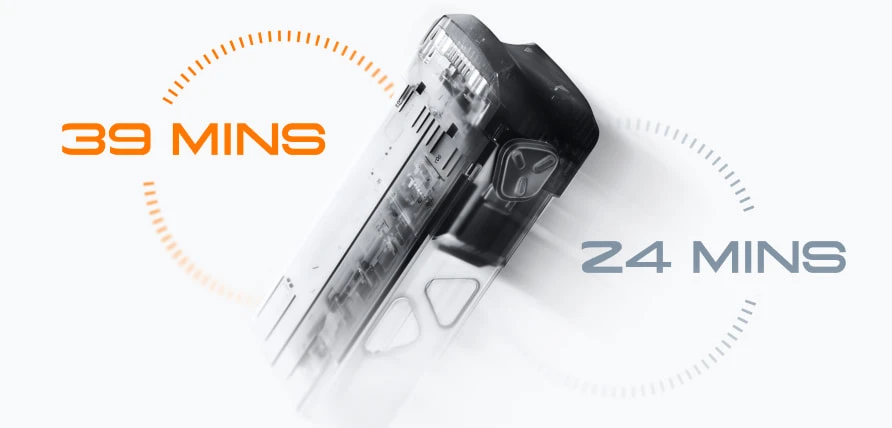

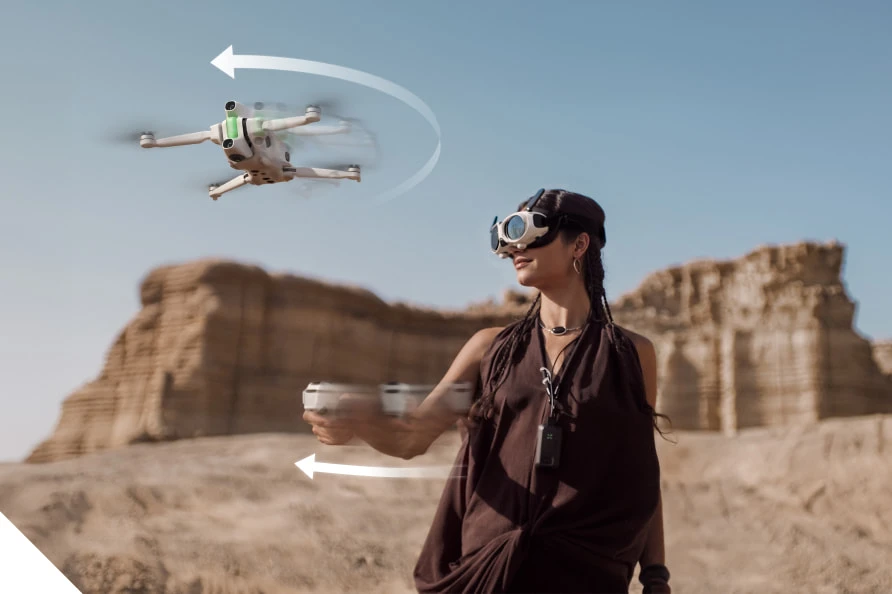

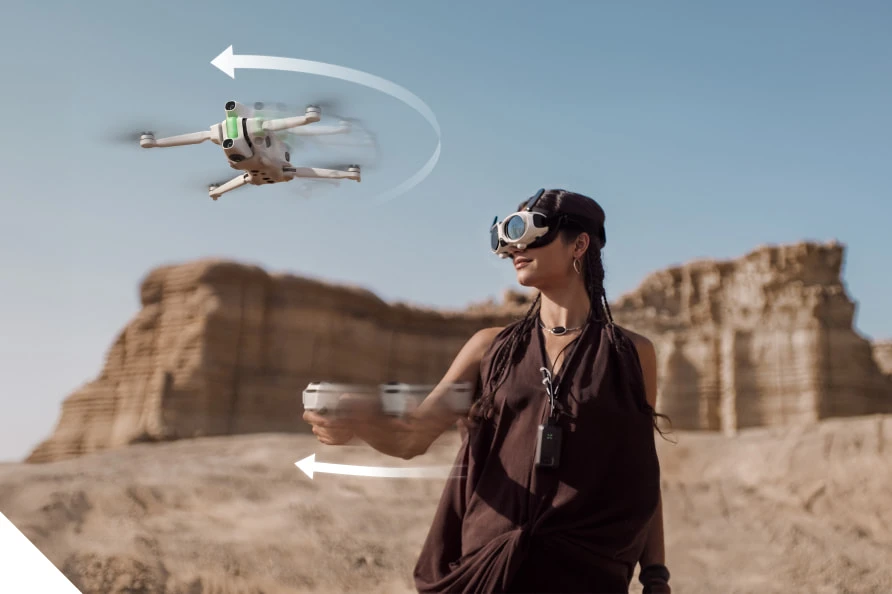


 Online learning has made specialist education available to families who may not live near a suitable teacher or who find regular travel difficult. For Quran education, however, convenience alone is not enough. A strong programme must combine accurate recitation, age-appropriate teaching, human attention and clear communication with parents.

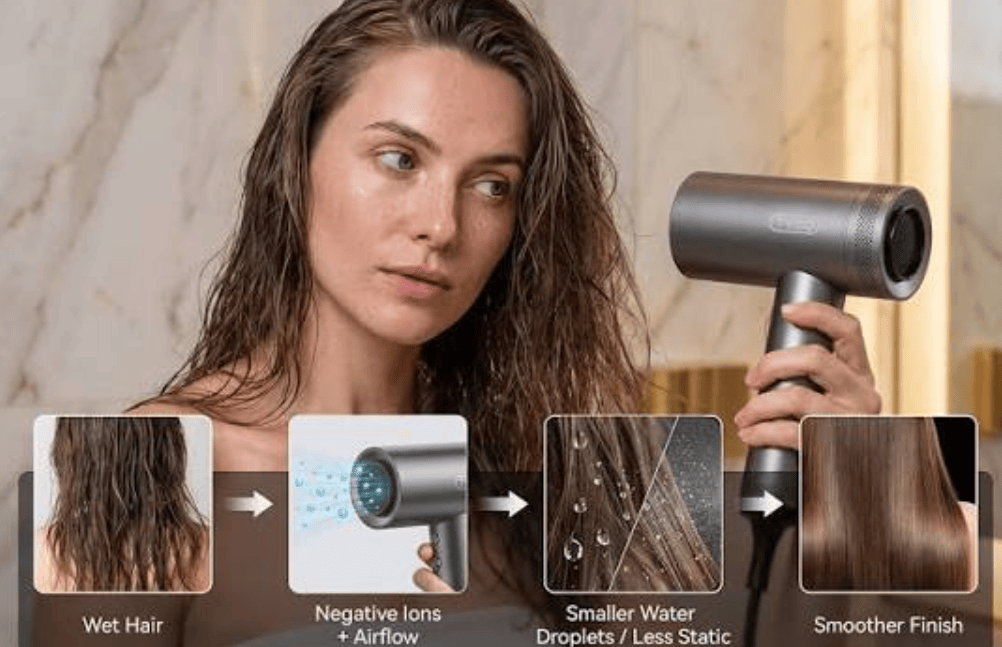
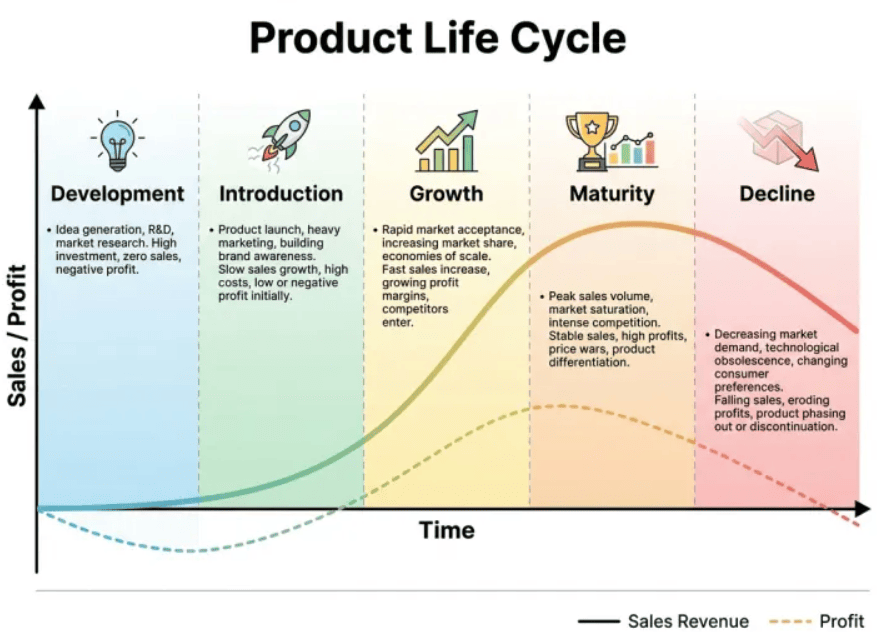




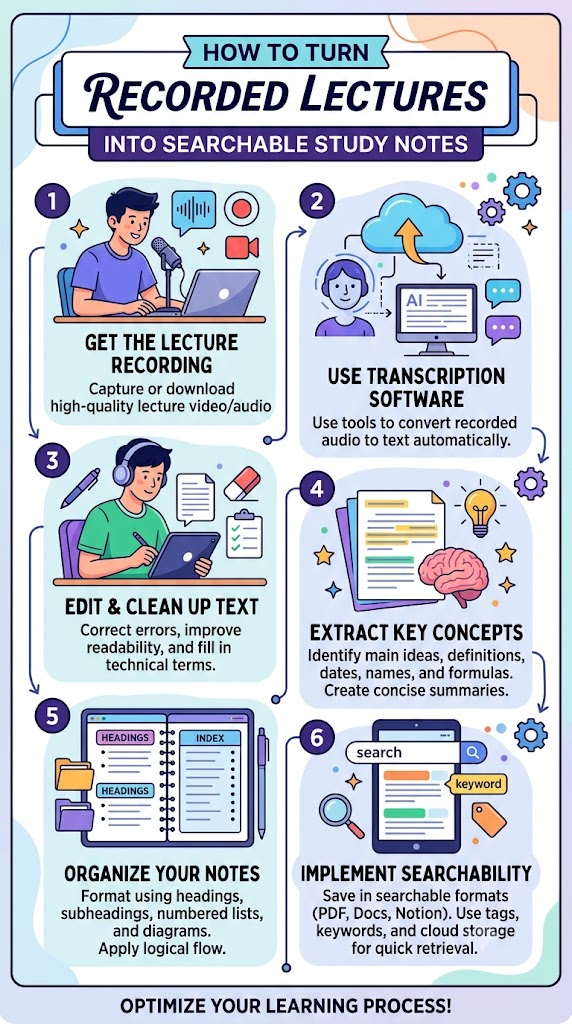


You must be logged in to post a comment.