Make Blogger Header, Navigation And Footer Full Width

  Blogger is a user-friendly service that provides a lot of really attractive looking default templates for those just starting out. Default templates come in handy, but the nice things about owning your own blog is that you have the chance to add your own personal touch. As a matter of fact, templates aren’t made to restrict your freedom of design, but instead they’re there to provide you a foundation to build from. With every default template available on Blogger, you can make changes to fit your style.

One of the most common requests out of the Blogger community when making alterations is how to change the look of some of the key sections like header, navigation, and footer. Initially, these items are designed to fit within just 1/3 of the page, surrounded by padding and margins on either side. These margins are used to give the page a slim fitting appearance, but could also cause your content to look compressed.

Important: Backup your Template

Making the changes to a full screen Blogger navigation, footer, or header can be done and won’t take you much time. Before you can make any changes, you should save extra copies of the template .xml file in case anything goes wrong. That way, if you don’t like it or it doesn’t come out looking like it should, you can reuse the contents of the original file to restore your blog to working condition.

Demo

Hover your mouse over the image to see a before and after example:

How to Make Header, Navigation and Footer Full Width in Blogger

Step : Access Your CSS File

If you’ve never opened up your CSS file before, log in to your Blogger account, select your blog and navigate to Template > Edit HTML. This will bring up the code of your template containing all your blog’s internal files in one place.

Step : Modify the Background

Click anywhere inside the code area > press CTRL + F keys and type the following line > hit Enter to find it (stop at the first occurrence of it):

body {

Just below body { you should see some lines that will look like this:

body {
font: $(body.font);
color: $(body.text.color);
background: $(body.background);
padding: 0 $(content.shadow.spread) $(content.shadow.spread) $(content.shadow.spread);
$(body.background.override)
}

Where you see the highlighted line above in the code, remove the line and replace it with:

padding: 0px;

Different templates will have minor variations, but you should still be able to find these lines within every template.

Step : Change the Content Section

Next, search using the CTRL+F keys for this part:

.content-inner {

Just below it, you will see this line:

.content-inner {
padding: $(content.padding) $(content.padding.horizontal); 
}

Remove the line in red and replace it with:

padding: 0px;

This will remove any of the padding around the inner content, so it won’t leave any room on both sides.

Now find this part:

$(content.background.color.selector){

Just below it you will see this line:

$(content.background.color.selector){
background-color: $(content.background.color);
}

Replace the line in red with:

background-color: $(body.background);

Finally, search for this tag:

]]>

And just above it, add this CSS:

.main-outer {
background: $(content.background.color);
}

Step : Make the Content Outer Full Width

Content is displayed differently between browsers, so you’ll next want to fix this so that it alters the width across the board. This code can be found searching for:

.content-outer, .content-fauxcolumn-outer, .region-inner {

And just below it you will see the following lines:

.content-outer, .content-fauxcolumn-outer, .region-inner {
min-width: $(content.width);
max-width: $(content.width);
_width: $(content.width);
}

Delete the line in red and replace that line with:

max-width: 100%;

Step #5: Finish It Up

Now you have just two more lines you need to change. Look for:

And click on the right arrow to expand the styles. Note: you will need to search for tag again, and just before it you’ll see these symbols highlighted in yellow:

]]>

Above this ]]> section of code, add the following:

.main-outer {
max-width: $(content.width);
margin: 0 auto;
}

Then run a search for:

]]>

Add these lines of code just before/above it:

.tabs-inner {
padding: 0px;
}
.section {
margin: 0px;
}
.header-inner .widget {
margin: 0px;
}

Save the template and exit out of the editor.

Finished!

Following along with this tutorial won’t affect or alter the pictures you are using on the blog, just the design of the content area. If you have a logo that stretches across the screen and fits perfectly for 1/3 page header, you will need to resize and re-upload this content so that it is able to work with the new adjustments.

7 Search Engine Optimization Tips For Bloggers

  SEO, as you might have already know, is an acronym for search engine optimization. In the simplest of words, it’s the way search engines like Google.com, Yahoo.com, Bing.com and others present your page in users’ search results on their sites.

Cool, how do they that?

Well, they do that via sophisticated software tools, called spiders. Consider the whole internet as an empty room, with air particles as websites. Now sneak a spider into that room. Each tiny step that this spider would take now is essentially crawling a website (as the room is dark and full of websites). This is how search engines crawl through the web picking up site after site, studying them and ranking them. This ranking is important, really important. A higher ranked website by Google will always be on the first page of Google’s search results for a related query compared to a lower ranked one.

So, in order to get ranked higher, you and I need SEO. SEO is like black pepper without which fried egg might not taste ‘that’ tastier. In simple words, in order for search engines to find your site and rank it higher than others in your field, you need to optimize it. Let’s see how with these 7 simple tips.

Ways to SEO Optimize your Blog

Before starting with our 7 simple tips for a quality SEO, it’s important to broadly classify those tips into two basic areas, on the basis of origin:

On-page Optimization

Refers to optimization of your actual web content including your HTML code, your text, as well as graphic content.

Off-page optimization

Off-page optimization, however, deals with things like backlinks (hyperlinks pointing to you site from other websites, apps and networks).

1. Create SEO Friendly Blog Post Titles

Post titles are important for SEO. They really are since they are deal makers or breakers. Whenever you write something, make sure you give proper attention to the post’s title. Make your titles simple, intriguing, descriptive and gullible so that people may know what is this all about and what to expect. An even better approach is to wear searchers shoes while giving a title and think how would you Google it if you were looking for content like this.

google search results, seo titleAlso, don’t forget to include keywords in your title and keep it under 70 characters (or search engines would crop it before looking).

2. Improve the quality of your content

If you think ‘content’ isn’t important for SEO, think again! Your content is the most important part of your site. While writing, don’t copy-paste from elsewhere, don’t stuff it with keywords alone, don’t bombard it with images and multimedia files and don’t write any lesser than 300 words. These all would affect your ratings quite poorly.

So, write original, use keywords in scenarios instead of straying them around (like I didn’t use SEO here, SEO there in every next line), use images where they suffice and make sure you name them properly to appear in image search results, i.e. an image with the “img009.jpg” name would never appear in the image search results but “tips_to_success.jpg” would. The best would be to use text content and wrap them proper in HTML tags like

etc. (search engines likes content this way). Also, make sure your blog post’s length is somewhere between 300-500 words – crossing over is fine but lesser isn’t.

seo title headings

3. Keywords are keys

Keywords are terms that others may use to search for your content. While keywords are important for SEO, don’t go on and stuff your site with keywords. This would make your content appear like a spam to spiders, who would neglect it henceforth.

Ideal is that once you have chosen your title (and included your keyword in it, as I have added keyword SEO in title above), use it in page URL, in your starting and ending paragraphs, as well as in article body where required without sounding awkward. Additionally, you may link it using anchor text to relevant resources in and out of site.

Adding keyword in the post URL using Custom Permalink

4. Meta-tags are important, but not ‘that’ much

If we had been living in early part of 21st century, meta tags might have done all the SEO for your site. Unluckily, we aren’t. Google and other search engines have long left using meta-tags for finding site information. Hence, if someone tells you meta-tagging is all you need for your sites SEO, tell them it isn’t.

Nevertheless, it’s important that you use your keywords in your meta-data. Some themes already do that for you, if they don’t (you can check that using page source or using view source code from browser), don’t sweat. You can use 3rd party plugins like All in One SEO Pack and Scribe.

5. Socialize!

Make others talk about your site and share your content on social media sites or their blogs. It gets even better if somehow sites with high ratings link back to your site. This makes spiders think that you are someone important that everyone these days is talking about, resulting in enhancing your ratings dramatically.

Guest posting is another good approach for that. Comment on other sites, make friends with bloggers (best in business) and make them comment at yours. These tiny little things do matter a lot, resulting in enhanced SEO of your site.

6. Link in and Link-Out

Hyperlinks or Links are important from SEO perspective. You can use them to:

Link out to other sites, networks and posts, or even to your previous posts (also called inbound or backlinks) using anchor element with keyword.

anchor element with keyword

Or even better, make others to link in to you, via sharing your content on their sites or social media networks.

As mentioned, an even outstanding strategy for building links is guest posting.

7. Write Often

Sites with new content every day, or twice thrice a week have still far better ratings than those who post every fortnight. A better incoming content frequency makes spider come to your site regularly, resulting in better ratings and enhanced SEO.

Are we done then? Well, trust me – your sites rating is in your hands, not in Google or Yahoo. SEO is just about doing things neatly and in a sophisticated manner. Walk your site these 7 steps for a quality SEO and you will witness the difference yourself at Google, if no place else.

Remember, code clean, write original, socialize… this is what SEO is all about!

How To Optimize Images For Better Search Engine Rankings

  When search engines start indexing the pages on your site, they don’t just focus on the writing. Web crawlers employed by services like Google and Bing shuffle through your site’s structural code looking for any relevant information that they might offer to their customers. Some of the information includes things like backlinks, tags and even images.

Images make up a big part of any website. They help to excite the visual senses of readers and offer a little extra entertainment value. What most blog owners don’t realize is that all of the photos that they upload to their site aren’t confined to their site alone. Crawlers make sure that these images also show up within their respective search engines sites.

Image searches can have the effect of drawing in large numbers of new readers that were just looking through content in Google images. You can benefit from this traffic and increase your average subscriber by practicing image optimization.

seo image optimization

Image Optimization Tip : Alt Tags & File Names

Visitors may love images, but computers don’t. Computers are designed to do what you tell them without violating any of the parameters. When web crawlers come across images on a website, they really don’t know what to do with it because they are made to collect information, not interpret it. The solution to this problem is to optimize images and appropriately label your alt tags so that they display the correct content when someone goes to look for it.

For example, let’s say you upload a picture of your dog, and label the “alt” tag by the dog’s name, ‘Frank’. The web crawler is going to read the alt tag without ever realizing it’s a picture of a dog; therefore, the crawler will come to the conclusion that it needs to display the image when someone run a search for ‘Frank’.

The minor word choice mistakes may not affect the operations of your website, or how your image is displayed, but it will affect the search results of others and the traffic that comes into your website. Whereas you may have been able to attract the dog lovers in the world using image optimization of your dog tagged ‘dog’, you are now drawing in crowds searching for their uncle “Frank”.

To include the alt tag, simply add alt=”this is your alt text” to your image tag. Here’s an example:

<img src="pug-dog.jpg" alt=”frank dog” />

But you don’t have to touch the html code of the image. Once the picture is uploaded, click on it and you will see the “Properties” setting. Add the alt text inside the box and hit OK:

image alt tag

This goes the same for file names on a website. You need to optimize images and file names on everything that you decide to save to your website directory so that this information can be appropriately indexed and be used as a search term. You could name the file of your dog Frank, “pug-dog.jpg”, which would encourage the search engine to add Frank into searches being performed with the phrase ‘pug dog’. Alt tags and file names play an important interpretation role between you and the machine that makes your blog possible.

Image Optimization Tip : Add A Caption

After uploading your images, you should always add a caption to the image, so that average browser understands what they’re looking at. This gives your website a more professional appearance and will help to keep people on your page.

Not everyone that comes across your picture using a Google Image search is looking for your blog. Maybe they just want to download the image, and that’s all you’ll ever get from them. The important thing is that they found your photo relevant to their search, and decided to navigate to your site in order to save it for their own use.

The longer those users stay on the site, the better it looks for you because it plays a role in the “bounce rate”. Bounce rate refers to when someone clicks on a link, realizes it’s not what they’re looking for, and then immediately goes back to the search engine. If you can reduce the number of times that this happens by providing captions and intriguing content that will make people want to stick around, your SEO ranking will improve.

blogger image caption
Image caption and SEO

Image Optimization Tip : File Size

Improving your bounce rate can be tough because the attention span of the everyday Internet user is incredibly short. It may be as short as 8 seconds. High bounce back rates and slow loading sites can be the death of most blogs because no one wants to wait for the content to load. By the time your website finally loads with the content that you need, they could have easily visited two or more sites and found what they need from someone who was better prepared to handle their traffic.

Optimize images so that you are able to keep the file size as small as possible while retaining the quality of the photo. Images taken from DSLR camera – although they may look great – can be up to 1.4 MB in size if you take them directly off your camera and upload them on your blog. This type of space is massive for any everyday blog, and will hurt your SEO ratings.

Use Photoshop or one of the many online services like Google Picasa to rescale your images or reduce the file size. One service that can perform this ability for free and do a great job is Kraken. When you access Kraken site, it will allow you to upload the picture and download the new image optimization versions to use on your Blogger site.

Putting It All Together

At the end of the day, the quality of your site and overall SEO ranking isn’t just about what you have to say. It’s the entire package of what you have to offer. Optimize images every chance you get and use the strategies discussed above. Now that you know that you might have been neglecting images all along, you can make necessary adjustments and start to see even better results from all your hard work.

5 Easy Ways To Improve The SEO Of A Blog & Boost Traffic

  5 easy ways to improve the SEO of a blog

A blogger needs to know at least the basics of SEO. For this, you don’t need to be an SEO expert but you need to know the minimum so that your posts are well indexed in the search engines.

The phrase “Content is King” is one of the widest spread Internet memes being used by so many bloggers with the idea that you should focus on having quality content, while the rest isn’t that important. This is not true. Quality content is essential, but bloggers shouldn’t focus only on this matter. Besides producing quality content, your text needs to be optimized for the search engines.

improve seo, seo tips, boost traffic
Boost traffic & increase SERP visibility with SEO

5 Easy Ways to Improve the SEO of a Blog

Now, let’s get to know the basics that any blogger needs to learn about SEO, as well as other simple SEO techniques. Below are 5 easy tips to improve the SEO of your blog:

1. Define the keyword

When you write a post, it is recommended to choose the right SEO keyword for your text. Your purpose is to make this keyword – or term – to be searched on Google, and then get your post among the top. For this, you need to use this keyword a few times in the text.

For example, here the keyword could be SEO, but this term is too common and I could hardly get in the top for this search. Then, I’ll work with a phrase or a long tail keyword, so that this post will rank for the term “easy ways to improve the SEO of a blog“. I will use this keyword a few times, but without overdoing it.

2. Use the keyword in the post title

Now that I have defined the keyword, I will use it in the post title. This step is very important, and certainly will help you to get a better SEO rank. For instance, the post title contains the easy ways to improve the SEO of a blog keyword, along with other words to form an attractive and optimized title for SEO.

3. Use the keyword in H2 tags

You must also use heading tags (h2, h3) in your posts. Here, we added the “easy ways to improve the SEO of a blog” keyword in a H2 heading. Do this always as it will help you rank well in the search results. If you don’t know or don’t understand what are the heading tags, I would suggest to do a further research on this topic.

4. Use the keyword in the text

Include the chosen keywords throughout the text. Especially in the first paragraph (please note that I have repeated the title in italics in the first sentence). But be careful when doing this, there is a maximum and minimum limit for that. A good keyword density is between 1.5% to 4.5% for best results. Less than that will have no effect and more can alert the search engines and your text might be considered spam.

5. Publish Posts with 300 words or more

Posts under 300 words have little chance to be among the top results in search engines. Of course, you will be able to rank for multiple keywords that are less popular with less than 300 words, but for the most competitive keywords that have the potential to bring a greater number of visits, it will be nearly impossible.

Thus, it is recommended to write posts with more than 300 words. It’s not hard when you really understand the topic you’re talking about.

Conclusion

As you can see, with some simple SEO techniques you can improve the traffic coming to your blog from the search engines. I hope you enjoyed these 5 easy ways to improve the SEO of a blog!

Blogger Vs WordPress: Which Is Better For You?

  There are two big-name services in the world of blogging: Blogger vs WordPress. No matter where you go on the internet looking for advice, these two names are nearly impossible to avoid because they play such an important role within the online content community.

If you’re just starting out a new blog, or making some major changes to your current layout, you’ll most likely be faced with the decision to choose between Blogger vs WordPress. Both are stellar services that are going to make your life as a blogger much easier, but ultimately, your decision must come down to one. So don’t cross over, let’s walk this path together and ensure that you don’t get lost in the wonder world of web, looking for answers.

blogger vs wordpress

Before we start!

WordPress as you might have noticed, comes in two different flavors, wordpress.org and wordpress.com. Seemingly same, but practically, not. Like in Blogger vs WordPress, hosting at wordpress.com is like renting a corporate apartment where the corporate is responsible for maintenance and facilitation of your place. While hosting at wordpress.org is similar to buying your own apartment, where you are responsible for your place’s security, maintenance and many others.

So, wherever in this post you see the word ‘WordPress’; know that it refers to wordpress.org.

User-Friendliness

WordPress is a clear front-runner in the blogging and web design community in terms of how many people actually use the platform. The founder of WordPress, Matt Mullenweg, provided eye-opening statistics that around 18.9% of the entire Internet runs on WordPress. Compared to a 2012 study done by Blogging.org, of all the actual blogs on the Internet, WordPress makes up 43%, Blogger 35%, and the remaining blogs are Tumblr or other less known services.

However, just because something is used more often than another, it doesn’t mean it’s easier to use. The problem with WordPress is that it wasn’t designed for beginners who just want to take up blogging as a side hobby. In order to set up your own WordPress blog, you have to have some previous knowledge of things like hosting, bandwidth, HTML and SEO practices. There are WordPress services out there that will help set up your site and get you online, but WordPress itself comes as a set of files that you are expected to download and configure to your own site.

Some hosting companies have made the idea of using WordPress a little bit easier with things like one-click downloads; but it’s still a pretty steep learning curve for new bloggers to overcome. You also have to deal with paying for the costs of hosting your site and acquiring the domain name. If you opt to use one of the many WordPress services instead of setting it up yourself, you’ll be stuck with a URL such as ‘yourwebsite.wordpress.com’, which takes away from the professional image you may be trying to portray.

Blogger is entirely based on Google and makes setting up a blog a breeze. With Blogger vs WordPress all you need to get started is to sign up for the service using your Google account, or make a new account like you would if you were setting up an email account. From there, Blogger takes responsibility for all your files, backing up the systems and the details associated with operating a content site like a database. Blogger is so much easier in terms of walking you through the steps, providing you with everything you need to be successful and it’s at little-to-no cost to you.

Design & Customizability

Hosting at WordPress means stepping into the Disney world. With hundreds of featured rich-customizable design templates, you would find yourself literally lost in the WordPress arena, ensuring that your site looks unique, catchy and simply marvelous to visitors. The wide array of WordPress templates include customized designs for nearly every walk of life including fashion, entertainment, music, health, kitchen, etc.

Blogger templates, some would say, are not responsive; but let me tell you a secret. With a little search online, you can find hundreds of free, highly customizable, responsive Blogger templates that you can easily integrate into your blog, so that you, and your site visitors stay in touch with your blog through their handsets. For WordPress, however, you don’t need to wander around. By default, it has rich and responsive native designs, making WordPress ideal for mobile bloggers.

Both platforms will allow you to make modifications to the theme and features of the site if you have experience or feel comfortable to use HTML and CSS. They also both provide helpful post areas for when you go to submit new content. These post areas will also include HTML and some basic functions to change the font style and the size of your text.

One design feature between the two that may tip the scale toward Blogger in the Blogger vs WordPress discussion is that Blogger is integrated with other Google services like Google Picasa. Picasa is a photo sharing site that will allow you to share all your personal photos, or the photos that you plan on using within your posts. These can then be accessed via the text editor when you are submitting content and can be easily included with the content.

Gadgets, Widgets & Plugins

Talking of plugins, WordPress provides you with thousands of easy to integrate plugins from security to multimedia, enabling you to add any feature or functionality in your site, in a couple easy steps. Users of this platform have submitted thousands of independent plugins that you can install for just about anything you would need, from SEO to E-commerce. There are so many interesting plugins available, that blog owners often make the mistake of cluttering their site with too many and distracting their readers from the content.

Blogger may not have as many plugins or widgets as WordPress, it does have enough to provide you with what you need. Blogger’s simplicity in many ways provides it with an edge over WordPress because you are able to focus most of your time in producing great content, instead of seeing how many bells and whistles you can add on the site.

The SEO Question

Not every person that starts a blog is looking to make money off the content; some people just like to write for the sake of writing. Whatever your goals are for starting the blog, search engine optimization – or SEO for short – is a key strategy in growing your readership, so others might enjoy what you have to share.

Over 1 quadrillion searches are performed via Google each year. The goal of most SEO producers is to implement strategies that can appease Google so that their content will be ranked higher up in search query results. Blogger is a service created by Google, so it’s obvious that they added their own formulas to the service to ensure that those blogs are doing what they need to do to be found.

Sticking to Blogger means Google would optimize your blog itself from a SEO perspective. All you need to do is check / uncheck a couple of options from your dashboard and Google will start crawling your site with just a click of a button. WordPress takes a hands-on approach that will require you to know a little bit more to modify your website design and content to meet these standards.

And the Blogger vs WordPress Winner Is…

In terms of Blogger vs WordPress, both services might be worth trying out, but ultimately Blogger comes out as a winner in all four categories discussed above. For new or returning bloggers, it is a fantastic service that makes it easy to focus on what you love, regardless of all the add-ons and fancy additions of WordPress. Blogger’s simplicity is perhaps one of it’s greatest advantages and provides bloggers of all experience levels a chance to succeed.

PageRank Checker – Check Your Google Page Rank

 PageRank is an algorithm used by Google Search to rank websites in their search engine results. Page Rank was named after Larry Page, one of the founders of Google as a way of measuring the importance of website pages.

What is Google PageRank and Why Is It Important

According to Google:

“PageRank works by counting the number and quality of links to a page to determine a rough estimate of how important the website is. The underlying assumption is that more important websites are likely to receive more links from other websites.”

Briefly, the Page Rank is an assessment of the importance of a web page. This relevance is calculated and published on a scale from 0 to 10. Google basically takes into account the number of backlinks that each page receives, however, the number doesn’t matter that much if we don’t build high quality backlinks from sites which are related to our links, preferably internal links.

A greater importance has the quantity of internal links linked by other websites, which happens when you create a post and someone publishes the link that redirects to this post that you created. So, the more backlinks your blog or site has, the higher is the chance of having a good PageRank.

Now that we have a basic understanding of what Page Rank is, how about checking yours?

Check Google Page Rank using the PageRank Checker

You can easily calculate your page rank and check the importance of your page. Just enter the address of your website / blog below and check it out:

Check Page Rank of your Web site pages instantly:


This page rank checking tool is powered by Page Rank Checker service

Do you want to share your page rank with your visitors? You can add a button to your blog by visiting the PageRank Buttons page.

The Difference Between White Hat SEO And Black Hat SEO

  The search engine optimization (SEO) is a good way to promote your blog on Google search results and other search engines. For those who don’t understand how SEO works, here you can find several SEO articles that might help you, but we need to be also aware of the good and bad SEO techniques that could have a direct impact on our ranking.

This article will shed some light on the terms known as black hat and white hat SEO and we will get to know what’s good and what is not when we optimize our website and its content.

black hat and white hat seo

What is Black Hat SEO?

From the ‘SEO dictionary’, the term black hat SEO has to do with the abusive techniques that will force the search engines to look at a specific site and rank it. This might work at first, but the algorithms can already see some of these techniques that have become common for a fast result.

Such practices to trick the search engines are, for example, the excessive use of keywords, especially in headings and subheadings; transparent keywords to the user or the so-called hidden text, automatically generated content, pages redirecting automatically to other content and more.

What is White Hat SEO?

The white hat SEO has to do with the good techniques in the ‘eyes’ of the search engines. These are considered ethical techniques for the ranking, helping thus, the positioning of a website or blog. However, working on the white hat is a process that requires dedication and results may take longer to appear (this is why so many people opt for black hat in order to ‘try’ something more ‘effective’) but the results could be much more safe and satisfactory on a long term.

Keep in mind that Google has plenty of tricks up its sleeve to penalize anyone who doesn’t act in accordance with the policies and rules of their website – this includes removing your page from any of the positions. Fair enough, after all, why Google would ‘reward’ somebody with the top spot if the site doesn’t provide good content for its users and at the same time, doesn’t meet the requirements of the algorithm?

For those who are interested and want to get to the top of Google search results, visit the webmaster guidelines page. There, you can find more information about how to create good content, how the design of your blog/site should be and how to work with your links. Also, you can find mentions about black hat SEO techniques.

Top 10 Search Engine Optimisation for Blogger Post

  No matter what online platform you’re using, search engine optimization (SEO) is a must. Relevant keywords, quality content, and social media marketing are all important aspects of running a successful online business. If you want your blog to stand out from the competition and to really rake in the dough, follow these 12 advanced SEO strategies.


Follow These 12 SEO Strategies to Drive Traffic to Your Blog

There’s no point in having a blog for your business or website if no one sees it. Search engine optimization is just as important for a blog as it is for any other website, so you’ll want to take your time planning a detailed SEO strategy.

As you start planning your blog, keep these 12 advanced SEO strategies in mind:

1. Start with Strong Keyword Research

If you have your own blog, you may not be tied to set-in-stone deadlines. Even so, most bloggers find that it helps to plan out their posts so there is ample time for research and brainstorming. In addition to thinking about what you’re going to write, you should also perform some keyword research before you actually start to write. Why? Because keywords are the driving force behind SEO.

When you sit down to do some keyword research, there are two ways to go. One option is to come up with some topic ideas yourself and then do the keyword research for that topic. Another option is to research trending topics in your niche (and on your competitor’s blogs) and then do some research to see which keywords offer the greatest opportunity.

There are plenty of free online tools you can use to do keyword research, so take advantage of them! Create a list of potential keywords and make note of their competition ranking and search volume. You want to strike the right balance between finding keywords that people are searching for and keywords that don’t already have a ton of content. It’s a skill you’ll have to develop, but it will all start to make sense as you see how different blog posts perform when you get around to doing a site audit.
2. Take Advantage of Long-Tail Keywords

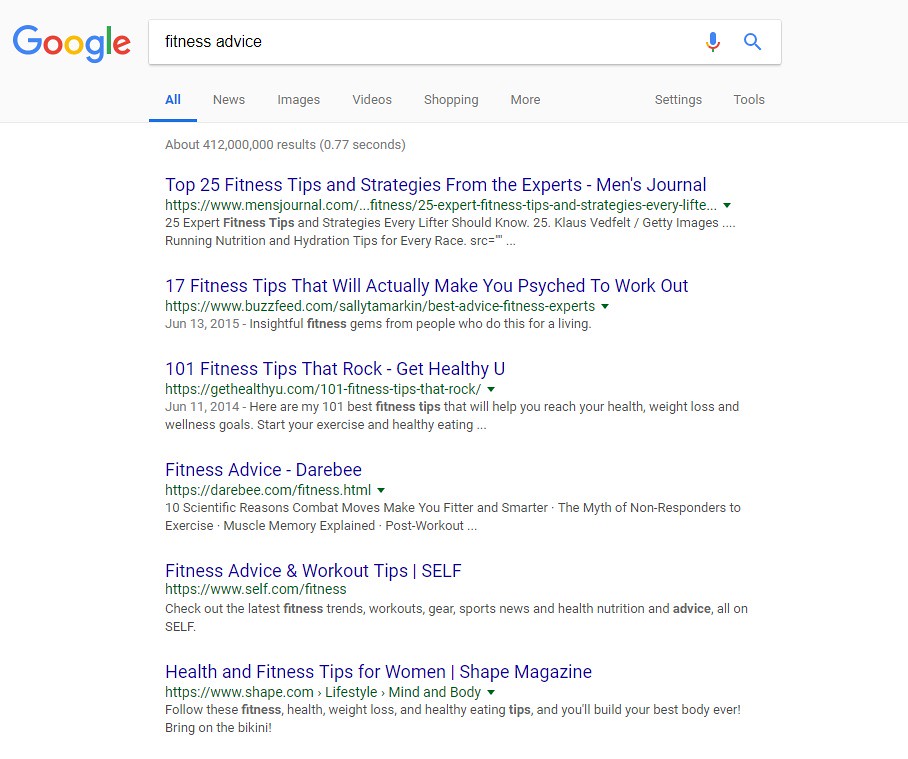
As you do your keyword research, you’ll find that certain keywords have a great deal of competition. For example, if your blog is about fitness and you type something simple like “fitness advice” into your Google search bar, you’ll get hundreds of thousands of results. You’ll see big names like Men’s Journal and Self.com on the first page of search results – names that you can’t possibly compete with.

So, how do you work your way into the first page of Google search results? By taking advantage of long-tail keyword opportunities.

Using “fitness advice” as an example, a long-tail keyword would be a string of words you put into the search bar to find specific information. If you think about it, people probably aren’t going to be searching for general fitness advice anyway – they’ll be looking for advice about specific fitness topics such as exercise motivation tips or the best workouts to burn fat.

These longer, more specific search terms are called long-tail keywords and they are a great tool for improving your blog’s SEO. Long-tail keywords have lower competition rankings while still having decent search volume. That combination means that you have a better chance of showing up on the first page of search results!

3. Perform SERP Research for Every Post

If you do a Google search for three different topics, you’ll find that the search engine results pages (SERPs) may look completely different. Some search terms yield a simple list of websites while others include paid product ads, maps of local results, answer boxes, and more. If you want your blog to rank well, you need to know what kind of SERP you’ll be appearing on and optimize for it.

The best way to do this is to try out different keywords (don’t forget about those long-tail keywords!) and see what kind of SERPs pop up. Depending on what the results are, you’ll have some idea what kind of search terms yield which results, and you can make your choices accordingly.

4. Optimize All Images for SEO

When it comes to a strong SEO strategy, the wider you spread your net the better. This doesn’t necessarily mean loading every page with dozens of keywords, however. Instead, it means taking advantage of specific SEO opportunities to build a strong overall strategy. One thing you don’t want to overlook when optimizing your blog is your images.

A good blog is all about the content, but you can’t rely solely on text for your SEO strategy. Every blog post you publish should include at least one image and it should be a good one. Depending on what topics you write about, images can do more than just break up big blocks of text – they can also demonstrate concepts and add quality to your post.

So, how do you optimize your images for SEO? You should try to work your keywords into the image file name, the alt text, and the caption text (if you use it). The image file name and caption text are self-explanatory, but you may not be familiar with alt text if you’re still new to SEO. Alt text for images is simply a description of the image that can be read by visually impaired visitors using a screen reader.

Your alt text should be an accurate and detailed description of the image, not just a list of keywords, but if you can work in your keywords naturally, all the better!

5. Make Use of Internal Links to Existing Posts

While linking to other posts within your own site is good for SEO, these links aren’t as valuable as external links. Even so, it’s a good idea to do it so you create a framework within your site that keeps your readers around for as long as possible. When planning a new post, think about the different posts you could potentially link to – don’t just link to your most popular posts, either. Internal links can be an opportunity to boost traffic to posts that are struggling to get attention. When you create internal links, be sure to use keywords for the link and use the keyword as your anchor text.

6. Update Existing Content to Keep It Current

The latest Google algorithm highly favors updated content, so don’t think that once you hit the “publish” button your work is done.  You’ll need to revisit your old posts once in a while to make sure the content is still relevant and current then make changes as needed to keep it updated. While you should do this for all of your posts if you have time, it is especially important for those posts where you appear on the 2nd or 3rd page of search results so you can bump it up to page 

When updating your existing content, there are a few different ways you can go. One option is to simply review the content and expand on some of your points. You could also beef up some of your claims with scientific evidence and an external link to the relevant journal article. Another thing you could do is add a section of quick tips at the end or scatter “fun facts” throughout the piece. Just don’t make the piece too cluttered or spammy with keywords.

7. Write Guest Posts and Obtain Backlinks

As a blogger, you have the freedom to choose what you write about and you can link to other posts on your site to increase value for your readers. What you really need to do, however, is get links from other reputable blogs back to yours – this is called backlinking and it is an important part of any successful SEO strategy. But how do you do it?

One way to get backlinks to your blog is to write a guest post for another blog. If you go this route, make sure it is a relevant blog – one that is in the same or a similar niche to yours. This ensures that the people reading your guest post will actually be interested in it and in following the link to your blog. It doesn’t hurt, however, if writing guest posts earned you some attention from a new audience.

So, how do you go about getting a gig as a guest blogger? Take the time to do some research to find other blogs that cover topics similar or complementary to your own then reach out to the owner about writing a guest post. Once you get approval, take some time to familiarize yourself with the blog and with the kind of content they publish so you can create a detailed pitch.

Unfortunately, you’ll probably find yourself dealing with a few rejections along the way, especially if you’re targeting blogs with a high readership. Just stick with it until you’re successful and then do a good job on the first one so you can get more.

8. Collaborate with Influencers

The goal of SEO is to make your blog appear on the first page of search results, so you have the greatest chance of reaching your target audience. While you should be optimizing your site for your target audience, you also want to expand your audience every opportunity you get. In addition to doing guest posts, you should also think about featuring influencers in your niche on your blog.

So, how do you collaborate with influencers on your blog? One way is to do an interview and write up a summary of that interview. You could also feature a quote from an influencer in one of your relevant posts or use some of their content as a reference in yours. When you do things like this, look for an opportunity to communicate directly with the influencer and see if you can get them to share the blog post with their own audience.

9. Experiment with Different Formats

If your blog is cluttered with content and difficult to navigate, it isn’t going to perform well. One of the main goals of SEO is to keep your readers on your site for as long as possible. If your site isn’t formatted well, readers may become frustrated at how difficult it is to find what they’re looking for that they end up leaving and going to the next result on the SERP.

Every blog is unique, so the format that works for one blog may not work for another. Don’t be afraid to experiment with different formats to see which one works best for you. Play around with different elements like infographics, videos, images, podcasts, and more. Trying out a new kind of content might inspire you or open up your blog to an entirely new audience.

10. Consider Creating a Mobile App 

We’ve already talked about the importance of optimizing your website for mobile users, but you may also want to consider creating a mobile app. Mobile apps work better for some applications than for others, but it never hurts to consider the possibility. You may even want to brainstorm some ideas then sit down and talk with an app developer to discuss your options. It’s unlikely that you’ll have the skills or the time to develop the app yourself.

While creating a mobile app is great, it can also be very expensive. If you think that it will really boost traffic and open your blog up to a new audience, it may well be worth the cost and the effort. If you aren’t sure, take the time to examine other options for improving your SEO before you spend a small fortune developing an app. If you have the money, a mobile app could be a great tool to have in your long-term SEO plan.

11. Perform Competitor Research for Keywords

Before you write a new post, you need to do your keyword research so you know how to optimize the post for SEO. In addition to doing keyword research for your own posts, however, you should also keep an eye on the keywords your competitors are ranking for. Online tools can help you identify the top-performing keywords for any given site so you can check up on your direct competitors as well as some of your lower-level competitors.

But what do you do with that keyword research? One thing you can do is try to steal the top slot on SERPs for the keywords your competitors are ranking for. If you notice that your competitor is ranking well for a low-competition keyword and you already have some content relevant to the keyword, consider making some updates to that content to further optimize the post.

You can also use competitor research to identify gaps areas where you might be able to slide into the top spot by writing a new post that is optimized for one of the keywords your competitor is not ranking well on. The options are endless, so take the time to familiarize yourself with the competition and what they are doing well so you can emulate it and improve upon it on your own blog.

12. Complete an SEO Audit

If you want to make significant improvements to your blog (and to its performance), you need to know exactly what is and is not working. You may already have some idea which posts are your most popular, but have you recently completed an in-depth audit of your entire site to see where you have opportunities to make improvements? If not, it might be time.

Generally speaking, an audit is an examination of your existing blog content and structure which includes various metrics for its performance. An SEO audit in particular looks at those specific aspects of site performance which can help you create new goals for future content in addition to providing guidance for how to update or upgrade your existing content for better search results.

When performing an SEO audit, you’ll want to look at how well each post is optimized for keywords and whether those keywords are still ranking well. You’ll want to make sure your SEO meta titles and descriptions are completed and current, and you want to check your page URLs as well. Make sure your image alt tags contain relevant keywords and include both internal and external links in your posts as much as possible.

These simple things could lead to a big boost in SERP rankings with minimal effort on your part.

Now that you’ve learned about the top 12 advanced SEO tips to drive traffic to your blog, all that is left is for you to implement them. Good luck!


Call for Papers: International Journal of Research (IJR)

 Dear esteemed researchers and scholars,

The International Journal of Research (IJR) invites submissions for consideration in our esteemed publication. As a reputable and scholarly journal committed to advancing knowledge across diverse fields, we encourage researchers, academicians, and professionals to contribute their original research papers, review articles, case studies, and scholarly works.

IJR seeks to publish high-quality, peer-reviewed manuscripts covering a wide spectrum of disciplines including, but not limited to:

  • Science and Technology
  • Engineering
  • Medicine and Healthcare
  • Social Sciences
  • Business and Management
  • Arts and Humanities
  • Education
  • Interdisciplinary Studies

Submission Guidelines:

  • Manuscripts should be original and previously unpublished.
  • Papers must adhere to the journal’s formatting and citation style.
  • All submissions undergo a rigorous peer-review process to ensure scholarly excellence.
  • Authors are requested to submit their manuscripts online via our website or email to ijr@ijrjournal.com.

Important Dates:

  • Submission Deadline: 30 of each month
  • Notification of Acceptance: Within a week
  • Publication Date: Within a week of Acceptance

Authors are encouraged to review our submission guidelines and policies available on our website for detailed information on manuscript preparation and submission procedures.

We look forward to receiving your scholarly contributions and fostering a collaborative platform for impactful research dissemination.

Best regards,

[International Journal of Research (IJR)]
[Website: www.ijrjournal.com]

NONI: INDIAN MULBERRY


Botanic name of Noni is Morinda Citrifolia. It is also called Indian Mulberry. It is an Ayurveda plant, found near the seas where temperature is below 25 degree Celsius. The noni tree is an evergreen shrub, up to 20 ft (6 m) tall, that grows in tropical areas of the South Pacific, including Australia, Malaysia, the West Indies, India, Vietnam, etc. Its branches and trunk are coarse, tough wood, and the leaves are glossy, oval, and dark green. Year-round, the tree yields a small fruit, which is cream-colored and about the size of a small potato. The noni fruit is noted for its bitter taste, unpleasant smell, and reportedly strong healing properties. It is very good for health. Noni has been in use from the bygone era. Noni is a great natural detoxifier. Today about 40 University are researching on Noni fruit and till now 164 nutrients have been found in it.
Noni has more than 150 nutrients. Compared to pineapple, Noni has 40 times more enzymes. It boost the immunity system. It is beneficial for health.
Noni is a rich source of vitamins B1, B2, B3, B5, B6, B12, C, E folate, beta, carotene and minerals such as calcium, potassium, magnesium, iron and phosphorus. Noni has Anti- oxidant, Anti-bacterial, Anti- inflammatory and Anti-wrinkle properties. It is a powerful food for cells and maintains the cell count. People of all ages can drink it. Noni juice is a strengthening drink that keeps the stress away, stimulates serotonin and endofrin, effects mood and emotions.

USES OF NONI 
1.Noni contains fibers.
2.It is beneficial in reducing pressure on the intestine. It has vitamins and minerals which protects our intestine.
3.It prevents increase of tumor, due to which it helps in fighting with the cancer.
4.People suffering from Asthma should take Noni juice everyday in the morning and evening.
5.Noni juice works like an insulin and helps to regulate sugar levels.
6.Noni juice helps in making body disease free.
7.Intake of noni juice is beneficial in skin disease like eczema.Various parts of noni plant have been used to treat skin problems such as acne, water retention, inflammation and others. Noni contains anthraquinone which has anti-wrinkle properties, and thus, can slow down the aging process of skin. Noni juice has goodness of antioxidants which helps to fight against free radicals and thereby, prevents cell damage.
8.Noni reduces the effect of wine.
9.Noni regulates blood cholesterol levels.
10.Noni juice has shown positive effects in protecting heart health by improving the blood flow in the arteries. It also helps in regulating blood pressure which definitely helps in maintaining heart health.
11.Noni is effective in stress, pain in urine, leucorrhoea and periods.
12.Noni helps to increase memory power.
13.Noni is beneficial for every problem related to hair like baldness,dryness of hair and also good for growth of hair.
14.Useful for arthritis and joint pain.
15.Improves the nervous system.
16.As an effective anti-oxidant keeps the poisonous elements and pollution away.
17.Noni juice boost the Immunity System.
18.It helps to detoxify the body. 

New Education Policy of India 2020

 The New Education Policy (NEP) of India was launched in 2020 with the aim of revamping the education system in the country and bringing about significant changes in the way education is imparted. The NEP is the first education policy in India to be launched in the 21st century, and it replaces the earlier National Policy on Education, which was launched in 1986 and revised in 1992.

The NEP is based on the principles of access, equity, quality, affordability, and accountability, and it aims to provide a holistic and multidisciplinary education to students from all backgrounds. The policy is designed to promote lifelong learning and to equip students with the skills and knowledge they need to succeed in a rapidly changing world.
One of the major goals of the NEP is to provide universal access to education from preschool to secondary school. The policy aims to increase enrollment rates and reduce dropout rates by providing free and compulsory education to all children between the ages of 3 and 18 years. It also emphasizes the importance of early childhood education and aims to provide high-quality preschool education to all children.
The NEP also seeks to bring about a significant shift in the curriculum and pedagogy of schools and colleges. It emphasizes the importance of multidisciplinary learning and encourages the integration of vocational and academic education. The policy aims to reduce the emphasis on rote learning and memorization and promote critical thinking, creativity, and problem-solving skills.
Another significant feature of the NEP is its focus on the use of technology in education. The policy aims to promote the use of technology to enhance learning outcomes and make education more accessible and affordable. It also emphasizes the importance of digital literacy and aims to provide students with the skills they need to use technology effectively.
The NEP also seeks to promote the internationalization of education and encourage greater collaboration between Indian and foreign educational institutions. The policy aims to attract foreign students to study in India and encourage Indian students to study abroad.
The NEP also addresses the issue of teacher training and professional development. It emphasizes the importance of continuous learning and aims to provide teachers with the skills and knowledge they need to deliver high-quality education. The policy also encourages the use of technology in teacher training and aims to provide teachers with access to high-quality online resources.
The NEP also addresses the issue of funding for education. The policy aims to increase public investment in education and encourage private investment in the sector. It also proposes the establishment of a National Research Foundation to fund research and innovation in education.
The NEP has received mixed reactions from stakeholders in the education sector. While some have praised the policy for its focus on access, equity, and quality, others have criticized it for being too ambitious and lacking in detail. Some critics have also raised concerns about the implementation of the policy, particularly in terms of funding and teacher training.
In conclusion, the New Education Policy of India is a comprehensive and ambitious policy that seeks to bring about significant changes in the education system of the country. The policy has the potential to transform the education sector and provide students with the skills and knowledge they need to succeed in a rapidly changing world. However, its success will depend on the effective implementation of the policy and the commitment of all stakeholders to work towards its goals.

Education Policy of USA

 The education policy of the United States is a complex and multifaceted issue, as education is primarily a responsibility of the individual states. However, there are some overarching policies and initiatives at the federal level that impact education in the country.

One of the key federal policies is the No Child Left Behind Act (NCLB), which was signed into law in 2002. This law aimed to improve student achievement by requiring states to implement annual standardized testing to measure student progress in reading and math, and by holding schools accountable for their students’ performance.
In 2015, the NCLB was replaced by the Every Student Succeeds Act (ESSA), which continued the focus on accountability and standardized testing, but gave states more flexibility in implementing their own policies to improve education.
The federal government also provides funding for education through programs like Title I, which provides financial assistance to schools with a high percentage of students from low-income families, and special education funding for students with disabilities.
Another key policy issue in education is school choice, which refers to the ability of parents to choose where their children go to school, including private and charter schools. While some argue that school choice promotes competition and improves education, others are concerned about the impact it may have on public schools and access to education for disadvantaged students.
Overall, the education policy of the United States is a complex and often contentious issue, with ongoing debates about the best approaches to improving student achievement and access to education.

Book Review: Flesh &amp;amp; Blood So Cheap


Flesh & Blood So Cheap cover

I liked this book. People who are interested in national disasters and US history as well as immigration will most probably be interested in reading this book.

Readers can gain knowledge of what it was like to work in New York City in the early 1900s. One of the things that was especially interesting was that there were no safety laws at work. Also, there was a big contrast between the rich and the poor. Some people may not like this book because it is very depressing, but it is an important event in history to remember.

This book was very well written. It has black and white photos along with descriptions of the photos. These photos give us a better idea of what people’s lives were like. This book is suitable for 9-20 year olds.

I give this book 5 stars.

Shri Dharmendra Pradhan launches Comic Book Developed by NCERT and UNESCO “Let’s Move Forward”

  Union Education and Skill Development & Entrepreneurship Minister Shri Dharmendra Pradhan, launched a novel comic book titled “Let’s Move Forward.” The launch event was held on August 29, 2023, at Kaushal Bhawan, New Delhi. Secretary, School Education Education and Literacy, Shri Sanjay Kumar; Secretary, Ministry of Skill Development & Entrepreneurship, Shri Atul Kumar Tiwari; Director, NCERT, Dr. Dinesh Prasad Saklani; officials of the Ministry of Education and UNESCO and students were also present at the event.

Speaking on the occasion, Shri Dharmendra Pradhan highlighted that this book will motivate students to prioritize holistic well-being while entertaining them through storytelling, with key focus on good health and wellness. He also stressed on the importance of stories in conveying important messages such as mental health and hoped that more such comic books will be developed in future. Good stories are extremely important for developing societal harmony and well-being, he stated.

He also mentioned the importance of the partnership with UNESCO at the time of India’s G20 Presidency and the subject of FLN which can be spread with the help of comic books. He urged UNESCO to spread Indian stories so that it benefits not only the youth of India but that of the entire world. ‘Explore’, ‘Experiment’ and ‘Experience’ are going to be of great significance, he mentioned. With the Amrit Kaal, a wave has to be created to spread the Indian knowledge in the entire world as a guiding light, he said.

This comic book is a collaborative effort between the National Council of Educational Research and Training (NCERT) and UNESCO New Delhi. It signifies a significant stride towards augmenting the goals of the School Health and Wellness Programme (SHWP). The SHWP, initiated under the Ayushman Bharat campaign in April ,2018 by Prime Minister Narendra Modi, is an initiative undertaken by the Ministry of Education and the Ministry of Health and Family Welfare. Its primary objective is to impart health education, prevent diseases, and enhance access to health services through wellness centres within educational institutions.

The “Let’s Move Forward” comic book is designed to cater to the diverse requirements of adolescents and encapsulates crucial information pertaining to the 11 thematic components of the School Health and Wellness Programme. These encompass a comprehensive range of subjects, including emotional well-being, interpersonal relationships, gender equality, nutrition and health, substance abuse prevention, healthy lifestyles, reproductive health, internet safety, and more.

The comic book imparts life skills essential for fostering responsible and health-conscious behaviour among adolescents. This innovative approach serves to not only disseminate health-related knowledge but also facilitate the acquisition of life skills necessary for comprehensive personal development. It is accessible in multiple languages, including Hindi, English, Assamese, Bengali, Gujarati, Kannada, Malayalam, Marathi, Odiya, Tamil, and Telugu, to ensure inclusivity across linguistic diversity.

The “Let’s Move Forward” comic book will be distributed across various educational and health institutions nationwide. Its distribution will encompass State School Education Departments, SCERTs, Colleges of Teacher Education (CTEs), Institutes of Advanced Study in Education (IASEs), District Institutes of Education and Training (DIETs), Block Institutes of Teacher Education (BITEs), and state health departments. Additionally, the comic books will be disseminated to the 29,000 schools affiliated with the CBSE, thereby expanding its outreach. An electronic version of the comic book will also be accessible on the Ministry of Education (MoE), NCERT, UNESCO, and DIKSHA websites.

***

Children receive all missed/due doses of Measles Containing Vaccine

 There have been some media reports alleging that an estimated 11 lakhs children in India missed their 1st measles vaccine dose in 2022, according to a report published by the World Health Organization and US Centres for Disease Control and Prevention (CDC). 

These reports are not based on facts and do not reflect the true picture. These reports are based on the estimated number reported under WHO UNICEF Estimates National Immunization Coverage (WUENIC) 2022 report which covers the time-period from 1st of January 2022 to 31st of December 2022. 

However, as per the HMIS of Union Ministry of Health & Family Welfare, a total of 2,63,63,270 children out of the eligible 2,63,84,580 children received their 1st dose of Measles Containing Vaccine (MCV) in the FY 2022-23 (April 2022 to March 2023) and only 21,310 children missed their 1st dose of Measles Containing Vaccine (MCV) in 2022-23. 

Besides this, several initiatives have been undertaken by the Government of India in coordination with the States to ensure that all children, either unvaccinated or partially vaccinated receive all missed/due doses of Measles Containing Vaccine (MCV):

  • The catch-up vaccination age for the administration of Measles Containing Vaccine (MCV) has been increased from 2 years to 5 years in the periodic immunization intensification activities. 
  • Intensified Mission Indradhanush, (IMI) 3.0 and 4.0 were carried out in 2021 and 2022 to vaccinate all unvaccinated/partially vaccinated children with missed/due doses of vaccines. Besides this, IMI 5.0 was carried out in 2023 with a special focus to increase the coverage of MR vaccine in children up to the age of 5 years. 
  • MR campaign was carried out in Delhi and West Bengal wherein all children in the age group of 9 months to 15 years (9months to 5 years in Delhi) were vaccinated with campaign dose of MR vaccine. The coverage of both the States reached >95%.
  • Several States have carried out Supplementary Immunization activities and outbreak response immunization wherein a total of 30 million children have been vaccinated with an additional dose of MR vaccine.
  • A Special Advisory on Outbreak Response Immunization was shared in November 2022 which clearly stated that One dose of MRCV has to be administered to all children aged 6 months to < 9 months in areas where the measles cases in < 9 months are above 10% of the total measles cases to not miss any child.
  • The Non measles Non rubella (NMNR) discard rate is >5.8%, the highest achieved so far for the country for the current financial year, indicating a robust surveillance mechanism in place. 

India’s unstinted commitment to ensure that every single child of the country is vaccinated with vaccines under Universal Immunization Programme has been recognized globally. India’s exemplary leadership and inspiration in the Regional Measles and Rubella Programme has been highly appreciated and recognized by the Measles and Rubella Partnership comprising of multiagency planning committee including the American Red Cross, BMGF, GAVI, US CDC, UNICEF and WHO. The Measles and Rubella Partnership Champion Award is scheduled to be conferred on the Ministry of Health and Family Welfare, Government of India in March 2024, at Washington DC.

****