Editing is a key skill in video production that can make or break the overall quality of a video. However, editing is a relatively simple process to understand. Once you have learned the basics you’ll be able to use your new skills to significantly raise the quality of your videos. Most of all, experimentation is key to becoming a great editor, so don’t be afraid to take the road less travelled.
THE METHODS FOR LEARNING:
Learning Basic Editing Techniques
Acquiring Advanced Editing Techniques
Choosing Ideal Software
1 Film footage to gather some practice material. Film anything and everything, as long as there’s lots of it. Don’t worry about trying to tell a story, just film your surroundings, the local park, your street, your room, or even your pet.
Most modern phones are able to shoot HD footage that is perfect for practicing your editing skills.
If you don’t have a camera handy, or just want to get started on editing, you can download video clips online to practice on.
2 Import the footage into your software. Usually editing software will have what’s called a ‘bin’, a specific place in the program to store all your raw footage.[1] This will look like a list of folders or a large blank space on the left side of the main editing screen.
If you can’t find an import button some software will allow you to drag in the file from your computer into the software.
3 Add clips to the timeline. After you have imported footage into the bins, start dragging them onto the ‘timeline’. The timeline appears as a long horizontal bar that takes up the bottom half of the editing screen.
The timeline is where the majority of the work will be done. Here, you can order, rearrange, and manipulate the footage in a variety of ways
4 Rearrange the clips on the timeline. Although the footage shot may be random, try rearranging the clips into different orders to tell different stories. To do so, click and drag the long rectangular box (that represents the video clip) back and forth.
The clips you place together can affect each other. The viewer of a video will always be thinking about the following clip in the context of the previous one.[3] When you’re watching a movie, TV show or video clip, the cut can become completely invisible if performed correctly.
5 Trim the video clips to change the pace of the video. The name of the tool varies from program to program, but generally it’s called the ‘Trim’ tool. You use this tool to trim the front or back of a clip to make it shorter or to extend it outwards. Click the very edge of a video clip in the timeline and drag it inwards and outwards. This will ‘trim’ the clip.
6 Implement transitions to make cuts more appealing. Depending on the tone of the video being made, a pre-made transition from one clip to another can give the video a breath of fresh air. Navigate to the ‘Transitions’ tab located in most editing software and drag a transition you like to the cut between two video clips.
Although transitions are fun, always be thinking about who you’re making the video for. Too many exaggerated transitions can detract from the quality of a video.
7 Export the video from the editing software to save your edits. Once you’ve finished trimming, rearranging and importing all the footage you like, it’s now time to export the video. The software collects all the edits you made of the clips and ‘encodes’ them into a friendly format.
Sometimes exporting can be intimidating due to the sheer amount of options available to you in the software. If in doubt, always export at 24 frames per second (fps) and at 1080p. This means that you’ll be able to play the final video in the media player of your choice. The quality will usually look better after the video is exported.
If you want to learn video editing then first you should understand very basics of video editing.
Then I think you should first start it with Windows movie Maker and after that goes to some other softwares. I’ll suggesting you some best softwares for video editing :—
Adobe premiere pro
Corel video studio
Light worksFinal cut pro
Sony Vegas movie studio
Cinelerra
Pinnacle studios
iMovie
Pitvi
These are the some software you must try to become a good video editor but as I said you should start with learning basics of video editing.
Some you tube channel where you can lean video editing are :—
Surfaced Studios
Rocketstock
kaptainkristian
Peter McKinnon
PremiumBeat
Buddies I am not a professional editor and not also connected to this video editing feild too much. But I provided you information as best of my knowledge.
The Most, if not all, careers involve some computer-based work and require strong typing skills. Information technology professionals, for example, must be efficient typists in order to write code for computer and software programs. Accuracy is equally as important as speed, as a simple typo could result in a system-wide error.
Now way day’s technology-driven world, students and young adults become familiar with computers at an early age. Some schools have stopped teaching typing altogether, assuming students already possess the skills necessary to be successful in the modern workplace, according to an article in MIT’s Technology Review.
without proper training and practice, many individuals resort to hunt-and-peck typing, or looking down at the keyboard to select the right keys one-by-one. Mobile technology, such as tablets and smartphones, have also increased reliance on hunt-and-peck strategies.
Preferred typing method is known as touch-type, or typing without looking at the screen. This is much more efficient than hunt-and-peck; the average person types at an average of 40 words per minute, but a person who relies on the touch-type method can exceed 75 words per minute, allowing them to complete their work much more quickly and with minimal errors.
You can prepare to enter the workforce, here are some pointers to improve your own typing skills:
1.) Use the correct starting position
When practicing your typing skills, it’s important to use proper hand placement. To start, keep your fingers positioned over the home row keys (left hand over the A, S, D, and F keys, and the right hand over the J, K, L, and ; keys), with your thumbs hovering over the space bar. From here, you can move your fingers slightly to reach neighboring keys. Your hands should always return this starting position.
These conventions are meant to help you familiarize yourself with the keyboard. As you become more experienced, you can experiment with different variations of this starting position to find the placement that is most comfortable and natural for you.
2.) Don’t look down your hands
Instead of looking down at your hands, focus on your screen. This can be difficult at first, especially if you have not yet mastered the exact placement of the keys. However, looking at the screen will help improve your accuracy because you will be able to catch your typos as they occur. You’ll also begin to memorize the placement of the keys, so you’ll be able to type more quickly as you practice.
3.) Maintain good posture
Sitting in an upright position is going to make it easier to type faster. If you are used to slouching in your chair or working from the couch, try moving to a straight-backed chair or working at your desk.
4.) Find a comfortable position for your hands
The wrong hand placement can make it uncomfortable to type for extended periods of time. The space bar of your keyboard should be centered with your body, so that you are not reading your screen or typing from an angle. As you type, rest your elbows on the table and keep your wrists slightly elevated. You should never bend or angle your wrists dramatically.
5.) Practice!
Nothing is mastered overnight, and in order to really improve your typing accuracy and speed, you need to practice every day. There are many websites that offer free typing skills tests and practice, such as Typing Academy, TypingClub and How To Type. It’s important to take your time with these typing exercises and assessments. Attempting to rush through them will only result in more errors at first. Trust that your speed will improve naturally as you become more familiar with the keyboard.
Improving your typing skills will not only make your student life much easier, it will benefit you in your future career as well. It might take a lot of practice to see improvement, but don’t give up. You’ll be typing like a pro in no time!
When a query performed on Google implies local results should be shown, the search engine populates a map pack of 3 local results. The map pack has many other names, including “local pack,” or the “Google 3-pack.”
If you own or operate a business that caters to your local community, chances are you qualify to get a Google My Business listing. A quality Google My Business listing can get you one step closer to being added to a local pack.
In this guide, we’ll explore the best way to add your business on Google My Business and offer some tips to increase your local rankings.
Back in March 2021, Google noted that there are more than 2 billion visits to local websites each month. That’s a lot of website traffic.
If you’re a small business owner, your #1 driver of new business is likely going to be referrals.
Referrals are great!
But, even with a referral, most people will still Google your business name to learn more about your business, read reviews, etc — before even contacting you.
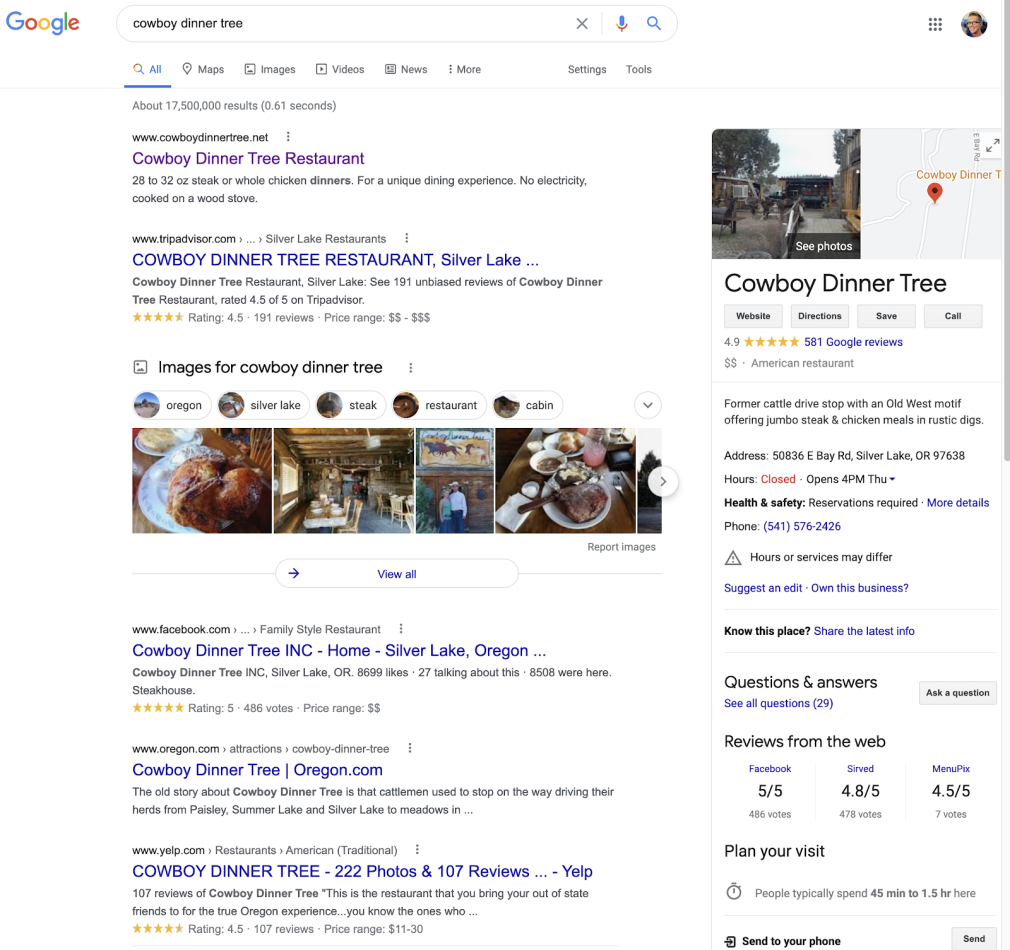
What happens when I perform a search on Google for “Cowboy Dinner Tree?”
The right-panel is generated by Google’s Knowledge Graph, but most of the data being populated here is sourced from Google My Business.
Now, what’s interesting about Cowboy Dinner Tree’s GMB listening is they don’t even have ownership of it. It isn’t owned by anyone.
Same with their Yelp, Facebook, etc. Even their website is very web 1.0.
How do they have a Google My Business listing if it isn’t claimed?
Google will automatically create one based on data they collect about businesses (entities). Keep this in mind as we get into the process of creating your own Google My Business listing.
Back to the benefits of owning your Google My Business listing.
You, the owner of your business, can provide the most accurate information about your business and have it displayed when someone does a search for your business on Google.
One of the other major benefits to claiming your Google My Business listing is that some simple optimizations and ongoing activities can help your chances of getting new business from organic search for free.Increase Your Visibilitywith the Listing Management ToolTry for Free →
How to add your business to Google My Business
You’ll have about 3 different scenarios to choose from:
Brand new business: Select Scenario 1 if your business is less than 6 months old.
Listing exists, unclaimed: If your business has been around longer than 6 months, start with Scenario 2 (but you may end up back at Scenario 1).
Listing exists, claimed: If you claimed your listing some time ago but don’t remember the login, the email is no longer active, or another person owns your listing, go with Scenario 3.
Scenario 1: Brand new business
Congratulations! Let’s get you on the path to getting you a Google My Business listing.
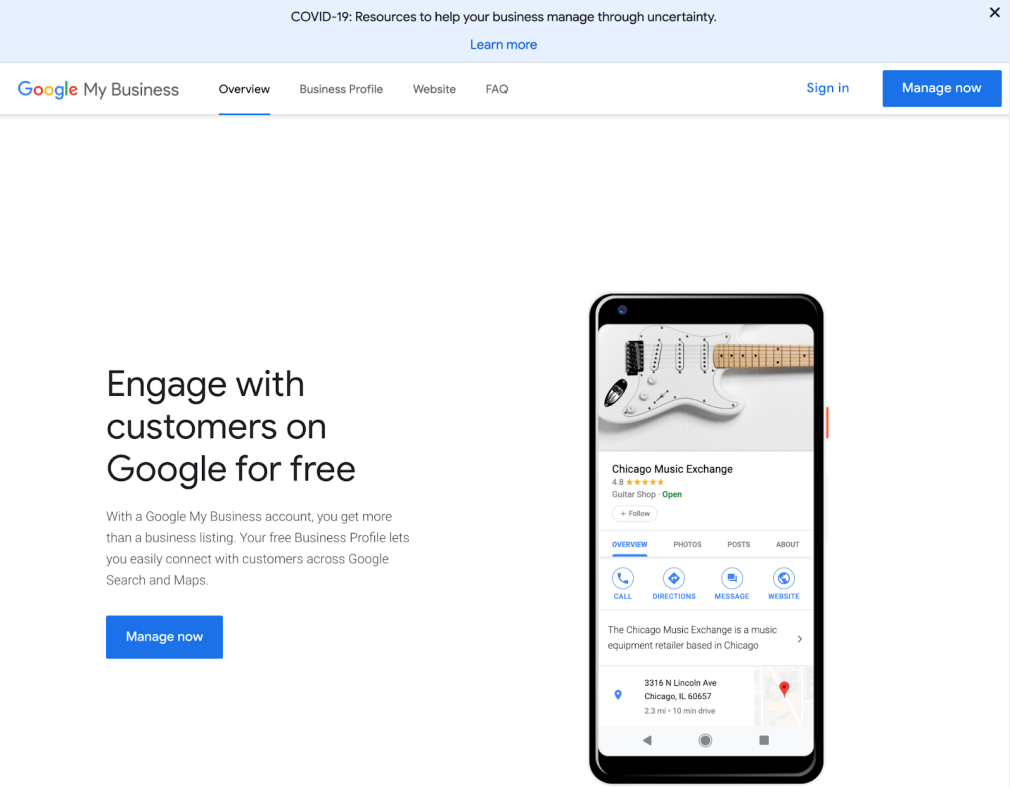
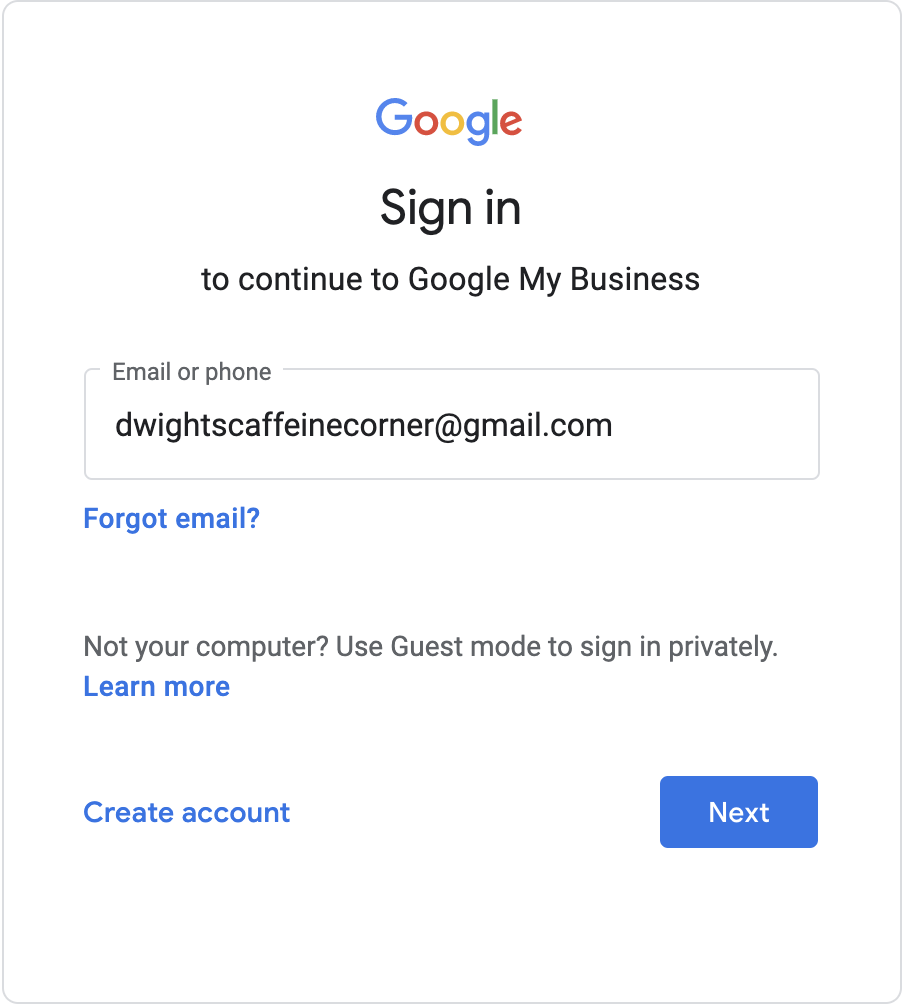
Step 2: Sign in to a gmail account that you own. This is important: remember what email address you are using here. This gmail account will be the Primary owner of the listing. Write it down on a post-it or take a screenshot if you need to.
Step 3: Once you have signed in, you’ll get taken to a page like the one below. Click on the Get Started button.
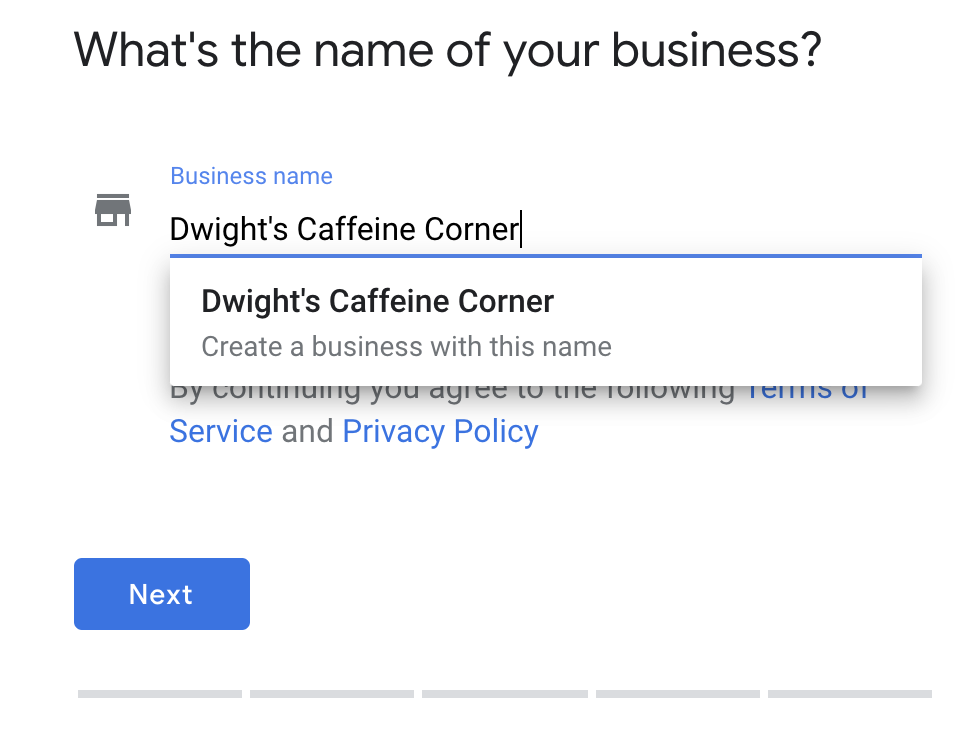
Step 4: Start typing in the name of your business. Google My Business will attempt to locate a listing but since your business is new, you likely don’t have one yet. When you spot the option to “create a business with this name,” click it, then click on Next.
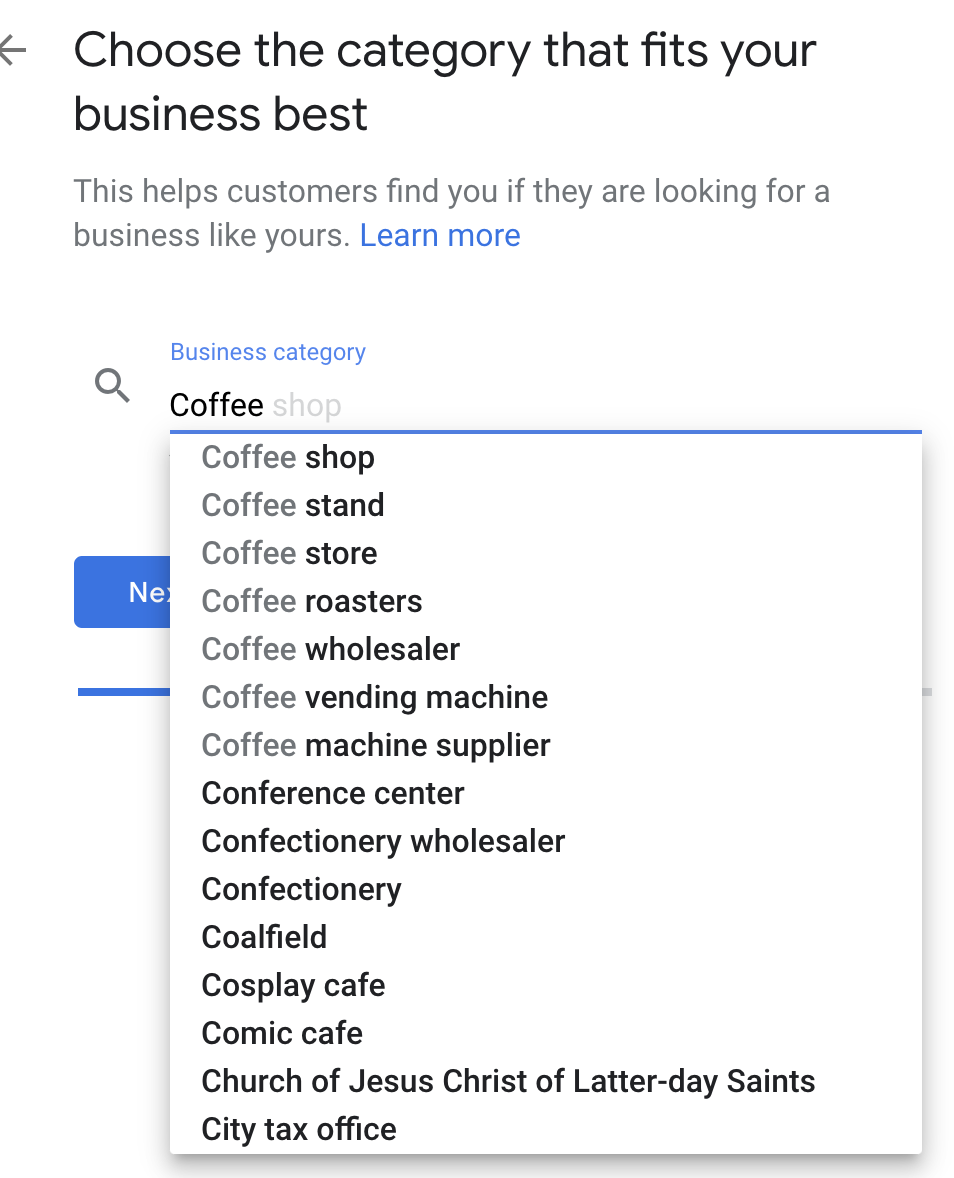
Step 5: Now we need to choose a Business category that best matches your business. For our example, coffee shops are the best matching category. If there are multiple categories that match your business, you’ll be able to add additional categories after your listing has been verified. Once you’ve chosen your category, click Next.
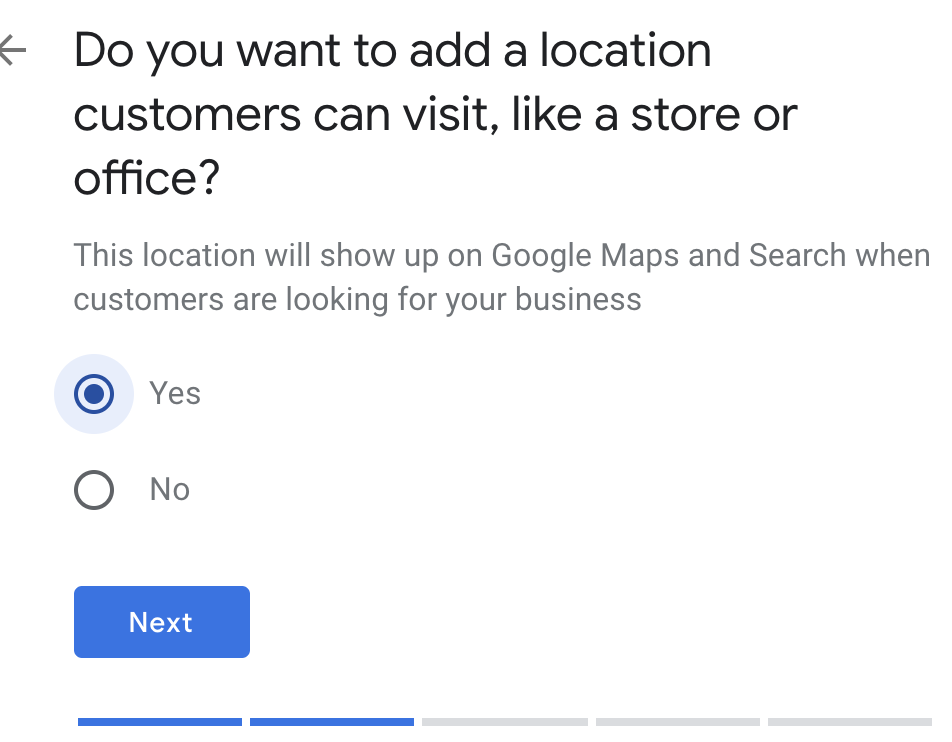
Step 6: Your next move depends on what type of business you operate. If your business is a brick and mortar, then the answer is yes. If you are a service provider (you go to your customers) and don’t have a physical storefront with signage then you will select no. If you are a service provider AND have a physical storefront with signage, then choose yes. Once you’ve made your choice, click Next.
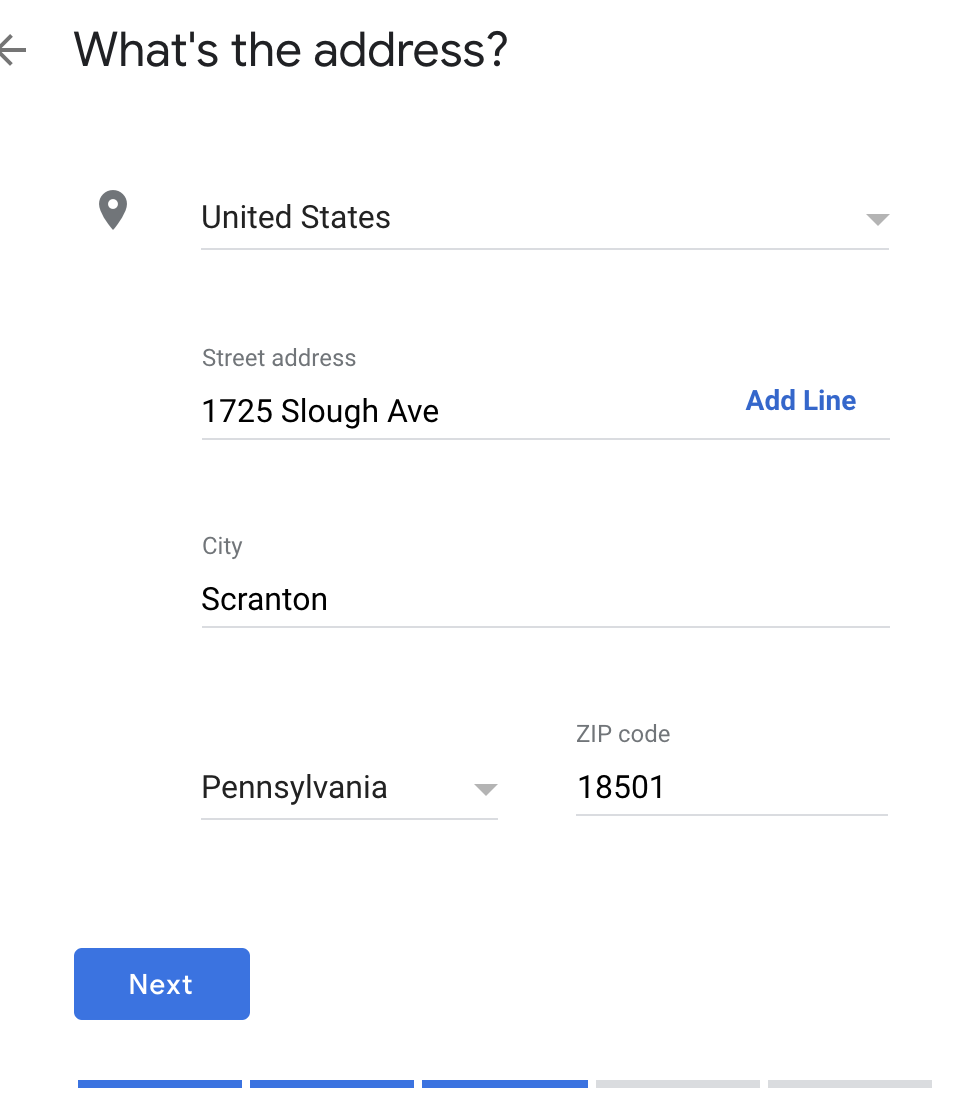
Step 7: Enter your address, then click Next if you answered yes in the previous step. If you chose no in the previous step, you will be asked to enter your service area. Once finished, click Next.
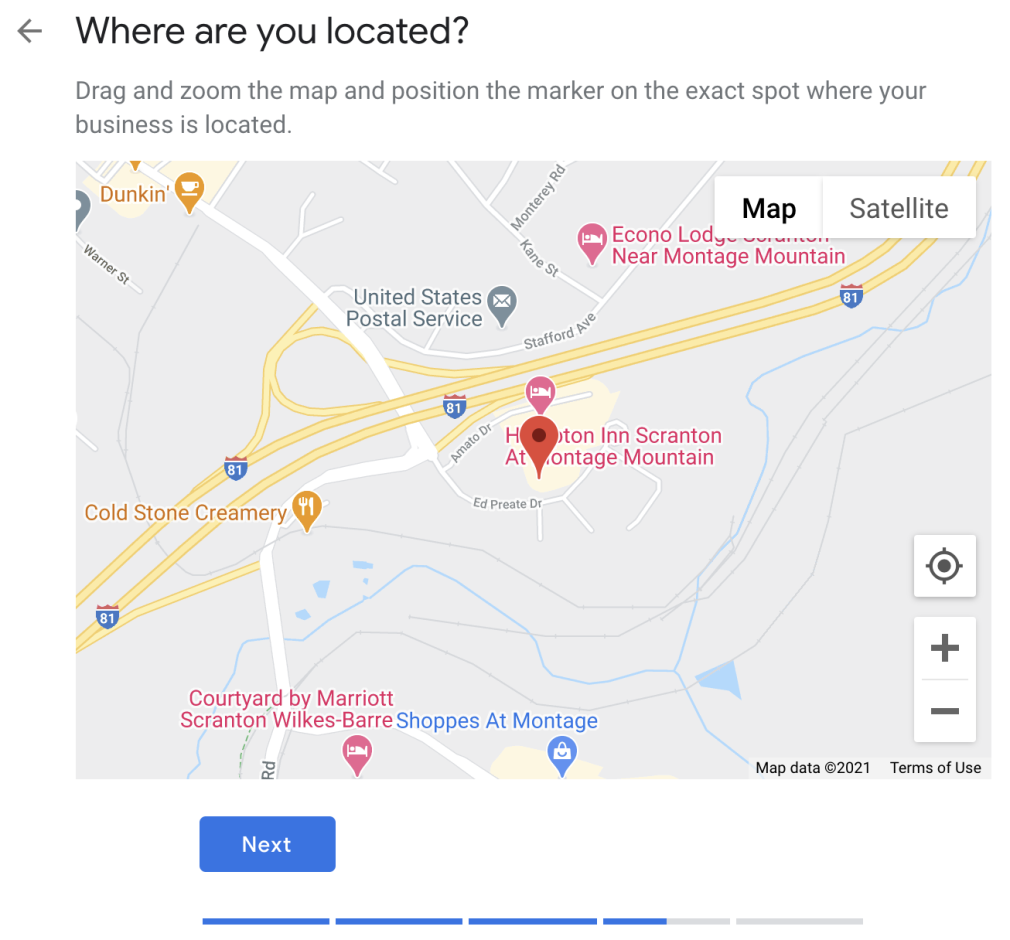
Step 8: If you are displaying your address, you might be asked to point to the exact spot where your business is located. Once finished, click Next. If you are not showing your address, you will be asked to provide your business phone number and website.
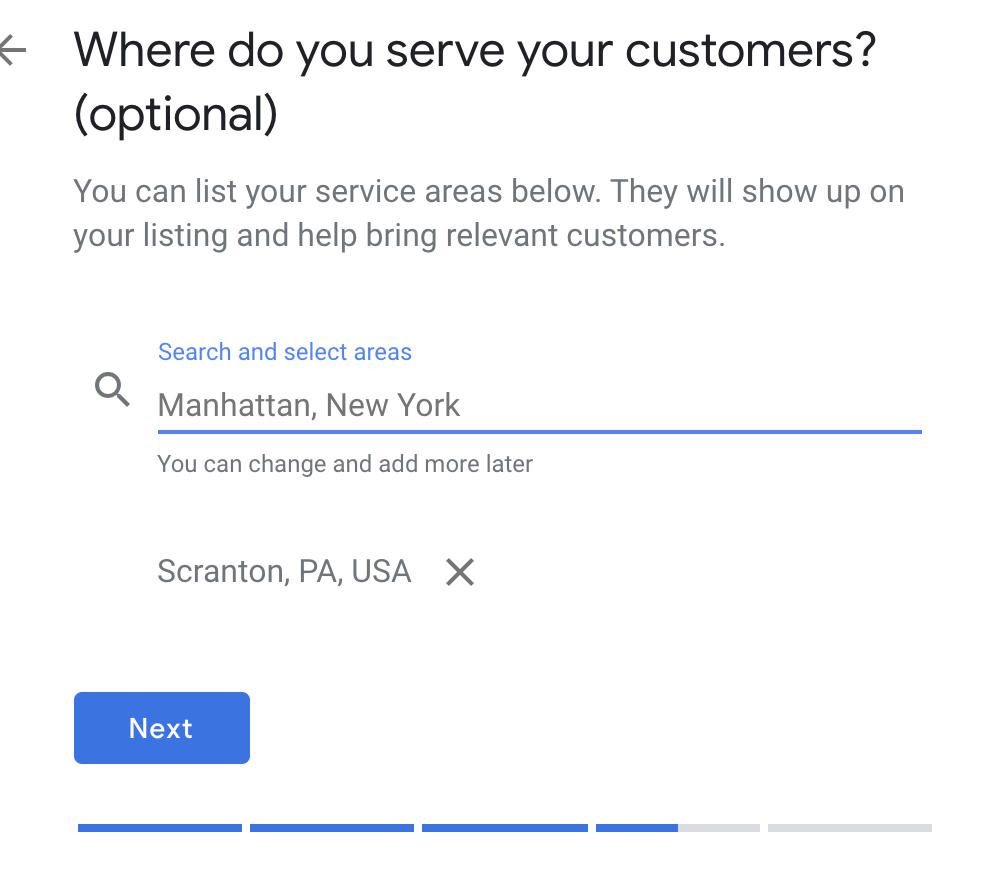
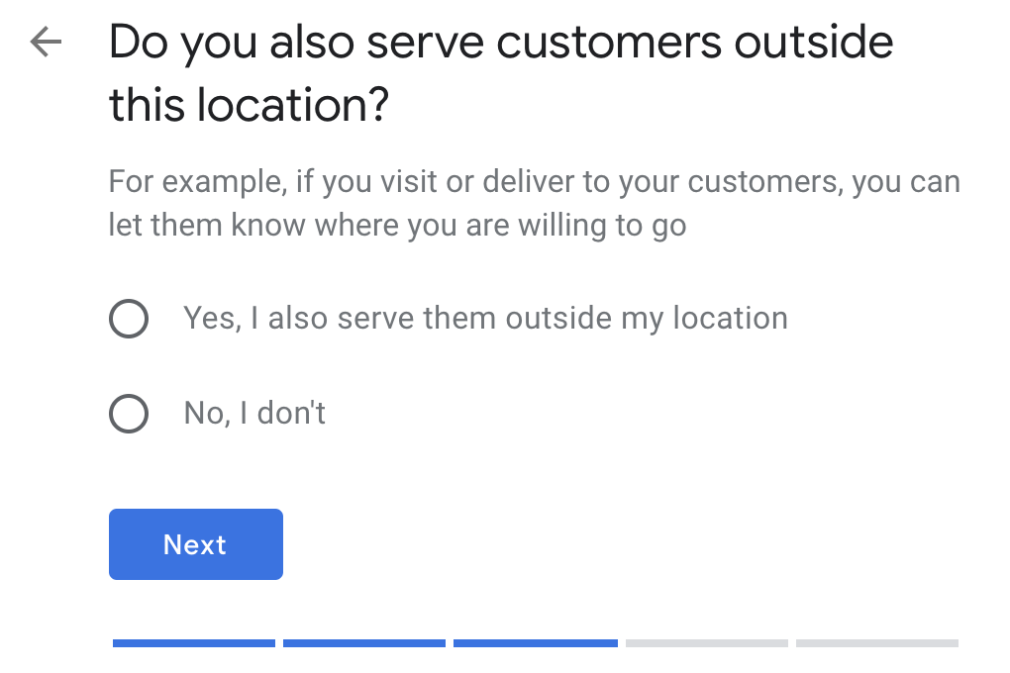
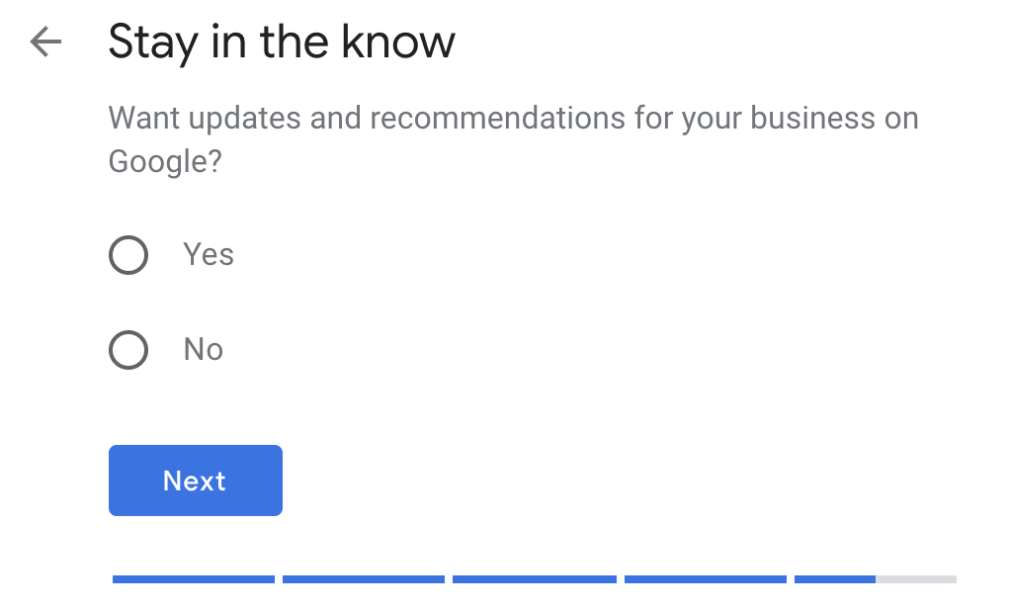
Step 9: If you’re showing your address, you’ll be asked if you also serve customers outside of your location. If you are not showing your address, you’ll be asked if you want to get updates and recommendations from Google. Choose your answer, then click Next.
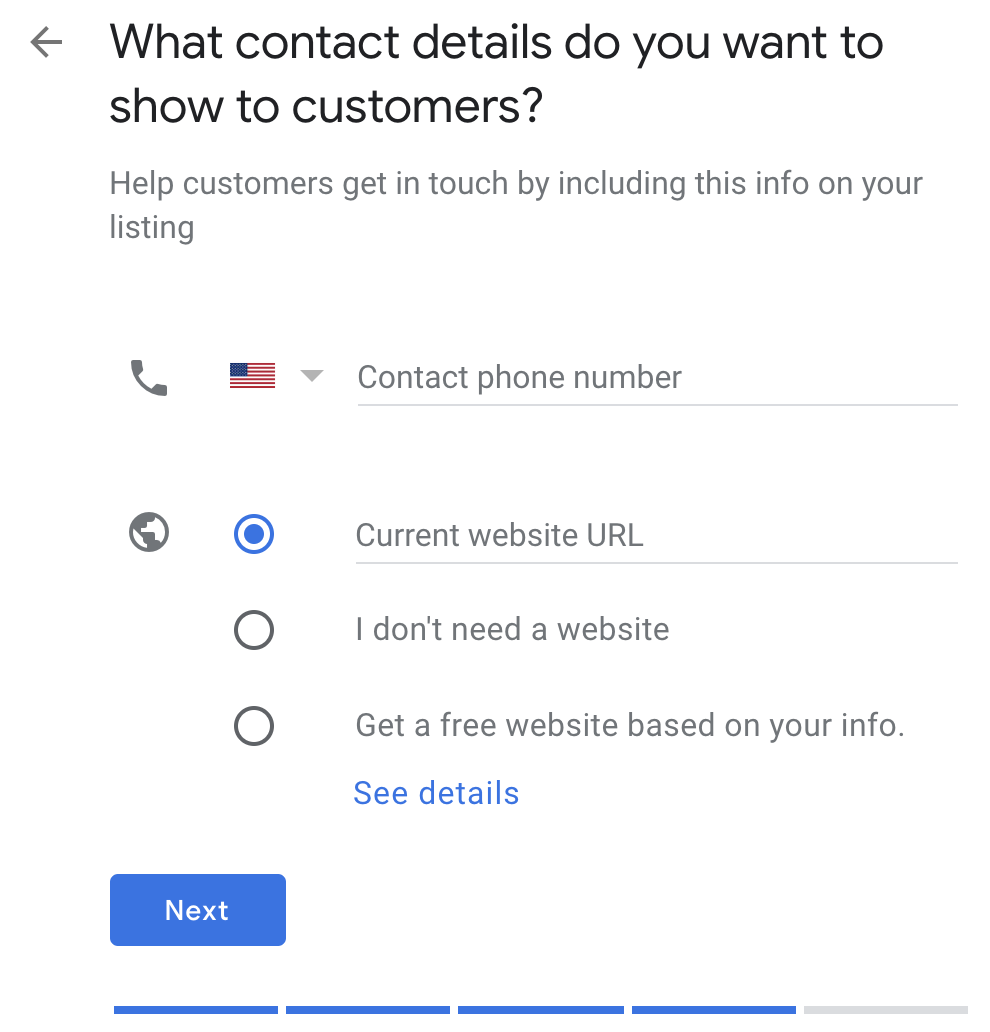
Step 10: If you’re showing your address, you’ll be asked to add your phone number and website. If you are not showing your address, skip to Step 10. Once you’ve added your website address and phone number, click Next.
Step 11: Time to finish and start the verification process! Select “Finish.”
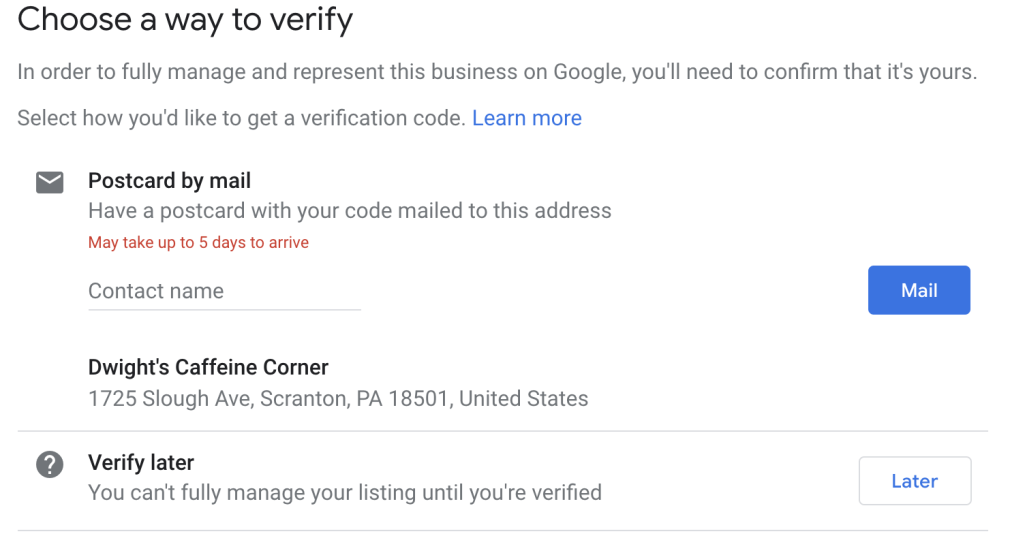
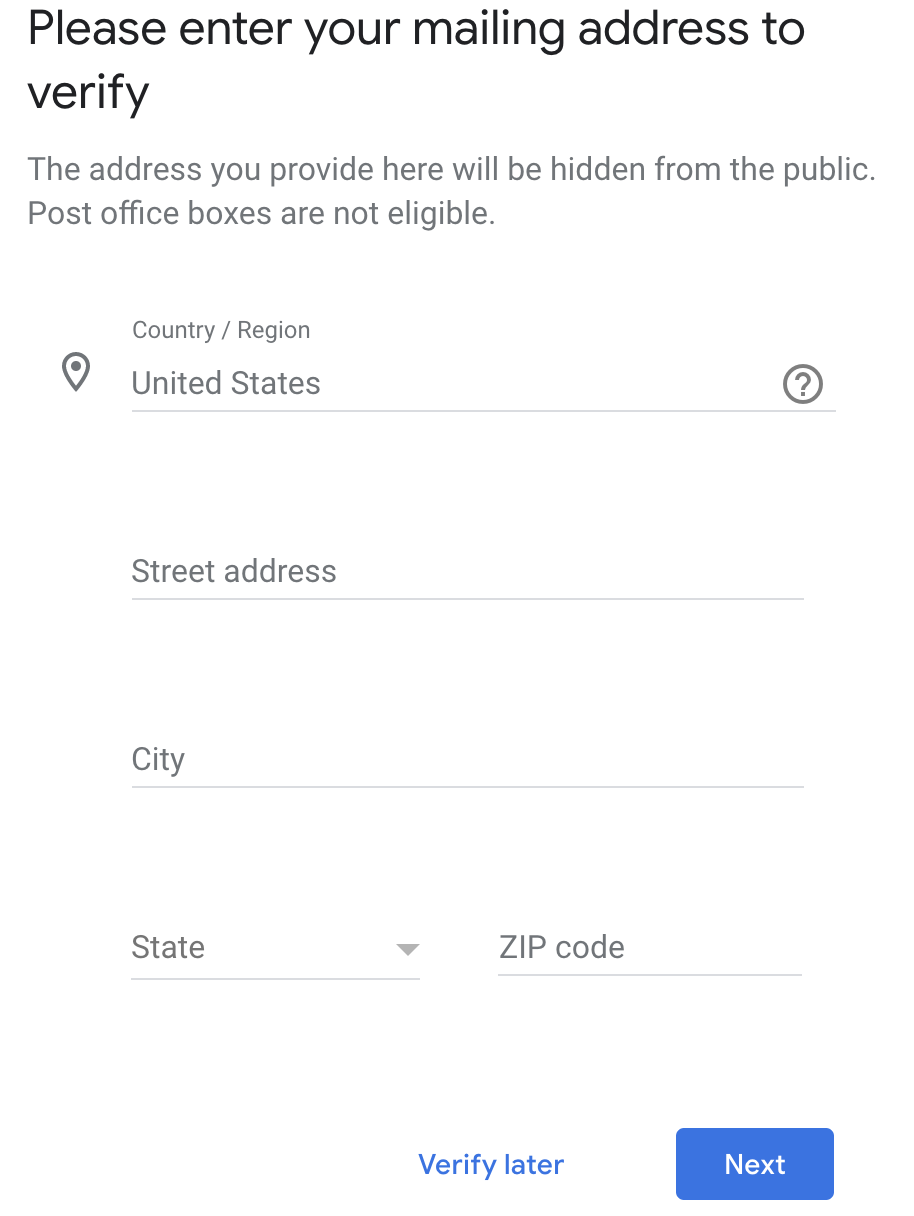
Step 12: If you are showing your address, you’ll be prompted to verify by postcard with an option to add a contact name. If you are hiding your address, you’ll be prompted to add an address for verification purposes. Your address will not be shown but is needed to verify your business.
Step 13: Once you receive the postcard (usually within 5 business days), log back into your listing to verify your listing.
Scenario 2: Listing exists, unclaimed
If your business has been around for at least 6 months, you might already have a Google My Business listing that was automatically created.
Go to Google Maps and perform a search for your business name. If a listing shows up and you see “Claim this business,” then claim it! If you see your listing and there’s a label that says ‘Manage this listing,” then head to Scenario 3.
If you have the option to claim the listing, you’re going to be asked to make sure the information is up to date, then you’ll go through the verification process.
Scenario 3: Listing exists, claimed
Maybe a former employee, an email address you don’t have access to anymore, or a former agency that claimed the listing on your behalf. Whatever the reason is, you don’t have access to your Google My Business listing.
Go to Google and perform a search for your business. Within the panel, you’ll see ‘Suggest an edit • Own this business?’ Select “own this business.”
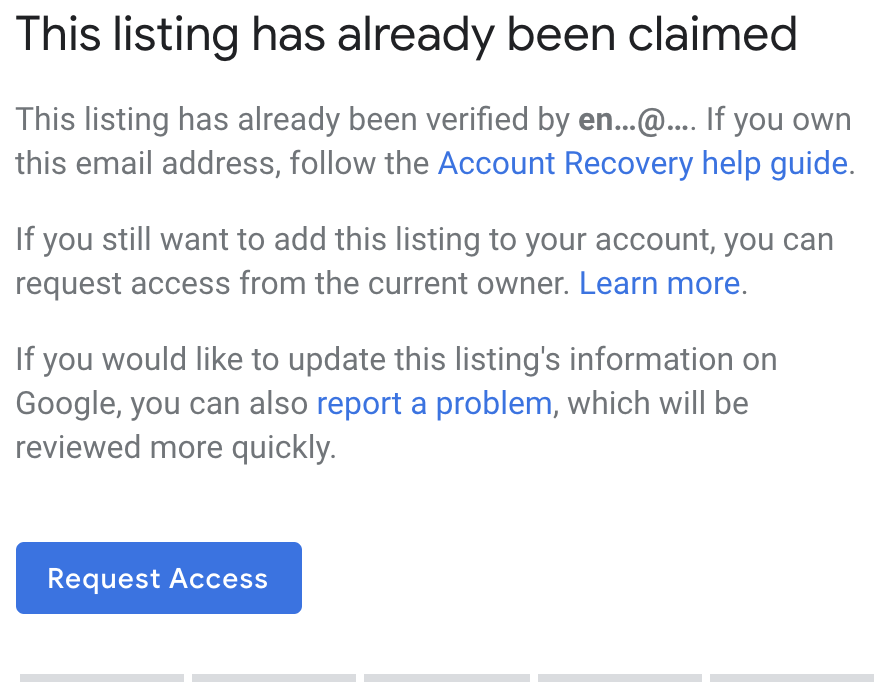
Google will show the first 2 characters of the email address that owns the listing. Sometimes, this may spark your memory with the email address that you used years ago to claim the listing.
If you don’t know the email address, click on the Request Access button.
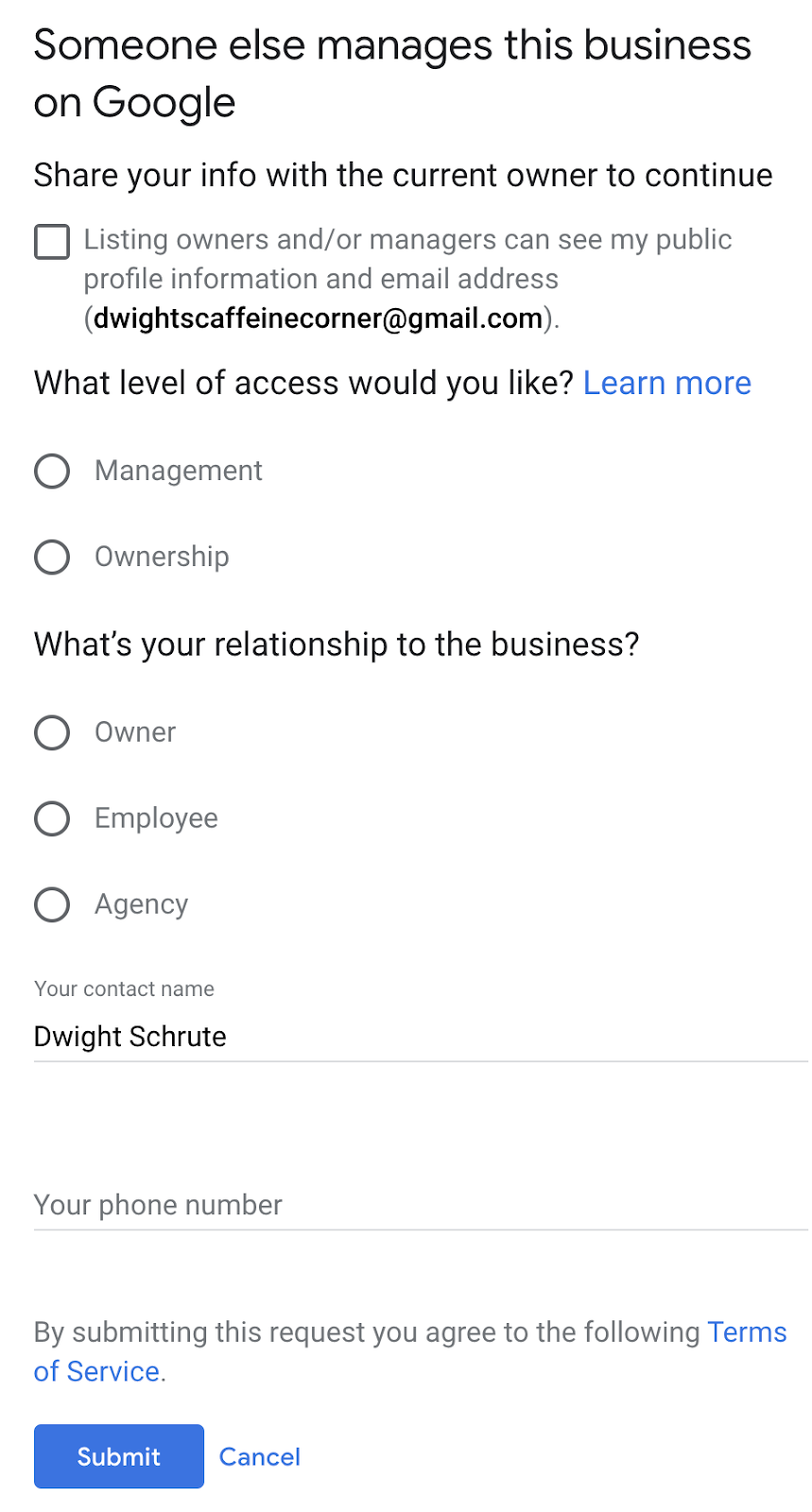
More often than not, you’re going to check the box to share your info with the current owners and managers of the listing.
For level of access, choose Ownership.
Your relationship to the business is likely going to be owner since you’re requesting ownership of the listing.
Provide your name and phone number, then submit.
After you submit the form, the current owner of the listing will get an email that asks them if the request is valid. You’ll also receive a confirmation email. Keep the confirmation email.
The current owner of the listing has 3 days to respond to your request. You can check the status of your request by clicking on the link within the confirmation email.
If your request is approved, you’ll get an email confirmation and can then start managing the profile.
If your request is denied, you’re going to need to contact Google My Business support via the Help Center.
Alternatively, you can get in touch with GMB Support on Twitter. It might take them a few days to respond, but they’ve been helpful in the past.
If the current listing owner does not respond within 3 days, you’ll get the option to claim the listing. Sign into g oogle.com/business and you should see an option to verify the listing.
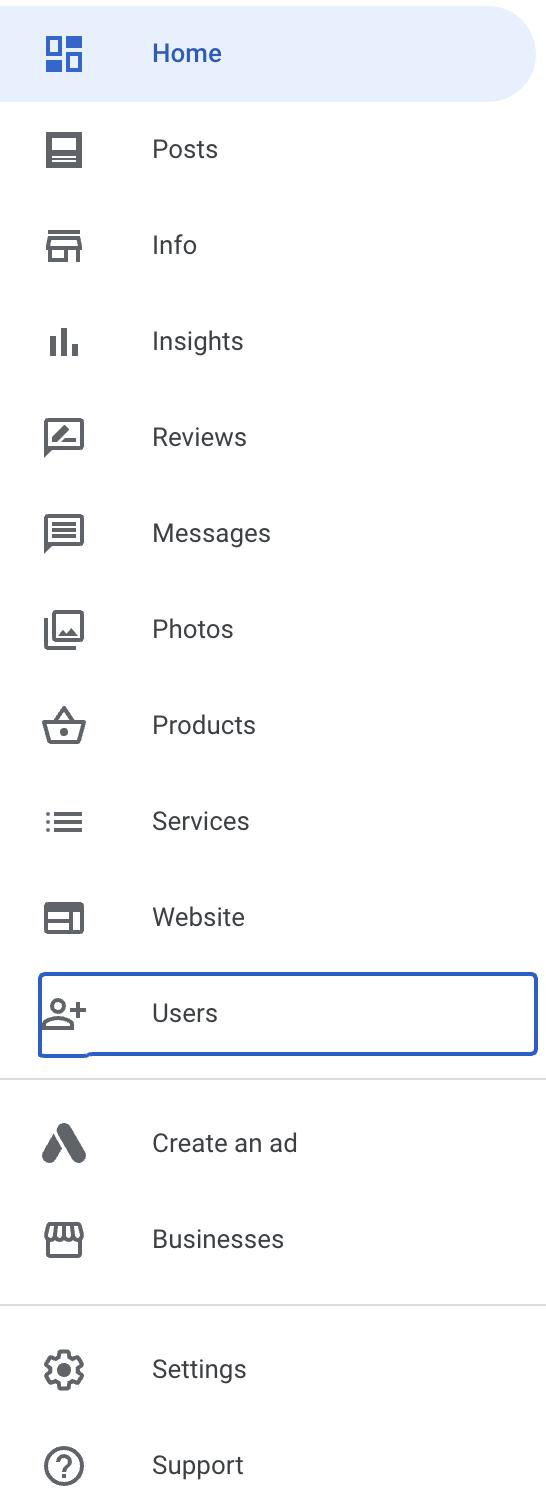
Once you get access to the listing, the first thing you will want to do is make sure that anyone who should have access to the listing does. Since you are now the primary owner of the listing, you can add or remove users from having access.
Next Steps
Once you’ve created or updated your listing, be sure to stay on top of it! Listing management is an important part of ensuring the information around your business is useful and accurate.
Set a predetermined time to check in on your listing, try a few marketing strategies to connect with your audience, and keep an eye out for any user interactions with your listing. You can also use listing management tools to take the guesswork out of managing your listing.
If you work in local SEO, you know that dealing with spam on Google My Business is going to be a constant battle. This is especially true if you work in industries like:
Legal
Health
Home services
We need to understand why Google My Business spam is so rampant.
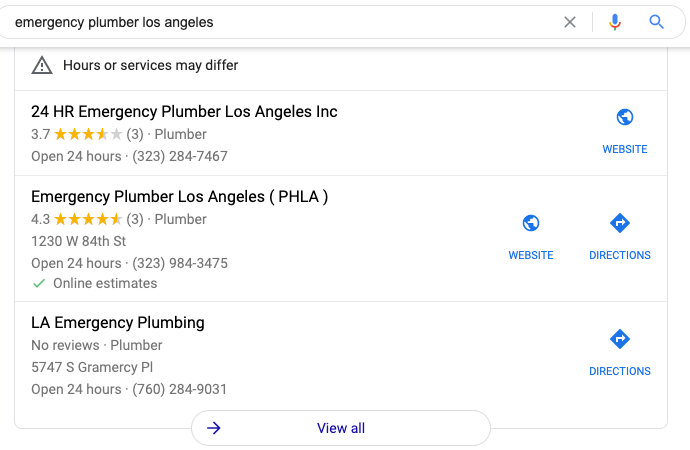
Unfortunately, having keywords in your business name is a massive ranking factor. As an example, I performed a search for “emergency plumber Los Angeles” and here are the top three Google My Business listings ranking in the map pack:
The first result (24 HR Emergency Plumber Los Angeles Inc) is a lead generation website, which is against Google My Business Guidelines. The second result appears to be a lead generation website, too. The third result? You guessed it, it’s another lead generation listing, they don’t even list a website!
These companies sell leads to real plumbers at a hefty price. Clicking through View all to see all listings, you don’t find a real plumber until the 10th result! Outside of completely fake listings that need to be removed, sometimes competitors will keyword stuff their Google My Business name.
Our Google My Business Spam Checklists
There are two checklists: one for identifying potential listings violating Google My Business guidelines and the other is a reporting checklist.
The first checklist doesn’t need to be done frequently, but it would be beneficial to do it at least once. If your rank tracking is set up correctly for Google Maps, you will likely just need to pay attention to your map rankings. If you drop a position on a major keyword, what listing is outranking you now? If it’s a new listing, head to checklist no.2.
Checklist No.1:
On google.com/maps, make sure you’re in the area you want to find spammers
Use the search operator intitle:”keyword” to surface listings with the keyword in the business title
Any listing that has the primary keyword is a Yellow flag
Any listing that is ONLY named the keyword is a Yellow flag
Any listing that has a modifier (-) is a Yellow flag
Any listing that has no website is a Yellow flag
On a Google Sheet, add the business name, address, phone number, website, and link to Google My Business listing for each Yellow flag listing
Repeat this process for each major keyword (topic) that you/your client covers
For good measure, perform a few raw searches in Maps as if you were a customer looking for the particular service, including the city name
This checklist enables you to find potential listings relatively quickly. These listings may be fake or could be completely legit. The second checklist will help us go through each listing, one-by-one, to build a case for the listing to be corrected or completely removed.
Checklist No.2:
Tip: (A “no” response on any checklist item will require documentation)
Use the state’s business name lookup. Is there a business registered at the address?
From the listing, click on photos and then go to Street View and 360º.
Is there signage for the business?
Is it a personal residence?
In a new tab, do a search of the exact address/is the listing the only one at that address?
Visit the website. Is the branding/logo the same as the business name?
Does the site have an about page with real people or company history?
Is the content heavily ‘SEO’d’ and generic?
Is the content focused on connecting users to someone else (lead gen)?
For industries that require a license, is one listed? If yes, is it a valid license?
This checklist should be used on each listing that has a Yellow flag.
Documenting Your Evidence
As you’re going through the checklist, you need to document all of your findings, this will be used when we submit the Business Redressal Form.
Open a Google Doc, name it appropriately, and let your documentation live there. Each listing should have it’s own Google Doc. The more detail you can provide in the document, the better. Some suggestions for added detail could include adding screenshots, external links with descriptions, etc.
Suggest an Edit or the Redressal Form?
If you are reporting a competitor that is just keyword stuffing their business name and the location is legitimate, you may want to consider simply suggesting an edit first.
Pro tip: Do not use an email address that is associated with Google My Business listings. This can cause your other listings to be suspended. (h/t to my friend, Jason Brown).
If and/or when your suggested edit does not stick, then submit the redressal form. If the listing is fake, go straight to the Business Redressal Form.
Filling Out the Redressal Form
Follow the Business Redressal Form instructions and fill out the sections. When you get to the last section that allows you to explain why you’re requesting a redress, this is where your Google Doc is going to come in handy.
In this field, you can’t add photos, but you are able to include a link to your Google Doc. When grabbing the Google Doc link, make sure it is viewable by anyone with the link. If it’s not, Google Support will not be able to see the contents. Don’t just drop the link and submit, provide some context, and then place the Google Doc link. Submit.
Repeat the process for each and every listing that you believe needs to be removed. Google recommends:
“If you have many URLs to report, we recommend submitting 10-100 at a time for a faster processing time. You can submit multiple URLs by clicking the ‘Add additional’ link or by uploading a spreadsheet with all the URLs.”
Now the hardest part begins, waiting.
In your original spreadsheet, add a date column and add the date that the redressal form was submitted. Timelines can vary depending on multiple factors but if nothing has happened after 10 weeks, then you’ll need to reassess the redressal and look for further evidence.
Having to deal with spam on Google My Business is frustrating and can be time-consuming, but if done correctly, can help protect users from spammers and help real small businesses. For more tips, check out SEMrush’s post about their Google My Business checklist.
Windows 11 is arriving to deliver you the best experience that Microsoft has designed this year. The new operating system is promised to start rolling out as a free upgrade to Windows 10 users later this year. But if you can’t wait and are looking for a way to download Windows 11 right away, you can certainly take a short route and download the Insider Preview build of the latest operating system on your system today. This will let you experience Windows 11 ahead of its public debut.
Microsoft has not given any exact timeline on when we will get Windows 11 as an upgrade on our Windows 10 machines. Nonetheless, the Redmond, Washington-based company is expected to roll it out by as early as October. This means that you would be able to get the new Windows version on your machine sometime later this year — or next year — depending on the rollout process.
How to download Windows 11 on your PC
Before beginning with the steps on how you can download Windows 11 Insider Preview on your PC, it is important to note that Insider Preview builds are specifically designed for testing purposes and are not meant to be installed on your primary PC. You would also experience some bugs and errors, and some of the features that Microsoft showcased last month are not a part of the Insider build. Still eager to get started?
You can follow the steps below.
Sign up for the Windows Insider Program by going to Settings > Update & Security > Windows Insider Program. And then, press Register and Sign Up. If you’re already a part of the Windows Insider community, you can sign in to your account and click Start flighting.
Review the Privacy Statement and terms appearing on your screen and click Submit.
Select Dev Channel from the Insider settings to download and install the current Windows 11 build meant for Windows Insider Preview and hit the Confirm button.
Your machine will now ask you to Read the Microsoft Insider Privacy Statement and Agreement. Once you have reviewed the statement and terms, click on Confirm.
Now, press Restart Now to restart your machine to get the Insider Preview build.
After restarting, make sure you are connected to an active Internet connection. You can then go to Settings > Update & Security > Windows Update and click the Check for updates button.
Your PC will start downloading the latest build from a Microsoft server.
Notably, Windows 11 has certain minimum hardware requirements that must be met to download the Insider Preview build. You can check out those requirements from the Microsoft website.
Before learning the programming language, let’s understand what is language?
What is Language?
Language is a mode of communication that is used to share ideas, opinions with each other. For example, if we want to teach someone, we need a language that is understandable by both communicators.
What is a Programming Language?
A programming language is a computer language that is used by programmers (developers) to communicate with computers. It is a set of instructions written in any specific language ( C, C++, Java, Python) to perform a specific task.
A programming language is mainly used to develop desktop applications, websites, and mobile applications.
Types of programming language
1. Low-level programming language
Low-level language is machine-dependent (0s and 1s) programming language. The processor runs low- level programs directly without the need of a compiler or interpreter, so the programs written in low-level language can be run very fast.
Low-level language is further divided into two parts –
i. Machine Language
Machine language is a type of low-level programming language. It is also called as machine code or object code. Machine language is easier to read because it is normally displayed in binary or hexadecimal form (base 16) form. It does not require a translator to convert the programs because computers directly understand the machine language programs.
The advantage of machine language is that it helps the programmer to execute the programs faster than the high-level programming language.
ii. Assembly Language
Assembly language (ASM) is also a type of low-level programming language that is designed for specific processors. It represents the set of instructions in a symbolic and human-understandable form. It uses an assembler to convert the assembly language to machine language.
The advantage of assembly language is that it requires less memory and less execution time to execute a program.
2. High-level programming language
High-level programming language (HLL) is designed for developing user-friendly software programs and websites. This programming language requires a compiler or interpreter to translate the program into machine language (execute the program).
The main advantage of a high-level language is that it is easy to read, write, and maintain.
High-level programming language includes Python, Java, JavaScript, PHP, C#, C++, Objective C, Cobol, Perl, Pascal, LISP, FORTRAN, and Swift programming language.
A high-level language is further divided into three parts –
i. Procedural Oriented programming language
Procedural Oriented Programming (POP) language is derived from structured programming and based upon the procedure call concept. It divides a program into small procedures called routines or functions.
Procedural Oriented programming language is used by a software programmer to create a program that can be accomplished by using a programming editor like IDE, Adobe Dreamweaver, or Microsoft Visual Studio.
The advantage of POP language is that it helps programmers to easily track the program flow and code can be reused in different parts of the program.
The advantage of POP language is that it helps programmers to easily track the program flow and code can be reused in different parts of the program.
Example: C, FORTRAN, Basic, Pascal, etc.
ii. Object-Oriented Programming language
Object-Oriented Programming (OOP) language is based upon the objects. In this programming language, programs are divided into small parts called objects. It is used to implement real-world entities like inheritance, polymorphism, abstraction, etc in the program to makes the program resusable, efficient, and easy-to-use.
The main advantage of object-oriented programming is that OOP is faster and easier to execute, maintain, modify, as well as debug.
Note: Object-Oriented Programming language follows a bottom-up approach.
Example: C++, Java, Python, C#, etc.
iii. Natural language
Natural language is a part of human languages such as English, Russian, German, and Japanese. It is used by machines to understand, manipulate, and interpret human’s language. It is used by developers to perform tasks such as translation, automatic summarization, Named Entity Recognition (NER), relationship extraction, and topic segmentation.
The main advantage of natural language is that it helps users to ask questions in any subject and directly respond within seconds.
3. Middle-level programming language
Middle-level programming language lies between the low-level programming language and high-level programming language. It is also known as the intermediate programming language and pseudo-language.
A middle-level programming language’s advantages are that it supports the features of high-level programming, it is a user-friendly language, and closely related to machine language and human language.
Example: C, C++, language
Most commonly used Programming Language
As we all know, the programming language makes our life simpler. Currently, all sectors (like education, hospitals, banks, automobiles, and more ) completely depend upon the programming language.
There are dozens of programming languages used by the industries. Some most widely used programming languages are given below –
The JEE (Main) 2021 session 4 will now be held on 26th, 27th and 31st August, and on 1st and 2nd September 2021
The JEE (Main) 2021 session 4 will now be held on 26th, 27th and 31st August, and on 1st and 2nd September 2021, informed Education Minister Dharmendra Pradhan on Thursday. The National Testing Agency (NTA) has been advised to provide a gap of four weeks between session 3 and session 4 of the JEE(Main) 2021 Exam, he said.
A total of 7.32 lakh candidates have already registered for JEE(Main) 2021 session 4. Registrations for the JEE (Main) session 4 is still in progress and dates for registration will be further extended upto 20th July.
Earlier, the third edition of engineering entrance exam was scheduled to be held from July 20 to 25 and the fourth edition from July 27-August 2. However, the exam was postponed due to Covid situation.
The NTA had stated that the remaining two sessions of the JEE (Main) —2021 would resume from July 20, 2021. In order to address the pandemic, the number of cities had been increased from 232 to 334.
Earlier this month, the NTA said that the postponed sessions of the JEE-Main exam would be conducted at 828 centres in all sessions instead of the previous 660.
“In order to address the ongoing Covid-19 pandemic, the number of cities have been increased from 232 to 334. The number of examination centres in every shift will also be increased from 660 to 828,” said Sadhana Parashar, senior director of NTA.
The admit card for the third session of the JEE-Main 2021 has been released by the the testing agency. According to a document of the NTA, candidates who had applied earlier for “session 3 (April 2021) (postponed) BE/BTech Paper I” were given time between 6 to 8 July to modify their particulars.
This year, the examination authority is giving students a choice to answer 75 questions (25 each in Physics, Chemistry and Mathematics) out of 90 (30 each in Physics, Chemistry and Mathematics).
Merit list/ranking will be prepared based on the best score of candidates.
JEE Main 2021 is also being conducted in 13 languages including Hindi, English, Bengali, Gujarati, Kannada, Odia, Punjabi, Tamil, Telugu and Urdu.
The contraindications to second dose of vaccine are:
Severe allergic reaction after a previous dose of this vaccine. If your treating physician considered this event as a severe allergic reaction to the vaccine, then you should not take second dose of vaccine. If you experience any other adverse event (known or unknown) after first dose, you can take the second dose.
Patients who have experienced major blood clotting (venous and/or arterial thrombosis) in combination with low platelet count (thrombocytopenia) following first dose of vaccine.
Since its founding in 1949, Public Administration and Development (PAD) has been reviewing and assessing the practice of public administration at the local, regional, national and international levels where it is directed to managing development processes in low and medium income countries.
The role of public administration in bringing about development?
On the role of public administration, it will address such areas as sustained economic growth, the promotion of social development, facilitating infrastructure development and protecting the environment, promoting public- private partnerships, managing development programmes and maintaining a legal framework for
ROLE OF PUBLIC ADMINISTRATION IN DEVELOPMENT TO BE CONSIDERED AT RESUMED GENERAL ASSEMBLY SESSION 15-19 APRIL
19960412 Background Release The crucial role of public administration in development, particularly in developing countries and economies in transition, will be the subject of a one-week resumed session of the General Assembly, beginning on Monday, 15 April. The resumed session represents the first time the Assembly will meet specifically to consider that issue.
The aim of the resumed session of the General Assembly is to explore themes contained in two distinct categories: the role of public administration, and capacity-building for effective administration. Thirteen specific topics were identified within those categories.
On the role of public administration, it will address such areas as sustained economic growth, the promotion of social development, facilitating infrastructure development and protecting the environment, promoting public- private partnerships, managing development programmes and maintaining a legal framework for development.
With respect to capacity-building, the Assembly will discuss improving civil service systems, organizational strengthening, the enhancement of policy-development capacity, strengthening financial management for development, human resource development for the public sector and the development of administrative capacities for post-conflict and crisis conditions.
In deciding to hold the resumed session, the Assembly recognized the important role that governments and public administrations can play in promoting sustained economic growth and sustainable development (resolution 49/136). It also recognized the need for strengthened public administrative and financial management capacities in order to ensure a civil service that is responsive to the needs of the people.
As a stimulant to its discussion, the Assembly will have before it a report of the Secretary-General containing a series of recommendations on strengthening the role of the United Nations in public administration and development, including recommendations for national governments (document A/50/847-E/1996/7).
Recommendations in Secretary-General’s Report
The report of the Secretary-General contains recommendations on the role of policy-making for public administration and development, the focus of the United Nations programme on that subject, the coordination of relevant activities within the United Nations system and support of donors. It also includes recommendations for national governments and United Nations responses.
On the role of policy-making, the Secretary-General recommends that the issue of public administration and development be included as a regular item on the agenda of the General Assembly and the Economic and Social Council and that the Group of Experts on Public Administration and Finance be redesignated the Committee on Public Administration and Development, which would report to the Council. Likewise, the United Nations programme in public administration and finance should be renamed the United Nations programme in public administration and development.
The United Nations programme in public administration and development should enhance its role as the central depository for materials, reports and non-print media on public administration and development worldwide, the report recommends. Using the latest technology, it should become the clearing-house for all materials on the subject, to serve as a catalyst for a network of international, regional and national institutions and organizations involved in those issues. The programme’s focus should be on action-oriented, practical research on effective systems and procedures in public adminstration.
Tied to its research and clearing-house functions is the assistance the United Nations can provide to individual governments, at their request, in helping them improve their governmental machinery and public management systems for development. To that end, the United Nations programme should be strengthened in the areas of advisory services, needs assessment, diagnostics and substantive support to projects. It is recommended that the United Nations assist governments, when requested, in translating the recommendations of global conferences into detailed programmes for implementation.
The report recommends that the United Nations programme assist in all the phases of the restoration of public administration institutions in countries recovering from conflict and crises, and that it actively assist developing countries and countries with economies in transition.
On coordination of public administration and development activities within the United Nations system, the Secretary-General recommends that a consultative group on the matter will meet once a year, under the auspices of the Department for Development Support and Management Services. It will focus on closer collaboration in the planning and implementation of global
– 3 – Press Release GA/9056 12 April 1996
programmes of information exchange, research, preparation of guidelines, and organizations of seminars and workshops. It will also provide a forum for mobilizing international assistance.
With regard to donor issues, the report recommends that the donor community recognize the significance of public administration in development and provide adequate resources to improve such structures in developing countries and those with economies in transition. Particular consideration should be given to the loan of expertise to carry out practical research and advisory missions. To that end, the Secretary-General recommends the establishment of a trust fund for United Nations activities in public administration and development.
The Secretary-General highlights a number of recommendations for governments made by the Group of Experts on Public Administration and Finance, which held its twelfth meeting from 31 July to 11 August 1995. Following each recommendation is a projected United Nations response (document A/50/525- E/1995/122, annex).
The Group states that national governments should strengthen the policy, advisory and administrative capacity in critical areas, while the United Nations programme can organize professional exchanges, arrange professional training programmes and prepare case studies on policy matters for dissemination.
According to the Group, in the process of restructuring public administration, government institutions should be encouraged to develop strategic plans and monitor their performance, while the United Nations would continue to undertake comparative studies on restructuring and disseminate them on a regular basis.
Leaders should invest in people, upgrading the capacity of national training institutions to develop a core group of professional trainers, the report states. The United Nations would seek to create and sustain momentum for a global exchange of information on human resource development.
Governments are asked to establish clear goals, encourage operational flexibility, measure results impartially and develop appropriate incentives, while the United Nations would continue offering advisory services in areas including the management of change, performance management and measurement, and information technology.
Public administration services should be provided to reflect ever- changing needs of the citizens they serve, the Group states. The United Nations can assist in developing state-of-the-art technological communication networks.
– 4 – Press Release GA/9056 12 April 1996
Furthermore, governments should encourage financial management at the grass-roots level, the Group states. For its part, the United Nations would assist governments in creating and strengthening national capacities in fiscal policy analysis and economic management, and in promoting a proper environment for capital flows for investment, private sector development, transparency and accountability.
According to the Group, governments should seek objective evaluations of their privatization programmes to establish the appropriate place and timing of privatization in structural adjustment programmes; they should also pay greater attention to performance improvement in parastatals. For its part, the United Nations shall, at the request of the government, arrange for such evaluations, assisting governments in defining the role and scope of their public, private and combined sectors.
While governments should provide an encouraging environment for small and medium-sized enterprises, the report states, the United Nations would assist countries by operating an information clearing-house, developing case studies of successes and failures and providing technical support.
National governments should assume the responsibility for establishing environmental standards for all infrastructure policies, the Group states. The United Nations would assist governments in administrative capacity- building and infrastructure management. Codification of laws must be undertaken to facilitate access to legal guarantees, with the United Nations assisting governments to organize a legal framework of public administration and strengthen judicial supervision of public administration.
For countries recovering from crisis and conflict, the development of both immediate and transitional or long-term strategies is recommended. The United Nations would provide special assistance to countries in post-conflict situations and to collapsed States, to help restore effective public administration.
Governments should promote the use of aid as a stimulant for development and economic growth in civil society, the Group states. The United Nations would provide technical assistance to strengthen institutional machinery capable of evaluating the consistency between development project outcomes and such macro-objectives as growth, employment and income distribution.
Related Meetings, Activities
A number of activities are also being carried out in connection with the resumed session. Among these, Cabinet ministers and other high-ranking officials from each of the major regions will hold an executive session to discuss their experiences in restructuring governments. An International Technical Forum was held on 11 and 12 April at Headquarters, the site of a
– 5 – Press Release GA/9056 12 April 1996
related Internet Exposition until 19 April. (For more information, see Note to Correspondents No. 5329, of 10 April.)
In the lead-up to the resumed session, regional meetings were held in Africa, Asia, Latin America and the Caribbean, and Central and Eastern Europe. The impetus for the session arose from the June 1994 Tangier Declaration of the Pan-African Conference of Ministers of the Civil Service, which called for the convening of a global conference on public administration and development.
The Journalism and mass media is the graduates work nationwide and worldwide at newspapers and magazines and in advertising, branding, broadcast news, social media, marketing, media research, photojournalism, publication design, public relations, radio, and other areas.
The Journalism is the activity of gathering, assessing, creating, and presenting news and information. It is also the product of these activities. Journalism can be distinguished from other activities and products by certain identifiable characteristics and practices.
There are five types,
investigative,
news,
reviews,
columns,
feature-writing.
The Rules Of Journalism
#1: Ask questions.
The journalist’s greatest assets is their natural curiosity. Start with the famed five W’s (and one H), then ask some more. Asking “why?” is what gets you the good stuff.
#2: Dig for the story.
If you think you’ve got the whole story, dig around some more. The most fascinating parts of the story are often just under the surface.
#3: Master the language.
As a journalist, language is your main tool. Read as much as you can and as often as you can, research odd words and archaic sayings, look at what’s behind etymology. Learn the patterns behind language and how to use them.
#4: Spelling matters.
Double-check if you aren’t sure about spelling or style (especially in the case of names), and read through messages and articles thoroughly before sending either.
#5: Know thy publication.
Before you pitch, know a publication’s style, editorial staff and content. Publications are usually more than happy to provide back-issues. If you can’t find writer’s guidelines, send a short introductory email requesting them.
#6: Contacts are your career.
Contacts (and your reputation with said contacts) are your entire career. Editors, sources and interviewees are all vital parts of the journalistic process. Without them, you’d be screwed.
#7: Once it’s off the record, keep it that way.
Trusted sources will tell you all sorts of juicy, fascinating, scandalous and personal things in your career as a journalist, often off the record. Shut up about it.
#8: Three is a golden number.
Mind the rule of threes: Have at least three reliable, corroborating sources for every fact; three interviewees for every article; and read through a piece at least three times before you sit down to change a comma – that’s at least.
#9: Rejection is opportunity.
Getting a story rejected means you’ve just opened up a line of communication with a new editor – congratulations. Pitch again. Rejection also gives you a chance to sell the story elsewhere: Sometimes rejection just means it’s not right for them
#10: Editors are teachers.
You can learn a hell of a lot from the experience of your editors, and when given the chance you should. They braved the journalistic battlefield before you, so you can trust their edits and advice. Usually, they’re right.
#11: Mind the word count.
Yes, you can do that in the assigned word count, and the editor will either make you add or cut if you don’t. Here, they always know better. (Remember this piece of key-advice from The Elements of Style and repeat it as your daily editing mantra: Omit unnecessary words.)
#12: Deadlines are holy.
Deadlines exist for a reason: Never skip out on a deadline unless you are incapacitated or dead. If you have to, let your editor know beforehand and have a damn good reason. Then, don’t do it again. Compare deadlines to menstrual cycles: If you skip one, you might just be stressed. If you skip several, you’re in trouble.
#13: Know the law.
Journalism can take you to some strange places. Make sure you know the law and what side of it you’re standing on at all times.
#14: Always do your research.
Make sure that your research is flawless and that you can always match which source gave which fact. Cross-reference, find first-hand information and do your background research before requesting, planning or conducting an interview.
#15: Have it outlined.
Have the skeleton of your idea outlined and ready by the time you pitch the idea. That way you have all the information ready, and it makes your job – and theirs – easier. Your outline should include the article’s proposed headline, the article’s sub-headers and sections (you can write down facts as key-words here) and who you will interview.
#16: Keep and file everything.
Keep prior notes, interviews, sources, tapes, the lot: You never know when you’ll need it, and you probably will.
#17: Guard your vices.
Many great journalists have been crippled or completely destroyed by their vices – and it can be almost anything: Overworking, coffee, manic exercising, painkillers or heavier drugs. Whatever yours is, keep it in check or risk your job.
#18: Burnout is a rabid, fanged monkey.
Burnout is a myth, until you’re there. It’s a mental and physical size of your writing engine, and if you don’t find your way to unwind you’ll get there a lot quicker.
The Mass media refers to a diverse array of media technologies that reach a large audience via mass communication. … Broadcast media transmit information electronically via media such as films, radio, recorded music, or television.
The types of mass media include Newspapers, Radio, Television, Internet, Magazines and more,
…
What is Mass Media?
Journalism.
Social Media.
Films.
Television.
Radio.
Advertising.
Public Relations.
Books, Magazines, Newspapers and Journals.
RULES OF MASS MEDIA
The Privacy Act works to guarantee privacy to individuals and controls how personal information is used. Defamation in the written form (libel) or the spoken form (slander) is illegal in the United States.
Section 315 (Equal Time Rule) ensures that broadcast media cannot favor any one candidate over another by granting one more time than another. The Fairness Doctrine ensured that radio stations offered equal time to opposing viewpoints.
The Freedom of Information Act grants the public, including the news media, access to many government documents. The Digital Millennium Copyright Act, established in 1998, extended existing copyright laws to encompass and protect information online.
Every student wants to join a dream college or university.
After schooling, we desire to join a top college or university for the security of our feature
Is a college the same thing as a university? What does “liberal arts” mean? Why are some colleges called public and others private? Here are the basics of the types of colleges.
Let me know about NIT AGARTALA
Institute is committed to developing highly competent young Engineers, Scientists, and Management Professionals to cater to the ever-increasing techno-managerial needs of national and international standards fulfilling professional ethics and societal commitment.
MISSIONS
• To produce techno-managerial human resources in line with global needs, offering a state-of-the-art facility, research, and engineering and allied disciplines.
• To enhance the effectiveness of technical education with innovative systems and devising a mechanism to facilitate the application of research findings to solve real problems of industries/academics.
• To nurture and sustain an academic ambience conducive to the development of intellectually capable and committed professionals so that effective growth is obtained for the region’s economic development and the nation as a whole.
• To establish as the corridor of higher education for the South East Asian countries.
EDUCATION SYSTEM
Presently the Institute offers eight UG courses and PG courses in several fields along with Post Doctoral Fellowships. This Institute is autonomous under NIT being act passed by the parliament.
The Institute recently introduced a new curriculum in IITs where more elective subjects are being offered to make the system flexible. Previously, the Institute used to follow the mark based system of evaluation, but have been switching over to a credit-based system to keep track of the global evaluation methods. Industrial training, Undertaking projects are parts of the education system and students are also encouraged to take various activities for social development through NSS and NCC.
Initiatives
The Institute recently has been converted from State Engineering College to National Institute of Technology. The total seats have been increased from 250 to 420 for the academic session 2007-2008. Recently three Under Graduate courses has been introduced in Electrical & Electronics Engineering, Transportation Engineering and Production Engineering. The Civil Engineering Department will start a PG programme in Structural Engineering to fulfil the requirement of the State. The nonresidential campus is to be made residential with the reopening of two boys hostels and one girl’s hostel for the students admitted for the session 2007-2008. A master plan is under preparation for 335 acres of land where a new campus will be built with modern facilities for the overall requirement of the Institute. The Institute is getting a 33 VK dedicated power supply through Tripura State Electricity Corporation Limited for uninterrupted power supply in the campus. The R. D. Department of Govt. of Tripura took total renovation work of the existing buildings after conversion to NIT. The Institute has also obtained a grant of 12 crore rupees from DoNER for the development of infrastructures like the extension of the Library Building, an extension of the Academic Building, the Centralized Computer Centre, a new water treatment plant and boys and girls common room. The campus is now totally connected through Wi-Fi with WiMAX wireless backbone and all e-journal facilities are available in the digital library of NIT Agartala.
Digital marketing the world become digitalizing day to day.
Every things we can do with digital, we are become digital life’s.
Marketing is main source for improve companies, on before digital life’s there was we have person to person and posters to expose their products and services
Now , we are in surviving digital life’s . every things will get on internet so the bases of internet ,we have recognised by Digital marketing .
The digital marketing it is high level, digital marketing refers to advertising delivered through digital channels such as search engines, websites, social media, email, and mobile apps.
by help of these online media channels, digital marketing is the method by which companies endorse goods, brands and services.
On these digital marketing we have a wide range of digital marketing jobs out there meaning there are a huge variety of career options.
Video/audio production.
Interactive technology (such as AI)
Mobile marketing.
Search engine optimization (SEO)
Search engine marketing (SEM)
Social media.
E-commerce.
Email marketing.
Scopes for digital marketing
The scope of digital marketing is quite good. Anyone who is looking to learning digital marketing would surely get a good benefit from it. There are also huge of job opportunities available in the field .
How can you start
There we have many web sites and blogs, start learning digital marketing help of reading books or blogs, enrolling in courses, watching videos on YouTube, listening to podcasts, watching webinars, and more.
WHO is bringing the world’s scientists and global health professionals together to accelerate the research and development process, and develop new norms and standards to contain the spread of the coronavirus pandemic and help care for those affected.
The R&D Blueprint has been activated to accelerate diagnostics, vaccines and therapeutics for this novel coronavirus.
The solidarity of all countries will be essential to ensure equitable access to COVID-19 health products.
Global research database
WHO is gathering the latest international multilingual scientific findings and knowledge on COVID-19. The global literature cited in the WHO COVID-19 database is updated daily (Monday through Friday) from searches of bibliographic databases, hand searching, and the addition of other expert-referred scientific articles. This database represents a comprehensive multilingual source of current literature on the topic. While it may not be exhaustive, new research is added regularly.
The WHO evidence retrieval sub-group has begun collaboration with key partners to enrich the citations and build a more comprehensive database with inclusion of other content. The database is built by BIREME, the Specialized Center of PAHO/AMRO and part of the Regional Office’s Department of Evidence and Intelligence for Action in Health.
For further information or questions, please contact the WHO Library via email.
Disclaimer: the designations employed and the presentation of the material in publications listed in this database does not imply the expression of any opinion whatsoever on the part of WHO concerning the legal status of any country, territory, city or area or of its authorities, or concerning the delimitation of its frontiers or boundaries. Dotted and dashed lines on maps represent approximate border lines for which there may not yet be full agreement.
The mention of specific companies or of certain manufacturers’ products in publications listed in the database does not imply that they are endorsed or recommended by WHO in preference to others of a similar nature that are not mentioned. Errors and omissions excepted, the names of proprietary products are distinguished by initial capital letters.
By listing publications in this database and providing links to external sites does not mean that WHO endorses or recommends those publications or sites, or has verified the content contained within them. The database has been compiled without warranty of any kind, either expressed or implied. The responsibility for the interpretation and use of publications included in this database lies with the reader. In no event shall WHO be liable for damages arising from its use.
































 Eduindex
You must be logged in to post a comment.