Viruses and its Classification

A computer virus is a piece of software that can “infect” other programs by modifying them; The modification includes injecting the original program with routine to make copies of the virus program, which can then go on to infect other programs. A virus can be prepended or postpended to an executable program, or it can be embedded in some other fashion. The key to its operation is that the infected program, when invoked, will first execute the virus code and then execute the original code of the program.

Viruses classified along two orthogonal axes: the type of target the virus tries to infect and the method the virus uses to conceal itself from detection by users and antivirus software.

A virus classification by target includes the following categories:

  1. Boot sector infector:
     Infects a master boot record or boot record and spreads when a system is booted from the disk containing the virus.
  2. File infector:
     Infects files that the operating system or shell consider to be executable.
  3. Macro virus:
     Infects files with macro code that is interpreted by an application.

A virus classification by concealment strategy includes the following categories:

  1. Encrypted virus:
     A portion of the virus creates a random encryption key and encrypts the remainder of the virus. The key is stored with the virus. When an infected program is invoked, the virus uses the stored random key to decrypt the virus.
     When the virus replicates, a different random key is selected..
  2. Stealth virus:
     A form of virus explicitly designed to hide itself from detection by antivirus software. Thus, the entire virus, not just a payload is hidden.
  3. Polymorphic virus:
     A virus that mutates with every infection, making detection by the “signature” of the virus impossible.
  4. Metamorphic virus:
     As with a polymorphic virus, a metamorphic virus mutates with every infection.

Virus countermeasures

  • The ideal solution to the threat of viruses is prevention: Do not allow a virus to get into the system in the first place, or block the ability of a virus to modify any files containing executable code or macros.
  • This goal is, in general, impossible to achieve, although prevention
    can reduce the number of successful viral attacks.
  • The next best approach is to be able to do the following :
  • Detection : Once the infection has occurred, determine that it has occurred and locate the virus.
  • Identification : Once detection has been achieved, identify the specific virus that has infected a program.
  • Removal : Once the specific virus has been identified, remove all traces of the virus from the infected program and restore it to its original state. Remove the virus from all infected systems so that the virus cannot spread further.

Environment Protection Act -1986

The constitution of India clearly states that it is the duty of the state to “protect & improve the environment and to safeguard the forests & wildlife of the country”. The department of environment was established in India in 1980. this later became the Ministry of environment & forests in 1985. The EPA (Environment Protection Act), 1986 came into force soon after the Bhopal gas tragedy & is considered an umbrella legislation as it fills many gaps in the existing laws. Thereafter a large number of laws came into existence as the problems began arising, or example, handling and management of hazardous waste rule in 1989.

An Act to provide for the protection and improvement of Environment. Whereas the decisions were taken at the United Nations Conference on the Human Environment held at Stockholm in June, 1972, in which India participated, to take appropriate steps for the protection & improvement of human environment.

Objective

  • Providing for the protection & improvement of the environment.
  • Preventing environmental pollution in all its forms.
  • To tackle specific environmental problems that are peculiar to different parts of the country.
  • To co- ordinate the activities of the various regulatory agencies already in existence.
  • To appoint environment officers to check environmental pollution.
  • To improve the quality of life by protection of environment.
  • Establishing environmental laboratories. To protect the forests & wildlife in the country.

SCHEME OF THE ACT

The Environment (Protection) Act, 1986 has 26 Sections & it has been divided into four chapters relating to, 1.Preliminary 2.General Powers of the central Government. 3.Prevention, Control, & Abatement of Environmental Pollution. 4.Miscellaneous.

PRELIMINARY : •Short Title, Extended & Commencement. •Definitions

Short Title, Extended & Commencement

The environmental protection act (1986) enacted under article 253 of the Indian constitution. To protect & improve environmental quality, control & reduce pollution from all sources. 1.This act may be called the Environmental (Protection) Act, 1986. 2.It extends to the whole of India.

IMPORTATNT DEFINATIONS

  1. Environment
  2. Environmental Pollutant
  3. Environmental Pollution
  4. Handling
  5. Hazardous Substance
  6. Occupier

GENERAL POWERS OF THE CENTRAL GOVERNMENT

  • Planning and execution of a nation-wide program for the prevention, control and abatement of environmental pollution.
  • Restriction of areas in which any industries, operations or processes or class of industries, operations or processes shall not be carried out or shall be carried out subject to certain safeguards.
  • Laying down procedures and safeguards for the handling of hazardous substances
  • Examination of such manufacturing processes, materials and substances as are likely to cause environmental pollution.
  • Carrying out and sponsoring investigations and research relating to problems of environmental pollution.
  • Establishment or recognition of environmental laboratories and institutes to carry out the functions entrusted to such environmental laboratories and institutes under this Act.

RULES TO REGULATE ENVIRONMENTAL POLLUTION

  1. The standards of quality of air, water or soil for various areas and purposes
  2. The maximum allowable limits of concentration of various environmental pollutants (including noise) for different areas
  3. The procedures and safeguards for the handling of hazardous substances
  4. The prohibition and restrictions on the handling of hazardous substances in different areas
  5. The prohibition and restriction on the location of industries and the carrying on process and operations in different areas
  6. The procedures and safeguards for the prevention of accidents which may •cause environmental pollution and for providing for remedial measures for •such accidents.

PREVENTION, CONTROL, AND ABATEMENT OF ENVIRONMENTAL POLLUTION

  • Persons carrying on industry operation, etc., not to allow emission or discharge of environmental pollutants in excess of the standards.
  • Persons handling hazardous substances to comply with procedural safeguards
  • Furnishing of information to authorities and agencies in certain cases
  • Powers of entry and inspection
  • Power to take sample and procedure

PUNISHMENTS

One of the objective of EPA is provide for deterrent punishment to those who endanger human environment safety & health. Section 15 of EPA provides that any person who fails to comply or contrivance any provision or rule or act he shall be punishable. With a fine  of 1 lakh. with imprisonment for term for 5 years. or both

Wireshark – Packet Analyzer

Wireshark is a free and open-source packet analyzer. It is used for network troubleshooting, analysis, software and communications protocol development, and education. Originally named Ethereal, the project was renamed Wireshark in May 2006 due to trademark issues. Wireshark is cross-platform, using the Qt widget toolkit in current releases to implement its user interface, and using pcap to capture packets. It runs on Linux, macOS, BSD, Solaris, some other Unix-like operating systems, and Microsoft Windows. 

Features

  • Available for UNIX and Windows.
  • Capture live packet data from a network interface.
  • Open files containing packet data captured with tcpdump/WinDump, Wireshark, and many other packet capture programs.
  • Import packets from text files containing hex dumps of packet data.
  • Display packets with very detailed protocol information.
  • Save packet data captured.
  • Export some or all packets in a number of capture file formats.
  • Filter packets on many criteria.
  • Search for packets on many criteria.
  • Colorize packet display based on filters.
  • Create various statistics.

Requirements

The amount of resources Wireshark needs depends on your environment and on the size of the capture file you are analyzing.

Microsoft Windows

  • Wireshark should support any version of Windows that is still within its extended support lifetime. •
  • At the time of writing this includes Windows 10, 8.1, Server 2019, Server 2016, Server 2012 R2, and Server 2012.
  • The Universal C Runtime. This is included with Windows 10 and Windows Server 2019.
  • Any modern 64-bit AMD64/x86-64 or 32-bit x86 processor.
  • 500 MB available RAM. Larger capture files require more RAM.
  • 500 MB available disk space. Capture files require additional disk space.
  • Any modern display. 1280 × 1024 or higher resolution is recommended.
  • A supported network card for capturing.

macOS

  • Wireshark supports macOS 10.12 and later.
  • Similar to Windows, supported macOS versions depend on third party libraries and on Apple’s requirements.

UNIX, Linux, and BSD

  • Wireshark runs on most UNIX and UNIX-like platforms including Linux and most BSD variants.
  • The system requirements should be comparable to the specifications listed above for Windows.

security attacks considered in wireshark

  • LOCAL AREA NETWORK ATTACKS
  • ARP Poisoning Attack
  • MAC Flooding Attack
  • DOS Attacks
  • DHCP Spoofing Attack
  • VLAN Hopping
Working diagram of  Wireshark

Advantages of using Wireshark

  • Free software
  • Available for multiple platforms – Windows & UNIX
  • Can see detailed information about packets within a network
  • Not proprietary can be used on multiple vendors unlike Cisco Prime

Disadvantages of using Wireshark

  • Notifications will not make it evident if there is an intrusion in the network
  • Can only gather information from the network, cannot send

ENVIRONMENTAL PROTECTION LAWS – Wildlife Act

Environment protection is practice of protecting the environment, on individual, organizational or governmental & (or) humans. Protection of the environment is needed due to various human activities.

Why laws are implemented?

  • Protect and preserve the environment.
  • The law  prescribes Responsibilities of the State for protecting the national environment.
  • Determine who can use natural resources and on what terms.
  • Create rules for how people can use natural resources.
  • Governments have determined to strengthen their judicial capacity to enforce environmental laws.

Wildlife Act (1972)

The wild life protection Act, 1972 is an Act of the Parliament of India enacted on 9 Sept 1972. It provides for protection of wild animals, birds, plants and for matters connected therewith. It extends to whole India, except Jammu and Kashmir. It has six schedules which give varying degrees of protection.

Definitions

  1. Animal- Amphibians, birds, mammals
  2. Animal Article- Articles made from wild animal
  3. Hunting- Capturing, Killing, poisoning, trapping, injuring animals etc
  4. Trophy- Whole or part of animal which been preserved.
  5. Wildlife- Any animal, bees, butterflies, crustacean, fish & moths;

Authorities appointed

Central government may appoint A Director of wild life preservation, Assistant Directors of wild life preservation, Other officers & employees as may be necessary.

State government may appoint A chief wild life warden, Wild life wardens, One Honorary wild life warden in each district, Other officers & employees as may be necessary.

Wild life Advisory Board

  • The Act enforces & enables the state governments & the administrators of the union Territories to constitute a wildlife Advisory Board in each state & Union Territory.
  • Areas to be declared as sanctuaries, national parks, or closed areas & their administration.
  • Formulation of policy for protection & conservation of wildlife.
  • Amendment of any schedule.
  • Any other matter referred by State government.

Hunting of wildlife animals

Hunting of wild animals is permitted in certain cases – If the animal has become dangerous to human life or beyond recovery. Killing or wounding in good faith in defense of oneself or any other person.

Grant of permit for special purpose like Education, Scientific research, Scientific management, Collection of specimen for zoos, museums & similar institute, Derivation, collection or preparation of snake- venom for manufacture of life saving drugs.

Protection of specified plants

No person shall Willfully pick, uproot, damage, destroy, acquire, or collect any specified plant from any land & any specified area by Central government. Possess, sell, offer for sale, or transfer by way to gift or otherwise, or transport any specified plant whether alive or dead.

Penalties

Imprisonment varying from six months up to seven years and/ or ranging from rs. 500 upto not less than rs. 10000 depending upon on the nature or seriousness of the offence committed regarding the specified wildlife.

BHOPAL GAS TRAGEDY

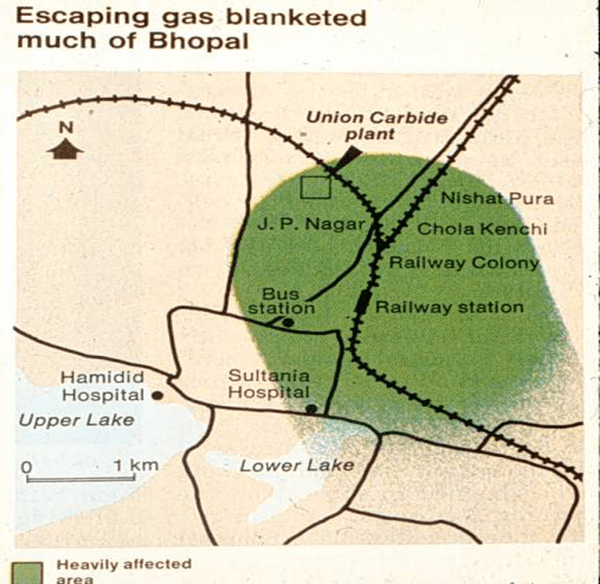
Around 1 a.m. on Monday, the 3rd of December, 1984, In the city of Bhopal, Central India, a poisonous vapour burst from the tall stacks of the Union Carbide pesticide plant. This vapour was a highly toxic cloud of methyl isocyanate. 2,000 people died immediately, 300,000 were injured. 7,000 animals were injured, of which about one thousand were killed.

AFFECTED AREA

POSSIBLE CAUSES

A tank containing methyl isocyanate (MIC) leaked. MIC is an extremely reactive chemical and is used in production of the insecticide carbaryl. The scientific reason for the accident was that water entered the tank where about 40 cubic meters of MIC was stored. When water and MIC mixed, an exothermic chemical reaction started, producing a lot of heat. As a result, the safety valve of the tank burst because of the increase in pressure. It is presumed that between 20 and 30 tonnes of MIC were released during the hour that the leak took place. The gas leaked from a 30 m high chimney and this height was not enough to reduce the effects of the discharge.

The high moisture content (aerosol) in the discharge when evaporating, gave rise to a heavy gas which rapidly sank to the ground. A weak wind which frequently changed direction, which in turn helped the gas to cover more area in a shorter period of time (about one hour). The weak wind and the weak vertical turbulence caused a slow dilution of gas and thus allowed the poisonous gas to spread over considerable distances.

One of the main reasons for the tragedy was found to be a result of a combination of human factors and an incorrectly designed safety system. A portion of the safety equipment at the plant had been non-operational for four months and the rest failed.

LAPSES ON THE PART OF THE GOVERNMENT

The Madhya Pradesh State government had not mandated any safety standards. Union Carbide failed to implement its own safety rules. The Bhopal plant experienced six accidents between 1981 and 1984, at least three of which involved MIC or phosgene.

WHY DID THE PEOPLE STAY QUITE ??

The country needed pesticides to protect her agricultural production. MIC is used to produce pesticides that control insects which would in turn, help increase production of food as a part of India’s GREEN REVOLUTION. Initially, India imported the MIC from the United States. In an attempt to achieve industrial self-sufficiency, India invited Union Carbide to set up a plant in the state of Madhya Pradesh to produce methyl isocyanate. To the people of the city of Bhopal, Union Carbide was a highly respected , technically advanced Western company. This coupled with political power and scientific expertise worked together to changed the people’s perception of what was dangerous and more importantly what was safe.

Suggested Solution

Alpha Napthol on carbonyl group addition followed by reaction with methyl amine would eventually gives carbaryl. This process does not generate or require handling the of Phosgene. This process does not require storage of MIC. Inherently safe process.

What is Web Hosting? And its Types

Web hosting is an online service that enables you to publish your website or web application on the Internet. When you sign up for a web hosting service, you basically rent some space on a physical server where you can store all the files and data necessary for your website to work properly.

A server is a physical computer that runs without any interruption so that your website is available all the time for anyone who wants to see it. Your web host is responsible for keeping that server up and running, protecting it from malicious attacks, and transferring your content — such as text, images, files, etc. — from the server to your visitors’ browsers.

Types of Web Hosting Packages

  1. Shared Hosting

This type of hosting is the most common answer for most web hosting needs and it’s an excellent solution for most small businesses and personal blogs. With this type of hosting, you’re sharing one server with other clients. Websites hosted on the same server share all its resources, such as memory, computing power, disk space, and others.

  • Pros :
  • Low cost, excellent for small online business websites
  • No need for specific technical knowledge
  • Pre-configured server options
  • User-friendly control panel — hPanel
  • Maintenance and server administration is taken cared for you
  • Cons :
  • Little or no control over server configuration
  • Traffic surges on other websites can slow down your website

2. VPS Hosting

When you’re using a Virtual Private Server — or VPS for short — you’re still sharing a server with other users. However, your web host allocates an entirely separate partition for you on that server. This means you get a dedicated server space and a reserved amount of resources and memory. In fact, VPS hosting can be great for medium-sized businesses with a rapidly growing number of websites and traffic.

  • Pros :
  • Dedicated server space
  • Traffic surges on other websites have no effect on your performance
  • Root access to the server
  • Easy scalability and high customizability
  • Cons :
  • More expensive than other types of hosting
  • Technical and server management knowledge is a must

3. Cloud Hosting

Cloud hosting is currently the most reliable solution on the market. With cloud hosting, your host provides you with a cluster of servers — your files and resources are replicated on each server. When one of the cloud servers is busy or encounters a problem, your traffic is automatically routed to another server in the cluster. This results in little to no downtime, which is excellent if you own a very busy website.

  • Pros :
  • Little to no downtime
  • Server failures have no effect on your website
  • Allocates resources on demand
  • Pay-as-you-pricing strategy — you only pay for what you use
  • More scalable than other web hosting types
  • Cons :
  • Hard to estimate the actual costs
  • Root access is not always provided.

4. WordPress Hosting

WordPress hosting is a particular form of shared hosting, created for WordPress site owners. Your server is configured specifically for WordPress and your site comes with pre-installed plugins for crucial tasks, such as caching and security.

  • Pros :
  • Low cost and beginner-friendly
  • One-click WordPress installation
  • Good performance for WordPress sites
  • Customer support team trained in WordPress issues
  • Pre-installed WordPress plugins and themes
  • Cons :
  • Recommended only for WordPress sites, which can be a problem if you want to host more than one website on your server

5. Dedicated Hosting

Dedicated hosting means that you have your own physical server that’s dedicated solely to your website. Therefore, you’re given incredible flexibility over how you want to manage your website. You can configure your server as you wish, choose the operating system and software you want to use, and set up the whole hosting environment according to your own needs.

  • Pros :
  • Full control over server configuration
  • High reliability and security options
  • Root access to your server
  • Cons :
  • High cost, more oriented towards larger businesses
  • Technical and server management knowledge is a must

Wannacry Cyber Attack

What was the cyber attack?

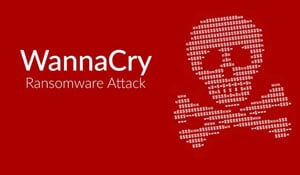
The WannaCry ransomware attack was a worldwide cyber attack in May 2017 by the WannaCry ransomware. It propagated through EternalBlue, an exploit developed by the United States National Security Agency (NSA) for older Windows systems. WannaCry is a ransomware cryptoworm, which targeted computers running the Microsoft Windows operating system by encrypting data and demanding ransom payments in the Bitcoin cryptocurrency. The worm is also known as WannaCrypt, Wana Decrypt0r 2.0, WanaCrypt0r 2.0, and Wanna Decryptor. It is considered a network worm because it also includes a transport mechanism to automatically spread itself. This transport code scans for vulnerable systems, then uses the EternalBlue exploit to gain access, and the Double Pulsar tool to install and execute a copy of itself. WannaCry versions 0, 1, and 2 were created using Microsoft Visual C++.

When did it happen?

The attack began on Friday, 12 May 2017, with evidence pointing to an initial infection in Asia at 07:44 UTC. Within a day the code was reported to have infected more than 230,000 computers in over 150 countries. Officially the initial outbreak was from 12 May 2017 to 15 May 2017. Organizations that had not installed Microsoft’s security update from April 2017 were affected by the attack.

How did it happen?

The vulnerability WannaCry exploits lies in the Windows implementation of the Server Message Block (SMB) protocol. The SMB protocol helps various nodes on a network communicate, and Microsoft’s implementation could be tricked by specially crafted packets into executing arbitrary code. It is believed that the U.S. National Security Agency discovered this vulnerability and, rather than reporting it to the infosec community, developed code to exploit it, called EternalBlue. This exploit was in turn stolen by a hacking group known as the Shadow Brokers, who released it obfuscated in a seemingly political Medium post on April 8, 2017. Microsoft itself had discovered the vulnerability a month prior and had released a patch, but many systems remained vulnerable, and WannaCry, which used EternalBlue to infect computers, began spreading rapidly on May 12. In the wake of the outbreak, Microsoft slammed the U.S. government for not having shared its knowledge of the vulnerability sooner.

Who did it?

The US and UK governments have said North Korea was responsible for the WannaCry malware attack affecting hospitals, businesses and banks across the world in May 2017. Ironically, it was allegedly developed as a cyber-attack exploit by the US National Security Agency. Although they were reported to have known of the tool’s vulnerabilities, the NSA didn’t bring it to Microsoft’s attention until the hacker group called Shadow Brokers leaked EternalBlue to an obscure website. Further analysis of the attack by companies such as Symantec revealed links to the Lazarus group who in turn have been linked to North Korea although the attack does not bear the hallmarks of a nation-state campaign.

Which security services were violated?

WannaCry spread using an exploit called EternalBlue, created by—and subsequently stolen from—the U.S. National Security Agency (NSA). EternalBlue enabled attackers to discover vulnerable computers on the target network. WannaCry also leveraged an NSA backdoor called DoublePulsar to install WannaCry on the networkThe WannaCry ransomware attack hit around 230,000 computers globally .A third of NHS hospital trusts were affected by the attack. Terrifyingly ambulances were reportedly rerouted, leaving people in need of urgent care in need. It was estimated to cost the NHS a whopping £92 million after 19,000 appointments were canceled as a result of the attack. As the ransomware spread beyond Europe, computer systems in 150 countries were crippled. The WannaCry ransomware attack had a substantial financial impact worldwide. It is estimated this cybercrime caused $4 billion in losses across the globe.

Affected organizations

  • Andhra Pradesh Police, India
  • Automobile Dacia, Romania
  • Boeing Commercial Airplanes
  • Cambrian College, Canada
  • Hitachi
  • Honda
  • Instituto Nacional de Salud, Colombia
  • Portugal Telecom
  • Pulse FM
  • Renault
  • Russian Railways
  • University of Milano-Bicocca, Italy
  • Vivo, Brazil

Viruses and Malicious software

A computer virus is a piece of software that can “infect” other programs by modifying them; The modification includes injecting the original program with a routine to make copies of the virus program, which can then go on to infect other programs. A virus can do anything that other programs do. The difference is that a virus attaches itself to another program and executes secretly when the host program is run.

The terminology in this area presents problems because of a lack of universal agreement on all of the terms and because some of the categories overlap. Malicious software can be divided into two categories: those that need a host program, and those that are independent.

  • Need a host program : The former, referred to as parasitic, are essentially fragments of programs that cannot exist independently of some actual application program, utility, or system program.  Examples: Viruses, logic bombs, and backdoors
  • Independent malware is a self-contained program that can be scheduled and run by the operating system.  Examples : Worms and bot programs

Backdoor or Trapdoor

A backdoor, also known as a trapdoor, is a secret entry point into a program that allows someone who is aware of the
backdoor to gain access without going through the usual security access procedures. Programmers have used backdoors legitimately for many years to debug and test programs; such a backdoor is called a maintenance hook. It Has been commonly used by developers. A threat when left in production programs allowing exploited by attackers. It is very hard to block in O/S. It requires good s/w development & update.

Logic Bomb

It is one of oldest types of malicious software. The code is embedded in legitimate program. It is activated when specified conditions met
 Eg presence/absence of some file
 Particular date/time
 Particular user
When it is triggered it typically damages system, Modify/delete files/disks, halt machine, etc.

Trojan Horse

A Trojan horse is a useful, or apparently useful, program or command procedure containing hidden code that, when invoked, performs some unwanted or harmful function. Trojan horse programs can be used to accomplish functions
indirectly that an unauthorized user could not accomplish directly, Which is usually superficially attractive. Eg game, s/w upgrade etc. When it runs performs some additional tasks. Allows attacker to indirectly gain access they do not have directly. Often used to propagate a virus/worm or install a backdoor. Another common motivation for the Trojan horse is data destruction. The program appears to be performing a useful function (e.g., a calculator program), but it may also be quietly deleting the user’s files.

Zombie

Program which secretly takes over another networked computer is called zombie. Then uses it to indirectly launch attacks. Often used to launch distributed denial of service (DDoS) attacks. Exploits known flaws in network systems.

Flavors of Unix

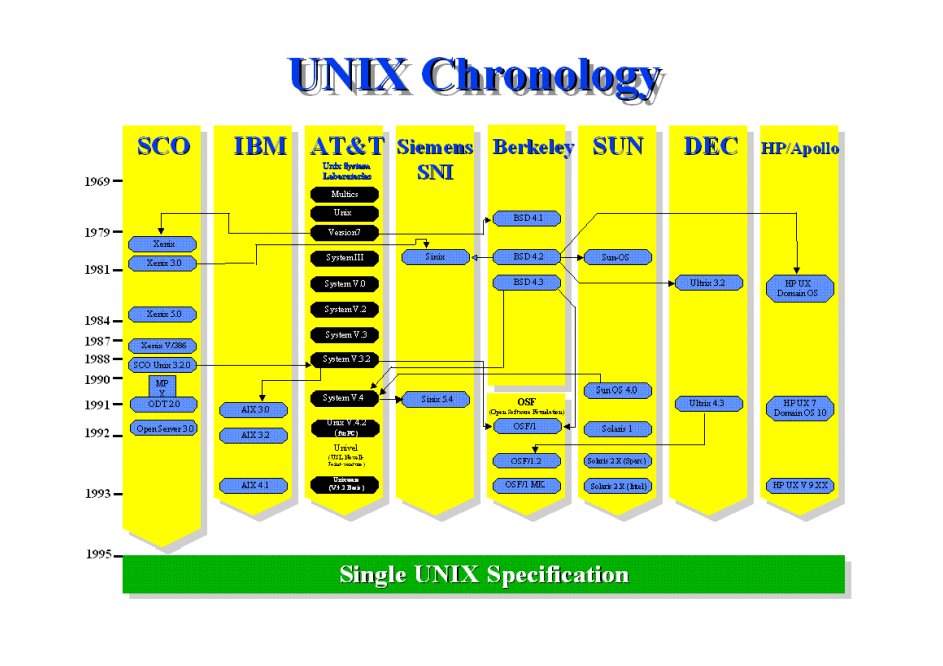
Unix is not a single operating system. It is in fact a general name given to dozens of o.s. by different companies, organizations or groups of individuals. These variants of unix are referred to as flavors. Although based on the same core set of unix commands, different flavors can have their own unique commands and features, and are designed to work with different types of h/w. Linux is often considered a unix flavor.

Among the ways in which the various flavors of UNIX differ are (1) fundamental design, (2) commands and features, (3) the hardware platform(s) (i.e., processors) for which they are intended and (4) whether they are proprietary software (i.e., commercial software) or free software (i.e., software that anyone can obtain at no cost and use for any desired
purpose).

Linux :
The most popular and fastest growing of all the Unix-like operating systems. It is developed by Linus Torvalds, Linux is a product that mimics the form and function of a UNIX system, but is not derived from licensed source code. Rather, it was developed independently; by a group of developers in an informal alliance on the net. A major benefit is that the source code is freely available (under the GNU copyleft), enabling the technically astute to alter and amend the system; it also means that there are many, freely available, utilities and specialist drivers available on the net. Linux is a registered trademark of Linus Torvalds. Recent versions of Glibc include much functionality from the Single UNIX Specification, Version 2 (for UNIX 98) and later.

FreeBSD :
The most popular of the BSD systems (all of which are direct descendants of BSD UNIX, which was developed at the University of California at Berkeley). BSDI is an independent company that markets products derived from the Berkeley Systems Distribution (BSD), developed at the University of California at Berkeley in the 60’s and 70’s. It is the operating
system of choice for many Internet service providers. It is, as with Linux, not a registered. UNIX system, though in this case there is a common code heritage if one looks far enough back in history.

IBM :
IBM has been quietly working on its mainframe operating system (formerly MVS) to add open interfaces for some years. In September 1996, The Open Group announced that OS/390 had been awarded the X/Open UNIX brand, enabling IBM to identify its premier operating system to be marked UNIX 95. This is a significant event as OS/390 is the first product to guarantee conformance to the Single UNIX Specification, and therefore to carry the label UNIX 95, that is not derived from the AT&T/ SCO source code.

NetBSD :
NetBSD is a free, fast, secure, and highly portable Unix-like Open Source operating system. It is available for a wide range of platforms, from large-scale servers and powerful desktop systems to handheld and embedded devices. Features the ability to run on more than 50 platforms, ranging from acorn26 to x68k

OpenBSD :
The OpenBSD project produces a FREE, multi-platform 4.4BSD-based UNIX-like operating system. Our efforts emphasize portability, standardization, correctness, proactive security and integrated cryptography. As an example of the effect
OpenBSD has, the popular OpenSSH software comes from OpenBSD. It May have already attained its goal of becoming the most secure of all computer operating systems.

Darwin :
Darwin is an open-source Unix-like operating system first released by Apple Inc. in 2000. It is composed of code developed by Apple, as well as code derived from NeXTSTEP, BSD, Mach, and other free software projects The new version of BSD that serves as the core for the Mac OS X

Many of the proprietary flavors have been designed to run only (or mainly) on proprietary hardware sold by the same company that has developed them. Examples include:

  • AIX – developed by IBM for use on its mainframe computers
  • BSD/OS – a commercial version of BSD developed by Wind River for Intel processors
  • HP-UX – developed by Hewlett-Packard for its HP 9000 series of business servers
  • IRIX – developed by SGI for applications that use 3-D visualization and virtual reality
  • QNX – a real time operating system developed by QNX Software Systems primarily for use in embedded systems
  • Solaris – developed by Sun Microsystems for the SPARC platform and the most widely used proprietary flavor for web servers
  • Tru64 – developed by Compaq for the Alpha processor

Optic Fibers in Communication

What are optical fibers ?

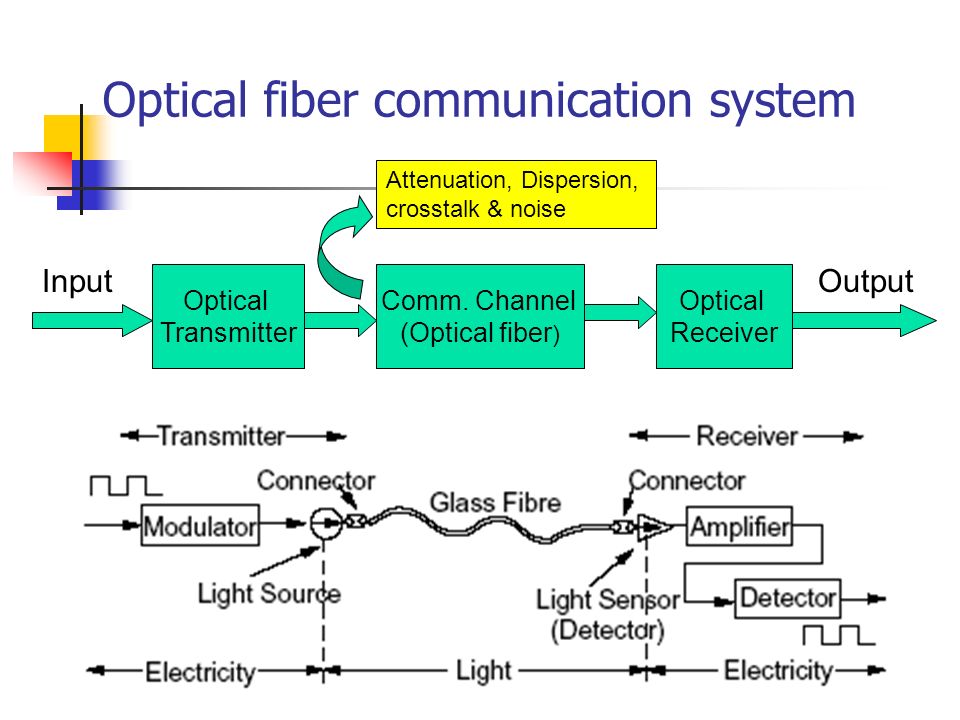
It is thin strands of pure glass which carry data over long distances. At very high speeds. The Fiber can be bent or twisted. Fibers are used instead of metal wires because signals travel without loss. Also, fibers are immune to the electromagnetic interference.

In an general optic fiber there is a core which is surrounded by cladding material which has lower refraction index than core.

Communication Systems

Basic Blocks

  • Transmitter : transmitter is one of the key elements of any fiber optic communications system and the choice of the correct one will depend upon the particular application that is envisaged.
  • Communication channel (medium) :fiber-optic link (or fiber channel) is usually a part of an optical fiber communications system which provides a data connection between two points.

Communication channel

  1. Wired
  2. Wireless Glass
  • Destinations and Receiver : Fiber optic receivers convert light signals into electrical signals for use by equipment such as computer networks.

Advantages of optical fibers

  • Can carry much more information
  • Easily available & cheaper
  • Much longer distances than co-axial cables
  • Immune to electromagnetic noise
  • Light in weight
  • Unaffected by atmospheric agents
  • Longer life Not hazardous

Disadvantages of Optical fibers

  • Expensive to install
  • They have to be installed by specialists
  • More costly to repair
  • Can only be used on ground
  • The distance between transmitter and
  • Receiver should keep short

Types of Security Attacks

Active Attacks

It is an attempts to alter system resources or affect their operation. It includes Modification of data, or creation of false data.

Four categories
 Masquerade
 Replay
 Modification of messages
 Denial of service

  1. Masquerade : It takes place when one entity pretends to be a different entity. For example, authentication sequences can be captured and replayed after a valid authentication sequence has taken place, thus enabling an authorized entity with few privileges to obtain extra privileges by impersonating an entity that has those privileges.
  2. Replay : Replay involves the passive capture of a data unit and its subsequent retransmission to produce an unauthorized effect.
  3. Modification of Messages : Modification of messages simply means that some portion of a legitimate message is altered, or that messages are delayed or reordered, to produce an unauthorized effect.
  4. Denial of Service : The denial of service prevents or inhibits the normal use or management of communications facilities. This attack may have a specific target; for example, an entity may suppress all messages directed to a particular destination (e.g., the security audit service). Another form of service denial is the disruption of an entire network, either by disabling the network or by overloading it with messages so as to degrade performance.

Passive Attacks

It attempts to learn or make use of information from the system but does not affect system resources. Passive attacks are in the nature of eavesdropping on, or monitoring of, transmissions. The goal of the opponent is to obtain information that is being transmitted.

Two types of passive attacks:

  • Release of Message Contents
  • Traffic Analysis
  1. Release of Message Contents : A telephone conversation, an electronic mail message, and a transferred file may contain sensitive or confidential information. We would like to prevent an opponent from learning the contents of these transmissions.
  2. Traffic Analysis : The opponent could determine the location and identity of communicating hosts and could observe the frequency and length of messages being exchanged. This information might be useful in guessing the nature of the communication that was taking place.

History of Unix

Origins of Unix

UNIX development was started in 1969 at Bell Laboratories in New Jersey. Bell Laboratories was (1964–1968) involved on the development of a multi-user, time-sharing operating system called Multics (Multiplexed Information and Computing System). Multics was a failure. In early 1969, Bell Labs withdrew from the Multics project.

Bell Labs researchers who had worked on Multics (Ken Thompson, Dennis Ritchie, Douglas McIlroy, Joseph Ossanna, and others) still wanted to develop an operating system for their own and Bell Labs’ programming, job control, and resource usage needs. When Multics was withdrawn Ken Thompson and Dennis Ritchie needed to rewrite an operating system in order to play space travel on another smaller machine (a DEC PDP7 [Programmed Data Processor 4K memory for user programs). The result was a system called UNICS (UNiplexed Information and Computing Service) which was an
’emasculated Multics’.

Unix Development

The first version of Unix was written in the low-level PDP-7 assembler language. Later, a language called TMG was developed for the PDP-7 by R. M. McClure. Using TMG to develop a FORTRAN compiler, Ken Thompson instead ended up developing a compiler for a new high-level language he called B, based on the earlier BCPL language developed by Martin Richard. When the PDP-11 computer arrived at Bell Labs, Dennis Ritchie built on B to create a new language called C. Unix components were later rewritten in C, and finally with the kernel itself in 1973.

Since it began to escape from AT&T’s Bell Laboratories in the early 1970’s, the success of the UNIX operating system has led to many different versions: recipients of the (at that time free) UNIX system code all began developing their own different versions in their own, different, ways for use and sale. Universities, research institutes, government bodies
and computer companies all began using the powerful UNIX system to develop many of the technologies which today are part of a UNIX system. By the late 1970’s, a ripple effect had come into play.

Key Factors

1969 The Beginning

The history of UNIX starts back in 1969, when Ken Thompson, Dennis Ritchie and others started working on the “little-used PDP-7 in a corner” at Bell Labs and what was to become UNIX.

1980 Xenix

Microsoft introduces Xenix. 32V and 4BSD introduced.

1983 System V

Computer Research Group (CRG), UNIX System Group (USG) and a third group merge to become UNIX System Development Lab.
AT&T announces UNIX System V, the first supported release. Installed base 45,000.

1991

UNIX System Laboratories (USL) becomes a company – majority owned by AT&T. Linus Torvalds commences Linux development.
Solaris 1.0 debuts.

1998 UNIX 98

The Open Group introduces the UNIX 98 family of brands, including Base, Workstation and Server. First UNIX 98 registered products shipped by Sun, IBM and NCR. The Open Source movement starts to take off with announcements from Netscape and IBM. UnixWare 7 and IRIX 6.5 ship.

2007

Apple Mac OS X certified to UNIX 03.

What is Firewall and its types

A firewall forms a barrier through which the traffic going in each direction must pass. A firewall security policy dictates which traffic is authorized to pass in each direction. A firewall may be designed to operate as a filter at the level of IP packets, or may operate at a higher protocol layer. Firewalls can be an effective means of protecting a local system or network of systems from network-based security threats while at the same time affording access to the outside world via wide area networks and the Internet.

TYPES OF FIREWALLS

  1. Packet Filtering Firewall

It is simplest, fastest firewall component. It is Foundation of any firewall system. Examine each IP packet (no context) and permit or deny according to rules. Hence restrict access to services (ports). A packet filtering firewall applies a set of rules to each incoming and outgoing IP packet and then forwards or discards the packet. The firewall is typically configured to filter packets going in both directions (from and to the internal network).

2. Stateful Packet Filters

A traditional packet filter makes filtering decisions on an individual packet basis and does not take into consideration
any higher layer context. To understand what is meant by context and why a traditional packet filter is limited with regard to context, a little background is needed. Most standardized applications that run on top of TCP follow a client/server model. A stateful packet inspection firewall reviews the same packet information as a packet filtering firewall, but also records information about TCP connections.

3. Application Level Gateway (or Proxy)

An application-level gateway, also called an application proxy, acts as a relay of application-level traffic. Application-level gateways tend to be more secure than packet filters. Rather than trying to deal with the numerous possible
combinations that are to be allowed and forbidden at the TCP and IP level, the application-level gateway need only scrutinize a few allowable applications. In addition, it is easy to log and audit all incoming traffic at the application level. A prime disadvantage of this type of gateway is the additional processing overhead on each connection.

4. Circuit Level Gateway

This can be a stand-alone system or it can be a specialized function performed by an application-level gateway for certain. A circuit-level gateway does not permit an end-to-end TCP connection; rather, the gateway sets up two TCP connections,
 Between itself and a TCP user on an inner host.
 Between itself and a TCP user on an outside host.

Internet of Behaviors (IoB)

Definition

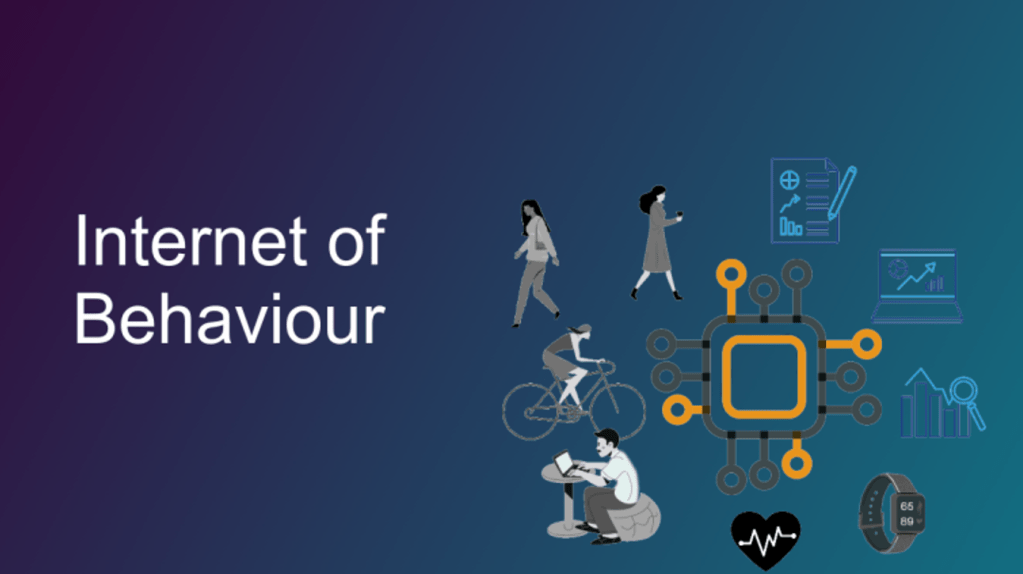
The collection and use of data to drive behaviors is called the Internet of Behaviors (IoB)

An example of it is industrial sites having employed computer vision to determine if employees were complying with mask protocol and then collecting this behavioral data to be analyzed by the organizations to influence people to follow government protocols at work.

What does the IoB mean ?

The purpose of the IoB is to capture, analyze, understand and respond to all types of human behaviors. In a way that allows tracking and interpreting those behaviors of people using emerging technological innovations and developments in machine learning algorithms. People’s behaviors are monitored and incentives or disincentives are applied to influence them to perform towards a desired set of operational parameters. Data collection (BI, Big Data, CDPs, etc.) provides valuable information about customer behaviors, interests and preferences, and this has been referred to as the Internet of Behavior (IoB). The IoB attempts to understand the data collected from users’ online activity from a behavioral psychology perspective. It seeks to address the question of how to understand the data, and how to apply that understanding to create and market new products, all from a human psychology perspective.

The IoB influences consumer choice, but it also redesigns the value chain. For companies, this means being able to change their image, market products more effectively to their customers or improve the Customer Experience (CX) of a product or service. Hypothetically, information can be collected on all facets of a user’s life, with the ultimate goal of improving efficiency and quality.

What does the IoB contribute?

Firstly, before the creation of the application, it is important to imagine the user’s interaction patterns and touch points. Involve them in the creation process, understand their needs, keep the app experience unified and cohesive, make navigation simple and meaningful so that the app is relevant and useful. Once the app is up and running, convey its purpose, create a user guide and reward by gamifying the CX in the app. Strong user engagement is required.

Secondly, solid tools are required such as multi-format support platforms (XML, JSON, PHP, CVS, HTML, etc.) That can connect to any API, that can upload data to the cloud, i.e. the fundamental features of platforms such as Google or Facebook. Platforms should allow for multi-channel personalization, centralized updates that are replicated, sending unique notifications that turn users into contributors to the personalization of the app, allow for social media integration and maintain an interactive interface.

Finally, it is the data captured through the app that serves to model user behavior. And in turn, this is the actionable data that can be sent in the form of pop-ups and notifications to the customer to encourage and incentivise them to adhere to a desired behavior. Analytics are necessary so that essential information can be extracted from all the data.

Benefits of IoB

uAnalyse customer buying habits across all platforms. uStudy previously unattainable data on how users interact with devices and products. uObtain more detailed information about where a customer is in the buying process. uProvide real-time POS notifications and targeting. uResolve problems quickly to close sales and keep customers happy. uCitizen data processed by public-sector uCommercial customer data uGovernment agencies uSocial media uPublic domain uLocation tracking.

Problem with IoB

The problem that can occur with this technology is not of a technical nature. The IoB is confronted with the adversity of how data is collected, stored and used. Its level of access is difficult to control and therefore all companies need to be aware of the liability of IoB use. Google, Facebook or Amazon continue to acquire software that potentially brings the user from a single app to their entire online ecosystem, without their permission. This presents significant legal and security risks to privacy rights, which also vary between jurisdictions around the world

Behavioral data can allow cybercriminals to access sensitive data that reveals customer patterns, collect and sell property access codes, delivery routes and even banking codes. These cybercriminals could take phishing to another level by generating more advanced scams, tailored to the habits of individual users, and thus maximizing the likelihood that users will be scammed. uIt is therefore important to have a secure platform, storage and execution of data with the use of tools such as Confidential Computing, E2E encryption or SDP tools.