
6 Tips to Help You Find Your Nursing Specialty

Choosing your specialty involves a lot of trial and error and some time and patience.

Eight years ago, if you had asked me which nursing specialty I was interested in, I would have been clueless. Today, I have a clear idea of which specialty I like best. Choosing your specialty involves a lot of trial and error and some time and patience.
Here’s how you can find out which specialty is right for you:

1. Work as a Certified Nursing Assistant (CNA) at a hospital or nursing home.

I did a few clinical rotations at an assisted living facility eight years ago and realized it was not a specialty I was interested in. Do not get me wrong, geriatric facilities are wonderful and there is so much to see and do. I would say the best part about that particular specialty is that you will bond with the residents. For me, it felt like my home away from home.

2. Position yourself for new experiences.

If you think you might like to work in a hospital setting, and want to expose yourself to other nursing specialties, I highly recommend applying as a CNA (also known as nurse tech) in the hospital “float pool.” This will automatically open so many doors for you because you will not be assigned to the same unit every week.
The point of the float pool is that whenever any floor needs an extra staff member, the shift is yours if you want it. You might find yourself working in ICU one night, the ER the next night, and so on. Working the float pool is one way that you can dip your toes into all specialties and see what you like.

3. Work on different units.

You can accomplish this through job shadowing or by switching to a new unit a couple years into your first job. Either way, you will eventually find something you enjoy.

4. Know your academic weakness, strengths.

Some students are great with cardiac topics and are happy when they end up working in a cardiac unit. Some students enjoy studying pediatrics or similar topics. While in school, figure out the nursing topics you enjoy the most. Your grades will reflect your confidence in those topics as well.

5. Do research online.

In addition to gaining experience with different specialties and practices, read up on other positions that might appeal to you. Through my own research, I found a quiz that shows you the types of specialties that might suit your interests. Give it a try and see what you think.

6. Don’t put too much stock in what other people say.

I would highly recommend that you take other peoples’ experiences with a grain of salt because everyone experiences things in a different way. What someone might dislike, you might absolutely love. Be mindful of that when peers say negative or positive things about any specialty.
Take my experience, for example. For years, my peers told me that the ER was crazy and chaotic. I got floated to the E.R. several times and each time it was an amazing experience. I knew then that I found my specialty.
Make sure you try out as many or all specialties if you can. Only then will you be able to decide which specialty works for you.

Find the specialty that\’s perfect for you.

Take our nursing specialty quiz to determine what type of career as a nurse you might be interested in. Whether you’ve never been a nurse, are a new nursing grad looking for a specialty or an experienced RN exploring options, Herzing University can help you discover your ideal nursing career.

5 Tips from Our Graduates

From navigating a career change to surviving online classes, here are their tried-and-true tips for success.

By earning your degree, you’re making an important investment in your future. We asked five of our recent graduates for their advice on how new and returning students can make the most of that investment and achieve their personal and professional goals.
From navigating a career change to surviving online classes, here are their tried-and-true tips for success.

1. Trust the process

Your classes won’t always be easy, and it can be tricky to find time for school when you’re balancing a full-time job and/or raising a family – but that doesn’t mean you can’t be successful.
“My advice for other students is to just stay focused,” says Trisha Warner, who earned her surgical technology degree while raising her three children.
“You will be more confident in everything you do. Every class is there for a reason, even if at the time it seems silly. You will make lifelong friends that will help you along the way. No one can take your degree from you.”

2. Get help when you need it

If you do find yourself struggling in class, know that you don’t have to go it alone. Whether you’re attending on campus or online, make sure that you are taking advantage of all the tools and resources at your disposal.
“Ask for help if you need it. This can be very challenging, but it might be what gets you from one week to the next!” says online MBA graduate Stephanie Dennis.
“Use the resources the school has available, whether it’s finding a tutor or making extra time to meet with your instructor,” she adds.

3. Start preparing for your job search BEFORE you graduate

From perfecting your resume to honing your interview skills, you ought to get a jump start on your future job hunt while you’re still in school.
For technology student Mary Kimani, working with Career Services helped her find new opportunities in the IT field.
“For me, the most challenging part was transitioning into the IT field after being in nursing school for two years,” she said. “I started working on my resume with the help of career services. This helped me start applying for several IT jobs and I received multiple interviews and job offers before graduation.”

4. Make your education work for YOU

Nursing grad Sharese Windley was accustomed to being a great student, but after failing her pharmacology course, she realized that she was going to have to take a different approach to her learning if she wanted to be successful.
“After taking four months off, I re-enrolled and switched to night classes at Herzing,” she said. “Taking classes in the evenings allowed me to study during the day, when my three children were at school. I retook pharmacology and made an A.”
“Failing that class changed my life. It made me reevaluate everything, and I found another route that worked a lot better for me in the long run. You just have to find your own way because the same process or path doesn’t work for everyone.”

5. Don’t get discouraged

When you feel overwhelmed or stressed, remember why you are earning your degree. Know that it’s possible for you to overcome whatever challenges you might be facing to achieve the career and the education you want.
“There may be moments when you want to give up and quit, but it’s the challenging times when we learn the most about ourselves and our abilities,” says business management graduate Virginia C. Cesar Jass.
“If you are struggling, get help. Keep a positive attitude, set attainable goals for yourself and manage your time wisely. Keep your eye on the prize and do everything you can to stay focused and get that degree. You will be so proud of yourself. It is all worth it.

How to Care For Your Mental Health as a Busy College Student

Mental health is so important to me as a college student, and it should be for you as well.

Your health and your well-being should always your first priority. That’s why mental health is so important to me as a college student, and it should be for you as well.
College classes can become overwhelming and take a toll on your mental health. Learning how to manage my mental health has been extremely important to me because I was recently diagnosed with Major Depressive Disorder. This illness didn’t come out of nowhere; it stems from childhood, and I’ve dealt with it ever since I was 8 or 9 years old. I am 23 years old now.
I have come a long way since I started classes more than a year ago. Long story short, I’ve hit my breaking point at times and needed to get professional help. I’m here today to share with you that you are not alone – there are millions of others who suffer from similar feelings.
Here are some tips that helped me and might assist fellow students to get through a rough patch:

1. Take time out for yourself

It’s easy to burn out and overwork yourself, which will worsen your mental health. I learned this the hard way. Instead, try to make time for the things you enjoy doing, such as watching television, playing with your child/children, getting on social media, talking to a friend, cooking, cleaning, sleeping … whatever helps you unwind and relax. Putting unnecessary stress on yourself does no good. Everyone wants to achieve high marks in classes, but is it worth it if your mental health is compromised?

2. Talk to a trusted individual

When things escalate and get to the point when it’s overwhelming, talk to someone you trust about how you’re feeling. Sometimes it seemed as if no one would understand how I was feeling, and, as a result, I bottled up my emotions. This is very unhealthy and dangerous for your mental health. Sometimes when you’re in a situation like mine you feel like you are alone, but you’re not. When you talk to a counselor, trusted friend or family member and release those negative feelings, you’ll feel tremendously better, and you’ll receive some words of wisdom from that person.

3. Develop a strong support system 

We have a great support network at Herzing, but we each need a strong emotional support system as well. Family is often your strongest support system. I know that I can definitely rely on my family, but if that’s not the case for you, close friends might be best. There are people around you that want to see you succeed and win in life! You are not alone in your educational journey.
Paying attention to my mental health has drastically improved my schooling. I would spend all day focusing and getting ahead of the game on my assignments, but I realized that I could only take so much at a time. Taking care of myself and my mental health helped me retain more information and feel better. We all are a work in progress, on an educational journey to start or improve our careers, and we should be taking the same approach to our mental health as well.

Grammar Lesson: Comma Splices

As an English teacher, comma splices are the most common writing error that I see. Here\’s how you can recognize and avoid them in your writing.

Have you ever received feedback that your writing contains a comma splice? You might be wondering what a comma splice is and why it matters if you have one. As an English teacher, comma splices are the most common writing error that I see. They’re easy to make, and we tend to see them in casual writing, which makes them harder to recognize and avoid in academic writing.

What is a comma splice?

The first step to recognizing a comma splice is knowing the difference between dependent and independent clauses. An independent clause is a sentence that expresses a complete thought and contains a subject (who or what the sentence is about) and a verb (what the subject is doing).
For example:
Picard was the best captain.
You can have a phrase with a subject and verb that does not express a complete thought. Often, this occurs when the sentence starts with a conjunction:
Because Picard was the best captain.
A conjunction is a word, such as “and,” “but,” or “because,” that is used to join two thoughts together. “Because Picard was the best captain” is missing a second thought and is therefore incomplete.

A comma splice occurs when two independent clauses are connected by a comma:

Picard was the best captain, Sisko is my favorite.
“Picard was the best captain” and “Sisko is my favorite” are both independent clauses; therefore, this is a comma splice.
There are three ways to fix a comma splice.

1. Replace the comma with a period

Picard was the best captain. Sisko is my favorite.
This is the easiest fix, and it gives you two complete sentences. However, depending on the audience and context for your writing, these two sentences might need a transitional word or phrase to show how they work together. Replacing the comma in a comma splice with a period works best when your two clauses are two independent and individual thoughts and when it’s clear to your audience how the two clauses are related.

2. Replace the comma with a semicolon

Picard was the best captain; Sisko is my favorite.
This is grammatically correct, but your reader might get confused if it’s unclear how your two clauses are related. A semicolon should only be used when two independent clauses are so very closely related that they simply cannot be in separate sentences.

3. Turn one of the independent clauses into a dependent clause

Adding a conjunction after the comma makes the second clause dependent:
Picard was the best captain, but Sisko is my favorite.
Adding an introductory element makes the first clause dependent:
Even though Picard was the best captain, Sisko is my favorite.
Bonus tip: “However” sometimes acts like a conjunction, but it’s not one. It’s a conjunctive adverb, which is similar to a conjunction, but different. The biggest difference is that a clause starting with a conjunction is almost certainly a dependent clause (But Sisko is my favorite…), while a clause starting with a conjunctive adverb is almost certainly an independent clause (However, Sisko is my favorite).
This means that “Picard was the best captain, however Sisko is my favorite” is STILL a comma splice.
A comma splice in your writing makes your ideas feel rushed. Comma splices are sometimes used intentionally in artistic writing, like a novel, when a character’s thoughts are racing. However, in academic writing, they should be avoided so that each idea is given the weight it deserves and so that the reader understands how different ideas relate to each other.

7 Easy Ways to Perfect Your Resume

These seemingly small details in your resume can make a big difference in helping you get noticed for the roles you want.

Whether you’re a recent grad new to the job search or an experienced professional looking for new opportunities, these seemingly small details in your resume can make a big difference in helping you get noticed for the roles you want.
Check out our quick tips for taking your resume from good to great:

1. Skip the formatting headache

Pre-formatted templates make it easier for you to get to the important steps – detailing the skills and accomplishments that make you right for the job – rather than wasting time on borders, spacing and fonts. If you’re creating your first resume, you might find it helpful to use a free template to get started.
Microsoft Word offers a variety of templates to help individuals at different career stages, from recent graduates to seasoned professionals, create the right resume for their job search. Free design tool Canva also has a library of resume templates that are ideal for those in creative industries like graphic design and marketing.

2. Show what you know

 It’s important to highlight your most recent degree and professional certifications. If you’ve earned an advanced degree, such as an MBA or an MSN, for example, list that at the top of your education section. Similarly, industry-recognized certifications might make you more qualified for the position you are applying for, so don’t bury them at the bottom of the page.

3. List your most relevant experience first

Your employer doesn’t need to know about every job you’ve ever had – only the ones that make you a good candidate for the role you are interested in. If you’re switching careers, highlight transferrable skills you gained from your old job that are applicable to this new role. If you’re a recent graduate or current student, highlight the skills and qualifications you have as a result of your internship experience, coursework and extracurricular activities. Check out this blog post for more resume writing tips.

4. Send your resume as a PDF

This is a simple but often-overlooked step that can make a big difference in your job search. When you send your resume as a PDF, you ensure that whoever opens the file sees it exactly as you intended. Some word processing applications may not be compatible, and older versions of Word can have trouble opening emailed documents. You want to make it as easy as possible for recruiters and hiring manager to open, read and pass along your resume.

5. Name your resume

More often than not, resumes are submitted and reviewed electronically. Therefore, it’s important to name the document so that it is easily searchable in the recipient’s inbox.
Pro tip: the name of your resume should not be “resume.” Include your first name, last name and the word “resume” in the title of your document to make sure that it doesn’t get lost in the shuffle.

6. Add links

Since you can assume that your resume will be opened on a computer or mobile device, consider embedding hyperlinks to your LinkedIn page, blog or online portfolio if you have one. You can also hyperlink your email, so that it’s even easier for a prospective employer to reach out to you after reviewing your resume.

7. Update your LinkedIn

If you’ve gone to the trouble to overhaul or refine your resume, make sure that those changes are reflected on your LinkedIn profile as well. This is especially important if you’ve included the link to your LinkedIn page in your resume document. You can even upload your resume PDF to LinkedIn to make it easier for recruiters and potential employers to read about your accomplishments.

Thinking Critically through Digital Media

Although the use of internet and digital materials in the language classroom has come a long way over the last 20 years, still the vast majority of web based material that finds its way into the language classroom is used for information input or comprehension purposes. The students’ interaction with the materials is as such largely passive with the teacher controlling the suitability of the materials selected and deciding what information the students will extract from it.


In Thinking Critically through Digital Media I have tried to build on this model, but develop it and take it to deeper and more critical levels of analysis that go beyond the superficial linguistic level and help to develop students not only as English language speakers, but as capable information literate participants in the global knowledge economy.

The book uses as its basis the development of key digital literacies. These include the ability to understand visually presented data, the ability collect and analyse data using a range of techniques and survey tools and the ability to create and deliver a range of presentation types using digital media tools.

Whilst developing these digital literacies students are also encouraged to assess the validity, credibility and underlying bias of the information they study and are given a range of research tools and techniques for reassessing the information and evaluating how it fits within their personal framework of belief systems and values.

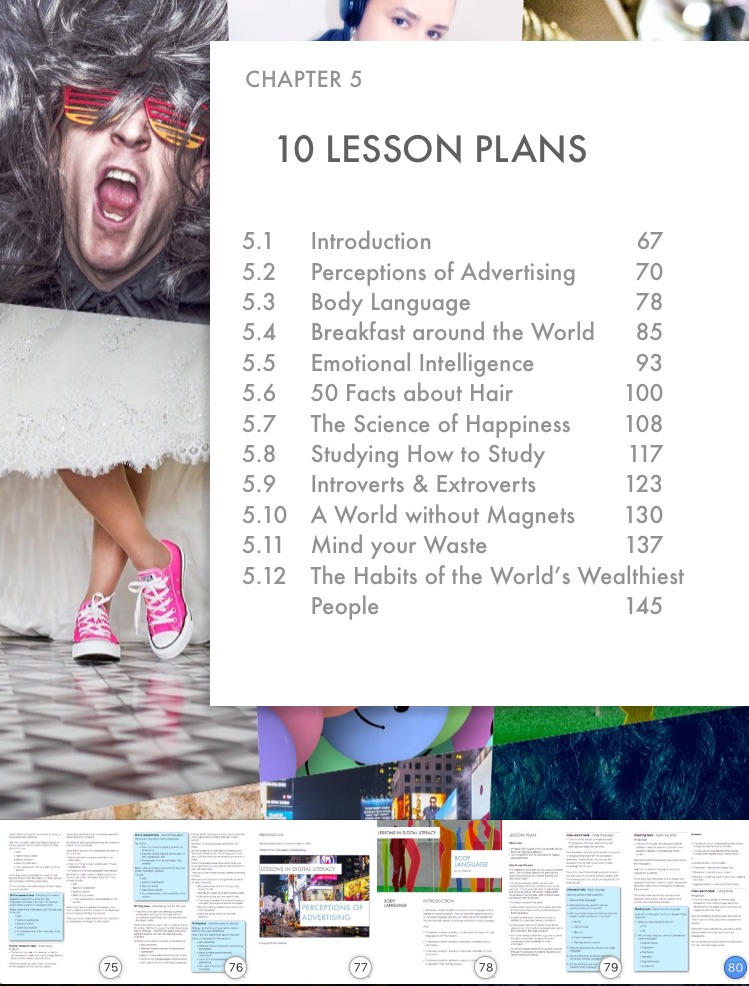
The book itself has four main chapters. The first three chapters contain a range of activities that teachers can use with students to develop their abilities to understand and create infographics, develop research polls and surveys and create and deliver presentations. These activities give students hands on exposure to a range of recommended tools and develop students as active creators of information whilst developing their abilities to work collaboratively in digital online environments.


The fourth key chapter of the book is a collection of lesson plans that teachers can use to take students through a complete process from accessing their existing knowledge about a topic, understanding new input, examining how the information fits into their existing value scheme, checking the credibility and validity of the information, carrying out their own parallel research through social media to finally sharing and reevaluating what they have learned.


I believe that the skills and abilities teachers can help students develop through the use of these materials are ones that are sadly lacking, not only in the English language classroom but also in the general education of many students around the world. Through the use of these materials I hope teachers can develop more actively and intellectually critical students who approach digital media with the ability not only to comprehend and consume information but also understand the possible bias, motivation and underlying values of those creating the information. I believe these skills and abilities are key to creating a more tolerant, open-minded and critically aware global society.

Related links:

Digital Tools for Teachers

Over the last few months I have been working on a new book project and finally have it completed.

The new book is Digital Tools for Teachers.

Digital Tools for Teacher Cover


This book has been written and designed primarily with English language teachers in mind though the majority of the resources and tools contained in the book will have much wider use than just language teaching.

The book is available at the introductory price of £1.99 from:


The book contains more than 70 tools and resources and these have been hand picked because they represent a broad cross-section of what is at present available.
The chapters of the book are divided into simple pedagogical tasks that most teachers need to carry out or help their students with and the descriptions of the resources are suitably concise to make the book easy for a stressed teacher to access and browse in a few spare moments between classes.

The sites, apps and resources within the book have been divided into the following chapters:

  • Reading Tools
  •  Writing Tools
  •  Speaking Tools
  •  Listening Tools
  •  Grammar Tools
  •  Presentation Tools
  •  Poll & Survey Tools
  •  Infographic Tools
  •  Course Creation Tools

You can download the first two chapters free here:  Digital Tools for Teachers

At present each chapter contains between 5 – 10 different sites that have been selected to help you make a quick choice of the tools you need.

All of the tools and resources selected for the book are either free or have a useable permanent freemium offering, so you will never be forced to pay for any of these resources in order to sustain the work you are doing with your students.

Over the coming years it is my intention to regularly review and expand on the contents of this book. If you would like to be involved and assist in this process you can do so by:

  •  Suggesting tools to be included in future editions
  •  Writing an entry about a tool you have used and found useful
  •  Reporting a dead link or a tool or resource that has become commercially unviable for teachers
  •  Reporting a typo or factual error.

Anyone who contributes in any of the ways above will get a brief mention in the next edition of the book along with a link to their own blog or website.

Related links

12 Tips for training older teachers to use technology

There is an assumption that persists in the educational community that more mature teachers are much more difficult and reluctant to be trained on the effective use of educational technology. To some degree, I think this assumption has been built on by the digital native vs digital immigrant myth. But as someone who has trained teachers of all ages all over the world I would say that, from my own experience, this hasn’t been the case.


What I have found to be the case is that more mature teachers are:

  • Less likely to lured by the shiny hardware and the seemingly wonderful claims made to go along with it.
  • More critical and sceptical about the way technology is used in the classroom.
  • Less confident when using various apps and websites and less likely to explore the different features.
  • More easily discouraged by failures.
  • Less familiar with various tools, applications and services that have become part of every-day life for younger users.
  • More likely to be able to see through “technology for technology’s sake” classroom applications.


So how should trainers approach the challenges of working with these teachers? Here are a few tips from my own experience of training older teachers to use technology.

Be sure of your ground pedagogically

So many edtech trainers are great with technology, but much less versed in educational theory and pedagogy. More mature teachers are more likely to have a stronger theoretical understanding, so be prepared to back up your ideas with sound pedagogical insights and try to relate your training back to theories of learning and pedagogical approaches.

Make sure training is hands on

Running through a list of tools and ideas in a presentation may have some value, but it doesn’t come anywhere close to the impact of giving teachers hands-on experience and the chance to actually work with the tech to create something.


Here is a collection of some of the activities I\’ve used in my training sessions: 20 Tech Enhanced Activities for the Language Classroom

Give solid examples of what you have done

Being able to speak from experience about how you have used tech with your own students will have far more impact than theoretical applications of “You could do blah blah blah with your students.” Sharing anecdotes of how you have used technology in your own classes, the challenges you have faced and how you have overcome or even been overcome by them can really lend credibility to your training.

Manage expectations

A positive attitude is great, but be prepared to also point out weaknesses, potential pitfalls and talk about your own failures. This might help your trainees avoid the same mistakes and stop them from becoming disillusioned.

Make time to experiment and explore

Don’t be tempted to cram in as many tools, techniques and activities as possible. Incorporate project time into your training so that teachers have the chance to go away and explore the things that interest them most and get their own perspective on how they can use them with students.

Back up technical training

Learning to use new tools is getting easier all the time, especially on mobile, but it’s still quite easy for teachers to forget which button to press or which link to follow. So back up any demonstrations with either an illustrated step-by-step guide or a video tutorial that teachers can come back to later.


Make their lives easier

Using technologies that can make what they already do a bit easier or a bit quicker is a great way to start. For example, I have a link to a tool that really quickly creates a cloze test activity. Sharing tools like this that start from what teachers already do can really help to get them on your side.


Do things that can’t be done

One of the most common remarks made by more mature teachers about technology is: “Well that’s fine, but you can do that without tech by …” If you can show examples of technology use that go beyond what is already possible in the classroom, then you are much more likely to get capture their enthusiasm. One example of this is the use of collaborative writing tools like PrimaryPad and its ability to track, record and show how students constructed text.

Solve classroom problems

Being able to spot a genuine classroom problem and show how technology can solve it can be very persuasive. One example of this is gist reading which can be very challenging to teach because students tend to ignore time limits. I show how using a free digital cue prompter can give teachers control of the text and push students to gist read at the speed the teacher chooses. Problem solved.

Plan with long term and short term goals

However inspiring your training session is, and however short or long it is, you should make sure that teachers leave it with a plan. SMART plans are great if you have time to work on them with the teachers. If you don’t have time to get them to create individual SMART plans, at least get them to think about the first step or the first technology application they will try in their classroom and what they will do with it.

Tech can be implemented in CPD

One of the reasons many mature teachers feel less confident with tech is because they often only use it in the classroom. Showing how technology can become part of their own self-guided CPD and professional practice, and helping them to build their PLN can really help to energise their technology use and make their development much more autonomous and long lasting.

Make sure everything works

I can’t emphasise this enough. Make sure you have updated all your plugins, browser versions, etc,and check the network and connectivity and make sure everything runs smoothly. Nothing puts teachers off more quickly than seeing the trainer fail.

Having read this list of tips you are likely to be thinking: “But all technology training should be like that!” Yes, you are right it should, but the truth is we are more likely to be able to get away with lower standards when working with teachers who are already more enthusiastic about tech. So the next time you walk into a training room and see a number of older teachers there, don’t groan with disappointment, but welcome the opportunity to test your skills and understanding with the most critical audience. If you can send them away motivated to use technology then you know you are on the right track.

This article was first published at: https://www.english.com/blog/training-older-teachers-to-use-technology

Related reading

5 Free Edtech and ELT eBooks

This is just a quick post to share 5 very short ebooks that have been taken from my award winning ebook – Digital Video – A Manual for Language Teachers.

Winner of the 2016 British Council Award for Innovation in Teacher Resources


The ebooks come from chapter 9 of the manual which contains 12 more entries like these. As well as the explainer text, which shows you how to use the tools and gives suggestions for tasks you can do in your classroom, each ebook also has a video tutorial.

Each ebook is available either as PDF from Payhip or from the iBooks Store. I hope you enjoy these free ebooks and find them useful.

Digital Classrooms – TedEd

TED Ed is a great tool for creating online lessons around videos. It enables you to structure a sequence of interactive activities around the video clip that guides the viewer towards a deeper understanding of the content. It’s an ideal tool for building blended learning.


Digital Classrooms – MoveNote

MoveNote is a great tool for getting your presentations online. It enables you to add a talking head with voiceover to guide your students through the materials. These can be embedded into online courses or webpages. It’s ideal for creating flipped learning.


Digital Classrooms – MailVu

MailVu is a great tool for creating asynchronous interaction in either an online course or as part of a blended learning unit of work. It enables asynchronous interaction with just a web-browser and a webcam or there is a free mobile app that runs on most platforms.


 Digital Classrooms – VideoNotes

VideoNot.es is a great tool for building your students’ digital literacies and their abilities to use video to study online. It enables students to take time stamped notes while they watch video content and save them alongside the video file.


Digital Classrooms – Wideo

Wideo is a great tool for creating simple animated movies. It enables you to create a range of teaching materials that explain simple theories. It’s also easy enough to use to get students creating their own animations.


I hope you enjoy these ebooks and find them useful. If you like them then please check out more of my ebooks at: PeacheyPublications.com and sign up for my Edtech & ELT enewsletter to be kept up to date on all that\’s new in digital learning.

Related links

Recap for enouraging reflection on learning

One of the true keys to learning and developing any ability is the willingness and capacity to reflect on what we have learned.


So how can we encourage our students to reflect on what they have learned? Generally we want them to reflect from a slightly more distant perspective of time rather than more immediately within the classroom and this is where Recap can really help.

Recap is a cross platform app that allows teachers to create classes and manage students and set them reflection questions that they can respond to using video on their laptop webcam or smart phone from their own home.


How does Recap work?
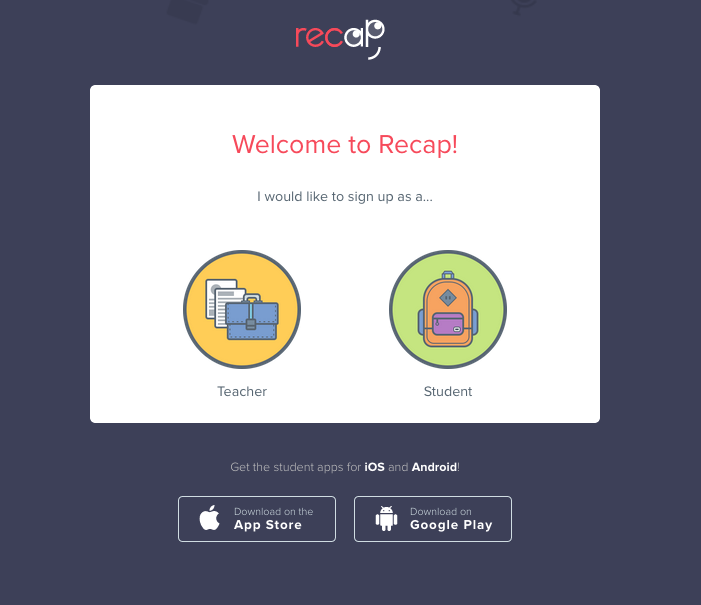
To create a class and add your students just register on the site as a teacher.


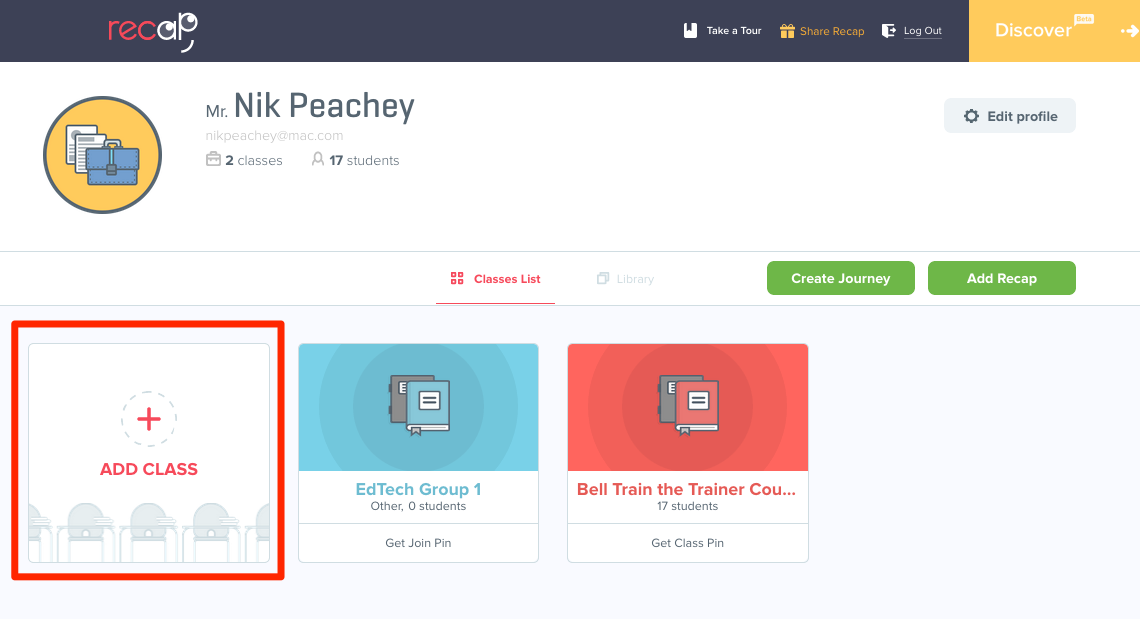
Once you have registered you click on Add Class and complete the class details form. You can also decide at this point whether you want your students to register with a PIN or an email. Email is a better option for older learners, whereas a PIN is better for younger ones as this doesn’t require them to have an email, but you do have to add all of their names.

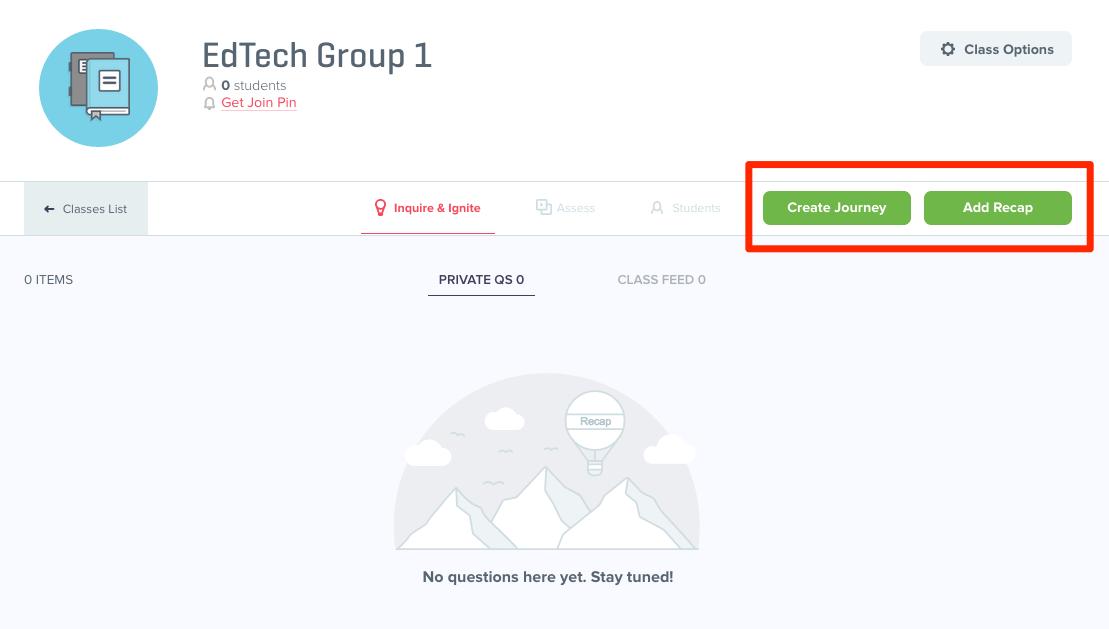
Once the class is created you get a link and a code that students can use to enter your class. I’ve set up a dummy EdTech class, so feel free to join and try it out as a student if you wish. Just use the code shown in the image below.

Once your class is ready you can add two types of tasks, a Recap or a Journey.

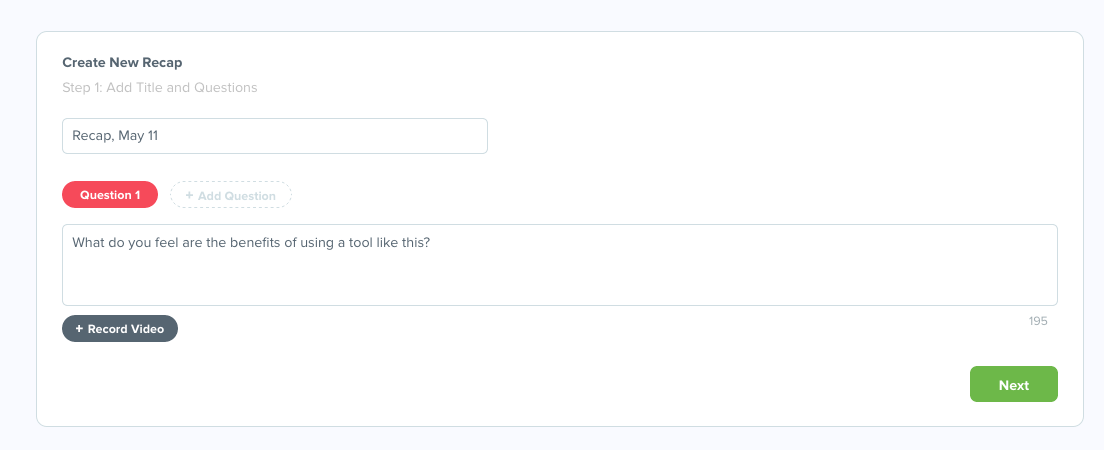
When you click on Add Recap you can type in and / or record your first question.

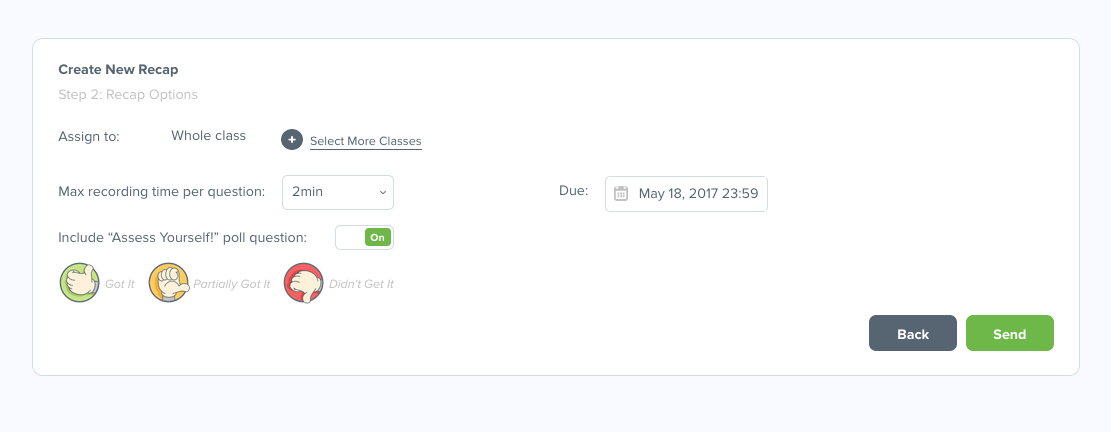
You can then click on ‘Next’ and set the length of recording for your students’ response and the due date for the assignment. You can also decide if it goes to the whole class or individual students and enable to do some self assessment of their recording.

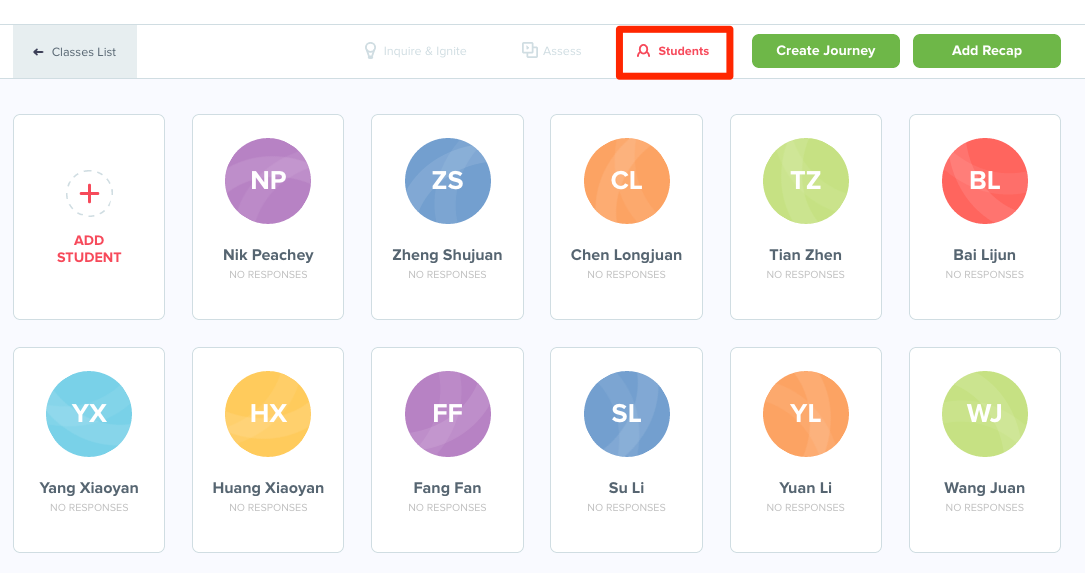
Once you click send the task becomes available to the students.  Once they have replied you can click on the student list and then select each student to see their responses.

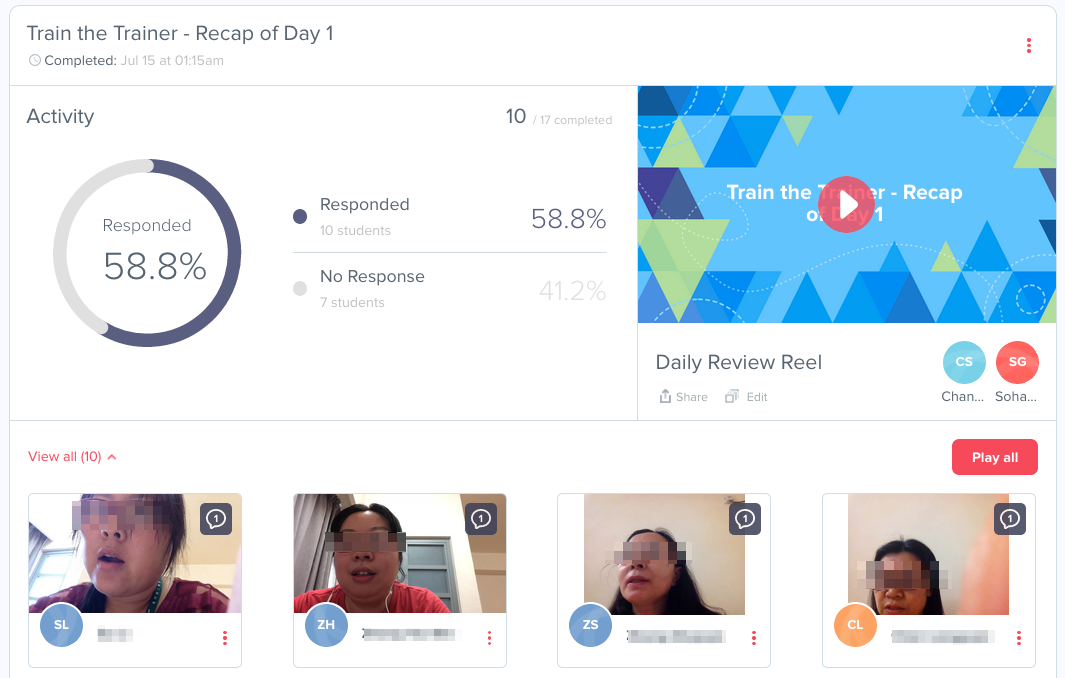
You can also click on ‘Assess’ and access all the student responses and respond back to them or watch a ‘showreel’ compilation of their responses.

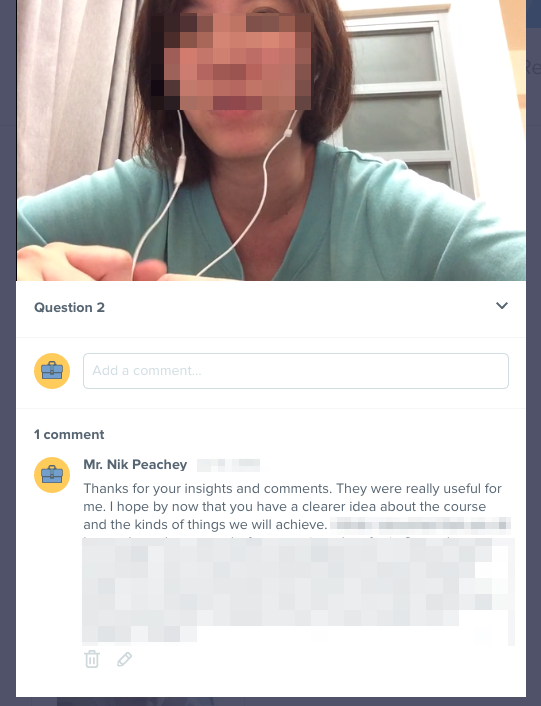
Once you have responded to their comments they can reply, so this can set up a kind of discussion chain.


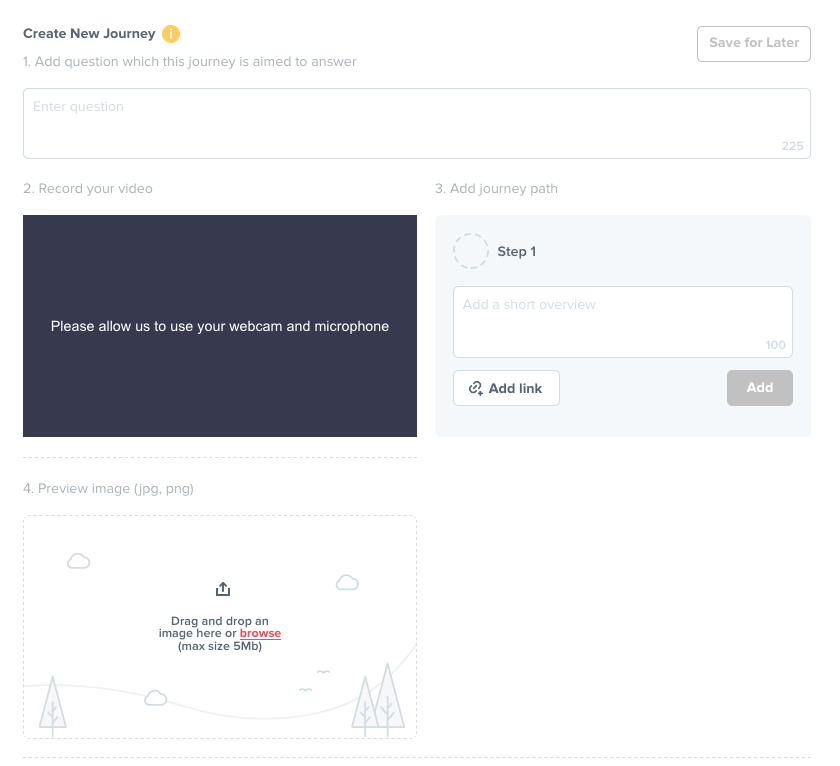
The second type of task you can add to Recap is a Journey. This is a question based around a sequence of materials with links to different media and video stimulus that you can record on your webcam or phone to help engage with students.

To do this just click on ‘Add Journey’, allow access to your webcam and microphone, record your video and then add steps and links to media you want your students to explore.


The video you record has to be very short so this isn’t a tool for delivering lectures, it’s more of a tool for setting students up to discover things for themselves.

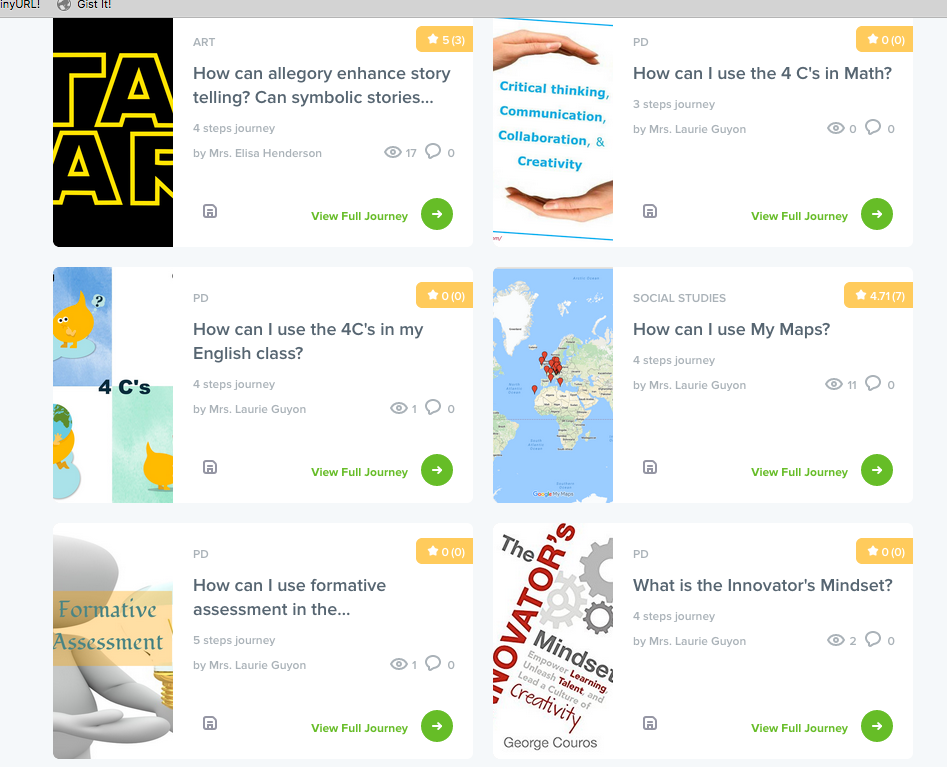
Once you have created your ‘Journey’ activity for your students you ca share it with them, but you can also add it to the Recap ‘Marketplace’ this allows you to share or sell your ‘Journey’ activity to other teachers, so this is a great way to potentially make a little money (the maximum sale price is $0.99).


 You can also find ‘Journey’ tasks that you can use with your students there.

How to use Recap with students?

  • Set a Recap task each evening after class and use it as a form of learner diary.
  • Use Recaps for action research and get students to tell you how they feel about what and how they are learning.
  • Set Recaps as short pronunciation assessment activities by getting students to read short texts.
  • Use Recaps to build a more positive dynamic and get to know your students a bit better and discover their motivation and interests.
  • Set Recap tasks to check students remember the vocabulary they learned during previous lessons.
  • Create Journeys based around infographics to get them researching and reflecting on the information within the graphic.
  • Use Journeys to get students doing research before coming to class for debates or for information sharing in class.
  • Use Journeys to share SOLE type questions that students can research.


What I like about Recap

  • Students are often shy to speak and ask questions in class so this is a chance to get them talking just to you.
  • Actually having the opportunity to listen carefully to each student during the class can be difficult, so Recap can provide you with the ability to fairly assess your students speaking.
  • The video clips your students submit are stored on the site, so over time you can see how they are progressing.
  • It’s a safe and controlled way for students to communicate with you through video.
  • You can actually get to know your students a bit better and give them some one to one time.
  • It’s great  to be able to give students speaking homework and for students to see themselves speaking and reflect on their own performance.
  • It’s free and works across platforms (there are apps for both Android and iOS).
  • It offers teachers the opportunity to make some money from their work.

I hope you find Recap useful to help develop your students’ ability to reflect and your own ability to develop a closer understanding of your students’ needs and abilities.

You can find lots more video based apps and activities in my award winning ebook – Digital Video – A Manual for Language Teachers.


Related links:

What\’s new about Lessons in Digital Literacy

Over the last few months, I have been revising and redesigning the series of lesson plans I first published in 2016. These lesson plans help to develop students linguistic and digital skills as well as their critical thinking by introducing them to a range of topics and information-rich graphics.

Lessons in Digital Literacy


What\’s New about the Lessons in Digital Literacy?


I\’ve incorporated a number of new features into the redesigned lesson plans.

The biggest change is that I have created digital versions for both teachers and students.

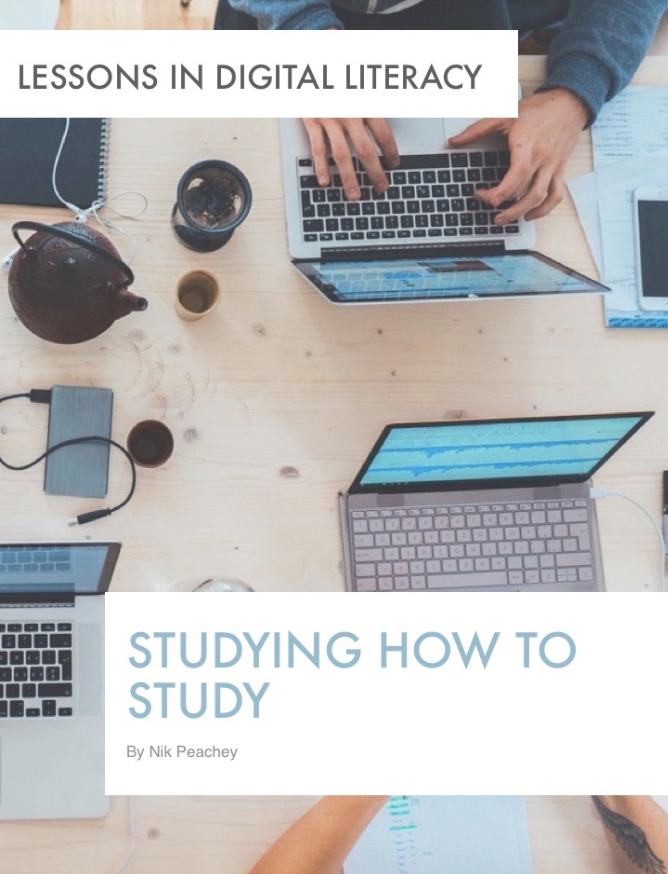
Example: Studying How to Study

/9
By Nik Peachey
LESSONS IN DIGITAL LITERACY
Studying How To Study


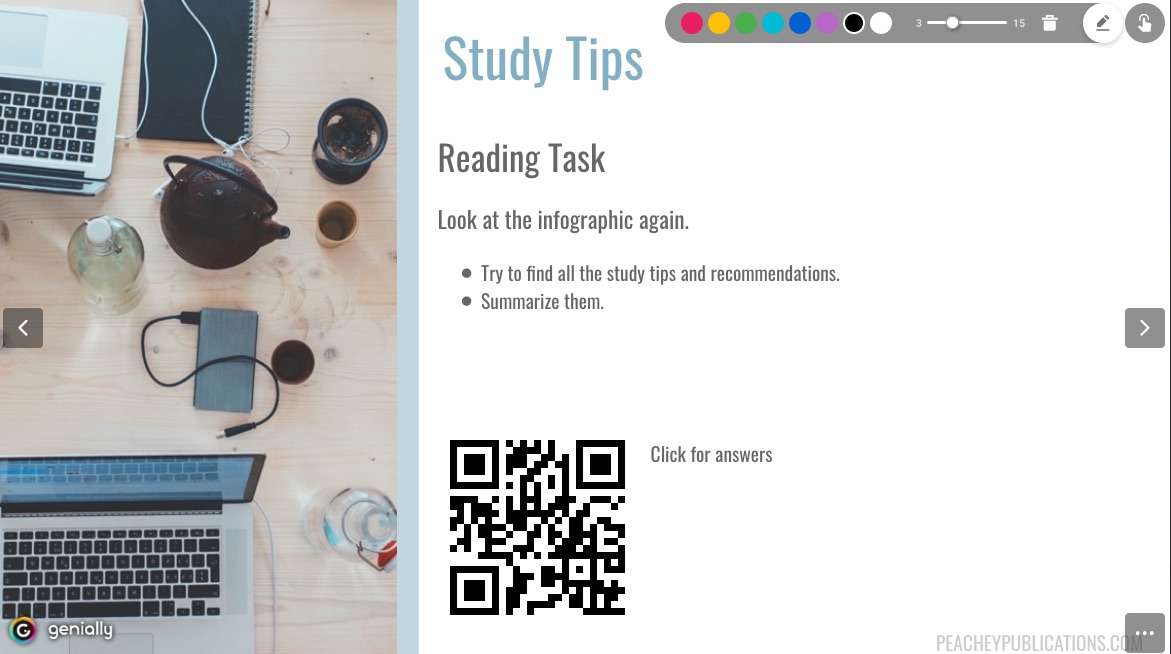
These presentations have been created using a technology called html5 which means that they will work in the browser in pretty much any device, including mobile phones, iPads and other tablets.

In order to make it easier for both teachers and students to access the infographic for the lesson, I\’ve added QR codes, so that students can either scan them onto a mobile phone from the teacher\’s copy or if they are using their own version of the student materials, they can just click on it and the infographic will open and they can scroll up and down it.


Another feature that these digital materials include is a marker for annotating over the presentation. This is easy to access on both the teacher and student copies and can be opened and closed along with the annotation.


Where writing activities are suggested I\’ve also created a link to an external notepad which students can use and then publish their work directly to the internet.


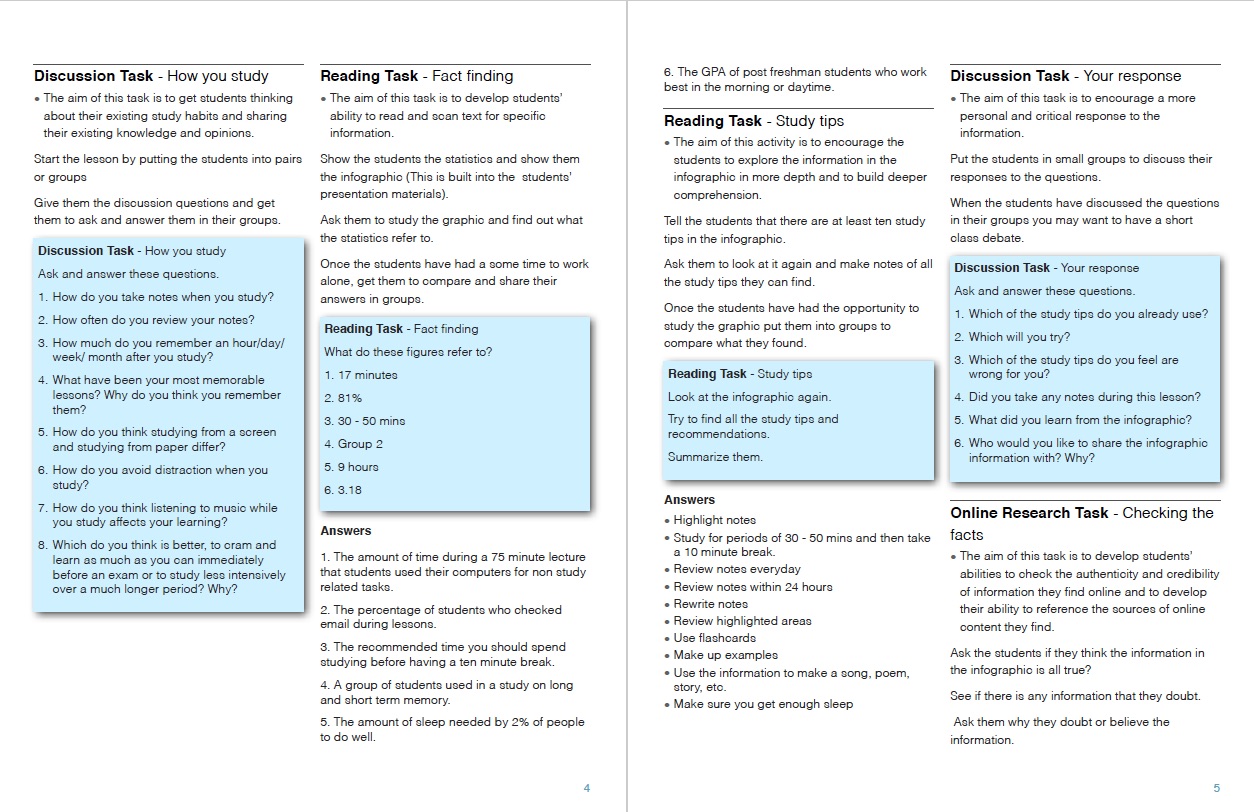
If your students don\’t have access to digital devices in the classroom you can still use these lessons as there is a PDF version of the students\’ version provided.


The underlying structure of each lesson looks a little like this.


As you can see I try to work from what students already know and believe, introduce new information to them, see how they respond to the information and then get them to examine and evaluate the information more deeply. The final part of each lesson helps students to synergise the information and incorporate it back into their belief system.

All of the lesson plans include detailed step by step instructions and guidance for teachers, as well as answer keys.


Although each plan contains eight to ten tasks and about 2 hours worth of material, they don\’t have to be completed in one lesson and some of the evaluation tasks used selectively.

 You can download all of these lesson plans and materials from: PeacheyPublications

I hope you enjoy themand sign up to my customer list to be informated when new materials become available and to get customer disocunts.

Related links:


Best

Nik Peachey

What\’s new about Lessons in Digital Literacy

Over the last few months, I have been revising and redesigning the series of lesson plans I first published in 2016. These lesson plans help to develop students linguistic and digital skills as well as their critical thinking by introducing them to a range of topics and information-rich graphics.

Lessons in Digital Literacy


What\’s New about the Lessons in Digital Literacy?


I\’ve incorporated a number of new features into the redesigned lesson plans.

The biggest change is that I have created digital versions for both teachers and students.

Example: Studying How to Study

/9
By Nik Peachey
LESSONS IN DIGITAL LITERACY
Studying How To Study


These presentations have been created using a technology called html5 which means that they will work in the browser in pretty much any device, including mobile phones, iPads and other tablets.

In order to make it easier for both teachers and students to access the infographic for the lesson, I\’ve added QR codes, so that students can either scan them onto a mobile phone from the teacher\’s copy or if they are using their own version of the student materials, they can just click on it and the infographic will open and they can scroll up and down it.


Another feature that these digital materials include is a marker for annotating over the presentation. This is easy to access on both the teacher and student copies and can be opened and closed along with the annotation.


Where writing activities are suggested I\’ve also created a link to an external notepad which students can use and then publish their work directly to the internet.


If your students don\’t have access to digital devices in the classroom you can still use these lessons as there is a PDF version of the students\’ version provided.


The underlying structure of each lesson looks a little like this.


As you can see I try to work from what students already know and believe, introduce new information to them, see how they respond to the information and then get them to examine and evaluate the information more deeply. The final part of each lesson helps students to synergise the information and incorporate it back into their belief system.

All of the lesson plans include detailed step by step instructions and guidance for teachers, as well as answer keys.


Although each plan contains eight to ten tasks and about 2 hours worth of material, they don\’t have to be completed in one lesson and some of the evaluation tasks used selectively.

 You can download all of these lesson plans and materials from: PeacheyPublications

I hope you enjoy themand sign up to my customer list to be informated when new materials become available and to get customer disocunts.

Related links:


Best

Nik Peachey

What\’s new about Lessons in Digital Literacy

Over the last few months, I have been revising and redesigning the series of lesson plans I first published in 2016. These lesson plans help to develop students linguistic and digital skills as well as their critical thinking by introducing them to a range of topics and information-rich graphics.

Lessons in Digital Literacy


What\’s New about the Lessons in Digital Literacy?


I\’ve incorporated a number of new features into the redesigned lesson plans.

The biggest change is that I have created digital versions for both teachers and students.

Example: Studying How to Study

/9
By Nik Peachey
LESSONS IN DIGITAL LITERACY
Studying How To Study


These presentations have been created using a technology called html5 which means that they will work in the browser in pretty much any device, including mobile phones, iPads and other tablets.

In order to make it easier for both teachers and students to access the infographic for the lesson, I\’ve added QR codes, so that students can either scan them onto a mobile phone from the teacher\’s copy or if they are using their own version of the student materials, they can just click on it and the infographic will open and they can scroll up and down it.


Another feature that these digital materials include is a marker for annotating over the presentation. This is easy to access on both the teacher and student copies and can be opened and closed along with the annotation.


Where writing activities are suggested I\’ve also created a link to an external notepad which students can use and then publish their work directly to the internet.


If your students don\’t have access to digital devices in the classroom you can still use these lessons as there is a PDF version of the students\’ version provided.


The underlying structure of each lesson looks a little like this.


As you can see I try to work from what students already know and believe, introduce new information to them, see how they respond to the information and then get them to examine and evaluate the information more deeply. The final part of each lesson helps students to synergise the information and incorporate it back into their belief system.

All of the lesson plans include detailed step by step instructions and guidance for teachers, as well as answer keys.


Although each plan contains eight to ten tasks and about 2 hours worth of material, they don\’t have to be completed in one lesson and some of the evaluation tasks used selectively.

 You can download all of these lesson plans and materials from: PeacheyPublications

I hope you enjoy themand sign up to my customer list to be informated when new materials become available and to get customer disocunts.

Related links:


Best

Nik Peachey

Would you like to become an ELT materials writer?

There are so many talented teachers who create materials for their students each day and never have the opportunity to get them published.

 Perhaps this is you.

  • Would you like to develop your career as an ELT writer?
  • Would you like to generate an income from the materials you produce?
  • Do you enjoy creating materials for your students?
  • Do you write articles for a blog that you would like to put into a book?
  • Do you create teacher development sessions that other teachers could use?
  • Do you like creating your own stories or games for students?
  • Do you have an idea for a teacher development book?
  • Do you have an idea for materials that don’t fit within the usual ELT paper-based niche?
  • Would you like some feedback and help with your ideas?
If you have answered yes to any of these questions, please sign up here to keep in touch with me about a new opportunity that I’ll be launching soon.
Over the last few months, I have been developing a plan to expand PeacheyPublications Ltd and turn it from my personal hobby into a disruptive digital publishing company by raising funds through Patreon.

Part of the plan is to involve more writers and develop and help them grow and become part of the company as the company grows.

What’s in it for you?

  • If you sign up to become a writer you’ll get editorial guidance and help to develop your ideas into publishable products.
  • Once your materials are ready we’ll do all the design and prepare the materials for publication on our platform.
  • Once your materials are published we will market them to our customers and help build up sales.
  • When the materials sell you’ll receive 50% in royalties.
  • We will also enable you to market the materials independently to receive 75% royalties.

Initially, we are looking for 10 – 20 writers to work with. You don’t have to be a previously published writer. This is open to anyone who has an idea for a lesson, activity, book, game or story.

Why us?

  • We can get your work published within weeks rather than years.
  • We give you editorial support based on more than 25 years experience in ELT.
  • We will market your materials for you through our networks and customer list.
  • We help you develop your ideas.
  • We look after design and make the materials look professional.
  • Using our platform you can generate extra income by marketing your materials yourself and by helping to sell materials from our other writers.
  • We will handle the VAT charges

Once again, if you are interested please sign up here

We’ll let you know when we launch.

Find out more about PeacheyPublications

Best

Nik Peachey