Month: May 2020
Creating social phrasebooks with Phraseum
I spend a lot of time looking at different web-based tools and apps and thinking about if and how they can be used for learning. Sometimes it takes some thought and at other times it’s really obvious. With Phraseum it was instantly obvious that this was a really great tool for learning.
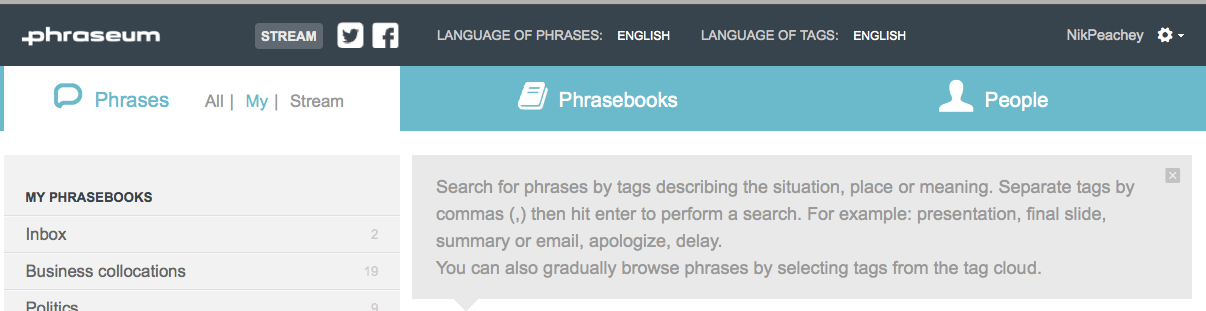
Phraseum allows you to collect words, phrases and sentences from anywhere on the web while you you browse and organise them into social phrasebooks.
Phraseum is a browser-based tool which can be activated from your browser toolbar. Simply create an account and then drag the ‘Clipping button’ bookmarklet to your favourites bar on your browser.
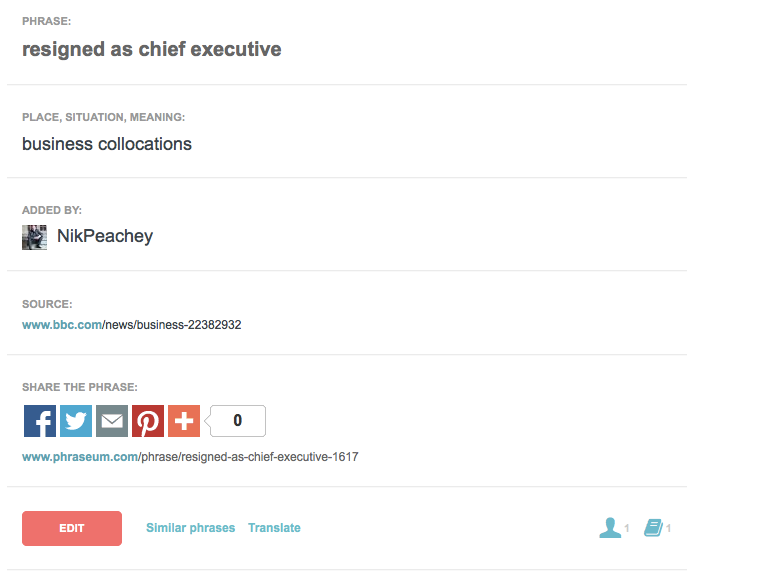
Once that’s done you can just collect any words or phrases that you find online by highlighting them and then clicking on the bookmarklet. This opens up a window where you can add tags to the phrase and add your own private notes and annotations. The tags could be a definition, translation, part of speech or something about the context in which it could be used. You can then save the phrase into one of your phrasebooks. The phrases and phrasebooks can be private or they can be made public and so shared with others.
If you want to include specific words or phrases from a word document or PDF, you can also just type in the words or phrases you want to include in your phrasebooks, but if you save them from the web then Phraseum also stores a link back to the original source, so you can go back and see how the word or phrase is used in context. You can also get a link from the phrase to a translation from Google Translate.
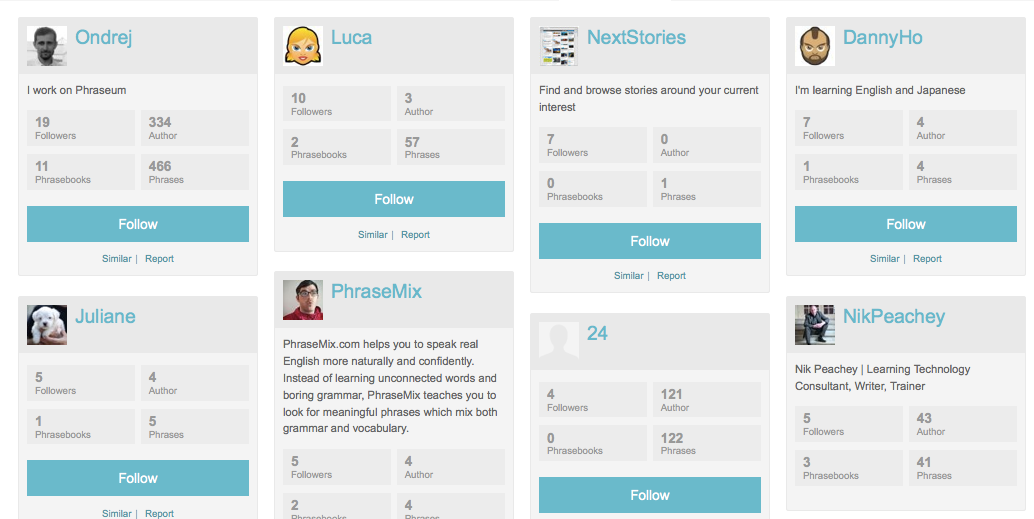
Phraseum is social, so you can share phrases and phrasebooks with anyone else on the site and follow other people if you like the kinds of things they are saving and sharing. You can also click on any of the tags on your phrase to find other related words or phrases which have been saved by other users and add those to your own collection.
If you use social media with your students you can post the phrases you save through various social media channels so this is a great way to feed information and activities into something like a Facebook group or page or a Twitter feed that you use with students.
All of the entries you make to Phraseum can be edited and changed, so students can always add additional tags, change them and add the same entry to multiple phrasebooks.
Phraseum also enables you to follow people in a similar way to Twitter or Pinterest. If you follow people you can see their public phrasebooks and keep up-to-date with what they are saving.
This is really useful if you are using it with students, as by following them you can easily monitor their work and use the comments feature if you need to help, support or encourage your students.
Here are a few examples of phrasebooks I\’ve created:
How to use Phraseum with students
- You could get started just by creating a few of your own useful phrasebooks and sharing them with your students.
- If you like to pre-teach vocabulary, a good way to do this would be to create a vocabulary phrasebook from a particular online article you would like your students to read. They can look at the phrasebook before they read and check they understand the vocabulary, or use it as a reference while or after they read.
- You could also collect a phrasebook with a collections of more random words and phrases and see if the students can predict the genre or kind of text the phrases came from.
- You can collect phrases into a phrasebook and ask students to suggest appropriate tags to add.
- If you train your students to use Phraseum then they can start using it to create phrasebooks while they read. They can sort new words into specific groups. They could be grouped according to the source or topic or they could group words according to word classification such as parts of speech or types of collocation.
- You can get students to share phrasebooks and crosscheck so that they share vocabulary and check that they have similar definitions or translations of the words.
- You can send students on treasure hunts for specific things, for example searching for business related collocations. If they use this as the tag they will then be able to share their results together (any tag you click on shows you all other words and phrases which share that same tag).
- Get students to use the phrasebooks to revise and review their vocabulary.
What I like about Phraseum
- I love that it works in the browser tool bar. This makes it really easy and quick to access at any time you are online.
- I really like the social aspect too. Being able to share and compare phrasebooks with other people is really useful.
- It’s great that it makes it easy for students to go back to the source of the word or phrase.
- Saving phrases really encourages students to think about words within lexical chunks rather than as independent entities.
- Phraseum can be used in multiple languages.
- It’s free.
Issues in urban planning
A checklist of some of the issues that must be considered in urban planning, when developing or implementing a policy or design:
- Urban sprawl & inefficient use of land causes housing affordability problems, transport problems, and uses up a finite resource.
- Transport: In most cases roads dominate, and the development does not support public transport and is unfriendly for walking and cycling.
- Design for human scale, rather than cars and commerce. Design should inspire community and create a pleasant living environment.
- Community or neighborhood identity adds to the feeling of place and cohesiveness of the community. This is helped by access to most facilities within the local area; a strong local economy (including a local currency or bartering system?) The dominant 20th-century model results in isolation, lack of familiarity with neighbors (which contributes to crime) and many more trips out of the neighborhood (esp by car).
- Single use vs mixed use developments. Since the rise of the car, Recent decades have favored single use; mixed use may enable more needs to be met locally.
- Environment: water & waste.
- Environment: energy usage.
- Affordability and accessibility. The social impact of housing costs.
- Regional development – decentralization, revitalization of country towns. How, and ask: Why is it needed, why have people left?
- To plan or not to plan?
- Overarching vision and plan? Or a few simple principles to encourage sustainability and quality of life? Note that suburban sprawl was created with regulations, and traditional neighborhoods which grew into the most vibrant and desirable parts of cities had much less regulation, and would certainly not be permitted today.
- Need for participation by local communities, and ultimate say in their own communities.
- Existing communities: gradual & staged improvements. How to create community? How to achieve appropriate density and affordable housing, when residents natural tendency is to fight change, especially change that might negatively affect their house prices.
Visiting the Dentist is Important. Here’s Why
It’s easy to put off a dentist appointment, especially when you don’t have teeth pain or have an urgent need. But here’s why you need to visit the dentist.
I chose to pursue a career in dental hygiene because I realized that I could truly make a difference and help people lead healthier lives. Many people do not understand the importance of proper dental care.
In addition to cleaning teeth and performing dental exams, dental hygienists educate their patients about the benefits of preventive dental care and how to maintain good oral health. Oral health is an important indicator of overall health and visiting the dentist should be a part of your healthcare routine.
Here are three reasons to visit the dentist every six months for a regular teeth cleaning:
1. Prevent plaque build-up
Plaque is a tacky deposit that adheres to the teeth and gingiva line (your gums) and is filled with damaging bacteria. Plaque build-up can be caused by the lack of a regular oral hygiene routine. Once plaque builds on the teeth, tartar becomes an issue and it may cause discoloration of the teeth. Seeing a dentist twice a year can help reduce plaque accumulation and improve an individual’s overall oral health condition.
2. Identify and treat tooth decay
It doesn’t take a hygienist long to diagnose tooth decay. Tooth decay affects the external layer of the teeth and is usually caused by the consumption of sugary foods. Tooth decay can exacerbate as plaque builds up and can gradually ruin the teeth. Regular cleanings prevent decay from progressing and destroying the teeth. Left untreated, tooth decay can cause aching, dental caries and can aggravate the gums.
Visiting the dentist regularly makes it easier for you to address tooth decay early on and reduce the need for expensive and occasionally painful dental work, such as a tooth extraction.

3. Reduce the risk of gum disease
A dentist can identify gum disease before it develops into a severe issue. If gum disease is left untreated, it can cause the gingiva to swell up, which makes chewing very painful. Consistent cleanings from a dental hygienist, along with proper brushing and flossing, can help ensure healthy gums and teeth and reduce the risk of developing a severe gum disease.
It’s easy to put off a dentist appointment because it may not seem like an urgent need, especially if you aren’t experiencing any pain or discomfort. If you don’t have insurance, dental care might seem like just another unnecessary healthcare expense.
Visiting the dentist is an important part of managing your overall health and wellness, however. Regular teeth cleanings help prevent severe oral health issues from developing and can reduce your chances of having to pay for an expensive and potentially painful dental procedure later on.
Some clinics may offer free or reduced-cost dental services. As a dental hygienist, I plan to volunteer at local community centers, offer classes to public and charter schools, and even work on a sliding fee scale to help lower cost clinics provide dental services to the public.
I’m currently exploring opportunities with the Student American Dental Hygiene Association (SAHDA), a volunteer network of students who help promote oral health, educate the public and provide others with access to dental care in high-need communities.
I look forward to making a change for the better with my degree.
Digital information literacy
Digital information literacy is also called fluency, and I like the definition I found on the 21st Century information fluency project website.
This site also has micromodules – small tutorials about information literacy.
Digital Information Fluency (DIF) is the ability to find, evaluate and use digital information effectively, efficiently and ethically. DIF involves knowing how digital information is different from print information; having the skills to use specialized tools for finding digital information; and developing the dispositions needed in the digital information environment.
As well as the definition there is a useful diagram.
Therefore in a module geared up to help users gain skills in digital information literacy, the following needs to be covered:
- Language and the meaning of terms used for digital searching e.g. subscription-based and free networked datasets, networked information – abstracting and indexing services, full-text material and digitised collections, access points, interfaces, search syntaxes
- Terms used for digital material e.g. learning objects, resource-based, multimedia etc
- Range of interfaces for accessing digital information – databases, datasets, electronic libraries, Internet, other multimedia – problem-solving so users can navigate sources and understand their scope
- Formats of digital information – text, audio, video, images, blogs, wikis etc.
- Portals, search engines, RSS feeds, subject gateway – catalogue, or directory, of internet resources e.g. OMNI Examples of several subject gateways via the OMNI website plus Internet tutorials on how to find information effectively and Internet detective.
- Resource Discovery Network (RDN) and web collections and sub-collections e.g. JISC collections
- Digital repositories e.g. OSLOR, Aeshare, Australian Flexible framework toolboxes
- FOSS (free and open source software) – examples relevant to information literacy e.g. Diigo ( a web-based annotating tool), blogger, google etc.
- Digital tools for searching – search engines, subject directories, gateways etc.
- Data sets e.g. Citation Index, databases, data centres
- Examples of online resources e.g. NZ National library, British library online gallery – world’s oldest printed book “Diamond Sutra”, wikipedia
- Publishing on the web, digital publications
- Intellectual property and options for copyright – creative commons, JISC models, copyright licensing Ltd.
This module will need to be linked to search strategies, evaluating and ethics modules.
References
Blackall, L. (2005). Digital literacy: how it affects teaching practices and networked learning futures _ a proposal for action research. The Knowedge Tree, Edition 07.
Breaks, M. & MacLeod, R. (2001). Joining up the academicinformation landscape: the role of the RDN hubs within the Distributed National Electronic Resource.
QUIZ: How Well Do You Know These Healthcare Acronyms?
Test your healthcare knowledge with this healthcare acronym quiz! Don’t forget to share the results with your friends.
10 Gifts All Nurse Practitioners Should Ask for This Holiday Season
Whether you are already a nurse practitioner or working toward becoming one, here are ten practical, but fun gifts you should ask for this holiday season.
It’s that time of the year again – winter is beginning, the temperatures have started to drop, and the holidays will soon be upon us. No matter what holiday you celebrate, gifts are likely on your mind, and while you might be ticking items off your shopping list for your loved ones, you might not know what to ask for yourself.
The best gifts tend to be the ones that you can use in your daily life. We know how passionate nurse practitioners are about their jobs, and asking for some fun, nursing-themed gifts can help make your workdays a lot easier. It can also help your family have a little fun with the items they buy for you, while not breaking the bank if money is tight.
Whether you are already a nurse practitioner or working toward becoming one, here are ten practical, but fun gifts you should ask for this holiday season:
1. Smartwatch
Timing is everything to a nurse practitioner, and having the right tools can make staying on top of it all much easier. That’s why you should ask for a watch this holiday season. With a smartwatch, you can easily set reminders for yourself, check your notifications and keep track of your calendar—all while on the go.
2. Coffee tumbler
If there’s one thing every nurse practitioner needs to get through the day, it’s energy! However, with your busy schedule, you might not have time to sit down and enjoy a cup of coffee before the start of your shift. Ask for a well-insulated coffee tumbler to keep your coffee warm on the way to work so you can stay energized all day.
3. Water bottle
Being a nurse practitioner can be physically demanding. Not only do you spend a lot of time on your feet, but you might also be running from room to room with limited time for breaks during a busy shift. Ask for a new water bottle this holiday season so that you can remember to stay hydrated even on your longest days.
4. Comfortable shoes and compression socks
When you are on your feet all day long, you need a pair of good shoes. There are plenty of comfortable shoes designed especially for nurses so that you can survive your shift without ever feeling the ache of tired feet. Compression socks can also help improve blood circulation to your feet and ankles, which reduces soreness and swelling. They can make a long shift feel much more comfortable.
5. Stethoscope
Depending on where you work, you might be allowed to bring your own stethoscope. Not only can you ask for a higher quality one, but you can also personalize it with a stylish, monogrammed ID tag that attaches to the tubing. With your own stethoscope, you never have to rush to find an available one, and you never have to worry about someone misplacing or losing yours.
6. Clipboard
Just like stethoscopes, clipboards are a hot commodity in a medical setting. The front desk uses them, nurses use them, and even doctors use them. Sometimes, clipboards go missing from where they should be. Ask for your own clipboard so you never have to search for one again. You can ask for one that’s personalized with your name on it, so everyone will know it belongs to you.
7. Retractable badge clips
As a nurse practitioner, you’ll have some sort of ID badge that you’ll have to carry on you at all times. Typically, it’s put on your shirt/scrubs with a normal clip. However, as technology advances, many hospitals are combining these IDs with key FOBs to get into locked doors. If you weren’t provided a retractable clip, it can become annoying to have to line up your shirt with the lock or remove your ID every time you need to go in a door. If you weren’t provided a retractable clip, you should ask for one for this holiday season to improve your daily quality of life at work.
8. Pocket organizer
Are you constantly misplacing your pens, scissors and other supplies? Ask for a medical pocket organizer to tuck into your scrubs. These are must-have for any nurse practitioner and will help you stay organized with everything you need.
9. New scrubs
You can never have too many scrubs! Start the year off right with a new set, or ask for a scrub jacket so you can stay warm during the chilly winter months. Underscrub t-shirts can also be game-changer when it comes to staying warm and comfortable throughout your shift.
10. Bag/Backpack
A nurse practitioner’s life can be chaotic, busy and unpredictable. You probably have a lot of items to carry between work, school and home — and a tote bag or backpack can make it a lot easier! Ask for a new one this holiday season so that you can keep everything you need in one convenient place!
Digital information literacy
Digital information literacy is also called fluency, and I like the definition I found on the 21st Century information fluency project website.
This site also has micromodules – small tutorials about information literacy.
Digital Information Fluency (DIF) is the ability to find, evaluate and use digital information effectively, efficiently and ethically. DIF involves knowing how digital information is different from print information; having the skills to use specialized tools for finding digital information; and developing the dispositions needed in the digital information environment.
As well as the definition there is a useful diagram.
Therefore in a module geared up to help users gain skills in digital information literacy, the following needs to be covered:
- Language and the meaning of terms used for digital searching e.g. subscription-based and free networked datasets, networked information – abstracting and indexing services, full-text material and digitised collections, access points, interfaces, search syntaxes
- Terms used for digital material e.g. learning objects, resource-based, multimedia etc
- Range of interfaces for accessing digital information – databases, datasets, electronic libraries, Internet, other multimedia – problem-solving so users can navigate sources and understand their scope
- Formats of digital information – text, audio, video, images, blogs, wikis etc.
- Portals, search engines, RSS feeds, subject gateway – catalogue, or directory, of internet resources e.g. OMNI Examples of several subject gateways via the OMNI website plus Internet tutorials on how to find information effectively and Internet detective.
- Resource Discovery Network (RDN) and web collections and sub-collections e.g. JISC collections
- Digital repositories e.g. OSLOR, Aeshare, Australian Flexible framework toolboxes
- FOSS (free and open source software) – examples relevant to information literacy e.g. Diigo ( a web-based annotating tool), blogger, google etc.
- Digital tools for searching – search engines, subject directories, gateways etc.
- Data sets e.g. Citation Index, databases, data centres
- Examples of online resources e.g. NZ National library, British library online gallery – world\’s oldest printed book \”Diamond Sutra\”, wikipedia
- Publishing on the web, digital publications
- Intellectual property and options for copyright – creative commons, JISC models, copyright licensing Ltd.
This module will need to be linked to search strategies, evaluating and ethics modules.
References
Blackall, L. (2005). Digital literacy: how it affects teaching practices and networked learning futures _ a proposal for action research. The Knowedge Tree, Edition 07.
Breaks, M. & MacLeod, R. (2001). Joining up the academicinformation landscape: the role of the RDN hubs within the Distributed National Electronic Resource.
Why do so many Moodle courses suck?
Moodle is a magnificent free product and has the potential to enable schools and teachers to build wonderfully unique interactive online learning courses in which learner interaction can be tracked, measured and responded to. Despite this the vast majority of Moodle courses I see are a long list of Word and PDF documents with at best a few forums that enable a minimum of human social interaction.
Given the state of many of these courses, it’s no wonder that drop out rates for online learning are so high. And of course Moodle isn’t the only culprit. Many of the other commercially available LMS (learning management systems) and VLE (virtual learning environment) platforms aren’t doing any better.
Moodle has been around now since 2002 and research carried out in 2013 showed that more than 7.3 million students had studied in more than 83 thousand registered sites.
![]() |
| Image from ELTPics: https://flic.kr/p/jBXAwK |
So why is it that so little progress has been made in developing innovative courses that really generate interaction with media rich content?
The problem surely isn’t Moodle, because the platform is capable of delivering all of the above.
The reality is that there are a number of causes:
- I think it’s fair to say that Moodle isn’t the most intuitive of platforms to work with. A lot of progress and improvements have been made, but it’s inevitable that a product with multiple modules constructed by different people is likely to result in some inconsistencies of look and feel.
- The fact that Moodle is seen as a ‘free’ platform and so a ‘cheap’ way to get learning online is another factor. Schools start using the platform with the impression that it won’t require much financial backing and that once they have provided the platform teachers will just be able to get their classes online.
- This brings me to the next point and that is lack of training. Most teachers I have met who use Moodle do so with only the most minimal and basic training and again this comes back to the perception that Moodle is a cheap solution. Many school managers seem to think that a few hours of training is enough to get their teachers designing great online courses. It’s not! Training to use Moodle effectively takes considerable time and needs to be constantly reinforced and renewed.
- A second element of training which is often overlooked is instructional design. A teacher may well be marvellous at developing and delivering their own materials in the classroom, but when it comes to converting those materials into effective online learning units there is a new level of skill and understanding that they need. Understanding the instructional design potential of an online platform and how to structure materials so that students progress through an online environment requires training and experience.
- Another factor in this mix is that the Moodle platform is often seen as the ‘property’ and responsibility of the IT department and as such they make the platform as secure as possible. Often this means that teachers’ access to many of the different features and potential that Moodle can deliver are hidden from the teacher and they don’t have the opportunity to experiment with the platform and learn for themselves.
So given all of these problems is it worth using Moodle or any other platform to develop online and blended learning for your students?
The answer is of course a resounding yes. To ignore the potential that online learning and new technology has to offer is to be like King Canute trying to order back the sea.
But to use technology effectively education establishments have to approach online learning with their eyes open.
- It isn’t a cheap solution.
- It will require a significant investment in training for teachers
- Teachers won’t just construct wonderful online courses in their free time. Developing good online materials takes time. More time than it takes to develop paper-based face to face materials, so they will need to be paid for this time.
- Teachers need to be trained at all levels of the platform including the admin level, not just at teacher level.
The best online courses, just like the best face-to-face courses, are usually designed by teachers who have developed an understanding of the needs and interests of their students and can choose content which they will enjoy and find engaging.
So, if platforms like Moodle are really to be used to develop effective and engaging learning which realises the potential of online and blended learning modes of delivery, then we must have managers who are willing to invest in developing the skills of their teachers and teachers who are willing to meet the challenges of new technology head on and accept their changing and more diverse roles as teachers, mentors and instructional designers.
For teachers who would like to try to develop their own Moodle skills.
You can register for a free Moodle platform at: http://www.mdl2.com/ It takes a few moments to register and then you have your own Moodle platform to use as a sandpit.
Here are a few quick video tutorials that can help get you started.
- How to add an image to Moodle and size it correctly
This video shows how to edit the html code to control the space the image takes on the screen. - Formatting a Moodle page
This video shows how to make the Moodle page look more attractive and professional - Adding an image to a Moodle webpage
This video shows how to add an image to a Moodle page - Adding a YouTube video to Moodle
This video shows you how to embed a video from YouTube into a Moodle page - Embedding a webpage into a Moodle page
This video shows you how to embed a webpage from a different site into a Moodle page so that it appears as part of the Moodle course - Creating a questionnaire
This video shows you how to create the questionnaire framework. - Adding questions to a questionnaire
This video shows how to add questions to the questionnaire once the framework has been created. - How to create a quiz
This shows how to create the quiz framework before adding questions - How to add questions to a quiz
This shows how to add questions to your quiz once you have created it.
I hope you find these videos useful and enjoy making a start at using Moodle to create more engaging materials.
5 Tips for Working on Group Projects
A group project is an ideal opportunity to sharpen your problem-solving and team-building techniques.
A group project is an ideal opportunity to sharpen your problem-solving and team-building techniques, which are important skills you’ll need throughout your career. In a survey by the National Association of Colleges and Employers, 82 percent of employers said that the ability to work well with a team was one of the most highly-valued qualities in an employee.
While group work is an important part of your learning experience and professional development in college, it can sometimes be a source of stress and anxiety. Working in a team isn’t always easy, especially when those in your group have different schedules or working styles than your own.
But don’t get discouraged! With the right approach, you can set your group up for success and take away valuable lessons for your career.
Follow these five steps for an effective and productive group project:
1. Have a kickoff meeting
The first meeting is an opportunity to get to know your fellow team members, brainstorm ideas and create a plan for the project. For example:
- Does your group want to appoint a group leader?
- How often will the group meet?
- Will you work independently for some parts of the project, or will all tasks be a group effort?
It’s important to set these expectations up front so that you are all on the same page before getting to work. As you discuss each of these questions, be sure to find solutions that work well for everyone.
You’ll want to create an open dialogue around important decisions so every team member feels comfortable voicing ideas or concerns. Be open to others’ suggestions and come to an agreement together.
2. Establish deadlines and responsibilities
After you’ve introduced yourselves and discussed project parameters, determine responsibilities for each member of your group. Make sure that each member has an important role in each phase of the project, from research to writing to the final presentation. Let your team members volunteer for the parts of the assignment that they find most interesting. This way, they will be more engaged in the project and likely more productive as a result.
Next, figure out deadlines for each phase of the project. Work backward from the final due date to set timelines for each task. For example, you will need to complete the research component of the assignment at least a few weeks prior to the final due date.
3. Schedule regular meetups
These meetings could be virtual, via a video conferencing app, or in-person, depending on what works best for your group. Have an agenda, or a list of items to discuss, for each meeting. This helps your team stay focused and ensures that no one is left out of the loop of communication. This is also a good time to check in on project status and see if you’re on track to meet the deadlines you set in the initial meeting.
There are also a variety of tools you can use to collaborate with your group outside of these meetings. Google Docs and Google Slides are free, online, cloud-based applications that allow you to share documents and presentations with your group via a custom link. These tools make it easy for your group to work together in real time, even if you aren’t able to be in the same room.
4. Be a team player
You must keep in mind that this is a group project and an effort on behalf of everyone, not just you. That means everyone should have an important role to play and an effort should be made to make sure all members are working together.
That’s why it’s important to establish clear lines of communication, determine responsibilities and set expectations at the beginning of the project. If you find that members of your group aren’t abiding by the guidelines you’ve agreed upon, it’s OK to let them know. Which brings us to our final point…
5. Hold everyone accountable
Perhaps one of the more difficult aspects of working with a team is the possibility of a confrontation, especially when people aren’t pulling their weight or there are disagreements about how to approach the project.
Try to find a balance between being kind and being firm when issues come up. Coming off too harsh will do absolutely nothing but harm your group’s motivation, but being too easy won’t help the project stay on schedule. Holding others accountable is a very important part of working as a team, so don’t be afraid to ask for help or call attention to a problem. Sometimes, it’s the only way to get the work done right, and that’s what you’re all there to do.
A study by Google researchers found that trust and communication were the most important factors to a team’s success. By following these steps, you can learn how to create a productive team environment and positive project outcomes. While disagreements might occur, being honest, upfront and respectful in your communication with other team members will help you be successful in resolving any issues. Good luck!
Analysis and Evaluation next phase for OIL
We did this after we finished the second presentation to research forums at both the polytechnic and the university (21 August and 24 August) to inform people about the evaluation processes which have taken place over the first year of the project. In particular, the presentations were to inform audiences about the findings of the research evaluation project – Real use research evaluation of an online essay writing module: In formation literacy eLearning modules project. The audiences at both venues were relatively small with approximately 15 at each event.
Brainstorm of ideas for the next phase of evaluation
1. Which modules from phase one do we need to test for usability?
- Business report – scheduled for 1 September 0800 – 1000 in computer lab H517. M and I and myself plus D has volunteered to help as well. This could be usability testing and not part of the research project.
- Science report – will not be used in class this year, but could be randomly used by second year students if they are referred to it by their lecturer. R wants to customise the module for first year students using the online editor. Then integrate it in the first year biology course in 2007. This would be ideal for the research project. Also D to get Rosemary to review the module for the Science Investigation – expert review.
- NZ Information Sources
– review Leitesha and Joseph modules, also review modules with Learning Centre students and staff at university and polytechnic – usability testing.
2. Which modules to be investigated as part of the research project?
Depending on the research design, expert review and use of the online editor for customisation could be incorporated in the research. Also real use with students in class and critique of the modules by users early October). Observation, focus group interviews (record and transcribe) and questionnaire testing of usability will still be used as methods for collecting data when in real use. Also a feedback blog could be set up for participants to add their feedback. Staff who participate in customisation of the modules would be asked to keep a log of the process, and be interviewed in a focus group. This would comprise case study research.
- Science report – as above.
- Essay writing
- Digital Information Literacy
- Maori & Pasifika
- Ethics – expert review & consultation – copyright expert
- Searching – expert review
- Evaluation – expert review
- Springboard (introduction to IL) module – expert review
– M wishes to customise this module for a foundation course.
– expert review & consultation – FLNW** conference visitors – this module and others.
– expert review & consultation – ongoing consultation
Need to make modifications to the questionnaire (remove irrelevant features), information sheet and consent form. Also the feedback sheet on the OIL website needs to be modified to collect feedback. If we add an information sheet and include the consent on the questionnaire, then people critiquing the modules of the OIL site could be included in the research project.
- Expert review will also be obtained re ANZIIL standards.
- Notify college research office about changes in methodology – information sheet, consent form, questionnaire, research design.
Methods for disseminating modules
- Add OIL link to institutional websites
- Training in online editor – introduce mid-September with Terry Stewart eCDF project – inhouse group training first from 4 September when usernames and passwords issued.
- Google not picking up site.
- ITPNZ, DEANZ, FLLinNZ, eLearning Directors notified
**FLNW = Future of Learning in a Networked World
We did this after we finished the second presentation to research forums at both the polytechnic and the university (21 August and 24 August) to inform people about the evaluation processes which have taken place over the first year of the project. In particular, the presentations were to inform audiences about the findings of the research evaluation project – Real use research evaluation of an online essay writing module: In formation literacy eLearning modules project. The audiences at both venues were relatively small with approximately 15 at each event.
Brainstorm of ideas for the next phase of evaluation
1. Which modules from phase one do we need to test for usability?
- Business report – scheduled for 1 September 0800 – 1000 in computer lab H517. M and I and myself plus D has volunteered to help as well. This could be usability testing and not part of the research project.
- Science report – will not be used in class this year, but could be randomly used by second year students if they are referred to it by their lecturer. R wants to customise the module for first year students using the online editor. Then integrate it in the first year biology course in 2007. This would be ideal for the research project. Also D to get Rosemary to review the module for the Science Investigation – expert review.
- NZ Information Sources
– review Leitesha and Joseph modules, also review modules with Learning Centre students and staff at university and polytechnic – usability testing.
2. Which modules to be investigated as part of the research project?
Depending on the research design, expert review and use of the online editor for customisation could be incorporated in the research. Also real use with students in class and critique of the modules by users early October). Observation, focus group interviews (record and transcribe) and questionnaire testing of usability will still be used as methods for collecting data when in real use. Also a feedback blog could be set up for participants to add their feedback. Staff who participate in customisation of the modules would be asked to keep a log of the process, and be interviewed in a focus group. This would comprise case study research.
- Science report – as above.
- Essay writing
- Digital Information Literacy
- Maori & Pasifika
- Ethics – expert review & consultation – copyright expert
- Searching – expert review
- Evaluation – expert review
- Springboard (introduction to IL) module – expert review
– M wishes to customise this module for a foundation course.
– expert review & consultation – FLNW** conference visitors – this module and others.
– expert review & consultation – ongoing consultation
Need to make modifications to the questionnaire (remove irrelevant features), information sheet and consent form. Also the feedback sheet on the OIL website needs to be modified to collect feedback. If we add an information sheet and include the consent on the questionnaire, then people critiquing the modules of the OIL site could be included in the research project.
- Expert review will also be obtained re ANZIIL standards.
- Notify college research office about changes in methodology – information sheet, consent form, questionnaire, research design.
Methods for disseminating modules
- Add OIL link to institutional websites
- Training in online editor – introduce mid-September with Terry Stewart eCDF project – inhouse group training first from 4 September when usernames and passwords issued.
- Google not picking up site.
- ITPNZ, DEANZ, FLLinNZ, eLearning Directors notified
**FLNW = Future of Learning in a Networked World
How to Ask for Professional References
The best way to ask for a reference is to be gracious, understanding of their time and straight to the point. Here are three tips.
Employers have tough decisions to make when hiring for their open positions. There might be several candidates who are well-qualified on paper, and it can be difficult to determine who is the best fit for the job.
One sure-fire way to differentiate yourself is to have strong references – people who can speak to your work ethic, professional skills, and the qualities that make you a good employee. In some cases, your professional references can make or break your chances of being hired, or help you stand out from other candidates who interviewed similarly.
According to a study by the Society of Human Resources Management (SHRM), more than eight out of 10 human resource professionals regularly check a candidate’s references. Speaking to a former supervisor or employer helps hiring managers gain better insight into your skills, experience, and your qualifications for the role.
Not sure how to approach a potential reference or what to ask for? We have all the tips you need to secure solid references and land the job:
Tips for Asking for References:
1. Who to ask:
Your references should be people who have worked with you directly and recently (within the last 7 years). It’s also important that you have a good professional relationship with the references you list. You want that person to be able to speak to your strengths in a confident way and advocate for you, if needed. For recent graduates, examples of who to ask include (in order of importance): current or past supervisors or managers, professors, coaches, and co-workers.
Occasionally, an employer might ask for a personal reference, such as a family member or friend. In this case, the employer is looking for someone who can speak more about your character and personality than your professional qualifications. Employers will usually specify if they are looking for a personal reference; otherwise, provide professional references. It’s a good idea to have 3-5 solid professional references ready to go in case you are asked during an interview or the application process.
2. How to ask:
The best way to ask for a reference is to be gracious and understanding of their time, as well as straight to the point.
“I’ve sincerely enjoyed my experience working for you and have learned so much. Would you be willing to be a professional reference for me throughout my job search process?”
Once your references accept, make sure to keep them up to speed on your career situation. Let them know when you are looking and applying for jobs; they might be able to network for you and help you make connections. Let them know when you are interviewing and when they might expect to receive a phone call or email from your prospective employer. You don’t want your reference to be caught off guard when they receive the call. It puts your reference in an uncomfortable situation and reflects poorly on you and your planning.
Always thank your reference after they have spoken on your behalf and update them on whether you were offered the position. Always offer to return the favor for them as well, if they should ever need you.
Establishing good professional relationships is important and will make it easier for you to ask for references down the road. Stay in contact with your references, and don’t just reach out when you need something from them. Check in from time to time to see how they are doing, wish them a happy holiday or birthday, or share a recent article or best practice. Having a mutually beneficial relationship means you will have a reference for life!
3. What to ask for:
It’s a good idea to prepare your references beforehand. Let them know what kind of position you are applying for and what was discussed in the interview. You can even jog their memory of successful projects you worked on together, or instances when you were able to generate good results. This will help them tailor the conversation to highlight your skills and achievements most relevant to the position. For example, you could say:
“When asked about my ability to work on a team, can you bring up how I worked with Jenny and Rick to pioneer the new app technology and took the lead on marketing initiatives that drove membership through the roof?”
Giving your references a few talking points beforehand will make it much easier for them to speak on your behalf.
Bonus Tip: Using your references to your advantage
There are other ways to leverage professional references. Written evaluations of your work or letters of recommendation can help you develop language around your skills and accomplishments on your resume or cover letter, in a networking situation, or during an interview.
For example, if on your quarterly evaluation, your supervisor indicated that you excelled in sales, you can include this accomplishment on your resume by saying something like:
“Recognized by the regional director for excellence in sales during 3rd quarter, increasing profitability by 20%.”
You can also submit letters of recommendation along with your application materials, or after an interview to showcase your proven ability to perform well in the job, especially if the market is super competitive.
When it comes to choosing good references and asking for a reference, Herzing’s Career Development Team is always here for you! You can reach us at careerdevelopment@herzing.edu or by calling (866) 508-0748 x240.
5 Tips for Improving Your Typing Speed & Accuracy
Knowing the placement of your computer keyboard is fastly becoming a standard skill. Here are five tips to keep you up to speed on your keyboard skills.
Most, if not all, careers involve some computer-based work and require strong typing skills. Information technology professionals, for example, must be efficient typists in order to write code for computer and software programs. Accuracy is equally as important as speed, as a simple typo could result in a system-wide error.
In today’s technology-driven world, students and young adults become familiar with computers at an early age. Some schools have stopped teaching typing altogether, assuming students already possess the skills necessary to be successful in the modern workplace, according to an article in MIT’s Technology Review.
However, without proper training and practice, many individuals resort to hunt-and-peck typing, or looking down at the keyboard to select the right keys one-by-one. Mobile technology, such as tablets and smartphones, have also increased reliance on hunt-and-peck strategies.
The preferred typing method is known as touch-type, or typing without looking at the screen. This is much more efficient than hunt-and-peck; the average person types at an average of 40 words per minute, but a person who relies on the touch-type method can exceed 75 words per minute, allowing them to complete their work much more quickly and with minimal errors.
As you prepare to enter the workforce, here are some pointers to improve your own typing skills:
1.) Use the correct starting position
When practicing your typing skills, it’s important to use proper hand placement. To start, keep your fingers positioned over the home row keys (left hand over the A, S, D, and F keys, and the right hand over the J, K, L, and ; keys), with your thumbs hovering over the space bar. From here, you can move your fingers slightly to reach neighboring keys. Your hands should always return this starting position.
These conventions are meant to help you familiarize yourself with the keyboard. As you become more experienced, you can experiment with different variations of this starting position to find the placement that is most comfortable and natural for you.
2.) Don’t look down your hands
Instead of looking down at your hands, focus on your screen. This can be difficult at first, especially if you have not yet mastered the exact placement of the keys. However, looking at the screen will help improve your accuracy because you will be able to catch your typos as they occur. You’ll also begin to memorize the placement of the keys, so you’ll be able to type more quickly as you practice.
3.) Maintain good posture
Sitting in an upright position is going to make it easier to type faster. If you are used to slouching in your chair or working from the couch, try moving to a straight-backed chair or working at your desk.
4.) Find a comfortable position for your hands
The wrong hand placement can make it uncomfortable to type for extended periods of time. The space bar of your keyboard should be centered with your body, so that you are not reading your screen or typing from an angle. As you type, rest your elbows on the table and keep your wrists slightly elevated. You should never bend or angle your wrists dramatically.
5.) Practice!
Nothing is mastered overnight, and in order to really improve your typing accuracy and speed, you need to practice every day. There are many websites that offer free typing skills tests and practice, such as Typing Academy, TypingClub and How To Type. It’s important to take your time with these typing exercises and assessments. Attempting to rush through them will only result in more errors at first. Trust that your speed will improve naturally as you become more familiar with the keyboard.
Improving your typing skills will not only make your student life much easier, it will benefit you in your future career as well. It might take a lot of practice to see improvement, but don’t give up. You’ll be typing like a pro in no time!
Analysis and Evaluation next phase for OIL
We did this after we finished the second presentation to research forums at both the polytechnic and the university (21 August and 24 August) to inform people about the evaluation processes which have taken place over the first year of the project. In particular, the presentations were to inform audiences about the findings of the research evaluation project – Real use research evaluation of an online essay writing module: In formation literacy eLearning modules project. The audiences at both venues were relatively small with approximately 15 at each event.
Brainstorm of ideas for the next phase of evaluation
1. Which modules from phase one do we need to test for usability?
- Business report – scheduled for 1 September 0800 – 1000 in computer lab H517. M and I and myself plus D has volunteered to help as well. This could be usability testing and not part of the research project.
- Science report – will not be used in class this year, but could be randomly used by second year students if they are referred to it by their lecturer. R wants to customise the module for first year students using the online editor. Then integrate it in the first year biology course in 2007. This would be ideal for the research project. Also D to get Rosemary to review the module for the Science Investigation – expert review.
- NZ Information Sources
– review Leitesha and Joseph modules, also review modules with Learning Centre students and staff at university and polytechnic – usability testing.
2. Which modules to be investigated as part of the research project?
Depending on the research design, expert review and use of the online editor for customisation could be incorporated in the research. Also real use with students in class and critique of the modules by users early October). Observation, focus group interviews (record and transcribe) and questionnaire testing of usability will still be used as methods for collecting data when in real use. Also a feedback blog could be set up for participants to add their feedback. Staff who participate in customisation of the modules would be asked to keep a log of the process, and be interviewed in a focus group. This would comprise case study research.
- Science report – as above.
- Essay writing
- Digital Information Literacy
- Maori & Pasifika
- Ethics – expert review & consultation – copyright expert
- Searching – expert review
- Evaluation – expert review
- Springboard (introduction to IL) module – expert review
– M wishes to customise this module for a foundation course.
– expert review & consultation – FLNW** conference visitors – this module and others.
– expert review & consultation – ongoing consultation
Need to make modifications to the questionnaire (remove irrelevant features), information sheet and consent form. Also the feedback sheet on the OIL website needs to be modified to collect feedback. If we add an information sheet and include the consent on the questionnaire, then people critiquing the modules of the OIL site could be included in the research project.
- Expert review will also be obtained re ANZIIL standards.
- Notify college research office about changes in methodology – information sheet, consent form, questionnaire, research design.
Methods for disseminating modules
- Add OIL link to institutional websites
- Training in online editor – introduce mid-September with Terry Stewart eCDF project – inhouse group training first from 4 September when usernames and passwords issued.
- Google not picking up site.
- ITPNZ, DEANZ, FLLinNZ, eLearning Directors notified
**FLNW = Future of Learning in a Networked World
We did this after we finished the second presentation to research forums at both the polytechnic and the university (21 August and 24 August) to inform people about the evaluation processes which have taken place over the first year of the project. In particular, the presentations were to inform audiences about the findings of the research evaluation project – Real use research evaluation of an online essay writing module: In formation literacy eLearning modules project. The audiences at both venues were relatively small with approximately 15 at each event.
Brainstorm of ideas for the next phase of evaluation
1. Which modules from phase one do we need to test for usability?
- Business report – scheduled for 1 September 0800 – 1000 in computer lab H517. M and I and myself plus D has volunteered to help as well. This could be usability testing and not part of the research project.
- Science report – will not be used in class this year, but could be randomly used by second year students if they are referred to it by their lecturer. R wants to customise the module for first year students using the online editor. Then integrate it in the first year biology course in 2007. This would be ideal for the research project. Also D to get Rosemary to review the module for the Science Investigation – expert review.
- NZ Information Sources
– review Leitesha and Joseph modules, also review modules with Learning Centre students and staff at university and polytechnic – usability testing.
2. Which modules to be investigated as part of the research project?
Depending on the research design, expert review and use of the online editor for customisation could be incorporated in the research. Also real use with students in class and critique of the modules by users early October). Observation, focus group interviews (record and transcribe) and questionnaire testing of usability will still be used as methods for collecting data when in real use. Also a feedback blog could be set up for participants to add their feedback. Staff who participate in customisation of the modules would be asked to keep a log of the process, and be interviewed in a focus group. This would comprise case study research.
- Science report – as above.
- Essay writing
- Digital Information Literacy
- Maori & Pasifika
- Ethics – expert review & consultation – copyright expert
- Searching – expert review
- Evaluation – expert review
- Springboard (introduction to IL) module – expert review
– M wishes to customise this module for a foundation course.
– expert review & consultation – FLNW** conference visitors – this module and others.
– expert review & consultation – ongoing consultation
Need to make modifications to the questionnaire (remove irrelevant features), information sheet and consent form. Also the feedback sheet on the OIL website needs to be modified to collect feedback. If we add an information sheet and include the consent on the questionnaire, then people critiquing the modules of the OIL site could be included in the research project.
- Expert review will also be obtained re ANZIIL standards.
- Notify college research office about changes in methodology – information sheet, consent form, questionnaire, research design.
Methods for disseminating modules
- Add OIL link to institutional websites
- Training in online editor – introduce mid-September with Terry Stewart eCDF project – inhouse group training first from 4 September when usernames and passwords issued.
- Google not picking up site.
- ITPNZ, DEANZ, FLLinNZ, eLearning Directors notified
**FLNW = Future of Learning in a Networked World
Managing the digital classroom – Getting students\’ attention
Competing with a computer or mobile screen for students\’ attention can be a challenge at best and at worst extremely frustrating. In this posting I will share some techniques and approaches for dealing with these problems.
Ban devices
- Obviously this is the simplest way to deal with the problem, however, banning devices in class can be hard to enforce especially with teen students and older. It will also become harder as more technology becomes wearable, and particularly with adult classes, this approach could border on the insulting.
- Banning devices in the classroom also deprives us and our students of the opportunity to develop responsible approaches to using these devices and robs students of the opportunity to develop their digital literacy skills and exploit the genuine benefits that technology in the classroom can bring.
Turn off the device
- This is much less extreme than banning devices from the class and can be part of a strategy for more responsible use of devices. Have parts of a lesson or even complete lessons when you ask students to turn off their device.
- In this way the devices can be available when we need them and we can start to build a more responsible though very controlled approach to the use of technology. This becomes more difficult with computers which take much longer to boot up.
Motivational reward
- You can use mobile or computer use as a motivational tool by giving students a break when they have been working well and allowing them a few minutes to use their mobile device or computer freely.
- This isn\’t to say that you don\’t also use them as part of the lesson, but just giving students a short break to check their email or social media can help top reduce their anxiety levels. Remember that many more digitally connected people now have parallel virtual lives happening along side their physical life.
Turn off the screen
- If you have students sitting with a computer screen screen in front of them in a more old fashioned computer room with desktop computers then you can ask them just to turn off the screen when you want their attention. Then they can quite easily turn it back on again when you are ready to get them working again.
Go to the home screen
- Rather than turning the screen off, you can also get students to go to the home screen on the computer or device, until you are ready for them to go back to work.
Turn over
- In the case of tablets or mobile phones an easy solution when you want students\’ attention is simply to ask them to turn their device over on the desk so the screen is facing downwards. Then as soon as you are ready for them to get back to work they can turn it over again.
Reinforce instructions
- You can use the devices with a backchannel tool like TodaysMeet to reinforce your instructions. As soon as you have given instructions verbally you can add them to the backchannel and then students also have them to refer back to during the activity.
- This can also help them to stay on task and interact with you and each other while they work.
Reduce teacher directed learning
- Think about how you can reduce teacher directed learning and point students towards web based materials where they can learn for themselves.
- You can use the backchannel tool like TodaysMeet to share links to the materials you want them to investigate. This could be text video or audio materials that you have created yourself or that you have discovered. You can point different groups of students towards different materials sources and then get them to share and compare what they have learned together.
- This approach makes much better use of the technology and helps your students to develop as more autonomous learners. It also demands more from them as critical thinkers and researchers and helps to develop the kinds of real life digital literacy skills they will need.
- This approach also has benefits for you as a teacher. It takes the spotlight off you and gives you The opportunity to get up close to the students, to monitor what they are doing and steer weaker students in the right direction.
Controlling the device
- Teach students how to control not be controlled by their mobile device. Many mobile apps are designed to be attention needy. They constantly flash up notifications through messages and sounds which attempt to engage the owner’s attention. Teach your students how to switch off these attention grabbing alerts so that they can control when they decide to check messages.
Keep doing it
Whichever of these techniques you use, the important thing is to be consistent and persistent. You have to train your students to adopt the kind of responsible behaviour towards their device that you want in your classroom. This isn’t going to happen instantly. You’ll need to stick with it.
Please feel free to share any suggestions or techniques you have for helping to manage a digital classroom.
Related links:


You must be logged in to post a comment.