
How to Leverage Social Media (Besides LinkedIn) For Your Job Search

Job seekers are using social media to help them find the perfect job — and not only in LinkedIn! Facebook can help you stay on top of company updates.

The majority of employers today are using social media in their recruiting processes, according to the Society of Human Resources Management (SHRM). Candidates are using social networking to find a job, too – and not only LinkedIn.

While LinkedIn remains the top social media platform for recruiters and job seekers, candidates are leveraging other social media platforms to build their personal brands, connect with their favorite employers, and get a sense of a company’s work culture before applying.

Here’s how you can use social media to supplement your job search:

1. Facebook

Facebook might not seem like a relevant platform for your job search, but it does have some unique advantages. According to a recent Jobvite survey, 67% of those who used social media in their most recent job search used Facebook. Here’s how you can, too:

  • Research potential employers. A company’s website and LinkedIn page can help you understand more about the business, but heading over to the corporate Facebook page can give you a little more insight into what it would be like to work there. Check out recent photos, birthday announcements, blog posts, press releases and reviews to learn more about the corporate culture and employee sentiment. For example, is it a fun, casual and creative place, or more of a traditional, conservative work environment? Facebook is a great place to get a look inside the company and determine whether a potential employer is a good fit for you.
  • Follow your favorite companies for regular updates. If you’re interested in the company, follow its Facebook page so you don’t miss any important updates. Many companies will post open positions and hiring announcements on social media, and you don’t want to be out of the loop!
  • Clean up your online image. It’s a good idea to comb through your own Facebook profile while you’re at it. Consider removing content or photos that you wouldn’t want a potential employer to see, or changing your privacy settings so that your updates are only visible to close friends. It’s common for employers to run a social media check on potential candidates, and you want to make sure you’re presenting yourself in the best light possible.

2. Twitter

Twitter is an ideal medium for building your professional brand – something that can distinguish you from other qualified applicants. By reflecting your “brand” through your social media footprint, you can help potential employers understand who you are and what type of leader and employee you would be.

  • Create a professional Twitter account. If you want to keep your personal and professional online identities separate, consider setting up a second, public Twitter profile where you can post specific work-related content. Be sure to flesh out your bio with keywords that reflect your interests and future goals, so employers can understand your background and the kinds of opportunities you’re interested in.
  • Follow industry hashtags. Show employers that you are passionate about your field and on top of the latest trends and conversations by following industry-relevant hashtags. If you have a unique perspective to offer on a particular issue or trend, share it on your own page, or start a conversation in the comments.
  • Build your professional network. Engaging with others on Twitter is a great way to continue building your professional online brand. Research who the influencers are in your field, and follow them to stay in-tune with the latest trends. You can also reach out to others for advice in navigating your job search, or crowd-source input from your followers.

3. Instagram

Instagram might seem like the last place to go during a job search, but it’s becoming one of the most valuable platforms for businesses today. More than 25 million businesses use Instagram worldwide, and just like Facebook, their profiles can provide a window into day-to-day company happenings and culture.

  • Follow your favorite companies to stay in-the-know. Some companies are phasing out their Facebook presence in favor of faster-growing platforms like Instagram. If a company’s Facebook page is a little light, head over to Instagram to see if it is posting more frequently there. If a company seems like it could be a good culture and career fit for you, hit the follow button so you don’t miss any important updates.
  • Track job search hashtags. Take advantage of the ability to search for job-related hashtags like #JobOpening or #NowHiring to be among the first to know when a new position is available. Some larger corporations might have a separate account for career and HR-related updates, so do your research to find out which pages you should be following.
  • Update your privacy settings. Again, if there are posts you don’t want employers to see, make sure to update the privacy settings on your personal Instagram account, or create a separate account for your professional updates.

But don’t forget about LinkedIn…

Of course, it’s still important to make sure your LinkedIn profile is up-to-date and that you’re active on the platform. LinkedIn is the world’s largest professional network with more than 610 million users worldwide and over 15 million active job postings, so this is the platform that should take most of your job search time. For example, 95 percent of recruiters report using LinkedIn as a sourcing tool to identify qualified candidates. By optimizing your LinkedIn profile, you can expand your network, get noticed by recruiters and take your career to the next level.

You can get more tips on how to navigate your job search through LinkedIn here. 

Need help getting started? If you’re not sure where to start your job search, schedule a time to meet with your career advisor. Our Career Development team is there to guide you through every step of the job search process – from creating a resume to fine-tuning your LinkedIn profile, and everything in between.

4 Certification Options for Healthcare Managers

Learn more about certification options for healthcare managers and how they can help you reach your career goals.

Healthcare managers, otherwise known as healthcare executives or administrators, work closely with registered nurses, physicians, surgeons and other healthcare workers to direct, plan and coordinate medical services.

Due to rising demand for healthcare services, employment for healthcare managers is expected to grow by 18% from 2018 to 2028, adding as many as 72,000 new jobs, according to the Bureau of Labor Statistics (BLS). The occupation also offers a competitive salary – the annual average is $99,730, and the top 10% earn more than $182,600, according to BLS.

Once you earn a bachelor’s degree in healthcare management, your next step to advance your career could be to earn an industry-recognized certification. Learn more about certification options for healthcare managers and how they can help you reach your career goals.

Why should I earn a certification in healthcare management?

A certification provides third-party validation of your knowledge and expertise, which can play an important role in helping you land your first job out of college or advance your healthcare management career years later. While a certification is not required to work as a healthcare manager, earning one can help you differentiate yourself from other candidates, position you for advanced roles, and increase your earning potential.

Herzing University offers a few sought-after industry certifications as part of its healthcare management degree program, including:

1. Lean Six Sigma Yellow Belt Certification (LSSYB) from GoLeanSixSigma

Revenue and efficiencies aren’t the only things at stake when errors are made in the healthcare industry – people’s lives are on the line. This is why significantly reducing medical errors is so crucial, and why Lean Six Sigma methodologies are so valuable. This certification takes you through the five-step approach of Lean Six Sigma, which can help healthcare managers improve the patient experience by shortening wait times, preventing falls and injuries and reducing medication errors.

2. Certified Specialist Managed Care (CSMC) through Healthcare Financial Mgmt Associations (HFMA)

This certification prepares you for the issues surrounding healthcare reform, case management, Medicare and Medicaid and cost reporting. At the end of the program, you’ll be able to navigate negotiation strategies, various managed care models, reimbursement calculations, benefit coordination, and more.

Once you’ve earned your degree and have relevant experience in the healthcare management field, you can pursue the following certifications:

3. Certified Associate in Project Management (CAPM) from the Project Management Institute (PMI)

If you don’t have a lot of experience under your belt as a healthcare manager, this certification is a great stepping stone to more advanced certifications. A CAPM certification demonstrates your working knowledge of project management. With this certification, you’ll be able to manage larger projects and bring valuable project management skills to your current healthcare management role.

4. Certified Specialist Business Intelligence (CSBI) through Healthcare Financial Mgmt Association (HFMA)

With a CSBI certification, you’ll learn how to leverage healthcare business intelligence and tools that can inform decisions surrounding quality of care, operational effectiveness, financial efficiency, and more. Once the certification is complete, you’ll be able to better recognize the role of data in the healthcare industry.

If you’re interested in the business of healthcare and helping organizations implement new technologies and processes to improve patient care, a career as a healthcare manager could be the right fit for you. Due to fast-growing employment prospects and a competitive average salary, healthcare manager is ranked #25 on U.S. News & World Report’s list of Best Paying Jobs for 2019 and #5 on its list of Best Business Jobs.

With additional certifications and experience, you can continue to advance your healthcare career and take on more responsibility within your organization. Learn more about Herzing University’s healthcare management program and start building your healthcare career today

Video communication apps and mobile learning

One of the great things about mobile devices such as tablets, iPads and phones is that most modern devices have good quality cameras and microphones built in. This opens up a really wide range of potential for communication and speaking practice that used to be such a struggle to organise on older laptops and desktop computers.

App developers have also been quick to exploit the potential of this powerful tool and in this post I’d like to look at some of the tools that have been created and how they can be used for language development.

Mailvu for asynchronous messages


Mailvu has been a long time favourite of mine, mainly because the web based version is so easy to use and doesn’t require any downloads. You just point your browser at: http://mailvu.com/ and as long as you have the Flash plugin installed on your computer you can start recording immediately. Mailvu also provides mobile apps for iOS, Android an Blackberry. These are easy to use and it allows you to send short spoken messages which don’t require the viewer to have any specific software or to download large video files. They just click a link and watch your message. This kind of cross platform compatibility is really important if you are working in a BYOD environment where students could be coming to class with a wide range of devices.

EyeReport for picture in picture


EyeReport  puts an interesting twist on the video communication genre by adding the ability to record video on video. By this I mean that students can upload or record a video on their mobile device and then add a video commentary over the top explaining or commenting on what they see in the original video. This opens up a whole range of potential activities that we can get students doing. They could add commentary to sporting clips, give guided tours of places they have visited, explain processes or even make their own documentaries. Once students have completed their recording these can be shared to YouTube, Facebook, Twitter or emailed directly from within the app.

CoachesEye for video annotation


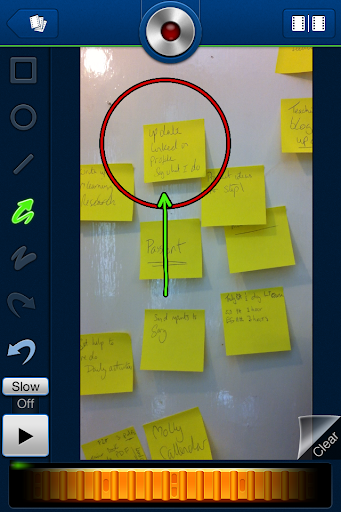
CoachesEye is a similar app to EyeReport (though this one is no longer free) but is much more feature rich. Like EyeReport you can record video commentary over video, but with CoachesEye you can also add annotations and you can stop and control where you insert your comments into the video. This app was designed for coaches to give detailed feedback to athletes on their physical movements, but it’s a great app to get students creating and talking about their own videos, and also a useful tool to use when observing teachers for training purposes.

Storytime for bedtime stories 


Storytime is another app which puts a new Twist on the video communication genre. It combines video conferencing with reading stories out loud. The app was designed to enable parents to read to their children from a distance and it contains a number of books you can choose to read and while you read you can discuss the books, ask questions and point to things on the page whilst chatting with the video window at the top. This is great for doing online tutoring with younger learners. There is quite a range of books from very basic and up and they are nicely illustrated.

Teleprompter for controlled speaking practice 


Teleprompter is an app that I wrote about a while back when it was still free (iPhone for Speaking Homework ). The app is what it says, it allows you to import text and then it scrolls through the text while creating a video of you reading it. This is great to get students doing controlled speaking practice and then watching and improving their speaking. You can set texts which include a range of sounds which they find difficult and then watch them together and help them to understand what elements of their pronunciation are causing problems.

Keek for video journals


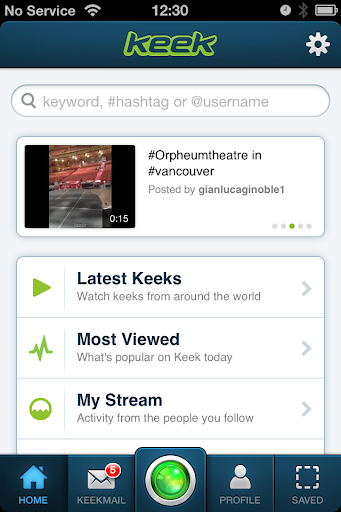
Keek mixes web with mobile in the form of video journals. Users can post short messages of up to 35 seconds from their mobile or computer and these are published to the web or can be browsed through the app. This would be a great tool to use as a daily learning journal, but it’s probably best used by adults or more responsible teens. It seems to be a very popular tool with teens in the USA and there is a wide range of content that students can browse through, some of which is not best suited to educational purposes, but as a concept this is quite a good app. If you prefer your students to be sheltered from this kind of popular culture app, then you can still take up the idea of the video learning journal and just get them to use their built in video camera app and post the messages to a Dropbox site.

Six3 for video messaging


Six3 is similar to MailVu and also compatible with most platforms, but it gives you the choice of recording private or public message and has an additional filter feature which can help to improve your appearance on the video. It’s called Six3 because you have 63 seconds of recording time in each message. Like Mailvu, the messages are also sent via links through your email, but they can also be posted directly to Twitter or Facebook from within the app.

Skype for synchronous online tutoring


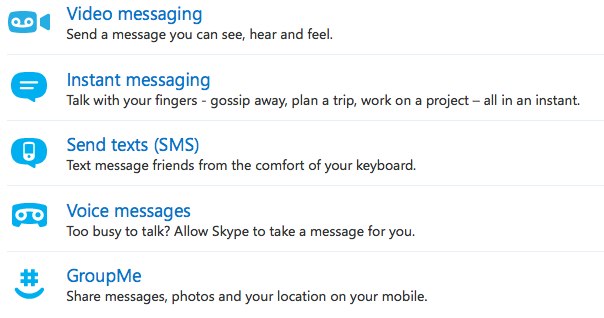
Skype has been around for a good while and was one of the first video based communication tools to break into the mainstream. It’s being used by many online schools to deliver live online lesson from teachers to all parts of the globe. One of the great things about Skype, apart from the reliability, is that it keeps developing and adding new features. The recent addition of video messages that enable it to be used as an asynchronous tool will really help to widen its scope for use as a language development tool.


Built in camera app
With all these apps and the possibilities they offer, it can be easy to overlook the obvious. Most modern mobile device come with a built in video camera application and you can always use this to record and send video message. This has the advantage that messages are very safe from third party app providers and any possible security breaches, but sending the video clips to someone else often involves sending the whole clip via email which can be slow and require good connectivity.

For more ideas and activities for using video and webcams to develop languages see my posting 20 WebCam Activities for EFL ESL Students

Why use video communication?

  • Well one of the best reasons to use these kinds of apps is to get students speaking. Speaking homework has always been particularly difficult for students, but now you can ask students to produce spoken homework which you can watch and assess.
  • Video as a communication genre is likely to become increasingly important as a 21st century digital literacy, so it’s important that our students have practice and are able to use this communication genre, just as they do with speaking on the telephone or writing emails.
  • Video can draw students’ attention to many of the paralinguistic features of communication that are hard to highlight in a crowded classroom.
  • Enabling students to record themselves speaking and then to watch themselves can be very enlightening for students as they can then start to self assess their own performance and look for ways they can improve. It can also encourage some students to try harder, because they know that someone else might see the video.
  • Video can be very engaging and can be played repeatedly so it gives students the chance to listen again and in more depth.
  • Video communication can help teachers to build a stronger sense of connection with their students, especially with online course when you might never physically meet your students. Conveying some sense of your personality, sense of humour and character can be very difficult in written communications, so video has some really big advantages.
  • Giving students 1 to 1 time and having the time to just sit down and spend a few moments listening to a single student without the noise of others around can be really difficult in the classroom, but having a short recorded video clip of our students can really enable us to focus on their specific strengths and weaknesses and enable us to give them some really personalised feedback.

Potential problems

  • As with any kind of online communication, make sure your students know how to protect their privacy and also themselves from harassment. Be sure to have a transparent and open policy on any kind of harassment so students know what is likely to happen to anyone harassing and how to report harassment.
  • If you are using video communications with younger students also make sure their parents know what you are doing and why you are doing it and get their approval (in writing if possible) and if possible get them involved too.
  • Make students aware of the difference between poor quality speaking and poor quality audio. You don’t want them to think they sound bad if the real problem is the recording quality and interference from background noise etc. Help your students to understand how to get he best quality results from whatever recording tools they have, by finding somewhere quiet to record and experimenting with the best distance from the microphone.
  • Helping students to look their best on video will also help to boost their confidence. Getting the camera angle right and having the light coming from the right direction can also have a big impact on how students look, so helping with this can be part of the learning experience. There is a useful article here which may help: http://www.makeuseof.com/tag/look-good-on-webcam/
  • Always remember and remind students that anything they do or say on video can potentially be seen by other people for years and even centuries to come, so whenever one of these apps is used, encourage them to think about what they are doing and saying and keep in mind that it could be seen by people they know and people they might yet meet as well as strangers who they might never meet. It’s important to remind students of how they want to be perceived.


I hope you enjoy these apps and that they help to get your students speaking. Please leave a comment if you have any favourite video communication apps that you use to get your students speaking.

Related links:

Students can avail credits by online courses per UGC’s regulations

Union Human Resource Development Minister Shri Ramesh Pokhriyal ‘Nishank’ informed that the Students enrolled in Universities and affiliated colleges may undertake SWAYAM courses and avail credits by completing these courses as per University Grants Commission (UGC)’s present regulations on credit framework for online learning courses.

Shri Pokhriyal further informed that UGC has shared a list of 82 Under Graduate & 42 Post Graduate Non-Engineering MOOCs courses  with University Vice Chancellors and College Principals,  which will  be offered in July Semester 2020 on SWAYAM Platform(www.swayam.gov.in).

He added that these courses cover subject areas such as Biochemistry/Biotechnology/Biological Sciences & Bioengineering, Education, Law, Computer Science and Engineering, Commerce, Management, Pharmacy , Mathematics , History, Hindi, Sanskrit, etc.

The Minister further said that in the prevailing COVID-19 pandemic scenario, Students, Teachers, Life-long learners, Senior Citizens and Homemakers may enrol and avail the benefits of SWAYAM courses to widen their horizon of learning.

SWAYAM (Study Webs of Active–Learning for Young Aspiring Minds) is a programme initiated by Government of India and designed to achieve the three cardinal principles of Education Policy viz., access, equity and quality.

Economic viability is crucial for higher educational institutions

Transport and Highways, Shri Nitin Gadkari today  said that economic viability is crucial for higher education institutions. These institutions need to reduce their operating cost without compromising on quality.

He was addressing a meeting via video conferencing with the representatives of MIT ADT University on future of higher education.

The Minister said that upgradation of universities is required, and value based education is the strength of the society. He further shared that our youth should understand their strengths and weaknesses and problems faced by them can be converted into opportunities. He added that enhancing capability of the youth is critical for the country at this stage.

Shri Gadkari  emphasised the need for integrated approach, effective coordination and team spirit among stakeholders and urged the industry to have self-confidence and positive attitude to overcome this challenging phase.

He opined that industry should focus more on innovation, entrepreneurship, science and technology, research skill and experiences to convert the knowledge into wealth.

The Minister recalled that Government of Japan has offered special package to its industries for taking out Japanese investments from China and move elsewhere. He mentioned that it is an opportunity for India which should be leveraged. 

He opined that there is need to work on decentralization of industries and focus on rural, tribal and backward areas of the country. He added that there is need to explore Agro MSME sector.

The Minister also stated that the government is planning to introduce vehicle scrappage policy. Recycling clusters may be started near the ports, which will boost automobile manufacturing industry in the country.

The Minister responded to the questions from participants which were about qualities needed for an entrepreneur and guidance on decision making.

1 Crore Treatments – Ayushman Bharat Pradhan Mantri Jan Arogya Yojana

Ayushman Bharat Pradhan Mantri Jan Arogya Yojana (AB-PMJAY), the flagship health assurance scheme of the Government of India today marked 1 crore treatments. To mark this milestone, Dr. Harsh Vardhan, Union Minister of Health and Family Welfare inaugurated the first edition of Arogya Dhara, a series of webinars created as an open platform for discussion on topical issues of public health, heretoday. The webinar is titled “Ayushman Bharat: 1 crore treatments and beyond”. Shri Ashwini Kumar Choubey, MoS (HFW) was also present during the webinar.

Dr. Indu Bhushan, CEO, NHA made a presentation on the performance of AB-PMJAY and discussed the journey ahead. The webinar was webcasted through all official social media pages of National Health Authority and was open for all members of the general public.

Speaking on the occasion, Dr. Harsh Vardhan said, “Providing 1 crore treatments to patients from the country’s poorest households since its launch less than two years agois a milestone achievement for Ayushman Bharat PMJAY scheme. These treatments worth Rs 13,412 crore have been provided through a growing network of 21,565 public and private empanelled hospitals.” “Ayushman Bharat will continue be a trailblazer with an all-encompassing humanitarian approach, to deal with various health-related challenges that will confront us in the months and years ahead,” he said.

He further said “Ayushman Bharat Pradhan Mantri Jan Arogya Yojana, is the flagship health assurance scheme of our Government, since its launch in 2018. It is providing affordable healthcare in the form of tertiary hospital treatment to poor and vulnerable Indians through a health cover of Rs. 5 lakh per family per year. Its aim is to ensure financial risk protection to more than 10.74 crore poorest, most vulnerable families in the country and is a step forward towards achievement of Universal Health Coverage in India.”

The Minister conveyed his best wishes and gratitude to all the States who have ensured the scheme delivers on its promise especially in the unprecedented times of COVID-19. “Government of India is making persistent efforts to expand testing and make treatment of COVID-19 available for free to all 53 crore beneficiaries of Ayushman Bharat PMJAY, further strengthening Government of India’s resolve, scope and capability to move towards universal health coverage. Concerted efforts by every health worker and all empanelled hospitals have helped us achieve the 1 crore mark,” he said.

On this occasion, Dr. Harsh Vardhan launched a‘Ask Ayushman’ chat bot on WhatsApp, a 24*7 AI-enabled assistant that provides information on various aspects of the AB-PMJAY scheme such as its benefits, features, process of making an e-card, locating the nearest empanelled hospital, sharing feedback and the process of lodging a grievance. One of the key features of the chat bot is that it is able to comprehend and respond in Hindi and English languages and it also provides text-to-speech feature for the users and can be universally used on all major social media platforms.

The Union Minister also launched a “Hospital Ranking Dashboard” which is a significant step to rank empanelled hospitals on the basis of beneficiaries’ feedback. The ranking will help NHA to take evidence based decision making for enhancing the quality measures and indicators of healthcare delivery across all empanelled facilities to further improve the beneficiaries experience.

Dr. Harsh Vardhan also released a “Special edition of the AB-PMJAY beneficiary e-card” exhibiting the milestone of 1 crore hospital admissions. Apart from the above, “Hindi version of the Ayushman Bharat PMJAY website” was also launched which shall enable to effectively connect with the masses and to empower them with access to right information through a user-friendly medium.

In his address, Shri Ashwini Kumar Choubey said that MoHFW and NHA have been consistently developing, sharing, revising all testing, treatment, hospital and related guidelines, insights and information to its beneficiaries, which is of great help in dispelling rumours and myths surrounding COVID-19.

Dr. Vinod Paul, Member (Health), NITI Aayog stated that since its launch in 2018, AB-PMJAY is providing affordable healthcare in the form of tertiary hospital treatment to poor and vulnerable Indians. The aim of PMJAY is to ensure financial risk protection to more than 10 crore poorest, most vulnerable families in the country and move step forward towards achievement of Universal Health Coverage in India.

Sh Indu Bhushan stated that NHA has utilised this period to leverage its IT systems, expertise and network of private sector stakeholders to support the Government of India’s preparedness and response in the form of managing the national COVID-19 helpline 1075 to conducting thousands of outbound calls to COVID positive patients and their families.

****

RPF efforts to identify and act against touting activity

As Indian Railways has started 15 pairs of AC Special trains on 12th May,2020 and announced 100 pairs of additional trains w.e.f 01 June 2020, complaints had started to pour in regarding touts of e-tickets using multiple personal Ids and cornering reserved berths in these special trains. It was also apprehended that once the reservation for the 100 pairs of trains start on 21.05.2020, the activities of these touts will escalate adversely affecting the availability of confirmed train reservations to the common man.

In view of the above, RPF has started concerted nation wide efforts to identify and act against these touts. Analysis of PRS data through PRABAL module clubbed with ground intelligence is being used to identify and bring them to book.

The drive has been launched on 20.05.2020 and despite the impact of AMPHAN in eastern part of the country, RPF has been able to arrest 14 touts including 8 IRCTC agents and recovered tickets worth Rs 636727/- (Rupees Six Lakhs Thirty Six Thousands Seven Hundreds and Twenty Seven) wherein the journey is yet to be performed.

The IRCTC agents were using personal Ids to corner tickets and then sell them unauthorizedly at a premium. Action has been initiated to get them blacklisted. One tout was found using auto fill software called Super Tatkal Pro.

***

Notification of Ecologically Sensitive Area of Western Ghats

Union Minister of Environment, Forest and Climate Change, Shri Prakash Javadekar today interacted with Chief Ministers, Cabinet Ministers & State Government Officers of six states viz, Kerala, Karnataka, Goa, Maharashtra, Gujarat and Tamil Nadu through Video Conference to discuss issues relating to notification of Ecologically Sensitive Area (ESA) pertaining to Western Ghats.

To conserve and protect the bio diversity of Western Ghats while allowing for sustainable and inclusive development of the region, Government of India had constituted a High Level Working Group under the Chairmanship of Dr. Kasturirangan. The Committee had recommended that identified geographical areas falling in the six States of Kerala, Karnataka, Goa, Maharashtra, Gujarat and Tamil Nadu may be declared as Ecologically Sensitive Areas. A draft notification was issued in October 2018 mentioning the areas to be notified in the ESA.

States were of unanimous view that looking into the importance of Western Ghats, there is need to ensure protection of the western Ghats. However, the states expressed their views as regards activities and extent of area mentioned in the said notification. It was decided that state specific issues shall be further deliberated so as to arrive at a consensus on the issue. The states expressed their desire to expedite early notification while protecting interest of ecology and environment.

flexible learning committee

T and I have just been brought on to the flexible learning committee and although there was good discussion about flexible learning issues most did not seem to have a clear idea of where the committee was heading re the information gathering for developing the strategy. Probably cos most people were relatively inexperienced with flex learning per se and were coming to terms with the whole concept. Now of course T and I have the job of coming up with the ideas/survey etc. to gather info on which to base the strategy…such is life and the challenge…and swallowing the \”I told you so\” feeling. It would have been a lot easier if we had been there from the start.

M of course is being roped in to our working group. Plus I will be involving L who is bringing us in to the 21st century although he isn\’t on the committee – yet. Good to have K as an ally on the same wave length and speaking the lingo.

Video communication apps and mobile learning

One of the great things about mobile devices such as tablets, iPads and phones is that most modern devices have good quality cameras and microphones built in. This opens up a really wide range of potential for communication and speaking practice that used to be such a struggle to organise on older laptops and desktop computers.

App developers have also been quick to exploit the potential of this powerful tool and in this post I\’d like to look at some of the tools that have been created and how they can be used for language development.

Mailvu for asynchronous messages


Mailvu has been a long time favourite of mine, mainly because the web based version is so easy to use and doesn\’t require any downloads. You just point your browser at: http://mailvu.com/ and as long as you have the Flash plugin installed on your computer you can start recording immediately. Mailvu also provides mobile apps for iOS, Android an Blackberry. These are easy to use and it allows you to send short spoken messages which don\’t require the viewer to have any specific software or to download large video files. They just click a link and watch your message. This kind of cross platform compatibility is really important if you are working in a BYOD environment where students could be coming to class with a wide range of devices.

EyeReport for picture in picture


EyeReport  puts an interesting twist on the video communication genre by adding the ability to record video on video. By this I mean that students can upload or record a video on their mobile device and then add a video commentary over the top explaining or commenting on what they see in the original video. This opens up a whole range of potential activities that we can get students doing. They could add commentary to sporting clips, give guided tours of places they have visited, explain processes or even make their own documentaries. Once students have completed their recording these can be shared to YouTube, Facebook, Twitter or emailed directly from within the app.

CoachesEye for video annotation


CoachesEye is a similar app to EyeReport (though this one is no longer free) but is much more feature rich. Like EyeReport you can record video commentary over video, but with CoachesEye you can also add annotations and you can stop and control where you insert your comments into the video. This app was designed for coaches to give detailed feedback to athletes on their physical movements, but it\’s a great app to get students creating and talking about their own videos, and also a useful tool to use when observing teachers for training purposes.

Storytime for bedtime stories 


Storytime is another app which puts a new Twist on the video communication genre. It combines video conferencing with reading stories out loud. The app was designed to enable parents to read to their children from a distance and it contains a number of books you can choose to read and while you read you can discuss the books, ask questions and point to things on the page whilst chatting with the video window at the top. This is great for doing online tutoring with younger learners. There is quite a range of books from very basic and up and they are nicely illustrated.

Teleprompter for controlled speaking practice 


Teleprompter is an app that I wrote about a while back when it was still free (iPhone for Speaking Homework ). The app is what it says, it allows you to import text and then it scrolls through the text while creating a video of you reading it. This is great to get students doing controlled speaking practice and then watching and improving their speaking. You can set texts which include a range of sounds which they find difficult and then watch them together and help them to understand what elements of their pronunciation are causing problems.

Keek for video journals


Keek mixes web with mobile in the form of video journals. Users can post short messages of up to 35 seconds from their mobile or computer and these are published to the web or can be browsed through the app. This would be a great tool to use as a daily learning journal, but it\’s probably best used by adults or more responsible teens. It seems to be a very popular tool with teens in the USA and there is a wide range of content that students can browse through, some of which is not best suited to educational purposes, but as a concept this is quite a good app. If you prefer your students to be sheltered from this kind of popular culture app, then you can still take up the idea of the video learning journal and just get them to use their built in video camera app and post the messages to a Dropbox site.

Six3 for video messaging


Six3 is similar to MailVu and also compatible with most platforms, but it gives you the choice of recording private or public message and has an additional filter feature which can help to improve your appearance on the video. It\’s called Six3 because you have 63 seconds of recording time in each message. Like Mailvu, the messages are also sent via links through your email, but they can also be posted directly to Twitter or Facebook from within the app.

Skype for synchronous online tutoring


Skype has been around for a good while and was one of the first video based communication tools to break into the mainstream. It\’s being used by many online schools to deliver live online lesson from teachers to all parts of the globe. One of the great things about Skype, apart from the reliability, is that it keeps developing and adding new features. The recent addition of video messages that enable it to be used as an asynchronous tool will really help to widen its scope for use as a language development tool.


Built in camera app
With all these apps and the possibilities they offer, it can be easy to overlook the obvious. Most modern mobile device come with a built in video camera application and you can always use this to record and send video message. This has the advantage that messages are very safe from third party app providers and any possible security breaches, but sending the video clips to someone else often involves sending the whole clip via email which can be slow and require good connectivity.

For more ideas and activities for using video and webcams to develop languages see my posting 20 WebCam Activities for EFL ESL Students

Why use video communication?

  • Well one of the best reasons to use these kinds of apps is to get students speaking. Speaking homework has always been particularly difficult for students, but now you can ask students to produce spoken homework which you can watch and assess.
  • Video as a communication genre is likely to become increasingly important as a 21st century digital literacy, so it\’s important that our students have practice and are able to use this communication genre, just as they do with speaking on the telephone or writing emails.
  • Video can draw students\’ attention to many of the paralinguistic features of communication that are hard to highlight in a crowded classroom.
  • Enabling students to record themselves speaking and then to watch themselves can be very enlightening for students as they can then start to self assess their own performance and look for ways they can improve. It can also encourage some students to try harder, because they know that someone else might see the video.
  • Video can be very engaging and can be played repeatedly so it gives students the chance to listen again and in more depth.
  • Video communication can help teachers to build a stronger sense of connection with their students, especially with online course when you might never physically meet your students. Conveying some sense of your personality, sense of humour and character can be very difficult in written communications, so video has some really big advantages.
  • Giving students 1 to 1 time and having the time to just sit down and spend a few moments listening to a single student without the noise of others around can be really difficult in the classroom, but having a short recorded video clip of our students can really enable us to focus on their specific strengths and weaknesses and enable us to give them some really personalised feedback.

Potential problems

  • As with any kind of online communication, make sure your students know how to protect their privacy and also themselves from harassment. Be sure to have a transparent and open policy on any kind of harassment so students know what is likely to happen to anyone harassing and how to report harassment.
  • If you are using video communications with younger students also make sure their parents know what you are doing and why you are doing it and get their approval (in writing if possible) and if possible get them involved too.
  • Make students aware of the difference between poor quality speaking and poor quality audio. You don\’t want them to think they sound bad if the real problem is the recording quality and interference from background noise etc. Help your students to understand how to get he best quality results from whatever recording tools they have, by finding somewhere quiet to record and experimenting with the best distance from the microphone.
  • Helping students to look their best on video will also help to boost their confidence. Getting the camera angle right and having the light coming from the right direction can also have a big impact on how students look, so helping with this can be part of the learning experience. There is a useful article here which may help: http://www.makeuseof.com/tag/look-good-on-webcam/
  • Always remember and remind students that anything they do or say on video can potentially be seen by other people for years and even centuries to come, so whenever one of these apps is used, encourage them to think about what they are doing and saying and keep in mind that it could be seen by people they know and people they might yet meet as well as strangers who they might never meet. It\’s important to remind students of how they want to be perceived.


I hope you enjoy these apps and that they help to get your students speaking. Please leave a comment if you have any favourite video communication apps that you use to get your students speaking.

Related links:

5 Steps to Become a Software Engineer

Interested in pursuing a career a fast-growing industry? Follow these five steps to become a software engineer in the technology field.

Software engineers, often referred to as software developers, design innovative software for businesses and clients. From a personal banking app to a company’s project management workflow system, software engineers are behind many of the essential apps and programs that make business and daily life more efficient.

Companies rely on software engineers to create better online experiences for their employees and customers. The Bureau of Labor Statistics predicts that employment for software engineers will grow by 24 percent between 2016 and 2026, adding as many as 302,500 new jobs.

Due to its reputation as one of the fastest-growing technology jobs today, software development was ranked as the #1 Best Technology Job in America for 2018 by U.S. News & World Report. Discover how much software developers make on average across the U.S. and what it takes to succeed in this high-demand field.

Interested in pursuing a career in this fast-growing field? Follow these five steps to become a software engineer:

1. Enroll in a software development program

The first step to becoming a software engineer is to enroll in a software development degree program. You don’t need to have a background in technology to pursue this degree path – most software development programs begin with foundational courses to help you learn common coding languages and basic programming skills, followed by more advanced courses to prepare you for entry-level roles in software development.

A bachelor’s degree is a requirement for most full-time software engineer positions. However, some students may choose to start out with an associate degree in software development. This path allows you to pursue entry-level information technology roles and gain experience as you work towards your bachelor’s degree.

2. Gain internship experience

Internships allow you to get hands-on experience in your field and put your skills and knowledge from class into practice. They are also great resume-builders and can be instrumental in helping you land your first job after college. Many aspiring software developers will complete an internship to position themselves for competitive entry-level software development jobs.

Working at a few different internships throughout your college career can also help you discover the types of companies you would like to work for after graduation. Software engineers can work in a variety of industries and business settings – such as healthcare, banking and marketing – so it’s important to explore which environment best suits your personal career interests.

3. Choose your specialty

Software engineers will typically specialize in computer applications software or computer systems software. Applications software includes word processors, games and other computer applications that allow users to perform a specific task. Computer systems software includes the computer operating systems, such as file management tools, system utilities and debuggers. The user does not typically interact with computer systems software.

bachelor’s degree software development program will prepare you for roles in either specialty and your internship experiences can help you determine which path you are most interested in pursuing. Both specialties require creativity, as well as advanced problem-solving and critical thinking skills.

4. Pursue industry certifications

A software development degree program will also prepare you to sit for industry certifications, such as the Oracle Certified Java Programmer or the Microsoft Certified Solutions Developer, which are valuable differentiators for entry-level candidates. Pursuing these certifications can help you advance your software development career and allow you to pursue roles with additional responsibility and specialization.

5. Continue your education

With experience, software engineers can advance to information technology project managers who oversee the software development process. A master’s degree may be required for advanced roles. Software engineers can pursue an MBA in Technology Management to develop the leadership and management skills necessary to advance their careers.

What Do Computer Programmers Do?

Programmers write code for computer programs and mobile applications. They also are involved in maintaining, debugging and troubleshooting systems.

The job of a computer programmer is vitally important in today’s digital-focused economy, which is why the number of openings in this field continues to grow.

Programmers write code for computer programs and mobile applications. They also are involved in maintaining, debugging and troubleshooting systems and software to ensure that everything is running smoothly.

Programming skills are essential for many technology disciplines, but are in especially high demand for software and web development roles. According to the US Bureau of Labor Statistics (BLS), web development jobs are projected to grow by as much as 15% over the 2016-2026 period, adding another 24,400 new jobs.

If you’re looking for an entry-level technology job with ample opportunities for career advancement and specialization, computer programming could be the right path for you.

What do computer programmers do?

On a typical day, a computer programmer can be involved in many different coding projects. Daily duties might include:

  1. Writing and testing code for new programs. Computer programmers work closely with web and software developers to write code for new mobile applications or computer programs. In some cases, programmers might have a similar role to web designers, creating the look, feel and functionality of a new software program. Writing new code often involves a lot of trial and error. Computer programmers have strong critical thinking and problem-solving skills, and enjoy using logic to solve complex problems.
  2. Updating existing programs. Programmers also create and install updates for existing software programs. An update might include a bug fix, or enhanced functionality to improve the user experience. Depending on the complexity of the update, these projects can take anywhere from a few days to several months.
  3. Identifying and correcting coding errors. On a daily basis, computer programmers might assist in troubleshooting parts of a website or computer program that are not functioning correctly. Often, problems are a result of an error in the code, and a programmer can help identify and correct the mistake quickly.
  4. Rewriting programs for different operating systems. Often, programmers have to rewrite code in a different languages, so that programs and applications can be compatible with different operating systems. For example, Windows and OS X programs are coded differently. Some programmers are trained to write new applications in SaaS code, which works across both operating systems.
  5. Secure programs against cybersecurity threats. Many computer programmers work in the cybersecurity field, helping to identify malicious software and fix software that could be vulnerable to potential hacks. Additionally, programmers can write code that prevents security breaches and data leaks. As the number and severity of cyber-attacks increases, demand for information security experts continues to rise. In fact, the Bureau of Labor Statistics (BLS) predicts that employment for information security analysts will increase by 28% through 2026, adding 28,500 new jobs.

How much do computer programmers make?

The median salary for computer programmers in 2018 was $84,280, with the highest-paid 10% earning more than $134,630, according to the BLS data. Keep in mind this is not an entry-level wage and you will need to work towards this level of pay after graduating with a degree and earning your first job. Discover the average computer programmer salary by state to determine a closer estimate in your region.

An entry-level career in computer programming offers upward mobility into more advanced and higher-paying roles. In fact, programming skills are the foundation for almost any top-ranked technology job today, such as: 

  • Computer Systems Analyst
  • Database Administrator
  • Security Analyst
  • Hardware Engineer
  • Software Developer
  • Web Designer

What are the benefits of a programming career?

Programming is a valuable skill set that may allow you to pursue opportunities in a variety of fields, including finance, healthcare, graphic design or digital marketing. Programming jobs are growing 12% faster than the average for all occupations, according to recent findings by job market research firm BurningGlass.

Many programmers also enjoy perks such as flexible hours and the option to work remotely, according to the BLS.

How do I become a computer programmer?

A bachelor’s degree in computer programming can prepare you for a broad range of entry-level programming positions. Herzing University’s computer programming bachelor degree program can be completed online in as little as 36 months and provides students with practical training in essential technology skills, such as:

  • Advanced web development
  • Object-oriented programming
  • Software development and testing
  • Mobile applications development 
  • Data warehousing

Continued learning is important for programmers because coding languages are constantly changing and evolving. Many programming professionals will pursue additional certification in specific coding languages, such as C++ or JavaScript. Some technology companies might even have their own vendor-specific coding languages, and require their employees to become certified in those additional languages as well.

What are my opportunities for advancement?

Achieving a masters-level education in a specialized area such as technology management can help programmers advance into management and leadership roles, like IT manager or computer systems analyst. Herzing’s computer programming degree program offers a dual credit option, allowing students to earn up to 12 credits toward an MBA as an undergraduate, saving time and money on both degrees.

Learn more about our technology degree paths and find out how you can get started on your computer programming career today.

How to Write a College Paper

Writing a research paper can be challenging if you aren’t a strong writer. Here are some tips on how to start writing a college paper.

Writing is an important skill for many professions, and long-form writing assignments are just one way your classes can help prepare you for your career. In addition to testing your writing ability, writing assignments allow you to showcase your critical thinking, research and analysis skills, which are also important for your career development.

However, writing a research paper can be challenging if you aren’t a strong writer and don’t really enjoy it. Getting started can be the most difficult part, but it’s important not to procrastinate if you want to get the best grade possible.

Here are some tips for tackling college writing assignments:

1. Do your research

The foundation of any good college essay is research. Fortunately, we live in the information age where all the resources you need are just a few clicks away. In addition to using your course materials and conducting your own online research, you should also take advantage of your school library to find academic research on your topic. All Herzing students have free online access to dozens of databases where you can find scholarly journals, magazine and newspaper archives, books, transcripts, multimedia and more to help with your research.

Don’t be afraid to ask a librarian for help if you’re not sure where to start. Professors often work with librarians to curate resources for specific assignments and research projects, so there might already be a selection of texts set aside for you to look at. Librarians are also available via phone, email and chat for online students who need help navigating the databases.

As you conduct your research, it is very important to document all the resources that you use. If you are taking notes, be sure to write down the name of the source and the page number, as you will need to cite these in your paper later. Copying someone else’s words without citing them is considered plagiarism, which is definitely something you want to avoid!

2. Craft your argument

Most college essays will require you to develop an argument relating to your topic. As you conduct your research, start thinking about what approach you would like to take with your essay. Ask yourself: 

  • What do I want my readers to learn from my paper?
  • What do I want them to understand about my topic?

If you are really stuck, it might help to read other academic essays on the topic. NEVER copy these examples, but you can take notes on how the writer formed their argument, the tone they used, and the examples they cited to support their points. You can use this for inspiration on how to form your own paper without copying anything they have written. For example, maybe you disagree with a prominent author’s point of view on your subject. This can be the basis for your own argument, provided you have the examples you need to support your point.

3. Make a tentative outline

Staring at a blank word document is one of the universal banes of writing. It can be hard to get started if you don’t have a clear direction for your paper in mind. That’s why you should create an outline. Outlines help you develop a logical, coherent structure for your paper, making it easier to translate your ideas into words and sentences. Here’s an example of an outline you might write if your essay is about self-driving vehicles:

  • Reasons why self-driving cars are a good idea
  • Reasons why some people may be against self-driving cars
  • Technological challenges to overcome before widespread use
  • Advances that have already been made
  • Why this is an important part of the future of transportation

You’ll notice that this outline is simple. You can make your outline as detailed as you want, but it helps to define the general framework for your argument first. For more tips on writing the perfect outline, check out this blog post.

4. Just write!

Once you type out your outline, it’s time to start writing. Fill in information in the form of paragraphs for each of your bullet points. You might find that you still need to do some research, or you might decide that you don’t need one of your points after all. That’s fine, and you should free to change your outline as you go.

Even with an outline, it can be very difficult to begin actually writing. You might be asking yourself:

  • How should I write this?
  • What tone should I use?
  • Is this language okay?

However, hovering over these questions too long can hamper your creative process. The best thing to do is just start writing. Don’t worry about how good or bad it is, as you can always revise later. Getting the basic flow of your argument down is most important.

5. Write an introduction and conclusion

Some people like to start by writing the introduction, but others prefer to save it for the end, especially because your argument can evolve as you write. Introductions are a vital part of an essay, and they should do more than give a brief overview of the paper. You want to create a strong hook for your reader so they want to keep going.

Example Hook: “Even though there are still some major manufacturing challenges to overcome, self-driving cars will become a vital source of transportation in the next 20 years.”

This introduction makes it clear that we will discuss some of the issues with self-driving cars and the arguments against them, but also provide solid reasoning for why they are part of the future of transportation. In the conclusion, you can reiterate those points to explain the reasoning for your argument, as well as why it is important to discuss this topic. Check out this blog post for more tips on writing a strong introduction.

6. Revise

No matter how good of a writer you are, you need to edit and proof your work. Make sure you leave yourself enough time for revisions, too. It’s a good idea to try to have your first draft done at least a week in advance so that you can make any necessary edits before the paper is due.

If writing is not one of your strengths, consider setting up an appointment with a Writing Center tutor to revise your first draft. Your tutor can help you identify and fix any logical or structural problems, as well as common spelling and grammar mistakes that could affect your grade.

Once all of this is done, congrats! You’ve officially written a college paper. Be sure to review your teacher’s critiques when you receive your grade, as they will help you perform better on future assignments. If you need additional help or want to focus on developing your writing skills over time, reach out to the Writing Center to set up a regular appointment.

CBSE on Cybersecurity for students, 21st Century Skills and Principals’

Union Human Resource Development Minister Shri Ramesh Pokhriyal ‘Nishank’ today released through video conferencing three handbooks prepared by the Central Board of Secondary Education (CBSE) on measures taken by the Board to adopt value-based global standards of education, in New Delhi today.

cyber security

Releasing  these three booklets, the Union Minister informed that the Handbook  ‘Cyber safety-A Handbook for Students of Secondary & Senior Secondary Schools’ ‘ is prepared to  create awareness about cyber security among the students  from class IX to XII. He said that the booklet will be a perfect guide for  teenagers who use internet and other digital platforms frequently may face variety of security risks.

Shri Pokhriyal further informed that through the booklet  ‘In Pursuit of Excellence- A Handbook for Principals’,  the principals of schools will be made aware of the Board’s systems and other useful information. It will ensure  better coordination between schools and CBSE administration. He added that the  third booklet  is ’21st Century Skills : A Handbook’ through which CBSE will make everyone  aware of 21st century skills and motivate them to use them in their daily life.

Shri Pokhriyal lauded the efforts of CBSE for preparing the booklets to benefit all the stakeholders under the entire education system of the country. The Minister hoped that these booklets will help in developing better understanding of the cybersecurity, improving efficiency,  gaining skills and leadership experience.

Click here to see the link of Cyber ​​Security Handbook : http://cbseacademic.nic.in/web_material/Manuals/Cyber_Safety_Manual.pdf

Click here to see the link of Prinicipal Handbook : http://cbseacademic.nic.in/web_material/Manuals/Principals_Handbook.pdf

Click here to see the link of  21st Century Skills Handbook : http://cbseacademic.nic.in/web_material/Manuals/21st_Century_Skill_Handbook.pdf

*****