Current Strategies used in Regenerative Medicine

The most common and most used strategy is cell-based therapy. Humans have a complex body structures and parts, having multicellular framework making it complicated and because of this it is difficult to know functions and structural role of each and every cell of the body. The ability of the cells to differentiate into other cells types is defined as “Cell Potency”. There are some cells which lack the ability of differentiation or cell potency.

Cell therapy consists of injecting novel or healthy cells in the pathogenic or injured tissues to just start differentiating there to help the cell grow back like earlier again. Also these cells are difficult to grow in in-vitro conditions as they do not give a considerable amount of cells, also for organs (e.g. liver) with a great replication potential in-vivo, as the cells lose the usual microenvironment needed to proliferate.

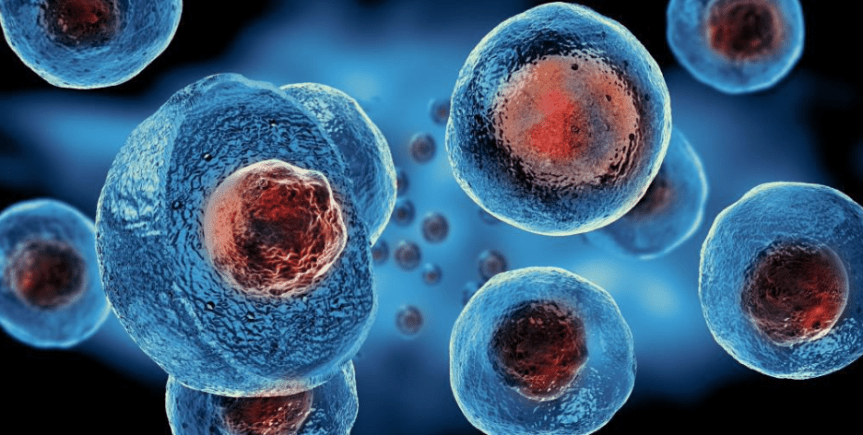
Stem cells can proliferate extensively, with the capacity of self-renewing while they maintain their undifferentiated state, until they are induced to differentiate into a specific cell type. Stem cells can be obtained in several ways, most commonly three ways; they are autologous if derived from patient, allogenic f derived from a human donor and xenogeneic if derived from another animals. And here we are more focused on the third type which is the xenogeneic one as animal regeneration plays very effective role in the human regenerative therapy. As mentioned earlier also these adult stem cells are present in various parts of human body also and has a lot of role or we can say differentiation to do in various parts of our body like one the part where the population of stem is higher is bone marrow which regularly differentiates all cells and which is possible with the presence of stem cells in there.

GERM LAYERDERIVED TISSUES AND ORGANS
EctodermEpidermal tissues and nervous system
MesodermBone, blood , cartilage, muscle, urogenital system, serious membranes
EndodermGI tract, airways

Being pluripotent and having other advantages is great but there are some difficulties and issues also related to stem cell therapy which cannot be ignored:

  • CARCINOGENESIS: The stem cells can develop into treaties which give rise to carcinogens which are causative agents of cancers and tumours in the body. They are fatal to another extent.
  • REJECTION: They are allogeneic, but immune responses can be avoided with some new developing technologies, like therapeutic cloning and adult cell reprogramming.
  • Need for feeder cells for tropic support: first time feeder cells were used in mouse fibroblasts, correlated with the risk of xeno-contamination.
  • ETHICAL AND MORAL ISSUES: They represent a notable source of debate, as theirsource is an embryo, which development is interrupted by the aspiration.

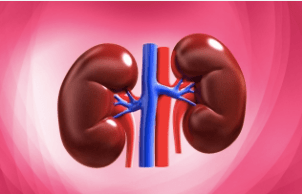
Kidney Regeneration by Human Regenerative Therapy

Animal models are essential for understanding the pathogenetic mechanisms governing the onset and progression of various kidney diseases and for pre-clinically testing novel, more effective, treatments for the patients afflicted with renal impairment. Despite the presence of several non-rodent models, rats and mice remain principal and indispensable species used by investigators in the field of nephrology. Emphasis is placed on several well-established models, such as the ischemic or reperfusion acute renal failure model, remnant kidney model, and unilateral ureteral obstruction model. Undoubtedly, establishment of authentic animal models is of vital importance in delineating the mechanisms of a range of human kidney diseases and in evaluating the feasibility and efficacy of novel therapeutic interventions.

Kidney diseases are fatal and can cause death and its mortality rate is almost 6-8% annually.

Kidney tissue derived from human pluripotent stem cells was generated using organ development mechanism of xenogeneic foetuses, suggesting possibility of generating humanised kidney using animal metanephroi as a scaffold. To apply his concept to humans, the size of the generated animal needs to be increased using larger host animal. Pigs are considered the most suitable f the possible larger animals models, because of their physiological and anatomical similarities to humans. The strategy that underlies humanised kidney generation assumes the transplantation of xenogenic foetal anlagen to adult patients. For this pig metanephroi has to be studied to see the similarities with human nephron so that the differences can be identified so that when the kidney is transplanted into the person the probability of rejection of the graft is already calculated and taken care off. The use of cloned pigs would be beneficial for this type of transplantation study because metanephroi from a cloned pig foetus could be transplanted into a syngeneic adult cloned pig. Thus, engraftment and growth of the graft could be evaluated without being affected by immune rejection. Kidney regeneration using pig metanephroi as a scaffold has potential not only in human medicine but also for companion animals.

What is Regenerative Therapy?

Regeneration is the process of renewal, restoration and growth that, makes genomes, cells, organisms. It is basically the process in which an organism regrows its lost parts, so that original function is restored. This ability to regenerate differs in different groups. For example: lizards who lose all or part of their tails can grow new ones, Sharks continually replace lost teeth, spiders can regrow missing legs or parts of legs etc.
It is one benefit or advantage for animals in which they can immediately regrow the parts of body which may be involved in locomotion, reproduction which are one of the most important processes in the life.
On the other hand, Regenerative therapy or regenerative medicine can be defined as the process of replacing or regenerating human cells, tissues, or organs to restore or establish normal function. Regenerative Medicine refers to a group of biomedical approaches to clinical therapies that may involve the use of stem cells. Regenerative therapy may enable scientists to grow tissues and organs in the laboratory or in in-vitro conditions and safely implant them when the body is unable to heal itself. Also rather than a simple scar as a result of injury can regenerate, there are some human organs and tissues that can regenerate. These include liver, fingertips and endometrium. The cartilage cells divides more as we age.

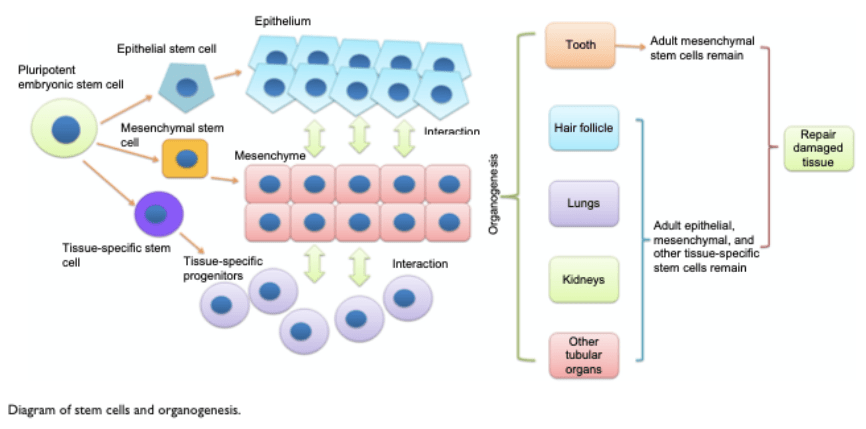
Veterinary medicine have been integral part and has been associated to the development of stem cell therapies. The large experimental animal models have always contributed large to the development of stem cell therapies and refinement of modern hematopoietic stem cell transplantation were noted nearly 5 decades ago. To restore the damaged cells, tissues, organs it is critical to understand the development mental process of specific tissues and them reproduce it. Stem cells play essential roles in organ developmental and tissue repair. Stem cells have always contributed to these experiments and are one of the most used techniques which are used in the field of developmental biology basically in regeneration of different important parts of our body like the bone regeneration or cartilage regeneration and may more. The embryonic stem cells differentiate into multipoint stem cells, including epithelial, mesenchymal, and other tissue- specific stem cells. Stem cells are actually the mesenchymal cell which are pluripotent in nature which means the cells basically are self replicating and are derived from human embryos or human fatal tissue and are known to develop tissues of the three primmer germ layers. Stem cells are present in our body in different types of tissues. A person’s body contains stem cells throughout their life and the body uses them when it needs them. Some parts of body has a regular presence and use stem cells like the bone marrow, dental pulp, adipose tissue, dermis, umbilical cord and the gut, in which the stem cells regularly divide to produce new body tissues for maintenance and repair. Developmental processes are initiated by interaction between these stem cells, resulting in the formation of highly specialised functional tissues and organs. The role of animal models or animal regeneration has a very important role to play in this human regenerative therapy. Right now also the researches on animal regeneration is carried out and works shows some human regenerative therapies can be carried out using them. Researches and advancements in this field which the stem cells and regenerative medicine continue to expand the knowledge of the basic biology and clinical applications of stem cells. Many of the pioneering developments in these fields of stem cells research have been achieved through collaborations of veterinary and human scientists. This review aims to provide an overview of the contribution of the large animal veterinary models in advancing stem cell therapies for both human and clinical veterinary patients may play in the future evolution of stem cell therapies for both human and animal patients will be explored.

Regenerative medicine implies replacement or regeneration of human cells, tissue or organs, to restore or establish normal function. Regenerative medicine or the human regenerative therapy is one of the major advancements in recent years which works on the principles of stem cell technology and tissue engineering in order to replace or regenerate human tissues and organs and restore their functions. This therapy has helped in the field as it can be used in the treatment of acute injuries, chronic diseases and congenital malfunctions. Many advances in regenerative medicine, including the basic and translational researches, have been developed and tested in experimental animals; pigs have played an important role in various aspects of this work. The value of pigs as a model species is being enhanced by the generation of specially enabling more sophisticated research to be performed and thus accelerating the clinical applications of regenerative medicine.

Molecular Basis of Ageing

Ageing is defined as the gradual deterioration of functional characteristics which are necessary for survival and the whole process of aging is termed as senescence in biological sense. In recent years, the processes and mechanisms of ageing and age-related diseases have also made progress. The scientific study of old age or the process of ageing is called as the gerontology and the biological aspect of process of aging or gerontology is called Biogerontology which is defined as the subfield of gerontology concerned with the biological aging process, its evolutionary origins, and potential means to intervene in the process. It involves interdisciplinary research on biological aging’s causes, effects and mechanisms. Lifespan is the length of time for which an organism lives and Life expectancy is the average period that a person may expect to live. It is found that genetic factors play roles in determining the longevity both within and between species.

Ageing is a complex biological process with complex mechanisms characterised by functional decline of tissues and organs, deterioration of functional characteristics, reduced adaptability and resistance, all contribute to an increase in the mortality caused by multiple chronic diseases. Ageing is divided into two types namely pathological and physiological ageing.

Pathological Ageing is defined as that type of aging in which people grow old with no significant antemortem cognitive impairment, and some of them may be high functioning. Physiological Ageing can be defined as that type of aging in which organism lead to senescence or the decline in the biological functions and organism’s ability to adapt to metabolic stress. The later one is the common ageing type in the human beings and most of the animals. As the process of ageing continues the susceptibility of the body towards different diseases increases like diabetes, muscle dysfunction, skin diseases etc. Ageing related disorders are really a serious threat to human health and reduce quality of life among elderly people.

CELL TYPES INVOLVED IN AGEING

Stem Cells
Stem cells are the cells which have the ability to perpetuate themselves as they are capable of continuous, repeated self-renewal divisions in order to maintain their population. A single stem cell can differentiate into or form different types of mature cell types. Stem cells are basically pluripotent cells characterized as undifferentiated and immature with the ability to self-renew.
Stem cell therapy is widely used in bone regeneration, organ regeneration and especially in cardiovascular regenerative medicine. This is done by regenerating various functional stem cells, with the potential function of regenerating various tissues and organs. Changes in cell cycle and a decline in the self-renewal ability of stem cells are closely related to aging. Decline of self-renewal factors contributes to stem cell aging. Although some changes in their function are intrinsic, more external factors can lead to impairment in their function. Physiological levels of ROS (Reactive oxygen species (ROS) are essential signaling molecules in many biological processes, wherein their level is tightly regulated. Excess ROS may cause apoptosis, premature senescence or unscheduled differentiation of stem cells) could regulate the balance between self-renewal and stem cell differentiation. High ROS levels could lead to DNA damage, shortening of telomeres and onset of premature ageing markers

Vascular Smooth Muscle Cells
According to the evidences it is said that senescent vascular smooth muscle cells have been observed in aging related diseases like diabetes mellitus which indicates that these cells contribute to aging. Aging results in a significant reduction of contractile vascular smooth muscle cells in focal patches along arterioles. Focal loss of contractile VSMCs occurs at a younger age due to the deficiency of senescence related protein which is called as caveolin-1. Age related contractile VSMC loss is not exacerbated by genetic depletion of insulin-like growth factor-1. The patchy loss of contractile VSMCs provides a cellular explanation for previous clinical studies showing focal micro-irregularities in retinal arteriolar responsiveness in healthy aged human subjects and is likely to contribute age-related retinal vascular complications.

Endothelial Cells
Endothelial cells have important functions in paracrine and endocrine actions, such as regulating vascular tension, maintaining blood circulation and neovascularization. Endothelial cells are essential part of the heart and vasculature. Senescence is closely related to endothelial cells. ROS (Reactive Oxygen Species) and inflammation play a role in the apoptosis of endothelial cells. Autophagy and exosomes containing harbor miRNAs which play a very important role in the course of a disease and also participate in the regulation of endothelial functions. Age related diseases are related to endothelial dysfunction and impaired autophagic activity.

Nutrition can help prevent these diseases

Some may wonder why it is so vital to eat well. What are the advantages of eating a well-balanced diet that includes nutrient-dense foods that are low in calories? One of the key health benefits is illness prevention. Here are a few reasons why your health may be affected by your diet.

OBESITY

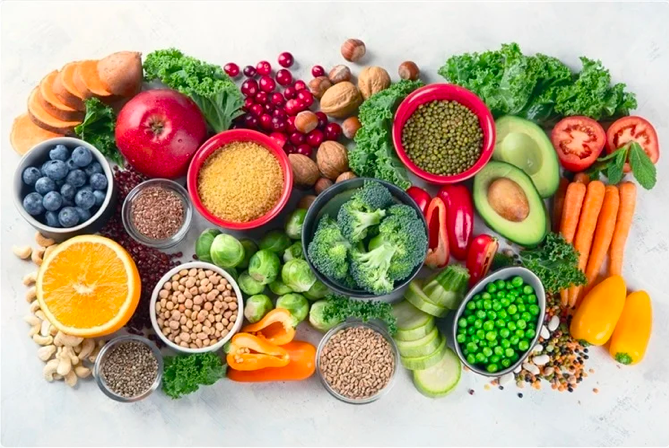
Obesity has been connected to an underlying factor in many other health disorders, such as cardiovascular disease and diabetes, and is directly tied to food. High-calorie meals and sedentary lifestyles are primarily to blame for these figures. Obesity is a big concern among seniors, who tend to become less active as they get older. Getting to and maintaining a healthy weight, on the other hand, is simple with the appropriate nutrition. Weight gain can be avoided by avoiding foods heavy in saturated and trans fats, as well as dishes with a lot of sugar. Instead of processed foods, people should eat whole grains, fruits, and vegetables.

More than 33% of people in the United States are obese, according to the Centers for Disease Control and Prevention.

DIABETES

Type 2 diabetes is on the rise worldwide, according to the WHO, which may contribute to the development of other illnesses such as renal and heart disease. Type 2 diabetes is primarily caused by consuming too much sugar, which can cause a person’s glucose levels to become erratic. People can reduce their risk of diabetes by avoiding processed baked goods, desserts, and sugary beverages like soda and fruit juice, according to Helpguide.org. Choose fruits, healthy grain cereals with low sugar content, and dark, leafy greens instead.

CANCER

Certain forms of cancer can be avoided by following a healthy diet. Keeping your body at a healthy weight will help you avoid malignancies of the breast, kidney, oesophagus, uterus, colon, and rectum. According to the American Cancer Society, 1,658,370 new cases of cancer will be diagnosed in 2015. Including a variety of fruits and vegetables in your diet can help reduce your risk of developing cancer. Focus on foods like soy beans, which, according to Helpguide.org, have been linked to a reduced risk of breast cancer.

CARDIOVASCULAR DISEASE

Cardiovascular disease kills more people than all forms of cancer combined, according to The Heart Foundation. There are many different types of cardiovascular diseases, but the most common is coronary heart disease. Fortunately, according to the World Health Organization, appropriate nutrition can minimise a person’s risk of acquiring this disease. Unbalanced diets or diets heavy in lipids and cholesterol can increase a person’s risk significantly. People can avoid heart disease by avoiding diets heavy in saturated and trans fats, as well as cholesterol, and instead opting for meals high in polyunsaturated fats, such as omega-3 fatty acids. It’s also a good idea to eat a lot of fruits and vegetables, healthy grains, and low-sodium dishes. A person’s blood pressure can be reduced by avoiding salt, which is a key factor in cardiovascular disease.

OSTEOPOROSIS

One of the leading causes of bone and fragility fractures is osteoporosis, a condition in which the bones become porous. This illness causes 8.9 million fractures each year, according to the International Osteoporosis Foundation. Fortunately, eating well can help you maintain good bone health and lower your chance of fracture. Vitamin D and calcium, two minerals that contribute to the formation of healthy bones, should be consumed at the recommended daily levels by older people. The National Institutes of Health recommends that you have at least 500 milligrammes of calcium and 600 international units of vitamin D every day. Regular physical exercise, in addition to a balanced diet, can help with bone health.

Classification of Micronutrients

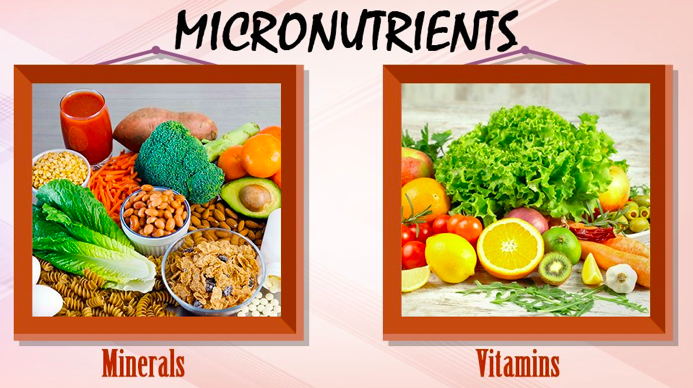
‘Micro’ means small, as their name specifies micronutrients are substances which individuals need in their eating routine in just limited quantities. These incorporate minerals and nutrients. Although most nourishments are combinations of nutrients, huge numbers of them contain a great deal of one nutrient and a little bit of different supplements. Nourishments are regularly gathered by the supplement that they contain in abundance.

Vitamins

Aside from Vitamin D, vitamins are fundamental nutrients, important in the eating regimen for good wellbeing. Vitamin D can be combined in the skin within the sight of UVB radiation. Many animal species can synthesize vitamin C, but humans cannot. Certain vitamin like mixes that are suggested in the eating routine, for example, carnitine, are thought helpful for endurance and wellbeing, yet these are not “basic” dietary supplements on the grounds that the human body has some ability to deliver them from different mixes. Also, a huge number of various phytochemicals have as of late been found in food (especially in new vegetables), which may have attractive properties including cell reinforcement movement. Test showing has been interesting yet uncertain. Other fundamental supplements not classed as nutrients incorporate basic amino acids, basic unsaturated fats, and the minerals talked about in the first area. Nutrient inadequacies may bring about illness conditions: goiter, scurvy, osteoporosis, impeded resistant framework, problems of cell digestion, certain types of disease, manifestations of untimely maturing, and poor mental wellbeing (counting dietary issues), among numerous others. Abundance levels of certain nutrients are likewise hazardous to wellbeing. The vitamins are conveniently divided into two major groups, those that are fat soluble and those that are water soluble. Fat-soluble vitamins are A, D, E, and K. Their absorption by the body depends on the normal absorption of fat from the diet. Water-soluble vitamins include vitamin C and the several members of the vitamin B complex.

Minerals

Dietary minerals are inorganic substance components needed by living animals, other than the four components carbon, hydrogen, nitrogen, and oxygen that are available in essentially all the natural atoms. Some have parts as cofactors, while others are electrolytes. The expression “mineral” is age-old, since the aim is to depict essentially the more uncommon components in the eating regimen. Some are heavier than the four just referenced – including a few metals, which regularly happen as particles in the body. A few dietitians suggest that these be provided from nourishments where they happen normally, or if nothing else as mind boggling mixes, or in some cases even from common inorganic sources, (for example, calcium carbonate from ground clam shells). Some are ingested significantly more promptly in the ionic structures found in such sources. Then again, minerals are frequently falsely added to the eating regimen as enhancements; the most notable is likely iodine in iodized salt which forestalls goiter.

Classification of Macronutrients

‘Macro’ signifies enormous or large, as their name proposes these are nutrients which individuals need to eat routinely and in a genuinely huge sum. They incorporate starches, fats, proteins, fiber and water. These substances are required for the flexibly of energy and development, for digestion and other body functions. Metabolism implies the cycle associated with the age of energy and all the ‘building squares’ needed to keep up the body and its capacities. Macronutrients give a great deal of calories however the measure of calories gave fluctuates, contingent upon the food source.

Every gram of starch or protein gives four calories, while fat gives nine calories to every gram.

Carbohydrates

Carbohydrates might be delegated monosaccharides, disaccharides or polysaccharides relying upon the quantity of monomer (sugar) units they contain. They are an assorted gathering of substances, with a scope of synthetic, physical and physiological properties. They make up a huge piece of nourishments, for example, rice, noodles, bread, and other grain-based items, yet they are not a basic nutrient, which means a human doesn’t have to eat sugars. The brain is the biggest shopper of sugars in the human body, and uses especially a lot of glucose, representing 20% of all out body glucose utilization. The brain utilises generally glucose for energy; if glucose is inadequate not withstanding, it changes to utilising fats. Monosaccharides contain one sugar unit, disaccharides two, and polysaccharides at least three. Monosaccharides incorporate glucose, fructose and galactose. Disaccharides incorporate sucrose, lactose, and maltose; cleaned sucrose, for example, is utilised as table sugar. Polysaccharides, which incorporate starch and glycogen, are regularly alluded to as ‘intricate’ starches since they are ordinarily long different stretched chains of sugar units.

Proteins

Proteins are the basis of numerous creature body structures (for example muscles, skin, and hair) and structure the compounds that control synthetic responses all through the body. Every protein particle is made out of amino acids which contain nitrogen and once in a while sulfur (these segments are answerable for the particular smell of consuming protein, for example, the keratin in hair). The body requires amino acids to deliver new proteins (protein maintenance) and to supplant harmed proteins. Amino acids are dissolvable in the stomach related juices inside the small digestive tract, where they are consumed into the blood. When ingested, they can’t be put away in the body, so they are either utilized as required or discharged in the urine. Proteins comprise of amino acids in various extents. The main angle and characterising normal for protein from a healthful viewpoint is its amino acid synthesis. For all animals, some amino acids are basic (can’t deliver them inside so they should be eaten) and some are trivial (can create them from other nitrogen-containing mixes). Around twenty amino acids are found in the human body, and around ten of these are fundamental. The combination of some amino acids can be restricted under uncommon pathophysiological conditions, for example, rashness in the newborn child or people in serious catabolic pain, and those are called restrictively fundamental. An eating routine that contains satisfactory measures of amino acids (particularly those that are basic) is especially significant in certain circumstances: during early turn of events and development, pregnancy, lactation, or injury (a consume, for example). A total protein source contains all the basic amino acids; a fragmented protein source needs at least one of the fundamental amino acids. It is conceivable with protein mixes of two inadequate protein sources (e.g., rice and beans) to make a total protein source, and trademark blends are the premise of unmistakable social cooking conventions. In any case, integral wellsprings of protein don’t should be eaten at a similar supper to be utilized together by the body. Abundance amino acids from protein can be changed over into glucose and utilised for fuel through a cycle called gluconeogenesis.

Fats and Oils

A particle of dietary fat ordinarily comprises of a few unsaturated fats (containing long chains of carbon and hydrogen atoms), clung to a glycerol. They are commonly found as fatty oils (three unsaturated fats appended to one glycerol spine). Fats might be delegated immersed or unsaturated relying upon the substance structure of the unsaturated fats included. Immersed fats have the entirety of the carbon atoms in their unsaturated fat chains attached to hydrogen particles, though unsaturated fats have a portion of these carbon molecules twofold reinforced, so their atoms have moderately less hydrogen molecules than a soaked unsaturated fat of a similar length. Unsaturated fats might be additionally delegated monounsaturated (one twofold security) or polyunsaturated (some twofold securities). Besides, contingent upon the area of the twofold security in the unsaturated fat chain, unsaturated fats are named omega-3 or omega-6 unsaturated fats. Trans fats are a sort of unsaturated fat with trans-isomer securities; these are uncommon in nature and in nourishments from normal sources; they are regularly made in a modern cycle called (halfway) hydrogenation. There are nine kilocalories in every gram of fat. Unsaturated fats, for example, formed linoleic corrosive, catalpic corrosive, eleostearic corrosive and punicic corrosive, notwithstanding giving energy, speak to strong insusceptible modulatory particles. Immersed fats (ordinarily from creature sources) have been a staple in numerous world societies for centuries. Unsaturated fats (e. g., vegetable oil) are viewed as more advantageous, while trans fats are to be kept away from. Immersed and some trans fats are regularly strong at room temperature, (for example, spread or fat), while unsaturated fats are normally fluids, (for example, olive oil or flaxseed oil). Trans fats are extremely uncommon in nature, and have been demonstrated to be exceptionally unfavorable to human wellbeing, yet have properties helpful in the food handling industry, for example, rancidity opposition.

Water

Water is the significant constituent of the human body. The body can’t deliver enough water by digestion or acquire enough water by food ingestion to satisfy its requirements. As an outcome, we need to focus on what we drink for the duration of the day to guarantee that we are meeting our day by day water needs, as not doing so may have negative wellbeing impacts. Water is discharged from the body in numerous structures; including pee and defecation, perspiring, and by water fume in the breathed-out breath. In this manner, it is important to satisfactorily rehydrate to supplant lost liquids.
Early proposals for the amount of water needed for upkeep of good wellbeing recommended that 6–8 glasses of water day by day is the base to keep up legitimate hydration. The idea that an individual ought to burn-through eight glasses of water for each day can’t be followed to a trustworthy logical source. Water is the primary constituent of cells, tissues and organs and is essential forever. Regardless of its entrenched significance, water is frequently failed to remember in dietary suggestions, and the significance of sufficient hydration isn’t referenced. As a result, wellbeing experts and nutritionists are here and there confounded and question the need of drinking water consistently, what amount should we drink, and how to know if patients are very much hydrated.

FibRE

Dietary fiber is a carbohydrate, explicitly a polysaccharide, which is not completely assimilated in people and in certain animals. Like all sugars, when it is processed, it can create four Calories (kilocalories) of energy per
gram, however much of the time, it represents not as much as that on account of its restricted retention and absorbability. Entire grains, beans, and different vegetables, organic products (particularly plums, prunes, and figs), and vegetables are acceptable wellsprings of dietary fiber. Fibre is imperative to stomach related wellbeing and is thought to diminish the danger of colon malignant growth. Fiber can help in mitigating both blockage and loose bowels by expanding the weight and size of stool and mellowing it. Fiber gives mass to the intestinal substance, and insoluble fiber particularly invigorates peristalsis – the cadenced strong constrictions of the digestive organs which move digesta along the stomach related lot. Some dissolvable strands produce an answer of high thickness; this is basically a gel, which eases back the development of food through the digestive organs. By easing back the retention of sugar, fiber may assist lower with blooding glucose levels, diminishing insulin spikes and lessening the danger of type 2 diabetes.

Nutrition and Nutrients

Nutrition is the science that deciphers the supplements and different substances in food corresponding to support, development, multiplication, wellbeing and infection of a living being. It incorporates ingestion, retention, absorption, biosynthesis, catabolism and discharge. The eating regimen of a living being is the thing that it eats, which is to a great extent controlled by the accessibility and acceptability of nourishments. For people, a solid eating routine incorporates readiness of food and capacity strategies that protect supplements from oxidation, warmth or draining, and that lessens danger of food-borne ailments.

In people, an undesirable eating regimen can cause deficiency related infections, for example, visual impairment, pallor, scurvy, preterm birth, stillbirth and cretinism, or supplement overabundance health compromising conditions, for example, weight and metabolic disorder; and such normal ongoing foundational illnesses as cardiovascular sickness, diabetes, and osteoporosis. Undernutrition can lead to wasting in acute cases, and the stunting of marasmus in chronic cases of malnutrition.

The seven significant classes of human supplements are sugars, fats, fiber, minerals, proteins, nutrients, and water. Supplements can be assembled as either macronutrients or micronutrients (required in little amounts).

Human nourishment manages the arrangement of basic supplements in food that are important to help human existence and great wellbeing. Helpless nourishment is a persistent issue regularly connected to neediness, food security or a less comprehension of sustenance and dietary practices and poor information about supplements needed by the body at different phases of life to forestall insufficiency of supplements in body which can effect-sly affect body. Lack of healthy nutrients and its results are huge supporters of passings, actual deaths and physical illness around the world. Great sustenance is really important for kids to develop physically and intellectually, and for typical human organic turn of events. The human body contains synthetic mixes, for example, water, starches, amino acids (found in proteins), unsaturated fats (found in lipids), and nucleic acids (DNA and RNA). These mixes are made out of components, for example, carbon, hydrogen, oxygen, nitrogen, and phosphorus. Any investigation done to decide healthful status must consider the condition of the body when tests, just as the compound piece of the entire eating regimen and of the multitude of materials discharged and eliminated from the body.

WHAT ARE NUTRIENTS?

A nutrient is a substance utilized by a creature to endure, develop, and recreate. The necessity for dietary supplement admission applies to creatures, plants, growths, fungi, and protists. Supplements can be joined into cells for metabolic purposes or discharged by cells to make non- cell structures, for example, hair, scales, plumes, or exoskeletons. A few supplements can be metabolically changed over to more modest atoms during the time spent delivering energy, for example, for starches, lipids, proteins, and aging items (ethanol or vinegar), prompting final results of water and carbon dioxide. All creatures require water. Fundamental supplements for creatures are the fuel sources, a portion of the amino acids that are joined to make proteins, a subset of unsaturated fats, nutrients and certain minerals. Plants require more assorted minerals retained through roots, in addition to carbon dioxide and oxygen assimilated through leaves. Parasites live on dead or living natural issue and address supplement issues from their host.
Nutrients might be natural or inorganic: natural mixes incorporate most mixes containing carbon, while all different synthetic substances are inorganic. Inorganic supplements incorporate supplements, for example, iron, selenium, and zinc, while natural supplements incorporate, among numerous others, energy-giving mixes and nutrients.

Waste Management: 4R’s Formula

Waste management has evolved into one of the most pressing issues facing humanity today. We are producing massive volumes of garbage of all types as a result of the phenomenal growth in human population and industrial activity. Waste can no longer be dumped or buried and forgotten because of its sheer size. Electronic garbage is one of the most complex wastes to manage.

Lead glass, batteries, mercury, cadmium, chromium, and ozone-depleting compounds are among the toxins found in e-waste (CFCs). Electronic garbage is responsible for 40% of lead and 70% of heavy metals detected in landfills. Groundwater contamination, air pollution, and soil acidification are all caused by these contaminants. Impaired brain development, cancer, and liver and kidney damage are among the health issues linked to such poisons.
Waste management is gradually becoming a sustainability concern, rather than just a problem to be solved. Waste management has evolved into a systematic process that includes the collection, transportation, and correct disposal of garbage, sewage, and other waste products, as well as the provision of various options for recycling and repurposing waste.

According to statistics, the globe created over 42 million tonnes of e-waste in 2014. India has surpassed China as the world’s fifth greatest producer of electronic garbage. Medical equipment accounts for around 8% of annual e-waste output, and it is increasing.

4R’s of waste management

  • Reduce: Producing more garbage and then attempting to control it consumes more resources and, in any case, increases dumping. Instead, campaigning for waste reduction in the first place is gaining traction. This entails extending the life of items and reducing use-and-throw options. Refurbishing medical equipment and utilising it for extended periods of time not only makes healthcare more inexpensive, but it also helps to reduce e-waste. The average life of medical equipment can be extended by at least 2-3 years with proper usage, frequent preventive maintenance, and calibration. We owe it to our environment to properly maintain our medical equipment so that it is not dumped unnecessarily and untimely.
  • Reuse: Use reusable alternatives whenever possible. As we all know, technology is always growing, and in the field of medical equipment, more items with higher capabilities are introduced every year. If hospitals want to improve their equipment, they could sell their existing used medical equipment to another hospital in tier II or III towns that could still use it. In hospitals, several medical devices are sanitised and reused on a frequent basis, including scissors, forceps, specula, and endoscopes.
  • Recycle: Breakdowns and a lack of spare parts are two of the most significant obstacles to utilising equipment longer. Electronic components and PCBs abound in medical equipment (Printed Circuit Boards). Printed Circuit Boards (PCBs) such as the motherboard, power supply board, control board, transmit-receiving board, display board, Sensor Interface Boards, and others can all be repaired, which can help medical equipment last longer. Even X-Ray and CT tubes can be fixed and reused. In comparison to using newer parts or purchasing new equipment outright, these methods make it cheaper.
  • Repair: If a piece of medical equipment has reached the end of its useful life or is beginning to endanger the safety of a patient or user, it is best to dispose of it responsibly. Printed circuit boards contain a variety of elements that can be removed and utilised in new devices. E-waste contains ferrous metals, copper, silver, gold, and polymers, which can all be recycled and profitably repurposed in new goods.

Types Of Diets

A diet is best described as a fixed plan of eating and drinking where the type and amount of food are planned out in order to achieve weight loss or follow a particular lifestyle. There are thousands of diets. Some are for losing weight, while others are for gaining weight, lowering cholesterol, living a long and healthful life, and many other reasons.

Ketogenic Diet

The ketogenic diet has been utilized for quite a long time as a treatment for epilepsy and is likewise being investigated for different employments. It includes decreasing starch admission and increasing fat admission. It sounds in opposition to good judgment, however it permits the body to consume fat as a fuel, instead of sugars.
Solid fats, for example, those in avocados, coconuts, Brazil nuts, seeds, slick fish, and olive oil are generously added to the eating routine to keep up a general accentuation on fat.
The eating regimen causes the separate of fat stores for fuel and makes substances called ketones through a cycle called ketosis. This eating regimen has hazards incorporating ketoacidosis for individuals with type 1 diabetes, be that as it may, and may bring about diabetic trance state and demise. Albeit most investigations are 2 years or less, there is some encouraging exploration according to diabetes the executives, metabolic wellbeing, weight reduction, and body sythesis change.

Vegetarian Diet

There are various types of vegetarian: lacto vegetarian, fruitarian vegetarian, lacto-ovo vegetarian, living food diet vegetarian, ovo vegetarian, pesco vegetarian, and semi vegetarian. The majority of vegetarians are lacto-ovo vegetarians, in other words, they do not eat animal-based foods, except for eggs, dairy, and honey. Studies over the last few years have shown that vegetarians have a lower body weight, suffer less from diseases, and typically have a longer life expectancy than people who eat meat.

Raw Food Diet

The crude food/Raw food diet, or crude foodism, includes burning-through nourishments and beverages that are not handled, are totally plant-based, and preferably natural. Raw foodists accept that in any event 75% of an individual’s food admission should comprise of uncooked food. A critical number of crude foodists are additionally vegetarians and don’t eat or drink whatever is creature based. There are four fundamental sorts of crude foodists: Raw veggie lovers, Raw vegetarians, Raw omnivores, and Raw carnivores.

Zone Diet

The Zone diet aims for a nutritional balance of 40 percent carbohydrates, 30 percent fats, and 30 percent protein in each meal. The focus is also on controlling insulin levels, which may result in more successful weight loss and body weight control than other approaches. The Zone diet encourages the consumption of high-quality carbohydrates – unrefined carbohydrates, and fats, such as olive oil, avocado, and nuts.

Vegan Diet

Veganism is to a greater degree a lifestyle and a way of thinking than an eating regimen. A veggie lover doesn’t eat whatever is creature based, including eggs, dairy, and nectar. Vegetarians don’t ordinarily embrace veganism only for wellbeing reasons, yet additionally for ecological, moral, and ethical reasons.

Vegans accept that cutting edge concentrated cultivating techniques are awful for our current circumstance and impractical in the long haul. If everyone ate plant-based food, the climate would profit, creatures would endure less, more food would be delivered, and individuals would for the most part appreciate better physical and psychological well-being.

Mediterranean Diet

The Mediterranean eating routine is Southern European, and all the more explicitly centers around the wholesome propensities for the individuals of Crete, Greece, and southern Italy. These days, Spain, southern France, and Portugal are likewise included, despite the fact that Portugal doesn’t contact the Mediterranean Sea. The accentuation is on bunches of plant nourishments, new natural products as pastry, beans, nuts, entire grains, seeds, olive oil as the primary wellspring of dietary fats. Cheddar and yogurts are the fundamental dairy nourishments. The eating routine additionally incorporates moderate measures of fish and poultry, up to around four eggs for each week, limited quantities of red meat, and low to direct measures of wine. Up to 33% of the Mediterranean eating regimen comprises of fat, with immersed fats not surpassing 8 percent of calorie consumption. The Mediterranean eating routine is the most widely contemplated diet to date, with dependable examination supporting its utilization for improving an individual’s personal satisfaction and bringing down illness hazard.

Can Dogs Eat Apples?

In short, yes, dogs can eat apples, but there are a few things to consider before feeding them to your dog. These fruits are high in nutrients that are good for your dog’s health, but there are some things to avoid, such as the cores and seeds. Moderation is crucial with apples, as it is with anything nice, because too many apples can cause stomach discomfort in dogs. 

However, before offering the apple to your dog, make sure it is free of the core and seeds. The seeds contain a very small quantity of cyanide, which is released only when they are eaten. Therefore, eating a couple of pips is unlikely to cause issues, just as it is in people.

They are healthy occasional snacks that can be quite refreshing and pleasant if served carefully and safely to your dog. Before offering your dog human foods, such as apples, you should always consult your veterinarian.

Apples are an excellent source of vitamin A, vitamin C, and dietary fiber for your dog’s diet. They also assist in keeping your dog’s teeth clean and freshening their breath.

What Benefits Do Apples Have For Dogs?

Apples can be a low-cost, high-nutrient food for dogs, as long as they’re offered in moderation. They’re low in protein and high in fiber, which can help with digestion and make them an excellent option for dogs on restricted diets that don’t allow for a lot of protein and fat. This is particularly beneficial for senior pets or canines suffering from specific ailments.

They’re also high in calcium and phosphorus, as well as vitamins A, C, and K. These fruits’ antioxidants may aid in the prevention of cancer and the treatment of joint disease symptoms. Dogs’ dental health and breath can also be improved by eating apples.

When Is It Bad For Dogs To Eat Apples?

When giving apples to dogs, the seeds and cores are the most important items to keep an eye out for. The seeds contain cyanide, which is poisonous in trace levels. It would take a large number of seeds to cause cyanide poisoning, so if your dog consumes a few, he is unlikely to be harmed. Even so, putting your dog’s health in danger is unnecessary. Therefore, remove the seeds before feeding your dog apples. Some people believe that stems are also hazardous, therefore it’s preferable to remove them as well. The apple’s core is solid and difficult to eat for most dogs. It is a choking hazard and can cause gastrointestinal blockage if ingested.

Because apples contain sugar, they should be consumed in moderation. Sugar can cause difficulties for dogs with cancer or diabetes, which is another reason to consult your veterinarian before providing it to your pet. Furthermore, even in healthy dogs, eating too many apples might cause stomach distress or diarrhoea. 

Sugar, artificial flavors, and chemicals are frequently included in apple-flavored or apple-containing items. Always check the labels before giving your dog any human foods, and stay away from additional sugars, artificial sweeteners like xylitol, and new substances, as they can be hazardous. Because many apples from shops are coated with additives that make them shiny, it’s best to buy organic apples. Any fruit you purchase should be washed because they may contain herbicides or pesticides. It’s possible that your dog will be allergic to it, just like most foods. Anaphylaxis, a potentially fatal illness, can occur in rare cases as a result of allergic responses. Stop feeding these fruits to your dog if you notice any signs of an allergic response, such as coughing, sneezing, swelling, hives, difficulty breathing, or other symptoms. Contact your veterinarian right away.

What Is The Best Way To Feed Apples To Your Dog?

Before feeding your pets human food, consult your veterinarian. Apple consumption may aggravate medical issues in some dogs. Once your veterinarian has given you the go-ahead, wash any fruits you wish to feed your dog, remove the stems, seeds, and cores, and chop them into bite-sized pieces. Apples can be served to dogs in a variety of ways. You can freeze them and eat them as a cool summer snack. They can be blended with other nutritious fruits to produce a wonderful smoothie, mashed into a homemade applesauce, or mixed in with your dog’s food for a sweet treat.

To summarize, dogs can eat apples, but they must be consumed in moderation. Apples are only treats, not a replacement for the dog’s usual diet. It means that your dog only needs one apple each day. Don’t be afraid to give your dog apples as a treat. Just remember to core the apple and discard all of the seeds inside. Keep the portions small enough so your dog’s coat shines, he doesn’t get diarrhoea, and he’s a happy camper.

10 Best MightyText Alternatives To Send SMS From PC

We send texts on our phones; now we can do the same on our desktop computers. Many Android apps, such as MightyText, are available on the Google Play Store as well as on App Store that allow users to send and receive text messages from their computers. MightyText is one of the most popular desktop clients for accessing and controlling mobile devices from a PC.

You can simply sync MMS, SMS, Videos, Photos, and other files to other devices with MightyText. It can also be used to send and receive text messages from computers. However, it can or cannot be a paid service. The free version of Mighty Text includes a monthly restriction of around 500 text messages. Mighty Text also includes a subscription edition that allows you to schedule messages, remove the message limit, remove adverts, and sync up to 100 GB of photographs and videos, among other things. MightyText’s Pro version costs $9.99 per month or $79.99 per year. If you’re satisfied with the free version’s 500 message limit per month, Mighty Text should function fine.

AirDriod 

The Airdroid is a good substitute for MightyText. Above all, if you want to send SMS from your computer. It will also include a number of additional features not available on MightyText. Along with the standard SMS, this is one of the coolest features. Messages from Telegram, WhatsApp, and Facebook Messenger are also synced via the Airdroid. 

Apart from that, it will have a number of other capabilities, such as notification mirroring. A file-sharing programme may make and receive phone calls, among other things. The nicest part about this software is that it allows you to send limitless text messages for free.

Yappy

Yappy is another option available as one of the most powerful alternatives. This programme is available as a web extension and is capable of syncing with both mobile and desktop computers. Furthermore, the quantity of messages you can send via your PC with Yappy is unrestricted. This extension’s free version includes everything, but if you prefer an ad-free experience, you may upgrade to the Pro version. The enhancements are only available in Chrome or Firefox. The free form has no message boundaries; it can send and receive SMS or alerts, make phone calls from a distance and hold a 14 day message.

MySMS

MySMS is an Android software that is both easy and powerful. You can even send SMS from your PC or tablet using this method. There are currently no more exciting features in the app. Despite this, it has grown in popularity due to its skills. It’s true. Presently With over 1 million users, MySMS is available in over 180 countries. 

You must send an SMS from your computer. After that, you must first log in to the MySMS Android app. So, just use the same Google account to log in to the desktop app. Now your account will be synced across both devices. As a result, you can send and receive messages using only your computer. In addition, you can save your messages to the cloud using Google Drive or Dropbox. The user interface for the MySMS features is similarly neat and tidy. It is really simple for users to navigate.

PushLine

One of the best ways is by using Pushline to manage your mobile and computer. If you simply want to send and receive SMS, this is one of the greatest apps. It is a completely free programme from which to choose. You will not see advertisements even if you have the free version.

Join

Another excellent MightyText alternative is Join. This app is highly adaptable and performs admirably on both mobile devices and computers. This is now accessible for both Android and iOS devices. 

However, regardless of the device you’re using, you can get SMS remotely using a browser. You also receive a slew of other capabilities, like file sharing. Screen sharing, toll-free voice, video conferencing, and more features are available. An end-to-end encryption option will be included with a Join. This will also ensure that your privacy is well protected. There are also a few fantastic connectors, such as Chrome, Outlook, Office365, and so on. The application has a free preliminary rendition for 30 days post which is accessible for 5$.

PushBullet

One of the best Mighty Text alternatives is PushBullet. This will also have a streamlined UI that will look fantastic on any device. Furthermore, seamless device syncing and relatively simple configurations make it even more appealing. 

Messages can now be sent and received from any platform. PushBullet also allows you to view notifications on your phone, share files and links, and communicate with pals. This is also accessible in both a free and a premium version. The free version does have some limitations, but the premium version allows you to go as far as you want.

TextFree

Text Free is another excellent free SMS and calling application for your Android phone. Text Free is a web application, you can use it from any programme. 

Text Free provides customers with a real phone number that can be used to exchange texts. The actual phone number can also be utilized to make judgments. Text free is a website that allows you to send free text messages to anyone, anywhere.

These Mightytext Alternatives do not expect access to your phone number; instead, the administration generates a strange phone number that can be used to message people. It’s an excellent way to send SMS in a trouble-free manner, as long as you don’t mind it being sent from a different number.

Pulse SMS

Pulse SMS may be the perfect choice for you if you’re seeking for an Android SMS programme that’s swift, secure, and packed with useful features. Expect your mind to be blown. You can sync your SMS and MMS communications across all of your devices, including PCs, using Pulse SMS. 

TextNow

Text Now is similar to the Text Free Android software, which keeps track of prior text messages. Text Now, like Text Free, allows users an arbitrary phone number to which they can send instant messages. Because it is a web application, it may be accessed from any device or programme. It also offers calling capabilities, however it is not free. 

The text now generates a random number and does not allow the user to send messages using their own phone number. The most important aspect is that it allows you to appreciate endless information from all around the world. So, if you don’t give a damn about numbers, the programme can be of use to you.

Send Anywhere

The application also offers a work area form, making it a perfect alternative for synchronizing your computerized devices. It allows you to move or transfer gadgets to its employees for more centralized access. Before beginning any data transfer, the programme verifies and generates a six-digit access pin. 

However, the plug has a 10-minute validity period after which the records are automatically destroyed. The application does not require any information exchange and allows you to surreptitiously move an unlimited amount of data.

Remote access apps for Android can, in fact, be used to send SMS from a computer. To begin sending and receiving messages, connect your Android to your computer using Wi-Fi or Bluetooth. Apart from sending and receiving SMS, remote access applications can also be used to manage other types of data stored on Android, such as photos, videos, and documents.


Cybercrime: History, Categories, Types, Prevention.

Crime that involves a computer and a network, where the computer may have been a target or may have been used to commission the crime. It may threaten a person or nation’s security and financial health. Cybercrime crossing national borders and involving a crime committed by at least one nation-state is referred to as cyber warfare. Most, but not all, cybercrime is completed by profit-driven cybercriminals or hackers. Individuals or groups can commit cybercrime. Some cybercriminals are well-organized, employ advanced strategies, and have a high level of technical expertise. Others are newcomers to hacking. These could be either political or personal in nature. Examples: Identity theft, human and drug trafficking, hacking, etc.

In the beginning of 1970s, crimes over telephones were committed. The first person to be convicted of cybercrime was Ian Murphy, also known as Captain Zap, in 1981. He hacked the American telephone company to manipulate their internal clock, so that users could make free calls at peak times. The first cyber criminal in India, Amit Tiwari had been on the watch list since 2003 until he was finally caught in 2011.

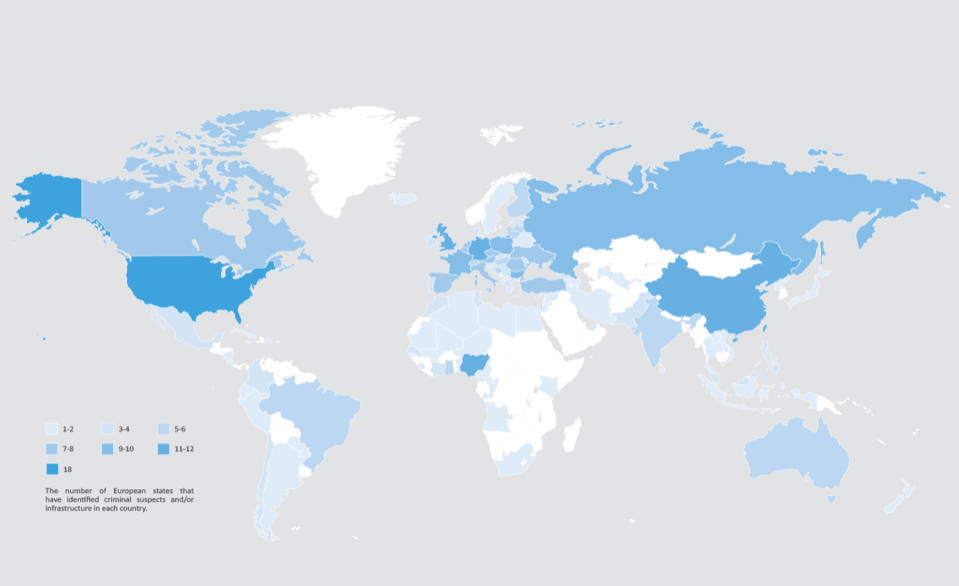
The country with the highest rate of cyber crime is USA (23.9%)  followed by China (9.63%) .

CATEGORIES OF CYBERCRIME

  1. The attack is directed towards a computer, such as a data breach on a corporate network. 
  2. A computer is used as a weapon in an attack, such as a denial of service (DoS) attack. 
  3. A computer is a tool used in the commission of a crime, such as digital identity theft, which leads to the theft of funds from a bank account.

TYPES OF CYBERCRIME

  • Financial Fraud: Dishonest misinterpretation of a fact intended to let another do or refrain from doing something that causes loss. Example: Fake e-mails
  • Online Harassment /Cyber Bullying/ Internet Trolls: Misusing personal information or passing derogatory comments at specific individuals of a race, gender, colour, etc.
  • Hacking: hacking is unauthorised access into a computer system and/or network.Because of the public coverage, government websites are a popular target for hackers. Hackers appreciate the media attention. The motivation for hacking is greed, power, publicity, revenge, adventure and the desire to access restricted information. Shutting down or misusing websites or computer networks.
  • Defamation: It involves any person with intent to lower down the dignity of the person by hacking his mail account and sending some mails with using vulgar language to unknown persons mail account.
  • Cyber Terrorism: Politically motivated use of computers and IT to cause serious disruption and fear in society. Terrorist attacks on the Internet is by distributed denial of service attacks, hate websites and hate E-mails, attacks on service network etc.
  • Child Pornography: In this cyber crime defaulters create, distribute, or access materials that sexually exploit underage children.
  • Virus Dissemination: Malicious malware that infects other programmes. Examples: Web Jacking, email bombing, Virus, Worms, Trojan Horse, Web Jacking etc. 
  • Computer Vandalism: Cyber vandalism is the act of damaging or destroying data rather than stealing or misusing it. This is a type of programme that attaches itself to a file and then circulates it.

PREVENTION

  • It is best not to give out personal information to strangers via e-mail, chat, or other social networking sites. 
  • Avoid transmitting any photograph to strangers through the internet, as incidences of photograph misuse or modification are on the rise. 
  • All netizens should use up-to-date anti-virus software to protect themselves from virus attacks. 
  • To avoid fraud, a person should never send credit card or debit card details to an un-secure website.
  • Using strong passwords for different account can help in prevention.
  • Managing social media settings as we have different private social media setting so that no one can see our private information.
  • Using a full time internet and overall security software.
  • Practicing safe web surfing.

Malnutrition: Under-nutrition and Over-nutrition

Malnutrition is a condition that outcomes from eating an eating routine which doesn’t gracefully a sound measure of at least one nutrients. This incorporates abstains from food that have too little nutrients or so numerous that the eating regimen messes wellbeing up. The supplements included can incorporate calories, protein, starches, fat, nutrients or minerals. An absence of supplements is called undernutrition or undernourishment while an overflow of supplements cases over-nutrition. Hunger is regularly used to allude to undernutrition – when an individual isn’t getting enough calories, protein, or micronutrients. On the off chance that undernutrition happens during pregnancy, or before two years old, it might bring about lasting issues with physical and mental turn of events. Extraordinary undernourishment, known as starvation or ongoing craving, may have indications that include: a short tallness, slender body, helpless energy levels, and swollen legs and mid-region. The individuals who are malnourished regularly get diseases and are habitually cold. The side effects of micronutrient inadequacies rely upon the micronutrient that is inadequate. Undernourishment is regularly because of an absence of great food which is accessible to eat. This is regularly identified with high food costs and neediness. An absence of breastfeeding may add to undernourishment.

Irresistible infections, for example, gastroenteritis, pneumonia, jungle fever, and measles, which increment supplement necessities, can likewise cause hunger. Regular micronutrient insufficiencies incorporate an absence of iron, iodine, and vitamin A. Lacks may turn out to be more normal during pregnancy, because of the body’s expanded need of supplements. In some non-industrial nations, overnutrition as corpulence is introducing inside similar networks as undernutrition. This is on the grounds that the food that is frequently accessible isn’t solid. Different reasons for lack of healthy sustenance incorporate anorexia nervosa and bariatric medical procedure. Lack of healthy sustenance expands the danger of contamination and irresistible sickness, and moderate hunger debilitates all aspects of the invulnerable framework. For instance, it is a significant danger factor in the beginning of dynamic tuberculosis. Protein and energy lack of healthy sustenance and insufficiencies of explicit micronutrients (counting iron, zinc, and nutrients) increment powerlessness to contamination. Ailing health influences HIV transmission by expanding the danger of transmission from mother to kid and furthermore expanding replication of the infection. In people group or regions that need admittance to safe drinking water, these extra wellbeing hazards present a basic issue.

TYPES OF MALNUTRITION

It can lead to serious health issues, including stunted growth, eye problems, diabetes and heart disease. It basically is of two types:

• Under-nutrition
This kind of Malnutrition results from not getting enough protein, calories or micronutrients. Undernutrition is caused fundamentally by a lacking admission of dietary energy, whether or not some other explicit nutrients is a restricting element.
Undernutrition ordinarily results from not getting enough supplements in your eating routine. This can cause Weight loss, Loss of fat and bulk, Hollow cheeks and indented eyes, A swollen stomach, Dry hair and skin, Delayed injury mending, Fatigue, Difficulty concentrating, Irritability, Depression and uneasiness. Individuals with undernutrition may have one or a few of these indications. A few sorts of undernutrition have signature impacts.

Kwashiorkor, a serious protein insufficiency, causes liquid maintenance and a projecting midsection. Then again, the condition marasmus, which results from serious calorie lack, prompts squandering and critical fat and muscle misfortune.

Undernutrition can likewise bring about micronutrient inadequacies. The absolute most regular lacks and their indications include:

  • Vitamin A: Dry eyes, night visual deficiency, expanded danger of contamination.
  • Zinc: Loss of hunger, hindered development, postponed mending of wounds, balding, looseness of the bowels.
  • Iron: Impaired cerebrum work, issues with managing internal heat level, stomach issues.
  • Iodine: Enlarged thyroid organs (goiter), diminished creation of thyroid hormone, development and improvement issues. Since undernutrition prompts genuine actual issues and medical issues, it can expand your danger of death. It’s assessed that hindering, squandering and zinc and Vitamin A lacks added to up to 45% of all kid passings in 2011.

• Over-nutrition
Overconsumption of specific nutrients, for example, protein, calories or fat, can likewise prompt hunger. This normally brings about overweight or heftiness. The primary indications of overnutrition are overweight and heftiness, however it can likewise prompt nutrient lacks. Research shows that individuals who are overweight or large are bound to have lacking admissions and low blood levels of specific nutrients and minerals contrasted with the individuals who are at a typical weight.
One investigation in 285 youths found that blood levels of Vitamin A and E in large individuals were 2–10% lower than those of typical weight members.
This is likely in light of the fact that overweight and obesity can result from an overconsumption of quick and prepared nourishments that are high in calories and fat yet low in different nutrients.

An investigation in more than 17,000 grown-ups and kids found that the individuals who ate inexpensive food had altogether lower intake of vitamin A and C and unhealthy, fat and sodium utilisation than the individuals who kept away from this kind of food.

COMMON CAUSES OF MALNUTRITION 

Common causes of malnutrition include:

  • Food insecurity or a lack of access to sufficient and affordable food: Studies link food insecurityin both developing and developed nations to malnutrition.
  • Digestive problems and issues with nutrient absorption: Conditions that cause malabsorption,such as Crohn’s disease, Celiac disease and bacterial overgrowth in the intestines, can causemalnutrition.
  • Excessive alcohol consumption: Heavy alcohol use can lead to inadequate intake of protein,calories and micronutrients.
  • Mental health disorders: Depression and other mental health conditions can increasemalnutrition risk. One study found that the prevalence of malnutrition was 4% higher in peoplewith depression compared to healthy individuals.
  • Inability to obtain and prepare foods: Studies have identified being frail, having poor mobilityand lacking muscle strength as risk factors for malnutrition. These issues impair food preparation skills.