Network topology refers to the arrangement of nodes, devices, and communication channels in a computer network. There are several types of network topologies, including bus, star, ring, mesh, and tree. Each topology has its own advantages and disadvantages, depending on the network’s size, scalability, and fault tolerance requirements.
Network topology has basically 5 types:
BUS TOPOLOGY – A bus topology connects all devices to a single communication channel called a bus. Data is transmitted along the bus to all connected devices, and each device listens for its specific address. This topology is simple and cost-effective for small networks, but it can suffer from congestion and is not scalable to larger networks.
STAR TOPOLOGY – A star topology connects all devices to a central hub or switch. Data is transmitted from the sender device to the hub, which then broadcasts the data to all other devices. This topology is widely used in LANs and is scalable, fault-tolerant, and easy to manage. However, it requires a larger number of cables and devices, and a single point of failure in the hub can disrupt the entire network.
RING TOPOLOGY – A ring topology connects all devices in a circular loop, where each device is connected to its neighboring devices. Data is transmitted in one direction along the loop, and each device repeats the data to the next device until it reaches its destination. This topology is simple and efficient for small networks, but it can suffer from congestion and a single faulty device can disrupt the entire network.
MESH TOPOLOGY – A mesh topology connects all devices in a fully interconnected network, where each device is connected to every other device. Data can be transmitted through multiple paths, making this topology highly fault-tolerant and scalable. However, it is complex and expensive to implement, and requires a large number of cables and devices.
TREE TOPOLOGY – A tree topology connects devices in a hierarchical structure, where branches of devices connect to a single root node or hub. Data is transmitted from the sender device to the hub, which then broadcasts the data to all other devices in the branch. This topology is scalable and fault-tolerant, and it allows for easy management and troubleshooting. However, a single point of failure in the root node can disrupt the entire network, and the network’s size and complexity can affect its performance.
In summary, network topology is an important aspect of computer networks that can affect the network’s performance, scalability, and fault tolerance. Choosing the right topology depends on the network’s requirements, size, and cost constraints. It is also important to consider network security and management issues when designing and implementing a network topology.
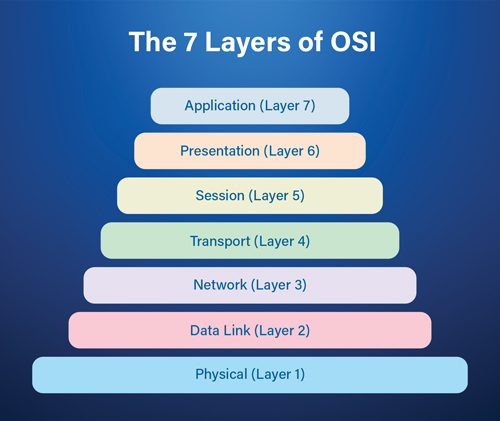
The Open Systems Interconnection (OSI) model is a conceptual framework for network communication that was developed by the International Organization for Standardization (ISO) in the 1980s. The OSI model provides a way to understand how data is transmitted over a network by breaking down the process into seven layers. Each layer has a specific function, and the layers work together to ensure reliable communication.
The OSI model provides a standardized way of describing network communication, which allows different network technologies and devices to communicate with each other. For example, a device that uses Ethernet can communicate with a device that uses Wi-Fi because they both follow the same OSI model. The OSI model also allows for easier troubleshooting of network issues because each layer has a specific function that can be tested independently.
However, the OSI model is a theoretical framework and does not correspond directly to the actual implementation of network protocols. In practice, network protocols are often a combination of multiple OSI layers, and some layers may be merged or omitted entirely. Nonetheless, the OSI model remains a useful tool for understanding the complex process of network communication.
Physical Layer: The physical layer is responsible for transmitting raw data bits over a physical medium such as copper wires, optical fibers, or radio waves. It deals with the electrical, mechanical, and physical characteristics of the physical medium. It also defines the procedures and functions that physical devices and interfaces have to perform for transmission to occur.
Data Link Layer: The data link layer is responsible for the reliable transfer of data frames over a physical medium. It establishes and terminates connections between network devices, performs error detection and correction, and manages flow control.
Network Layer: The network layer is responsible for routing data packets from the source to the destination network. It determines the best path for data to travel and manages congestion control.
Transport Layer: The transport layer is responsible for ensuring reliable end-to-end communication between applications. It segments and reassembles data into packets and provides error recovery and flow control.
Session Layer: The session layer is responsible for managing communication sessions between applications. It establishes, maintains, and terminates sessions and provides synchronization and recovery in case of failures.
Presentation Layer: The presentation layer is responsible for ensuring that data is presented in a format that can be understood by the application layer. It provides data encryption, compression, and decryption.
Application Layer: The application layer is responsible for providing network services to user applications. It provides a user interface and manages application-level protocols such as HTTP, FTP, and SMTP.
Search Engine Optimization, more commonly referred to as SEO, is one of the most crucial aspects of marketing. As such, if you’re working to market your blog or your business, you need to know what SEO means and what the rules and ways of SEO success are. While a successful SEO strategy isn’t an exact science, and its practice has been challenged on many fronts throughout the years, knowing the basics is still important to an effective marketing campaign.
What is SEO?
SEO refers to the process of making a website more visible on a search engine’s results page. To clarify, a great SEO strategy will put a company’s website at the top of the list on a Google search page, therefore increasing the likelihood that people will visit the site. Search engines strive to provide the most relevant results for a person conducting a search, so that when a person runs an internet search for “cupcakes,” the first thing to appear isn’t a cookie shop, but a bakery that specializes in cupcakes as well as a definition of the dessert. In other words, SEO helps to make a search relevant to the user and can be critical in driving traffic to your site.
Search engines work by searching the Internet to find text that meets certain criteria. This text is known as keywords and refers to the most important theme(s) of the website, company, or product. Scouring the online world to find keywords are why, as in the example above, a search for “cupcakes” yields a result of multiple pages about cupcakes, not cookies. Other important things that a search engine uses to rank a website include titles, headings, and links that make up the content of a website’s pages. Search engines also employ search engine indexing to find, digest, and store the content of a website. A search engine index refers to the set of data that’s used to base a final search result on.
The Importance of Keyword Research
Another important part of an SEO introduction is understanding the significance of keywords. We explained above that keywords are the specific words or set of words that best describe the theme or overall concept of an idea, website, business, or product. Keywords are the words that people use when conducting a search, and should be words that are included in the content of your webpage. Choosing the right keywords can help to drive traffic to your site, attract potential customers, and greatly improve your SEO ranking.
When deciding what keywords you should include in your text, you should consider things such as the relevancy of the keyword(s) to your website and company, as well as the competitors that are using the same keyword(s) (you can check this by running a quick Google search of chosen keywords yourself, and seeing what sites appear at the top of the list). To discover the value of your keywords, you can buy a sample campaign from Google AdWords, which will allow you to test the traffic generated by your chosen keywords. If all three things are in check—the keywords are relevant to your website, competitors are experiencing success with similar keywords, and a sample campaign yields high traffic—you should feel confident in moving forward with the keywords.
SEO Tools and Services
Although an SEO introduction is a fantastic place to start, as your marketing initiatives develop, you might want to think about acquiring additional SEO products and services. These resources are frequently made available by the search engines themselves, including Google’s Google Analytics, Google Webmaster Tools, Google AdWords Keywords Tool, Google Alerts, Google Trends, DoubleClick Ad Planner, Google Page Speed, Google Site Map, and others.
In addition to the tools offered by Google, you may also investigate additional internet tools or even employ a business that specializes in SEO marketing to build and optimize your website.
Having great communications and networking skills in college will go a long way in establishing your identity.
Here are some of the best tip from seniors on how to network better in your college as a fresher-
1. Build networking into your everyday routine
If the idea of networking is intimidating to your introvert-self, you’re not alone. But, with a little intention, you can start building your network during your everyday activities, like engaging with your professors and classmates.
Sometimes your professors and classmates can be some of your most valuable assets when it comes to job hunting. Not only can your professors offer valuable industry insight and advice, they’ve also taught some bright students in the past — what are they up to now? Sometimes those former students will email professors links to job openings: “Graduation is coming up… know any promising students who could take on this role?” By actually talking to your professors, it keeps your name in the back of their minds when this question arises.
2. Get involved on campus
There are a number of benefits to getting involved on campus. You’ll make friends, beef up your resume, and, yes, build your network.
There are a ton of ways to get involved on campus, including honor societies, professional clubs, social sororities and fraternities, jobs, student media, club spots — you name it. Not only will you be able to connect with a number of other students, you’ll also be able to connect with speakers, advisers, and mentors.
If your campus has an involvement or club fair, go! Or sign up for a campus email newsletter, peruse the bulletin boards in the study lounges or library, and talk to classmates and friends. As cheesy as it sounds, there’s something out there for everyone.
3. Pay a visit to your campus career center
Chances are, your campus has a career center full of free resource.
Find open internships or jobs posted by alumni, get tips on how to build your online presence, participate in a mock job interview, and learn about upcoming job fairs. Even if you aren’t actively looking for a job right now, it can’t hurt to stop by these job fairs. Shake hands with company representatives, pass your resume around, have conversations, learn what’s going on in your industry, and see where your potential future lies.
4. Develop your online presence
If the idea of talking to strangers makes you a little sweaty, don’t worry. You can also network from behind a screen — though not exclusively.
Start by building your online presence. If you haven’t already, create your LinkedIn profile. Depending on your industry, you might also want to make a website or start an online portfolio. Even if it’s a little sparse right now, you’re getting an awesome head start.
You can also leverage social media, as long as your profiles are cleaned up. Your school might even have an alumni group on Facebook, and these can be infinitely helpful. Alumni will often post job openings within their company, and if you’re a fit, you can reach out to the poster to learn more. You already have one thing in common (ahem, where you went to school), so start a conversation. Ask thoughtful questions about the company and the open position. They just might go to their manager on Monday morning and give you a glowing recommendation, putting you ahead of the pack.
5. Be open to new connections
Honestly, establishing a networking connection could happen anywhere. Maybe you’re at your bus stop and overhear a professor talking and politely join in. Or you’re in line at the local coffee shop and hear a fellow student chatting about the guest lecturer they’re excited about.
6. Don’t be afraid to make the first move
But really, don’t be afraid to make the first move when it comes to building your network. Confidence can go a long way! Our best small-talk tip? Be genuine. Don’t treat networking like a game of who can make the most connections or how many resumes you can pass around. Instead, genuinely take interest in who you’re talking to — who they are and what they do. Try to remember important information about them. If you have to, jot some notes down in your phone.
7. Maintain your networks
We can’t emphasize enough that networking is more than collecting business cards, passing out resumes, and gaining LinkedIn connections. It’s hard work, and you’ll want to invest some time in maintaining your networks. If you meet someone at a job fair, for example, shoot them an email afterward. Even if they don’t have your perfect job position open right now, let them know you appreciate the time they took to talk to you.
For brownie points, throw in something personal you learned during your conversation. This will show that you were genuinely listening, and they just might remember you when they’re hiring again.
Intern at Hariyali Foundation In collaboration with Educational News
In the present day times, where the social media has entered the lives of the people so deeply, it becomes very important for an individual to must check that what they are watching whether it is correct on not and whether it is beneficial or harmful for them.
Each day hundreds of messages and news come to a person having an android phone through social media. There are silly forwarded messages some spreading hate and some spreading terror. On the other hand, some messages will literally cry to get forwarded to be at least 15 to 30 people, then only the wish of the person(who’ll be sending the messages) will come true and something good will happen. Whereas, some messages, will give compel you to forward the message, as you love your family and friends. These days social media has become an ultimate way to transfer the garbage of someone’s brain into your brain and ultimately ruin your day and your lovely mood.
Sometimes, when one opens chrome there are some suggestive news below the search button. In the name of providing similar relatable news as per the liking of the user, the browsers have made it so monotonous. Vital news which is itself so important for the nation and its subjects, it is generally not shown to the people. One has to spend hours searching and scrolling for the news which is important.
Not only offline, but there are some online newspapers being read by most of the population, which actually don’t post the exact news describing the situation but there are again changes into the real news in the name of editing and freedom of expression. And in this mean process, the gist of the news gets lost and the news becomes something totally different. For instance it’s like a Gulaab Jamun with no sugar in it at all. And when that happens, it is not Gulaab Jamun at all. But a person who doesn’t knows about the absence of sugar in it, will consume it assuming it to be normal Gulaab Jamun and at a later stage the person will be able to know that what he consumed was not a proper Gulaab Jamun.
The author after this sweet example believes that it must be clear that whatever is being published is not the same as the actual thing. Let’s move further a bit more to realize that how social media controls the life of a person.
There are a number of posts on social networking sites making a particular religion and group of people so naïve, so innocent that all the torture is being done by the entire nation on that community, that religion. But the truth is all well known to the subjects of the nation. To the people who entirely believe the news shown through social media, it is harmful for them because they will carry a bad image for a particular community. In the name Secularism, people are taking the nation and its ethics for granted and spread hate between the citizens of the country.
And also there are some particular slangs being used for the people LGBTQ community and are used without any hitch in social media by silly people for creating a bad image in the minds of the people of the Nation. The opportunists make their way by utilizing different opportunities for crying out their so called pain and for a better reach; they use social media and pollute it.
And also the present government too is responsible for such a situation when so called foreign websites and apps are just crushing the dreams of the youth, the future of the nation. The easy availability of porn and other related materials is actually a very big threat for the nation’s future. It is a full planned mechanism to destroy the youth (the future of the nation) and the force on the borders (the present of the nation).
The readers are expected to distinguish and watch only that news which is important in the growth of the nation. Take good messages and news into the brain. Don’t let any person sitting miles away to make a fool out of you and choose what is important for you and for the mankind.
Automation is the technology by which a process or procedure is performed with minimal human assistance. Automation or automatic control is the use of various control systems for operating equipment such as machinery, processes in factories, boilers and heat treating ovens, switching on telephone networks, steering and stabilization of ships, aircraft and other applications and vehicles with minimal or reduced human intervention.
Network automation is the process of automating the configuring, managing, testing, deploying, and operating of physical and virtual devices within a network. With everyday network tasks and functions automated and repetitive processes controlled and managed automatically, network service availability improves. It is the process of using software to automate network and security provisioning and management in order to continuously maximize network efficiency and functionality.
Automation is still green, but when it begins to mature, network admins and engineers will not even need to log into any router or firewall equipment. Of course, automation will not replace human intelligence (our jobs). With the proper automation tool, we will be able to do thousands of tasks per day, something that probably took months before. Automation will give us more time to think about network architecture, design, and plan for its capacity.
Best Network Automation Tools and Software of 2020:
Here are some of the best network automation tools, some are free, and others are paid :
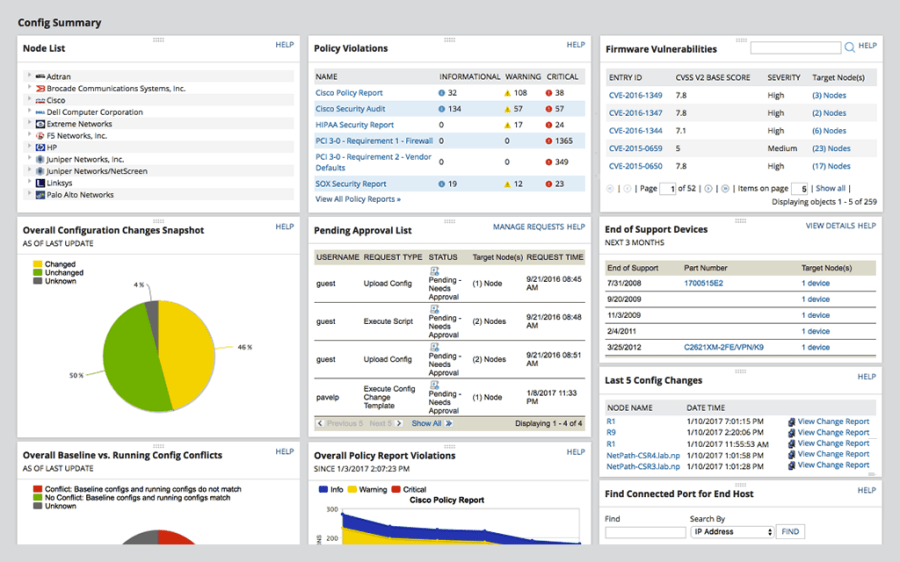
Solarwinds Network Automation Manager(NAM) –
Solarwinds Network Automation Manager (NAM) is an integrated network automation tool designed for highly scalable or enterprise networks. It provides full automation and management from a unified web-based console. (NAM) includes components of various network automation tools and operations management software for all your network deployments.
It includes some features of the Network Performance Monitor (NPM), Netflow Traffic Analyzer (NTA), User Device Tracker (UDT), Network Configuration Manager (NCM), IP Address Manager (IPAM), VoIP & Network Quality Manager (VNQM), and SolarWinds High Availability. The network engineer can configure certain network automation functions on NAM and let the tool monitor the availability, faults, and performance for all nodes and paths in your network.
Its key features include : analysing traffic and bandwidth and find hogs, monitoring and backing-up network devices automatically, deploying network configurations in bulk, automatic subnet discovery and IP scanning and monitoring network performance.
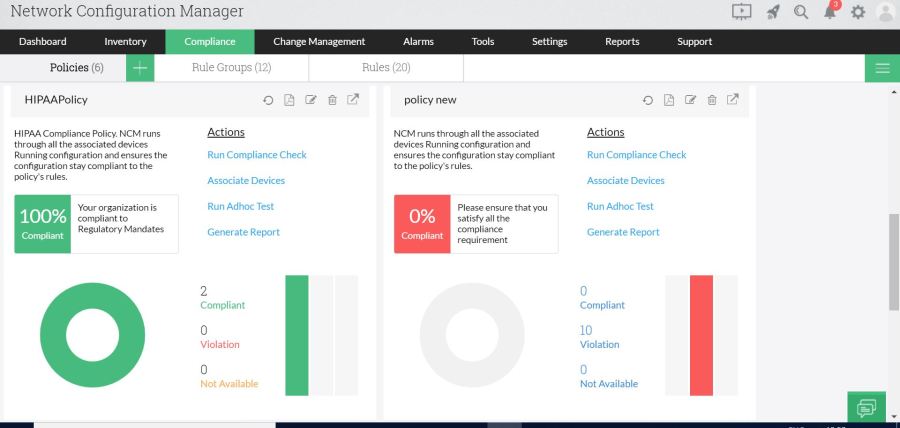
ManageEngine Network Configuration Manager (NCM) by ManageEngine is one of the most comprehensive software for network configuration, change, and compliance management. It supports multi-vendor networks with products from Cisco, NetGear, Fortinet, Juniper, HP, and more.
NCM can help you automate the management of the entire lifecycle of network device configurations. You can automate daily monotonous configuration tasks in bulk. Instead of going one by one, which generally would take a long time, you can apply a new configuration or changes to multiple devices. You can also schedule automatic configuration backups that might be useful in case of rollbacks.
Its key features include : automating new or edit configuration in bulk, network automation using Configlets, configuration backups, configuration change notifications and rollback actions.
Ansible (Tower) –
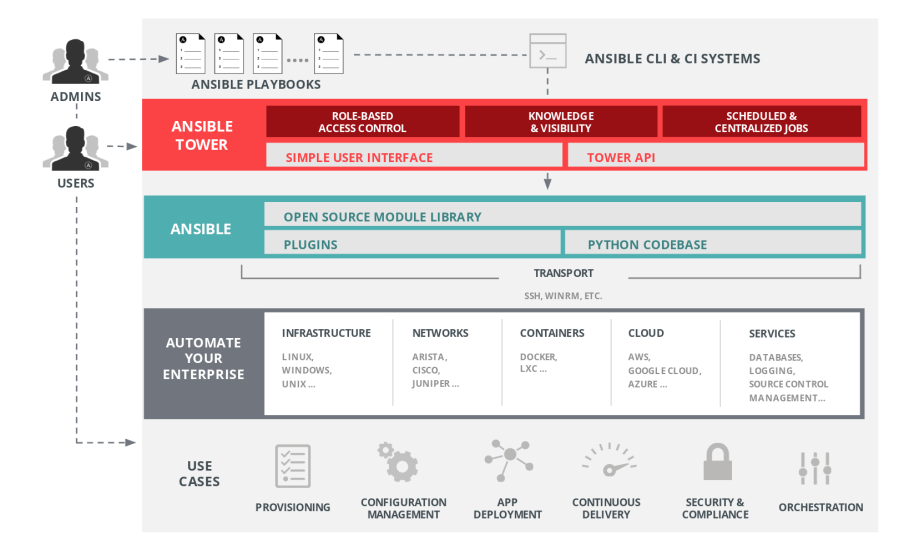
Ansible by RedHat, the simple automation framework, is definitely at the core of a lot of new networking DevOp solutions. It automates the configuration of servers and provides native support for legacy and open network infrastructure. Ansible is an open-source project built by the community. It is available for Linux/Unix-like OS and Windows.
To automatically configure servers, Ansible uses playbooks, which are ordered units of scripts (written in YAML) that define how a server should work and behave through the Ansible automation tool.
Ansible Tower is the enterprise web-based GUI tool that makes Ansible easy to use. The software is designed to be the central platform for all automation tasks. Ansible Tower helps network teams manage complex deployments.
Its key features include : leveraging the current network CLI commands to automate over 45 different networking vendors, between switches, routers, load balancers, and firewalls, provide automation for software-based controllers (SDN), automate interconnection of hybrid and multi-clouds.
Netmiko –
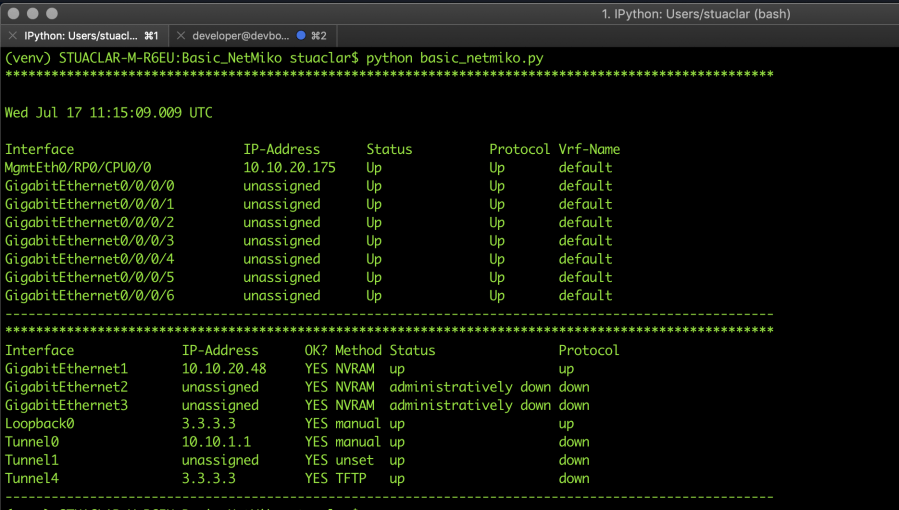
Netmiko is an open-source Python library based on the Paramiko SSH library. It allows easier management and connection of network devices through SSH. Netmiko improves the library of Paramiko by including support to a wide range of networking vendors and platforms, such as Arista EOS, Cisco ASA, HP Comware7, Juniper Junos, Linux, and more. The tool simplifies and automates the logging to a network device through SSH and executes commands.
Its key features include : establishing an SSH connection to network devices, execute “show” commands and retrieve the results, execute configuration commands, it supports a wide range of vendors and platforms.
NAPALM–
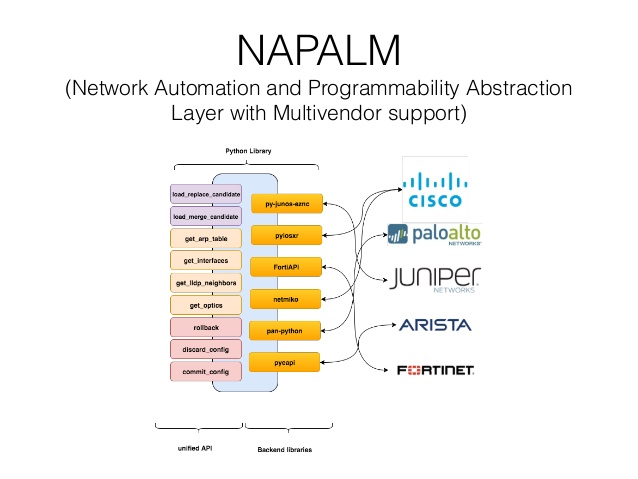
NAPALM (Network Automation and Programmability Abstraction Layer with Multivendor support) is a Python library that can interact with different network devices via a unified API. The software is cross-platform and open-source. It uses different technologies to connect to the network devices, execute configurations, and retrieves the output data. It can support different networking operating systems such as Arista EOS, Cisco IOS, Cisco IOS-XR, Cisco NX-OS, and Juniper JunOS.
Its key features include : connecting to single or multiple devices, executing commands automatically, replace, merge, and compare configurations, discarding or rollbacks configuration, retrieving and audit information.
Truesight Network Automation –
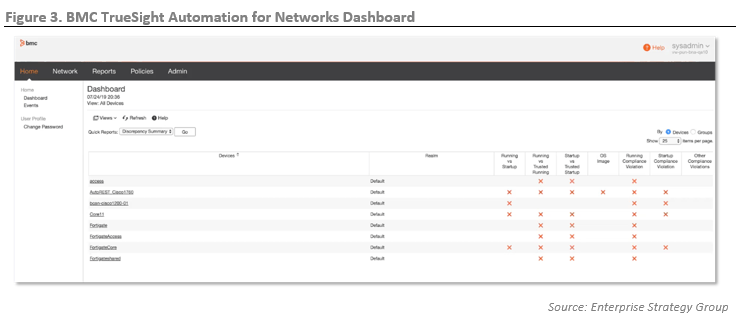
Truesight formerly known as BladeLogic, is now part of the BMC product portfolio. Truesight is an APM with AIOps (Artificial Intelligence Operations) capabilities. It is designed to improve the performance and security of hybrid-cloud environments at a cost-efficient price. TrueSight provides scalable and automated network configuration management capabilities. The software gives full control of the entire configuration across the network, from systems, routers, and firewalls. It can also be programmed to automatically keep track of changes in configuration and apply rollback in case of failure.
Its key features include : service-aware analytics, auto-scans and auto-backups, automatic audits and security compliance checks, patch and image update automation, capacity optimization.
Apstra OS–
Apstra OS (AOS) is referred to as a self-operating network, which automates the lifecycle of leaf-spine network switching. AOS supports multiple switches hardware vendors (Cisco, Juniper, Arista, and more) and operating systems (EOS, Junos, NX-OS, and more).
Apstra comes with a single console to automate your network. It decouples the network (software) from the underlying physical and virtual infrastructure. It works at the management plan to control switches or other devices through their open APIs.
ApstraOS ensures that network elements such as protocols, design, cabling, etc. work continuously. With AOS, you can create, edit, or remove leaf-spine devices, instantly across different network vendors. AOS also comes with closed-loop real-time validation and advanced data analytics.
Its key features include : automated L3 design and deployment with intra-rack virtual networks, operational analytics. Intent-Based Analytics (IBA), built-in Telemetry, NSX-T and vSphere Integration.
NetBrain Automation–
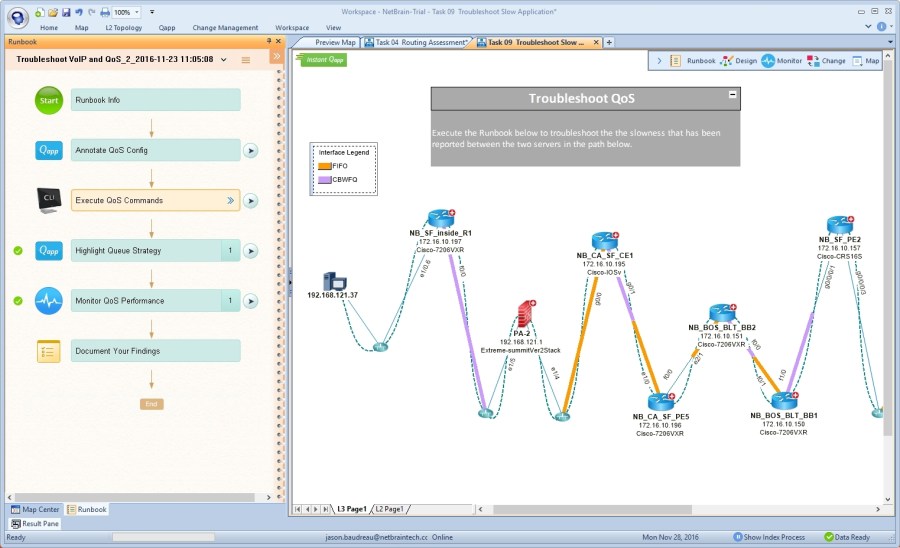
NetBrain is an adaptive network automation platform. It uses a single-pane-of-glass that shows all network data through mapping and visualization. The software also comes with a powerful search engine that allows you to look through all your network elements.
NetBrain performs an in-depth automatic network discovery to collect data from all network devices. It decodes multi-vendor networks and builds a digital representation of the network. The software creates a dynamic map to be used as a UI to all devices and to configure automation tasks. The software improves the device map experience by adding CLI automation and data from third-party network vendors through API.
Its key features include : automaticing network device inventorying, single-pane-of-glass and dynamic maps, viewing device’s CLI at the map-level, automating workflows with Executable Runbooks.
When the lock down was announced our whole educational system came to an abrupt stop. Now we had to depend on online apps and webinars to learn.
Until the lock down period was announced most of us were not even aware of the existence of such apps. By the time lock down was announced the fame for an app like Zoom, had won over the millions of people across the world. It was one of the popular apps used around the world to conduct meetings. It accommodated more than about 100 participants.
First times in online classes are always a headache because half of the people forget to turn on the audio and camera. Not only us but teachers also have hard time in finding different functions. Online classes are always an advantage in situations where classroom learning cannot take place but in many strong opinions it can never take over the idea classroom learning.
To the other side of online classes, it opens us to a world of disparities between the elite and the middle class and the poor. An online class eliminates the human connection that a face-to-face, in-house teaching environment provides. An online instructor cannot gauge the mood, involvement and engagement level of her students the way she can in a traditional lecture-based classroom.
There are a lot of problems with online learning. Most of the students will face difficulty in connecting with the teacher. Without a proper connection at home for internet, students will find difficulty in attending the classes. Proper 4G connection is need for the smooth conduct of meeting in Zoom. This creates a digital divide between the students. Not all students can afford a phone or not all will have a proper connection. This creates a differentiate between the haves and have nots.
Such a simple issue as this can really draw us attention over the issue of network and internet connections, but what most of us forget is in some states of India, internet connections have been cut off which makes it very hard for students in that are to attend class.
Zoom classes does not allow you to enhance your learning capacity. It doesn’t provide for any kind of learning other than the academics. Sometimes the app would crash and there would be a lag.
Most of the times when classes go on, the system gets lagged and create network problems due to which students wont be able to focus. Students are forced to sit in front of their phones for hours listening to lectures which can have a lot of effect on their eyes as well as their thinking capacity.
Sometimes classes are taken without giving any breaks in between, this can cut off the span of concentration of a student. One person can normally concentrate to max to max half an hour without any other thoughts barging in, with proper breaks in between it becomes easier to learn.
Taking all these facts into consideration we can come to the conclusion that online learning may not always be an alternative for classroom education. Being in touch with human beings and socializing with people is what develops a persons character.
Most of us learn from school, from what we see and hear we develop into better versions of ourselves. Being outside in the sun, playing in the mud, reading a book to bed etc adds up to the character of a child. In all places learning by experience matters.
Abdul Kalaam once said – “Love your job but NEVER fall in love with your company”.
Desperate times calls for desperate measures. At least that’s what some of the reputed, well known and no-so-known companies have done in the recent times, owing to the pandemic. Many a companies are trying to cope with the lashes of COVID-19 by cutting costs, eliminating positions and retrenching people. Positions that were once considered to be very crucial to the functioning of the business were just scraped off from the hierarchy and employees occupying those positions were handed a ‘good-bye’ note.
But there is a stark difference in how some of the companies decided to do so. In some companies, the CEO was very transparent in explaining why there is a necessity to lay off people and they felt extremely sorry while doing so. They wrote long, meaningful mails and they at least tried to empathise with the laid off employees. And then there are other companies who’s CEOs just mailed a short message conveying that they are being laid off without any note of sorry or explanation, forget about transparency. But whatever be the mode or the reason of laying off, we as employees should understand that it is best for business and instead of leaving on a bad note, we should make sure to leave with respect and on a good note.
There is no doubt that we might be feeling very smitten inside, but we should not let that feeling empower us to destroy everything that we have accumulated over the years. Now, one must be wondering how to do so amidst such emotional times. I would like to suggest a few ways by which one can leave on a good note even when things might have not worked in their way. Some of those suggestions are:
Try to not dwell on the negative emotions. At the time of lay off, one might feel very low about it, but try not to feed into the negative emotions. Instead of that, one should think about one’ achievements, successes and milestones at the company. Think about what was your best contribution and what worked for you and try to harvest on that.
Try to work out a plan to handover your work. Since one is working remotely, one must be very methodical and careful while handing over very confidential information such as clients’ list project reports and other such documents so that others’ can plan out the work. It is very okay to feel about withholding information, but one should not do so because one should understand that it is not the end of one’s career.
Draft a proper good bye mail. Draft a short and clear mail, intended to one’s colleagues, friends and other people in one’s office network. Make sure to include your contact details – mostly phone number and personal mail id so that people can stay in touch with you. Also one should not forget to give a note of thanks to everyone, in spite of all differences. Such a habit will definitely help one in one’s career while searching for other jobs.
Try to build and amend bridges at the time of leaving. One should talk to the close colleagues, confidantes and the network of peers and mentors, so that they can assist to find a new job in this landscape.
These are the very few steps one should take to ensure that even though things did not quite work out well for you, there is always a way to make things better at some other place.






.jpg)




 Eduindex
You must be logged in to post a comment.