Mastering Laravel Eloquent Joins: A Comprehensive Guide

Daily writing prompt
List your top 5 grocery store items.

Laravel Eloquent is a powerful ORM that simplifies database operations in PHP applications. Understanding Eloquent joins is crucial for developers to create efficient database interactions and craft high-performance applications. In the world of Laravel, Eloquent relationships are a fundamental concept that can dramatically streamline the process of working with database relations. In this article, we will delve into the intricacies of Eloquent joins, exploring their types, use cases, and best practices for optimizing performance and maintainability. Keep reading to become proficient in leveraging Eloquent joins for your Laravel projects.

Advanced Eloquent Join Techniques and Performance Optimization

When working with large datasets, optimizing Laravel Eloquent joins is crucial for improving performance. Subquery joins allow you to filter or sort data before joining, which reduces the volume of data processed. Additionally, indexing foreign keys and frequently used columns can significantly speed up query execution, while query caching can prevent unnecessary repetitive operations.

To further boost efficiency, leverage Laravel Eloquent join capabilities to create more specific SQL queries with raw expressions. While eager loading can be useful, it may lead to memory overhead if overused. Instead, lazy loading can load related models on demand, balancing performance with data availability for smoother application performance.

Exploring the Basics of Laravel Eloquent Relationships

Eloquent relationships in Laravel are syntaxes used to define associations between database tables, allowing developers to define how different models interact. These relationships are defined within the Eloquent model, allowing for methods like hasMany and belongsTo, which simplify retrieval and manipulation of related records without writing cumbersome SQL queries. These relationships serve as the foundation for all types of joins within the framework.

Eloquent also allows eager loading, avoiding the N+1 query problem by preloading related models, reducing the number of queries sent to the database and improving application performance. Developers can use these relationships to write clearer and more fluent code. Eloquent also handles complex scenarios like many-to-many relationships, using pivot tables for easy establishment and operation.

Delving into the Types of Eloquent Joins and Their Use Cases

Laravel Eloquent provides various join operations, including inner, left, right, and cross joins. Inner joins retrieve records with matching values in both tables, ideal for direct relationships between two models. Left and right joins retrieve all records from one table and matching records from another, including null if no match is found.

Left joins are useful for optional relationships like fetching all products and reviews. Cross joins produce Cartesian products between two tables, combining each row of the first table with all rows in the second. Developers must understand these joins effectively to address different application requirements.

Troubleshooting Common Issues with Laravel Eloquent Joins

Eloquent joins are a powerful tool for data management, but they can also present challenges. One such issue is the ‘N+1 query problem’, where an additional query is executed for each primary record to retrieve related records. To minimize this, use eager loading correctly. Column name conflicts can also occur when joining tables with identical column names. To avoid this, use table aliases and select columns explicitly.

Eloquent’s selectRaw method can be used to define output precisely. Incorrect relationship definitions can cause unexpected results or errors. Verify that foreign keys and local keys are properly matched. If inconsistencies arise, review model definitions. Profiling queries can reveal inefficient joins or indexing issues, allowing developers to quickly identify and address performance bottlenecks.

Leveraging Eloquent Join Best Practices for Clean and Maintainable Code

When implementing Eloquent joins, it’s essential to follow best practices, such as consistently naming database tables and columns to follow Laravel’s convention-over-configuration paradigm. Breaking complex joins into scopes can make queries more readable and reusable, promoting a cleaner code structure and easier maintenance. Avoid over-engineering Eloquent relationships, as simplifying them can lead to easier-to-understand and more maintainable code.

Strive for a balance between performance and readability to ensure a codebase is efficient and approachable. Documentation is crucial for maintainable code, especially when dealing with complex join operations and relationships. It clarifies intent and helps fellow developers navigate and extend the codebase confidently.

Overall, mastery of Laravel Eloquent joins can lead to the development of robust and efficient applications. By understanding the different types of joins and their use cases, employing advanced techniques for optimization, troubleshooting common issues, and adhering to best practices, you can ensure that your code remains clean, maintainable, and performant. With the knowledge and tools accessible through Eloquent, Laravel developers are well-equipped to tackle the challenges of database management in their web applications.

How Does an Engineer Create a Programming Language?

Besides being a software engineer, Marianne Bellotti is also a kind of technological anthropologist. Back in 2016 at the Systems We Love conference, Bellotti began her talk by saying she appreciated the systems most engineers hate —”messy, archaic, duct-tape-and-chewing-gum.” Then she added, “Fortunately, I work for the federal government.”

At the time, Bellotti was working for the U.S. Digital Service, where talented technology workers are matched to federal systems in need of some consultation. (While there, she’d encountered a web application drawing its JSON-formatted data from a half-century-old IBM 7074 mainframe.)

The rich experiences led her to write a book with the irresistible title “Kill It with Fire: Manage Aging Computer Systems (and Future Proof Modern Ones).” Its official web page at Random House promises it offers “a far more forgiving modernization framework” with “illuminating case studies and jaw-dropping anecdotes from her work in the field,” including “Critical considerations every organization should weigh before moving data to the cloud.”

Kill it With Fire by Marianne Bellotti - book cover

Bellotti is now working on products for defense and national security agencies as the principal engineer for system safety at Rebellion Defense (handling identity and access control).

But her latest project is a podcast chronicling what she’s learned while trying to write her own programming language.

“Marianne Writes a Programming Language” captures a kind of expedition of the mind, showing how the hunger to know can keep leading a software engineer down ever-more-fascinating rabbit holes. But it’s also an inspiring example of the do-it-yourself spirit, and a fresh new perspective on the parsers, lexers and evaluators that make our code run.

In short, it’s a deeply informative deconstruction of where a programmer’s tools really come from.

Going Deep

In one blog post, Bellotti invited listeners to “start this strange journey with me through parsers, grammars, data structures and the like.”

And it is a journey, filled with hope and ambition — and a lot of unexpected twists and turns. “Along the way, I’ll interview researchers and engineers who are active in this space and go deep on areas of programming not typically discussed,” the podcast host promised. “All in all,  I’m hoping to start a conversation around program language design that’s less intimidating and more accessible to beginners.”

But the “Marianne Writes a Programming Language” podcast also comes with a healthy dose of self-deprecation. “Let’s get one question out of the way,” her first episode began. “Does the world really need another programming language? Probably not, no.” But she described it as a passion project, driven by good old-fashioned curiosity. “I have always wanted to write a programming language. I figured I would learn so much from the challenge.”

“In an industry filled with opinions, where people will fight to the death over tabs -vs.- spaces, there isn’t much guidance for would-be program language designers.”

—Marianne Bellotti, software engineer and podcast host

Fifteen years into a sparkling technology career, “I feel like there are all these weird holes in my knowledge,” Bellotti told her audience. And even with the things she does know — like bytecode and logic gates — “I don’t have a clear sense of how all those things work together.”

In the podcast’s third episode, Bellotti pointed out that, “for me at least, the hardest part of learning something is figuring out how to learn it in the first place.” She discovered a surprising lack of best-practices documents, she wrote in an essay in Medium. “In an industry filled with opinions, where people will fight to the death over tabs -vs.- spaces, there isn’t much guidance for would-be program language designers.”

Still, her podcast’s first episode showed the arrival of those first glimmers of insight. “Even knowing very little upfront, I had a sense that in order for a programming language to work, there had to be some sense of cohesion in its design.”

Where to Begin?

Her Medium post cited a 2012 article titled “Programming Paradigms for Dummies: What Every Programmer Should Know,” which offers a taxonomy of language types based on how exactly they’re providing their abstractions. That article apparently got her thinking about how exactly a programming language helps communicate the connections that exist between its various data structures — which led to more insights. (In a later podcast, Bellotti even says “technology suggests to its user how it should be used.”)

“Eventually I came to my own conclusions,” she wrote in her Medium article. To be successful at creating her own language, she realized that she needed to think of  programming paradigms like object-oriented or functional programming “as logical groupings of abstractions and be as intentional about what is included and what isn’t.”

Bellotti is also trying to design a language that will work for her specific needs: to know how likely certain types of problems are in a given system, to achieve model resilience. But on her first podcast episode, Bellotti acknowledged that she still had to begin by typing, “How do you design a programming language” into Google —and was surprised by how little came up. (Although she did discover “there’s a whole world of obscure experimental languages that appear in research papers, rack up a host of citations, and never touch an actual computer other than their inventor’s.”)

“I feel like I’ve been struggling to hang pictures around my home and one day someone knocks on my door and introduces me to the hammer,”

—Marianne Bellotti, software engineer and podcast host

So where to begin? Avoiding the standard dry collegiate textbooks like “Compilers: Principles, Techniques, and Tools,” she instead found her way to the book Writing an Interpreter in Go, a book which by necessity also created its own programming language (a modified version of Scheme called Monkey) for its interpreter.

That book’s author, Thorsten Ball, became her podcast’s first guest, explaining that his language was not so much designed as experimented into existence. (Later, other people suggested something similar — that Bellotti “pick something you like in another language and copy the implementation to start, because figuring out all the edge cases from scratch is really hard.”)

In that first podcast episode, Bellotti explained her concern that “tiny little design decisions I don’t even realize I’m making could have dramatic impacts… it does seem to be the case that programmers create languages without being able to fully anticipate exactly how they will be used or how technology will change around them.”

Things Get Complicated

There are moments where it all sounds so simple. (“What you’re doing when you write a programming language is actually writing a series of applications that take string input and translate it into something the machine can execute.”)

But things get complicated pretty quickly, and by episode three Bellotti started to see a pattern: “Confronting what feels like a tidal wave of information is becoming an all too familiar feeling on this project.” Yet, while considering a need for her language’s source code-interpreting parser, she realized that parsers can be auto-generated — as long as she can supply that tool with the necessary grammar rules.

“I feel like I’ve been struggling to hang pictures around my home and one day someone knocks on my door and introduces me to the hammer,” she told her podcast audience.

She ends up talking to a linguist who studied under Noam Chomsky, who refers her to another linguistics professor, who begins by discussing whether language can be learned through the brute-force assimilation of machine learning, and ends up explaining why Chomsky’s “context-free grammar” ultimately became the basis for programming languages and compilers.

But there are resources to discover. Along the way, Bellotti found a Reddit forum about programming language design. (“This subreddit is full of great stories and people will give detailed explanations and encouragement, which is rare on the internet these days.”) She’s also found a forum for people building Domain Specific Languages.

By December, she’d received a comment from a grateful listener who was also writing their own programming language, and was glad to find a relevant podcast. And Bellotti acknowledged in a response that her whole journey “has been so much fun so far.”

Progress is clearly being made. By episode 12, Bellotti considered how hard it would be to add modules to her language. (“From my vantage point, being able to split a system specification into smaller parts means you get to reuse those parts and build progressively more complex systems that are in easily digestible chunks.”) And there’s also already an empty repository on GitHub that’s waiting expectantly for the code to arrive.

Then, in mid-April Bellotti announced that episode 12 would be the last one “for a while. I’ve made some design decisions that I feel really good about, but it’s clear that the only way to validate them is to write code and try things out.”

She’s also spending some time researching how to optimize her compiler, “But really, I just need to just be heads-down, hands-on-a-keyboard for a while on this.”

And so, the podcast has entered a productive hiatus, leaving listeners with this tantalizing promise.

“I’ll be back in a couple of months to let you know how that went.”

Developers dread these programming languages, but which one pays the most?

A portion of the report ranks programming languages by their correlating developer salary. If you’re looking to get paid well, it might be worth your time to learn Clojure and maybe not Dart

office.jpg
Image: GettyImages/RyanJLane

On Monday, Stack Overflow published the results of its 2021 Developer Survey. The findings highlight a range of sentiments and economic information such as developer attitudes toward specific “dreaded” languages and how much certain programming languages pay on average. So, which programming languages do developers love, and which one should you learn if you want to get paid top dollar?

Top programming languages: Loved, hated and wanted

Overall, the results are based on a global survey conducted in May and June of this year involving more than 83,000 software developers. Rust topped the list in terms of languages developers love versus the options they dreaded, with 86.98% of responses saying they loved Rust compared to the 13% of responses who dreaded it. Clojure ranked No. 2 in this regard with 81% of respondents saying they loved the language versus 18.88% who dreaded it.

Interestingly, there’s a marked drop-off between the top two and the rest of the field. TypeScript ranked third with 72.73% of respondents saying they loved the language versus 27.27% who dreaded it. In order, Elixir, Julia, and Python round out the top six.

On the other end of the spectrum, Cobol ranked at the least loved programming language, with 84.21% of respondents saying they dreaded it, versus 15.79% who loved it. In order, VBA, Matlab, Objective-C, Groovy and Assembly sat at the bottom of the list as the top six most dreaded programming languages.

A portion of the report identifies the programming languages developers wanted to have in their arsenal. Stack Overflow determined these languages based on the percentage of “developers who are not developing with the language or technology but have expressed interest in developing with it.” Python topped the list by a wide margin with 19.04% of respondents wanting the programming language, followed by runner-up TypeScript (15.29%). In order, JavaScript (14.59%), Go (14.54%), Rust (14.09%) and Node.js (11.9%) round out the top six most wanted programming languages.

“Rust is the “most loved” language for the sixth straight year, and Python was the “most wanted” for the fifth straight year. Though it’s not as “new” as Rust, Python is easy to learn and applicable across industries. It’s one of the most widely implemented languages, and programs tend to be clear and readable,” said Khalid El Khatib, SVP of marketing communications at Stack Overflow.

Top paying programming languages

A section of the report ranks programming languages by their correlating developer salary. To determine this figure, the survey asked respondents to list their total compensation. Clojure topped the list at $95,000 nearly $14,000 higher than runner-up F# ($81,037). Elixir and Erlang both garnered the same pay ($80,077) followed by Perl and Ruby, with both also earning the same pay ($80,000). On the economic flip side, Dart sat at the bottom of the list at $32,986, just a few grand below PHP ($38,916).

How to get help in the programming forum

When we start our coding journey we used to get stuck at many places and e often want to get rid of it soon as possible but not many of us are blessed with some mentor who guides us through this journey but there comes to the programming forums like stack overflow or stack exchange where programmers help each other with there piece of code. And it is not only exclusive to beginners, even veterans get help from here and help in exchange!  But there are some manners or you can see unwritten rules between programmers on how to get help . Let us jump into it! :

Things to remember while getting help

Photo by Tim Gouw on Pexels.com
  1.  Whatever problem you have written it in a proper detailed manner. like specifying what problem/ error you are getting, what you are trying to do etc, and don’t forget to mention what you have already tried solving! because it saves both your and your helper’s time ! 
  2. Don’t ever forget to add some relevant screenshots/code of the problem! it helps you get helped fast! for codes use snippets! Or Pastebin!
  3. always gives more details whenever helpers ask for it! Sometimes what happens is we think this much information is enough to get help but it is oftentimes not true. and never think bad about it! helpers not trying to insult you or anything it’s always in a good means !There are some such cases when people get offended easily ! tip: don’t!
  4. So what happens quite some time that people get helped but they came across second follow up questions or they didn’t get something from the answer maybe like because of lack of knowledge/information. so they often think the helper may help them with this one too as they did before but remember one thing they are not obliged to answer your every question! and don’t worry someone else from somewhere helps you with that! so be little patience! helpers doesn’t get paid they doing this voluntary out of love/ passion for this they have, so be respectful towards them that they are trying to help you take out so valuable time from their life! with patience here comes our next point!
  5. so this point is very important, especially for beginners! because what most beginners do at these forums is they ask questions and see nobody replying to them in like a few minutes they leave it and go back to their other work. This is quite unprofessional behaviour. just let us suppose when you left the forum and someone came helping you and in between he wants a few more info regarding the question of what he is supposed to do wait for you > No! He is not obliged to do so by seeing such behaviour, the unresponsiveness many others helpers who may help in the case will not even try to help because they presume you may have solved it or don’t need help anymore. which is not true in your case !  that’s why it is advised to ask your question in your free time or when you can easily reply to their follow-up questions regarding your question! just have little patience young learners!
  6. last but not least! it is actually the first point, sort of saying! why? Because of most of the questions we come across, there are more chances that many others may also encounter it somewhere some time ago ! and get helped with it too! So the thread or the question related to most of the problem already exists in these forums or on any other website ! so our first step should be to simply “GOOGLE”, very important I repeat very importantly! as it will help others and yourself to save time and waste it on already resolved queries . The thing is many peeps don’t even put this much effort and interrupt the flow at these quality forums! And yes people are very concerned and strict about it so good luck!

so, you especially don’t worry if you have read and followed me all the way to this ! Now I suppose you know now what to do when you are stuck at some tricky code or silly one 🙂 best of luck 

What Do you think about this article pls tell me in the comments! and don’t forget to like it , sayonara 🙂

Basics of C++ Programming

What is C++ ?

is a general-purpose programming language created by Bjarne Stroustrup as an extension of the C programming language, or “C with Classes”. The language has expanded significantly over time, and modern C++ now has object-oriented, generic, and functional features in addition to facilities for low-level memory manipulation. It is almost always implemented as a compiled language, and many vendors provide C++ compilers. C++ was designed with an orientation toward system programming and embedded, resource-constrained software and large systems, with performance, efficiency, and flexibility of use as its design highlights. C++ has also been found useful in many other contexts, with key strengths being software infrastructure and resource-constrained applications,including desktop applications, video games, servers (e.g. e-commerce, web search, or databases), and performance-critical applications (e.g. telephone switches or space probes).

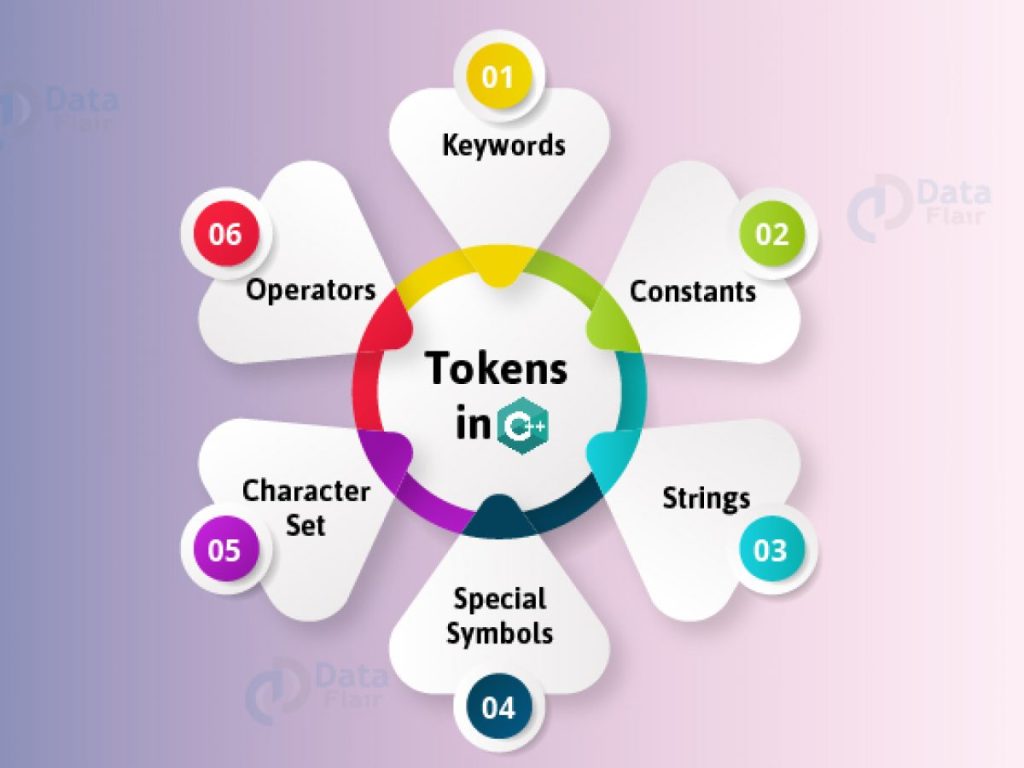
Tokens in C++

  1. Identifiers: Identifiers are names given to different elements such as variables,arrays, structures, functions, classes, objects etc.It should not be keywords
  2. Keywords: These are reserved words used for specific purpose in a program. Keywords have fixed meaning, and its meaning cannot be changed.
  3. Constants:
  4. Constants are like a variable, having fixed value . Their value never changes during execution of program once they are defined.
  5. Strings: A sequence or a set of characters is known as a string.
  6. Operators: C++ operator is a symbol that is used to perform mathematical or logical operations.

Keywords in C++

asm continue float new static unsigned
auto default for private struct using
bool delete friend protected switch virtual
break do goto public template void
case double if register this volatile
catch else inline return throw wchar_t
char enum int short try while
class extern long signed typedef
const export namespace sizeof union

Datatypes in C++

Sr. No. Data Type Category Data Types
Built-in Data Types char, wchar_t, int, long, float, double, long double
Derived Data Types Array , Pointer
User-defined data types Structure, Union,  Class and Enumerated
4Data Qualifiers / Modifiers short, long , signed , unsigned

Operators in C++

Sr. No. Type of operators Operators
Arithmetic operators + – * / %
Unary operators – ++ – –
Relational operators < <= > >= == !=
Logical operators ! || && 
Assignment operators = += -= *= /= %=
Conditional operator ? :
Bitwise operators | Bitwise OR & Bitwise AND ^ Bitwise Ex-OR ~ 1’s complement << Shift Left >> Shift Right

Variables in C++

•Variables are the name of memory locations that are allocated by compilers, and
the allocation is done based on the data type used for declaring the variable.

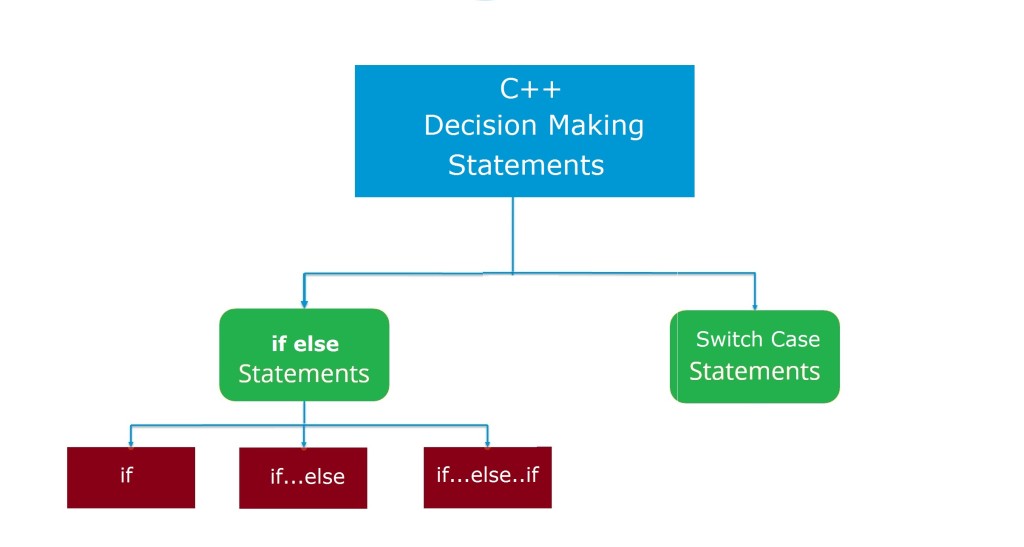
Decision Making Statements in C++

  1. if statement
  2. if-else statement
  3. Nested if-else statement
  4. else-if ladder statement
  5. switch statement

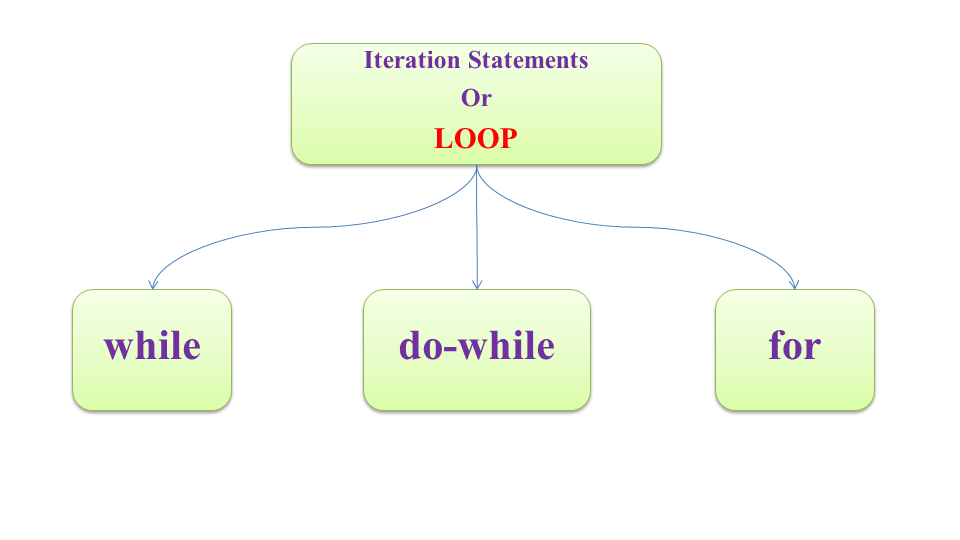
Looping Statements in C++

  1. while statement
  2. do-while Statement
  3. for statement
  4. Nested Loops

Control Statements in C++

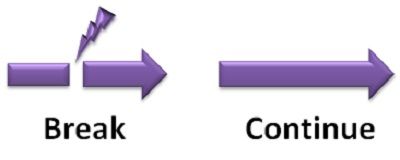
  1. break statement
  2. continue statement

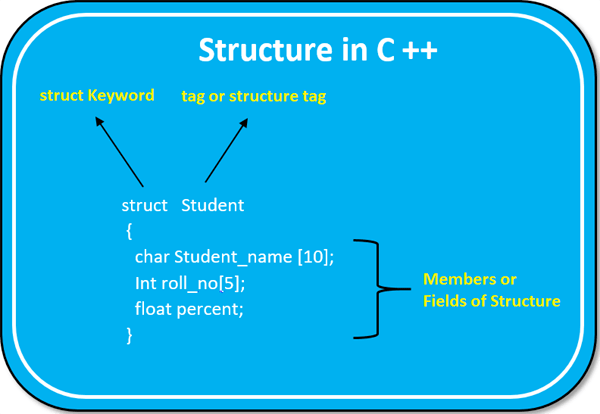
Structures in C++

•A set or a group of data items of different data types defined in a single
unit is known as a structure.
•A structure is a convenient tool for handling a group of logically related data items.
•A structure is a user defined data type
•Once the structure type has been defined, it is easy to create variables of that type
using declarations

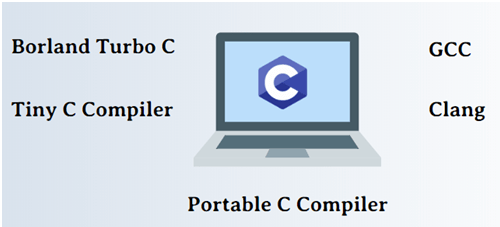
C++ Compilers

  1. MinGW / GCC
  2. Borland C++
  3. Dev C++
  4. Embracadero
  5. Clang
  6. Visual C++
  7. Intel C++
  8. Code Block

Programming Languages that you must learn [part 2]

[By Bhoomika Saini]

Photo by Karolina Grabowska on Pexels.com

If you’re new to the field of software development, the toughest part of learning programming is deciding where to begin. There are hundreds of programming languages in widespread use, each with its own complexities and idiosyncrasies. As you begin your journey as a software developer, you’ll start to discover which programming language will be most suitable for you, your interests, and your career goals.

When deciding which programming language to learn, it’s important not to get caught up in flashy trends and popularity contests. The best programming languages to learn in 2021 are likely the same ones that were best to learn in 2017 and 2018, and that will continue to be true for the next several years as well.

Although the field of computer programming changes rapidly, the languages that we’ve discussed above have a great deal of staying power. By learning one or more of these languages, you’ll be in an excellent position not only for this year but in the years to come.

In the list below, we go over the best and most in-demand programming languages for many of the most common use cases including web development, mobile development, game development, and more.

Scala

If you’re familiar with Java—a classic programming language in its own right—it’s worth checking out its modern cousin, Scala. Scala combines the best features of Java (such as its Object-Oriented Structure and its lightning-fast JVM runtime environment) with a modern twist.

As a functional programming language, Scala allows engineers to elevate the quality of their code to resemble pure math. Scala allows for concurrent programming, allowing complex procedures to be executed in parallel. Furthermore, it is a strongly typed language. Engineers can create and customize their own data types, allowing them to have the peace of mind knowing entire swaths of bugs are impossible at runtime.

Elm

One of the youngest languages on our list, what began as a Harvard student’s thesis has now grown to become a point of passion for front-end developers around the world.

Elm compiles to JavaScript, making it ideal for building fast-executing UIs with zero errors at runtime. Elm is a functional programming language, allowing developers to create client-side interfaces without the declarative trappings of HTML and CSS.

Ruby

Ruby is another scripting language that’s commonly used for web development. In particular, it’s used as the basis for the popular Ruby on Rails web application framework.

Beginners often gravitate toward Ruby because it has a reputation for having one of the friendliest and most helpful user communities. The Ruby community even has an unofficial saying, “Matz is nice and so we are nice,” encouraging members to model their kind and considerate behavior on Ruby’s chief inventor Yukihiro Matsumoto.

In addition to the active community and its straightforward syntax, Ruby is also a good language to pick up thanks to its association with great tech businesses. Twitter, Airbnb, Bloomberg, Shopify, and countless other startups have all built their websites using Ruby on Rails at some point.

C#

Like C++, C# (pronounced C Sharp) is a general-purpose, object-oriented language built on the foundations of C. It was originally designed by Microsoft as part of its .NET framework for building Windows applications.
C# uses a syntax that’s similar to other C-derived languages such as C++, so it’s easy to pick up if you’re coming from another language in the C family. C# is not only the go-to for Microsoft app development, but it’s also the language mobile developers use to build cross-platform apps on the Xamarin platform.

Additionally, anyone who is interested in VR development should consider learning C#. C# is the recommended language for building 3D and 2D video games using the popular Unity game engine, which produces one-third of the top games on the market.

HTML

What this language is used for: 

  • Web documents 
  • Website development 
  • Website maintenance

HTML stands for Hypertext Markup Language. Don’t let the complicated-sounding name fool you, though; HTML is one of the most accessible stepping stones into the world of programming. 

Technically, HTML is a markup language, which means that it is responsible for formatting the appearance of information on a website. Essentially, HTML is used to describe web pages with ordinary text. It doesn’t have the same functionality as other programming languages in this list and is limited to creating and structuring text on a site. Sections, headings, links and paragraphs are all part of the HTML domain. 

Rust

Rust is a bit of an upstart among the other languages on this list, but that doesn’t mean it’s not a valuable language to learn. Stack Overflow’s 2020 Developer Survey found that Rust was the most loved programming language among developers for the fifth year in a row, with 86.1 percent of Rust developers saying that they want to continue working with it.

Developed by the Mozilla Corporation, Rust, like C and C++, is intended primarily for low-level systems programming. What Rust adds to the mix, however, is an emphasis on speed and security. Rust emphasizes writing “safe code” by preventing programs from accessing parts of memory that they shouldn’t, which can cause unexpected behavior and system crashes.

The advantages of Rust mean that other big tech companies, such as Dropbox and Coursera, are already starting to use it internally. While it may be a bit more difficult to master than other beginner languages, Rust programming skills are likely to pay off handsomely, as the language’s popularity will only continue to rise in the near future.

CSS

What this language is used for: 

  • Web documents 
  • Website development 
  • Website design

CSS, or cascading style sheets, is usually applied in conjunction with HTML and governs the site’s appearance. While HTML organizes site text into chunks, CSS is responsible for determining the size, color and position of all page elements.  

CSS is convenient, too; the cascading part of the name means that an applied style will cascade down from parent elements to all children elements across the site. This feature means that once users determine aesthetics for the main parent, they won’t have to manually repeat their code across a website. Moreover, the delegation of site organization to HTML and aesthetics to CSS means that users don’t have to completely rewrite a web page just to change a color. 

CSS is an approachable language that allows beginning programmers to dip their toes in the metaphorical coding pool. If you’re new to coding, there’s no reason not to learn CSS before tackling more complex languages!

Perl

What this language is used for:

  • System administration 
  • GUI development 
  • Network programming

Perl isn’t the most commonly used language on the market. In fact, just 3.1 percent of developers used it in 2020, and it didn’t even make Stack Overflow’s commonly used languages list for 2019. However, we are recommending it for a reason. If you’re already well into your career, learning Perl could significantly boost your earnings potential. 

Developers who know Perl tend to make 54 percent more than the average developer (PDF, 2.4MB). That said, it is worth noting that most of the people who know these are senior developers, who tend to make more at a baseline — thus, attempting to quantify the “bonus” that a programming language provides may be somewhat tricky. That said, learning a language like Perl may still make a junior developer better suited for a promotion or raise. 

The Practical Extraction and Report Language — or Perl, for short — is a scripting language that is commonly used to extract information from a text file and create a report. 

While many programming languages are compiled languages — wherein a target machine translates the program — Perl is an interpreted language, wherein a third “interpreting” machine locates the code and executes a task. Usually, interpreted programs require more CPU, but because Perl is such a concise language, it creates short scripts that can be processed quickly. 

Basic Concepts of Object Oriented Programming

What is Object Oriented Programming?

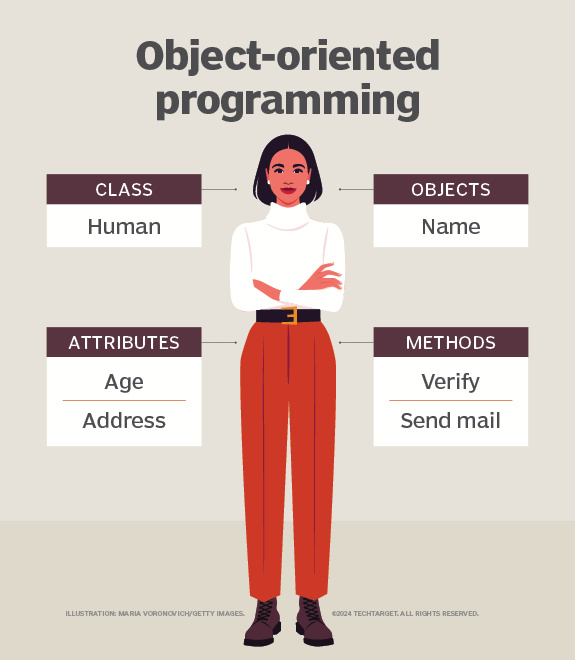
Object-oriented programming (OOP) is a fundamental programming paradigm used by nearly every developer at some point in their career. OOP is the most popular programming paradigm and is taught as the standard way to code for most of a programmers educational career. OOP focuses on the objects that developers want to manipulate rather than the logic required to manipulate them. This approach to programming is well-suited for programs that are large, complex and actively updated or maintained.

Example

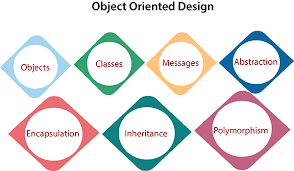
Following are the Basic Concepts Of OOP

  1. Objects
  2. Classes
  3. Data Encapsulation
  4. Data Abstraction
  5. Inheritance
  6. Polymorphism
  7. Message Passing
  8. Dynamic Binding

1. Object

•Objects are the basic run-time entities in the object-oriented system.
•They may represent a person, a place, a bank account, a table of data etc.
•They may also represent user-defined data such as vectors, time and lists.
•Programming problem is analyzed in terms of objects and the nature of
communication between them.
•Objects take up space in the memory and have an associated address
•Each object contains data and code to manipulate the data

2. Class

•Class is defined as an abstract data type characterized by a set of properties
(attributes and functions) common to its objects
•Class is a user defined data type for object
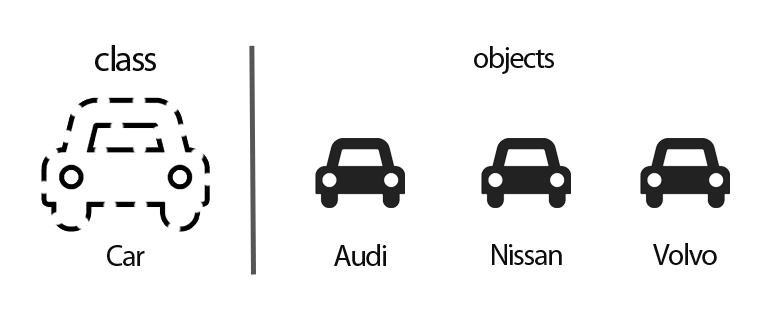
•Objects are the variables of the type class
•Thus class is a group of objects of similar type
•e.g. Mango, apple, pineapple, orange are objects of class Fruit
•Class is defined first and then objects are created of the type class

3. Data Encapsulation

•The fundamental idea behind OOP approach is to combine the data and
functions operate on that data, into a single unit
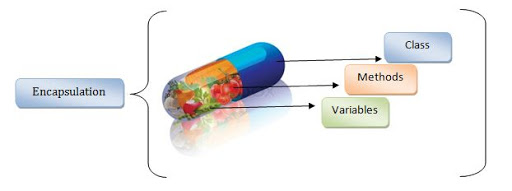
•The wrapping up of data and functions into a single unit (called class) is
known as encapsulation
•The data is not accessible to the outside world
•The encapsulation (protection) of Data from direct access by outside
functions in a program is called Data hiding or Information hiding

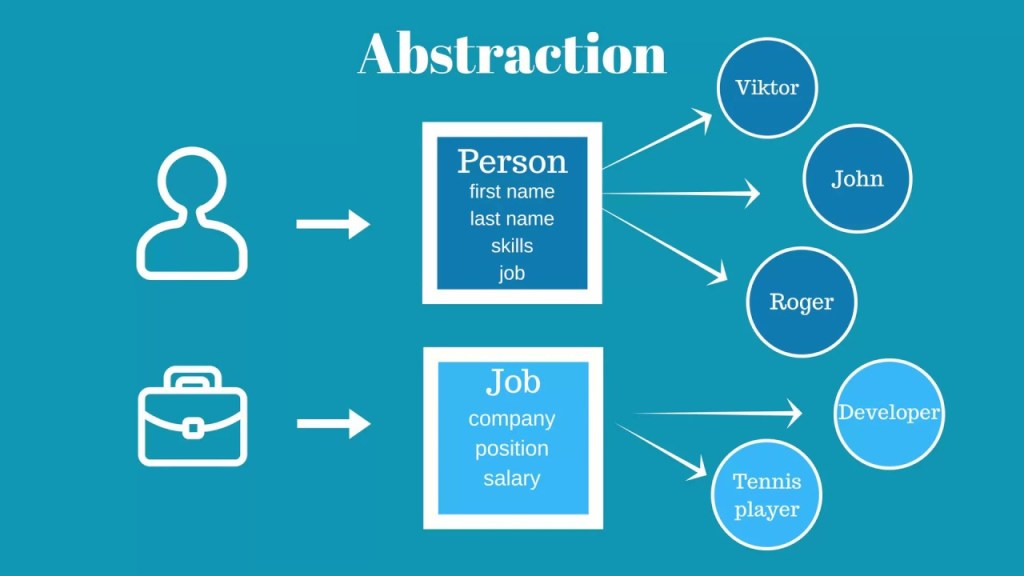
4. Data Abstraction

•Abstraction refers to the act of representing essential features without
details
•Abstraction is also defined as hiding an implementation details from user
•Classes use the concept of data abstraction and hence they are also known
as Abstract Data Types (ADT)
•Classes are defined as a list of abstract attributes such as size, weight, cost,
and function to operate on these attributes

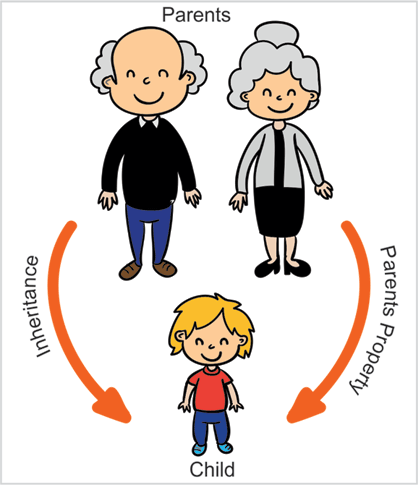
5. Inheritance

•Inheritance is the process by which objects of one class acquire the
properties of objects of another class
•In OOP, the concept of inheritance provides the idea of reusability
•Reusability allows to add additional features to an existing class without
modifying it
•It is possible by defining a new class from the existing class
•The new class will have combined features of both the classes
•The mechanism of deriving a new class from existing class is called as
Inheritance

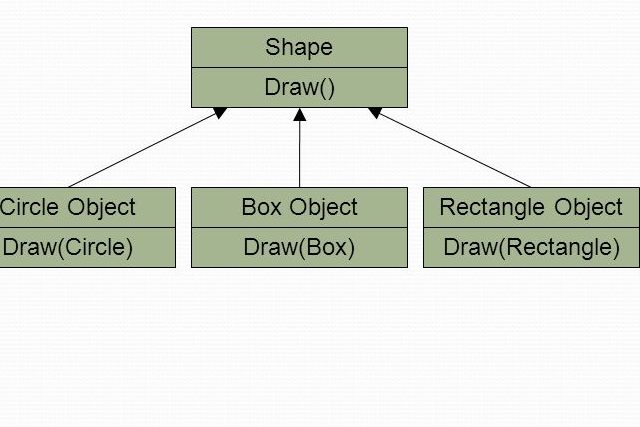
6. Polymorphism

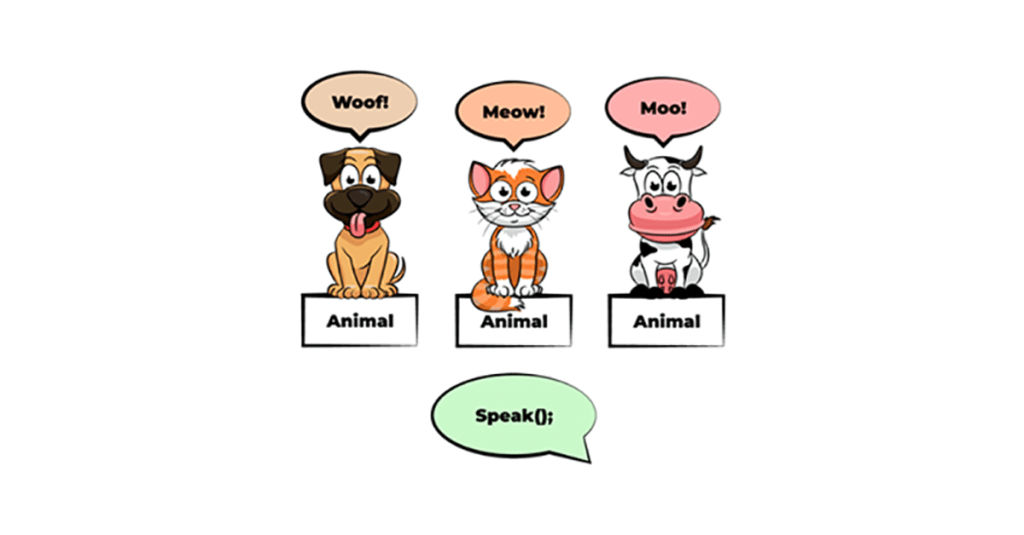
•Polymorphism means the ability to take more than one form
•An operation may exhibit different behavior in different instances and
this behavior depends upon the types of data used in the operation
•Polymorphism can be implemented using function overloading,
function overriding and operator overloading
•It allows the objects with different internal structures to share the
same external interface

In the above example all animals are performing the same task of speaking but it is different for every animal.

7. Message Passing

•The Objects communicate with one another by sending and receiving
information (Messages)
•A message for an object is a request for execution of a function
•Message passing involves specifying the name of the object, the name of
the function and the information to be sent

8. Dynamic Binding

•Dynamic binding means that the code associated with a given function
call is not known until run-time.
•The code to be executed is selected at the run-time
•The same function executes different code dynamically depending on
data entered at run-time
•It is associated with polymorphism and inheritance.
•A function call associated with a polymorphic reference depends on the
dynamic type of that reference.

RESOURCES FOR PROGRAMMING

Before starting I would like to thank you for all your support and help please see my other articles about coding and how to learn it .Well, starting with computing becomes really tough, especially because nobody knows where to. As mentioned earlier, C++ may be a good start. it’s an honest language with various applications, and is accepted in most programming contests. Python is another good language for beginners, but its easy and possesses its demerits as a primary language(you will find it tough to maneuver to C++ if you recognize Python as your maternal language , whereas learning Python after C++ is trivial).
1. Find a course on C++.Start with Bucky’s C++ tutorials. they’re easy to know and to the purpose . If you watch and practice 2-3 videos each day , then you’ll easily finish it in 1 month. confirm you implement everything taught either on Ideone or on your Computer’s IDE. the primary video during this series explains the way to install and use it. Follow the instructions well, and there wouldn’t be any issues. Don’t move to subsequent video without understanding and practicing the previous one on your own.
Another great website is www.learncpp.com.
2. Have a revision toolAfter completing the above tutorial, you ought to have an honest revision tool. It are often a book, a website, an app, etc. Books have both theory and questions in them, hence they’re more useful. you’ll start with this very famous book called allow us to C++. it’ll prove very beneficial after you’ve got done Bucky’s tutorials.
You can also use this app Sololearn, which is beneficial if you would like to catch up the syntax of any language.
3. Get a practice sourceThere are tonnes of internet sites out there which contain questions for practice. an honest one is SPOJ. Solve them within the order of decreasing number of users(click on the users tab to rearrange in decreasing number of users order). this will be done while reading the book(step 2). After you’re thorough with it, you’ll move to the classical section and again arrange and solve. These are very nice problems which they’re very useful for developing good coding skills.
There are many other sites like CodeChef, HackerRank, CodeForces, HackerEarth, etc. SPOJ may be a excellent spot to start out because it requires brooding about the matter from scratch with none precoded stuff.
4. determine the way to use the online to unravel your problemsThere tons of resources online. Learn to google well and use few keywords. once you see a compilation error, paste the exception type on search bar. you’ll definitely find an answer on StackOverflow. Similarly, if you can’t solve say problem ID 3458, then google SPOJ 3458. most likely you’ll get a solution . this is often a really important tip for aspiring programmers.Like this text and provides your feedback it’ll be highly appreciated and share the article together with your friends. Also check the previous article on the way to start with coding. And my other article on data science