Educational Technology article – Attributes of Open Pedagogy: A Model for Using Open Educational Resources

Openness
by Scinoptica
Openness
by Scinoptica

 My article – Attributes of Open Pedagogy: A Model for Using Open Educational Resources has recently been published in Educational Technology the magazine for managers of change in education. This article brings together some of the ideas about Open Education Practices that I have been posting over the past year. Your comments are welcomed.

Abstract
Open Educational Resources (OER) have swept in on a tide of digital information and brought sweeping changes to learning and teaching. In this article, the author establishes a rationale for the term open pedagogy, and, using current research, presents eight attributes of open pedagogy grounded in the concept of openness and Open Educational Practice (OEP). Participatory technologies present many challenges for educators, who may not know how to use them appropriately to effect change in the new culture of learning that is evolving. The question is, how can an open pedagogy benefit learners and teachers alike, and precipitate creative and inclusive communities in an OEPosphere?

QUIZ: Which Nursing Environment is Right for You?

Take this quiz and learn which nursing environment is best suited for you and your future nursing career! Don’t forget to share the results with your friends

Take this quiz and learn which nursing environment is best suited for you and your future nursing career! We’ll help you make a decision, or even reinforce your decision, on which healthcare setting is best for you whether that be a nursing home, private practice, hospital or more! Don’t forget to share the results with your friends and family on social media! 


What’s the Difference Between a Finance Degree and an Accounting Degree?

Finance is the general management of money and investments. Accounting is the method by which companies keep track of their finances.

If you’re interested in working with numbers and understanding the financial aspects of running a business, a degree in finance or accounting might appeal to you. Both degrees offer solid employment prospects and can help you launch or advance your business career.

Before you start researching degree programs, it’s important to understand that accounting and finance are not the same thing. While both fields deal with money management, finance and accounting are two separate areas of study and have very different roles within an organization.

Defining Finance and Accounting

Finance is the general management of money and investments. Accounting is the method by which companies keep track of their finances and involves detailed record keeping and analysis of financial transactions.

In other words, someone in finance is focused on the future, helping organizations and individuals make sound financial decisions that improve profitability or show a return on investment at a later date. Accounting professionals monitor the day-to-day flow of money in and out of an organization. Keeping track of revenues and losses is critical to helping a company understand its overall financial well-being.

Now, let’s explore the degrees themselves and how they differ.

What Do You Learn When You Study Finance?

When you study finance, you’ll learn principles in financial management, financial modeling, investments, and how economic factors can affect your company and the financial markets. This type of program prepares you to make strategic investment decisions based on a company or client’s financial health, the economic climate and market risk. Finance careers can be demanding, as your decisions often affect the bottom line for your organization or your clients.

Here are some of the entry-level jobs you could land with a degree in finance, according to Glassdoor.com:

  • Financial Analyst
  • Investment Advisor o Financial Planner
  • Insurance Underwriter
  • Budget Analyst
  • Credit Analyst
  • Junior Tax Associate
  • Financial Auditor

What Do You Learn When You Study Accounting?

When you study accounting, you’ll learn how to prepare assets, assess liability, document financial transactions and analyze financial reports. There are several different types of accountants, and their responsibilities can vary depending on their work environment and qualifications.

For example, public accountants prepare taxes for organizations or individuals. They might also act as a financial advisor and help clients create personal budgets, manage investments, and save for retirement. Management accountants record and analyze financial data for their employer, so that the company can make informed financial decisions. A well-rounded accounting degree program will prepare you for success in a variety of specialties and environments.

Herzing University offers a several accounting programs tailored to your career goals. An amazing perk of these programs is that they all have online options as well!

  • MBA – Accounting: Our MBA in Accounting program can help you build the necessary skillset to pursue management positions in accounting, finance, operations, and more. The primary goal of this program is to prepare you for the Certified Management Accountant (CMA) exam from the Institute of Management Accountants (IMA) so you can become a certified accountant.
  • Bachelor of Science in Accounting: This program prepares you for a successful accounting career in both the private and public sectors. Your courses will help you apply accounting theory and techniques to real-world scenarios and develop the leadership skills needed for career advancement.
  • Associate and Associate of Applied Science in Accounting: An associate degree in accounting is a great way to begin your accounting career. Your classes will prepare you for entry-level roles in accounts payable and receivable, bookkeeping, payroll and taxation.
  • Diploma in Bookkeeping and Payroll Accounting: This is an introductory program designed to provide students with a basic understanding of general accounting and payroll practices. Graduates of the diploma program qualify for entry-level bookkeeper positions, as well as support positions in payroll accounting.

U.S. News & World Report ranked Accountant as the #3 Best Business Job for 2019. Earning your degree in accounting can also prepare you for other in-demand jobs, such as:

  • Bookkeeper
  • Controller
  • Accounting Manager
  • Senior Auditor
  • Tax Preparer
  • Certified Public Accountant

Ready to make your decision?

Understanding the differences between a finance degree and an accounting degree can help you make the right decision for your future. Whichever path you choose, you’ll be preparing for a growing, stable career with a variety of job opportunities.

Mobile Learning in ELT: Survey 2013

In 2010, after buying my first iPad I decided to do some research into how teachers were using mobile devices in their classrooms and their teaching. At this stage ‘smart’ phones were already starting to make an impact and tablet devices were just coming onto the market.  The research results from this first survey were published in the Guardian Online under the title ‘English language teachers connect to mobile learning’ http://www.guardian.co.uk/education/2010/sep/14/teachers-mobile-learning and the complete results and report can be downloaded from: http://technogogy.org.uk/mobile_survey.pdf


I followed this research up in 2011 using the same survey questions in an attempt to see how things had advanced with the intervening period and the results from that survey were  published in May 2011 on the DELTA Publishing blog under the title ‘mLearing and ELT: Are We Mobile Ready?’ http://www.deltapublishing.co.uk/development/mlearing-and-elt-are-we-mobile-ready

One of the main observations from this survey was that many teachers were in fact ready and willing to embrace mobile learning and mobile devices, but that publishers seemed to be more reluctantly lagging behind.

Over the last 18 months since publishing the 2011 survey results, mobile learning seems to have made its way into the main stream of discourse surround the implementation of educational technology in our schools and universities, so I have decided once again, thanks to the support of the Bell Educational Services Teacher Training department,  to launch a more extensive survey building on the original one to try to discover the extent to which the ‘talk’ about mobile learning has had any genuine impact and realisation in our schools and classrooms over the past three to four years.

Whether you use technology, mobile learning or avoid it please find time to answer these 20 questions and share your ideas, opinions and reflections and I will once again publish the results for all to share.

Many thanks for your help and participation.

Related links:

Educational Technology article – Attributes of Open Pedagogy: A Model for Using Open Educational Resources

Openness
by Scinoptica
Openness
by Scinoptica

 My article – Attributes of Open Pedagogy: A Model for Using Open Educational Resources has recently been published in Educational Technology the magazine for managers of change in education. This article brings together some of the ideas about Open Education Practices that I have been posting over the past year. Your comments are welcomed.

Abstract
Open Educational Resources (OER) have swept in on a tide of digital information and brought sweeping changes to learning and teaching. In this article, the author establishes a rationale for the term open pedagogy, and, using current research, presents eight attributes of open pedagogy grounded in the concept of openness and Open Educational Practice (OEP). Participatory technologies present many challenges for educators, who may not know how to use them appropriately to effect change in the new culture of learning that is evolving. The question is, how can an open pedagogy benefit learners and teachers alike, and precipitate creative and inclusive communities in an OEPosphere?

How Excellent Nurses Become Nurse Leaders

With a master’s degree, experienced nurses can move beyond the frontlines of patient care to management and executive positions within an organization

Nurses play a pivotal role in defining the future of health services, from the ER all the way up to the C-suite. In addition to learning how to accommodate a growing, diverse patient population, healthcare organizations need experienced nursing leaders to help them navigate changes in technology, community care, healthcare reform and legislation.
With a master’s degree, experienced nurses can move beyond the frontlines of patient care to management and executive positions within an organization. You may choose to become a nurse administrator or seek leadership and management-level roles.
Not sure if you’re ready to take the next step in your nursing career? Consider how a master’s degree in nurse leadership can help you expand your skillset and touch more lives as a result.

Why do we need more nursing leaders?

According to the American Nurses Association, more than 500,000 experienced registered nurses (RNs) are expected to retire by 2022. As more new nurses join the workforce and hospitals compete for Magnet status, it’s critical that healthcare organizations have qualified and skilled leaders to guide them in achieving the highest quality of care.
“Like many other positions in the field, nursing leaders will continue to be in high demand for years to come,” said Dr. Mary Judith Yoho, system dean of nursing strategy and assessment at Herzing University.
Healthcare is the fastest-growing occupational field today and is projected to add 2.4 million jobs by 2026. Employment for health services managers, and executives specifically, is expected to grow by 20 percent in that time period, the Bureau of Labor Statistics predicts.

What nursing skills and qualities are most important?

Excellent nurses can become true leaders by developing their background in business, ethics and healthcare policy. They’re set apart by their ability to see the “big picture” and move organizations forward in response to the changing healthcare landscape.
Not only do they have the administrative knowledge and business acumen to make high-level decisions that can improve operations and processes, they’re also well-versed in the ethical and legal principles that govern quality patient care.

What can I do with an MSN in Nurse Leadership and Administration?

Earning a master’s degree helps you achieve a well-rounded perspective on nursing, supplementing your accumulated clinical expertise with an understanding of the business of healthcare.
MSN-prepared nurses know the ins-and-outs of patient care and have the organizational knowledge they need to plan, implement and evaluate system-wide strategies and improvements.
An MSN in Nurse Leadership can lead to a variety of management roles, from overseeing a nursing unit to leading the entire nursing department. Possible job titles include:
  • Chief Nursing Officer
  • Director of Nursing
  • Nurse Manager
  • Nurse Administrator
  • Healthcare Manager
Herzing University’s MSN in Nurse Leadership and Administration program prepares graduates to work in management, leadership and administrative roles in major health systems, primary care settings, acute care and community-based healthcare agencies.

Mobile Learning in ELT: Survey 2013

In 2010, after buying my first iPad I decided to do some research into how teachers were using mobile devices in their classrooms and their teaching. At this stage ‘smart’ phones were already starting to make an impact and tablet devices were just coming onto the market.  The research results from this first survey were published in the Guardian Online under the title ‘English language teachers connect to mobile learning’ http://www.guardian.co.uk/education/2010/sep/14/teachers-mobile-learning and the complete results and report can be downloaded from: http://technogogy.org.uk/mobile_survey.pdf


I followed this research up in 2011 using the same survey questions in an attempt to see how things had advanced with the intervening period and the results from that survey were  published in May 2011 on the DELTA Publishing blog under the title ‘mLearing and ELT: Are We Mobile Ready?’ http://www.deltapublishing.co.uk/development/mlearing-and-elt-are-we-mobile-ready

One of the main observations from this survey was that many teachers were in fact ready and willing to embrace mobile learning and mobile devices, but that publishers seemed to be more reluctantly lagging behind.

Over the last 18 months since publishing the 2011 survey results, mobile learning seems to have made its way into the main stream of discourse surround the implementation of educational technology in our schools and universities, so I have decided once again, thanks to the support of the Bell Educational Services Teacher Training department,  to launch a more extensive survey building on the original one to try to discover the extent to which the ‘talk’ about mobile learning has had any genuine impact and realisation in our schools and classrooms over the past three to four years.

Whether you use technology, mobile learning or avoid it please find time to answer these 20 questions and share your ideas, opinions and reflections and I will once again publish the results for all to share.

Many thanks for your help and participation.

Related links:

3 Ways a Career Coach Can Help You Achieve Your Goals

Here are three ways career development coaches can help set you on a path to success.

Whether you are looking for a career change, working toward your next promotion or seeking a personal sense of accomplishment, partnering with the career development team at your university can help you achieve your goals.

Career coaches support and guide students from the first day of class to graduation and beyond. Here are three ways career development coaches can help set you on a path to success.

1. Finding the best career for you

Career coaches assist with career exploration, which includes salary negotiation and job search strategies. If you have questions about a particular career field, career coaches can help bridge that gap. If you are in the process of researching different career fields, they can provide you with additional resources and information.

2. Building networking and interviewing skills

Career coaches can also help you develop valuable soft skills, such as communication skills necessary for interviewing and networking. These skills are essential for finding a job as well as ensuring ongoing career growth and development. Coaches can help you practice questions that might come up in an interview and strategize questions to ask potential employers.

You can work with your career coach to develop a strong LinkedIn profile and identify professional organizations that will help you expand your circle. Career coaches can also help you begin building your personal brand so that you can effectively position yourself for desired roles.

3. Creating a resume and portfolio

Finally, career coaches help guide you through the job search process step-by-step. Herzing University’s Career Development team recently launched the Career Center, a diverse platform of career resources built to help students at every level. In the Career Center, you can create a cover letter, resume, e-portfolio or even a business plan with the help of your career coach. The resource center is available 24/7 so busy students are able to get the help they need when it is most convenient for them.

No matter what your career goals are, the Career Development team at Herzing University is ready to partner with you.

work meanderings


Its taken a while to get going on my blog. I wonder do I deserve a virtual choc fish for starting and hopefully writing something meaningful.
Source: www.bbc.co.uk

A lot has been happening at work. For a start we are lucky enough to have visits from a couple of people involved in flexible learning – Cathy Gunn (University of Auckland) and John Clayton (WINTEC – Hamilton, NZ)….more about this later.

FLUG meets Blackboard head on
I have been busy with the formation of the new and improved FLUG – a group of enthusiasts involved in flexible learning and support. With our organisational strategy of flexible teaching and learning, it was timely to change the name of the Blackboard User Group to FLUG (Flexible Learning Users Group).

We also needed to extend the group – so a bigger cross section of people involved in flexible options here could muck in and get their hands dirty.

Source: www.geoimagery.com

This way the small core of enthusiasts and people involved with the Learning Management System will have more of “a voice” in some of the changes which are happening here in our organisation. So the Bb User Group has re-birthed as FLUG.

So…what does this mean? FLUG will hopefully provide information to the newly formed Flexible …committee about operational matters and stuff from the coal face. We also hope to assist in developing some sort of flexible learning and teaching strategy which is meaningful for our learners and staff in the organisation.

So who do we think we are…why should we have a say?
Because FLUG hopefully will represent the “real users” because it is made up mainly of people who get it. But do we?

We all know that flexible learning is a very important strategy for quality education.What gets me though is that every organisation seems to be busying themselves with the development of strategies for eLearning or flexible learning and teaching…..but what are these strategies based on?? What everyone else has been doing..or on the unique culture within an organisation? The former I believe because it is easier.

It is also easier to follow like sheep and stay with an LMS like Bb – the same as the others. It is also easier to stay with an imposition model – a model where the learners are told what they’re getting rather than being asked how they want to approach teaching and learning.

The best model for a flexible learning and teaching strategy which I have seen is the one QUT (Queensland University of Technology) developed called the QUT Teaching Capabilities Framework. See overview at: http://www.library.qut.edu.au/framework/

QUT surveyed staff and students who were using the LMS (Blackboard), to find out what was important to them as both teachers and learners. The project team took their findings and using a process of wide consultation, they developed a framework. This framework now underpins how teaching and learning is offered at the university, and has informed the professional development of staff.

Unfortunately, we have not gone down this track, but have taken the route followed by many. Additionally, we have also developed a teaching qualification without developing a teaching and learning strategy first. Now staff will be indoctrinated into “a way” of teaching which may not be right for our learners…or for our environment.

We have broken the first golden rule! We didn’t find out what our learners actually wanted first!
As a result, our flexible learning and teaching strategy may also not be based on actualities but on assumptions. I believe we do have time to find out what our teachers and learners actually want, what their experience is to date and what they would like to see happening.

Wont this save time in the end! We are in a good position to really do something different and lead flexible learning in a new direction.


I would really like to see us get out from behind the herd, stop the baaing and mooing and get to the green grass first…for a change.

Watch this space to find out how the flexible strategy and the teaching qual evolve.

QUIZ: What Should You Major In?

We’ve got the quiz to help you decide what career-focused program is best suited for you.

We’ve got the quiz to help you decide what career-focused program is best suited for you. We’ll help you hone in on your search and feel confident in the pathway you’re about to embark on here at Herzing. Take this quiz today to learn what major you should study. 


Here’s What a Medical Assistant’s Resume Should Look Like

To make yourself stand out from the pool of other applicants, you need to showcase why are you are the best fit for the position. Here are some tips!

In a high-demand field like medical assisting, competition for jobs can be intense. To make yourself stand out from the pool of other applicants, you need to showcase why are you are the best fit for the position.

Here are some tips for crafting a standout medical assisting resume.

1. Summarize your clinical and administrative skills

Medical assisting students or graduates should focus on displaying their proficiency with key clinical skills, such as administering medications and taking vitals. Be sure to also describe the impact of your work, such as helping an organization serve more patients, or working alongside a team of doctors and nurses to improve the patient experience.

If you are applying for a front desk medical assisting position, you also need to demonstrate that you have relevant administrative skills. For example, highlight your experience with using electronic medical records systems, or your knowledge of medical billing. Your proficiency with medical terminology is also an important skill for both front office and back office positions.

“Including relevant skills in your job descriptions will help your resume become more searchable by the Applicant Tracking System, a tool that many employers use to scan resumes for qualified candidates,” says Jennifer Osburn, a Career Development Coach at Herzing University.

2. Feature your work experience

If you’ve completed a medical assisting externship as part of your degree program, make sure this is featured prominently on your resume. Employers look for experienced candidates, even for entry-level roles. They want to be able to tell immediately whether you have the skills needed to succeed on the job, and externships are a good marker of your preparation and experience.

On the other hand, if you are a student looking for an externship, you might not have a lot of direct professional experience to highlight. In this case, you should showcase your relevant experiences, which can include academic accomplishments, extracurricular activities and volunteer work that make you a good fit for the position.

3. Highlight transferable skills

If your work experience does not directly align with the position you want, focus on highlighting the skills you have that would help you succeed in an MA role. These are called transferable skills.

Examples of skills that you may have performed at other, non-healthcare related positions that are transferable to an MA position include customer service, data entry, or clerical work. Employers also value soft skills, such as communication and teamwork.

4. List your education

It is important to include your education on your resume. Make sure to state the level of degree you’ve earned, such as a diploma or an associate degree in medical assisting. Also include your expected graduation date and any accolades you have received.

5. Showcase your certifications

Healthcare certifications like the Red Cross BLS for Healthcare Providers or first aid certification can help you differentiate yourself from the pool of other applicants. Be sure to include the dates for when you obtained these certifications, as well as when they are expected to expire. Medical assisting graduates should list their Registered Medical Assisting (RMA) certification or Certified Clinical Medical Assistant (CCMA) certification, as they are required by some states.

6. Update your resume for each position

Always be sure to update your resume to match the skills and requirements for the position. According to a Career Builder survey, 61% of employers are more likely to pay attention to a resume that is tailored to the position in question. Creating a customized resume demonstrates your interest in the positon and lets employers know how serious you are as a candidate.

Bonus: Resume Dos and Don’ts

There are certain dos and don’ts that apply to every resume, no matter the career or position.

Do:

  • Organize your resume: Organize your skills and information in a way that is easy to digest and understand. A medical assisting resume will typically have a section for relevant skills at the top, followed by professional experience, education, volunteer work or extracurricular activities.
  • List a professional email: Make sure that you list a professional email at the top of your resume so it is easy for employers to contact you. If you are a student, you can use your college or university email address. Also, make sure that you have a professional voicemail message recorded for the phone number that you list.
  • Save as a PDF: Do save your resume as a PDF. This may seem like a very trivial tip, but it can make a big difference in your job search. Sending your resume as a PDF ensures that whoever opens the file sees it exactly as you intended. Some word processing applications may not be compatible, and older versions of Word can have trouble opening emailed documents. You want to make it as easy as possible for recruiters and hiring managers to open, read and pass along your resume.

Don’t:

  • Overlook typos: Typos and grammar mistakes show poor attention to detail and a lack of effort. Before you submit your resume to an employer, proofread it yourself or ask an advisor to review it with you.
  • Sell yourself short: Your resume is your ticket to landing an interview. Make sure that it clearly shows your qualifications and why you are a good fit for the position. Consider all of the tips and tricks above to ensure your resume is the best it can be.

Where can you go to get resume help?

Herzing’s Career Development Team can help you organize your resume, share tips for improving your job descriptions, and review the final draft with you to make sure there are no typos or grammar mistakes. Visit Herzing’s online Career Center or set an appointment with your advisor to get started.


Mix Images and Animation on Your Mobile

A couple of years back I wrote about a really nice web based tool called Xtranormal and since then I’ve heard from so many teachers saying how useful their students have found it, so I was delighted yesterday to find that the same makes had now produced a free mobile / tablet app called Tellagami. The app runs on a mobile device and allows users to add animated speaking characters to a selection of backgrounds or to the users’ own images. You can then either use text to speech to write a script for the character, or you can record your own voice and the app will lip-synch you text to the character. This is very quick and easy to do. Here’s how.

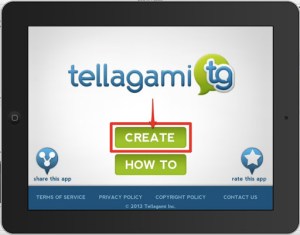
Open the app an click on create.


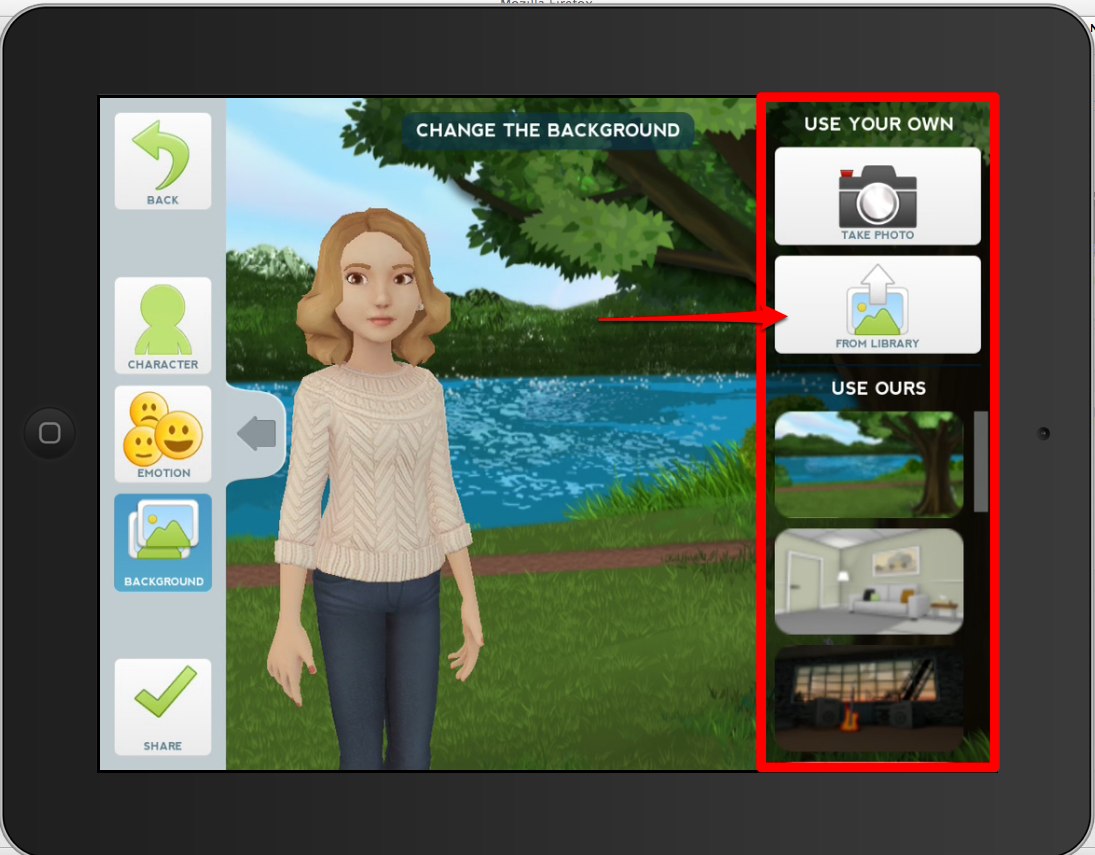
Then choose your background, either from the ones provided, from your own image library or you can take a photograph of wherever you are at the time.

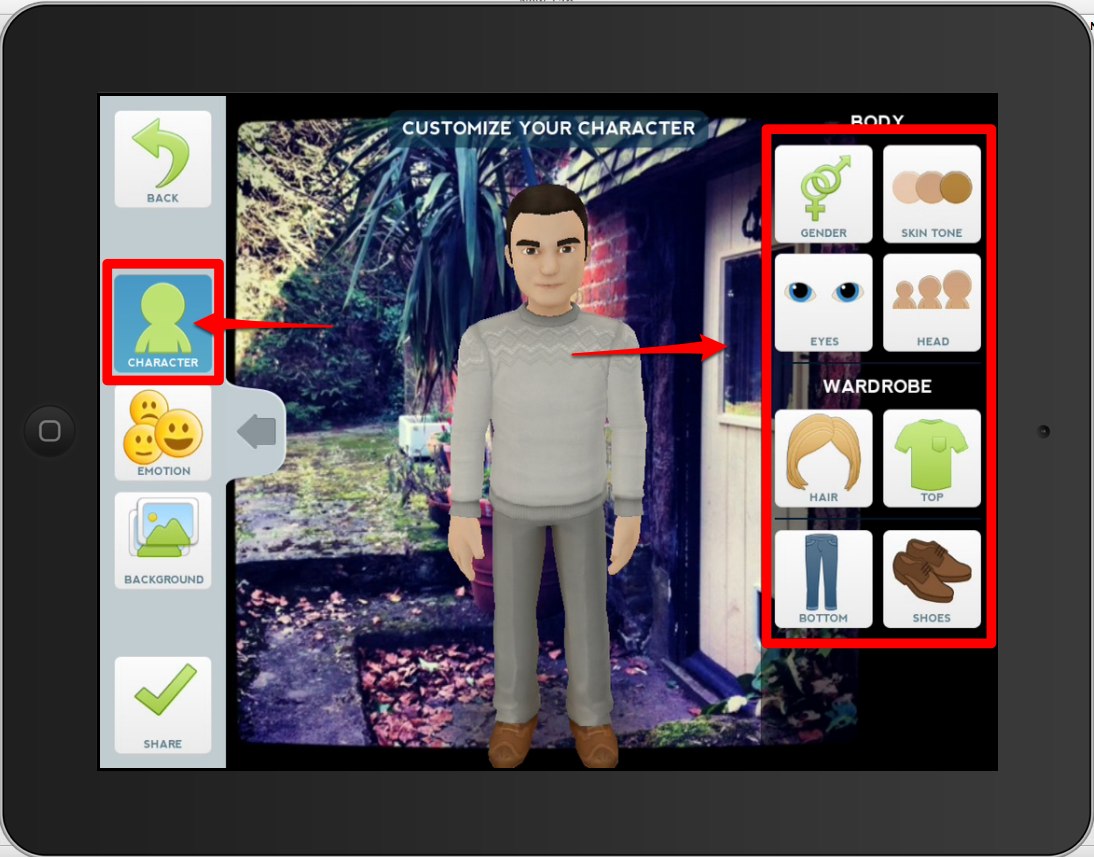
Then you can choose the character you want to use and customise their appearance.

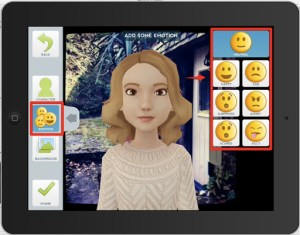
Next you can select an emotion for your character.


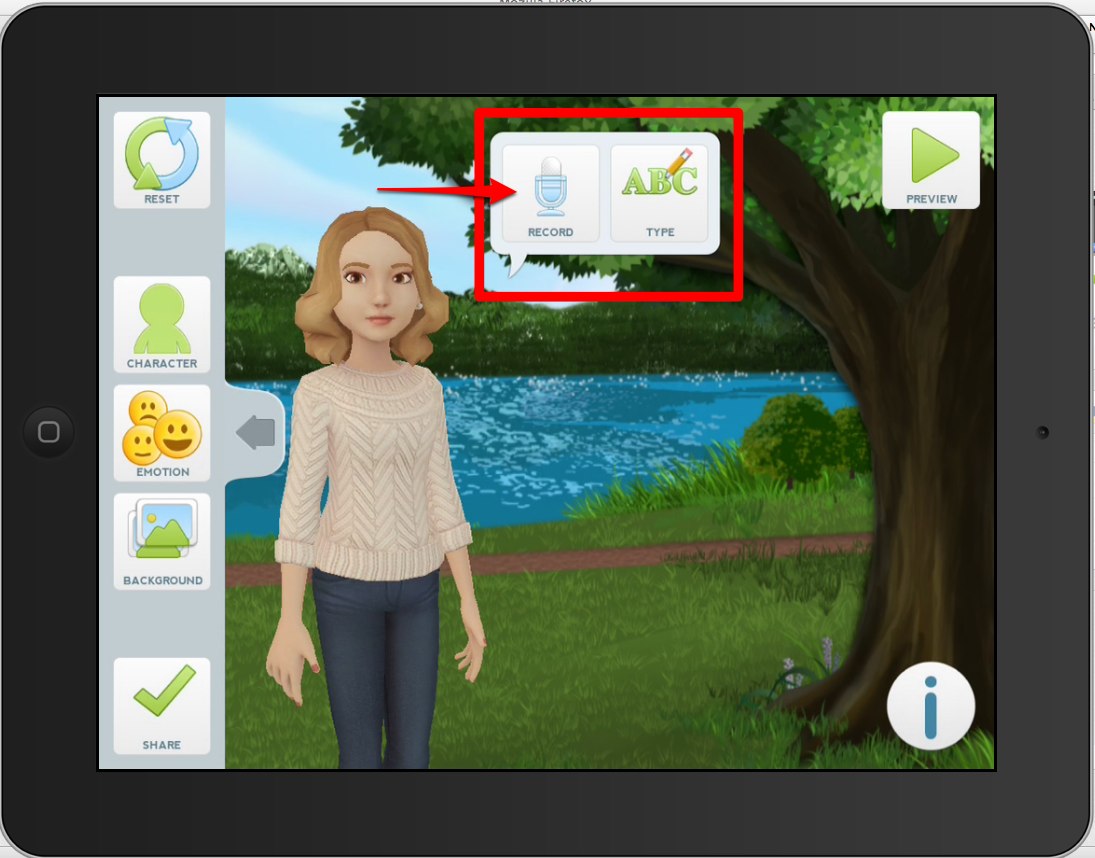
Lastly, you can either type in your message or record it directly onto your device. You can record up to 30 seconds of spoken audio.


Once you animation is complete you can either send it by email, share it through various social networks or just save it onto your device to show it in class.


 You can complete the whole process in just a couple of minutes.

I think this is a great app to get students speaking either in the classroom, at home or while they are out and about in the world.

Some learning activities for students

  • Ask the students to create 4 – 5 animated images explaining their route to school.
  • Get students to create animated images of 4 – 5 of their favourite places around their town.
  • Get students to take pictures of objects and create an animated video dictionary.
  • Get students to talk about images of people in their family.
  • Create some animated images of different steps in a process (making coffee, tea etc) and then get the students to watch and put them in the correct order.
  • Get students to create an animated image journal by adding one new image each day.
  • Get students to take pictures of their favourite book covers or film posters and then record a review.
  • Get students to create animated video cards on special occasions.

 I’m sure there are lots more activities you can think of.

What I like about Tellagami

  • It’s free and very easy to use.
  • It encourages students to speak.
  • It can be used effectively outside the classroom.
  • Students can use it to pull some aspects of their own life and experience into the classroom.
  • It produces very professional looking results.

Possible problems

  • At present it’s only available for iPhone / iPad so that limits who can use it.

 So if your students have iPads / iPhones and you ant to give them motivating speaking assignments for homework, Tellagami is a great tool to use for the job.

I hope you find it useful.

Related links

Best

work meanderings


Its taken a while to get going on my blog. I wonder do I deserve a virtual choc fish for starting and hopefully writing something meaningful.
Source: www.bbc.co.uk

A lot has been happening at work. For a start we are lucky enough to have visits from a couple of people involved in flexible learning – Cathy Gunn (University of Auckland) and John Clayton (WINTEC – Hamilton, NZ)….more about this later.

FLUG meets Blackboard head on
I have been busy with the formation of the new and improved FLUG – a group of enthusiasts involved in flexible learning and support. With our organisational strategy of flexible teaching and learning, it was timely to change the name of the Blackboard User Group to FLUG (Flexible Learning Users Group).

We also needed to extend the group – so a bigger cross section of people involved in flexible options here could muck in and get their hands dirty.

Source: www.geoimagery.com

This way the small core of enthusiasts and people involved with the Learning Management System will have more of \”a voice\” in some of the changes which are happening here in our organisation. So the Bb User Group has re-birthed as FLUG.

So…what does this mean? FLUG will hopefully provide information to the newly formed Flexible …committee about operational matters and stuff from the coal face. We also hope to assist in developing some sort of flexible learning and teaching strategy which is meaningful for our learners and staff in the organisation.

So who do we think we are…why should we have a say?
Because FLUG hopefully will represent the \”real users\” because it is made up mainly of people who get it. But do we?

We all know that flexible learning is a very important strategy for quality education.What gets me though is that every organisation seems to be busying themselves with the development of strategies for eLearning or flexible learning and teaching…..but what are these strategies based on?? What everyone else has been doing..or on the unique culture within an organisation? The former I believe because it is easier.

It is also easier to follow like sheep and stay with an LMS like Bb – the same as the others. It is also easier to stay with an imposition model – a model where the learners are told what they\’re getting rather than being asked how they want to approach teaching and learning.

The best model for a flexible learning and teaching strategy which I have seen is the one QUT (Queensland University of Technology) developed called the QUT Teaching Capabilities Framework. See overview at: http://www.library.qut.edu.au/framework/

QUT surveyed staff and students who were using the LMS (Blackboard), to find out what was important to them as both teachers and learners. The project team took their findings and using a process of wide consultation, they developed a framework. This framework now underpins how teaching and learning is offered at the university, and has informed the professional development of staff.

Unfortunately, we have not gone down this track, but have taken the route followed by many. Additionally, we have also developed a teaching qualification without developing a teaching and learning strategy first. Now staff will be indoctrinated into \”a way\” of teaching which may not be right for our learners…or for our environment.

We have broken the first golden rule! We didn\’t find out what our learners actually wanted first!
As a result, our flexible learning and teaching strategy may also not be based on actualities but on assumptions. I believe we do have time to find out what our teachers and learners actually want, what their experience is to date and what they would like to see happening.

Wont this save time in the end! We are in a good position to really do something different and lead flexible learning in a new direction.


I would really like to see us get out from behind the herd, stop the baaing and mooing and get to the green grass first…for a change.

Watch this space to find out how the flexible strategy and the teaching qual evolve.

Earning a Nursing Degree Online: Ask a RN-BSN student

Being a RN has opened more doors than I can count. The opportunity to care for patients has provided me the chance to make a difference.

In celebration of National Nurse’s Week, Shenese Stewart, an RN-BSN student at Herzing University, shares her first-hand knowledge about what it takes to succeed in an online RN to BSN nursing program.
Earning a Nursing Degree Online: Ask a RN-BSN student

Why did you decide to study nursing?

I worked as a Certified Nursing Assistant and Certified Medical Assistant before returning to school to become a registered nurse. Eventually, my desire to do more for my patients outgrew my scope of practice. I worked as a Licensed Practical Nurse for four years before deciding to return for my RN license.
Being a RN has opened more doors than I can count. The opportunity to care for patients in a multitude of settings provides people like me the chance to make a difference in several places in the nursing field.

What does a typical day as an online RN-BSN student look like for you?

I work three 12-hour shifts per week that often turn into 13 or 14 hours depending on what happens that day. During each day that I work, I will check Blackboard for announcements and my e-mail to make sure I do not miss any important messages, but I do not do any school work. The other four days of the week, I work out in the morning, eat breakfast and have a scheduled study time that is usually 8-12 hours long. I\’ll study for 45 minutes and take a 15-minute break.

How do you balance home/family, work and online schooling?

Online schooling is very demanding, so you have to practice good time management. Because there is not a certain time to be in class, it is easy to put off logging on until later. Work, however, is a priority and cannot be put off until later.
My family and friends are the people I call when I need to cry, laugh, vent and express joy. They are my support system and my cheering squad. It took practice for me to look at my school schedule, work schedule and family obligations and set blocked times for them, but it got better over time.
I make appointments to hang out, go to dinner and go to movies instead of doing it randomly. This has helped my family and friends understand that they are important and a priority, but school is important and a priority too.

What is most challenging about being a nursing student online, and how have you overcome those challenges?

The most challenging part for me has been reducing my hobbies to devote more time to school and staying the course when I get distracted. Nursing takes a considerable amount of time to learn. It is not just memorizing – it is understanding and putting it into practice.
I enjoy piano lessons, self-defense classes and other extra-curricular activities that I needed to put on hold in order for me to accomplish my goal. I\’ve learned my brain starts to get tired after about 45 minutes of concentration, so I take a 15-minute break and do something else to prevent becoming distracted. I may fold clothes, watch television or eat a snack.

What tips do you have for future RN-BSN students?

  • Ask questions: Always understand the reason behind anything you do. Never memorize anything just for the test. There are no dumb questions. Know what you don\’t know, and know where to find the answers. There is always something to learn.
  • Don’t compete with anyone but yourself. Nursing school and the profession isn\’t about competition. It is about collaborating and helping each other make a positive difference in the lives of others.
  • Know what type of learner you are and the best way to study. Everyone is different, so there is no right or wrong way. Just do what works for you. For example, I learn best by reading and writing in a quiet environment alone in the morning. I need to read the material twice and make note cards. I study the note cards at a later time while listening to classical music. I also use the VARK learning style questionnaire.
  • Never give up. If you are not successful in a class, remember that you may be delayed, but you are not denied. Remember your reason for pushing so hard, and know it is worth it in the end.
When you finish, help someone else. Remember how you felt and pay it forward.

Mix Images and Animation on Your Mobile

A couple of years back I wrote about a really nice web based tool called Xtranormal and since then I\’ve heard from so many teachers saying how useful their students have found it, so I was delighted yesterday to find that the same makes had now produced a free mobile / tablet app called Tellagami. The app runs on a mobile device and allows users to add animated speaking characters to a selection of backgrounds or to the users\’ own images. You can then either use text to speech to write a script for the character, or you can record your own voice and the app will lip-synch you text to the character. This is very quick and easy to do. Here\’s how.

Open the app an click on create.


Then choose your background, either from the ones provided, from your own image library or you can take a photograph of wherever you are at the time.

Then you can choose the character you want to use and customise their appearance.

Next you can select an emotion for your character.


Lastly, you can either type in your message or record it directly onto your device. You can record up to 30 seconds of spoken audio.


Once you animation is complete you can either send it by email, share it through various social networks or just save it onto your device to show it in class.


 You can complete the whole process in just a couple of minutes.

I think this is a great app to get students speaking either in the classroom, at home or while they are out and about in the world.

Some learning activities for students

  • Ask the students to create 4 – 5 animated images explaining their route to school.
  • Get students to create animated images of 4 – 5 of their favourite places around their town.
  • Get students to take pictures of objects and create an animated video dictionary.
  • Get students to talk about images of people in their family.
  • Create some animated images of different steps in a process (making coffee, tea etc) and then get the students to watch and put them in the correct order.
  • Get students to create an animated image journal by adding one new image each day.
  • Get students to take pictures of their favourite book covers or film posters and then record a review.
  • Get students to create animated video cards on special occasions.

 I\’m sure there are lots more activities you can think of.

What I like about Tellagami

  • It\’s free and very easy to use.
  • It encourages students to speak.
  • It can be used effectively outside the classroom.
  • Students can use it to pull some aspects of their own life and experience into the classroom.
  • It produces very professional looking results.

Possible problems

  • At present it\’s only available for iPhone / iPad so that limits who can use it.

 So if your students have iPads / iPhones and you ant to give them motivating speaking assignments for homework, Tellagami is a great tool to use for the job.

I hope you find it useful.

Related links

Best