
Recorded lectures solved one problem and created another. Students no longer miss content when they are ill or working a shift, but a semester of recordings is fifty or sixty hours of video that nobody can revise from. The recording is a safety net, not a study resource, and the difference matters most in the fortnight before exams.
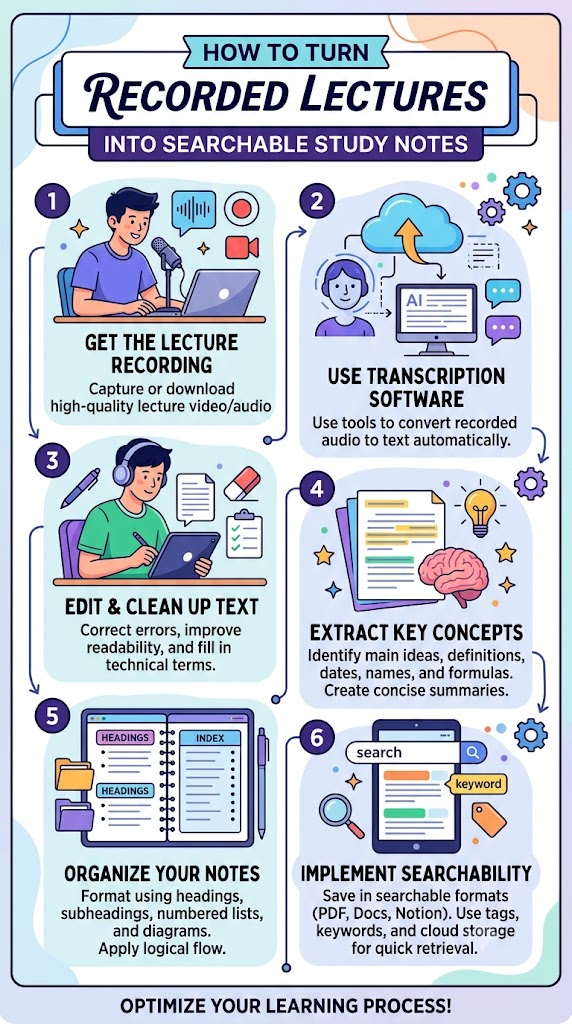
The fix is to convert recordings into text early in the term, while the material is still fresh enough that you can structure it sensibly.
Why text beats video for revision
A ninety-minute lecture is about 13,000 spoken words. Read at a normal pace, that is roughly forty minutes; skimmed for a specific concept, it is under five. More importantly, text is searchable. When a past paper asks about a term your notes do not cover, being able to search “hysteresis” across an entire semester of transcripts and land on the three minutes where it was explained is worth more than any amount of re-watching.
Text also survives. Lecture capture systems routinely purge recordings at the end of the academic year. A folder of transcripts does not expire.
Getting an accurate transcript
Automatic speech recognition on clear academic English now sits around 95% accuracy, which works out at roughly one error every twenty words — almost always on names, acronyms and technical vocabulary. A browser-based lecture transcription tool will process a ninety-minute lecture in a few minutes and return timestamped text you can correct as you read.
Two things improve accuracy more than anything else: recording from the room’s audio feed rather than a phone at the back, and giving the tool a clean audio file rather than a screen recording with background music. If your institution publishes the lecture with auto-captions already, downloading those is usually faster than re-transcribing.
Turning a transcript into notes
A raw transcript is not a study note. It is a long, unpunctuated wall of speech with digressions about the weather in it. Convert it in three passes:
- Pass one — structure. Insert headings wherever the lecturer changed topic. Most lecturers signal this out loud: “right, moving on to”, “the second mechanism is”. Search for those phrases.
- Pass two — compress. Under each heading, reduce the speech to bullet points. Aim for a tenth of the original length.
- Pass three — question. Convert each bullet into a question you could be asked. This is the material you will actually revise from.
The third pass is the one students skip and the one that does the work. Reading notes produces recognition; answering questions produces recall, and exams test recall.
Fixing the vocabulary problem
Every discipline breaks automatic transcription in its own way. Medicine loses drug names, law loses case citations, engineering loses units. Before you start editing, build a short find-and-replace list for the ten or fifteen terms your module uses constantly. Running that list over every transcript for the semester takes seconds and removes most of the visible errors at once.
A note on timestamps
Keep them. When a transcript passage does not make sense on the page — usually because the lecturer was pointing at a diagram — the timestamp lets you jump straight to that moment in the recording instead of hunting for it. In practice you will need this for perhaps five percent of a lecture, but it is the five percent that matters.
What this costs in time
For one module with eleven lectures, expect about twenty minutes of processing per lecture: a few minutes of transcription running in the background, ten minutes of structuring and five minutes of compression. That is under four hours across a term, spread out, replacing what would otherwise be fifteen-plus hours of panicked re-watching in May.
The wider point is that a recording is a record of an event, while notes are a record of an argument. Transcription is simply the cheapest available bridge between the two.





You must be logged in to post a comment.