
innovation JISC online conference

Innovating eLearning 2006 JISC online conference
A couple of entries really caught my eye and very much match with some of the isssues our institution is currently facing. Peter Miller – University of Liverpool
pointed us to the idea of Shared Learning Contexts (SLCs) which are described in Scott Wilson\’s blog at http://www.cetis.ac.uk/members/scott/blogview?entry=20050210014657 The diagram of the SLC illustrates a learner-centred model using open source technologies.

Geoff Stead\’s statement summed it up really – \”VLE fervor has put shackles on a lot of creativity from people like ourselves who earn a living using technology to service learning. Five years ago we were creating learning tools that assisted low-literacy learners to find their voice and publish themselves online. We created project-based environments to share problems and strategies for dealing with low maths skills. But these things are impossible within SCORM (the standard VLE materials need to comply with) Almost 100% of the demand we get for resources to support learning need to fit into the lowest common denominator of VLEs … namely: a single thread of learning objects, each one insular, curriculum mapped, with no connection to the learning process, no inbuilt dialog / saving / thought origination for the student. So yes, they have provided an excuse for less adventurous staff to hide behind. But they have also imposed a set of standards on all purchasing that have ended out stamping out a lot of creativity that was previously embedded in the resources as well. And all with the best intent! \”

Some of the replies to this statement, referred to the usefulness of VLEs for staff new to eLearning. My thought on this is that we have basically trained people up to expect the VLE or Learning Management System approach whereas if the use of a variety of tools could have been \”sold\” to staff early on – through really good resourcing and support – we wouldn\’t all be caught up in using the corporate, expensive, proprietary tools. Tools which suit the company not the teachers and learners.

There was a very good article on one of the discussions – an evaluation of the use of blogging in a course related to technology.

Reflecting on professional practice by Annette Odell, University of East London. \”Applications of Learning Technologies\” is an accredited professional development course. Assessment is by means of a portfolio of work built up during the course and a key component within this is a reflective log, kept online using a blog.

This presentation describes the use of blogs on this context; briefly discusses different uses of blogs; reflects on personal experience with using blogs for different purposes and why the \’reflective blog\’ appears to be a consistently successful use; discusses factors that promote success and problems to be oversome; and summarises the participants\’ perspective on the value of keeping a reflective blog within this course and as part of their professional development record.

5 Steps to Become a Neuroscience Nurse

As the need for nursing support increases, there are myriad opportunities for new and experienced nurses to advance their careers in specialties.

As the need for nursing support increases, there are myriad opportunities for new and experienced nurses to advance their careers in specialties, such as oncology, the emergency room and even neuroscience.
Neuroscience is one of the most complex areas of study in the healthcare field. Nurses who pursue this specialty embrace the opportunity to make a difference in the lives of patients who are recovering from serious injuries and/or lifelong impairments.

What is a neuroscience nurse?

A neuroscience nurse treats patients with neurological injuries and disorders, including head and spinal trauma from accidents, or illnesses such as Parkinson’s disease, Alzheimer’s, epilepsy and multiple sclerosis. It’s important for these nurses to have a firm understanding of how the nervous system works and how it can affect both the mind and the body.
Patients struggling with a neurological disorder or injury can behave unpredictably. Neuroscience nurses need to be strong, patient and compassionate communicators in order to help patients with chronic or long-term disabilities learn how to live with and manage their situations.

What do neuroscience nurses do?

Neuroscience nurses are involved in many aspects of patient care, including assessing, diagnosing and treating patients. Many neuroscience nurses are part of the neurological unit at a hospital, but they can also work for rehabilitation facilities, homecare agencies and neuroscience specialists.
As a neuroscience nurse, you might be involved in:
  • Performing physical assessments and neurological exams
  • Daily living assistance
  • Physical rehabilitation
  • Surgical or wound care

How do I become a neuroscience nurse?

Think you might be interested in becoming a neuroscience nurse? Follow these five steps to help make it a reality.
  1. Earn your Bachelor of Science in Nursing: The Bachelor of Science in Nursing is quickly becoming the new educational standard for nurses, as it offers more opportunity for employment.
  2. Become a Registered Nurse (RN): If you’re not already a registered nurse, you will have to pass the NCLEX-RN exam, then apply for opportunities in neurological treatment and care. Be sure to use these NCLEX study tips as you prepare for the exam.
  3. Immerse yourself in the world of neurological nursing: Volunteering with a neurological unit at a hospital or specialized facility can help you get first-hand exposure to what neuroscience nursing is all about. You can also demonstrate your commitment and passion to continued education and patient care, both of which can help differentiate you from other candidates if you choose to pursue a neuroscience nursing career.
  4. Become a Certified Neurological Registered Nurse (CNRN): If you want to become a certified neuroscience nurse, you will have to sit for the Certified Neuroscience Registered Nurse (CNRN) exam, which requires at least one year of neurological nursing experience as an RN. The American Board of Neuroscience Nursing, which administers the exam, has many helpful resources for preparing for the exam and continuing your neuroscience education.
  5. Recertification and advancing your career: You’ll need to regularly renew your nursing license and CNRN certification. You can take it one step farther and consider a Master of Science in Nursing for positions as a nurse practitioner or nurse educator, giving you the opportunity to position new nurses for success and help shape the future of patient care.

How much does a neuroscience nurse make?

The average salary for a RN is $70,000 per year, or about $33.65 per hour, according to the Bureau of Labor Statistics—and the average salary for a BSN will be higher compared to a nurse with only an associate’s degree. Your pay will be dictated by the state you work in, your place of employment, and the relative demand for the neuroscience specialty in your area.
Earning your Bachelor of Science degree in nursing means you may also pursue graduate nursing programs to become more qualified in your specialty and pursue jobs in management or administration.

Gamification to encourage learner autonomy

This post tries to pull together a couple of things I have been thinking about recently. The first was a post I saw on the 21st Century Fluency Project blog a few weeks back. The title of the article \’How I Turned My Classroom into a ‘Living Video Game’ caught my eye and before I even had time to read it I started thinking about how the factors that create motivation in computer games could be applied to the classroom. The article is well worth reading, although this is only one element it touches on.

The other thing I have been thinking about recently is time management and distraction as it is one of the more significant objections which teachers often raise to having students using computers and mobile devices in the classroom, so when I saw \’HabitRPG\’ I thought it could be a useful tool to help deal with the problems and implement more of a gamified approach to the  classroom.

HabitRPG is a time and task management tool which overlays motivational elements of computer games onto managing time and tasks.

The two major motivational elements are health points, which can be used up and coins which can be earned by doing daily tasks, following good habits and doing jobs from your \’Todos\’ list. These coins can then used to buy rewards.


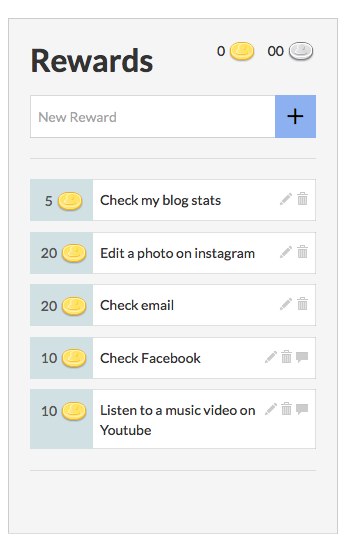
You can define the rewards for yourself. In my case I decided to define the rewards as the things that I usually do to procrastinate, such as check my email or look at facebook updates etc.


Then you can simply add your list of \’one off\’ jobs to the \’Todos\’ list. For me these are things like \’write an article\’, \’complete a job application\’, \’update my CV\’ etc. These become more valuable the longer they are left and so this increase motivation to do them and gain the coins so that you can pay for your rewards.


Then there are my daily chores which I can set up. These are things like \’update my blog\’ , \’add some links to Scoop.it\’ , \’search my RSS feeds for interesting articles\’ etc. If I do these they earn me coins, but if I don\’t do them by the end of the day I lose health points.


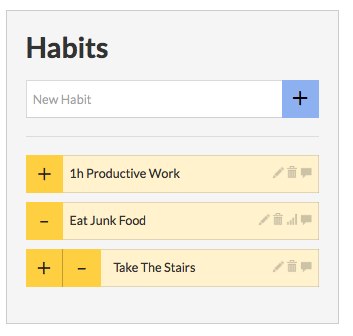
Lastly, there are the habits. These can be positive or negative depending on whether you do them or not, like \’take a walk\’ or \’have a snack\’.


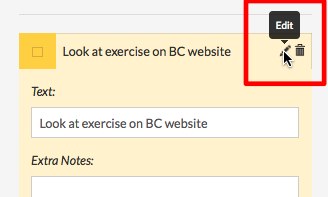
You can edit all of your lists quit simply by clicking on the pen icon, making the changes and then clicking on save and close.


The main thing you may need to edit is the price of rewards and the amount of coins you get for each task.

To change the price of the rewards, you just click the edit icon and then type in the price. The default amount for a reward is 20, but you can adjust the price depending on how much time your reward takes.


To change the amount of coins you are rewarded for doing each task, you need to go to edit and then go into the advanced options and choose, Easy, Medium or Hard. Doing a hard task will of course earn you more coins.


Once you have your lists set up it becomes quite easy just to click the + and – each time you do a task or have a reward.

Everyone starts off with 50 health points and if they have no coins to buy rewards or if they indulge in bad habits then they have to pay with health points. The challenge is to stay alive and build up enough coins to start buying rewards.

So how would this work with students?

  • Well you could set the rewards as similar things to my own rewards, especially in a connected classroom. You could also add things like play a game or have a few minutes free browsing time online etc.
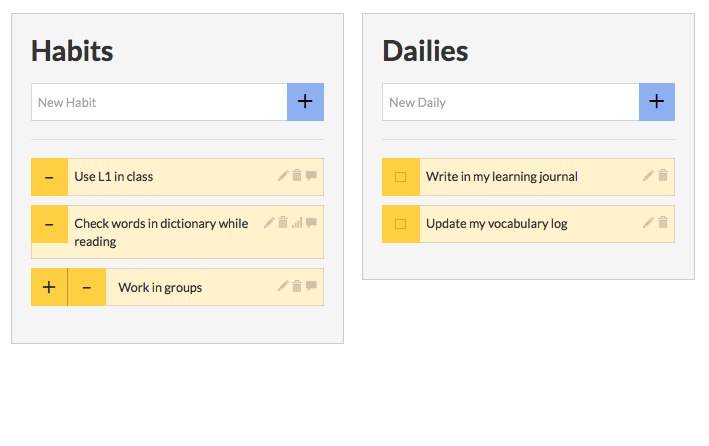
  • Within the habits you could have things like \’speak L1\’, \’take notes\’ or \’copy an answer\’ etc.
  • The daily things could be \’revise vocabulary\’, \’read a short article\’, communicate with someone in English\’, \’do an activity from the course book\’ etc.
  • The \’Todos\’ could be a range of homework and autonomous learning assignments.


Here\’s what I imagine an ELT students profile would look like.


You\’ll need to guide students through the set up process and make sure they understand that for this to work they will need to be honest. You could actually have one page for the whole class, or set a page up for a group of students, but it will probably work better if they manage their own page.

They can also add a few elements of personalisation. If the click on the avatar (top left) there are a range of ways to change its appearance.


What I like about HabitRPG

  • It\’s free and easy to use.
  • It can help get students to take responsibility for their \’bad habits\’ and reduce the amount of \’policing\’ you have to do.
  • It can encourage students to work on single tasks with concentration, rather than constantly multitasking.
  • It\’s a great way to get students to take responsibility for their own time and learning and have some fun at the same time.
  • It could increase motivation and help your students to be better organised.
  • Students have their own account so they can log in on any computer.


Things I\’m not so sure about

  • Each student would need to have a computer or mobile device for this to work effectively.
  • It would be great to see this on mobile, but I think that is being planned and it does run in the safari browser on iPad.
  • There is some down time sometimes.
  • Grouping students would also be great, but again I think this is coming.


If you want to know more about HabitRPG, there is quite a long tutorial below which shows a number of other features that you can unlock by playing the game.


I hope you enjoy HabitRPG and that it helps your students to be more organised and disciplined about they way they use their computer or mobile device for learning.

Related links:

Eid being celebrated across Middle East today amidst lockdown

Eid is being celebrated by the Muslims across the Middle East today amidst lockdown. Special Eid prayers were performed at home by people. Religious leaders and rulers have urged people to perform the Eid prayers at home in the face of the pandemic affecting the globe. 

AIR correspondent reports that Eid is being celebrated across the Middle East today under lock down conditions. Normally performed at mosques and Mussalas, but this year due to the current exceptional circumstances created by the spread of COVID-19, Eid Al Fitr prayers are being performed at home, without Khutba, or sermon in most of the countries in the Middle East.

This is the first time that Eid is being performed without the traditional namaz in the mosques and special greetings and festivities associated with it. Traditional Eid shopping, night bazaars were all missing this time. Eid Al Fitr prayers are being performed at home to ensure safety, as mosques will remain closed due to the precautionary measures to contain the spread of COVID-19. During the entire month of Holy Ramadan, mosques across UAE and Saudi remained closed. The faithful were asked to offer prayers at home Muezzins however, chanted the Eid Takbeers through loudspeakers from dawn till the Eid prayer time. 

5 Tips to Write a Scholarship Essay that Stands Out

Many scholarship applications require students to write a personal essay. Here are a few tips to ensure your essay response doesn’t fall flat.

Many scholarship applications require students to write a personal essay. You might be asked to discuss your personal experiences, goals, knowledge of a particular subject, or a combination of these topics. While these questions might seem simple at first glance, it’s not always easy to know where to start.

Here are a few tips to ensure your essay response doesn’t fall flat:

1. Follow the essay guidelines

Before you begin writing, read the prompt carefully and make note of any specific requirements for the content or format of the essay. For example, there might be a word count limit, or the prompt may ask you to answer several different questions instead of just one. You might find it helpful to underline or highlight key parts of the prompt so that you don’t forget to address them in your response.

It’s also a good idea to reread the prompt after you have written your essay and are beginning the revision process. Make sure you aren’t missing any key elements from your response and that you have used the correct format (if there was one specified). It may sound simple, but following instructions is an easy way to ensure that your application makes it to the next round of consideration.

2. Use an outline

If you want to write a standout essay, it’s important to organize your ideas before you draft your response. An outline can make it easier for you to develop your main idea (often referred to as your thesis) as well as the supporting points that will be the focus of each of your paragraphs.

Planning is especially critical if the prompt has multiple components or requires you to respond to more than one question. Using an outline will ensure that your essay follows a logical progression and that each of your supporting points connects back to your main idea.

3. Emphasize your main point throughout

Your thesis statement – or your main idea – should be introduced in your first paragraph, but that shouldn’t be the last time it’s brought up. Each paragraph should support your thesis and provide evidence as to why it’s true. This ensures that your main point shines through your essay instead of only being mentioned in the opening and closing paragraphs. The result is a strong, focused essay that leaves a lasting impression on the reader.

4. Don’t forget to proofread

If you submit your essay with spelling or grammar errors, it will likely be ruled out pretty quickly. Running your essay through spellcheck is always a good idea. Additionally, reading your essay out loud can help you pick up on grammar errors you may not have noticed, as well as ensure that your essay flows well. If you’ve planned ahead and finished your essay before the deadline, ask a friend, mentor or a professor to proofread it for you. It’s always helpful to have another set of eyes review your work before you submit it.

5. Make your conclusion count

Your conclusion paragraph is one of the most important parts of your essay. This is where you have an opportunity to make a lasting impression on your readers and show them why you are uniquely qualified for a particular scholarship. Do not just rehash your opening paragraph in your closing. Instead, summarize your main points in a way that reinforces your thesis statement and shows why it matters.

If possible, see if you can connect the experiences or ideas you highlighted in your essay to the mission and values of the organization for you are addressing. This will show the reader that you not only have strong writing skills, but that you have put time and thought into your response.

Facilitating flexible learning

Today three of us ran a workshop about facilitating flexible learning: how to give great feedback and still have a LIFE.

Overall, I think it went well. Lots of discussion and questions and people were keen to make contact at the end of the class….always a good sign.

It appears that the title and the content offered were timely. There was a big contingent from one school who have a push on to put courses online. This was excellent. They did have concerns, however, about how to get their content online. They were advised to work with the programme developers, and offered assistance to have people work alongside them, but not do it for them. The mentality is still there to get stuff on Blackboard, rather than thinking how they would like to present content and activities, and what technologies could assist.

There was some discussion about models where content is handed over to a team to create resources. Leigh made a good point about models he had seen which didn’t work and had cost lots of money. He believes it is best to start with finding resources which already exist and can be re-used…if possible. This makes a lot lof sense.

Some institutions which are heavily in to distance education – open polytechnic, UK, Athabasca university have production units but this makes sense. Open university in NZ used to do this as well, but has found it is more cost effective to enable staff to take charge of their courses and they have moved to Moodle. It would be interesting to talk to someone and find out how it is actually going.

The total number who enrolled was 13 but 3 people didn’t turn up. The group were very interested and gave positive evaluations.

I started the workshop off with an overview of facilitating online learning…well I sort of took charge of it really…we did brainstorm how we would approach it earlier in the week, but the actual content we presented was up to us individually. At the 11th hour, I felt the need to slap together some slides…too many bullet points..but for next time I will develop some concept maps.Hey I can try out CMAP.

I will try and get them done before this group finishes their online discussion. This will continue on until the end of the second week in May. Easter in the middle sort of interrupts the flow. The timing for the next workshop will be better. And hey next time we will try out Elluminate for the initial session.

People liked the different cases we presented. Merrolee had lots of practical advice and talked about how she managed the online discussion. It is good for people to hear the nitty gritty stuff from someone so experienced…well I am too. I talked about how assessment was linked in strongly to the discussions. We gave tips for managing prolific postings and motivating people to go online. I really have to do something about the amount of content in the evaluating eLearning for best practice course though…I will definitely be going with the learner-generated model for next year. hopefully i will still be teaching it then.

Leigh gave a very insightful overview of alternatives such as egroups, and how they are very useful platforms for handing over ownership of material to students….giving them something they can take away with them when they leave their 3 yr programmes…when they are locked out of the institutional platforms. Some of the OTs were very intrigued with the idea of having a community of practitioners able to remain in contact about professional issues.

It will take time but the ideas are filtering through. All we need are enthusiastic staff who act as “hotpoints” in their schools and talk about what they are doing to others. I do love running workshops with staff, and seeing the lightbulbs come on.

The next offerings will need to be a practical show and tell with staff demonstrating what they are doing. Oh when to schedule all these? We have two visiting speakers coming in May and June, Peter Mellow (AUT) on the Study Txt mobile learning project – article. Also John Milne (Massey) who is coming to work with us on the TEC eLearning guidelines an ECDF project. Exciting stuff.

Men Share What It’s Like to Become a Nurse

A recent NYU study found that the number of men in the nursing workforce is steadily increasing, growing nearly 5% between 2005 and 2015.

Employment in the healthcare sector is booming, and more men are entering into healthcare professions than ever before. In fact, a recent NYU study found that the number of men in the nursing workforce is steadily increasing, growing nearly 5% between 2005 and 2015.

While it might have been unusual several years ago for men to work in certain healthcare jobs, there’s now a push for more gender diversity in healthcare staff. This is especially true in nursing, as hospitals struggle to find enough qualified nursing staff to meet the growing demand for their healthcare services.

The Bureau of Labor Statistics predicts that employment for registered nurses (RNs) will increase by as much 15 percent by 2026, adding more than 400,000 new jobs.


We sat down with two of our recent BSN graduates, Jonathan Cabrera and Brandon Shaver, to talk about why they chose a career in nursing.


Q: Why did you choose a career in nursing?

Cabrera: I’ve always known that I wanted to help people. As I got older, I wanted to do something in medicine. I considered surgery, massage therapy and chiropractic medicine, but none of those careers felt like the right path for me. I knew that nursing would allow me to make a difference in the medical field and increase my opportunities for employment.

Shaver: After being in the military for four years, I wanted a complete change of pace. I found myself watching shows like Scrubs, House, Grey’s Anatomy, and ER, thinking to myself, “I could totally do that.” I was working as a dental assistant at the time, and one day a coworker mentioned that I should look into becoming a registered nurse. I did some research and immediately knew that was the route I should take.

Q: Despite the increasing demand for nurses, it’s still a profession that is largely dominated by women. Do you feel that this is changing? Why should more men consider nursing as a career option?

Cabrera: It’s not so much about whether you’re a girl or a guy. It’s about what you want to do and how you want to help others. I think a diverse classroom of students brought a good balance to my studies and my clinical experiences. We each brought a unique set of experiences to the table. As a nurse, I find that having a mix of different perspectives helps us find well-rounded solutions and allows us to do our jobs better.

Shaver: It’s not unusual to meet a man in the nursing field. Doctors used to be only men and nurses used to be only women, but we know that those stigmas don’t matter anymore. Nursing is a great line of work to get into, no matter your gender. There are so many options for growth, and if you’re like me and you get bored easily, there are always different specialties to explore and a variety of ways to advance your career.

Q: What did you enjoy the most about your nursing classes/clinical?

Cabrera: I completed a clinical rotation at a local community clinic, and I loved seeing first-hand how much we were able to help people. I enjoyed being a part of the staff and providing medical assistance for people that would otherwise be underserved due to their financial circumstances.

Shaver: My first clinical rotation at a nursing home made me reevaluate if I really wanted to be a nurse. It can be challenging at first, but as the semesters move along and you start making connections with your classmates, you realize that you’re all struggling together. You learn to make the best of the challenging moments and rely on each other. When I think back about all of my classes and clinical experiences, I remember all the people I shared those stressful times with and all the memories we had together.

Q: What do you enjoy the most about the nursing profession?

Cabrera: I’m glad to see that the field is changing. I think I finally found where I’m supposed to be, and I’m grateful not only for my experience at Herzing but for the opportunity to make a real difference in others’ lives.

Shaver: I like knowing that all my hard work has finally allowed me to have a great job, in the specialty I wanted to work in, in a location I wanted to live, working the hours I’d like to work, making the money I think I deserve. Not everyone can say that, but the nursing profession has so many options and opportunities for everyone.

Q: What words of wisdom do you have for those considering a career in nursing?

Cabrera: It doesn’t feel like it’s a woman’s job or a woman’s world. We’re all working together to help care for people in need.

Shaver: Make the leap sooner rather than later. Rely on your friends and family to help you get through the tough moments. Your classmates will get you through the hard times in school. Work with them, not against them, and you will be successful.

Thinking about a career change to nursing? Like Cabrera and Shaver, more men are realizing that nursing isn’t only a viable career option, it’s a job they’d like to do. Whether you’re just beginning your nursing career or looking to advance, Herzing University offers a variety of degree pathways to help you achieve your goals.

Learn more about our nursing programs and get started on your own journey today!

How to Plan for a Busy Week

As a college student, it’s inevitable that some weeks will be busier than others. Follow these tips to reduce stress and make your busy weeks more manageable.

As a college student, it’s inevitable that some weeks will be busier than others. Taking classes while working and/or caring for a family can make for a hectic schedule, and it can quickly become overwhelming if you don’t have a plan in place.

Fortunately, with the right approach and proper time management, you can learn to conquer a busy week with ease. Follow these tips to reduce stress and make your busy weeks more manageable.

1. Determine your priorities

Learning how to prioritize your academic demands with your personal life will make it easier for you to manage busier periods. Your personal priorities typically fall into three main categories:

  • Essential priorities, such as your own health and well-being and the health of your family. These are your number one priorities, and not much else should take precedence over them.
  • Important priorities, which are tied to your essential responsibilities, like school and work. These are tasks that cannot be avoided or pushed to the side just because there is some other leisurely activity you would rather do instead.
  • Optional priorities, which are activities you wish to participate in for personal fulfillment only. Reading a book, surfing the web or watching TV are examples of optional priorities. These should be completed only after all other family, school or work commitments are already taken care of for the day.

2. Reorganize your to-do list

Create a list of everything that you need to accomplish in the week ahead, and then go back and prioritize those items based on importance. This will help you visually plan out your time. There might be some less-important items that you just can’t get to, and that’s okay. You want to make sure you have enough time for your essential and important priorities, such as work, school and your family.

3. Plan ahead

If you have several large assignments to work on in one week, it might help you to break them down into smaller parts. Rather than spending several hours studying the night before an exam, spend 30 minutes to an hour each day of the week leading up to the exam. This approach allows for more flexibility in your schedule and also makes large tasks seem more manageable. Be sure to plan out when you are going to work on each assignment so that you are able to hold yourself accountable for your deadlines.

4. Create a study space for yourself

Having a designated study space for yourself, whether it’s a kitchen table or the local library, is important to stay focused. A messy environment is not conducive to productivity, so do yourself a favor and organize your space before the week even begins. Check out our tips for creating the perfect study environment.

5. Limit screen time and social media use

Your phone can be a huge distraction. Help yourself be more efficient by turning off your phone while you are doing schoolwork. If it helps, set aside some time during the day to do a little phone surfing as a way to relax and break up your workload.

6. Remember that it is okay to say “NO”

A large part of prioritizing is learning to say “no” to certain activities. Say that there is a big sporting event going on one night, but you had previously blocked out that time to work on a paper that is due at the end of the week. As much as you want to participate, remind yourself that you don’t have to be present at every event and that your own success should always come first. In most cases, there will be another opportunity to participate in the future.

7. Don’t neglect time for self-care

Self-care is crucial to your health and productivity. Maintaining a healthy diet and a consistent sleep schedule as well as getting regular exercise are elements of self-care that should never be sacrificed due to a busy week. If they are, that behavior can quickly become self-destructive, potentially affecting both your mental and physical health.

One way to avoid burnout is to give yourself a few minutes of downtime each day to do an activity you enjoy. Going for a run, reading an article, or listening to music are all ways that you can reset and refresh your mind. You’ll probably feel much better and will be more focused and productive as a result.

With just a few positive lifestyle changes, you can be productive on even your busiest days. Fitting it all in can be difficult at times, but it is not impossible if you find the right routine and commit yourself to plan ahead.

Why I don’t want an IWB (Interactive Whiteboard)

Recently, I have been asked quite  few times about IWBs and which ones are best etc. My usual answer is ‘none’ and then I have to explain, so I thought, instead of explaining I would write this post so that I could point people towards each time they ask.

So this is my classroom set up of preference and these are the key components.


1. Data projector – I’m not really bothered which one as long as it produces a good screen resolution (There’s a reasonable article here on how to choose one:
How to Buy a Projector)


2. A Laptop – My preference here is for a MacBook, but I can understand why some people find that extravagant and don’t feel they are worth the extra financial outlay. Personally, I think they are worth the extra money, because they work faster and so save time (the most valuable commodity we have) and because they are pretty durable(The Apple products I’ve owned have lasted at least twice as long as their PC counterparts I’ve had and are still going strong.)


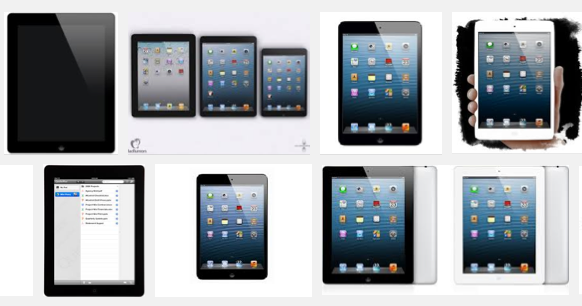
3. iPad – Again my preference here is for the iPad mini, because it is so light to hold in one hand and pass around, but still big enough and powerful enough to fulfil my storage needs and to operate without squinting (also quite a bit cheaper)


4. Reflector app – This is a key app that you download onto your laptop. It then enables you to project your iPad screen onto your computer (and so through the data projector) as it wirelessly receives signals from the iPad’s Airplay function.


For those who aren’t familiar with Airplay, it’s an Apple function that allows you to use the wireless to project sound and vision from an iPhone, iPad, iTouch etc of to Apple TV. You can find more information here: Airplay

Why I like the Airplay enabled set up

  • For me this allows the best of both worlds. I can use the laptop for any software that’s native to computer world and very quickly and wirelessly switch to the mobile environment of the iPad.
  • This set up is portable so you can use it in any room with a data projector and computer, as long as the Reflector app is installed.
  • This also has the advantage of allowing your students access to the data projector if they also have iPads, in fact the Airplay function combined with Reflector can allow your students to project onto the screen from a number of iPads simultaneously, which is great to get students showing and comparing work for the whole class to see.
  • Controlling the projection screen from the iPad means that you can move around the class and control it from wherever you are.
  • To hand control over to students you just pass them the iPad
  • You can store all your materials on your iPad and use it to do all your preparation / marking etc at home.
  • You don’t have to fiddle with replace or try to find those awful IWB pens.
  • The iPad gives you access to the vast range and variety of apps that you just can’t run on a computer or IWB environment. 
  • An iPad and a $12.99 app are hugely cheaper than the cost of an IWB and far more flexible.
  • You can also use the Reflector app to record screen activity so you can easily turn parts of your lessons into flipped learning or useful revision.
  • The iPad and laptop set up provides an authentic digital learning environment so digital literacies can be developed, whereas IWB software is an artificial digital environment which students will only encounter within schools.

There are of course some downsides to this arrangement. 

  • Hand writing on the iPad screen isn’t so comfortable even with a stylus and a good whiteboard app (though if you want to try it I would recommend Bamboo Paper).
  • The Reflector app isn’t free, but it is very cheap ($12.99) so much cheaper than an IWB.
  • This set up only works with Apple mobile products as the controller (Though you can use any laptop to install the app on), so if your students bring along Android or other devices they won’t be able to access your projector (but they wouldn’t on an IWB either).
  • The Reflector app runs through the wireless to connect the laptop to the iPad, so you may need to have some specific ports open if your IT manager has them closed.

If you don’t have the choice and you already have an IWB, then that’s fine, you could still install the Reflector app and start using an iPad too, but given the choice it’s pretty clear. So, now hopefully I’ll be getting asked this question a lot less often.

Do post comments and let me know what you think. I’d also appreciate hearing about any alternative apps you may have used to connect your iPad and especially your Android tablet to the projector

Related links:

“Hunar Haat” with the theme of “Local to Global”

After a gap of about 5 months due to the Corona pandemic, “Hunar Haat”, which has become “Empowerment Exchange” of artisans and craftsmen from across the country, will restart from September 2020 with the theme of “Local to Global” and comparatively larger participation of artisans.

Union Minister for Minority Affairs Shri Mukhtar Abbas Naqvi today said here that “Hunar Haat”, which has provided employment and employment opportunities to more than 5 lakh Indian artisans, craftsmen, culinary experts and other people associated with them in the last 5 years, have become popular among the people. “Hunar Haat”, which provides market and opportunity to master artisans and craftsmen from remote areas of the country, has become a credible brand of rare exquisite indigenous handmade products.

It is to be noted that Prime Minister Shri Narendra Modi, during his instantaneous visit to “Hunar Haat”, organised at India Gate, New Delhi in February 2020, had encouraged and lauded indigenous handmade products of artisans and craftsmen. Appreciating the artisans and craftsmen and their products in “Man Ki Baat” programme, Prime Minister Shri Modi has said, “A few days ago, at a small place at the Hunar Haat in Delhi, I witnessed hues of our country’s diverse expanse, cultures, traditions, cuisines & the warmth of emotions. As a matter of fact the repertoire comprising traditional attires, handicrafts, carpets, utensils, Bamboo & brass products, Phulkari of Punjab, exotic leatherwork of Andhra Pradesh, beautiful paintings from Tamilnadu, brass products of Uttar Pradesh, Bhadohi carpets, copper work of Kutch, a number of musical instruments & innumerable stories; the vivid mosaic of pan- Indian art & culture was truly unique. The stories of the artisans’ perseverance, zeal & love for their skill are equally inspiring as well.”

Prime Minister Shri Modi had said, “Hunar Haat, of course, is a platform showcasing art & craft; it is also lending wings to people’s dreams. It is a venue where it is impossible to overlook the country’s diversity. Besides handicrafts, it displays the diversity of India’s varied cuisine too. in a single row, one could savour the sight of Idli- Dosa, Chhole- Bhature, Daal- Baati, Khaman- Khandvi & what not! I thoroughly enjoyed having the delicious Litti- Chokha of Bihar. All over India, fairs & exhibitions such as this are organized from time to time. Whenever the opportunity arises, one should attend such events to know India, to experience India. Thus, not only would you be able to be a part of the country’s art-culture canvas; you will also contribute in the progress & prosperity of hardworking crafts persons, especially women.”

Shri Naqvi informed that utilising the time during nationwide lockdown; artisans and craftsmen have prepared their rare indigenous exquisite products at large scale and will bring them for display and sale in next “Hunar Haat”.

Shri Naqvi said that social distancing, hygiene, sanitisation and use of masks will be ensured at “Hunar Haat”. There will be a special “Jaan Bhi, Jahaan Bhi” pavilion to create health awareness among the people with the theme of “Say no to panic, yes to precautions”. 

The Minority Affairs Ministry has organised more than 2 dozen “Hunar Haat” so far across the country where lakhs of artisans, craftsmen have been been provided employment and employment opportunities through these “Hunar Haat”.

In the coming days, “Hunar Haat” will be organized in Chandigarh, Delhi, Prayagraj, Bhopal, Jaipur, Hyderabad, Mumbai, Gurugram, Bengaluru, Chennai, Kolkata, Dehradun, Patna, Nagpur, Raipur, Puducherry, Amritsar, Jammu, Shimla, Goa, Kochi, Guwahati, Bhubaneswar, Ajmer, Ahmedabad, Indore, Ranchi, Lucknow and other places.

Shri Naqvi said that this time, people will also be able to buy “Hunar Haat” products digital and online also. Union Minority Affairs Ministry has started process to register these artisans and their indigenous products on “GeM” (Government e Marketplace). Several export promotion councils have shown interest to provide international markets at large scale for handmade indigenous products of these artisans and craftsmen.

Shri Naqvi said that lakhs of master artisans and craftsmen from across the country are happy and excited that “Hunar Haat” is going to be organised again.

Facilitating flexible learning

Today three of us ran a workshop about facilitating flexible learning: how to give great feedback and still have a LIFE.

Overall, I think it went well. Lots of discussion and questions and people were keen to make contact at the end of the class….always a good sign.

It appears that the title and the content offered were timely. There was a big contingent from one school who have a push on to put courses online. This was excellent. They did have concerns, however, about how to get their content online. They were advised to work with the programme developers, and offered assistance to have people work alongside them, but not do it for them. The mentality is still there to get stuff on Blackboard, rather than thinking how they would like to present content and activities, and what technologies could assist.

There was some discussion about models where content is handed over to a team to create resources. Leigh made a good point about models he had seen which didn\’t work and had cost lots of money. He believes it is best to start with finding resources which already exist and can be re-used…if possible. This makes a lot lof sense.

Some institutions which are heavily in to distance education – open polytechnic, UK, Athabasca university have production units but this makes sense. Open university in NZ used to do this as well, but has found it is more cost effective to enable staff to take charge of their courses and they have moved to Moodle. It would be interesting to talk to someone and find out how it is actually going.

The total number who enrolled was 13 but 3 people didn\’t turn up. The group were very interested and gave positive evaluations.

I started the workshop off with an overview of facilitating online learning…well I sort of took charge of it really…we did brainstorm how we would approach it earlier in the week, but the actual content we presented was up to us individually. At the 11th hour, I felt the need to slap together some slides…too many bullet points..but for next time I will develop some concept maps.Hey I can try out CMAP.

I will try and get them done before this group finishes their online discussion. This will continue on until the end of the second week in May. Easter in the middle sort of interrupts the flow. The timing for the next workshop will be better. And hey next time we will try out Elluminate for the initial session.

People liked the different cases we presented. Merrolee had lots of practical advice and talked about how she managed the online discussion. It is good for people to hear the nitty gritty stuff from someone so experienced…well I am too. I talked about how assessment was linked in strongly to the discussions. We gave tips for managing prolific postings and motivating people to go online. I really have to do something about the amount of content in the evaluating eLearning for best practice course though…I will definitely be going with the learner-generated model for next year. hopefully i will still be teaching it then.

Leigh gave a very insightful overview of alternatives such as egroups, and how they are very useful platforms for handing over ownership of material to students….giving them something they can take away with them when they leave their 3 yr programmes…when they are locked out of the institutional platforms. Some of the OTs were very intrigued with the idea of having a community of practitioners able to remain in contact about professional issues.

It will take time but the ideas are filtering through. All we need are enthusiastic staff who act as \”hotpoints\” in their schools and talk about what they are doing to others. I do love running workshops with staff, and seeing the lightbulbs come on.

The next offerings will need to be a practical show and tell with staff demonstrating what they are doing. Oh when to schedule all these? We have two visiting speakers coming in May and June, Peter Mellow (AUT) on the Study Txt mobile learning project – article. Also John Milne (Massey) who is coming to work with us on the TEC eLearning guidelines an ECDF project. Exciting stuff.

5 Apps Students Can’t Live Without

These apps have helped me be successful thus far in my student life, and hopefully they can do the same for you.

From managing due dates to prepping for important exams, there are abundant online resources that students can use to stay organized, stay connected and get ahead at the same time. Now, it’s easier than ever to do all of that – and more – from your phone. But, with so many different apps to choose from, it’s not always easy to find the tool that works best for you.


Here are my top five rated apps for student survival. While this list is certainly not exhaustive, these apps have helped me be successful thus far in my student life, and hopefully they can do the same for you.


1. iCalendar or Outlook


Organization and tidiness cannot be overemphasized. It’s imperative to develop strong organizational skills because holding yourself accountable to your commitments will have a domino effect on other areas of your life. A student who is always on time to class is bound to be on time to work. Someone who keeps an agenda is likely to be a good at time management.


Most smartphones come with a built-in calendar application that pulls in events and reminders from your connected email account. In addition to managing your daily schedule, you can set alerts and configure your calendar to pull in information from other apps, such as Notes or Reminders.


There’s also My Study Life, an app specially designed to help you keep every aspect of your student life on track. My Study Life includes a homework tracker for due dates and assignments, as well as a calendar and a class schedule manager.


2. Evernote or One Note


Evernote is designed for the digital notetaker. With the ability to access your notes instantly from your computer, phone or tablet, Evernote is a great tool for busy students who study on-the-go. You can also enhance your notes with checklists, tables, links and screenshots clipped from the web.


Another helpful note-taking tool is Microsoft One Note, which also has cloud-sharing abilities that make it easy for you to access your notes anytime from anywhere. Regardless of which solution you choose, be sure to check out these tips for digital note-taking.


3. SymboLab


SymboLab is a great resource for students who need additional help in mathematics. An excellent calculator for myriad mathematical problems, SymboLab can help with graphing equations, finding integrals, derivatives and limits, and solving problems with unfamiliar symbols. This has been very helpful to me throughout my student career!


4. PocketPrep


PocketPrep offers a variety of different exam prep packages that can prepare students for the next step in their academic and professional careers. From standardized testing to advanced industry certifications, such as CompTIA A+ or the PMI PMP, PocketPrep has it all. Each prep package comes with a variety of practice questions, custom exams and a progress tracker to help you assess your strengths and weaknesses.


5. Peak Brain Training


This app offers brilliant brain teasers that help you maintain cognitive agility. Peak Games has even created a game in collaboration with MIT that is designed to improve your memory – something that can benefit you greatly when it comes time to study for your exams.


Brain teasers are an entertaining way to keep yourself sharp – you can use them when you need a study break or when you have extra time during your commute or in between classes. Lumosity Games offers similar exercises and programs to improve your memory and problem-solving abilities.

Why I don\’t want an IWB (Interactive Whiteboard)

Recently, I have been asked quite  few times about IWBs and which ones are best etc. My usual answer is \’none\’ and then I have to explain, so I thought, instead of explaining I would write this post so that I could point people towards each time they ask.

So this is my classroom set up of preference and these are the key components.


1. Data projector – I\’m not really bothered which one as long as it produces a good screen resolution (There\’s a reasonable article here on how to choose one:
How to Buy a Projector)


2. A Laptop – My preference here is for a MacBook, but I can understand why some people find that extravagant and don\’t feel they are worth the extra financial outlay. Personally, I think they are worth the extra money, because they work faster and so save time (the most valuable commodity we have) and because they are pretty durable(The Apple products I\’ve owned have lasted at least twice as long as their PC counterparts I\’ve had and are still going strong.)


3. iPad – Again my preference here is for the iPad mini, because it is so light to hold in one hand and pass around, but still big enough and powerful enough to fulfil my storage needs and to operate without squinting (also quite a bit cheaper)


4. Reflector app – This is a key app that you download onto your laptop. It then enables you to project your iPad screen onto your computer (and so through the data projector) as it wirelessly receives signals from the iPad\’s Airplay function.


For those who aren\’t familiar with Airplay, it\’s an Apple function that allows you to use the wireless to project sound and vision from an iPhone, iPad, iTouch etc of to Apple TV. You can find more information here: Airplay

Why I like the Airplay enabled set up

  • For me this allows the best of both worlds. I can use the laptop for any software that\’s native to computer world and very quickly and wirelessly switch to the mobile environment of the iPad.
  • This set up is portable so you can use it in any room with a data projector and computer, as long as the Reflector app is installed.
  • This also has the advantage of allowing your students access to the data projector if they also have iPads, in fact the Airplay function combined with Reflector can allow your students to project onto the screen from a number of iPads simultaneously, which is great to get students showing and comparing work for the whole class to see.
  • Controlling the projection screen from the iPad means that you can move around the class and control it from wherever you are.
  • To hand control over to students you just pass them the iPad
  • You can store all your materials on your iPad and use it to do all your preparation / marking etc at home.
  • You don\’t have to fiddle with replace or try to find those awful IWB pens.
  • The iPad gives you access to the vast range and variety of apps that you just can\’t run on a computer or IWB environment. 
  • An iPad and a $12.99 app are hugely cheaper than the cost of an IWB and far more flexible.
  • You can also use the Reflector app to record screen activity so you can easily turn parts of your lessons into flipped learning or useful revision.
  • The iPad and laptop set up provides an authentic digital learning environment so digital literacies can be developed, whereas IWB software is an artificial digital environment which students will only encounter within schools.

There are of course some downsides to this arrangement. 

  • Hand writing on the iPad screen isn\’t so comfortable even with a stylus and a good whiteboard app (though if you want to try it I would recommend Bamboo Paper).
  • The Reflector app isn\’t free, but it is very cheap ($12.99) so much cheaper than an IWB.
  • This set up only works with Apple mobile products as the controller (Though you can use any laptop to install the app on), so if your students bring along Android or other devices they won\’t be able to access your projector (but they wouldn\’t on an IWB either).
  • The Reflector app runs through the wireless to connect the laptop to the iPad, so you may need to have some specific ports open if your IT manager has them closed.

If you don\’t have the choice and you already have an IWB, then that\’s fine, you could still install the Reflector app and start using an iPad too, but given the choice it\’s pretty clear. So, now hopefully I\’ll be getting asked this question a lot less often.

Do post comments and let me know what you think. I\’d also appreciate hearing about any alternative apps you may have used to connect your iPad and especially your Android tablet to the projector

Related links:

Why I don\’t want an IWB (Interactive Whiteboard)

Recently, I have been asked quite  few times about IWBs and which ones are best etc. My usual answer is \’none\’ and then I have to explain, so I thought, instead of explaining I would write this post so that I could point people towards each time they ask.

So this is my classroom set up of preference and these are the key components.


1. Data projector – I\’m not really bothered which one as long as it produces a good screen resolution (There\’s a reasonable article here on how to choose one:
How to Buy a Projector)


2. A Laptop – My preference here is for a MacBook, but I can understand why some people find that extravagant and don\’t feel they are worth the extra financial outlay. Personally, I think they are worth the extra money, because they work faster and so save time (the most valuable commodity we have) and because they are pretty durable(The Apple products I\’ve owned have lasted at least twice as long as their PC counterparts I\’ve had and are still going strong.)


3. iPad – Again my preference here is for the iPad mini, because it is so light to hold in one hand and pass around, but still big enough and powerful enough to fulfil my storage needs and to operate without squinting (also quite a bit cheaper)


4. Reflector app – This is a key app that you download onto your laptop. It then enables you to project your iPad screen onto your computer (and so through the data projector) as it wirelessly receives signals from the iPad\’s Airplay function.


For those who aren\’t familiar with Airplay, it\’s an Apple function that allows you to use the wireless to project sound and vision from an iPhone, iPad, iTouch etc of to Apple TV. You can find more information here: Airplay

Why I like the Airplay enabled set up

  • For me this allows the best of both worlds. I can use the laptop for any software that\’s native to computer world and very quickly and wirelessly switch to the mobile environment of the iPad.
  • This set up is portable so you can use it in any room with a data projector and computer, as long as the Reflector app is installed.
  • This also has the advantage of allowing your students access to the data projector if they also have iPads, in fact the Airplay function combined with Reflector can allow your students to project onto the screen from a number of iPads simultaneously, which is great to get students showing and comparing work for the whole class to see.
  • Controlling the projection screen from the iPad means that you can move around the class and control it from wherever you are.
  • To hand control over to students you just pass them the iPad
  • You can store all your materials on your iPad and use it to do all your preparation / marking etc at home.
  • You don\’t have to fiddle with replace or try to find those awful IWB pens.
  • The iPad gives you access to the vast range and variety of apps that you just can\’t run on a computer or IWB environment. 
  • An iPad and a $12.99 app are hugely cheaper than the cost of an IWB and far more flexible.
  • You can also use the Reflector app to record screen activity so you can easily turn parts of your lessons into flipped learning or useful revision.
  • The iPad and laptop set up provides an authentic digital learning environment so digital literacies can be developed, whereas IWB software is an artificial digital environment which students will only encounter within schools.

There are of course some downsides to this arrangement. 

  • Hand writing on the iPad screen isn\’t so comfortable even with a stylus and a good whiteboard app (though if you want to try it I would recommend Bamboo Paper).
  • The Reflector app isn\’t free, but it is very cheap ($12.99) so much cheaper than an IWB.
  • This set up only works with Apple mobile products as the controller (Though you can use any laptop to install the app on), so if your students bring along Android or other devices they won\’t be able to access your projector (but they wouldn\’t on an IWB either).
  • The Reflector app runs through the wireless to connect the laptop to the iPad, so you may need to have some specific ports open if your IT manager has them closed.

If you don\’t have the choice and you already have an IWB, then that\’s fine, you could still install the Reflector app and start using an iPad too, but given the choice it\’s pretty clear. So, now hopefully I\’ll be getting asked this question a lot less often.

Do post comments and let me know what you think. I\’d also appreciate hearing about any alternative apps you may have used to connect your iPad and especially your Android tablet to the projector

Related links:

Ajmer Smart City is instrumental in fight against Covid-19

Ajmer Municipal Corporation (AMC), started taking proactive measure as early from 2nd March 2020, and further issued strict measures from 11th March, the day World Health Organization (WHO), declared the novel coronavirus (COVID-19) outbreak a global pandemic. AMC sets up Covid-19 War room at Nagar Nigam and is headed by the Senior Ajmer Administrative officials, Medical and Police officers to monitor the existing Covid-19 situation and take further action to reduce the spreading of Covid-19 among its citizens. War Room is also instrumental in planning and implementation of various innovative strategies in order to create awareness among its citizens for following Covid-19 precautionary steps issued by WHO and MHA:

  • Avoid close contact with people who are sick, maintain distance of 6 feet.
  • Avoid touching your eyes, nose, and mouth with unwashed hands.
  • Stay home when you are sick.
  • Cover your cough or sneeze with a tissue, then throw the tissue in the trash.
  • Clean and disinfect frequently touched objects and surfaces every day. High touch surfaces include counters, tabletops, doorknobs, bathroom fixtures, toilets, phones, keyboards, tablets, and bedside tables.
  • Wash your hands often with soap and water. In case soap and water are not readily available, use a hand sanitizer that contains at least 60% alcohol. Cover all surfaces of your hands and rub them together until they feel dry.
  • Stay out of crowded places and avoid mass gatherings
  • If surfaces are dirty, clean them. Use detergent or soap and water prior to disinfection.
  • Take your temperature if symptoms develop.
  • Don’t take your temperature within 30 minutes of exercising or after taking medications that could lower your temperature, like acetaminophen.

Key initiatives taken by Ajmer City Administration to reduce the spread of Covid-19 virus are as follows:

Public Address system (PA)- Awareness drives related to COVID-19 are being broadcast regularly using PA systems in association with fire and sanitation department of Municipal Corporation Ajmer. Regular surprise field visits are organised by City Collector and Commissioner to review the ground work and take feedback from the citizens directly.

Food and shelter: Homeless are being shifted to designated city shelter. Cooked food and essential things are provided to needy people in the selected localities. In War room, complaints are received from persons for requirement of food. Dry rashan have been distributed to needy persons after physical verification by Flying Squad Magistrates.

Use of Fire Tenders for disinfection: City fire force is using big fire tender to disinfect different locations like main roads of the city, bus stands, bus stops, railway stations, institutions, hospital campus, shops etc. small fire tenders are being used to disinfect whole city ward streets.

Government offices disinfection drive by Nigam health staff

COVID-19 Helpline number is established at city level and is monitored by war room officers. This helpline can be reached for food supply requirement, Disinfection and sanitation services.

Surveillance technologies- Real-time tracking of Disinfection and sanitation workers with GPS based technology.

Setting up quarantine facilities- Hotels and other private institutions are being acquired to Setting up quarantine facilities in the city. CORONA contact tracing of positive case is being done and persons coming in contact are being kept in quarantine centres as per guidelines

ICCC- Abhay Command and Control Center is being used by city Police and traffic department. CCTV camera footage is accessed for monitoring live traffic movement and public movement.

Movement of Migrants: RAJ COP APP is used for issuing the e-passes for inter-state and inter-city movement. Passes are approved by designated city officials for persons want to go outside of Rajasthan or persons want to come to Ajmer city. Stranded labourers of other states can also register on RAJ COVID INFO APP and e-mitra website and arrangements are being made for safe transportation of registered ones to their destinations. Pilgrims visiting Dargah Sharif Ajmer, who were held up in Ajmer due to Lock Down have been identified and have been sent to their respective places by trains and buses after medical checkup/screening and taking care of guidelines.