MISSION SAGAR – INS KESARI AT PORT LOUIS, MAURITIUS

As part of Mission Sagar, Indian Naval Ship Kesari entered Port Louis Mauritius on 23 May 2020. The Government of India is providing assistance to friendly foreign countries in dealing with the COVID-19 Pandemic, and towards this Indian Naval Ship Kesari is carrying COVID related essential medicines and a special consignment of Ayurvedic medicines for the people of Mauritius. 

In addition, a 14-member Specialist Medical Team comprising Indian Navy doctors and paramedics is also embarked onboard this ship, to work alongside their Mauritian counterparts and together render assistance for COIVD-19 related emergencies. The Medical Assistance Team includes among others, a Community Medicine specialist, a pulmonologist and an anesthesiologist.

An official ceremony for handing over the medicines from the Government of India to Government of Mauritius was held on 23 May 2020. Hon’ble Minister for Health, Dr Kailesh Jagutpal received the consignment on behalf of Government of Mauritius. The Indian side was represented by the High Commissioner of India to Mauritius, H.E Shri Tanmaya Lal. The minister also interacted with Commander Mukesh Tayal, Commanding Officer of Indian Naval Ship Kesari during the handing over ceremony.

         The assistance to Mauritius is a part of the Government of India outreach amidst the ongoing COVID-19 pandemic. ‘Mission Sagar’, is in consonance with the Prime Ministers vision of Security and Growth for All in the Region ‘SAGAR’. This missionhighlights the importance accorded by India to relations with the countries of the IOR and builds on the excellent relations existing between the two countries to battle the COVID-19 pandemic. The operation is being progressed in close coordination with the Ministry of External Affairs, and other agencies of the Government of India.

3 Advantages of My Nursing School

Finding the right nursing school to make my nursing career possible wasn’t an easy task. Here are three advantages that helped me choose my nursing school.

Nursing is one of the most rewarding and challenging careers and it brings joy to my heart. We take care of people who are at their most vulnerable and provide support for our patients’ families during trying times.

I chose to become a nurse because I wanted to do more for my patients. I recently graduated from the LPN program at Herzing University and I am now continuing my education in Herzing’s RN to BSN program. My plan is to eventually obtain my MSN and become a nurse educator.

Finding the right nursing school to make all of this possible wasn’t an easy task. I remember being frustrated when researching schools in my area. There were long waiting lists, expiration dates for prerequisite classes, not enough instructors to accommodate nursing student demand, inflexible schedules for the working student and extremely competitive GPA and test score requirements. I felt that it was easy for students – many of whom had the potential to become great nurses – to be turned away from these programs or to become discouraged while applying. I knew what I wanted in a nursing program and I was determined not to give up. I eventually found what I was looking for at Herzing University. Here are three advantages to Herzing’s nursing program:

1. Multiple nursing pathways

I wanted a school that would make it easy for me to advance my nursing degree if I chose to do so. Herzing’s LPN program allows students the opportunity to seamlessly continue their education in the ASN and BSN programs. Even if you did not complete an LPN program at Herzing, you can still receive credit for your prior learning. This allows students to accelerate their nursing education and earn their degrees faster.

2. Flexibility and student support

I was looking for a program that offered online classes, a supportive faculty and small class sizes. I found these advantages at Herzing. The eight-week course terms and online classes offered the flexibility I needed to earn my degree, and these factors continue to make it possible for me to balance my nursing career and my educational goals. The small class sizes have allowed me to build relationships with my instructors and I have felt supported every step of the way throughout my nursing journey.

3. Fast track to MSN

Another awesome advantage of Herzing’s nursing program is the opportunity to earn credit toward your MSN while you are enrolled in the bachelor’s degree program. Even if you aren’t sure if you want a MSN, I highly recommend this route because the tuition rate is the same and you do not have to add any extra classes to your course load. It is a great way to get ahead and save money on your education.

My advice for other students is to really think about what you want from a nursing program, and don’t settle for less! With the right school, it is possible for you to achieve your dream of becoming a nurse.

bronwynhegarty doctorate meanderings

bronwynhegarty doctorate meanderings

I have been reading this work by Hope Hartman:

Hartman, H.J. (2001). Developing students’ metacognitive knowledge and skills. In H.J. Hartman (ed.), Metacognition in learning and instruction. Kluwer, 33-68. Academic Publishers: the Netherlands.

I like the models she proposes:
Executive management metacognition – plan, monitor and evaluate progress.
Strategic metacognitive knowledge – what (facts), when and why (context) and how (procedures).

These models would enable participants to use metacognitive strategies for the three tasks in their course. This would help them develop metacognitive control and knowledge and also reflect.

For each task participants will be asked to plan, monitor and evaluate their progress using self-questioning techniques and reflect using a blog.

Why do I like the models she proposes:
1. Discipline diverse – these models can be used in a number of disciplines as they relate to any type of learning. The examples in the chapter relate to reading, maths, science social studies, writing.

2. Self-questioning is used and this can be modelled to encourage learners to create their own questions. The answers of course are generated by the learner.

3. Critical thinking – the models encourage this and by scaffolding the learning, critical thinking questions can be developed by the students themselves.

I also like the components of the BACEIS model and the internal and external supersystems.B = behaviour
A = affect
C = cognition
E = environment
I = interacting
S = systems

The cognitive system includes metacognition plus critical thinking, creativity and learning strategies. It would make it too big a project I guess to also look at motivation, affective self-regulation and attitudes (affective system) which are also part of the internal supersystem.

The external supersystem includes culture and instructional techniques as well as teacher characteristics etc as influences on thinking but they are not really relevant for this project.

9 Skills Employers Are Looking For

Here are some of the top hard and soft skills employers are looking for in today’s job market.

In an increasingly digital economy, many organizations are seeking employees with technology-focused skill sets. However, HR and talent executives, as well as other people managers, agree that “soft” skills, such as critical thinking and communication, are also crucial to an organization’s productivity. Demonstrating competence in both hard and soft skills will positively influence an individual’s career advancement.

Here are some of the top hard and soft skills employers are looking for in the year ahead:

Top Hard Skills:

1. Cloud Computing

Cloud computing is the top hard skill that employers are looking for in 2019, according to LinkedIn. From project management to mobile app development, many companies are leveraging cloud technology to streamline their internal processes, or to create new technology solutions for their customers. As a result, cloud computing is becoming an essential skill for many technology professionals, including software engineers, network architects and more.

2. Artificial Intelligence

According to data from LinkedIn, the number of AI-related skills on LinkedIn profiles grew 190% between 2015 and 2017. Many industries have already begun to adopt AI technology to streamline processes and improve business results, including healthcare, software, finance and manufacturing. Companies need skilled technology professionals to spearhead their digital transformation, and those with AI experience are in high demand. A career-focused technology program can help you become more familiar with AI technology and other new advancements you need to stay competitive in the field.

3. Data Science

In today’s business environment, data is more important to companies than ever before. Data-driven insights can help organizations improve efficiencies, identify customer needs and strategize for the future. Companies need professionals who are able to analyze and distill data into actionable steps that they can use to drive their businesses forward.

With a data analytics degree, you can position yourself for some of the most rapidly growing jobs today. Herzing University offers a bachelor’s degree in data analytics and a Master of Business Administration (MBA) in Data Analytics program to help you start or advance your analytics-focused career.

Top Soft Skills:

4. Creativity

Creativity is the number one soft skill that employers are looking for in 2019, according to LinkedIn. Keep in mind that creativity doesn’t always correlate with artistic ability. In a professional setting, being creative can mean having a unique thought process or a new perspective. No matter the industry, companies are always looking for new ways to grow their business and differentiate themselves from their competitors. For example, creative thinkers have helped companies like Apple, Amazon and Google become the prominent industry leaders they are today.

5. Collaboration

The ability to work in a team is the most valued skill by employers, according to a survey by the National Association of Colleges and Employers. Advancements in technology have made companies more connected than ever before, and facilitated greater collaboration with employees around the world. As a result, companies are looking for candidates that demonstrate strong teamwork skills, as well as leaders who promote collaboration and creativity from their team members.

6. Analytical Reasoning

From business and technology to healthcare and nursing, analytical reasoning is one of the most important skills for growing and advancing in your career. Many industries are becoming more data-driven, and companies are looking for employees who can analyze trends and draw conclusions from large sets of data. Strong analysis skills can also help you become a better problem-solver, examining all sides of an issue to arrive at the best, most effective solution.

7. Adaptability

It can be difficult for companies to keep up with the pace of change when it comes to technology and the needs of their customers. As a result, companies look for employees who can learn and grow at a fast pace. Adaptability is also important when it comes to project management, as you might have to balance multiple tasks and deadlines at once.

8. Time Management

Time management is an essential skill for any working professional. By improving your level of organization, you can increase your productivity, reduce stress and ensure that you are able to complete all of your tasks on time. Planning ahead and prioritizing are important time management skills you can start developing while in college so that you are prepared for the demands of a fast-paced work environment.

9. People Management

Being able to lead, coach and empower people is crucial if you want to become a manager. An MBA program focused on soft skills, such as leadership, communication and problem-solving, can help you develop the people management skills you need to effectively motivate others and advance in your career.

According to a 2018 report by LinkedIn, the number one priority for employers is training for soft skills. Earning your degree or advancing your education through an MBA program can help you develop the critical soft skills needed to succeed in your field, as well as the leadership and managerial knowledge you need to advance your career. 

5 Daily Habits to Help You Boost Your GPA

By implementing better habits both in and out of the classroom, you can set yourself up for success all year. Here are five daily habits to boost your GPA.

As a college student, one of your top priorities is to maintain a good grade point average (GPA), but when you have work, class, family and so much more to manage, it can be extremely difficult to keep up.

One of the best ways to take control of a busy schedule is to have a routine. By implementing better habits both in and out of the classroom, you can set yourself up for success all year.

Here are five daily habits to boost and maintain your GPA:

1. Take notes

Your professor likely won’t require you to take notes during class, but you need to in order to remember key information at a later date, such as before a test. Some students prefer to type their notes on a laptop, while others will take theirs by hand. There is research to suggest that writing notes by hand is more effective because it requires more focus, making it more likely you’ll remember the information later. If you’re not used to taking notes, it’s OK to experiment with different styles to find what works best for you. Just make sure that you keep all your class notes in the same place so it’s easy to find them later.

Review your notes whenever you have downtime and before important quizzes or exams. You’d be surprised how much regular repetition can help you understand a topic. Reviewing your notes after class can also help you identify areas in which you’re struggling. Be sure to follow up with your professor or research the answers in your textbook. As you prepare for exams and quizzes, you might also find it helpful to rewrite your notes in the form of a study guide.

2. Study on-the-go

Nobody wants to lug their textbooks around all day. Luckily, there are many ways you can take your study materials on the go and have some fun while you’re at it! One example is to make a quiz or flashcards out of your notes. You can do this the traditional way on notecards, or use Quizlet to create an online quiz.

It doesn’t matter which method you choose, but keep your lifestyle in mind. For example, if you don’t often have a laptop or tablet with you, Quizlet might not be the best resource. You should try flashcards or printing out a mock quiz instead. The more accessible you make your study materials, the more likely you are to actually study.

Also, be sure that the study materials you create are challenging enough that they will help you learn, but not overly difficult. A good rule of thumb is to make your quiz questions 75% challenging and 25% easy. The easy questions will keep your memory fresh while providing temporary relief from the difficult questions. A well-balanced study session is key to finding success.

3. Make time for homework each day

Homework is designed to test your brain outside of the classroom. It can be challenging, but that’s the point. The more you work on something, the more likely you are to remember it. It can be tempting to wait until the last minute to get it all done, but this not the best way to handle your homework.

Instead, by making time for homework every day. This way, you will be studying and familiarizing yourself with course material far more regularly, and you will start to understand the material better. Additionally, because you aren’t spending late nights trying to finish your homework at the last second, you can give every assignment the attention it deserves.

4. Take time for yourself

Sometimes students struggle to get their GPA up because they are suffering from test anxiety and going overboard with their study habits. If you study too much and worry too much, you won’t perform as well as you would have if you took some time for self-care.

So, take some time to unwind and relax every day. Turn on Netflix, read a book, or just spend some time with your family – whatever you need to do to relax. Of course, you should still be responsible with your time and make sure you are studying at some point in the day. Find your balance and you will do just fine.

5. Use a planner

Many students use a planner to help find that balance between studying, self-care and other commitments. There are many time management apps – some even specifically designed for students – that can help you plan out your days and manage your to-do list effectively. You can find out more about which type of planner is best for you in this blog post. All are equally great resources for staying on track!

While maintaining a strong GPA is important, try not to put too much pressure on yourself to achieve perfect grades. You might not ace every exam, but you can position yourself for success by practicing good time management habits and taking care of your health. Trust that your hard work will pay off in the end, and focus on doing your best!

Peer editing in digital and mobile environments

For years now I have been happily using EtherPad based services like http://primarypad.com/ and http://sync.in/ to get participants on the training courses I deliver to work collaboratively to create and peer edit texts. Increasingly though I’ve been having problems with the reliability of the free services these companies provide and the lack of reliable compatibility with mobile devices.


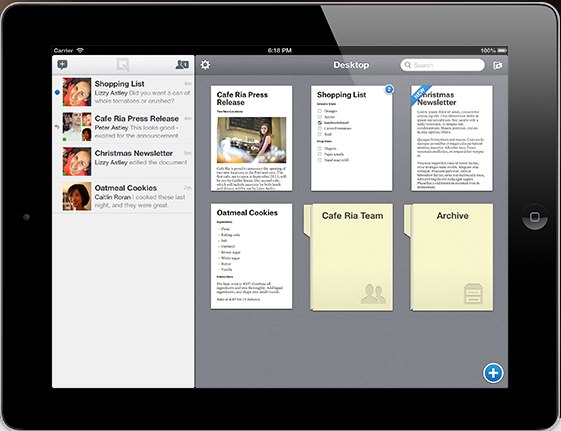
At last it seems that now I have a very elegant solution in the form of https://quip.com/.
Quip looks a lot like Evernote and has a similar interface with documents contained in notebooks, but one of the big differences is that Quip was designed specifically to enable peer editing and collaboration on documents and has a very clear way of showing and tracking the changes.

Here’s a short tutorial showing you how it works:


Why should we get our students peer editing?

  • It improves their awareness of accuracy
  • It can improve the quality of their writing
  • Pushes students to accept that writing is a process that needs revisions and redrafting
  • The ability to collaborate in digital environments is likely to be an important real world digital literacy


What kinds of peer editing activities can we do with students?

  • We can give them texts with planted errors (10 – 20) in to work on a find and correct together. These could be the lyrics of songs they like or stories or articles they have read.
  • We can get students to correct each others’ compositions before we look at them.
  • We can give them texts with specific features missed out and get them to work together to add them. These could be linking or referencing devices, punctuation, vocabulary words, grammatical features such as prepositions or articles etc.
  • We can get them working together to rearrange parts of a text into a better order or structure.
  • We can give them the bare structure of a story and ask them to embellish it and make it more descriptive and interesting.


What I like about Quip

  • It’s free
  • Nicely designed interface
  • Works and looks well in both tablet  app form and in the browser
  • Clearly tracks and highlights changes to documents by different users
  • It looks secure and enables you to limit who sees and works on the document while editing
  • Has a kind of chat messaging feature which works along side the notes for changes
  • We can use it to get students collaborating and working together outside the classroom


What I’m not so sure about

  • It requires registration, which can slow things down in class, but it does also add a degree of security
  • I haven’t tried it with larger groups yet so I’m not sure how reliably it will function when scaled up to say having a whole class work synchronously on a single document
  • Not sure how long it will stay free (There is a Quip Business already available)

I’m now looking forward to my next course so that I can try Quip out and get a bit more experience with it. I hope you also find it useful with your students. Do drop me a line and let me know how it goes.

Related links:

bronwynhegarty doctorate meanderings

bronwynhegarty doctorate meanderings

I have been reading this work by Hope Hartman:

Hartman, H.J. (2001). Developing students’ metacognitive knowledge and skills. In H.J. Hartman (ed.), Metacognition in learning and instruction. Kluwer, 33-68. Academic Publishers: the Netherlands.

I like the models she proposes:
Executive management metacognition – plan, monitor and evaluate progress.
Strategic metacognitive knowledge – what (facts), when and why (context) and how (procedures).

These models would enable participants to use metacognitive strategies for the three tasks in their course. This would help them develop metacognitive control and knowledge and also reflect.

For each task participants will be asked to plan, monitor and evaluate their progress using self-questioning techniques and reflect using a blog.

Why do I like the models she proposes:
1. Discipline diverse – these models can be used in a number of disciplines as they relate to any type of learning. The examples in the chapter relate to reading, maths, science social studies, writing.

2. Self-questioning is used and this can be modelled to encourage learners to create their own questions. The answers of course are generated by the learner.

3. Critical thinking – the models encourage this and by scaffolding the learning, critical thinking questions can be developed by the students themselves.

I also like the components of the BACEIS model and the internal and external supersystems.B = behaviour
A = affect
C = cognition
E = environment
I = interacting
S = systems

The cognitive system includes metacognition plus critical thinking, creativity and learning strategies. It would make it too big a project I guess to also look at motivation, affective self-regulation and attitudes (affective system) which are also part of the internal supersystem.

The external supersystem includes culture and instructional techniques as well as teacher characteristics etc as influences on thinking but they are not really relevant for this project.

5 Powerful Leadership Traits to Help You Earn a Management Position

In order to position yourself for leadership roles, you’ll need to demonstrate that you have the skills and knowledge needed to do the job.

In the next phase of your career, you might aspire to be a manager or a leader within your organization. With the right skills and mindset, you can effect change, inspire others and create positive outcomes for your team and your company.
In order to position yourself for leadership roles, you’ll need to demonstrate that you not only have the skills and knowledge needed to do the job, but also the right mix of leadership qualities to be an effective manager.
A recent Gallup study found that only 10 percent of working professionals possess the talent to be a great manager.
Here are five traits you’ll need in order to be a part of that top 10 percent:

Communicate with Expertise

Great managers are expert communicators. Not only do they set clear goals and expectations for their team members, they must also keep their managers, and in some instances, company executives, informed on project outcomes, status and strategy.
Look for opportunities to develop your communication skills throughout your academic or professional career. The more practice you have with giving presentations or speeches, communicating with clients, or working with others on a project, the more prepared you’ll be when it comes time for you to lead.

See the Big Picture

You’ll take on more responsibility as you advance to leadership roles, but you’ll likely be less involved with the day-to-day tasks you were once assigned. Now, it’s important to see the big picture and understand how different parts of the business contribute to the company’s overall goals and where you and your team fit into that.
Being able to foresee potential issues or obstacles – or even opportunities for growth and change – is a large part of your job as a leader. When issues do come up, keep a positive attitude and focus on finding a solution. Strong critical-thinking, problem-solving and decision-making skills are all important attributes for a manager.

Manage Projects Effectively

You’ll likely oversee several teams and projects at once. Being able to keep multiple balls in the air and ensure that you meet your deadlines is a crucial skill for success.
Part of delivering on your goals and promises means delegating to your team members, and facilitating collaboration across teams, if necessary. Being able to inspire and motivate others to achieve a common goal – as well as hold everyone accountable for their assigned tasks – is a hallmark of a good manager.

Deliver on Promises

It’s important that you also exemplify the qualities and values that you ask of your employees. Time management, accountability and responsibility are all still equally important in managerial roles as they were early on in your career.
Great managers recognize that their team’s success is their success, and they work to cultivate a respectful and positive work culture. By following through on your promises and the goals you set for yourself and your team, you motivate others to perform and produce quality work – and everyone wins.

Make Transparency a Priority

Be honest with your team members when there is an issue or a problem, but don’t dwell on negative outcomes. Instead, focus on finding a solution to the problem or discuss what can be learned from a situation that didn’t turn out as planned.
It’s up to you to make sure that your team is motivated and engaged. While it’s important to learn from our mistakes, no one is perfect. Help your employees develop the skills and knowledge they need to advance in their own careers by building a culture that is based on learning.
That promotion may not be as far off as you think. By finding ways to develop your communication, critical-thinking and problem-solving skills now, you can prepare and position yourself for the next level of your career.

Peer editing in digital and mobile environments

For years now I have been happily using EtherPad based services like http://primarypad.com/ and http://sync.in/ to get participants on the training courses I deliver to work collaboratively to create and peer edit texts. Increasingly though I\’ve been having problems with the reliability of the free services these companies provide and the lack of reliable compatibility with mobile devices.


At last it seems that now I have a very elegant solution in the form of https://quip.com/.
Quip looks a lot like Evernote and has a similar interface with documents contained in notebooks, but one of the big differences is that Quip was designed specifically to enable peer editing and collaboration on documents and has a very clear way of showing and tracking the changes.

Here\’s a short tutorial showing you how it works:


Why should we get our students peer editing?

  • It improves their awareness of accuracy
  • It can improve the quality of their writing
  • Pushes students to accept that writing is a process that needs revisions and redrafting
  • The ability to collaborate in digital environments is likely to be an important real world digital literacy


What kinds of peer editing activities can we do with students?

  • We can give them texts with planted errors (10 – 20) in to work on a find and correct together. These could be the lyrics of songs they like or stories or articles they have read.
  • We can get students to correct each others\’ compositions before we look at them.
  • We can give them texts with specific features missed out and get them to work together to add them. These could be linking or referencing devices, punctuation, vocabulary words, grammatical features such as prepositions or articles etc.
  • We can get them working together to rearrange parts of a text into a better order or structure.
  • We can give them the bare structure of a story and ask them to embellish it and make it more descriptive and interesting.


What I like about Quip

  • It\’s free
  • Nicely designed interface
  • Works and looks well in both tablet  app form and in the browser
  • Clearly tracks and highlights changes to documents by different users
  • It looks secure and enables you to limit who sees and works on the document while editing
  • Has a kind of chat messaging feature which works along side the notes for changes
  • We can use it to get students collaborating and working together outside the classroom


What I\’m not so sure about

  • It requires registration, which can slow things down in class, but it does also add a degree of security
  • I haven\’t tried it with larger groups yet so I\’m not sure how reliably it will function when scaled up to say having a whole class work synchronously on a single document
  • Not sure how long it will stay free (There is a Quip Business already available)

I\’m now looking forward to my next course so that I can try Quip out and get a bit more experience with it. I hope you also find it useful with your students. Do drop me a line and let me know how it goes.

Related links:

Survival Guide to Being a Working Adult and a College Student

These tips can help make your transition to student life as smooth as possible and keep you on track to achieve your goals.

In today’s competitive job market, many adults are going back to school to earn or advance their degrees. Whether you’re looking to change career paths or to advance in your current career, these tips can help make your transition to student life as smooth as possible and keep you on track to achieve your goals.

1. Set goals and track your progress

You likely have specific goals for your career and education. Maybe your degree will help you get that promotion you’ve been working towards, or maybe you’re looking for a change of pace and beginning a career in a new field. It’s important to have long-term goals, but it can also benefit you to have short-term goals while you’re in school. For example, striving to get all A’s in your first semester of classes helps you get closer to your long-term goal of graduating, while also giving you something to work towards right now.

Keep track of what you are doing to meet your goals as well as your progress. Celebrating your successes, like getting an A on your first exam, can boost your productivity and help you stay motivated through rough patches or busier periods.

2. Work ahead when you can

As a working student, you’ll learn how to make the most of little pockets of free time, such as in the waiting room of the doctor’s office, or in between classes. Use these spare moments to get ahead in your coursework or to cross items off your to-do list.

Herzing graduate Ashely Oloshove quickly mastered the art of multitasking so she could enjoy her time with family and still get her schoolwork done.

“I work five or six days a week, but I am home with my kids every night. As the kids are eating, I might be doing dishes or packing lunches for the next day. We might have a family movie night, but I’m working on my homework while I watch,” she says.

3. Use time management apps

Time management is an important skill for any student to master and it’s especially important if for working students who are balancing a busy schedule. Today, there are a variety of apps that can help you manage your time. You can even program these apps to send you reminders about upcoming deadlines or daily to-dos, so you don’t let anything slip through the cracks.

Survival Guide to Being a Working Adult and a College Student

4. Take advantage of student resources

Most universities have a variety of academic and career resources available for students, whether you’re attending on-campus or online. If you need help writing a paper, for example, many universities have writing centers that can help you navigate any step of the writing process. Course-specific tutors can help you understand key class concepts or study for an upcoming exam. Some campuses even offer childcare services, which can be an important resource for any adult student with children.

By setting clear goals for yourself, practicing good time management and taking advantage of all the resources your school has to offer, you can position yourself for a successful college career.

flexible learning committee

T and I have just been brought on to the flexible learning committee and although there was good discussion about flexible learning issues most did not seem to have a clear idea of where the committee was heading re the information gathering for developing the strategy. Probably cos most people were relatively inexperienced with flex learning per se and were coming to terms with the whole concept. Now of course T and I have the job of coming up with the ideas/survey etc. to gather info on which to base the strategy…such is life and the challenge…and swallowing the “I told you so” feeling. It would have been a lot easier if we had been there from the start.

M of course is being roped in to our working group. Plus I will be involving L who is bringing us in to the 21st century although he isn’t on the committee – yet. Good to have K as an ally on the same wave length and speaking the lingo.

How to Leverage Social Media (Besides LinkedIn) For Your Job Search

Job seekers are using social media to help them find the perfect job — and not only in LinkedIn! Facebook can help you stay on top of company updates.

The majority of employers today are using social media in their recruiting processes, according to the Society of Human Resources Management (SHRM). Candidates are using social networking to find a job, too – and not only LinkedIn.

While LinkedIn remains the top social media platform for recruiters and job seekers, candidates are leveraging other social media platforms to build their personal brands, connect with their favorite employers, and get a sense of a company’s work culture before applying.

Here’s how you can use social media to supplement your job search:

1. Facebook

Facebook might not seem like a relevant platform for your job search, but it does have some unique advantages. According to a recent Jobvite survey, 67% of those who used social media in their most recent job search used Facebook. Here’s how you can, too:

  • Research potential employers. A company’s website and LinkedIn page can help you understand more about the business, but heading over to the corporate Facebook page can give you a little more insight into what it would be like to work there. Check out recent photos, birthday announcements, blog posts, press releases and reviews to learn more about the corporate culture and employee sentiment. For example, is it a fun, casual and creative place, or more of a traditional, conservative work environment? Facebook is a great place to get a look inside the company and determine whether a potential employer is a good fit for you.
  • Follow your favorite companies for regular updates. If you’re interested in the company, follow its Facebook page so you don’t miss any important updates. Many companies will post open positions and hiring announcements on social media, and you don’t want to be out of the loop!
  • Clean up your online image. It’s a good idea to comb through your own Facebook profile while you’re at it. Consider removing content or photos that you wouldn’t want a potential employer to see, or changing your privacy settings so that your updates are only visible to close friends. It’s common for employers to run a social media check on potential candidates, and you want to make sure you’re presenting yourself in the best light possible.

2. Twitter

Twitter is an ideal medium for building your professional brand – something that can distinguish you from other qualified applicants. By reflecting your “brand” through your social media footprint, you can help potential employers understand who you are and what type of leader and employee you would be.

  • Create a professional Twitter account. If you want to keep your personal and professional online identities separate, consider setting up a second, public Twitter profile where you can post specific work-related content. Be sure to flesh out your bio with keywords that reflect your interests and future goals, so employers can understand your background and the kinds of opportunities you’re interested in.
  • Follow industry hashtags. Show employers that you are passionate about your field and on top of the latest trends and conversations by following industry-relevant hashtags. If you have a unique perspective to offer on a particular issue or trend, share it on your own page, or start a conversation in the comments.
  • Build your professional network. Engaging with others on Twitter is a great way to continue building your professional online brand. Research who the influencers are in your field, and follow them to stay in-tune with the latest trends. You can also reach out to others for advice in navigating your job search, or crowd-source input from your followers.

3. Instagram

Instagram might seem like the last place to go during a job search, but it’s becoming one of the most valuable platforms for businesses today. More than 25 million businesses use Instagram worldwide, and just like Facebook, their profiles can provide a window into day-to-day company happenings and culture.

  • Follow your favorite companies to stay in-the-know. Some companies are phasing out their Facebook presence in favor of faster-growing platforms like Instagram. If a company’s Facebook page is a little light, head over to Instagram to see if it is posting more frequently there. If a company seems like it could be a good culture and career fit for you, hit the follow button so you don’t miss any important updates.
  • Track job search hashtags. Take advantage of the ability to search for job-related hashtags like #JobOpening or #NowHiring to be among the first to know when a new position is available. Some larger corporations might have a separate account for career and HR-related updates, so do your research to find out which pages you should be following.
  • Update your privacy settings. Again, if there are posts you don’t want employers to see, make sure to update the privacy settings on your personal Instagram account, or create a separate account for your professional updates.

But don’t forget about LinkedIn…

Of course, it’s still important to make sure your LinkedIn profile is up-to-date and that you’re active on the platform. LinkedIn is the world’s largest professional network with more than 610 million users worldwide and over 15 million active job postings, so this is the platform that should take most of your job search time. For example, 95 percent of recruiters report using LinkedIn as a sourcing tool to identify qualified candidates. By optimizing your LinkedIn profile, you can expand your network, get noticed by recruiters and take your career to the next level.

You can get more tips on how to navigate your job search through LinkedIn here. 

Need help getting started? If you’re not sure where to start your job search, schedule a time to meet with your career advisor. Our Career Development team is there to guide you through every step of the job search process – from creating a resume to fine-tuning your LinkedIn profile, and everything in between.

4 Certification Options for Healthcare Managers

Learn more about certification options for healthcare managers and how they can help you reach your career goals.

Healthcare managers, otherwise known as healthcare executives or administrators, work closely with registered nurses, physicians, surgeons and other healthcare workers to direct, plan and coordinate medical services.

Due to rising demand for healthcare services, employment for healthcare managers is expected to grow by 18% from 2018 to 2028, adding as many as 72,000 new jobs, according to the Bureau of Labor Statistics (BLS). The occupation also offers a competitive salary – the annual average is $99,730, and the top 10% earn more than $182,600, according to BLS.

Once you earn a bachelor’s degree in healthcare management, your next step to advance your career could be to earn an industry-recognized certification. Learn more about certification options for healthcare managers and how they can help you reach your career goals.

Why should I earn a certification in healthcare management?

A certification provides third-party validation of your knowledge and expertise, which can play an important role in helping you land your first job out of college or advance your healthcare management career years later. While a certification is not required to work as a healthcare manager, earning one can help you differentiate yourself from other candidates, position you for advanced roles, and increase your earning potential.

Herzing University offers a few sought-after industry certifications as part of its healthcare management degree program, including:

1. Lean Six Sigma Yellow Belt Certification (LSSYB) from GoLeanSixSigma

Revenue and efficiencies aren’t the only things at stake when errors are made in the healthcare industry – people’s lives are on the line. This is why significantly reducing medical errors is so crucial, and why Lean Six Sigma methodologies are so valuable. This certification takes you through the five-step approach of Lean Six Sigma, which can help healthcare managers improve the patient experience by shortening wait times, preventing falls and injuries and reducing medication errors.

2. Certified Specialist Managed Care (CSMC) through Healthcare Financial Mgmt Associations (HFMA)

This certification prepares you for the issues surrounding healthcare reform, case management, Medicare and Medicaid and cost reporting. At the end of the program, you’ll be able to navigate negotiation strategies, various managed care models, reimbursement calculations, benefit coordination, and more.

Once you’ve earned your degree and have relevant experience in the healthcare management field, you can pursue the following certifications:

3. Certified Associate in Project Management (CAPM) from the Project Management Institute (PMI)

If you don’t have a lot of experience under your belt as a healthcare manager, this certification is a great stepping stone to more advanced certifications. A CAPM certification demonstrates your working knowledge of project management. With this certification, you’ll be able to manage larger projects and bring valuable project management skills to your current healthcare management role.

4. Certified Specialist Business Intelligence (CSBI) through Healthcare Financial Mgmt Association (HFMA)

With a CSBI certification, you’ll learn how to leverage healthcare business intelligence and tools that can inform decisions surrounding quality of care, operational effectiveness, financial efficiency, and more. Once the certification is complete, you’ll be able to better recognize the role of data in the healthcare industry.

If you’re interested in the business of healthcare and helping organizations implement new technologies and processes to improve patient care, a career as a healthcare manager could be the right fit for you. Due to fast-growing employment prospects and a competitive average salary, healthcare manager is ranked #25 on U.S. News & World Report’s list of Best Paying Jobs for 2019 and #5 on its list of Best Business Jobs.

With additional certifications and experience, you can continue to advance your healthcare career and take on more responsibility within your organization. Learn more about Herzing University’s healthcare management program and start building your healthcare career today

Video communication apps and mobile learning

One of the great things about mobile devices such as tablets, iPads and phones is that most modern devices have good quality cameras and microphones built in. This opens up a really wide range of potential for communication and speaking practice that used to be such a struggle to organise on older laptops and desktop computers.

App developers have also been quick to exploit the potential of this powerful tool and in this post I’d like to look at some of the tools that have been created and how they can be used for language development.

Mailvu for asynchronous messages


Mailvu has been a long time favourite of mine, mainly because the web based version is so easy to use and doesn’t require any downloads. You just point your browser at: http://mailvu.com/ and as long as you have the Flash plugin installed on your computer you can start recording immediately. Mailvu also provides mobile apps for iOS, Android an Blackberry. These are easy to use and it allows you to send short spoken messages which don’t require the viewer to have any specific software or to download large video files. They just click a link and watch your message. This kind of cross platform compatibility is really important if you are working in a BYOD environment where students could be coming to class with a wide range of devices.

EyeReport for picture in picture


EyeReport  puts an interesting twist on the video communication genre by adding the ability to record video on video. By this I mean that students can upload or record a video on their mobile device and then add a video commentary over the top explaining or commenting on what they see in the original video. This opens up a whole range of potential activities that we can get students doing. They could add commentary to sporting clips, give guided tours of places they have visited, explain processes or even make their own documentaries. Once students have completed their recording these can be shared to YouTube, Facebook, Twitter or emailed directly from within the app.

CoachesEye for video annotation


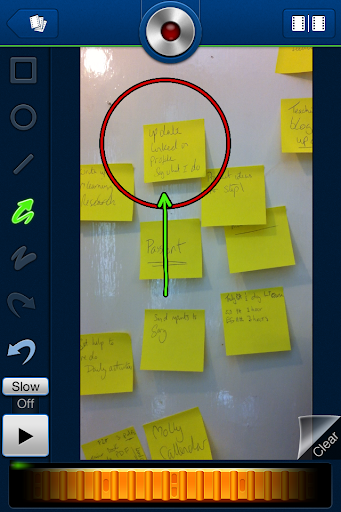
CoachesEye is a similar app to EyeReport (though this one is no longer free) but is much more feature rich. Like EyeReport you can record video commentary over video, but with CoachesEye you can also add annotations and you can stop and control where you insert your comments into the video. This app was designed for coaches to give detailed feedback to athletes on their physical movements, but it’s a great app to get students creating and talking about their own videos, and also a useful tool to use when observing teachers for training purposes.

Storytime for bedtime stories 


Storytime is another app which puts a new Twist on the video communication genre. It combines video conferencing with reading stories out loud. The app was designed to enable parents to read to their children from a distance and it contains a number of books you can choose to read and while you read you can discuss the books, ask questions and point to things on the page whilst chatting with the video window at the top. This is great for doing online tutoring with younger learners. There is quite a range of books from very basic and up and they are nicely illustrated.

Teleprompter for controlled speaking practice 


Teleprompter is an app that I wrote about a while back when it was still free (iPhone for Speaking Homework ). The app is what it says, it allows you to import text and then it scrolls through the text while creating a video of you reading it. This is great to get students doing controlled speaking practice and then watching and improving their speaking. You can set texts which include a range of sounds which they find difficult and then watch them together and help them to understand what elements of their pronunciation are causing problems.

Keek for video journals


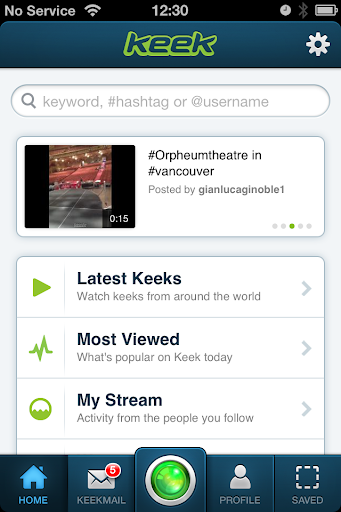
Keek mixes web with mobile in the form of video journals. Users can post short messages of up to 35 seconds from their mobile or computer and these are published to the web or can be browsed through the app. This would be a great tool to use as a daily learning journal, but it’s probably best used by adults or more responsible teens. It seems to be a very popular tool with teens in the USA and there is a wide range of content that students can browse through, some of which is not best suited to educational purposes, but as a concept this is quite a good app. If you prefer your students to be sheltered from this kind of popular culture app, then you can still take up the idea of the video learning journal and just get them to use their built in video camera app and post the messages to a Dropbox site.

Six3 for video messaging


Six3 is similar to MailVu and also compatible with most platforms, but it gives you the choice of recording private or public message and has an additional filter feature which can help to improve your appearance on the video. It’s called Six3 because you have 63 seconds of recording time in each message. Like Mailvu, the messages are also sent via links through your email, but they can also be posted directly to Twitter or Facebook from within the app.

Skype for synchronous online tutoring


Skype has been around for a good while and was one of the first video based communication tools to break into the mainstream. It’s being used by many online schools to deliver live online lesson from teachers to all parts of the globe. One of the great things about Skype, apart from the reliability, is that it keeps developing and adding new features. The recent addition of video messages that enable it to be used as an asynchronous tool will really help to widen its scope for use as a language development tool.


Built in camera app
With all these apps and the possibilities they offer, it can be easy to overlook the obvious. Most modern mobile device come with a built in video camera application and you can always use this to record and send video message. This has the advantage that messages are very safe from third party app providers and any possible security breaches, but sending the video clips to someone else often involves sending the whole clip via email which can be slow and require good connectivity.

For more ideas and activities for using video and webcams to develop languages see my posting 20 WebCam Activities for EFL ESL Students

Why use video communication?

  • Well one of the best reasons to use these kinds of apps is to get students speaking. Speaking homework has always been particularly difficult for students, but now you can ask students to produce spoken homework which you can watch and assess.
  • Video as a communication genre is likely to become increasingly important as a 21st century digital literacy, so it’s important that our students have practice and are able to use this communication genre, just as they do with speaking on the telephone or writing emails.
  • Video can draw students’ attention to many of the paralinguistic features of communication that are hard to highlight in a crowded classroom.
  • Enabling students to record themselves speaking and then to watch themselves can be very enlightening for students as they can then start to self assess their own performance and look for ways they can improve. It can also encourage some students to try harder, because they know that someone else might see the video.
  • Video can be very engaging and can be played repeatedly so it gives students the chance to listen again and in more depth.
  • Video communication can help teachers to build a stronger sense of connection with their students, especially with online course when you might never physically meet your students. Conveying some sense of your personality, sense of humour and character can be very difficult in written communications, so video has some really big advantages.
  • Giving students 1 to 1 time and having the time to just sit down and spend a few moments listening to a single student without the noise of others around can be really difficult in the classroom, but having a short recorded video clip of our students can really enable us to focus on their specific strengths and weaknesses and enable us to give them some really personalised feedback.

Potential problems

  • As with any kind of online communication, make sure your students know how to protect their privacy and also themselves from harassment. Be sure to have a transparent and open policy on any kind of harassment so students know what is likely to happen to anyone harassing and how to report harassment.
  • If you are using video communications with younger students also make sure their parents know what you are doing and why you are doing it and get their approval (in writing if possible) and if possible get them involved too.
  • Make students aware of the difference between poor quality speaking and poor quality audio. You don’t want them to think they sound bad if the real problem is the recording quality and interference from background noise etc. Help your students to understand how to get he best quality results from whatever recording tools they have, by finding somewhere quiet to record and experimenting with the best distance from the microphone.
  • Helping students to look their best on video will also help to boost their confidence. Getting the camera angle right and having the light coming from the right direction can also have a big impact on how students look, so helping with this can be part of the learning experience. There is a useful article here which may help: http://www.makeuseof.com/tag/look-good-on-webcam/
  • Always remember and remind students that anything they do or say on video can potentially be seen by other people for years and even centuries to come, so whenever one of these apps is used, encourage them to think about what they are doing and saying and keep in mind that it could be seen by people they know and people they might yet meet as well as strangers who they might never meet. It’s important to remind students of how they want to be perceived.


I hope you enjoy these apps and that they help to get your students speaking. Please leave a comment if you have any favourite video communication apps that you use to get your students speaking.

Related links:

RPF efforts to identify and act against touting activity

As Indian Railways has started 15 pairs of AC Special trains on 12th May,2020 and announced 100 pairs of additional trains w.e.f 01 June 2020, complaints had started to pour in regarding touts of e-tickets using multiple personal Ids and cornering reserved berths in these special trains. It was also apprehended that once the reservation for the 100 pairs of trains start on 21.05.2020, the activities of these touts will escalate adversely affecting the availability of confirmed train reservations to the common man.

In view of the above, RPF has started concerted nation wide efforts to identify and act against these touts. Analysis of PRS data through PRABAL module clubbed with ground intelligence is being used to identify and bring them to book.

The drive has been launched on 20.05.2020 and despite the impact of AMPHAN in eastern part of the country, RPF has been able to arrest 14 touts including 8 IRCTC agents and recovered tickets worth Rs 636727/- (Rupees Six Lakhs Thirty Six Thousands Seven Hundreds and Twenty Seven) wherein the journey is yet to be performed.

The IRCTC agents were using personal Ids to corner tickets and then sell them unauthorizedly at a premium. Action has been initiated to get them blacklisted. One tout was found using auto fill software called Super Tatkal Pro.

***