

Billionaire Mukesh Ambani of Reliance Industries Ltd. unveiled the much-awaited JioPhone Next co-developed with Alphabet Inc.’s Google, a handset designed to target India’s hundreds of millions of first-time smartphone users.
“An ultra-affordable 4G smartphone is essential,” Mr Ambani told shareholders at Reliance’s annual general meeting on Thursday, outlining the capabilities of the device that will run a re-engineered version of the Android operating system. Alphabet Chief Executive Officer Sundar Pichai joined remotely to say that the JioPhone was “built for India” and would deliver translation features, a voice assistant and a great camera.
Neither company leader disclosed a price for the handset, which will debut in the market on September 10, ahead of the country’s peak shopping and gifting season. Both indicated plans to achieve a breakthrough price.
Jio is India’s leading telecom operator with over 423 million users of voice and data services. The new 4G-capable device will try to entice users of basic phones, those “trapped in the 2G era,” in Mr Ambani’s words, to make the transition to more advanced hardware. For Google, it marks another effort toward making Android friendlier to more frugal devices and thus accessible to a wider audience of potential users of its services.
Google Cloud technologies will form the basis for Jio’s upcoming 5G wireless solutions as well as serving the internal needs of online services such as Reliance Retail and JioMart, Mr Ambani said.
Engineers from the two companies worked for more than nine months to co-develop the JioNext hardware specifications in sync with a modified version of Android that would maintain a high-end experience without recourse to expensive components. The launch comes nearly a year after Google agreed to buy a $4.5 billion stake in Jio Platforms Ltd., the digital arm of Reliance Industries.
Global tech leaders like Google and Facebook Inc. have jumped on the Reliance bandwagon as they look for ways to grab a slice of the Indian market where an estimated 300 million first-time smartphone users are expected to start accessing the internet by 2025, according to the Internet and Mobile Association of India.
Asia’s richest man, pursuing his own large-scale project of turning an oil-and-petrochemicals giant into a homegrown tech leader, presented the new device even as the plans to sell hundreds of millions of the Google-powered smartphone faced supply chain headwinds.
Standing in the way of the Google-Jio alliance will be China’s fast-rising coterie of leading smartphone makers. Xiaomi Corp., Oppo, Vivo and OnePlus have already established their brands, credentials and some manufacturing facilities in India, with their domestic approach of high specs at low prices resonating well with the Indian consumer.
Category: Tech
Video games and Education : How to bridge the two

Videos games have become a significant part of our culture for over half the century. They have also lead to many leading artistic and technical endeavors including many innovations in all these years. People have started to recognize the importance of these games as culturally important and the need to curate and store them properly.
Education is one of the areas that have gone through a transformational change in 2020 and forward. The learning space has transitioned from a physical space to a space that has gone digital. The convergence of various technologies and modalities has given birth to a new space in the education system.
When it comes to Computer games, many used to scoff at them as a mere product for brief entertainment, but the increased proliferation of digital in every individual’s life means that Video games have a more significant role to play than ever before. The increased visual fidelity with better computing power has signified more immersion in the digital world. Online education has been given a push from governments around the globe. The majority of the higher institutions are teaching remotely with the help of different online tools. One of the major challenges that many educators face is the problem of engagement on par with the physical class.
Instead of just looking at online education as an alternative for the physical classes, we have to look at online education as a means of learning that can enhance the experience and engagement of the students than the physical classes as well. The technologies in 2021 clearly indicate that various tools and measures can be added into the experience of not just online learning and but also in the space of cultural heritage and digital tourism. Video games are an important tool that educators can leverage to fulfill these requirements.
Engagement and immersion can be the key factors that can drive the education system forward. There are many instances where students skip a certain subject even before attempting to learn it. This can be due to a poor and unfavorable experience with a certain instructor or wrong assumptions about the difficulty of that subject. Engaging interfaces in the form of creative games, virtual reality, augmented reality, mixed reality can help alleviate these types of issues.
Human-Computer-Interaction is an important field where the aspect of design and technology converge. This area not just deals with technological issues but also with the psychological and socio-cultural problems while designing/building a product or an interface. The interface is an important area that is often overlooked on many platforms. Many Educational platforms don’t offer the freedom that can help students, but they rather use the stingy design philosophy and force the users to a particular behavior while using it. Therefore the interface of games becomes equally important. Games can be used to create a more participatory environment for both the teachers and students alike while increasing the experimentation and systematic thinking in the class.
Video games are usually played to win or accomplish a level. Players are motivated by winning these challenges and this is the key to stay engaged. Games motivate through fun, which is part of the natural learning process in human development with instant and visual feedback.
We can conclude that the implementation of video games in the realm of education can make online learning more engaging and intuitive for learners. This is still a novel field of research and we have a long way to go but we cannot dismiss the numerous possibilities that games can provide us in this area.
Cloud Computing Services
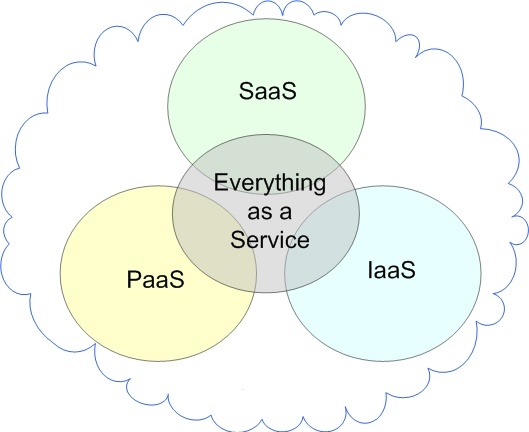
The three main Cloud Computing Services are:
- Software as a Service (SaaS)
- Platform as a Service (PaaS)
- Infrastructure as a Service (IaaS)
Software as a Service (SaaS)
SaaS makes use of the internet to offer apps to consumers that are controlled by a third-party vendor. The majority of SaaS apps operate immediately in your web browser, thus there are no client-side downloads or installation required.
In simple words, Users can access software through the internet using SaaS services, which charge a monthly subscription fee.
Examples of SaaS are Dropbox, Google Workspace (formerly GSuite), Cisco WebEx, Salesforce, GoToMeeting, SAP Concur, etc.
SaaS Characteristics
- Handled from a central location.
- The website is hosted on a remote server.
- Available via the internet.
- Scalable, with multiple levels for small, medium, and large companies.
- Security, compliance, and maintenance are all included in the price.
When to Use SaaS
- Startups and small businesses that need to create an ecommerce site immediately and don’t have time to deal with server or software difficulties.
- Short-term initiatives that demand rapid, simple, and cost-effective collaboration.
- Tax software, for example, is an example of an application that isn’t used very often.
- Apps that require access from both the web and mobile devices.
Platform as a Service (PaaS)
PaaS is a software development platform. Because this platform is supplied through the internet, developers may focus on developing software instead of worrying about operating systems, software upgrades, storage, or infrastructure.
PaaS enables companies to grow and develop apps using unique software components that are integrated into the PaaS. Because they take on cloud qualities, these programmes, also known as middleware, are scalable and highly available.
In simple words, People utilise these tools to create apps, and PaaS vendors supply hardware and software tools through the internet. The majority of PaaS users are programmers.
Examples of PaaS are Windows Azure, AWS Elastic Beanstalk, Heroku, Google App Engine, Force.com, OpenShift, etc.
PaaS Characteristics
- Multiple users can access it.
- Scalable – depending on the size of your company, you may pick from a variety of resource levels.
- The system is based on virtualization technology.
- It’s simple to use even if you don’t have a lot of experience with system management.
When to Use PaaS
PaaS is frequently the most cost- and time-effective method for a developer to construct a unique software.
PaaS allows the developer to concentrate on the creative aspects of app creation rather than routine duties like software upgrades and security fixes. The app will take up all of their time and brainpower to develop, test, and launch.
Infrastructure as a Service (IaaS)
Infrastructure as a Service (IaaS) refers to cloud infrastructure services that are made up of highly scalable and automated computing resources. Computers, networking, storage, and other services may all be accessed and monitored via IaaS. Instead of purchasing hardware altogether, IaaS allows organisations to acquire resources on-demand and as-needed.
In simple words, Pay-as-you-go storage, networking, and virtualization are among the services provided by IaaS companies. IaaS allows organisations to avoid investing in costly on-site resources by providing cloud-based alternatives to on-premise infrastructure.
Examples of IaaS are Linode, DigitalOcean, Amazon Web Services (AWS), Rackspace, Microsoft Azure, Cisco Metacloud, Google Compute Engine (GCE), etc.
IaaS Characteristics
- As a service, resources are provided.
- The price varies according on the amount of food consumed.
- The services are extremely scalable.
- On a single piece of hardware, there might be several users.
- The infrastructure is under the total control of the organisation.
- Adaptable and dynamic
When to Use IaaS
- IaaS may be preferred by startups and small businesses to avoid spending time and money on acquiring and developing hardware and software.
- Larger businesses may choose to maintain total control over their apps and infrastructure, but they want to buy just what they use.
- Companies that are experiencing rapid expansion like the scalability of IaaS, which allows them to simply swap out particular hardware and software as their needs change.
Business and management related topics
INTRODUCTION:-
Business management involves the supervision, organisation and coordination of business resources and operations to achieve specific objectives.Managing yourself: introduction to management and leadership styles. Managing money and key financial concepts, including the implications of various sources of finance and the relative importance of cash flow and profit. Managing people, stakeholder management and professional communication.
Topics Of Business AND Management:-
* Advertising
* Business Planning
* Business Planning Guides
* Business Structure
* Business Structure
* E-Commerce
* Employment Issues
* Energy Topics
* Financial Management
* Integrating Business and Family
* Inventory Control
* Insurance
* Legal Issues
* Marketing
* Market Research
* Merchandising
* Packaging
* Pricing
* Record Keeping
* Risk Management
* Self-Employment Assessment
* Social Media
* Taxes
* Time Management
1. Advertising:-
Advertising — A fact sheet on advertising your business from the U.S. Small Business Administration.
Advertising (PDF) — Another advertising fact sheet from U.S. Small Business Administration.
Advertising — A PowerPoint presentation on advertising by Rutgers University Cooperative Extension.
Advertising Topics — A variety of advertising topics for agricultural business owners.
Online Advertising — Tips on online advertising by the U.S. Small Business Administration.
2. Business Planning:-
Business Planning — Business planning fact sheet by Penn State University.
Business Planning Workbook — Business planning resources for small farmers from the University of Maryland.
Business Plans Made Simple — A six-page fact sheet on how to write a business plan for your small business from the Nevada Small Business Development Center.
Economic Analysis of a New Business — Doing It Right — An eight-page fact sheet on conducting an economic analysis of your new business from Kansas State University Research and Extension.
Market Planning for Value-Added Agricultural Businesses (PDF) — A 53-page market planning guide and workbook from the University of New Hampshire.
Plan Your Farm — Business planning tools for small-scale farmers from Cornell University.
Restaurant Start-Up Profile (PDF) — A 51-page fact sheet on starting-up your own restaurant from the Illinois Institute for Rural Affairs.
Starting a Business — A fact sheet on starting a home-based business from the Iowa Small Business Development Centers.
Starting a Business in Your Home: Weighing the Pros and Cons — A four-page fact sheet on the pros and cons of starting a home-based business from UMaine Extension.
Starting a Home Business — An eight-page fact sheet on starting a home-based business from UMaine Extension.
Starting a Successful Catering Business (PDF) — A six-page fact sheet on starting a catering business from Virginia Cooperative Extension.
Starting Your Own Business (PDF) — A four-page fact sheet on starting your own business from the University of Wisconsin Extension.
Ten Frequently Asked Questions for Micro and Home Based Business Start-Ups — A four-page fact sheet on micro and home-based business start-ups from the Oklahoma Cooperative Extension Service
Writing a Business Plan (PDF) — A six-page fact sheet on business planning by the University of Tennessee.
3. Business Planning Guides:-
Business Plan Guide — Guide with worksheets to assist in developing your business plan from the Massachusetts Small Business Development Center Network
Business Planning — A guide for writing farm-based business plans from Cornell University.
Business Planning for the Agriculture Sector: A Guide to Business Plan Development for Start-up to Mid-Size Operations — A book to help agricultural business operators and a full fledged business plan from Cornell University
Business Plans and Profiles Index — A subject guide to sample business plans and profiles for specific business types from Carnegie Library.
Developing a Bed & Breakfast Business Plan — A 98-page fact sheet on creating a bed and breakfast business plan from Illinois Extension.
Developing a Business Plan for Value-Added Agricultural Products — A four-page fact sheet on developing a business plan for value-added agricultural products from Oklahoma State University
Landscape Business Planning Guide — How to develop and implement a well-defined business strategy from Cornell University
Online Business Planning Software — A free business planning software tool for agricultural and natural resource businesses from the University of Minnesota.
Sample Business Plan: Moose Mountain Cafe — Sample plan for a cafe business from New Hampshire Small Business Development Center.
Sample Business Plans — A selection of business plans to assist in the wording of your own plan from Michigan Small Business & Technology Development Center.
Sample Business Plans — A list of business plans to assist in drafting a plan for your business from the Small Business Development Center Network.
Sample Business Plans — Sample business plans for a wide range of businesses.
Scaling Up for Regional Markets — Scaling up for regional markets tutorial by ATTRA.
4. Business Structure:-
Choose Your Business Structure — A fact sheet written by the U.S. Small Business Administration.
Determine Your Federal Tax Obligations — A fact sheet on what form of legal entity you should use from the U.S. Small Business Administration.
Farmers’ Guide to Business Structures — A SARE publication outlining the various forms of business structures available to farmers’ and small businesses.
How to Organize Your Business — A six-page fact sheet on how to organize your home-based business from UMaine Extension.
Selecting an Organizational Structure for Your Small Business — A four-page fact sheet on structuring a small business from Montana State University.
Starting, Operating, or Closing a Business — Web links to a new business checklist, selecting a business structure, employees, deductions, recordkeeping and accounting methods, and FAQs from the IRS.
5. Customer Service:-
Customer Service — Customer service video by the U.S. Small Business Administration.
Focus on Customer Service — A Colorado State University Fact Sheet on improving your service to customers.
Obtaining Referrals to Increase Sales — Methods of gaining referrals in the sales industry from the University of Florida Extension.
So You’re in Sales — A six-page fact sheet on customer service for your home-based business from UMaine Extension.
The Customer is Still King — University of Maryland Extension bulletin on customer service.
6. E-Commerce:-
Creating Valuable Content that Converts — Recorded webinar exploring ways to improve the online presence for small businesses from eXtension.org.
Email Marketing — A fact sheet for eMarketing from the U.S. Small Business Administration.
Five Key Ingredients in Creating a Small Business Website — An article about creating a website for your small business by the U.S. Small Business Administration.
Maps, Apps and Mobile Media Marketing — Recorded webinar exploring a variety of ecommerce tools for your business from eXtension.org.
Selling On-line — A 24/7 Opportunity – Factors to consider in starting an on-line business by the University of Maryland Extension.
You are Here — Recorded webinar exploring mapping tools for small businesses from eXtension.org.
7. Employment Issues:-
Charming the Worker Bees — A fact sheet on employee compensation from the Iowa Small Business Development Center
Communication on the Job for Employees — A four-page fact sheet on communication for employees from the Alabama Cooperative Extension System.
Communication Skills for Daily Use at Work — A four-page fact sheet on communication skills at work from the Alabama Cooperative Extension System.
Developing and Implementing Sound Hiring Practices — A ten-page fact sheet on hiring procedures and practices from Purdue University Cooperative Extension.
Evaluating Employee Performance — A fact sheet from eXtension.org.
Great Employees Require Great Employers — A fact sheet on recruiting employees from the Iowa Small Business Development Center
Independent Contractor or Employee? — A fact sheet from the Internal Revenue Service.
Managing Employees — A fact sheet on employees from the U.S. Small Business Administration.
Orientation and Training of New Employees (PDF) — A fact sheet from North Carolina State University Cooperative Extension.
Overtime Rule — (Maine DOL Information and Resources). Maine Department of Labor information about the new overtime rule.
Recruiting and Retaining Employees — A video from the U.S. Small Business Administration.
Writing Effective Job Descriptions — A fact sheet from the U.S. Small Business Administration.
8. Energy Topics:-
Saving money through energy conservation and alternative energy sources — Energy saving tips for the homeowner, traveler, and business owner. Includes video how-to from UMaine Extension.
Efficiency Maine Business Program — Save energy and money and improve the environment from Efficiency Maine.
9. Financial Management:-
Balance Sheet Template — An Excel spreadsheet from the Maine Small Business Development Center.
Benchmark Data — 2015 Farm Credit East financial benchmark data for selected natural resource-based industries.
Break-Even Analysis Template — An Excel spreadsheet from the Maine Small Business Development Center.
Capital Sources for Your Business — A six-page fact sheet on finding capital sources for your business from UMaine Extension.
Cash Flow Template — An Excel spreadsheet from the Maine Small Business Development Center.
Developing an Income Statement (PDF) — A fact sheet from Oklahoma State University Extension.
Managing a New Business: A Beginner’s Guide to Financial Concepts and Tools — A 16-page fact sheet on successful small business management from Oregon State University.
Preparing Financial Statements — A fact sheet from the U.S. Small Business Administration.
Profit and Loss Template — An Excel spreadsheet from the Maine Small Business Development Center.
Setting Up Your Own Business: Financing Your Business — A three-page fact sheet on financing your business from the University of Nebraska – Lincoln Extension.
Setting Up Your Own Business: Monitoring the Health and Growth of Your Business — A six-page fact sheet on using financial statements to measure the health and growth of your business from the University of Nebraska – Lincoln Extension.
10. Integrating Business and Family:-
Setting Personal, Family and Business Goals for Business Success — from Iowa State University.
11. Inventory Control:-
Managing your Inventory — A fact sheet on stock control in your small business from the Iowa Small Business Development Center
12. Insurance:-
Agricultural Business Insurance — A fact sheet on insurance options for farm businesses from Penn State University.
Business Insurance: The Basics — When considering business insurance, business owners should start with the basics from the Missouri Small Business development Centers.
Get Insurance — What type of insurance to get for your business from the U.S. Small Business Administration.
How to Insure Your Business — 4-page fact sheet covers insurance types, state laws, insurance options and steps to setting up an insurance program from UMaine Extension.
13. Legal Issues:-
Avoiding Patent, Trademark and Copyright Problems — An eight-page fact sheet on how to avoid patent, trademark and copyright problems from the Nevada Small Business Development Center
Copyright Basics — A fact sheet on dealing with copyright issues from the Iowa Small Business Development Center
Deciding if Bankruptcy is an Option for You — Information about bankruptcy options provided by the Virginia Cooperative Extension.
Patents, Trademarks and Copyrights — U.S. Small Business Administration video on intellectual property protection.
Taxes and Permits — A six-page fact sheet on taxes and permits for your home-based business from UMaine Extension.
14. Marketing:-
Building Your Brand During a Downturn — Fact sheet on branding from the Missouri Small Business & Technology Development Centers.
Developing a Sensible and Successful Marketing Attitude — A five-page fact sheet on general marketing principles from Purdue University Cooperative Extension.
Developing and Implementing a Successful Marketing Plan — A five-page fact sheet on developing and implementing your marketing plan from Purdue University Cooperative Extension.
Direct Marketing of Farm Produce and Home Goods (PDF) — Direct marketing alternatives and strategies for beginning and established producers.
Food for Profit: Marketing Your Food Product — A fact sheet on the basics of marketing food products profitable by Penn State University Extension.
Is There a Market for My Product or Service? — A fact sheet on marketing techniques for growing businesses from the Iowa Small Business Development Center
Marketing Specialty Forest Products (PDF) – A fact sheet discussing was entrepreneurs can market their specialty forest products by the University of Nebraska.
Marketing Strategies to grow your business — A fact sheet on understanding marketing for small businesses from Penn State University.
Marketing: What Needs to be Done — An eight-page fact sheet on marketing from Kansas State University Research and Extension.
15. Market Research:-
A Do-it-Yourself Approach to Market Research — A fact sheet on conducting market research from MissouriBusiness.net.
Building Healthy Communities: Analyzing Local Markets — An eight-page fact sheet on analyzing local markets from Kansas State University Extension.
Demographics and Lifestyle Analysis — A fact sheet from the University of Wisconsin Cooperative Extension.
Estimating Retail Market Potential — A four-page fact sheet on estimating retail market potential for your home-based business from UMaine Extension.
Marketing Research for Entrepreneurs and Small Business Managers (PDF) — An eight-page fact sheet on market research for small businesses from Montana State University Extension Service.
Market Research: Surveying Customers to Determine Their Needs — A two-page fact sheet to aid in conducting your market research from the University of Wisconsin Extension.
Micro and Home-Based Businesses: Market Research — A six-page fact sheet on market research from Oklahoma State University Extension
Tradeshow Marketing — A fact sheet to help prepare for trade shows from the U.S. Small Business Administration.
16. Merchandising:-
Merchandise Presentation for Agricultural Businesses — A Penn State University publication on food product merchandising.
17. Packaging:-
The Role of Packaging in Society and the Environment — Understanding the types of packaging and the purpose from the University of Florida.
18. Pricing:-
How to Price Your Products and Services — A four-page fact sheet on pricing your products and services from the Iowa Small Business Development Center
Introduction to Pricing — A U.S. Small Business Administration resource to sound pricing strategies.
Micro and Home-Based Business Product Pricing — A four-page fact sheet on pricing for micro and home-based businesses from Oklahoma Cooperative Extension Service
Smart Pricing Strategies — A fact sheet on pricing from the Virginia Cooperative Extension.
Understanding Pricing Objectives and Strategies — A publication on pricing strategies for the value-added agricultural producer.
19. Record Keeping:-
Financial Statements — A fact sheet describing the balance sheet, income statement, and the cash flow statement from UMaine Extension.
Ratio Analysis — A fact sheet on using ratios to analyze your business performance from UMaine Extension.
Recordkeeping — A fact sheet from the U.S. Internal Revenue Service.
Record Keeping for a Small Business — A Powerpoint Presentation on basic recordkeeping from the U.S. Small Business Administration.
Record Keeping for Profit — A six-page fact sheet on record keeping for your home-based business from UMaine Extension.
Records — A fact sheet on tips for successful record keeping from UMaine Extension.
Setting Up Your Own Business: Records and Bookkeeping — A six-page fact sheet on records and bookkeeping for your small business from the University of Nebraska-Lincoln Extension.
The Projected Cash Flow Statement — A fifteen-page fact sheet on developing a projected cash flow statement from Purdue University Cooperative Extension.
20. Risk Management:-
Risk Management Agency Homepage — Website listing of resources related to risk management in Agriculture from the United States Department of Agriculture Risk Management Agency.
The Ag Risk Education Library — Risk Management Education Center from the University of Minnesota.
21. Self-Employment Assessment:-
Self- Assessment Checklist (PDF) — A self-assessment tool from the Nevada Small Business Development Center.
Small Business Readiness Assessment Tool — Take a test to see if you are ready to start your own business from the U.S. Small Business Administration.
Starting and Managing a Business — Programs and services to help you start, grow and succeed from the U.S. Small Business Administration.
22. Social Media:-
Getting Down to Business with Social Media — Recorded webinar exploring the use of social media in your business from eXtension.org.
How to Use Social Media for Your Farm Business(PDF)— A workbook designed to help you better understand how to use social media marketing in your farm business.
Intro Social Media for Small Business — Introduction to using social media in small business from the Alabama Cooperative Extension System.
Social Media and Internet Marketing — Social media and Internet marketing for small business from SBDC.NET.
Social Media for Agricultural Businesses: Blogs — A Penn State University publication about using Blogs as a marketing tool in your business.
Social Media for Agricultural Businesses: Facebook — A Penn State University publication about using Facebook as a marketing tool in your business.
Social Media for Agricultural Businesses: Twitter — A Penn State University publication about using Twitter as a marketing tool in your business.
Using Facebook to Grow Your Farm Business — A webinar that will teach you how to use Facebook to help market your farm business.
Using Social Media to Grow Your Farm Business — A webinar outlining strategies for using social media to help market your farm business.
23. Taxes:-
Business Use of a Car — A fact sheet from the U.S. Internal Revenue Service.
Filing and Paying Taxes — A fact sheet from the U.S. Small Business Administration.
IRS Checklist for starting a business — Start up checklist for small businesses from the IRS.
Self-Employed Individuals Tax Center — Basics on self-employment, filing requirements, and reporting responsibilities for independent contractors from the IRS.
Small Business and Self-Employed Tax Center — One stop resource assistance center for filing your business returns from the IRS.
Taxes and Permits — A six-page fact sheet on taxes and permits for your home-based business from UMaine Extension.
24. Time Management:-
7 Leaders Share Insights About Work-Life Balance — A Syracuse University publication offering seven time management tips for balancing work and life.
Managing Time in the Workplace — A four-page fact sheet on learning to manage time from the University of Florida.
Ten Strategies for Better Time Management–A fact sheet written by the University of Georgia Extension.
Time Management for a Small Business (PDF) — A time management guide from the U.S. Small Business Administration.
25. Branding:-
Branding Power Video — Proper branding creates an anchor in the customer’s mind which can be triggered by recurring events. When you really, really build a brand, every time that somebody has that recurring need in their life, your product is what is going to pop in their mind and that is what branding is.
Marketing Your School Foodservice DVD & Guide — Join FAME’s Golden School Foodservice Director of the Year, Jean Ronnei, and foodservice branding guru, Tom Whitney, for a step-by-step guide to marketing and branding your school foodservice program.
Accelerate Your Business — How can any organization consistently improve its most important desired outcomes, and do it in a way that is sustainable? In the end, it comes down to mastering simple, practical processes that can be repeated over and over again. In this content-loaded seminar.
Reference Link:
https://extension.umaine.edu/business/library/small-business-management-topics/
BIO REMEDIATION

Bioremediation is a process of clean up of waste from environment, basically it is a type of waste management technique which involves the use of organisms to remove or utilize the pollutants from a polluted area. Microorganisms like Bacteria and Fungi are the main role player when it comes to executing the process of Bioremediation. Bacteria are the most crucial microbes in this process as they break down the waste into nutrients and organic matter. Even though this is an efficient process of waste management but bioremediation cannot destroy 100% contaminants. Bacteria can easily digest contaminants like chlorinated pesticides or clean oil spills but microorganisms fail to destroy heavy metals like lead and cadmium. It’s great isn’t it.
Here arises a question why is it so important ?
It is important mainly because of two factors
1. It uses no harsh chemicals.
2. It can allow waste to be recycled.
Basically there are two main classes of bioremediation that are in-situ and ex-situ.
In-situ – In situ refers to when contaminated waste is treated right at its point of origin. For example, there may be soil that is contaminated. Rather than remove the soil from its point of origin, it is treated right where it is.
Ex-situ – Ex situ refers to treatment that occurs after the contaminated waste has been removed to a treatment area. To use soil as the example again, the soil may be removed and transported to an area where the bioremediation may be applied.
Bioremediation can be carried out by bacteria that is naturally present in the environment or adding nutrients, this process is called biostimulation.
Emerging Trends in Social Media

Over the past decade, social media has managed to secure a special position in our hearts.
Like every other evolutions in the world, the way we use social media platforms also evolves.
With the quick growth of social media, trends change every second day and thus brands and individuals are in a hurry to adopt them fast!
Major Trends…
1) Augmented Reality
Augmented reality (AR) is an interactive experience of a real-world environment where the objects that reside in the real world are enhanced by computer-generated perceptual information, sometimes across multiple sensory modalities, including visual and auditory.
How it is used in different ways in social media?
Now, during the pandemic times, it wasn’t easy for people to go out for shopping and try out the things they wanted to purchase.
So Augmented Reality became an important feature in social media apps so that consumers can try out the business products from their respective homes.

MORE COMMON EXAMPLES OF AR IN SOCIAL MEDIA
Mark Zuckerberg, founder of Facebook, recently said Augmented Reality has slowly become the company’s “topmost priority” .
We have already witnessed how social media apps like Snapchat and Instagram have become more AR oriented– all the face filters that we use on such social media apps are nothing but small facets of Augmented Reality.

2)VIRTUAL REALITY
Virtual reality (VR) refers to a computer- generated simulation in which a person can interact within an artificial three-dimensional environment using electronic devices, such as special goggles with a screen or gloves fitted with sensors.
Users have a realistic feeling experience when it comes to Virtual Reality.
VIRTUAL REALITY IN SOCIAL MEDIA
A) VR CHAT
VRChat is a free-to- play massively multiplayer online virtual reality social media platform. It allows players to interact with others as 3D character models.
Users can interact via text chats and then play the games according to their needs.

B) FACEBBOOK SPACE
It allows an integration with Facebook, which makes it easy to invite our friends and acquaintances to the VR world.
Three people can actually interact using a VR device. This has however now been discontinued.
3)Shopping through Social Media
Many new brands and business firms deal with their consumers entirely though social media platforms like Facebook and Instagram.
Both these social media platforms provide services like a complete e- commerce portal and also allows business firms to show their products on the platforms while attaching a link to the firm’s official website. Customers can view products, see prices and can directly order products from these social media platforms.

4) News Culture on Social Media
This is one of the most popular trends we tend to see these days on social media. People spent most of their times in social media and therefore many mainstream media channels maintain good interaction with their audiences on social media platforms like Instagram, Facebook and Twitter via video stories, pictorial presentations and like.
Many new media houses are completely based on social media. People mostly get to know about recent happenings through social media.
Twitter as compared to any other social media platform has distinctively been credited for instantaneous news.

5) Hash-tag Culture
This is another form of social media trend that can be seen these days where interested groups make a hash-tag phrase (for example: #xyz) regarding their concerned matters.
This has widely been witnessed on Twitter and Instagram where users make their interested topics “trendy” on social media. This is especially done on Twitter to bring anything to public notice.

DIGITAL MARKETING BASICS
When we hear a term like this we often confined ourselves in a nutshell thinking about it as a technical expression. But what does digital marketing mean? Is this a simple marketing we do for goods normally? Or it is more than that?
Well, we will know some of the basic features of digital marketing and will try to understand the concept thoroughly.
This word does not contain only one theme like most words. It contains a series of online services the company provides to its customers. Marketing is a broad term that encompasses every activity related to promoting the services of a business or selling products to customers and when it is done online it is termed digital marketing.
Being ready to take your business online requires various aspects, so marketers generally tend to follow up SWOT stratergy that means strengths, weaknesses, opportunities, and threats in taking up the business online. It has various components-
1. Search Engine Optimization (SEO)
2. Content Marketing
3. Social Media Marketing
4. Pay Per Click (PPC)
5. Affiliate Marketing
6. Native Advertising
7. Marketing Automation
8. Email Marketing
Together these all come under one field of digital marketing. Now you have the answer to why this field is so demanding in today’s world. It not only help you to learn new skills but also very helpful in getting a handsome salary if you opt for it as a profession. All you require is to see, think, do, and care about the type of marketing you will be staging online.
A very famous KPIs approach which stands for key performance indicators: measurable, practical, achievable, and provides directions towards your online business is very useful.
So, to understand it on a brief note we can say that browsing anything, related to any product or service through your browser comes under digital marketing. The term comprises of a large internet service consisting of almost everything which we do on the internet.
“It’s much easier to double your business by doubling your conversion rate than by doubling your traffic.”
How to start coding? Part-2

This article is in continuation to How to start coding part-1. So now you have decided which programming language to choose from to starting coding. But here comes the tricky part, learning. There are again tons of resources available to learn from. But it is not humanly possible to scrap through all of those. So in this article, I will show you how you choose from the pool of resources available.

Youtube
The pre-eminent of all the resources, Youtube has “python programming” playlists that are quite lucid. These playlists/courses are free to watch. Similar to classroom learning experience from the comfort of your home, Youtube provides content that is worth laudable.
W3 Schools
If you are more into learning from reading rather than watching tutorials, then this site is the perfect place for avid readers like you. With laconic content, it will surely bolster your learning experience. The small bits of example try yourself will surely help you get your foundation laid.
Python org
This official documentation of python also provides with lucid explanation for beginners. Along with the explanation, this site also has all the python version released ready to install on your system. Documentation, community, news, events, jobs, everything related to python under one hood.
The list does not end here. There are also other popular resources available. It is not feasible for me to cover all these. Hope you find all these resources useful.
7 Best Windows 10 apps in 2021
(By Bhoomika Saini)
Since, this pandemic known as Covid 19 commenced, it made a huge impact to the whole world and everything went digital. And the necessity for using windows and its best features became more important. We’ll talk about Windows 10 and some of its best apps to ease up your work from home or many other experiences. There’s a wide range of apps available and it might be difficult to choose. So, whether you’re in need for a better work from home experience or beneficial productivity or some entertainment, we got you covered with some of the best apps for Windows 10 for 2021.
- Spotify Music
Microsoft store on Windows 10 makes it easier for you to download this app. All the music and podcasts lovers can discover a lot here. The sync feature of this app is amazing as it can easily switch from your mobile to desktop and vice versa. Moreover, it provides a clean user interface and it has a “made for you“ playlist for your every mood.
A little mood enlightenment from work requires some good music and Spotify got it all covered.
2. Netflix
Who refuses to Netflix and chill? A break from work is necessary.
And Netflix brings all your favorite shows and movies in one place. It got a huge range of your favorites with the genre of your choice. Moreover, you can choose from 3 subscription plans, skip the intros and all the videos are streaming.
So, what’ s stopping you?
3. Audible
Love reading books but can’t make out time to read? This app solves it all.
Audio book app is accessible anytime, anywhere. Just plug-in your earphones and explore the world of your favorite books. It’ll also improve your fluency, vocabulary, attention span and memory. And the biggest benefit, time management.
So from now, listen your books.
4. Duolingo
If you love languages, then this is the best place for you.
You can download this app from Microsoft store easily. Moreover, this app asks for no fee and is ad-free. It’s small lessons will help you to achieve your goals smoothly as it picks up the course from the basic level.
Learn languages from the highest rated platform from the comfort of your home.
5. Google Meet
Whether it’s a business meeting or online schooling, Google meet became one of the most important educational tool for workspace.
More than 100 million users access this app and it’s easily available on Microsoft store. This app is secure and virus free. Moreover, it’s features like live captioning, speech to text, easy messaging, layout and screen setting and compatibility makes it beneficial and easy to use.
6. WhatsApp Desktop
Messaging has become an important feature and WhatsApp became a huge success during this pandemic.
WhatsApp desktop is easily available on Microsoft store. If you have less disc space then WhatsApp web is best for you. This app brings keyboard shortcuts for a better productivity. You can use a type in keyboard, drag, drop, copy or paste files from the sites and ease your work load.
Bigger screen experience without any problem is good, isn’t it?
7. Pinterest
Need some inspiration or ideas for life? Don’t worry!
This platform is for everyone- your hobbies, interests, etcetera, everything is available here. It has a five star rating on the store for a good reason, you get to the source directly and moreover it’s free of cost, you just need to sign in. So, pinning your interests or pinning interests of your choice is up to you.
Keep exploring and expand your knowledge.
Digitalization: Where will we head?

Digitalization is the process of converting information in the form of text, audio, video, or any combination of all three or more into digital format. The omnipresence of computers in our daily lives had its roots in the introduction of computers in Indian workspaces in the 1990s. Since then the proliferation has increased manifold and digitalization has become an integral part of lives. Indian IT exports have been one of the major contributing factors to our GDP and this will not slow any time soon.
Digitalization has certainly made out lives much more comfortable and easier than it was a couple of decades ago. Since 2015 Indian government focused on increasing digital proliferation to even more areas. With the initiatives like digital India, numerous services have been transferred into digital platforms. This is evident with some major examples like the Driving license and Learners license services which have been fully transferred to an online platform and all the paperwork can be completed without visiting the RTO. The candidates have to select their slot and attempt the test of the stipulated date. This is reduced middlemen corruption and made the process of obtaining a driver’s license much more seamless. After the advent of the Covid pandemic, there has been an unprecedented growth in digital platforms. People who were wary or unsure of digital platforms were forced to learn and adapt due to the unavailability of non-digitalized services due to restrictions. Schools have adapted to the age of online classes. The consumption of online coaching platforms has increased. Businesses are developing infrastructure to support their digital services. Small business owners are jumping on online platforms to reach a wider range of potential clients.
But there are still many discrepancies with digital proliferation. This growth and reach of digital are not equally distributed. India still faces many problems due to its weak infrastructure and limited internet connectivity. This phenomenon which is also called ‘Digital Divide’ has to be addressed quickly. Because many rural areas don’t have the facility of good internet connectivity and many rural communities have not been able to avail many benefits of this digital revolution. Government schools in rural areas have been affected the most during the pandemic as the schools there don’t have adequate funding to facilitate online classes. Many teachers are untrained to use digital tools and many students don’t have laptops or smartphones to really take advantage of online classes. But this problem is not just limited to rural and undeveloped areas and many people whom we call urban poor also face similar problems.
Government initiatives are commendable but there needs to be more focus on the equal distribution of these digital services. There has to be a greater emphasis on how the services can be availed by the weaker economic section of the society otherwise it will only exacerbate the issue of the digital divide that we are facing right now. Despite having the second biggest internet user base second to China, only half of our population has an active internet connection. A new policy needs to be implemented at a national level so that digital services can be availed equitably by every citizen of India.
Fog Computing
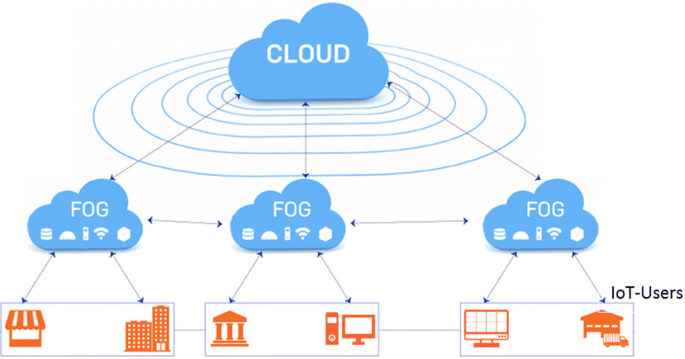
Fog computing, also known as fog networking or fogging, is a decentralised computing architecture that exists between the cloud and data-generating devices. Users may put resources, such as programmes and the data they generate, in logical areas to improve performance using this flexible structure.
In simple words, Fog computing is a type of decentralised computing infrastructure in which data, machines, storage, and applications are distributed between the data source and the cloud.
The term “fog nodes” is used in fog computing. These fog nodes are closer to the data source, and they have more processing and storage power. When compared to sending the request to the cloud for centralised processing, fog nodes can process the data much faster.
The large number of devices connected to the internet makes the cloud more clogged. Fog computing has become important for IoT devices since cloud computing is not feasible in some circumstances. It is capable of handling the huge amounts of data generated by these devices.
Advantages of Fog Computing
- Privacy:Fog computing could be used to limit the amount of information shared. Instead of transmitting sensitive user data to a centralised cloud infrastructure, any sensitive data may be examined locally. The IT staff will be able to track and operate the device in this manner. Also, any subset of data that requires analysis may be transmitted to the cloud.
- Bandwidth: There are pretty minimal bandwidth requirements since the selected data may be processed locally rather than being sent to the cloud. These bandwidth reductions will be particularly useful as the number of IoT devices grows.
- Latency: Another advantage of processing data locally is the reduction in latency. The data can be processed at the data source that is closest to the user geographically. This can result in immediate answers, which is very useful for time-sensitive services.
- Productivity: Fog apps can be used by customers who want the machine to perform the way they want it to. With the appropriate set of tools, developers may quickly create these fog apps. They can deploy it whenever they wish when the work is completed.
Disadvantages of Fog Computing
- Complexity: Fog computing is a difficult concept to grasp because of its complexity. Many devices, situated in various places, each store and analyse their own collection of data. This might add to the network’s complexity. In addition, a fog infrastructure has more complex fog nodes.
- Power Consumption: In a fog environment, the number of fog nodes present is proportional to their energy consumption. This means that these fog nodes demand a lot of energy to work properly. There is higher power usage in a fog infrastructure when there are more fog nodes. Most businesses attempt to cut costs by utilising fog nodes.
- Authentication: Fog computing is a large-scale service provider. End users, internet service providers, and cloud providers are all part of fog computing. In the fog, this might lead to difficulties with trust and authentication.
- Maintenance: In comparison to cloud architecture, where maintenance is smooth, fog is not. Because controllers and storages are dispersed throughout the network, additional maintenance is required. Processing is decentralised in the fog architecture.
Edge Computing
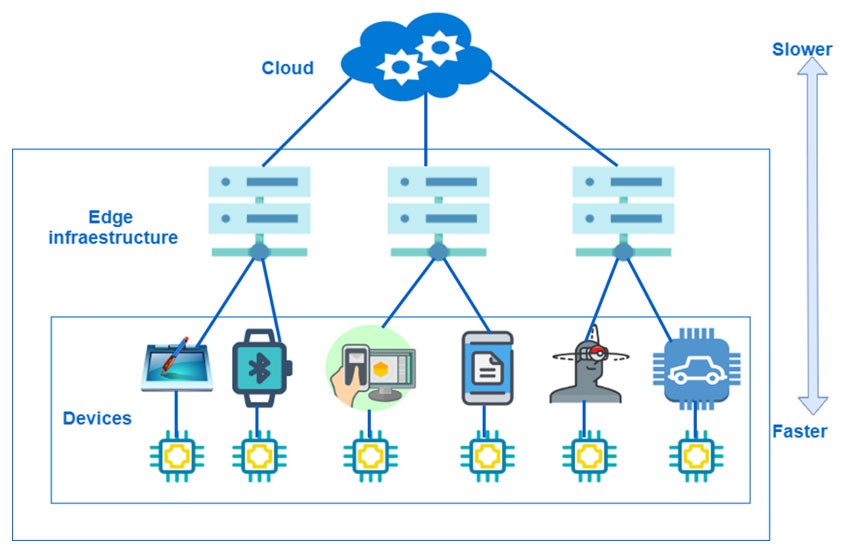
Edge computing allows for faster response times that aren’t hampered by network latency, as well as decreased bandwidth by selectively transferring the right data to the cloud.
Edge computing architecture is directly applicable to IoT-linked devices.
A large amount of data is generated by remote sensors placed on a machine, component, or device. If the data is transported back across a long network link to be evaluated, logged, and monitored, it takes considerably longer than if it is handled at the edge, near to the data source.
Edge computing was formed as a result of the rapid growth of the Internet of Things (IoT) devices that connect to the internet to receive information from the cloud or to send data back to the cloud.
Advantages of Edge Computing
- Speed: Edge computing has the capacity to reduce latency and enhance network speed. By processing data closer to the source of information, substantially minimizes the distance it must travel.
- Scalability: You can utilize the edge to scale your own IoT network without worrying about storage requirements. Also, IoT devices may be installed here with just one implantation.
- Reliability: Edge computing excels at maintaining reliability. Edge computing provides an uninterruptible service since it does not rely on internet connections or servers most of the time. There is no need for users to be concerned about service disruptions or poor internet connections. It can also use microdata centers to store and possess data locally. As a result, IoT devices can be assured of a stable connection. As a result, edge computing is advised for usage in remote places where a stable network connection is unavailable.
- Cost: IoT services require additional network bandwidth, data storage, and processing power, so they can be expensive to implement. Edge computing for IoT allows users to minimize bandwidth and data storage requirements, and data centers may be replaced with device solutions. As a result, the cost of installing IoT devices and applications is significantly reduced. Also, not all of the information is transferred to the cloud. Only the most relevant data will be transmitted to the cloud, saving network bandwidth. This can lower overall infrastructure expenditures.
Disadvantages of Edge Computing
- Incomplete Data: Only partial sets of data may be processed and analysed using edge computing. The rest of the information is just discarded. Companies may lose a lot of important information as a result of this. As a result, companies must decide what sort of data they are prepared to lose before using edge computing.
- Investment Cost: Building an edge infrastructure may be time-consuming and costly. This is because of their complexity, which requires the use of more resources and equipment. Also, the IoT device with edge computing requires the use of more local hardware in order to function. Overall, this might lead to greater efficiency, but it will need considerable investment.
- More Storage Space: Edge computing requires a substantial increase in storage capacity on your device. This will not be a concern because storage devices are growing increasingly compact. It is, though, something to keep in mind while creating an IoT device.
- Maintenance: Edge computing, unlike a centralized cloud architecture, is a distributed system. This means that there are more network configurations with many compute nodes to choose from. This requires a greater level of maintenance than a centralized system.
LIFE CYCLE OF INNOVATION

INNOVATION
Innovation is the action or process involved in improving an existing product/service. It involves new techniques and ideas to create better products that add up value to the customers. Innovation enhances the brand value and is the key to the successful running of the organizations.
Example: Power banks – They are innovative reusable devices that replace conventional chargers in the absence of electricity. Power banks store the battery and give power through USB ports to the devices in need of charging.
LIFE CYCLE OF INNOVATION
The phases of innovation in an innovation life cycle can be the following
- Ideation – Ideation starts with the necessity of a solution for a problem or to satisfy the customer’s requirements. The problem statement is identified first and the feasible idea to solve it, is generated. Curiosity, Creativity, Involvement gives impetus for a new idea to spark. This may either increment an old one or open a new market. Innovation potentials are generally identified through
- Targeted search – This involves finding potentials through creativity workshops, idea contests, or LEAD user workshops.
- Random findings – This involves discovering the new idea randomly while coming across some new products, suggestions, and customer feedback.
- Research – This is one of the important steps as it involves identifying risks. After the idea is generated, research should be done to conceptualize and bring an idea into a form. Proof of Concept (POC) must be provided and it should prove that neither a similar product is available in the market nor POC is available and patented. This phase should ensure that the idea is possible by analyzing
- Customer’s requirements – Customer’s unheard problems and needs.
- Market potential – Market size and attractiveness for the generated idea.
- Growth potential – Expected opportunities, growth, and scalability.
- Risks and feasibility – Potential risks, technical barriers and laws, standards, and patterns.
- Offering – This phase involves offering the product as a complete one to the market. Before it is offered, the availability of resources and scope of the product in the market must be analysed. The feedback from the potential customers must be obtained and incorporated. Use these customers as an anchor to obtain new customers.
- Commercialization – This involves launching the product as a commercial one to gain profit from it. The following points should be considered for commercialization
- Sales plan and marketing strategy – How the product is delivered to the customers and attracting, convincing, and making the customers realize the need for the product.
- Contracts and license management – Regarding the terms and conditions for using the product
- Product management and engineering – Involves packaging, delivery, and installation. Striving continuously for future enhancements and updating the versions on a timely basis.
- Customer support – Customer helpdesks, feedback management, etc.
- Growth – This phase is to ensure leading the market. Continuous study on the competitors, new arrivals, and customer needs could help retain the market position. The product should be able to sustain the competitive market. Customer acceptance and support should be increased through the performance of the product. Eventually, revenue generation increases. The availability of the product must be expanded.
- Retirement – A product goes through this phase when there is a replacement of the product by an advanced one. The product tends to lose the market position thereby failing to generate expected revenue. This may happen due to a decrease in demand, the substitution of technology or the product may no longer provide a relevant solution to the customers.
These phases of innovation are considered indispensable in the product’s lifecycle. So, it becomes mandatory to take care of every detail in the life cycle to achieve success and sustain in the market.
Windows 11 and What holds for microsoft in 2021 and beyond

Microsoft will hold the Windows event dubbed as ‘what’s next of windows’ on Thursday, June 24. After the alleged leak of Windows 11 developer build on the internet, it begs the question, what is Microsoft going to reveal on June 24? Because if rumors are true, Microsoft will officially announce Windows 11 to be the successor of windows.
WHAT ABOUT WINDOWS 10?
Many were surprised after hearing about the news of a Windows event. Apparently, in 2015 one of the Microsoft senior spokespeople told that Windows 10 would be the last version of windows. Many assumed that Microsoft will continuously update windows as a service. But this doesn’t seem to be true anymore. It’s hard to believe but windows 10 is almost 7 years old now. Windows 10 has seen major overhauls and many major updates throughout its lifespan. But this has been proven as a double-edged sword for Microsoft since its launch in 2015. Microsoft has also updated the end of support date for Windows 10 to June 2015 which confirms that Windows 10 is not the last version of Windows after all. After Microsoft disbanded its in-house testing team in favor of the Windows 10 update service where users participate in the testing phase (Windows insider program). This new method of update delivery has been problematic and many users’ Windows PCs were marred with bugs and broken functionalities. It seems that updating Windows operating system is not as easy as Android, Mac OS, or iOS. The legacy platforms and enterprise business that Microsoft has to support have always kept Windows progress at a snail’s pace. Microsoft cannot radically change the interface or remove its functionalities as many legacy software still relies on those functionalities. The leak version has the start button in the middle of the taskbar and it looks more like the Mac OS taskbar now. Thankfully it can also be changed back to the left corner like the previous versions. There is also a separate search button and new icons and it looks like that Windows is leaving behind the flat design language.
WHAT TO EXPECT FROM WINDOWS 11?
The leaked build of Windows is not drastically different from the current version of Windows 10 but many experts believe that the leaked version is most probably the UX team build and there will be a lot more than Microsoft will unveil in the event. The leak was indirectly acknowledged by Microsoft and indicated that ‘This is just the start. There is a possibility that the Windows 11 or Windows Sun Valley or whatever they will call it, will be an incremental update and Windows 10 users could update free of charge. But we cannot be sure as of yet until the official event.
Satya Nadella and Panos Panay will be present at the event to unveil Windows 11 features and capabilities on Thursday. The Microsoft store could also get an overhaul and there is also a good probability of support for ARM processors and the support for upcoming Intel’s new Big little architecture. There will be an overhaul in the the system sounds and UI and new animations. All these are still speculations and we will have to wait will the official announcement by Microsoft themselves.
What is Python programming language?
Python is one of the most popular and fastest-growing programming language. Inherently, it is interpreted, high-level, general-purpose, and object-oriented scripting language, which means the following:
•Interpreted
An interpreter processes the source file at runtime, it reads the lines of code, one by one and performs what is said. Similarly to Perl and PHP, Python does not require that you compile your program before executing it. So, you do not have to invoke a compiler. Instead of running the compiler that helps turn source files into compiled class files, you simply run a .py file. Python byte code compilation is automatic and entirely implicit.
•High-level
Python relies on easy-to-read structures that are later translated into a low-level language, the original code that is run on a computer’s central processing unit (CPU). A high-level language is intended to be used by a programmer and the written code is further interpreted into a low-level language. Like C++ or Java, before running, Python has to be processed. This enables Python’s portability — it can run on different kinds of computers with nearly no modifications.
•General-purpose
Python can be used for nearly everything. It is applicable to almost every field for a variety of tasks. Be it the execution of such short-term tasks as software testing or long-term product development that involves roadmap planning, Python works well for them all, it is applicable all over the map. Its roles are unlimited. It is popular not only among software engineers, but also among specialists in other fields: mathematics, data analysis, science, accounting, and network engineering. Likewise, Python cliques with young people because it’s a very beginner-friendly scripting language.
•Object-oriented
This programming paradigm gives an overall orientation towards scripting and powerful code structuring. This object-oriented approach allows thinking of problems in terms of classes and objects. Then, objects are composed in such a way to make up complex computer programs. Beside the object-oriented programming, Python also supports a procedural paradigm. With OOP being only one of the options, you can make Python programming more advanced by going for an object-oriented programming approach. Developers can create reusable patterns of code thus curtailing redundancy in development projects.
 Eduindex
You must be logged in to post a comment.